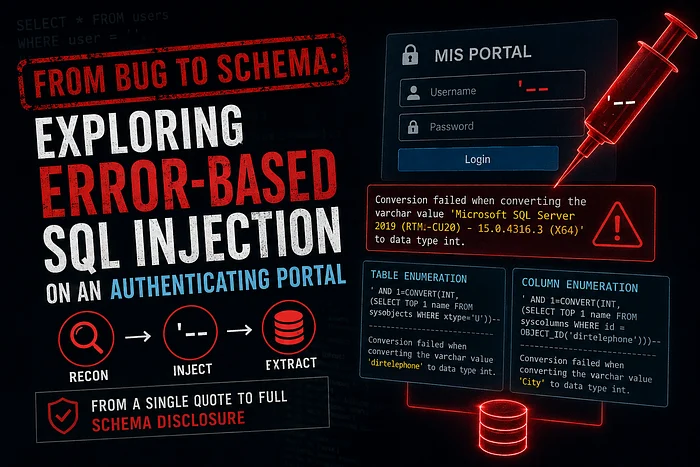
From Bug to Schema: Exploring Error-Based SQL Injection on an Authenticating Portal
The username field of a login form was concatenated directly into a SQL query without escaping, so a single quote caused a database error. By using error-based techniques, the author could make the database reveal its version, schema names, table names and column names in error messages.

Sql Injection
The full write-up lives on its author's site
It belongs to its author, so we link to it rather than copy it. The other two tabs are our own rewrites, checked against it.
Context
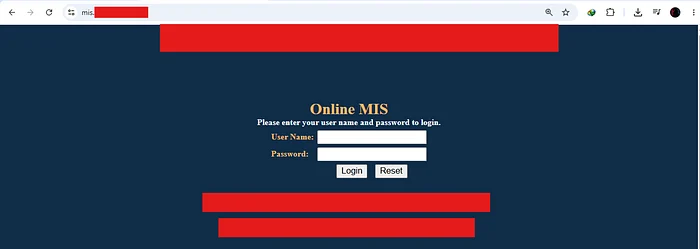
The target was a production web application reached through a Vulnerability Disclosure Program (VDP). The researcher's first task was to map the attack surface, and passive reconnaissance turned up a subdomain hosting an online Management Information System (MIS) Portal. Navigating to it revealed a standard login form that required a valid username and password before anything else could be reached.
The feature under test was therefore the authentication form itself: the Username field, which the application passed into a database query. The report notes that all identifiers, domain names and organisation details were anonymised or replaced with generic terms to comply with non-disclosure requirements, and that no data was modified during anonymisation.
Setup
The report describes no accounts, roles or tooling versions; testing happened during a designated period under the VDP. The testing was carried out during a designated testing period under the VDP, and the entry point was unauthenticated: the login form was reachable without credentials. The researcher used passive reconnaissance with search engine queries, then tested the login form.
Finding it
The researcher began with passive reconnaissance, using search engine filters, commonly called Google Dorking, to find assets that were not part of the main site. A wildcard domain query was used to filter out the main website and surface exposed subdomains:
site:*.example.com
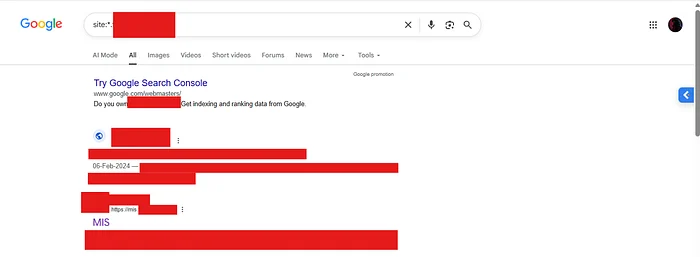
Among the indexed results, one subdomain stood out because it hosted an MIS Portal with a login form. That form became the input surface to test.
Exploitation
Step 1: Breaking the query logic with a single quote
The reasoning was that SQL injection starts where input meets the database interpreter, so the Username field was the obvious place to probe. To see how the backend handled unexpected input, the researcher entered a single quotation mark (').

The backend replied with the details of the crash in the database. The error indicated that the application built its query dynamically by concatenating strings, in the shape of:
SELECT * FROM users WHERE user = 'INPUT'
An odd number of quotation marks broke the interpreter, which showed that no input escaping was implemented.
Step 2: Repairing the syntax structure
Before extracting anything, the researcher demonstrated control of the query logic by fixing the syntax that the quote had broken. This was done by commenting out the rest of the developer's code with the SQL inline comment syntax (- -).
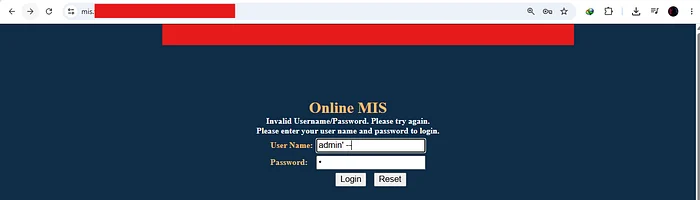
With the close-quote and the comment in place, the database engine no longer crashed. Instead the application returned a clean authentication error: "Invalid Username/Password. Please try again." That confirmed the execution alignment: the injected quote closed the string and the comment removed the remainder of the original query, so the statement ran as intended.
Step 3: Triggering context discovery via data conversion
Because the engine returned detailed structural errors to the browser, the researcher chose error-based extraction. The technique is to make the engine fetch a text value and then attempt to convert it to an incompatible type such as INT. The conversion fails and the text value appears inside the error message returned to the client.
To confirm the system context without inspecting user data, the researcher accessed the environment configuration variables. The payload triggers a type conversion error in Microsoft SQL Server when it tries to convert its text version string to an integer; if the application shows database errors, the version is disclosed in the message.

The output showed a failure to explicitly convert the data types, exposing the technology stack. The same payload was then replicated through environmental functions to validate the schema database name and the role privileges of the operational user, without accessing any application logs.
Step 4: Proving data extraction within the rules
The VDP required researchers to prove they could retrieve data so the issue could be triaged as high impact. To do this ethically, the researcher avoided any queries against credential or account tables. Instead, the conversion payloads were aimed at the system's own object indices, sysobjects and syscolumns, to show that data structures could be read out-of-band.
Enumerating table assets:
Input: The payload causes an SQL Server type conversion exception by attempting to convert the first user-defined table name to an integer value. In case there are database exceptions shown in the application, the name of a database table is exposed through the error message.
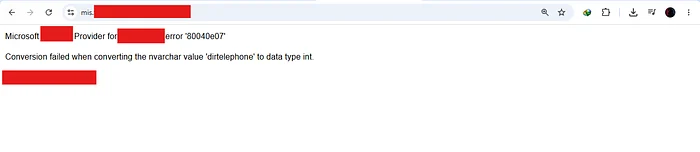
The response leaked an internally defined system tracking table name, dirtelephone, in the middle of the data type conversion error text.
Enumerating column assets:
Using the table name obtained, the researcher asked for structural attribute lists:
Input: The payload causes an SQL Server type conversion exception by attempting to convert the first user-defined table name to an integer value. In case there are database exceptions shown in the application, the name of a database table is exposed through the error messag

The response identified a metadata field name, City, in a particular column from the error stream.
Root cause
The application built SQL queries by concatenating user input directly into the statement string, as the error in Step 1 showed. No escaping or parameterisation was applied to the Username field, so a quote changed the structure of the query. The second contributing factor was that the database engine's detailed error messages were returned to the client's browser, which turned a syntax error into a reliable extraction channel: any value the engine tried to convert to an integer was echoed back in the error text. The report does not describe any server-side defences; the error showed no input escaping was implemented.
Impact
The researcher assessed the issue with CVSS v3.1 and recorded a base score of 9.8 (Critical), citing the unauthenticated public entry point and total confidentiality compromise. In practice, the demonstrated impact was reading database structures: the version and technology stack, a table name (dirtelephone) and a column name (City), with the schema name and user privileges validated through environment functions. The researcher states that arbitrary read impact was tested to its fullest extent, while deliberately avoiding credential and account tables. The report does not show extraction of application data beyond schema metadata.
Fix
The measures its findings point to are parameterised queries (or equivalent escaping) for the Username field, so input cannot alter query structure, and suppression of detailed database errors from responses, so conversion failures are not echoed to the client.
Variants to test
- Quote in any login or search field. Submit a single
'and look for a database error or a change in behaviour. A positive result is a raw engine error, or a different response from the one a normal invalid login produces. - Comment-based repair. Follow the quote with an inline comment (
- -) and see whether the crash disappears and a normal authentication error returns. A positive result confirms the input sits inside a string literal in a concatenated query. - Type conversion on version strings. Ask the engine to convert its version or configuration value to an integer. A positive result is an error message containing the version or configuration text.
- System catalogue enumeration. Point conversion payloads at
sysobjectsandsyscolumnsto read table and column names. A positive result is a table or column name appearing inside a conversion error. - Environment functions. Use environment functions to read the schema name and the privileges of the database user. A positive result is the schema name or role information echoed in an error.

On any target, the safe stopping point is the same one used here: reveal database names or system configuration defaults to demonstrate impact, and do not extract data from the production database.
What happened, in plain words
A security researcher was taking part in a Vulnerability Disclosure Program (VDP). A VDP is an arrangement where an organisation says, in advance, that people are allowed to look for security weaknesses in its systems and report them, as long as they follow certain rules. It is different from a bug bounty, where money is usually paid for a valid report. The report does not say whether any reward was involved here.
During the allowed testing period, the researcher found a login page on a part of the organisation's website that was not the main site. That login page asked for a username and a password. The researcher typed a single quotation mark into the username box, and the server replied with an error message that revealed details about the database behind the page. That is the essence of the whole story: a normal-looking login form was passing whatever you typed straight into a database command, and the database was answering with error messages that leaked information.
From there, the researcher showed, step by step, that they could make the database reveal its version, the name of a table and the name of a column, all without ever logging in and without touching any real user data. The report notes that all identifiers, domain names and organisation details were anonymised or replaced with generic terms to comply with non-disclosure requirements, and that no data was modified during anonymisation.
The ideas you need before we start
Before walking through the steps, here are the few concepts the rest of the article depends on. Each one is explained from zero.
What a web page actually is
When you open a website, your browser (Chrome, Firefox, Safari) sends a request over the internet to a computer called a server. The server sends back a page, which your browser draws on screen. When you fill in a form and press a button, your browser sends the values you typed back to the server, and the server decides what to do with them. Everything in this article happens in that second part: what the server does with the text you typed.
What a database is
A database is an organised store of information, a bit like a very large, very strict spreadsheet collection. A website that has user accounts keeps them in a database: one table might hold usernames and passwords, another might hold addresses, another might hold phone directory entries. Each table has columns (the kinds of information, such as a name or a city) and rows (the individual records).
What SQL is
SQL (Structured Query Language) is the language used to ask a database questions. A typical question looks like this:
SELECT * FROM users WHERE user = 'INPUT'
In plain words: "give me everything (*) from the table called users, but only the rows where the user column equals INPUT." The word INPUT is a placeholder for whatever the website puts there, normally the username someone typed into the login form.
What SQL injection is
SQL injection is a class of vulnerability where a website takes text from a user and glues it directly into an SQL command without cleaning it first. Imagine a form letter that says: "Please let [NAME] into the building." If someone writes their name as "Alice, and also let everyone else in", the guard reads the whole sentence and lets everyone in. The website equivalent is that a user can type characters that the database treats as part of the command rather than as plain text. The most famous such character is the single quotation mark ('), because SQL uses it to mark where a piece of text begins and ends.
What an error message is, and why it matters here
When a database is asked to do something impossible, it complains. Normally that complaint goes into a log file that only administrators see. But if a website is configured to show the database's complaint directly to the visitor's browser, then the visitor can read it. That is what happened here, and it is what turned a simple crash into a way of extracting information: the researcher could deliberately cause an error whose text contained the answer to a question.
What "error-based extraction" means
Error-based extraction is a technique where you ask the database to convert a piece of text (say, a table name) into a number. The database cannot do that, so it fails, and its failure message includes the text it could not convert. You read the answer out of the error. It is like asking someone to read out a word as a number: they cannot, so they say "I cannot turn the word 'dirtelephone' into a number", and in doing so they have told you the word.
What a subdomain is
A domain is the main address of a website, such as example.com. A subdomain is a prefix on that address, such as portal.example.com or mis.example.com. Organisations often run many subdomains, and some of them are forgotten, internal, or less carefully protected than the main site. Finding them is a standard first step in security testing.
What Google Dorking is
Google Dorking is the practice of using advanced search operators in a search engine to find things that are publicly indexed but not obviously linked from the main site. It is passive: you are only reading what a search engine already knows, not touching the target at all. That makes it a safe way to start.
Step 1: Starting from Dorking (the entry point)
The researcher's first task was to map the attack surface. The attack surface is simply the total set of things an attacker could interact with: every page, form, login box and service that is reachable. You cannot test what you cannot find, so mapping comes first.
To discover unknown or unreported assets, the researcher used passive reconnaissance with search engine filters, commonly called Google Dorking. A wildcard domain query was used to filter out the main website and surface exposed subdomains:
site:*.example.com
What this line means, piece by piece:
site:tells the search engine to restrict results to one website.*.example.commeans "any subdomain of example.com". The asterisk is a wildcard, standing for any prefix.
So the whole query asks the search engine: "show me every indexed page that lives on any subdomain of example.com." The researcher was not attacking anything yet; they were reading a public index.
Among the indexed results, one subdomain stood out because it hosted an online Management Information System (MIS) Portal. An MIS Portal is a web application used by an organisation to manage and view its internal information, such as records and reports. Navigating to it revealed a standard login form that required a valid username and password before anything else could be reached.
That login form became the input surface to test. The reasoning is simple: a login form is the one place on a website that is deliberately reachable by anyone, without an account, and it necessarily takes text from a stranger and passes it to the server. If the server handles that text carelessly, the login form is where it will show.
Step 2: Breaking the query logic with a single quote
The researcher's reasoning was that SQL injection starts where input meets the database interpreter. The interpreter is the part of the database software that reads the SQL command and carries it out. The Username field was the obvious place to probe, because it is the field whose contents are most likely to end up inside a database query.
To test how the backend handled unexpected input, the researcher entered a single quotation mark (').
The backend replied with the details of the crash in the database. The error indicated that the application built its query dynamically by concatenating strings, in the shape of:
SELECT * FROM users WHERE user = 'INPUT'
Line by line, in plain words:
SELECT *means "give me every column".FROM usersmeans "from the table called users".WHERE user = 'INPUT'means "but only rows where the user column equals the text INPUT".
The single quotes around INPUT are how SQL marks a piece of text. The website was taking whatever was typed into the username box and dropping it in place of INPUT, quotes and all. So when the researcher typed a single ', the query became something with an odd number of quotation marks in it. SQL needs quotes in pairs: one to open a piece of text, one to close it. An odd number leaves one hanging, the interpreter cannot make sense of the command, and it crashes. The crash message coming back to the browser showed two things at once: the input was being pasted straight into the query, and no input escaping was implemented. Escaping is the process of neutralising special characters (like turning a quote into something the database treats as plain text) before they go into a query.
Step 3: Repairing the syntax structure
Before extracting any information, the researcher demonstrated control of the query logic by fixing the syntax that the quote had broken. This matters because a crash alone could be a coincidence or a harmless bug. If you can make the query valid again on your own terms, you have shown that you are genuinely steering the database command, not just breaking it.
This was done by commenting out the rest of the developer's code with the SQL inline comment syntax (- -). A comment in SQL is text the database ignores. Everything after the comment marker on that line is treated as a note to humans, not as part of the command. So if you can insert a comment marker, you can silence whatever the developer wrote after your input.
With the close-quote and the comment in place, the database engine no longer crashed. Instead the application returned a clean authentication error: "Invalid Username/Password. Please try again." That confirmed the execution alignment: the injected quote closed the string, and the comment removed the remainder of the original query, so the statement ran as intended and the application simply found no matching user.
Think of it as a sentence that reads "Let [NAME] in and lock the door." If you write your name as "Alice' and ignore the rest", you have closed the name off and turned the remainder into a comment. The guard now reads "Let Alice in" and ignores the locking instruction.
Step 4: Triggering context discovery via data conversion
Because the engine returned detailed structural errors to the browser, the researcher chose error-based extraction. The technique is to make the engine fetch a text value and then attempt to convert it to an incompatible type such as INT (an integer, a whole number). The conversion fails, and the text value appears inside the error message returned to the client.
To confirm the system context without inspecting user data, the researcher accessed the environment configuration variables. Environment configuration variables are settings the database holds about itself, such as its version and configuration. The payload triggers a type conversion error in Microsoft SQL Server when it tries to convert its text version string to an integer; if the application shows database errors, the version is disclosed in the message.
The output showed a failure to explicitly convert the data types, exposing the technology stack. The technology stack is the combination of software the site is built on: here, Microsoft SQL Server as the database. Knowing the stack matters because different databases have different commands and different system tables, and the next steps depend on knowing which one you are talking to.
The same payload was then replicated through environmental functions to validate the schema database name and the role privileges of the operational user, without accessing any application logs. A schema is the container that holds a set of database objects such as tables. Role privileges are the permissions the database user has: whether it can only read, or also write, delete and so on. Knowing these tells you how much damage a real attacker could do, which is exactly what a triage team needs to judge severity.
Step 5: Proving data extraction within the rules
The VDP required researchers to prove they could retrieve data so the issue could be triaged as high impact. Triaging means sorting a report by how serious it is. A report that says "there might be a problem" is hard to act on; a report that shows a specific table name coming out of the database is easy to act on.
To do this ethically, the researcher avoided any queries against credential or account tables. Credentials are usernames, passwords and similar secrets. Reading those would mean touching real people's data, which is exactly what a responsible tester avoids. Instead, the conversion payloads were aimed at the system's own object indices, sysobjects and syscolumns, to show that data structures could be read out-of-band. System object indices are the database's own internal catalogue: tables that list what other tables and columns exist. Reading them tells you the shape of the database without reading anybody's actual records. Out-of-band here means the information comes back through a side channel (the error message) rather than through the normal query result.
Enumerating table assets:
Input: The payload causes an SQL Server type conversion exception by attempting to convert the first user-defined table name to an integer value. In case there are database exceptions shown in the application, the name of a database table is exposed through the error message.
What this block describes, in plain words: the researcher sends a command that asks the database for the name of a table, then asks the database to treat that name as a number. The database cannot turn a name into a number, so it raises a conversion exception, and the name appears in the exception text. The condition "in case there are database exceptions shown in the application" is the whole trick: it only works because the site shows those errors to the visitor.
The response leaked an internally defined system tracking table name, dirtelephone, in the middle of the data type conversion error text. A table name like this is a strong piece of evidence: it is a real object inside the organisation's database, and it came out through a login form that anyone on the internet can reach.
Enumerating column assets:
Using the table name obtained, the researcher asked for structural attribute lists:
Input: The payload causes an SQL Server type conversion exception by attempting to convert the first user-defined table name to an integer value. In case there are database exceptions shown in the application, the name of a database table is exposed through the error messag
This block follows the same pattern as the previous one: cause a conversion exception, and read the answer out of the error text. The difference is what is being asked for. Having learned a table name, the researcher now asks for the columns inside it, which is the next level of detail in mapping the database.
The response identified a metadata field name, City, in a particular column from the error stream. Metadata is data about data: here, the description of the table's structure rather than its contents. So the researcher now knew a table (dirtelephone) and one of its columns (City), all without reading a single row of real information.
Why this works: the root cause
The application built SQL queries by concatenating user input directly into the statement string, as the error in Step 2 showed. Concatenating means gluing strings together: "SELECT ... WHERE user = '" + input + "'". No escaping or parameterisation was applied to the Username field, so a quote changed the structure of the query. Parameterisation is the safe alternative: instead of gluing the input into the command, you hand the input to the database separately and tell it "this is data, never a command". The database then cannot be tricked into treating a quote as syntax.
The second contributing factor was that the database engine's detailed error messages were returned to the client's browser, which turned a syntax error into a reliable extraction channel: any value the engine tried to convert to an integer was echoed back in the error text. The report does not describe any server-side defences; the error showed no input escaping was implemented.
Impact
The researcher assessed the issue with CVSS v3.1 and recorded a base score of 9.8 (Critical), citing the unauthenticated public entry point and total confidentiality compromise. CVSS is a standard scoring system for vulnerabilities; a score of 9.8 is at the top of the scale. Unauthenticated means no login was needed to reach the vulnerable form. Confidentiality compromise means information could be read that should not have been readable.
In practice, the demonstrated impact was reading database structures: the version and technology stack, a table name (dirtelephone) and a column name (City), with the schema name and user privileges validated through environment functions. Arbitrary read means the ability to read whatever the database user is permitted to read, at will. The researcher states that arbitrary read impact was tested to its fullest extent, while deliberately avoiding credential and account tables.
Fix
The measures its findings point to are parameterised queries (or equivalent escaping) for the Username field, so input cannot alter query structure, and suppression of detailed database errors from responses, so conversion failures are not echoed to the client. In everyday terms: stop gluing user text into commands, and stop showing the database's complaints to strangers.
Variants to test
If you ever find yourself in a similar position, on a target you are authorised to test, these are the same checks in a reusable form.
- Quote in any login or search field. Submit a single
'and look for a database error or a change in behaviour. A positive result is a raw engine error, or a different response from the one a normal invalid login produces. - Comment-based repair. Follow the quote with an inline comment (
- -) and see whether the crash disappears and a normal authentication error returns. A positive result confirms the input sits inside a string literal in a concatenated query. - Type conversion on version strings. Ask the engine to convert its version or configuration value to an integer. A positive result is an error message containing the version or configuration text.
- System catalogue enumeration. Point conversion payloads at
sysobjectsandsyscolumnsto read table and column names. A positive result is a table or column name appearing inside a conversion error. - Environment functions. Use environment functions to read the schema name and the privileges of the database user. A positive result is the schema name or role information echoed in an error.
On any target, the safe stopping point is the same one used here: reveal database names or system configuration defaults to demonstrate impact, and do not extract data from the production database. That is the difference between a report that gets fixed and a report that gets you into trouble.
Glossary
- Attack surface: the total set of pages, forms, services and inputs an attacker could interact with.
- Authentication: the process of proving who you are, usually with a username and password.
- Bug bounty: a programme that pays rewards for valid security reports.
- Column: one kind of information in a database table, such as a name or a city.
- Comment (SQL): text the database ignores, marked with
- -in the syntax used here. - Concatenation: gluing strings together, which is how the vulnerable query was built.
- Confidentiality compromise: information being readable by someone who should not be able to read it.
- Conversion exception: an error raised when the database is asked to turn a value into an incompatible type, such as text into a number.
- Credentials: usernames, passwords and similar secrets used to log in.
- CVSS: a standard scoring system for rating the severity of vulnerabilities; 9.8 is Critical.
- Database: an organised store of information, made of tables, columns and rows.
- Domain: the main address of a website, such as
example.com. - Environment configuration variables: settings the database holds about itself, such as its version.
- Error-based extraction: reading information out of a database's error message by deliberately causing a failure that contains the answer.
- Escaping: neutralising special characters in input so the database treats them as plain text.
- Google Dorking: using advanced search engine operators to find publicly indexed pages that are not obviously linked.
- INT: an integer, a whole number; used here as the incompatible type that triggers an error.
- Interpreter: the part of the database software that reads and carries out SQL commands.
- Metadata: data about data, such as the structure of a table rather than its contents.
- MIS Portal: a Management Information System portal, a web application for managing and viewing an organisation's information.
- Out-of-band: obtaining information through a side channel rather than the normal query result.
- Parameterisation: handing user input to the database separately from the command, so it can never be treated as syntax.
- Passive reconnaissance: gathering information without touching the target, for example by reading search engine results.
- Payload: the specific text or command a tester sends to trigger a behaviour.
- Privileges: the permissions a database user has, such as read, write or delete.
- Role: a named set of privileges assigned to a database user.
- Row: one individual record in a database table.
- Schema: the container that holds a set of database objects such as tables.
- Server: the computer that receives requests from your browser and sends back pages.
- SQL: Structured Query Language, the language used to ask a database questions.
- SQL injection: a vulnerability where user input is glued into an SQL command and can change its structure.
- Subdomain: a prefix on a domain, such as
portal.example.com. sysobjects/syscolumns: the database's own internal catalogue tables listing what tables and columns exist.- Table: a collection of related records in a database, made of columns and rows.
- Technology stack: the combination of software a site is built on.
- Triage: sorting a security report by how serious it is.
- Unauthenticated: reachable without logging in.
- VDP (Vulnerability Disclosure Program): an arrangement where an organisation authorises people to look for and report security weaknesses under stated rules.
- Wildcard: a symbol (here
*) that stands for any text, used in the search query to match any subdomain.