How a Simple Dork Led to a Critical 10.0 CVSS

Web Security
The full write-up lives on its author's site
It belongs to its author, so we link to it rather than copy it. The other two tabs are our own rewrites, checked against it.
Context
A critical (CVSS 10.0) vulnerability does not necessarily involve a complicated zero-day attack chain. At times, simple misconfigurations can provide attackers with a key to an unlocked front door.
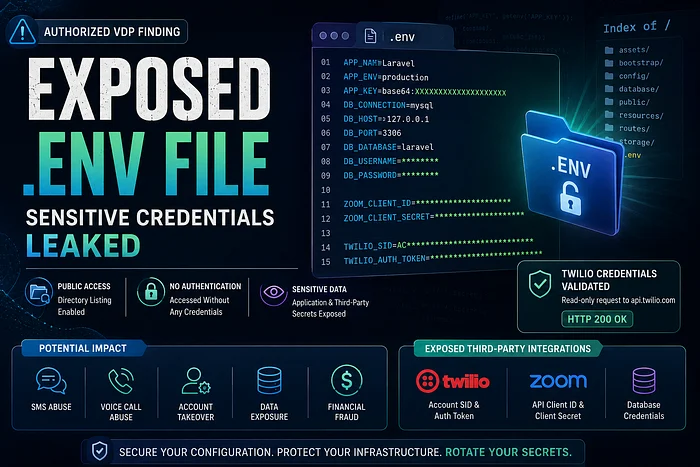
The target was a Laravel application reachable at https://subdomain.target.com/, tested during a designated testing period under a public Vulnerability Disclosure Program (VDP). The report classifies the issue as CWE-538 (Insertion of Sensitive Information into Externally-Accessible File or Directory), with a CVSS v3.1 score of 10.0 and the vector CVSS:3.1/AV:N/AC:L/PR:N/UI:N/S:C/C:H/I:H/A:H. The stated impact is active API token disclosure and external credential compromise.
All identifiers, domain names and organisation details in the report have been anonymised or replaced with generic terms to comply with non-disclosure requirements. No data was modified during that anonymisation.
Setup
The work was a legitimate penetration test against a public VDP. The discovery happened at the reconnaissance stage, using subdomain enumeration and indexing together with Google Hacking Database (GHDB) operators.
Finding it
During reconnaissance the researcher searched for publicly indexed environment files belonging to the target's endpoints. Google Dorking frequently exposes assets whose environment configuration files have been inadvertently indexed by crawlers, because of a lack of proper access permissions or a missing or inadequate robots.txt. One of the search results pointed to a live host with directory indexing enabled, which is what made the host worth opening directly.
Exploitation
Step 1: Dorking (the entry point)
The search used the following GHDB-style query:
site:*.target.com ".env"
The result set included a live host with directory indexing turned on.
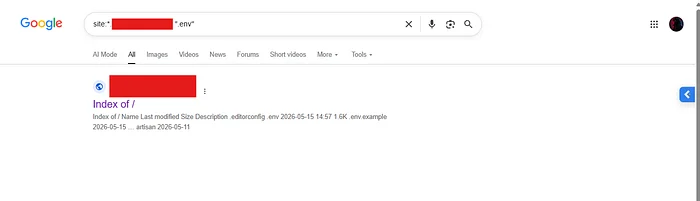
Step 2: Public directory listing
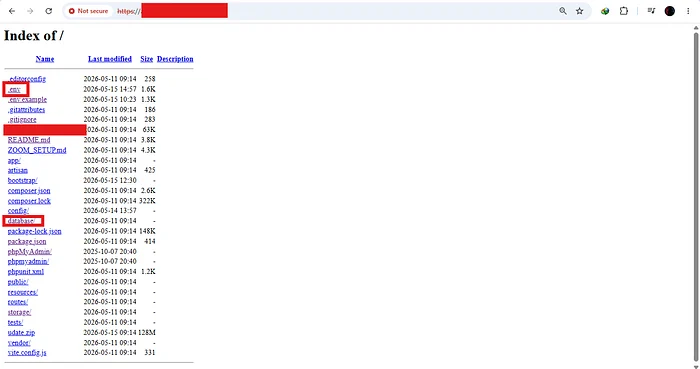
Direct access to the root domain showed that directory listings were enabled across all web server directories:
Rather than serving only the production front-end compiled by the framework from its /public directory, the web server was improperly configured to load the whole application root directory. Some of the listed directories were visible in the response:
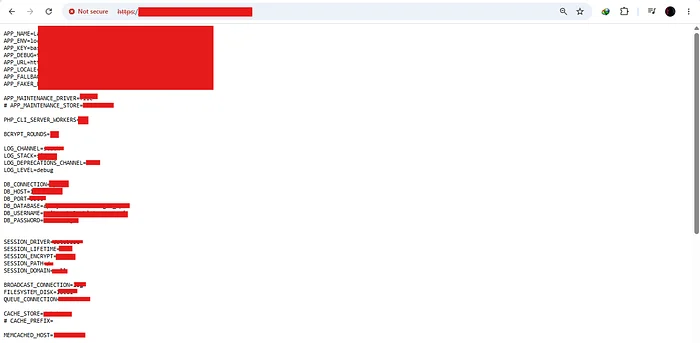
Step 3: Exposed .env configuration
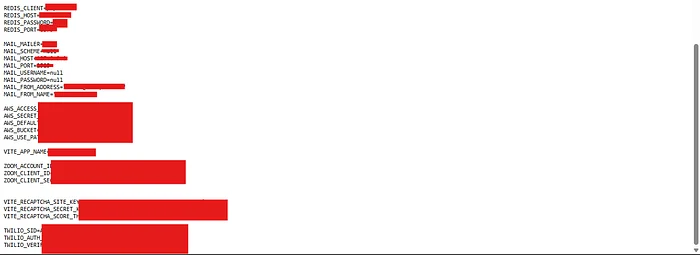
The .env endpoint required no authentication whatsoever. Requesting it returned all environmental settings in plaintext:
The exposed file contained operational secrets in four groups:
- Application framework key:
APP_KEY - Database access keys:
DB_USERNAME,DB_PASSWORD - External services: Zoom API keys and tokens (
ZOOM_CLIENT_SECRET) - Messaging gateway: Twilio Account SID, Twilio Auth Token (
TWILIO_SID,TWILIO_AUTH_TOKEN,TWILIO_VERIFY_SID)
Step 4: Credential validation (Twilio authentication)
To establish maximum impact without breaching authorisation procedures or disturbing operations, the researcher performed a non-destructive verification. A read-only authentication script was run against the Twilio API using the exposed Account SID and Auth Token:
$SID="TWILIO_SID"$TOKEN="TWILIO_AUTH_TOKEN"$B64=[Convert]::ToBase64String( [Text.Encoding]::ASCII.GetBytes("${SID}:${TOKEN}"))$URL="https://api.twilio.com/2010-04-01/Accounts/$SID.json"try { $r=Invoke-WebRequest ` -Uri $URL ` -Method GET ` -Headers @{Authorization="Basic $B64"} ` -ErrorAction Stop Write-Host "" Write-Host "========== TWILIO CREDENTIAL VALIDATION ==========" -ForegroundColor Cyan Write-Host "Timestamp: $(Get-Date -Format 'yyyy-MM-dd HH:mm:ss K')" Write-Host "Endpoint: https://api.twilio.com/2010-04-01/Accounts/${SID}.json" Write-Host "HTTP Status: $($r.StatusCode)" $data=$r.Content | ConvertFrom-Json Write-Host "Account SID: $($data.sid)" Write-Host "Status: $($data.status)" Write-Host "Type: $($data.type)" Write-Host "==================================================" -ForegroundColor Cyan}catch { Write-Host "" Write-Host "========== REQUEST FAILED ==========" -ForegroundColor Red if ($_.Exception.Response) { Write-Host "HTTP Status: $([int]$_.Exception.Response.StatusCode)" } Write-Host "Error: $($_.Exception.Message)" Write-Host "===================================="}
The script builds the HTTP Basic credential by Base64-encoding SID:TOKEN, then issues a single GET against the account resource at https://api.twilio.com/2010-04-01/Accounts/$SID.json with an Authorization: Basic header. It prints the HTTP status and, on success, the account SID, status and type returned in the JSON body. The catch block reports the status code and error message if the request fails.
The API responded with HTTP 200 OK and an active account status. This step transformed a theory about a potential vulnerability into an actual active credential compromise, because it proved that a third party could communicate with the external API infrastructure.

Root cause
The web server was configured to serve the whole application root directory instead of only the framework's /public directory, and directory listing was enabled across the web server directories. That combination made the application's .env file directly reachable at https://subdomain.target.com/.env with no authentication. The file was returned in plaintext with no authentication.
Impact
The exposed file gave away the application framework key, database credentials, Zoom API keys and tokens, and Twilio Account SID, Auth Token and Verify SID. The Twilio pair was proven live: the account responded with HTTP 200 and an active status, so an attacker holding the same file could authenticate to the messaging gateway as the organisation. The report does not enumerate the specific actions that the Zoom keys or the database credentials would have permitted.
Fix
The report does not state what was changed after disclosure.
Testing limitations and responsible disclosure
In line with responsible disclosure guidelines, the researcher states three points:
- No harmful operations: no messages were sent, no resources were modified, no user data was accessed, and no destructive actions were taken with the validated credentials.
- Immediate notification: the finding was reported on the VDP reporting portal straight away.
- Data sanitisation: all sensitive keys and real domain names were redacted in the reporting evidence package.

Variants to test
- Run the same dork against other scopes, for example
site:*.target.com ".env", and look for hosts whose results include configuration files rather than application pages. - Request
/.envdirectly on any host found this way. A positive result is a plaintext key/value file returned without authentication. - Request the root path and look for a directory index. A positive result is a listing that includes application directories rather than only the compiled front-end.
- Check for other framework configuration files in the same root, such as backups or environment variants, and see whether they are served the same way.
- When credentials are found, validate them with a single read-only call, as done here with the Twilio account endpoint, and stop there.
What happened, in plain words
A company had a website built with a popular tool called Laravel. Laravel is a framework: a ready-made set of building blocks that developers use to assemble a web application, so they do not have to write every piece from scratch. Like most applications, this one needed a place to keep its private settings: the password for its database, the keys it uses to talk to other online services, and so on. Laravel keeps those settings in a file called .env (short for "environment").
That file is supposed to live on the server, out of reach of anyone browsing the site. On this server it did not. The web server had been set up to hand out the whole application folder, and it also had a feature called directory listing switched on, which means it would show a visitor a list of every file and folder instead of a normal web page. As a result, anyone who typed the right address could download the .env file and read every secret inside it, with no login at all.
The researcher found the server with a Google search trick, opened the file, and then made one harmless test call to Twilio, a service the company used to send text messages, to prove the stolen keys really worked. Twilio answered that the account was active. The researcher reported it and stopped there.
The lesson is the one in the opening line of the report: a maximum-severity problem does not have to be clever. Sometimes it is a door left unlocked.
The ground rules of this test
The work was done during a designated testing period under a public Vulnerability Disclosure Program, or VDP. A VDP is a formal arrangement in which an organisation invites researchers to report security problems under agreed rules. The report notes that the vulnerability was identified by a VDP, and that all identifiers, domain names and organisation details have been anonymised or replaced with generic terms to comply with non-disclosure requirements. No data was modified while doing that anonymising.
The report classifies the problem in two standard ways:
- CWE-538, which is a catalogue entry meaning "Insertion of Sensitive Information into Externally-Accessible File or Directory". In plain terms: private information was placed in a file that outsiders can reach.
- CVSS v3.1 score of 10.0, the maximum. CVSS is a scoring system that rates how serious a vulnerability is, from 0 to 10, based on how easy it is to exploit and how much damage it can do. The report gives the full vector as
CVSS:3.1/AV:N/AC:L/PR:N/UI:N/S:C/C:H/I:H/A:H. You do not need to memorise it; the important part is that it is reachable over the network, needs no login and no user interaction, and has high impact on confidentiality, integrity and availability.
The stated impact is active API token disclosure and external credential compromise. An API (Application Programming Interface) is the way one piece of software talks to another over the internet. Think of it as a service counter: you hand over a request in a fixed format and get an answer back. A token or key is the password-like string that proves to that counter who you are. "Active" means the keys were not expired or fake: they still worked.
Before you start: what you need
The report describes no special accounts, roles or tools. The discovery happened at the reconnaissance stage, which is the part of a security test where you gather information about a target before touching anything: what hosts exist, what software they run, what is publicly visible. The techniques used were subdomain enumeration (finding the smaller hosts that belong to a main domain, such as shop.example.com under example.com) and indexing, together with Google Hacking Database (GHDB) operators. GHDB is a public collection of clever search queries that people use to find things search engines have accidentally catalogued, such as exposed configuration files.
Step 1: Dorking, the entry point
A "dork" is simply a search query crafted to surface something specific. Google indexes the web by following links and reading pages, and sometimes it indexes files that were never meant to be public. The researcher searched for publicly indexed environment files belonging to the target's endpoints. An endpoint is one addressable place on a server, such as a page or a file.
The query used was:
site:*.target.com ".env"
Line by line, in plain words:
site:tells Google to return only results from a particular site.*.target.commeans "any subdomain of target.com". The asterisk is a wildcard standing in for whatever comes before the dot, so it coversmail.target.com,shop.target.comand so on.".env"in double quotes asks for pages containing that exact text. The quotes stop Google from treating the dot as punctuation and ignoring it.
Put together, the query asks: "show me anything on any subdomain of this company that mentions .env." The report explains why this works: Google Dorking frequently exposes assets whose environment configuration files have been inadvertently indexed by crawlers, because of a lack of proper access permissions or a missing or inadequate robots.txt. A crawler is the automated program a search engine uses to visit and catalogue pages. robots.txt is a small public file at the root of a site that politely tells crawlers which parts not to visit. It is a request, not a lock, and if it is missing or badly written, crawlers may wander into places they should not.
One of the search results pointed to a live host with directory indexing enabled. That detail is what made the host worth opening directly: if a search engine had already listed its files, a human could probably list them too.
Step 2: The public directory listing
Opening the root domain directly showed that directory listings were enabled across all web server directories. A directory listing is what a web server shows when you ask for a folder rather than a specific page and it has no index page to give you: a plain list of the files and folders inside, like opening a filing cabinet and finding every folder labelled. Normally a website turns this off, because it tells strangers exactly what you have.
The request made was:
Line by line:
GETis the HTTP method meaning "give me this thing". HTTP is the language browsers and servers use to talk; a method is the type of request.GETasks for a resource without changing anything./is the path being requested. A single slash means the root, the top of the site, the equivalent of the front door.HTTP/1.1is the version of the protocol being spoken.Host: subdomain.target.comtells the server which site you want. One server can host many sites, so this line is how it knows which one to answer for.
Here is what had gone wrong. Laravel applications are built so that only one folder, named /public, is meant to be visible to the outside world. That folder holds the compiled front-end, the files a browser actually needs. The rest of the application, including the .env file, sits above it and should never be served. This server was improperly configured to load the whole application root directory instead. The report shows some of the directories that appeared in the listing:
Step 3: The exposed .env file
The .env endpoint required no authentication whatsoever. Authentication is the process of proving who you are, usually with a username and password. Here there was none: no login box, no prompt, nothing. Requesting the file returned all the environmental settings in plaintext, meaning readable text, not encrypted or scrambled in any way.
The request was:
Line by line:
GETagain asks for a resource without changing anything./.envis the path: a file called.envsitting at the root of the site. The leading dot is part of the filename; such files are conventionally hidden on Unix-like systems, but a web server that is misconfigured will serve them anyway.HTTP/1.1andHost:do the same jobs as before: state the protocol version and name the site.
The exposed file contained operational secrets in four groups:
- Application framework key:
APP_KEY - Database access keys:
DB_USERNAME,DB_PASSWORD - External services: Zoom API keys and tokens (
ZOOM_CLIENT_SECRET) - Messaging gateway: Twilio Account SID, Twilio Auth Token (
TWILIO_SID,TWILIO_AUTH_TOKEN,TWILIO_VERIFY_SID)
What each of these is, in plain words:
APP_KEYis Laravel's application framework key.DB_USERNAMEandDB_PASSWORDare the login for the database, the place where the application stores its records. Think of the database as the company's filing room and these two values as the key to it.ZOOM_CLIENT_SECRETis one of the Zoom API keys and tokens.TWILIO_SID,TWILIO_AUTH_TOKENandTWILIO_VERIFY_SIDbelong to Twilio, a service companies use to send text messages and make phone calls from their software. The SID is an identifier, like an account number. The Auth Token is the password that goes with it. Together they are the keys to the messaging gateway, the channel through which the company sends messages to its users.
Step 4: Proving the keys work, without causing harm
Finding a password in a file does not by itself prove the password is real. It could be a placeholder, an old value, or a test key. To establish maximum impact without breaching authorisation procedures or disturbing operations, the researcher performed a non-destructive verification: a check that proves the point and changes nothing. "Non-destructive" is the key word. Sending a real text message to a real customer would have been destructive in the sense that it would have affected people and cost money. Asking the service "who am I?" does not.
The read-only authentication script run against the Twilio API using the exposed Account SID and Auth Token was:
$SID="TWILIO_SID"$TOKEN="TWILIO_AUTH_TOKEN"$B64=[Convert]::ToBase64String( [Text.Encoding]::ASCII.GetBytes("${SID}:${TOKEN}"))$URL="https://api.twilio.com/2010-04-01/Accounts/$SID.json"try { $r=Invoke-WebRequest ` -Uri $URL ` -Method GET ` -Headers @{Authorization="Basic $B64"} ` -ErrorAction Stop Write-Host "" Write-Host "========== TWILIO CREDENTIAL VALIDATION ==========" -ForegroundColor Cyan Write-Host "Timestamp: $(Get-Date -Format 'yyyy-MM-dd HH:mm:ss K')" Write-Host "Endpoint: https://api.twilio.com/2010-04-01/Accounts/${SID}.json" Write-Host "HTTP Status: $($r.StatusCode)" $data=$r.Content | ConvertFrom-Json Write-Host "Account SID: $($data.sid)" Write-Host "Status: $($data.status)" Write-Host "Type: $($data.type)" Write-Host "==================================================" -ForegroundColor Cyan}catch { Write-Host "" Write-Host "========== REQUEST FAILED ==========" -ForegroundColor Red if ($_.Exception.Response) { Write-Host "HTTP Status: $([int]$_.Exception.Response.StatusCode)" } Write-Host "Error: $($_.Exception.Message)" Write-Host "===================================="}
This is PowerShell, the scripting language built into Windows. It lets you automate things you would otherwise click through. Line by line, in plain words:
$SID="TWILIO_SID"stores the account identifier in a variable called$SID. A variable is a labelled box that holds a value so you can use it later. In the published report the real value has been replaced with the placeholderTWILIO_SID.$TOKEN="TWILIO_AUTH_TOKEN"does the same for the secret password, again replaced with a placeholder.$B64=[Convert]::ToBase64String([Text.Encoding]::ASCII.GetBytes("${SID}:${TOKEN}"))builds the credential string Twilio expects. It takes the textSID:TOKEN(the two values joined by a colon), turns it into bytes, and encodes those bytes as Base64. Base64 is a way of writing any data using only ordinary letters, digits and a couple of symbols. It is not encryption; anyone can decode it. It exists so that awkward characters can travel safely inside a text-based protocol. The result is stored in$B64.$URL="https://api.twilio.com/2010-04-01/Accounts/$SID.json"builds the address to call.https://means the connection is encrypted.api.twilio.comis Twilio's API server.2010-04-01is the version of the API, baked into the address so old clients keep working when the API changes.Accounts/$SID.jsonpoints at the account record, with.jsonasking for the answer in JSON, a common text format for structured data that both humans and programs can read.try {starts a block of code to attempt. If anything inside fails, the matchingcatchblock at the bottom runs instead. This is how the script handles errors gracefully rather than crashing.$r=Invoke-WebRequestsends the actual web request and stores the response in$r.Invoke-WebRequestis PowerShell's built-in tool for fetching a URL, the scripting equivalent of typing an address into a browser.-Uri $URLsays where to send it.-Method GETsays to useGET, the read-only method: fetch, do not change.-Headers @{Authorization="Basic $B64"}attaches a header. Headers are extra lines of information sent alongside a request, like the label on a parcel.Authorizationis the header that carries proof of identity.Basicis a simple scheme meaning "the credential is the Base64 string that follows".-ErrorAction Stoptells PowerShell to treat any error as serious and jump straight to thecatchblock, rather than carrying on quietly.- The
Write-Hostlines print messages to the screen so the person running the script can see what happened. They print a title, the timestamp, the endpoint being called, and the HTTP status code. A status code is the three-digit number a server returns to say how it went; 200 means success, 401 means not allowed, 404 means not found. $data=$r.Content | ConvertFrom-Jsontakes the body of the response, which is JSON text, and turns it into a structured object stored in$data. The|symbol is a pipe: it passes the result of one step into the next, like a pipe carrying water.- The next three
Write-Hostlines print$data.sid,$data.statusand$data.type: the account identifier, whether the account is active, and what kind of account it is. }catch {begins the error-handling block. Inside it, the script prints a failure banner, and if the server sent a response at all, it prints the status code and the error message.
The API responded with HTTP 200 OK and an active account status. That single answer changed everything. It transformed a theory about a potential vulnerability into an actual active credential compromise, because it proved that a third party could communicate with the external API infrastructure. In everyday terms: the researcher did not just find a key on the pavement; they tried it in the lock and the door opened.
Why it worked: the root cause
The web server was configured to serve the whole application root directory instead of only the framework's /public directory, and directory listing was enabled across the web server directories. Those two mistakes together made the .env file directly reachable at https://subdomain.target.com/.env with no authentication.
There is a subtle point worth understanding. Laravel never got a chance to say "no". The web server answered before the application was even consulted.
What an attacker could have done
The exposed file gave away the application framework key, database credentials, Zoom API keys and tokens, and the Twilio Account SID, Auth Token and Verify SID. The Twilio pair was proven live: the account responded with HTTP 200 and an active status, so an attacker holding the same file could authenticate to the messaging gateway as the organisation. In plain terms, they could have authenticated to the messaging gateway as the company. The report does not enumerate the specific actions that the Zoom keys or the database credentials would have permitted.
How to fix it
The report does not state what was changed after disclosure.
Testing limitations and responsible disclosure
In line with responsible disclosure guidelines, the researcher states three points:
- No harmful operations: no messages were sent, no resources were modified, no user data was accessed, and no destructive actions were taken with the validated credentials.
- Immediate notification: the finding was reported on the VDP reporting portal straight away.
- Data sanitisation: all sensitive keys and real domain names were redacted in the reporting evidence package.
Variants to test
If you want to practise the same thinking on a target you are authorised to test:
- Run the same dork against other scopes, for example
site:*.target.com ".env", and look for hosts whose results include configuration files rather than application pages. - Request
/.envdirectly on any host found this way. A positive result is a plaintext key/value file returned without authentication. - Request the root path and look for a directory index. A positive result is a listing that includes application directories rather than only the compiled front-end.
- Check for other framework configuration files in the same root, such as backups or environment variants, and see whether they are served the same way.
- When credentials are found, validate them with a single read-only call, as done here with the Twilio account endpoint, and stop there.
Glossary
- API: the way one piece of software talks to another over the internet, like a service counter with a fixed format for requests and answers.
- APP_KEY: Laravel's own master key, used to protect session data and encrypted values.
- Authentication: the process of proving who you are, usually with a username and password.
- Base64: a way of writing any data using only ordinary letters, digits and a couple of symbols. Not encryption; anyone can decode it.
- Bug bounty programme: a scheme where an organisation pays researchers for reporting security problems. Related to, but distinct from, a VDP.
- Crawler: the automated program a search engine uses to visit and catalogue pages.
- Credential: a value that proves identity, such as a password, token or key.
- CWE-538: a catalogue entry meaning "Insertion of Sensitive Information into Externally-Accessible File or Directory".
- CVSS: a scoring system that rates how serious a vulnerability is, from 0 to 10, based on how easy it is to exploit and how much damage it can do.
- Database: the place where an application stores its records, like a filing room.
- Directory listing: what a web server shows when you ask for a folder and it has no index page: a plain list of the files inside.
- Dork: a search query crafted to surface something specific, often something that was never meant to be public.
- Endpoint: one addressable place on a server, such as a page or a file.
.envfile: the file where a Laravel application keeps its private settings, such as database passwords and API keys.- Framework: a ready-made set of building blocks developers use to assemble a web application.
- GHDB (Google Hacking Database): a public collection of search queries used to find things search engines have accidentally catalogued.
- GET: the HTTP method meaning "give me this thing". It asks for a resource without changing anything.
- Header: an extra line of information sent alongside a request or response, like the label on a parcel.
- HTTP: the language browsers and servers use to talk to each other.
- JSON: a common text format for structured data that both humans and programs can read.
- Laravel: a popular framework for building web applications in the PHP language.
- Non-destructive: a check that proves a point without changing anything or affecting real people.
- Penetration test: an authorised attempt to break into a system in order to find and fix its weaknesses.
- PowerShell: the scripting language built into Windows, used to automate tasks.
- Reconnaissance: the information-gathering stage of a security test, before touching anything.
robots.txt: a small public file at the root of a site that politely asks crawlers not to visit certain parts. A request, not a lock.- Root directory: the top-level folder of an application or website.
- Rotate (credentials): replace a secret with a new one and invalidate the old one, so anyone who copied it loses their use.
- SID: an identifier, like an account number, used by services such as Twilio.
- Static asset: a file the web server hands over directly from disk, without the application being involved.
- Status code: the three-digit number a server returns to say how a request went; 200 means success, 401 means not allowed, 404 means not found.
- Subdomain: a smaller host that belongs to a main domain, such as
shop.example.comunderexample.com. - Subdomain enumeration: finding the subdomains that belong to a main domain.
- Token: a password-like string that proves to a service who you are.
- Twilio: a service companies use to send text messages and make phone calls from their software.
- Variable: a labelled box in a program that holds a value so you can use it later.
- VDP (Vulnerability Disclosure Program): a formal arrangement in which an organisation invites researchers to report security problems under agreed rules, without legal action.
- Vector (CVSS): the string of letters and colons that spells out how a CVSS score was arrived at.
- Zoom: a video meeting service; here, one of the external services whose keys were exposed.