TATA Group Security Research Discovering a Hardcoded AES Key
A hardcoded AES key and IV were embedded in obfuscated client-side JavaScript used to encrypt login passwords. An attacker who obtains an encrypted login request could recover the key and decrypt the password offline.

Application Security
The full write-up lives on its author's site
It belongs to its author, so we link to it rather than copy it. The other two tabs are our own rewrites, checked against it.
Context
During an assessment carried out under a Responsible Disclosure Program, the researcher examined the login process of one of the TATA group's services. The login page did not send the password in plaintext. Instead, a client-side mechanism encrypted the user password before the request was sent, and the code responsible lived in a publicly served JavaScript file named ziato.js.
The report frames the issue as a key-management failure rather than a flaw in AES itself: encryption is only as strong as the protection of its keys, and a decryption key shipped to every visitor in client-side code makes the encryption ineffective. The write-up deliberately withholds implementation details, the recovered key and the test password.

Setup
The work was done against the public login page. The tools and preconditions that the report describes are:
- A browser with the Network tab open, to capture the login request.
- Access to the publicly served
ziato.jsasset. - A Python script using
re,sysandrequeststo fetch the JavaScript and evaluate the obfuscated key construction. - A controlled test password, chosen by the researcher, used to sign in through the normal form.
- An offline decryption step using the recovered key/IV pair and the captured ciphertext.
The report states that no other user's account, credentials or destructive actions were involved at any point.
Finding it
The researcher reviewed the JavaScript files loaded by the login page and noticed that the password field was encrypted on the client before submission. Client-side encryption is not a vulnerability by itself. The problem is that a reusable secret embedded in JavaScript delivered to every visitor can be recovered by anyone who can inspect the application code.
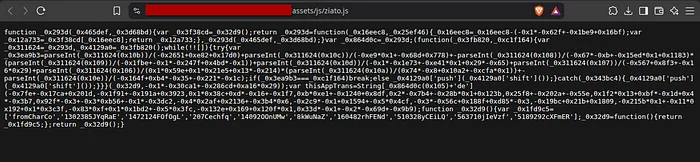
The source did not contain the key as a plain string. The key was built with a function of the form String.fromCharCode(), whose arguments were arithmetic expressions written in hexadecimal. The obfuscation made code review harder but did not protect the key.
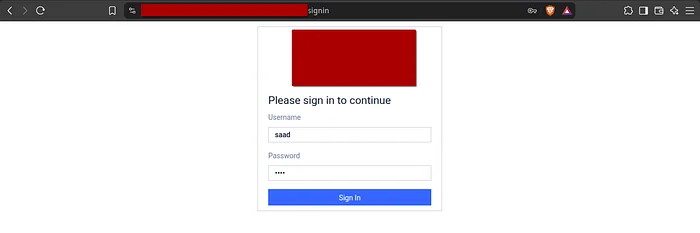
Evidence 1 shows the login page together with the publicly served ziato.js asset.
Exploitation
Step 1: Locate the client-side encryption
The login flow was exercised and the JavaScript used by the login page was inspected. The encryption logic was found in ziato.js. This established that the password seen on the wire would be ciphertext produced by code the client controls.
Step 2: Deobfuscate the key construction
The key was not a literal. It was assembled by a String.fromCharCode(...) call whose arguments were hexadecimal arithmetic. The researcher wrote a script to fetch the asset, extract the argument expressions from the call, evaluate each one and turn the resulting code points into characters. The script as published is:
import reimport sysimport requestsTARGET_URL = "https://target.com/ziato.js"def fetch_source(url: str) -> str:    resp = requests.get(url, timeout=15)    resp.raise_for_status()    return resp.textdef extract_fromcharcode_args(js_source: str) -> list[str]:    """    Finds the String[...]('de')(...) call used to build the key and    returns its raw comma-separated argument expressions.    """    match = re.search(        r"String\[[^\]]+\+'de'\]\(([^;]+?)\);",        js_source,    )    if not match:        raise ValueError(            "Could not locate the String.fromCharCode(...) construction call. "            "The file may have changed \u2014 inspect it manually."
        )    args_blob = match.group(1)    args = [a.strip() for a in args_blob.split(",")]    return argsdef evaluate_key(args: list[str]) -> str:    chars = []    for i, expr in enumerate(args, start=1):        value = eval(expr, {"__builtins__": {}}, {})        if not isinstance(value, int) or not (0 <= value <= 0x10FFFF):            raise ValueError(f"Term {i} evaluated to an unexpected value: {value!r}")        chars.append(chr(value))    return "".join(chars)def main():    url = sys.argv[1] if len(sys.argv) > 1 else TARGET_URL    print(f"[*] Fetching {url}")    source = fetch_source(url)    print("[*] Extracting obfuscated key-construction arguments")    args = extract_fromcharcode_args(source)    print(f"[*] Found {len(args)} terms")    print("[*] Evaluating each term")    key = evaluate_key(args)    print("-" * 50)    print(f"Recovered key/IV : {key}")    print(f"Length           : {len(key)} chars ({len(key.encode())} bytes)")    print("-" * 50)if __name__ == "__main__":    main()
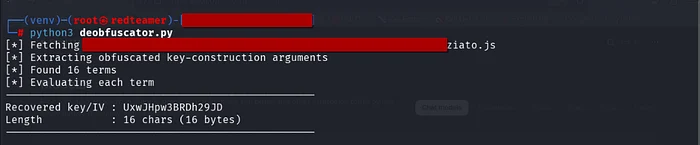
The important parts are the regular expression that finds the String[...+'de'](...) construction, the split of its comma-separated arguments, and the evaluation of each expression with builtins disabled before converting the integer to a character. The result was a 16-character string, which the researcher then tested against the application's encryption scheme.
Evidence 2 shows the obfuscated key-construction logic in the source.
Step 3: Capture a live login request
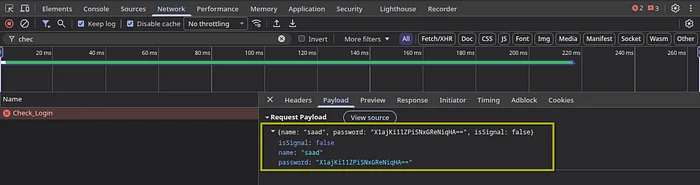
The researcher signed in through the normal form using a controlled test password and inspected the resulting request in the browser's Network tab. The password field in the request body contained ciphertext rather than the password that had been typed. This confirmed that the encryption runs in the real login flow, not only in some unused code path. The captured request was kept only for the assessment.
Evidence 3 shows the request payload with the encrypted password field.
Step 4: Verify by offline decryption
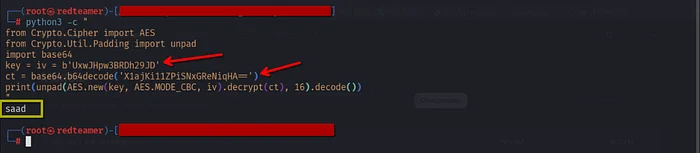
Using the recovered key/IV pair and the captured ciphertext, the researcher decrypted the value offline with the AES-128-CBC cipher that the application uses. The plaintext matched the test password exactly. This is the decisive validation: the conclusion rests on a successful decryption, not merely on the presence of a hardcoded key or on a suspicion of weak cryptography.
Evidence 4 shows the decryption output matching the controlled test input.
Root cause
The application relies on a static AES key that is generated at runtime in client-side JavaScript by decrypting obfuscated expressions. Because the code that builds the key is delivered to every visitor, anyone can reproduce the construction and recover the key. The obfuscation with String.fromCharCode() and hexadecimal arithmetic only raises the effort of reading the code; it does not keep the secret.
Existing defences did not stop this. The secret was embedded in code delivered to every visitor, so anyone inspecting the application code could recover it. The report does not describe any server-side control that would have prevented recovery of the key from the public asset.
Impact
If an attacker obtains encrypted login requests, they can reverse the captured ciphertext with the recovered hardcoded key. The report lists possible ways of obtaining such requests: capturing traffic, a compromised endpoint, or systems that log request bodies. The consequences therefore depend on where and how the attacker gets hold of the encrypted requests; the report does not claim that the key alone gives access to accounts.
The assessment was limited to a controlled test password. No other user's account or credentials were accessed, and no destructive actions were performed.
Fix
The recommendation is to remove the custom client-side encryption scheme. Where HTTPS is implemented correctly, passwords can be sent safely over the TLS channel. Secrets hardcoded into JavaScript that is publicly available should not be relied on to protect data.
The report does not say whether the issue was fixed or what the vendor changed.
Variants to test
- Look for key material in public JavaScript bundles. Search for
String.fromCharCode,atob,CryptoJS,AESand similar patterns in assets loaded by login and registration pages. A positive result is a value that can be reconstructed and used to decrypt a captured request. - Check for obfuscated arithmetic. If the key is built from hexadecimal expressions, evaluate them in a sandbox and compare the resulting length with the cipher's expected key size. A 16-character result points to AES-128.
- Capture and decrypt a controlled request. Submit a known test password, take the ciphertext from the request body, and try to decrypt it with the recovered key/IV. A match confirms the finding.
- Look for request-body logging. If encrypted requests are stored in logs or captured by an intermediary, the recovered key turns those records into plaintext passwords. A positive result is a stored request body that decrypts to a real credential.
- Check whether the same key is reused across sessions. If the key and IV are reused, captured requests may be decryptable with the same material. A positive result is two different sessions decrypting with the same key/IV.
What happened, in plain words
A security researcher looked at the login page of one of the TATA group's online services. Normally, when you type your password into a login form and press the button, the password travels to the company's server so it can be checked. On this service, the password was scrambled (encrypted) inside the browser before it was sent, so anyone watching the network traffic would see gibberish instead of the password.
That sounds like a good idea, but there was a problem. To unscramble the password, a secret piece of information called a key is needed. The service built that key inside a JavaScript file that every visitor's browser downloads. JavaScript is the programming language that runs inside web pages; any file a browser downloads can be read by anyone who knows how to look. The key was hidden behind some trickery (obfuscation), but the researcher worked out the trick, recovered the key, and used it to turn a captured scrambled password back into the real one.
The researcher did this as part of a Responsible Disclosure Program, which is an arrangement where a company invites outsiders to find security problems and report them privately instead of exploiting them. The write-up deliberately leaves out the recovered key, the test password and identifying details of the application.
The idea behind the problem
Encryption is like putting a letter in a locked box. The box can travel in the open, and only someone with the right key can open it. The strength of the whole arrangement depends on who holds the key. If you hand a copy of the key to everyone who walks past, the lock is pointless.
That is what happened here. The service scrambled the password in the browser, but it also shipped the unscrambling key to every browser. Anyone who can read the page's code can find the key and open the box.
A few terms you will meet throughout:
- Client-side means the work happens in your browser (the client) rather than on the company's server.
- Ciphertext is the scrambled version of a message. Plaintext is the readable original.
- AES is a widely used, well-regarded encryption method. AES-128 means it uses a key of 128 bits, which is 16 bytes, or 16 characters in the simple text form used here.
- IV stands for Initialisation Vector. It is an extra random-looking value used alongside the key so that encrypting the same password twice does not produce identical ciphertext. In this case the report says the key was recoverable from the public code.
- CBC is a mode of operation for AES, a set of rules for how to apply the cipher to data longer than one block.
- Obfuscation means making code hard to read without actually protecting anything. It is like writing a note in messy handwriting: it slows a reader down, but it does not stop them.
Setting up
The researcher worked against the public login page. The report lists what was needed:
- A browser with the Network tab open. The Network tab is a panel in the browser's developer tools that lists every request the page makes and shows what was sent and received. It is how you see the traffic between your browser and a website.
- Access to the publicly served
ziato.jsfile. A.jsfile is a JavaScript file; the browser downloads it to run the page's logic. - A Python script using three standard building blocks:
refor pattern matching in text,sysfor reading command-line arguments, andrequestsfor downloading a web page from code. Python is a general-purpose programming language often used for small automation tasks. - A controlled test password, chosen by the researcher, typed into the normal login form.
- An offline decryption step, done on the researcher's own machine, using the recovered key/IV and the captured ciphertext.
The report states that no other user's account, no other person's credentials and no destructive actions were involved at any point.
Finding it
The researcher opened the login page and looked at the JavaScript files it loads. One of them, ziato.js, contained logic that scrambled the password before the form was submitted.
Scrambling data in the browser is not automatically a vulnerability. The problem is where the secret lives. If the secret is embedded in code that every visitor receives, then every visitor can, in principle, recover it. There is no wall between the code and the attacker: the attacker already has the code.
The key was not written as a plain string like "mysecretkey12345". Instead it was built at runtime by a function called String.fromCharCode(). That function takes numbers and turns them into characters. For example, the number 65 becomes the letter A. The numbers passed to it were written as arithmetic expressions in hexadecimal, a number system with sixteen digits (0 to 9 and A to F) often used in programming. So instead of a readable key, the file contained something like a sum that produces each character.
This made the code harder to read, but it did not protect the key. Anyone willing to do the arithmetic gets the same result the browser gets.
Evidence 1 shows the login page and the publicly served ziato.js file.
Step by step
Step 1: Locate the client-side encryption
The researcher used the login flow and inspected the JavaScript the login page loads. The scrambling logic was in ziato.js. This established that the password seen on the network would be ciphertext produced by code running in the browser, which the visitor controls.
Why this step matters: before you can test anything, you need to know where the relevant code lives. The Network tab tells you which files the page downloads; from there you can open them and read them.
Step 2: Deobfuscate the key construction
The key was not a literal value. It was assembled by a String.fromCharCode(...) call whose arguments were hexadecimal arithmetic. The researcher wrote a script to download the file, pull out those argument expressions, evaluate each one, and turn the resulting numbers into characters. The script as published is:
import reimport sysimport requestsTARGET_URL = "https://target.com/ziato.js"def fetch_source(url: str) -> str: resp = requests.get(url, timeout=15) resp.raise_for_status() return resp.textdef extract_fromcharcode_args(js_source: str) -> list[str]: """ Finds the String[...]('de')(...) call used to build the key and returns its raw comma-separated argument expressions. """ match = re.search( r"String\[[^\]]+\+'de'\]\(([^;]+?)\);", js_source, ) if not match: raise ValueError( "Could not locate the String.fromCharCode(...) construction call. " "The file may have changed \u2014 inspect it manually."
) args_blob = match.group(1) args = [a.strip() for a in args_blob.split(",")] return argsdef evaluate_key(args: list[str]) -> str: chars = [] for i, expr in enumerate(args, start=1): value = eval(expr, {"__builtins__": {}}, {}) if not isinstance(value, int) or not (0 <= value <= 0x10FFFF): raise ValueError(f"Term {i} evaluated to an unexpected value: {value!r}") chars.append(chr(value)) return "".join(chars)def main(): url = sys.argv[1] if len(sys.argv) > 1 else TARGET_URL print(f"[*] Fetching {url}") source = fetch_source(url) print("[*] Extracting obfuscated key-construction arguments") args = extract_fromcharcode_args(source) print(f"[*] Found {len(args)} terms") print("[*] Evaluating each term") key = evaluate_key(args) print("-" * 50) print(f"Recovered key/IV : {key}") print(f"Length : {len(key)} chars ({len(key.encode())} bytes)") print("-" * 50)if __name__ == "__main__": main()
Line by line, in plain words:
import re,import sys,import requestsbring in three tools: pattern matching, command-line handling, and web downloading.TARGET_URL = "https://target.com/ziato.js"is the address of the file to download. The report uses a placeholder address here.def fetch_source(url: str) -> str:defines a function that downloads a page and returns its text.requests.getdoes the download;raise_for_statusmakes the script stop with an error if the download failed;return resp.texthands back the page contents.def extract_fromcharcode_args(js_source: str) -> list[str]:defines a function that finds the key-building call inside the downloaded JavaScript.- The
re.search(...)line uses a regular expression, a pattern for finding text. It looks for theString[...+'de'](...)construction and captures what is inside the parentheses. The comment above it explains that the call is written in a disguised form rather than as the plain nameString.fromCharCode. - If no match is found, the script raises an error saying the file may have changed and should be inspected manually.
args_blob = match.group(1)takes the captured text, the comma-separated arguments.args = [a.strip() for a in args_blob.split(",")]splits that text on commas and trims spaces, giving a list of expressions.def evaluate_key(args: list[str]) -> str:defines a function that turns those expressions into characters.chars = []starts an empty list to collect characters.- The
forloop goes through each expression.eval(expr, {"__builtins__": {}}, {})computes the arithmetic. Passing an empty__builtins__restricts what the evaluated expression can do, which is a safety measure when evaluating text as code. - The
ifcheck makes sure the result is a whole number in the valid range for a character code (0 to 0x10FFFF, the maximum Unicode code point). If not, it raises an error. chars.append(chr(value))converts the number to its character and adds it to the list.return "".join(chars)glues the characters into one string.def main():is the entry point. It picks the URL from the command line if one was given, otherwise usesTARGET_URL.- The
printlines report progress: fetching, extracting, how many terms were found, evaluating. key = evaluate_key(args)produces the recovered key.- The final
printlines show the recovered key/IV and its length in characters and bytes. if __name__ == "__main__": main()runsmain()when the script is executed directly.
The result was a 16-character string. The researcher then tested it against the application's encryption scheme.
Why this step matters: the browser has to be able to build the key to scramble the password, so the recipe for building it must be in the file. If you can follow the recipe, you get the key. The script just automates the arithmetic.
Evidence 2 shows the obfuscated key-construction logic in the source.
Step 3: Capture a live login request
The researcher signed in through the normal form using a controlled test password and looked at the resulting request in the browser's Network tab. The password field in the request body contained ciphertext, not the password that had been typed.
A request is a message your browser sends to a server, for example when you submit a form. The request body is the part that carries the data, such as the form fields. Seeing ciphertext there confirmed that the encryption runs in the real login flow, not only in some unused piece of code. The captured request was kept only for the assessment.
Why this step matters: reading code tells you what could happen; capturing a real request tells you what does happen. It is the difference between reading a recipe and watching the cake come out of the oven.
Evidence 3 shows the request payload with the encrypted password field.
Step 4: Verify by offline decryption
Using the recovered key/IV pair and the captured ciphertext, the researcher decrypted the value offline with the AES-128-CBC cipher that the application uses. The plaintext matched the test password exactly.
"Offline" means on the researcher's own machine, without sending anything back to the service. This is the decisive validation: the conclusion rests on a successful decryption, not merely on the presence of a hardcoded key or a suspicion that the cryptography is weak.
Why this step matters: finding a key in code is interesting, but proving that the key actually unlocks a real captured password is what turns a suspicion into a confirmed finding.
Evidence 4 shows the decryption output matching the controlled test input.
Why it happened
The application relies on a static AES key that is generated at runtime in client-side JavaScript by decrypting obfuscated expressions. Because the code that builds the key is delivered to every visitor, anyone can reproduce the construction and recover the key. The obfuscation with String.fromCharCode() and hexadecimal arithmetic only raises the effort of reading the code; it does not keep the secret.
Existing defences did not stop this. The secret was embedded in code delivered to every visitor, so anyone inspecting the application code could recover it. The report does not describe any server-side control that would have prevented recovery of the key from the public asset.
A useful comparison: hiding a spare house key under the doormat makes it less obvious, but anyone who knows to look under the mat finds it. Obfuscation is the doormat. It changes where you look, not whether the key is there.
What an attacker could do with it
If an attacker obtains encrypted login requests, they can reverse the captured ciphertext with the recovered hardcoded key. The report lists possible ways of obtaining such requests: capturing traffic, a compromised endpoint, or systems that log request bodies.
- Capturing traffic means intercepting network data, for example on a shared network or through a compromised device.
- A compromised endpoint means a machine or service on the path that an attacker controls.
- Request-body logging means a system that stores the contents of requests, perhaps for debugging or monitoring. If those stored bodies contain ciphertext and the key is public, the stored data becomes readable passwords.
The consequences therefore depend on where and how the attacker gets hold of the encrypted requests. The report does not claim that the key alone gives access to accounts.
The assessment was limited to a controlled test password. No other user's account or credentials were accessed, and no destructive actions were performed.
How to fix it
The recommendation is to remove the custom client-side encryption scheme. Where HTTPS is implemented correctly, passwords can be sent safely over the TLS channel.
- HTTPS is the secure version of the web protocol. It wraps traffic in TLS, a protocol that encrypts data between your browser and the server and verifies that the server is who it claims to be.
- Because TLS already protects the connection, adding a second layer of encryption in the browser, with a key everyone can see, adds no real protection and creates a false sense of safety.
Secrets hardcoded into JavaScript that is publicly available should not be relied on to protect data. The report does not say whether the issue was fixed or what the vendor changed.
Other places to look for the same pattern
These are general checks that follow from the finding:
- Look for key material in public JavaScript bundles. Search for
String.fromCharCode,atob,CryptoJS,AESand similar patterns in assets loaded by login and registration pages. A positive result is a value that can be reconstructed and used to decrypt a captured request. - Check for obfuscated arithmetic. If the key is built from hexadecimal expressions, evaluate them in a sandbox and compare the resulting length with the cipher's expected key size. A 16-character result points to AES-128.
- Capture and decrypt a controlled request. Submit a known test password, take the ciphertext from the request body, and try to decrypt it with the recovered key/IV. A match confirms the finding.
- Look for request-body logging. If encrypted requests are stored in logs or captured by an intermediary, the recovered key turns those records into plaintext passwords. A positive result is a stored request body that decrypts to a real credential.
- Check whether the same key is reused across sessions. If the key and IV are reused, captured requests may be decryptable with the same material. A positive result is two different sessions decrypting with the same key/IV.
What to take away
The lesson is that obfuscation is not a replacement for key management. Encryption is only as strong as the protection of its keys. If the key travels to every visitor, it is not a secret.
For anyone building a login form: do not trust any secret in publicly distributed client-side software to protect your data. Use HTTPS and let the secure connection do the protecting.

Glossary
- AES: A widely used symmetric encryption algorithm. The same key encrypts and decrypts.
- AES-128: AES using a 128-bit key, which is 16 bytes, or 16 characters in the simple text form used here.
- API: An interface that lets one piece of software talk to another. Not central to this report, but the term appears in general security discussions.
- Browser developer tools: Built-in panels in a browser for inspecting a page, its code and its network traffic.
- CBC: Cipher Block Chaining, a mode of operation for AES that chains blocks together using an IV.
- Ciphertext: Scrambled data produced by encryption.
- Client-side: Work done in the user's browser rather than on the server.
- Code point: A number that identifies a character in the Unicode standard.
- Cookie: A small piece of data a website stores in your browser, often used to remember who you are. Not central to this report.
- Credentials: Information used to prove identity, such as a username and password.
- Deobfuscation: The process of making obfuscated code readable again.
- Encryption: Transforming readable data into scrambled data so that only someone with the key can read it.
- Endpoint: A specific address or service that receives requests. Also used to mean a machine or service on a network path.
- eval: A programming function that runs text as code. Useful but risky, which is why the script restricts what the evaluated text can access.
- Hexadecimal: A number system with sixteen digits (0 to 9 and A to F), common in programming.
- HTTPS: The secure version of the web protocol, using TLS to encrypt traffic between browser and server.
- IV (Initialisation Vector): An extra value used with a key in some encryption modes so that identical plaintexts do not produce identical ciphertexts.
- JavaScript: The programming language that runs in web pages.
- Key: The secret value used by an encryption algorithm to scramble and unscramble data.
- Key management: The practice of generating, storing, distributing and protecting keys.
- Network tab: The part of browser developer tools that lists requests and responses.
- Obfuscation: Making code hard to read without actually protecting it.
- Offline: Done on the researcher's own machine, without contacting the service.
- Plaintext: Readable, unencrypted data.
- Python: A general-purpose programming language often used for automation and scripting.
- Regular expression: A pattern used to find text inside a larger text.
- Request: A message a browser sends to a server, for example when submitting a form.
- Request body: The part of a request that carries data such as form fields.
- Responsible Disclosure Program: An arrangement where a company invites outsiders to report security problems privately.
- Sandbox: A restricted environment where code can run without affecting the rest of the system.
- Server-side: Work done on the company's server rather than in the browser.
- String.fromCharCode(): A JavaScript function that turns numbers into characters.
- TLS: The protocol that encrypts and authenticates traffic between a browser and a server.
- Token: A piece of data used to represent a session or permission. Not central to this report.
- Vulnerability: A weakness in software that can be used to cause harm or break a security promise.
- ziato.js: The publicly served JavaScript file that contained the client-side encryption logic and the obfuscated key construction.