One Invitation, Three Vulnerabilities: Breaking RBAC Across Two Applications
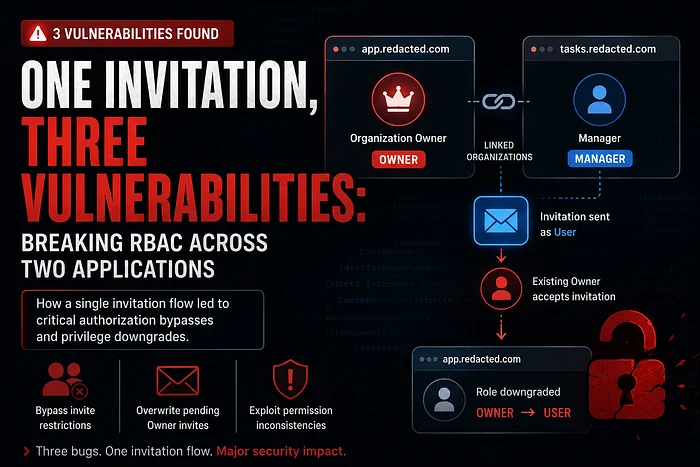
The invitation system did not consistently enforce role-based access control across two linked applications, allowing a Manager to downgrade an Organization Owner by inviting them as a User, overwrite a pending Owner invitation with a User invitation, and modify existing invitations even after the invite permission was removed. An attacker with the Manager role could thus bypass RBAC restrictions and influence who gets invited and what role they receive.
 Published on medium.com
Cybersecurity
The full write-up lives on its author's site
It belongs to its author, so we link to it rather than copy it. The other two tabs are our own rewrites, checked against it.
Context
The target is a product referred to only as REDACTED, made up of several interconnected applications. Two of them matter here:
app.redacted.com, used for general organization management.tasks.redacted.com, used for task management.
Both applications have their own role and permission systems, and an organization can be linked between the two. The feature under test is organization invitations: an administrator creates an invitation, assigns a role, and the invited user joins the organization. When the two applications are linked, a single invitation sent from one subdomain can add the person to the linked organization in both subdomains.
Because invitations sit directly on top of roles and permissions, they are a natural place to look for authorization bugs. The researcher's starting question was simple: what can each organization role do, and not do, with pending invitations?
Setup
The preconditions it does describe are:
- An organization that exists in both
app.redacted.comandtasks.redacted.comand is linked between them. - A victim account that holds the Organization Owner role.
- A Manager account in
tasks.redacted.com, which is the lower-privileged role used throughout the testing. - For the first finding, the victim must be an Owner in
app.redacted.comwhile no longer being a member oftasks.redacted.com.
Finding it
The researcher began by testing what different organization roles could and could not do with pending invitations. The observation that drove everything else was that the application's authorization checks were not consistently enforced across the different ways an invitation could be created or modified.
One finding led to another. What started as an invitation-management issue turned into three separate authorization vulnerabilities, including a cross-application privilege downgrade in which a Manager could indirectly cause an Organization Owner in another application to be downgraded to a regular User.
The write-up presents them in reverse order of impact, starting with the most severe.
Exploitation
Step 1: Manager downgrades an Owner across the linked applications
When the two applications are linked, an invitation sent from one subdomain can add the person to the linked organization in both subdomains. The first question was what happens when you invite someone who is already inside the organization as a lower role. The application checked whether the invited user was already in the organization and returned an error, so that path was blocked.
That raised a second question: does the check cover both domains when deciding whether the invited user is already inside?
To test it, the researcher removed the second owner from tasks.redacted.com and left that account as an owner in app.redacted.com. From the Manager's account in tasks.redacted.com, the researcher then invited that account as a user, making sure the invitation would add the account to the organization in both subdomains.
The account was already an Owner in app.redacted.com, yet the invitation still arrived in the victim's inbox. When the victim clicked it, they were in the organization in both tasks.redacted.com and app.redacted.com as a user.
The sequence is:
Manager → Invite Owner as User → Victim accepts → Owner becomes User
The issue was in how the two applications synchronized roles. From the perspective of tasks.redacted.com, the victim was no longer a member, so the Manager was allowed to invite them. But the victim was still an Organization Owner in app.redacted.com. When the victim accepted the invitation as a User, the linked organizations synchronized their membership and the lower User role replaced the existing Owner role.
The Manager never directly downgraded the Owner. The invitation flow in tasks.redacted.com made the synchronization system do it, which bypasses the RBAC restriction that normally prevents a Manager from downgrading an Owner.
Step 2: Manager downgrades a pending Owner invitation
Here the Owner invites the email [redacted] as an owner into the organization. A Manager should not be able to delete or edit that pending invitation, because it carries a higher role than the Manager holds.
The researcher, as a Manager, sent a new invitation to the same email address [redacted] as a user. The already pending Owner invitation was overwritten: the invitation for [redacted] became a user invitation rather than an owner invitation. Because it was now a user invitation, the Manager was also able to delete or edit it.
The sequence is:
Owner invitation → Manager re-invites same email as User → Owner invitation becomes User invitation → Manager can now edit/delete it
The authorization check itself was working correctly: the Manager could not directly modify or delete the pending Owner invitation. The problem was that the duplicate-email invitation flow provided another way around that check. When the Manager invited the same email address as a User, the application did not create a separate invitation. It overwrote the existing Owner invitation with the new, lower-privileged role. Once the invitation became a User invitation, the Manager was allowed to modify or delete it.
The application protected the invitation based on its current role, but failed to protect how that role could be changed in the first place.
Step 3: Manager controls existing invitations after losing the invite permission
This one does not rely on duplicate invitations or on cross-application synchronization. The researcher removed the "Invite members or create member accounts" permission from the Manager role.
As expected, the Manager could no longer create new invitations. Trying to do so returned a 403 Forbidden, so the permission check on creation looked correct.
The next test was what the same Manager could do with an invitation that had already been created by an Owner. The Owner created a pending invitation, and the researcher accessed that invitation from the Manager's account. The Manager could still modify the invitation and change the invited user's role, including changing it to a higher-privileged role. They could also delete or resend the invitation.
The sequence is:
No invite permission → Can't create invitation → Can still modify existing invitation
The application correctly checked the permission when creating an invitation, but did not apply the same authorization boundary to the other invitation-management actions. Removing the permission only stopped the Manager from creating invitations; it did not stop them from controlling invitations that already existed. This could be used to change an invitation created by an Owner into a higher-privileged role, so a Manager who was explicitly denied the ability to invite members could still influence who gets invited and what role they receive.
Root cause
All three findings come down to the same underlying problem: the application trusted invitation state and role synchronization without consistently enforcing the authorization boundaries around them.
- Role synchronization across linked applications treated the membership state of one application as authoritative for the other. A Manager in
tasks.redacted.comcould invite an account that was absent there but still an Owner inapp.redacted.com, and on acceptance the synchronized membership let the lower role replace the higher one. - Re-inviting the same email address overwrote the pending invitation. The application did not create a separate invitation; it replaced the existing Owner invitation with the new, lower-privileged role. The protection on the invitation was evaluated against its current role, not against the role it originally carried or the actor who created it.
- Authorization was applied to creation but not to the other invitation actions. The invite permission was checked when creating an invitation, but modify, delete and resend were not held to the same boundary. Modify, delete and resend on an existing invitation were not held to the same boundary, so a Manager without the invite permission could still change the role on an Owner's pending invitation.
Impact
- A Manager could indirectly downgrade an Organization Owner to a regular User across two connected applications, by inviting the Owner as a User from the application where the Owner was no longer a member and relying on role synchronization on acceptance. This relies on the linked-organization setup and the victim accepting the invitation.
- A Manager could overwrite a pending Owner invitation with a User invitation by re-inviting the same email address, and then edit or delete it.
- A Manager who had been explicitly denied the "Invite members or create member accounts" permission could still modify, delete and resend existing invitations created by an Owner, including changing the invited user's role to a higher-privileged one.
Fix
Based on the root causes described, the boundaries that need enforcing are:
- When checking whether an invitee is already a member, evaluate membership across every linked application, not just the one the invitation is sent from.
- On role synchronization, never let an acceptance event lower an existing role in a linked application without an explicit authorization check against that role.
- Treat a re-invitation to an existing email address as a modification of the existing invitation, and authorize it against the role currently on that invitation and the actor's own role.
- Apply the invite permission to every invitation-management action (modify, delete, resend, role change), not only to creation, and check it against the invitation's current role.
Variants to test
- Linked-tenant membership checks. In any product where one identity spans two linked applications, remove the account from one side and try to invite it from the lower-privileged side. A positive result is an invitation that is accepted and changes the account's role on the other side.
- Duplicate-email invitation overwrite. As a lower role, re-invite an email address that already has a pending higher-role invitation. A positive result is that the pending invitation's role changes, or that the lower role can now edit or delete it.
- Per-action permission gaps. Remove the invite permission from a role, confirm creation returns
403 Forbidden, then act on an invitation created by a higher role. A positive result is a successful modify, delete, resend or role escalation on that existing invitation. - Role change on pending invitations. As a Manager, attempt to raise the role on an invitation created by an Owner. A positive result is an invitation that grants more than the Manager could grant directly.
- Acceptance-time role resolution. Accept an invitation while holding a higher role in a linked application and observe which role wins. A positive result is the lower role replacing the higher one.
What happened, in plain words
A security researcher was testing a product that the write-up calls REDACTED. The product is not one website but several websites that work together. Two of them matter for this story:
app.redacted.com, which is used for general organization management.tasks.redacted.com, which is used for task management.
Think of an organization as a company account that several people share. Each person in it has a role, and the role decides what that person is allowed to do. The two most important roles here are Organization Owner, the person at the top who can do almost everything, and Manager, a role below the Owner with fewer powers. There is also a plain User role, the lowest of the three.
The feature the researcher looked at is organization invitations. An invitation is how you add somebody to the organization: an administrator types the person's email address, picks the role that person should get, and sends the invitation. The invited person receives it and clicks to accept, and then they are a member with that role. It is the same idea as inviting a colleague to a shared workspace in a chat or document tool.
When the two applications are linked, one invitation sent from one of them can add the person to the linked organization in both of them at once. That linking is the detail that makes the story interesting.
Invitations sit directly on top of roles and permissions, so they are a natural place to look for authorization bugs. Authorization means deciding whether a person is allowed to do a particular thing. An authorization bug is when the software lets somebody do something their role should not allow. The researcher's starting question was simple: what can each role do, and not do, with invitations that are still waiting to be accepted?
The answer turned out to be three separate problems, all in the same invitation feature:
- A Manager could indirectly make an Organization Owner become a plain User, across the two linked applications.
- A Manager could take an invitation that an Owner had sent to somebody as an Owner, and turn it into a User invitation, then edit or delete it.
- A Manager whose role had been stripped of the permission to invite members could still change, delete and resend invitations that an Owner had already created, including raising the role on them.
The write-up presents them starting with the most severe. Below, each one is explained from scratch, with the same sequences the researcher used.
The pieces you need to know first
Before the three findings, a few everyday ideas make everything easier to follow.
A subdomain is the part in front of a domain name. In app.redacted.com, the app part is the subdomain and redacted.com is the main domain. Companies often split one product across several subdomains, one per application, and that is exactly what REDACTED does.
A role is a label attached to a person inside an organization that says what they may do. Owner, Manager and User are three such labels, from most powerful to least.
A permission is a single specific ability, such as "invite members or create member accounts". A role is a bundle of permissions. Removing one permission from a role takes that one ability away without changing anything else.
A pending invitation is an invitation that has been sent but not yet accepted. It sits in the system waiting, and it already carries the role the person will get when they accept.
RBAC stands for Role-Based Access Control. It is the common approach where the software decides what you can do based on your role rather than on who you are individually. If your role says Manager, you get the Manager abilities and nothing more. The whole point of RBAC is that a lower role cannot do what a higher role can do.
Synchronization means two systems keeping their copy of the same information in agreement. Here, the two applications keep the same organization membership in agreement, so a change on one side is reflected on the other. Think of two calendars that mirror each other: an event added to one appears in the other.
A 403 Forbidden is the standard response a web server sends when it understands your request but refuses to carry it out because you are not allowed. It is the software saying no on purpose, as opposed to a 404, which means the thing you asked for does not exist.
Setting the scene
What it does describe are the conditions needed to reproduce the findings:
- An organization that exists in both
app.redacted.comandtasks.redacted.com, and is linked between them. - A victim account that holds the Organization Owner role.
- A Manager account in
tasks.redacted.com, which is the lower-privileged role used throughout the testing. - For the first finding, the victim must be an Owner in
app.redacted.comwhile no longer being a member oftasks.redacted.com.
That fourth condition is the setup trick for the first bug, and it is worth pausing on. The victim is still powerful in one application but has been removed from the other. From the point of view of tasks.redacted.com, the victim is simply not there any more.
How the researcher found it
The researcher started by testing what different organization roles could and could not do with pending invitations. The observation that drove everything else was that the application's authorization checks were not applied consistently across the different ways an invitation could be created or modified.
One finding led to another. What started as an invitation-management issue turned into three separate authorization vulnerabilities, including a cross-application privilege downgrade in which a Manager could indirectly cause an Organization Owner in another application to be downgraded to a regular User.
The write-up presents them in reverse order of impact, starting with the most severe.
Finding 1: a Manager makes an Owner become a User
What the researcher tried first
When the two applications are linked, an invitation sent from one subdomain can add the person to the linked organization in both subdomains. The first question was what happens when you invite someone who is already inside the organization as a lower role. The application checked whether the invited user was already in the organization and returned an error, so that path was blocked.
In plain terms: the software was not stupid. If you tried to invite somebody who was already a member, it noticed and refused. That is the sensible behaviour, because otherwise you could quietly change an existing member's role by inviting them again.
The question that opened the door
That raised a second question: does the check cover both domains when deciding whether the invited user is already inside?
This is the key idea of the whole finding. The software refused to invite an existing member, but which membership list was it checking? If it only looked at the application the invitation was sent from, then somebody who was removed from that one application but still a member of the other would look like a stranger to it.
How it was tested
To test it, the researcher removed the second owner from tasks.redacted.com and left that account as an owner in app.redacted.com. From the Manager's account in tasks.redacted.com, the researcher then invited that account as a user, making sure the invitation would add the account to the organization in both subdomains.
Step by step, this is what happened:
- The victim account was removed from
tasks.redacted.com. It stayed an Owner inapp.redacted.com. - The Manager, working inside
tasks.redacted.com, sent an invitation to that same account and chose the plain User role. - The invitation was set up so that accepting it would add the account to the organization in both subdomains.
The account was already an Owner in app.redacted.com, yet the invitation still arrived in the victim's inbox. When the victim clicked it, they were in the organization in both tasks.redacted.com and app.redacted.com as a user.
That last sentence is the bug. The victim was an Owner. They clicked an invitation that said User. They ended up a User, in both applications.
The sequence
Manager → Invite Owner as User → Victim accepts → Owner becomes User
Read left to right, this line is the whole attack in four steps:
Manageris the person starting it, the lower-privileged account.Invite Owner as Useris the action: the Manager sends an invitation to the Owner's account, choosing the User role.Victim acceptsis the Owner clicking the invitation, which is a normal thing to do when an invitation arrives.Owner becomes Useris the result: the Owner's role is replaced by the lower one.
Why it worked
The issue was in how the two applications synchronized roles. From the perspective of tasks.redacted.com, the victim was no longer a member, so the Manager was allowed to invite them. But the victim was still an Organization Owner in app.redacted.com. When the victim accepted the invitation as a User, the linked organizations synchronized their membership and the lower User role replaced the existing Owner role.
Think of two reception desks for the same building. The desk at the side entrance has a list that no longer includes you, so the person there happily issues you a visitor badge. The main desk still has you down as the building manager. When the two lists are reconciled at the end of the day, the visitor badge wins and you are no longer the manager. Nobody at the side entrance had the authority to demote you, but the reconciliation did it anyway.
The Manager never directly downgraded the Owner. The invitation flow in tasks.redacted.com made the synchronization system do it, which bypasses the RBAC restriction that normally prevents a Manager from downgrading an Owner.
That distinction matters. If you had asked the software "can a Manager change an Owner's role?", it would have said no, and it would have been right. The Manager never asked that question. They asked a different one, "can I invite this person?", and the answer to that was yes, because from where the Manager stood the person was not a member. The demotion happened as a side effect of the synchronization, not as a direct action.
Finding 2: a Manager takes over a pending Owner invitation
The setup
Here the Owner invites the email [redacted] as an owner into the organization. A Manager should not be able to delete or edit that pending invitation, because it carries a higher role than the Manager holds.
This is the normal RBAC expectation. The invitation is for an Owner, so only somebody at least as senior as an Owner should be able to touch it. A Manager is below an Owner, so the invitation should be out of reach.
What the researcher did
The researcher, as a Manager, sent a new invitation to the same email address [redacted] as a user. The already pending Owner invitation was overwritten: the invitation for [redacted] became a user invitation rather than an owner invitation. Because it was now a user invitation, the Manager was also able to delete or edit it.
Notice what did not happen. The Manager did not need to break into anything, guess a password or find a hidden page. They simply used the ordinary invite form a second time, with the same email address, and chose a lower role.
The sequence
Owner invitation → Manager re-invites same email as User → Owner invitation becomes User invitation → Manager can now edit/delete it
Line by line:
Owner invitationis the starting state: a pending invitation created by the Owner, carrying the Owner role.Manager re-invites same email as Useris the Manager sending a fresh invitation to the same address, this time as a User.Owner invitation becomes User invitationis the overwrite: there is still only one invitation for that address, and it now carries the lower role.Manager can now edit/delete itis the consequence: the invitation is now a User-level object, and a Manager is allowed to manage User-level invitations.
Why it worked
The authorization check itself was working correctly: the Manager could not directly modify or delete the pending Owner invitation. The problem was that the duplicate-email invitation flow provided another way around that check. When the Manager invited the same email address as a User, the application did not create a separate invitation. It overwrote the existing Owner invitation with the new, lower-privileged role. Once the invitation became a User invitation, the Manager was allowed to modify or delete it.
The application protected the invitation based on its current role, but failed to protect how that role could be changed in the first place.
A useful comparison is a locked filing cabinet. The cabinet is locked, and only senior staff have the key, so a junior employee cannot open it. But there is a second, unlocked drawer in the same room, and putting a new label on the locked cabinet's folder moves it into the unlocked drawer. The lock was never picked. The folder was simply relabelled through a route nobody had guarded.
Finding 3: a Manager keeps control after losing the invite permission
The setup
This one does not rely on duplicate invitations or on cross-application synchronization. The researcher removed the "Invite members or create member accounts" permission from the Manager role.
That permission is exactly what it sounds like: the ability to send invitations and create accounts for new members. Taking it away from the Manager role should mean the Manager can no longer invite anybody.
The first test
As expected, the Manager could no longer create new invitations. Trying to do so returned a 403 Forbidden, so the permission check on creation looked correct.
A 403 Forbidden is the server's way of saying "I know what you want, and you are not allowed to do it". Seeing it here is a good sign: the software is enforcing the rule where it should.
The second test
The next test was what the same Manager could do with an invitation that had already been created by an Owner. The Owner created a pending invitation, and the researcher accessed that invitation from the Manager's account. The Manager could still modify the invitation and change the invited user's role, including changing it to a higher-privileged role. They could also delete or resend the invitation.
So the same Manager who was just told "no" when creating an invitation was allowed to edit, delete and resend an invitation that already existed, and even to raise the role on it. The permission was being checked at the front door but not at the side doors.
The sequence
No invite permission → Can't create invitation → Can still modify existing invitation
Line by line:
No invite permissionis the starting state: the Manager role has had the invite permission removed.Can't create invitationis the behaviour that works correctly, confirmed by the403 Forbidden.Can still modify existing invitationis the gap: the other invitation actions were not held to the same rule.
Why it worked
The application correctly checked the permission when creating an invitation, but did not apply the same authorization boundary to the other invitation-management actions. Removing the permission only stopped the Manager from creating invitations; it did not stop them from controlling invitations that already existed. This could be used to change an invitation created by an Owner into a higher-privileged role, so a Manager who was explicitly denied the ability to invite members could still influence who gets invited and what role they receive.
Think of a building where your key card no longer opens the front door, so you cannot bring guests in. But the same card still opens the door to the room where guest passes are printed, and you can print one there. The rule was applied to one action and forgotten for the others.
The common cause
All three findings come down to the same underlying problem: the application trusted invitation state and role synchronization without consistently enforcing the authorization boundaries around them.
- Role synchronization across linked applications treated the membership state of one application as authoritative for the other. A Manager in
tasks.redacted.comcould invite an account that was absent there but still an Owner inapp.redacted.com, and on acceptance the synchronized membership let the lower role replace the higher one. - Re-inviting the same email address overwrote the pending invitation. The application did not create a separate invitation; it replaced the existing Owner invitation with the new, lower-privileged role. The protection on the invitation was evaluated against its current role, not against the role it originally carried or the actor who created it.
- Authorization was applied to creation but not to the other invitation actions. The invite permission was checked when creating an invitation, but modify, delete and resend were not held to the same boundary. Modify, delete and resend on an existing invitation were not held to the same boundary, so a Manager without the invite permission could still change the role on an Owner's pending invitation.
In one sentence: the software kept asking "is this person allowed to do this action?" but not "is this person allowed to touch this particular invitation, in the state it is in right now?".
What an attacker could achieve
- A Manager could indirectly downgrade an Organization Owner to a regular User across two connected applications, by inviting the Owner as a User from the application where the Owner was no longer a member and relying on role synchronization on acceptance. This relies on the linked-organization setup and the victim accepting the invitation.
- A Manager could overwrite a pending Owner invitation with a User invitation by re-inviting the same email address, and then edit or delete it.
- A Manager who had been explicitly denied the "Invite members or create member accounts" permission could still modify, delete and resend existing invitations created by an Owner, including changing the invited user's role to a higher-privileged one.
What the write-up says about the fix
Based on the root causes described, the boundaries that need enforcing are:
- When checking whether an invitee is already a member, evaluate membership across every linked application, not just the one the invitation is sent from.
- On role synchronization, never let an acceptance event lower an existing role in a linked application without an explicit authorization check against that role.
- Treat a re-invitation to an existing email address as a modification of the existing invitation, and authorize it against the role currently on that invitation and the actor's own role.
- Apply the invite permission to every invitation-management action (modify, delete, resend, role change), not only to creation, and check it against the invitation's current role.
Similar things to test elsewhere
These are the same ideas generalised, so they can be tried on other products with invitations and roles.
- Linked-tenant membership checks. In any product where one identity spans two linked applications, remove the account from one side and try to invite it from the lower-privileged side. A positive result is an invitation that is accepted and changes the account's role on the other side.
- Duplicate-email invitation overwrite. As a lower role, re-invite an email address that already has a pending higher-role invitation. A positive result is that the pending invitation's role changes, or that the lower role can now edit or delete it.
- Per-action permission gaps. Remove the invite permission from a role, confirm creation returns
403 Forbidden, then act on an invitation created by a higher role. A positive result is a successful modify, delete, resend or role escalation on that existing invitation. - Role change on pending invitations. As a Manager, attempt to raise the role on an invitation created by an Owner. A positive result is an invitation that grants more than the Manager could grant directly.
- Acceptance-time role resolution. Accept an invitation while holding a higher role in a linked application and observe which role wins. A positive result is the lower role replacing the higher one.
Glossary
- 403 Forbidden: the standard response a web server sends when it understands a request but refuses to carry it out because the requester is not allowed.
- Application: one piece of software with its own web address; here, each subdomain is a separate application.
- Authorization: the process of deciding whether a person is allowed to perform a particular action.
- Authorization bug: a flaw where the software lets somebody do something their role should not permit.
- Cross-application: happening across two or more separate applications that are connected to each other.
- CVSS score: a standard numeric rating of how severe a security flaw is.
- Domain: the main part of a web address, such as
redacted.com. - Downgrade: lowering somebody's role or privileges to a less powerful one.
- Duplicate-email invitation flow: the behaviour where inviting an email address that already has a pending invitation reuses or overwrites that invitation instead of creating a new one.
- Email address: the address an invitation is sent to; here it is also the key the software uses to identify an invitation.
- Invitation: a message sent to an email address offering membership in an organization with a chosen role, which takes effect when accepted.
- Linked organization: an organization that exists in two connected applications and keeps its membership in agreement between them.
- Manager: the lower-privileged role used throughout the testing, below Organization Owner.
- Membership: the fact of an account belonging to an organization.
- Organization: a shared company account that several people belong to, each with a role.
- Organization Owner: the highest role in the organization, able to do almost everything.
- Pending invitation: an invitation that has been sent but not yet accepted.
- Permission: a single specific ability, such as inviting members; roles are bundles of permissions.
- Privilege: the level of power an account has; higher privilege means more allowed actions.
- RBAC (Role-Based Access Control): deciding what a person may do based on their role rather than on the individual.
- Resend: sending an existing invitation again to the same email address.
- Role: a label attached to a member that determines what they may do, such as Owner, Manager or User.
- Role synchronization: keeping the roles and membership of two linked applications in agreement so a change on one side appears on the other.
- Subdomain: the part in front of a domain name, such as
appinapp.redacted.com. - User: the lowest role in this story, a regular member.
- Victim: the account whose role is affected by the attack, here an Organization Owner.

