($$$) Origin ip to account takeover
The application generated password reset links using the user-supplied Host header without validation, allowing an attacker to poison the reset link to point to their own server. An attacker could capture the reset token and take over a victim's account.
 Published on medium.com
Today, I’d like to share one of my interesting findings: Origin IP Disclosure Leading to Account Takeover.
The full write-up lives on its author's site
It belongs to its author, so we link to it rather than copy it. The other two tabs are our own rewrites, checked against it.
Context
The target was a public bug bounty program for example.com, with a maximum bounty of $100. The application sat behind Cloudflare, and the feature at the centre of the finding was the standard Forgot Password flow: a user submits a reset request, the application emails a link containing a reset token, and the user clicks that link to set a new password.
The write-up describes two linked issues: disclosure of the origin IP address behind Cloudflare, and password reset poisoning through the Host header, which together led to account takeover.
Setup
The researcher worked with:
- Wappalyzer, to fingerprint the technologies in use.
- Shodan, Censys and JavaScript files as sources for the origin IP.
- Burp Suite, including Burp Collaborator, to intercept and modify requests and to observe out-of-band interactions.
- An Ngrok server, to host an attacker-controlled endpoint that would receive the reset token.
- An account already created on example.com.
No specific product versions are given in the report.
Finding it
Port scanning and directory brute-forcing produced nothing interesting. Wappalyzer then showed that the application was protected by Cloudflare, which prompted the researcher to look for the origin IP address behind it.

The search started on Shodan with this query:
ssl.cert.subject.CN:"*.example.com" 200
The query matches hosts whose TLS certificate subject common name is a wildcard for the target domain and that return HTTP 200. It returned an IP address, which the researcher investigated further and confirmed belonged to example.com. Visiting the IP address directly redirected to the application's login page.
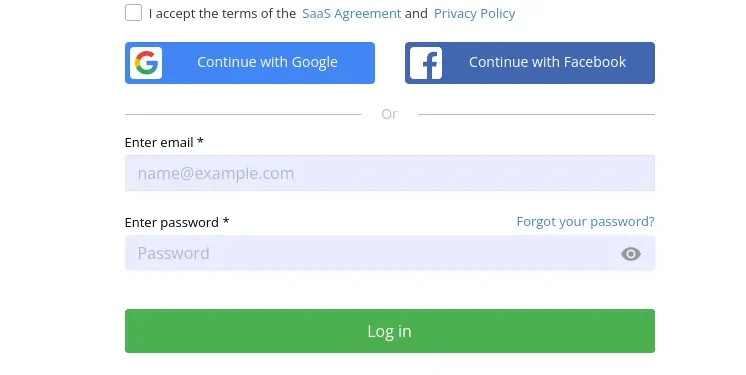
The researcher already had an account, but logging in with those credentials against the origin IP failed, so the account itself could not be used to confirm the origin. Looking around the login page, the researcher noticed the Forgot Password feature and decided to test it for password reset poisoning.
Exploitation
Step 1: Intercept the reset request and point the Host header at Burp Collaborator
The password reset request was intercepted in Burp Suite and its Host header was changed to the researcher's Burp Collaborator domain. After forwarding the request, a password reset email arrived.
The email's reset link contained the Burp Collaborator hostname instead of the legitimate domain. Clicking the link produced an immediate HTTP interaction in Burp Collaborator, confirming that the application used the user-supplied Host header when generating password reset links.

Step 2: Repeat with an Ngrok server
To validate further, the researcher started an Ngrok server and replaced the Host header with the Ngrok domain, forwarding the modified request through Burp Suite. The reset email this time contained the Ngrok URL instead of the legitimate application domain.
This made it clear that reset links were built from the user-supplied Host header without proper validation. An attacker could craft a malicious reset link pointing at an attacker-controlled server; if a victim clicked it, the reset token could be captured, potentially leading to account takeover.
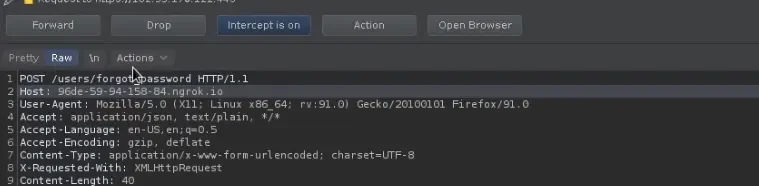

Step 3: Capture the token and reset the password
The researcher clicked the link to reset the password and received the password reset token on the Ngrok server. Using that token, the password reset succeeded.

Root cause
The application generated password reset links from the Host header supplied in the request rather than from a fixed, configured domain. Because the header is attacker-controlled, the link in the email pointed wherever the requester chose. The researcher had already found the origin IP behind Cloudflare before testing the reset flow. The report says reset links were generated from the user-supplied Host header without proper validation.
Impact
An attacker could potentially craft a malicious reset link pointing at an attacker-controlled server; if a victim clicked it, the reset token could be captured. When the victim clicks it, the reset token is delivered to the attacker, who can then reset the password and take over the account. The report frames this as potential account takeover, conditional on the victim clicking the poisoned link.
Fix
The report does not state what was changed. The appropriate fix is to build reset links from a fixed, configured domain, or to validate the Host header against an allow-list of expected hostnames and reject requests that do not match. Restricting direct access to the origin so that traffic must pass through Cloudflare would also help.
Variants to test
- Host header on other email-generating features. Try registration confirmation, email change and invitation emails with a modified
Hostheader. A positive result is an email whose link points at your Collaborator or Ngrok domain. - Other headers used to build links. Send
X-Forwarded-Host,X-Hostand similar headers alongside or instead ofHost. A positive result is a link built from the injected value. - Origin IP discovery. Run the Shodan query from the report, and also check Censys and JavaScript files for references to the origin. A positive result is an IP that serves the application directly and redirects to its login page.
- Host header with a port or userinfo. Try values such as
attacker.example:443or[redacted]. A positive result is a reset link that resolves to the attacker's host. - Absolute URL in the request line. Send the reset request with an absolute URI whose host differs from the
Hostheader. A positive result is a link built from the request-line host.
Timeline from the report: bug report on 17 June 2022, ticket created on 19 June 2022, bounty confirmed on 28 June 2022. The researcher's tip: if you find the origin IP, try password reset poisoning.
What happened, in plain words
A security researcher was looking at a public bug bounty program for a website called example.com. A bug bounty program is a scheme where a company invites people to test its systems and pays them for reporting security problems instead of punishing them. The most this program offered for a single finding was $100.
The website was protected by Cloudflare. Cloudflare is a service that sits between visitors and the real website, like a receptionist in front of an office: every visitor talks to the receptionist first, and the receptionist passes the message on. One of the things this does is hide the real address of the website's server, so attackers cannot reach it directly.
The researcher found the real address anyway (the origin IP). Then, on the website's Forgot Password page, the researcher found a second problem: the website built the password reset link in the email using a piece of information that the person sending the request controls. By putting their own server's name into that piece of information, the researcher made the website send a reset email whose link pointed at the researcher's server. When someone clicks such a link, the secret code inside it (the reset token) is delivered to whoever owns that server. With that code, a password could be reset, which could potentially lead to account takeover.
The researcher reported it on 17 June 2022, a ticket was created on 19 June 2022, and the bounty was confirmed on 28 June 2022.
This article walks through the same steps the researcher took, explaining every term from scratch. You only need to be comfortable using a browser and a computer to follow along.
Context
The target was a public bug bounty program for example.com, with a maximum bounty of $100. The application sat behind Cloudflare, and the feature at the centre of the finding was the standard Forgot Password flow: a user submits a reset request, the application emails a link containing a reset token, and the user clicks that link to set a new password.
Let us unpack that paragraph.
- Bug bounty program: a company publishes rules saying "test our website, and if you find a security flaw, tell us privately and we may pay you". The amount offered here was capped at $100.
- Application: the website and the software running behind it. When you log in to a site, you are talking to an application.
- Cloudflare: a protective layer in front of the application. Visitors reach Cloudflare, and Cloudflare forwards their requests to the real server. This hides the server's real address and can block some attacks.
- Forgot Password flow: the usual sequence where you click "Forgot Password", type your email address, and the site sends you an email with a link. That link contains a long random string called a reset token. A token is like a temporary key: whoever has it can prove they are allowed to reset that account's password. The link is the key's delivery envelope.
The write-up describes two linked issues: disclosure of the origin IP address behind Cloudflare, and password reset poisoning through the Host header, which together led to account takeover.
- Origin IP disclosure: finding out the real numeric address of the server that Cloudflare is hiding. An IP address is like a street address for a computer on the internet.
Hostheader: when your browser asks a server for a page, it includes a small note saying which website name it wants, for exampleexample.com. That note is theHostheader. It exists because one server can host many websites, so the server needs to know which one you mean. The important part: the note is written by the client (your browser, or a tool), so the client can write anything in it.- Password reset poisoning: a flaw where the application trusts that client-written note when building the reset link. If the note says "my server is attacker.example", the email link points at attacker.example.
- Account takeover: gaining control of someone else's account, usually by changing their password so the real owner is locked out.
Setup
The researcher worked with:
- Wappalyzer, to fingerprint the technologies in use.
- Shodan, Censys and JavaScript files as sources for the origin IP.
- Burp Suite, including Burp Collaborator, to intercept and modify requests and to observe out-of-band interactions.
- An Ngrok server, to host an attacker-controlled endpoint that would receive the reset token.
- An account already created on example.com.
No specific product versions are given in the report.
What each tool is, in plain words:
- Wappalyzer: a browser extension (or website) that looks at a page and guesses which software built it, for example which web server, which programming framework, which protection service. It is like reading the labels on the back of a device to see who made it.
- Shodan: a search engine for internet-connected devices and servers. Instead of searching web pages for words, it searches for technical details that servers expose, such as certificate names and open ports.
- Censys: similar to Shodan, another search engine for internet-facing systems.
- JavaScript files: the code files a website sends to your browser to make the page interactive. They sometimes contain addresses or configuration details the developers did not intend to publish.
- Burp Suite: a tool that sits between your browser and a website, like a postal worker who opens every letter, lets you read and rewrite it, and then sends it on. It is used to inspect and change requests.
- Burp Collaborator: a companion service that gives you a unique, throwaway domain name and records any contact made to it. If you put that domain into a request and later see a hit, you know the application used your value somewhere. It is like leaving a marked envelope in a pile and seeing whether it comes back to you.
- Ngrok server: a service that gives your own computer a public web address on the internet, so traffic from outside can reach it. Here it was used to host a page that would receive the reset token.
- Account: a login on the site, with an email address and password, that the researcher had already registered.
Finding it
Port scanning and directory brute-forcing produced nothing interesting. Wappalyzer then showed that the application was protected by Cloudflare, which prompted the researcher to look for the origin IP address behind it.
- Port scanning: probing a server to see which numbered doors (ports) are open and what services answer on them. Each service on a computer listens on a port number, like different extension numbers on a phone system.
- Directory brute-forcing: trying a long list of common folder and file names on a website (for example
/admin,/backup) to see if any exist and are exposed. - Origin IP: the real address of the server behind Cloudflare. If you can reach it directly, you skip the protective layer entirely.
The image shows the title of the write-up, "Origin IP Disclosure Leading to Account Takeover", introducing the finding.
The search started on Shodan with this query:
ssl.cert.subject.CN:"*.example.com" 200
Line by line:
ssl.cert.subject.CNis a Shodan field. It refers to the name written inside a server's TLS certificate. A TLS certificate is the digital ID card a website presents so browsers can confirm they are talking to the right site and encrypt the conversation. The subject is the part of the certificate describing who it belongs to, and CN stands for Common Name, the main name on the certificate."*.example.com"is the value being searched for. The*is a wildcard meaning "any single name in front of example.com", so it matcheswww.example.com,mail.example.comand so on. Certificates often list wildcard names like this.200is the HTTP status code for "OK". A status code is a short number a server returns to say how the request went; 200 means the page was served successfully.
So the query asks Shodan: "show me servers whose certificate mentions a wildcard name for example.com and that answer web requests successfully". The idea is that the real server behind Cloudflare still has a certificate for the domain, and Shodan has already indexed it.
The query returned an IP address. After investigating it further, the researcher confirmed that it belonged to example.com. When the researcher visited the IP address directly, it redirected to the application's login page.
The image shows the IP address returned by the search and the login page it redirected to when visited directly.
A redirect is when a server answers your request by telling your browser "go to this other address instead". Typing the bare IP address into a browser landed on the site's login page.
Visiting the IP address directly redirected to the application's login page. The researcher already had an account, but logging in with those credentials against the origin IP failed, so the account itself could not be used to confirm the origin. Looking around the login page, the researcher noticed the Forgot Password feature and decided to test it for password reset poisoning.
Why test Forgot Password? Because that feature sends an email containing a link, and links are built from text. If the application builds that text from something the requester controls, the link can be redirected. The researcher suspected exactly that.
Exploitation
Step 1: Intercept the reset request and point the Host header at Burp Collaborator
The password reset request was intercepted in Burp Suite and its Host header was changed to the researcher's Burp Collaborator domain. After forwarding the request, a password reset email arrived.
In plain words: the researcher typed an email address into the Forgot Password form and pressed submit, but Burp Suite caught the outgoing request before it left. The researcher edited the Host line to say the Collaborator domain instead of example.com, then let it go. The application processed it and sent the email.
The email's reset link contained the Burp Collaborator hostname instead of the legitimate domain. Clicking the link produced an immediate HTTP interaction in Burp Collaborator, confirming that the application used the user-supplied Host header when generating password reset links.
- HTTP interaction: a recorded contact from a client to the Collaborator domain. Seeing one means something followed the link you planted.
- User-supplied: provided by whoever sends the request, which in this case is the researcher, not the website owner.
The image shows the HTTP interaction arriving in Burp Collaborator after the poisoned link was clicked.
This is the core of the bug. The application should have built the link from its own fixed domain name. Instead it copied the Host value from the incoming request into the email.
Step 2: Repeat with an Ngrok server
To validate further, the researcher started an Ngrok server and replaced the Host header with the Ngrok domain, forwarding the modified request through Burp Suite. The reset email this time contained the Ngrok URL instead of the legitimate application domain.
Why repeat it? A single result could be a fluke. Doing the same thing with a different domain shows the behaviour is consistent and depends only on what the requester writes in the header.
This made it clear that reset links were built from the user-supplied Host header without proper validation. An attacker could craft a malicious reset link pointing at an attacker-controlled server; if a victim clicked it, the reset token could be captured, potentially leading to account takeover.
- Validation: checking that the application accepts only expected values. Here, the report indicates there was none.
- Attacker-controlled server: a machine the attacker owns or rents, which receives whatever is sent to it.
- Victim: the person whose account the attacker wants.
The images show the reset email containing the Ngrok URL in place of the legitimate domain.
Step 3: Capture the token and reset the password
The researcher clicked the link to reset the password and received the password reset token on the Ngrok server. Using that token, the password reset succeeded.
The image shows the reset token arriving on the Ngrok server and the password being reset successfully.
This is the final proof. The token, which is the temporary key to the account, was delivered to a server the researcher controlled. With it, the researcher set a new password. In a real attack, the victim would be the one clicking the link, and the attacker would be the one receiving the token.
Root cause
The application generated password reset links from the Host header supplied in the request rather than from a fixed, configured domain. Because the header is attacker-controlled, the link in the email pointed wherever the requester chose. The researcher had already found the origin IP behind Cloudflare before testing the reset flow. The report says reset links were generated from the user-supplied Host header without proper validation.
- Fixed, configured domain: a name written into the application's settings by its developers, which does not change based on what a visitor sends.
- Allow-list: a list of values that are permitted. Anything not on the list is rejected. Here, the application should have accepted only its own hostnames.
Impact
An attacker could potentially craft a malicious reset link pointing at an attacker-controlled server; if a victim clicked it, the reset token could be captured. When the victim clicks it, the reset token is delivered to the attacker, who can then reset the password and take over the account. The report frames this as potential account takeover, conditional on the victim clicking the poisoned link.
In everyday terms: the attacker does not need the victim's password. They only need the victim to click a link in an email that looks like it came from the real site. That is why this class of bug is serious.
Fix
The report does not state what was changed. The appropriate fix is to build reset links from a fixed, configured domain, or to validate the Host header against an allow-list of expected hostnames and reject requests that do not match. Restricting direct access to the origin so that traffic must pass through Cloudflare would also help.
In plain words: do not trust the note the visitor writes about which website they want. Use your own known name, or check the note against a short list of names you accept. And make sure the real server cannot be reached except through the protective layer.
Variants to test
- Host header on other email-generating features. Try registration confirmation, email change and invitation emails with a modified
Hostheader. A positive result is an email whose link points at your Collaborator or Ngrok domain. - Other headers used to build links. Send
X-Forwarded-Host,X-Hostand similar headers alongside or instead ofHost. A positive result is a link built from the injected value. - Origin IP discovery. Run the Shodan query from the report, and also check Censys and JavaScript files for references to the origin. A positive result is an IP that serves the application directly and redirects to its login page.
- Host header with a port or userinfo. Try values such as
attacker.example:443or[redacted]. A positive result is a reset link that resolves to the attacker's host. - Absolute URL in the request line. Send the reset request with an absolute URI whose host differs from the
Hostheader. A positive result is a link built from the request-line host.
Some terms from that list:
- Registration confirmation, email change, invitation emails: other messages the site sends that contain links. Any of them could be built the same wrong way.
X-Forwarded-Host,X-Host: extra headers that proxies and load balancers sometimes use to pass along the original hostname. If the application reads these instead ofHost, the same trick works through them.- Port: the number after a colon in an address, such as
:443, which selects a service on the server.443is the usual port for encrypted web traffic. - Userinfo: the
name@part you sometimes see before a hostname in a URL. Browsers treat everything before the@as login information and the part after it as the real host, which can be used to disguise a link. - Absolute URL in the request line: instead of asking for
/reset, the client asks for the full addresshttp://something/reset. Some servers build links from that full address.
Timeline from the report: bug report on 17 June 2022, ticket created on 19 June 2022, bounty confirmed on 28 June 2022. The researcher's tip: if you find the origin IP, try password reset poisoning.
Glossary
- Account: a login on a website, made of an email address and a password, that belongs to one person.
- Account takeover: gaining control of someone else's account, usually by changing their password so the real owner cannot get in.
- Allow-list: a list of values that are explicitly permitted; anything not on the list is refused.
- Application: the website and the software running behind it that responds to your requests.
- Attacker-controlled server: a computer owned or rented by an attacker, which receives whatever is sent to it.
- Absolute URL in the request line: a request that names the full address of the page, including the hostname, rather than just the path.
- Bug bounty program: a scheme where a company invites people to test its systems and pays them for reporting security problems privately.
- Burp Collaborator: a service that gives you a unique domain and records any contact made to it, used to detect when an application uses a value you supplied.
- Burp Suite: a tool that sits between your browser and a website so you can read and modify requests before they are sent.
- Censys: a search engine for internet-connected systems, similar to Shodan.
- Cloudflare: a service placed in front of a website that forwards visitors' requests to the real server and hides its address.
- Common Name (CN): the main name written inside a TLS certificate, identifying the site it belongs to.
- Directory brute-forcing: trying a long list of common folder and file names on a website to find exposed ones.
- Fixed, configured domain: a hostname written into the application's settings by its developers, which does not change based on what a visitor sends.
- Forgot Password flow: the sequence where a user requests a password reset and the site emails a link containing a reset token.
- Host header: a note in every web request saying which website name the client wants; it is written by the client and can be set to anything.
- HTTP interaction: a recorded contact from a client to a server, such as a hit on a Collaborator domain.
- HTTP status code: a short number a server returns to describe how a request went, such as 200 for OK.
- IP address: the numeric address of a computer on the internet, like a street address.
- JavaScript files: code files a website sends to your browser to make pages interactive; they can contain configuration details.
- Ngrok server: a service that gives your own computer a public web address so outside traffic can reach it.
- Origin IP: the real address of the server behind a protective layer such as Cloudflare.
- Password reset poisoning: a flaw where the application builds the reset link from a value the requester controls, so the link points at the requester's server.
- Port: a number that selects a particular service on a server, such as 443 for encrypted web traffic.
- Port scanning: probing a server to see which ports are open and which services answer.
- Redirect: a server's answer telling the browser to go to a different address instead.
- Reset token: a long random string inside a password reset link that proves the holder is allowed to set a new password.
- Shodan: a search engine for internet-connected devices and servers, searching technical details rather than page text.
- TLS certificate: the digital ID card a website presents so browsers can confirm its identity and encrypt the conversation.
- Token: a temporary secret string that stands in for a password or proves permission for one action.
- User-supplied: provided by whoever sends the request, rather than by the website owner.
- Userinfo: the
name@part before a hostname in a URL, which browsers treat as login information and which can be used to disguise a link. - Validation: checking that a value matches what is expected and rejecting it otherwise.
- Victim: the person whose account or data an attacker is trying to reach.
- Wappalyzer: a tool that inspects a page and guesses which software and services the site uses.
- Wildcard: the
*symbol in a name, meaning "any single name in this position". X-Forwarded-Host,X-Host: extra headers that proxies sometimes use to pass along the original hostname.