Privilege Escalation to remove the owner from the organization
An administrator could send a request with a parameter indicating owner status to become an owner, then remove the legitimate owner from the organization. This allowed full takeover of the organization.
 Published on medium.com
Today, I am going to share one of my most interesting findings: a Privilege Escalation vulnerability that allowed an attacker to remove the owner of an organization and take control of the entire organization.
The full write-up lives on its author's site
It belongs to its author, so we link to it rather than copy it. The other two tabs are our own rewrites, checked against it.
Context
The target is a multi-tenant organisation platform, referred to throughout as https://organization.redacted.com because the company's name is not disclosed. The application supports several user roles, of which two matter here: Owner and Administrator. The researcher observed that administrators did not have permission to modify the organisation's settings.
The feature under test is the organisation membership API: the endpoints that promote users, list organisation users and remove users from an organisation. The write-up describes a privilege escalation in which an administrator can promote themselves to Owner through a mass-assignment style parameter, then use the Owner-only removal endpoint to delete the legitimate Owner and take over the organisation.
Setup
The researcher worked against the redacted target with two accounts created for the purpose:
- Owner
- Administrator
Traffic was intercepted and modified with Burp Suite. The application's API is versioned under /v1.2/ and speaks HTTP/2. No other tooling, versions or preconditions are described.
Some background on how the researcher arrived at the target: on 19 November 2022 he reported a Google Maps API key exposure issue to the same company. Two days later the security team triaged that report and assigned it a medium severity rating. Having had a report accepted, he decided to spend more time hunting on the platform.
Finding it
After analysing the application, the researcher noticed that administrators did not have permission to modify the organisation's settings. That raised the question of how role-based access control was actually enforced, so he began comparing requests made by the Owner and Administrator accounts in Burp Suite.
While intercepting requests from the Owner account, he found a JSON parameter in the request body:
{ "is_owner": true}
That parameter was the lead. If the server trusted a client-supplied is_owner flag on a request the administrator was already authorised to send, then the role boundary would rest on nothing more than the value of a field the client controls.
Exploitation
Step 1: promote the Administrator to Owner
To test the theory, the researcher intercepted a request from the Administrator account and modified it to include the same body. The request line was:
PUT /v1.2/organization/org-id/qid/[administrator-email-address] HTTP/2
Request body:
{ "is_owner": true}
The PUT targets the organisation identified by org-id, with the administrator's own email address as the final path segment, and the body sets the ownership flag to true. After forwarding the request, the application accepted the change, and the Administrator account was promoted to an Owner account. The privilege escalation was confirmed.
Step 2: check whether one Owner can remove another
With Owner rights in hand, the researcher wanted to establish the full impact. He investigated whether an Owner could remove another Owner from the organisation. Testing with the Owner account, he intercepted the request responsible for removing users:
DELETE /v1.2/organization/org-id/user/owner-id HTTP/2
This endpoint takes the organisation ID and the target user's ID. To use it against the legitimate Owner, he first needed that owner's user ID.
Step 3: obtain the owner's user ID
After spending some time analysing the application's API endpoints, he found one that disclosed user information, including user IDs:
GET /v1.2/organization/6386d3e81dcec0115ea89f6d/user
With both the organisation ID and the owner's user ID available, he had everything needed to test the impact of the escalation.
Step 4: remove the original Owner
He intercepted another request in Burp Suite and modified it to target the owner's account:
DELETE /v1.2/organization/org-id/user/owner-id
Using the appropriate organisation ID and owner ID, the request was successfully processed, demonstrating that a newly promoted Owner could remove the original Owner from the organisation.
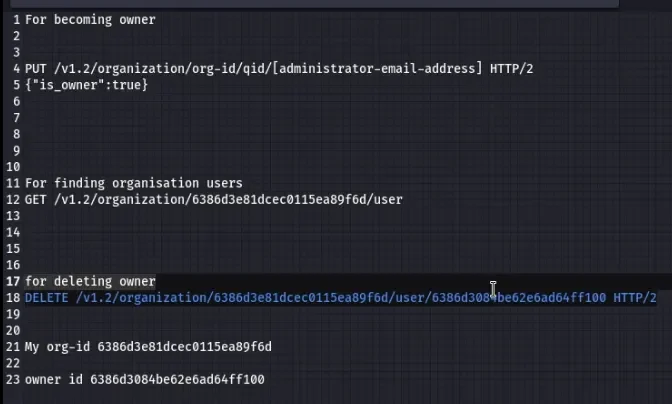
He sent the request and waited for the response. The original Owner was removed from the organisation. At that point his account remained the only Owner, giving him complete control over the entire organisation.
Root cause
The flaw appears to be an authorisation design mistake: the ownership role was accepted from a client-supplied is_owner field in the request body. Adding "is_owner": true to the request was enough to change the role. This is the classic mass-assignment pattern, where a request handler binds request fields onto a model without restricting which fields a given role may set.
The second half of the chain is that an Owner could delete another Owner, so once the attacker held Owner rights the legitimate Owner could be removed. The report does not describe the server-side code, so the exact binding and check logic is likely as described above rather than confirmed.
Impact
An Administrator could escalate their privileges to Owner and then remove the legitimate Owner, resulting in a complete takeover of the organisation. The researcher describes this as a critical authorisation flaw, because it allowed an attacker to bypass the intended role hierarchy and gain full administrative control over an organisation's resources, settings and users. The chain required an Administrator account and the owner's user ID, which the researcher obtained from an endpoint that disclosed user information.
After validating the issue and documenting the impact, he responsibly reported the vulnerability to the company's security team.
Five days later the security team responded that the report had been marked as a duplicate. He notes that he later reported another privilege escalation vulnerability and a 2FA bypass issue, and both of those were also marked as duplicates. No bounty or severity is stated for this report.
Fix
The report does not say what the company changed. Based on the root cause, the fix should be twofold: the server should ignore or reject client-supplied role fields such as is_owner on membership updates, deriving the role only from server-side state and an explicit authorisation check; and the removal endpoint should refuse to delete an Owner unless the caller is authorised for that specific action, so that one Owner cannot silently remove another.
Variants to test
- Role flags in profile or membership updates. Send a
PUTorPATCHto your own membership record with fields such asis_owner,role,is_adminorpermissionsset to an elevated value. A positive result is a2xxresponse and a subsequent request that only the higher role should be able to make succeeding. - Owner removal by a peer Owner. With two Owner accounts, call the user-removal endpoint against the other Owner's ID. A positive result is the target disappearing from the organisation's user list.
- User enumeration endpoints. Look for
GETendpoints under the organisation path that return member records including user IDs, as in the example above. A positive result is a response listing identifiers you can feed into the removal or promotion endpoints. - Role changes on other members. Repeat the promotion request with another user's email address in the path instead of your own. A positive result is that user's role changing without their consent.
- Mass assignment on registration and invitation flows. Try adding the same role fields to account creation or invitation acceptance requests. A positive result is a new account that starts with elevated rights.
Duplicates are part of the journey: as the researcher puts it, every duplicate means you were thinking in the right direction and finding real vulnerabilities. Stay consistent, stay curious, and keep pushing forward.

What happened, in plain words
A security researcher found a way for a low-level user of a website to give themselves the highest level of power on that website, and then to throw out the person who originally owned it. The website lets people create an "organisation" (think of a shared workspace, like a company account on a service) and invite other people into it with different levels of permission. The two levels that matter here are Owner and Administrator.
An Owner is the person in charge of the organisation. An Administrator is meant to be one step below: the researcher noticed they could not change the organisation's settings. An Administrator is meant to be one step below: they can do some things, but the researcher noticed they could not change the organisation's settings. The bug was that an Administrator could modify a request to become an Owner, and then use their new power to delete the real Owner. Once the real Owner was gone, the attacker was the only Owner left and had complete control of the organisation.
The researcher reported it responsibly, and five days later the company told him the report was a duplicate: someone else had reported the same problem first. No bounty or severity rating is stated for this report.
This article walks through the same steps the researcher took, in the same order, explaining every idea from scratch along the way. You only need to be comfortable using a browser and a computer to follow it.

The target and some background
The company's name is not disclosed, so the researcher refers to the target as:
https://organization.redacted.com
That is a web address, just like any site you type into your browser. The part after https:// is the domain name. Here it has been replaced with redacted.com to hide the real company.
Before this finding, on 19 November 2022, the researcher had reported a different issue to the same company: a Google Maps API key exposure. An API key is a short secret string that lets a program use someone else's service (in this case Google Maps) and usually gets billed for it. If that key leaks, other people can use the service on the owner's account. Two days later the security team looked at that report, confirmed it was real (this is called triaging), and rated it medium severity. Severity is how serious a security problem is judged to be, usually on a scale from low to critical.
Seeing that his report had been accepted encouraged him to spend more time hunting on the platform. That is a common path into bug bounty work: one accepted report builds confidence and familiarity with a target.
The feature being tested
The application supports several user roles. Two matter here:
- Owner
- Administrator
A role is a label attached to a user account that decides what that account is allowed to do. Think of a building: the Owner has a master key, the Administrator has a key to most rooms but not the manager's office. Applications commonly enforce this with role-based access control (RBAC): the server checks the role of the person making a request before deciding whether to allow the action.
The feature under test is the organisation membership system: the parts of the application that promote users, list the people in an organisation, and remove people from it. These actions happen through an API.
An API (Application Programming Interface) is the set of addresses and rules a website's own pages use to talk to its server behind the scenes. When you click a button in a web app, your browser usually sends a small request to one of these addresses, and the server sends back data, often in a format called JSON (JavaScript Object Notation), which looks like {"name": "value"}. You can think of an API as a restaurant menu: each dish has a name and a fixed way to order it, and the kitchen (the server) decides whether to serve it.
To test the authorisation model, the researcher created two accounts, one for each role:
- Owner
- Administrator
Having both accounts let him compare what each one was allowed to do, and compare the requests each one sent.
The tool: Burp Suite
Burp Suite is a program that sits between your browser and a website. It can pause (intercept) each request your browser sends, let you read and edit it, and then forward it on to the server. Security testers use it because the browser normally hides these requests; Burp lets you see and change them.
A request is the message your browser sends to a server: it says what you want (for example, "show me this page" or "change this setting") and carries any data you are submitting. A response is the server's reply.
Finding it
After analysing the application, the researcher noticed that administrators did not have permission to modify the organisation's settings. That made him curious: how exactly was the application enforcing the difference between roles? If the check was solid, an Administrator should be blocked from anything Owner-only. If it was weak, there might be a way around it.
So he opened Burp Suite and began comparing the requests made by both accounts. While intercepting requests from the Owner account, he found a JSON parameter in the request body:
{ "is_owner": true}
Line by line:
- The outer curly braces
{ }mark a JSON object, a collection of named values. "is_owner"is the name of a field (a parameter). The quotes are part of JSON syntax.trueis a boolean value, meaning yes. So the whole thing says: "the is_owner flag is set to yes".
This caught his attention immediately. The researcher wondered whether manipulating this parameter could elevate his privileges. If the server trusted the browser's value, then anyone who could send this request could claim to be an Owner.
This kind of flaw has a name: mass assignment. It happens when a server takes the fields from a request and copies them straight into its internal record without checking which fields the user is allowed to set. Imagine a hotel guest form where you write your own room number and the hotel simply believes you: you could write the number of the penthouse suite. The safe design is for the hotel to look up your booking itself.
Step 1: promote the Administrator to Owner
To test the theory, the researcher intercepted a request from the Administrator account and modified it to include the same body. The request line was:
PUT /v1.2/organization/org-id/qid/[administrator-email-address] HTTP/2
Request body:
{ "is_owner": true}
Line by line:
PUTis the HTTP method, the verb of the request. It generally means "create or replace this thing". Other common methods areGET(read something),POST(submit something new) andDELETE(remove something)./v1.2/organization/org-id/qid/[administrator-email-address]is the path, the address of the specific thing being changed.v1.2is the version of the API.org-idstands for the organisation's identifier, a unique code for that organisation.qidis a path segment as written in the report. The last part is the administrator's own email address, which identifies the user record being updated. The square brackets and the words inside them are placeholders: the researcher replaced them with the real values.HTTP/2is the version of the protocol used to carry the request. HTTP is the language browsers and servers use to exchange requests and responses; version 2 is a newer, more efficient version of it.- The body is the data being sent along with the request, here the same
is_ownerflag set totrue.
Why this step? The Administrator account was already allowed to send this kind of request about its own membership. The researcher modified the request to include the is_owner field and forwarded it.
After forwarding the request, the application accepted the change. To his surprise, the Administrator account had now been promoted to an Owner account. The privilege escalation was confirmed.
Privilege escalation means gaining a higher level of permission than you are supposed to have. It is like a regular employee finding that a form on the intranet lets them write "director" in a box and being given a director's office key.
Step 2: check whether one Owner can remove another
At this point the researcher had found a privilege escalation, but he wanted to understand the full impact. A bug that lets you promote yourself is serious; a bug that lets you then remove the real owner is much worse.
So he investigated whether an Owner could remove another Owner from the organisation. While testing with the Owner account, he intercepted the request responsible for removing users from the organisation:
DELETE /v1.2/organization/org-id/user/owner-id HTTP/2
Line by line:
DELETEis the HTTP method meaning "remove this"./v1.2/organization/org-id/user/owner-idis the path. It points at the organisation (org-id) and then at a specific user (owner-id) inside it.owner-idis a placeholder for the target user's unique identifier.HTTP/2is again the protocol version.
This endpoint takes the organisation ID and the target user's ID. To use it against the legitimate Owner, the researcher first needed that owner's user ID. A user ID is a unique code the system uses to tell one account apart from another, a bit like a customer number.
Step 3: obtain the owner's user ID
After spending some time analysing the application's API endpoints, he found one that disclosed user information, including user IDs:
GET /v1.2/organization/6386d3e81dcec0115ea89f6d/user
Line by line:
GETis the HTTP method for reading data. It should not change anything on the server./v1.2/organization/6386d3e81dcec0115ea89f6d/useris the path. Here the organisation ID is a real-looking value,6386d3e81dcec0115ea89f6d, and the path ends in/user, suggesting it returns the organisation's users.HTTP/2is the protocol version.
Why this step? The removal request needs the target's user ID, and the researcher did not have it. This endpoint handed it over. An endpoint that returns information it should not, or more than it should, is often called an information disclosure. It is like a reception desk that will read out any employee's staff number to anyone who asks.
With both the organisation ID and the owner's user ID available, he now had everything needed to test the impact of the privilege escalation.
Step 4: remove the original Owner
He intercepted another request in Burp Suite and modified it to target the owner's account:
DELETE /v1.2/organization/org-id/user/owner-id
Using the appropriate organisation ID and owner ID, the request was successfully processed. This demonstrated that a newly promoted Owner could remove the original Owner from the organisation.
He sent the request and waited for the response. The original Owner was removed from the organisation. At that point his account remained the only Owner, giving him complete control over the entire organisation.
This is the full chain: an Administrator escalates to Owner, then removes the legitimate Owner, resulting in a complete takeover. The researcher describes it as a critical authorisation flaw, because it let an attacker bypass the intended role hierarchy and gain full administrative control over an organisation's resources, settings and users.
Why it worked
The flaw appears to be an authorisation design mistake: the ownership role was accepted from a value the client sent (is_owner in the request body). Adding "is_owner": true to the request was enough to change the role. That is the classic mass-assignment pattern: the request handler copies request fields onto its internal record without restricting which fields a given role may set.
The second half of the chain is that an Owner could delete another Owner, so once the attacker held Owner rights the legitimate Owner could be removed. The report does not describe the server-side code, so the exact binding and check logic is likely as described rather than confirmed.
Reporting it
After validating the issue and documenting the impact, he responsibly reported the vulnerability to the company's security team.
Responsible disclosure means telling the organisation privately, giving them a chance to fix the problem, instead of publishing it or using it for harm.
Five days later the security team responded that the report had been marked as a duplicate. A duplicate means someone else had already reported the same issue, so the later report does not earn a reward. He notes that he later reported another privilege escalation vulnerability and a 2FA bypass issue, and both of those were also marked as duplicates. 2FA (two-factor authentication) is a second proof of identity at login, such as a code from your phone, on top of your password. No bounty or severity is stated for this report.
How it should be fixed
The report does not say what the company changed. Based on the root cause, the fix should be twofold: the server should ignore or reject client-supplied role fields such as is_owner on membership updates, deriving the role only from server-side state and an explicit authorisation check; and the removal endpoint should refuse to delete an Owner unless the caller is authorised for that specific action, so that one Owner cannot silently remove another.
Things to try on your own targets
If you want to look for similar problems, here are variants worth testing. Only test on systems where you have permission, such as a bug bounty programme's in-scope targets.
- Role flags in profile or membership updates. Send a
PUTorPATCHto your own membership record with fields such asis_owner,role,is_adminorpermissionsset to an elevated value. A positive result is a2xxresponse (a success code) and a subsequent request that only the higher role should be able to make succeeding. - Owner removal by a peer Owner. With two Owner accounts, call the user-removal endpoint against the other Owner's ID. A positive result is the target disappearing from the organisation's user list.
- User enumeration endpoints. Look for
GETendpoints under the organisation path that return member records including user IDs, as in the example above. A positive result is a response listing identifiers you can feed into the removal or promotion endpoints. - Role changes on other members. Repeat the promotion request with another user's email address in the path instead of your own. A positive result is that user's role changing without their consent.
- Mass assignment on registration and invitation flows. Try adding the same role fields to account creation or invitation acceptance requests. A positive result is a new account that starts with elevated rights.
A word about duplicates
Duplicates are part of the journey. As the researcher puts it, every duplicate means you were thinking in the right direction and finding real vulnerabilities. Sometimes another researcher just happens to get there first. What matters is continuing to learn, improving your methodology and keeping going. Stay consistent, stay curious, and keep pushing forward. Your next report could be the one that makes all the hard work worthwhile.
Glossary
- API: the set of addresses and rules a website's pages use to talk to its server behind the scenes.
- API key: a secret string that lets a program use someone else's service, often billed to the key's owner.
- Administrator: a role below Owner that can do some management tasks but, in this application, cannot change the organisation's settings.
- Authorisation: the process of deciding whether a user is allowed to perform a particular action.
- Boolean: a value that is either true or false.
- Bug bounty: a programme where organisations reward people for reporting security problems in their systems.
- Burp Suite: a tool that sits between your browser and a website so you can pause, read and edit requests before they are sent.
- DELETE: an HTTP method meaning "remove this".
- Duplicate: a report of a problem that someone else has already reported.
- Endpoint: a specific address in an API that performs one action, such as removing a user.
- GET: an HTTP method for reading data; it should not change anything on the server.
- HTTP: the language browsers and servers use to exchange requests and responses.
- HTTP/2: a newer, more efficient version of HTTP.
- Information disclosure: when a system reveals data it should not, or more than it should.
- JSON: a text format for structured data, made of named values inside curly braces.
- Mass assignment: a flaw where a server copies fields from a request into its records without checking which fields the user is allowed to set.
- Method: the verb of an HTTP request, such as GET, PUT, POST or DELETE.
- Organisation: a shared workspace or company account on the platform, with its own users, settings and resources.
- Owner: the highest role in an organisation, with full control over its resources, settings and users.
- Parameter: a named value sent with a request, such as
is_owner. - Path: the part of a web address that points at a specific thing, such as
/v1.2/organization/org-id/user/owner-id. - Privilege escalation: gaining a higher level of permission than you are supposed to have.
- PUT: an HTTP method meaning "create or replace this thing".
- Request: the message a browser sends to a server asking for something or submitting data.
- Response: the server's reply to a request.
- Responsible disclosure: reporting a vulnerability privately to the organisation so they can fix it before it is made public.
- Role: a label on a user account that decides what that account may do.
- Role-based access control (RBAC): enforcing permissions by checking a user's role before allowing an action.
- Severity: how serious a security problem is judged to be, usually from low to critical.
- Triaging: the security team's first review of a report, where they confirm it is real and rate it.
- 2FA (two-factor authentication): a second proof of identity at login, such as a code from your phone, on top of your password.
- User ID: a unique code the system uses to identify one account.