PII Leakage - Revealing Secrets
Publicly accessible PDF invoice reports were indexed by search engines and exposed customer names and pending invoice amounts. An attacker could enumerate invoice numbers to view other customers' billing information.
 Published on shahjerry33.medium.com
PII stands for Personally Identifiable Information.It is a kind of data which helps us to identify ones identity, for instance your full name, social security number, taxpayer identification number, driver’s license number, PAN card number, mobile number, address, etc. This kind of issues can breach the privacy of…
The full write-up lives on its author's site
It belongs to its author, so we link to it rather than copy it. The other two tabs are our own rewrites, checked against it.
Context
This write-up describes a personally identifiable information (PII) leak found on a private HackerOne program. The affected functionality was an Invoice No lookup: a page where a visitor enters an invoice number and the application returns the matching invoice, including the customer name and the pending or paid amount. The report does not name the target, the domain or the application.
The researcher frames PII as data that identifies a person, such as full name, social security number, taxpayer identification number, driver's licence number, PAN card number, mobile number or address, and notes that leaking it breaches a user's privacy.
Setup
The report does not describe any account, role or tooling beyond a browser and Google search. The invoice lookup page was reachable and returned results for valid invoice numbers, and invoice PDF reports were already public and indexed by search engines.
Finding it
The researcher started from search engines rather than from the application. Google dorks surfaced PDF reports that were already public. On closer inspection, the PDFs contained customer names and pending invoice amounts, and one thing was common to all of them: they did not state to whom the report belonged, nor whether any amount was still pending, even though the content concerned bill payments.

Subdomain enumeration through dorks then turned up a domain hosting the Invoice No functionality. Entering a random invoice number there returned an error, so the lookup itself was not simply returning everything.
The breakthrough came from the file names of the public PDFs. They followed a pattern of a year followed by a number, for example <year>-13659. Dropping the year and submitting only the number produced a valid result, showing the customer name together with the pending or paid amount.
Exploitation
Step 1: Find public invoice PDFs with Google dorks
The researcher used dorks to look for invoices and found PDF reports that were already public.
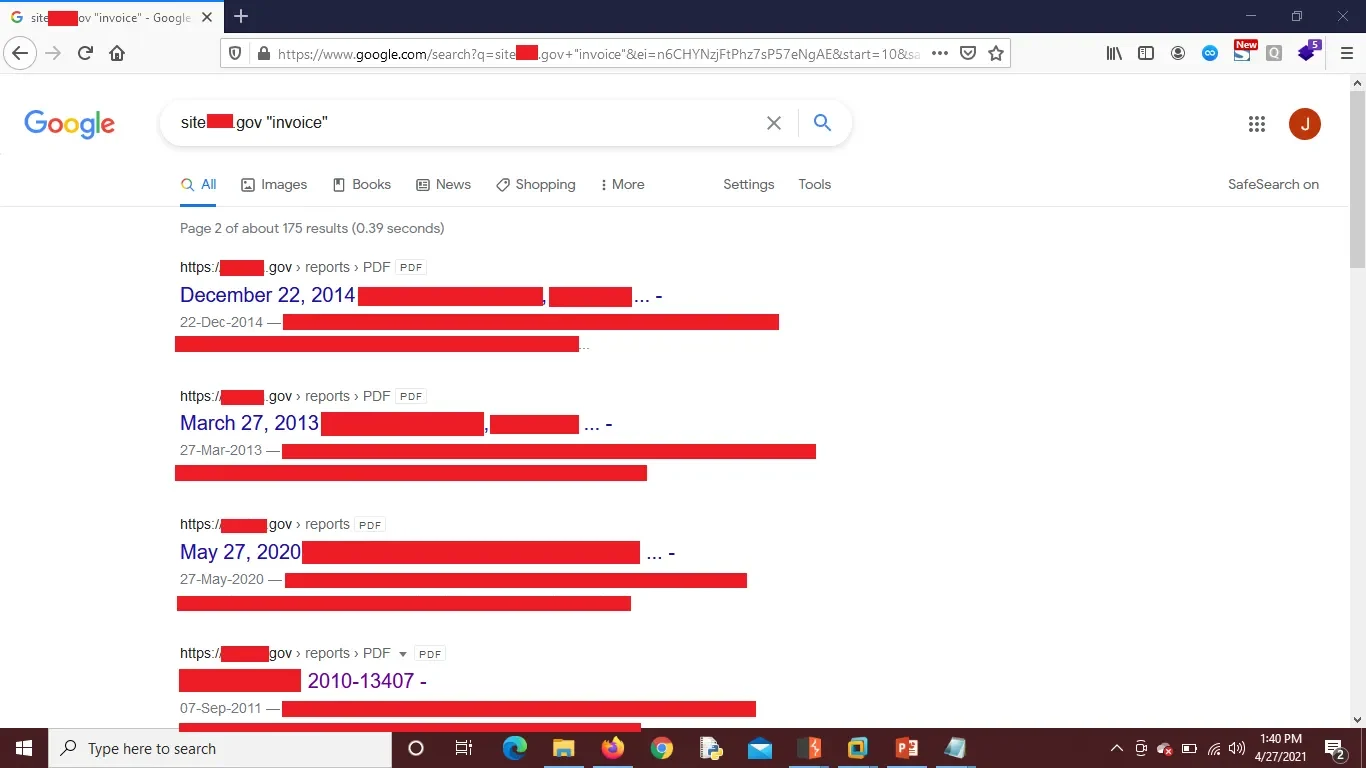
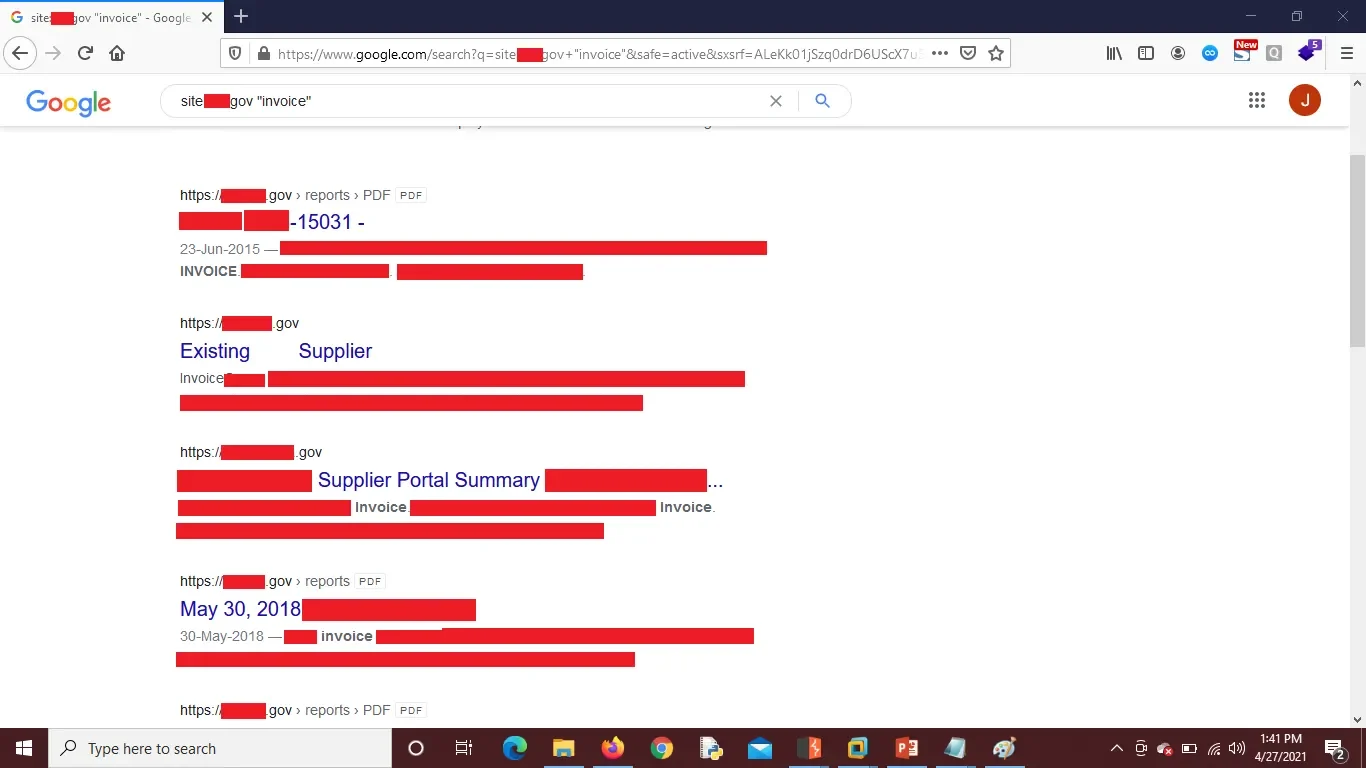
The three dorks listed in the report are:
site:target.gov "invoice"
site:*.target.gov
site:*.target.gov "invoice"
The first identifies invoices of users on a single domain, the second enumerates subdomains, and the third identifies invoices of users across all subdomains. target.gov is the placeholder used in the report, not the real host.
Step 2: Enumerate subdomains and locate the invoice feature
Subdomain enumeration led to a domain exposing the Invoice functionality.
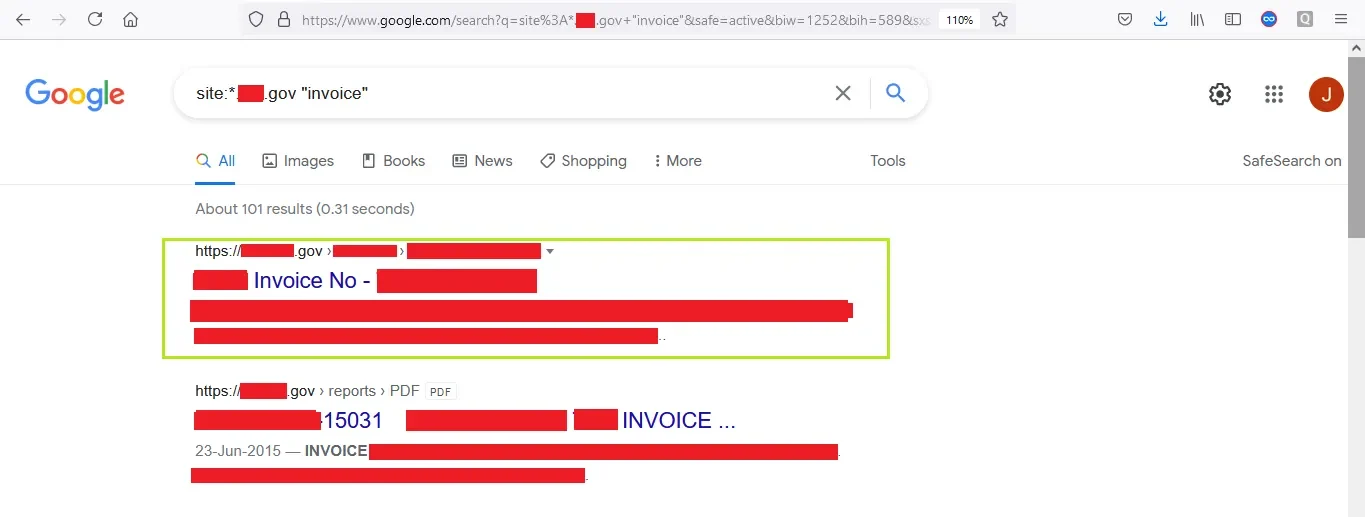
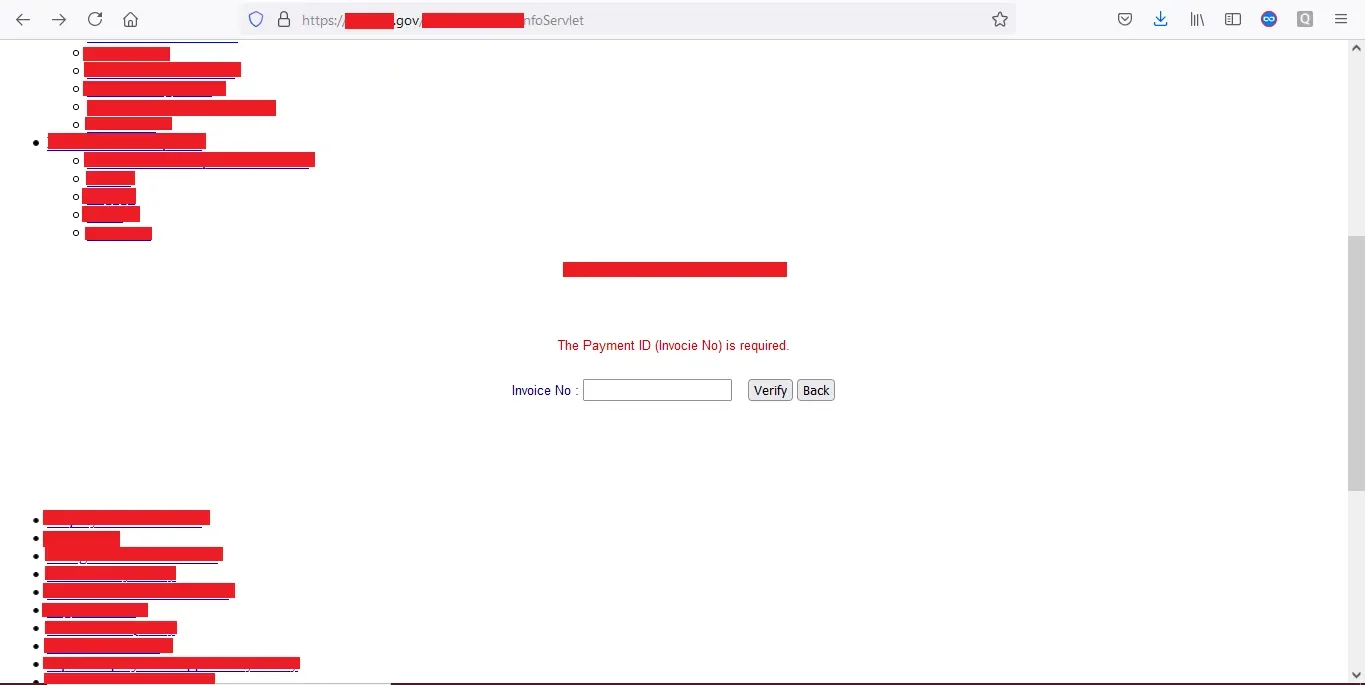
Step 3: Confirm that random numbers fail
Entering a random invoice number returned an error.
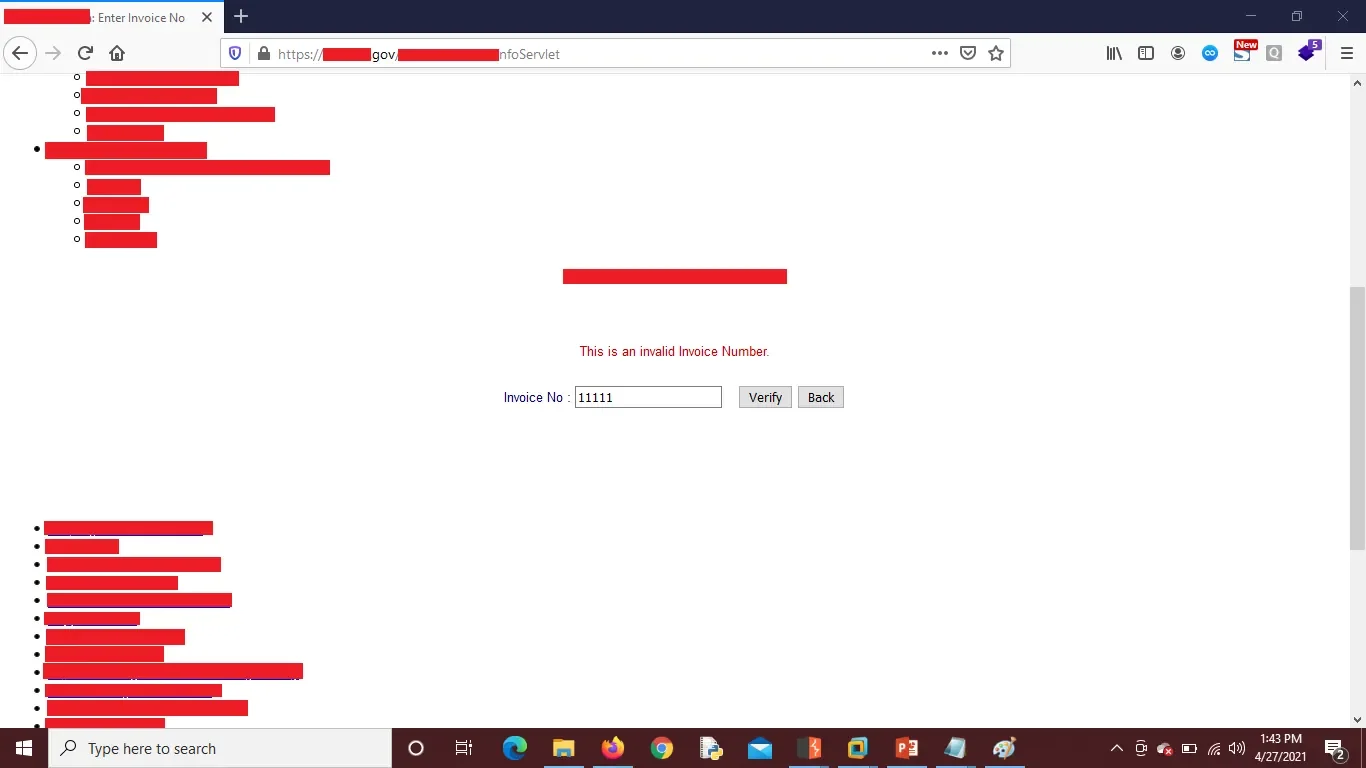
Step 4: Open the public PDF directory
The researcher opened the directory holding the publicly available PDF reports.
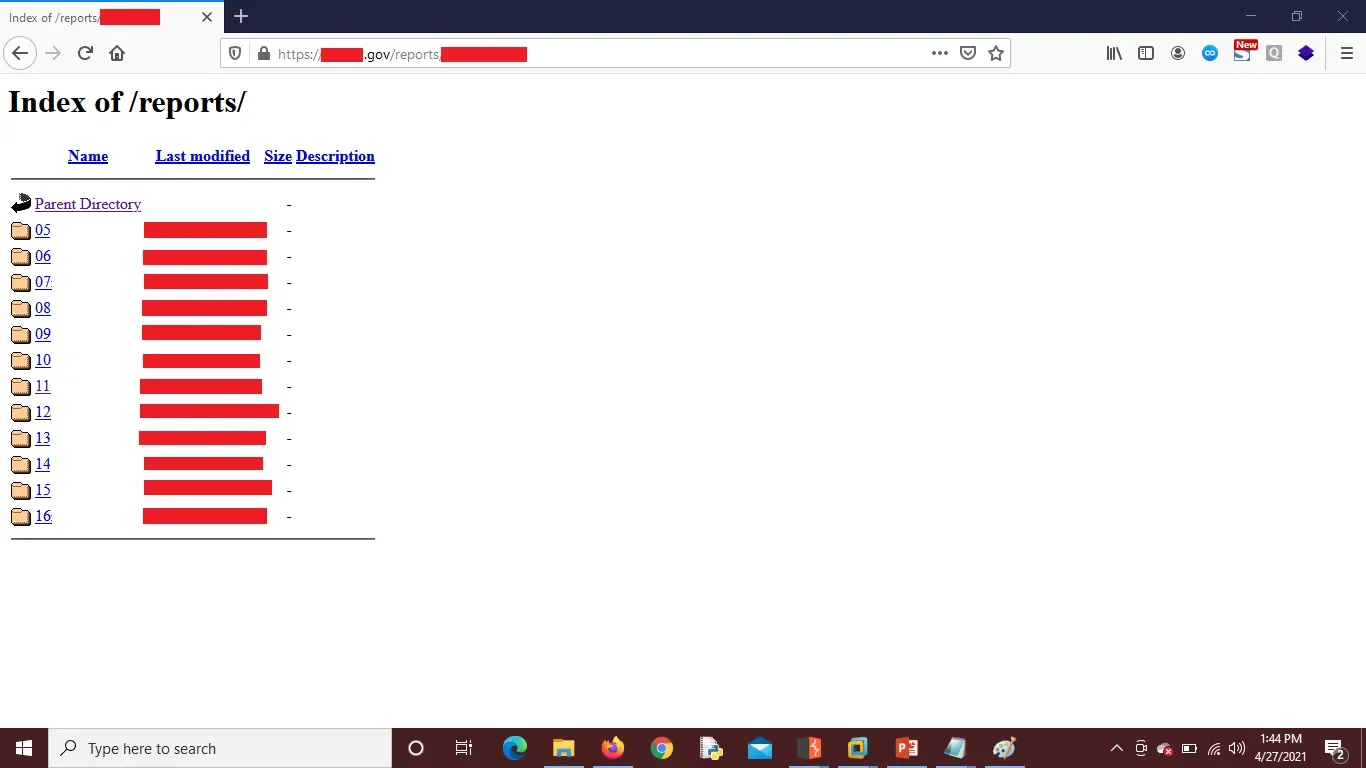
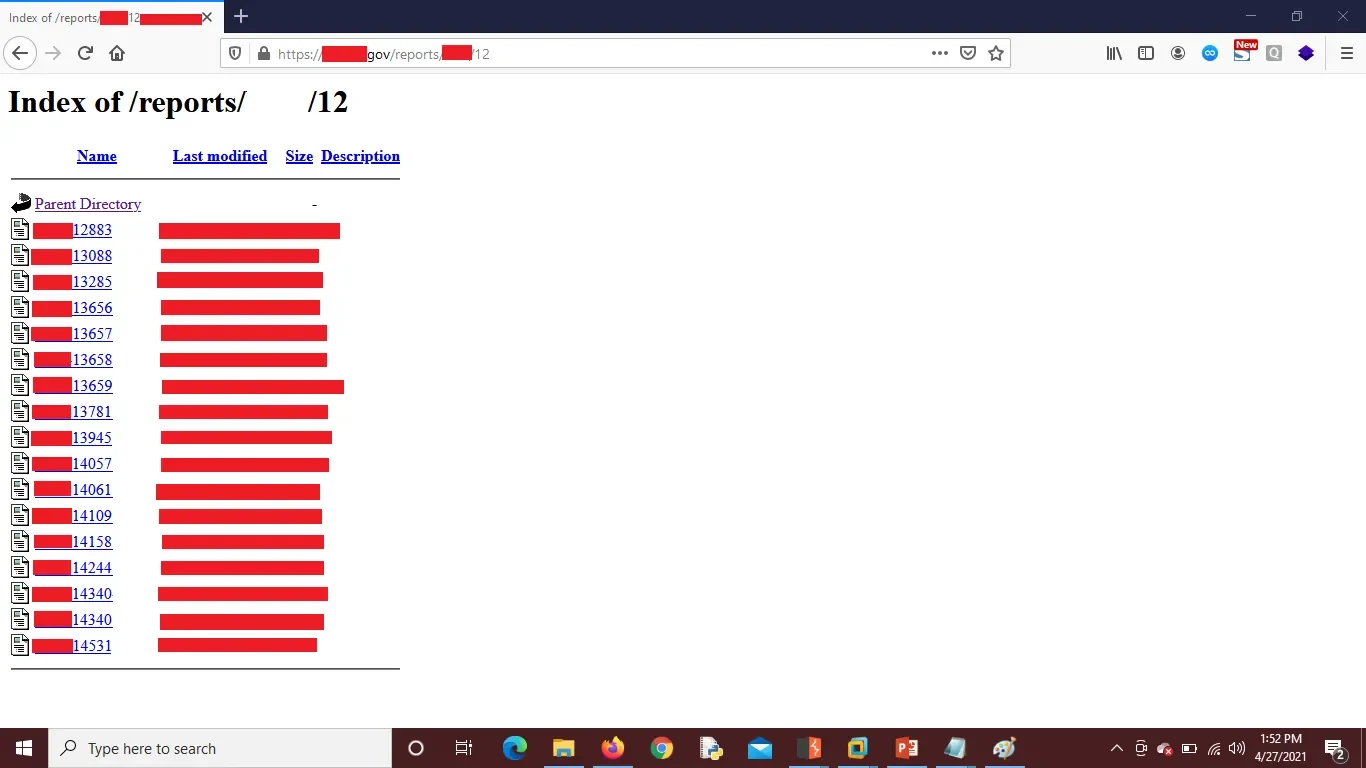
The report files carried invoice identifiers in their names.
Step 5: Submit an identifier taken from a file name
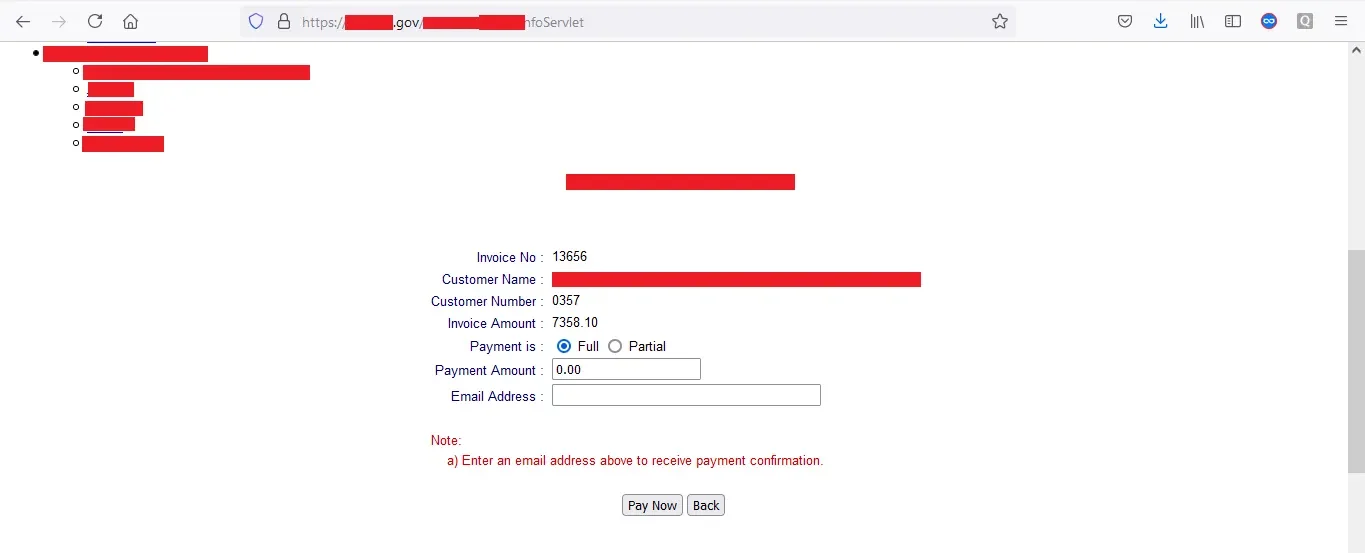
Using the invoice number from the file name 13656, the researcher submitted it to the lookup and received a result.
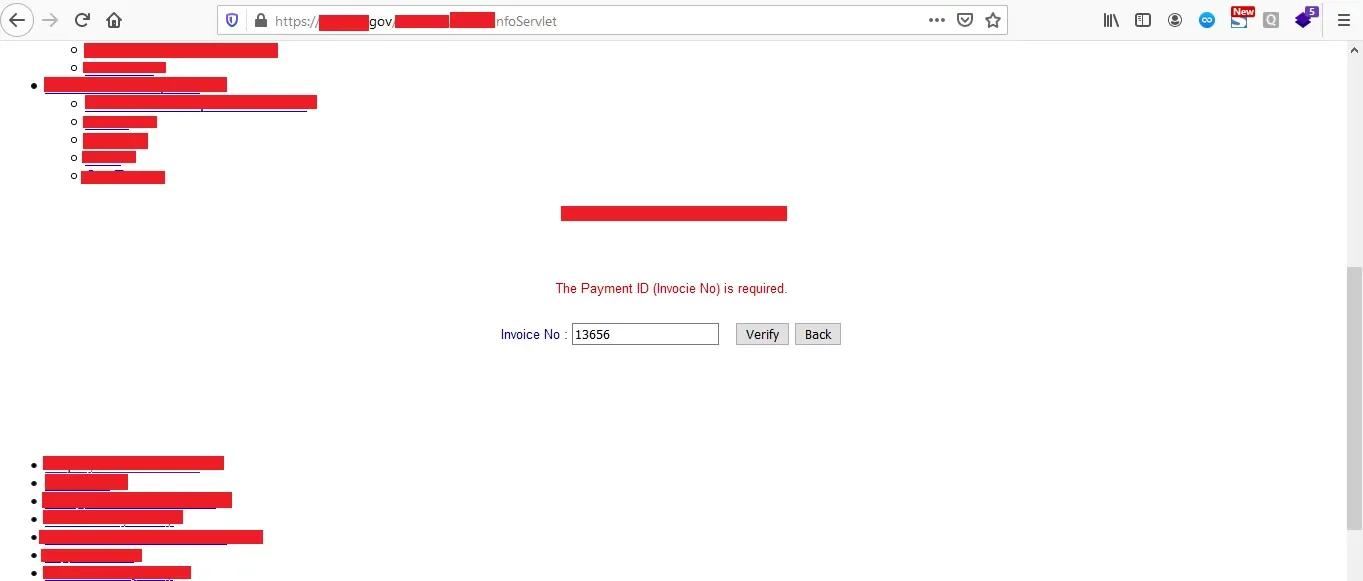
Step 6: Confirm with further identifiers
More invoice IDs were submitted to check that the behaviour was consistent.
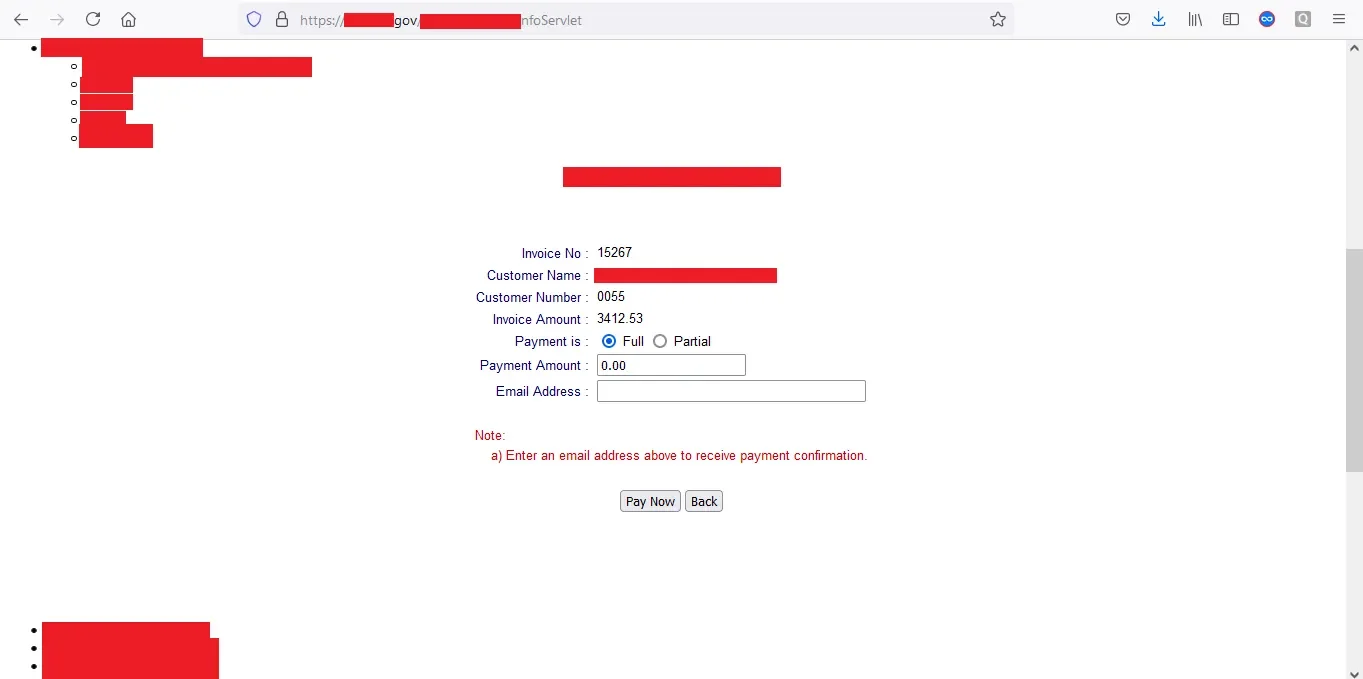
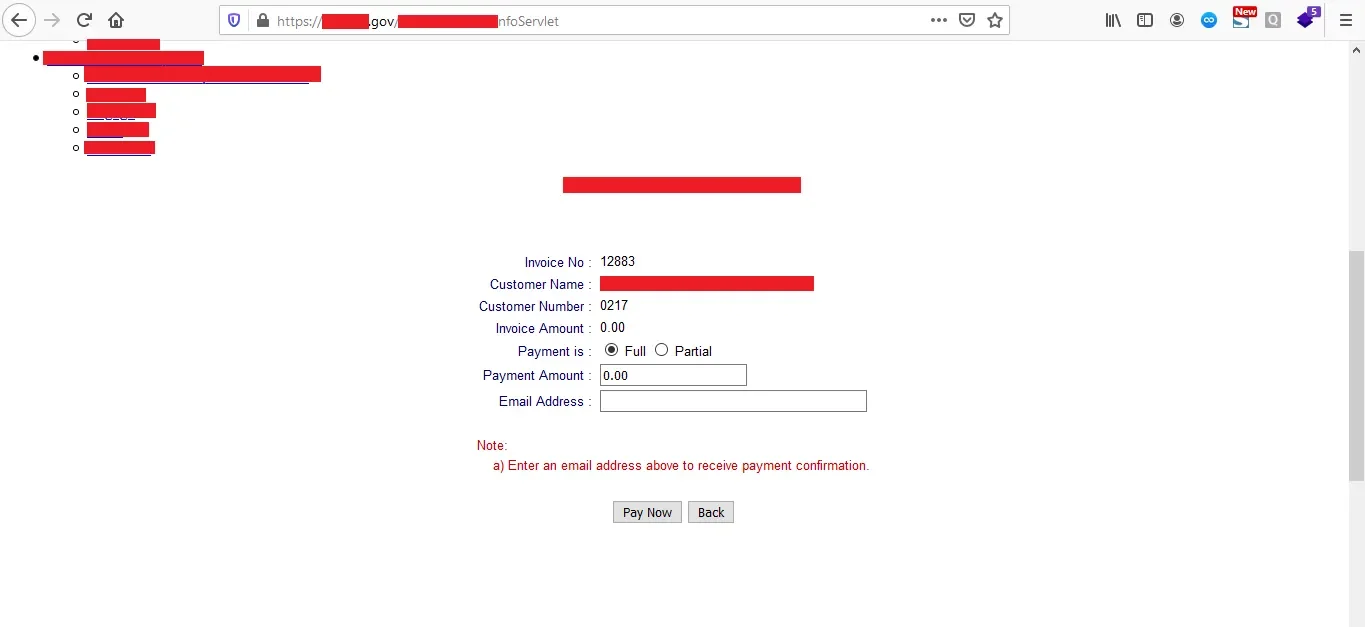
Each successful lookup returned the customer name and the pending or paid amount, which is the PII leak.
Root cause
In the researcher's view, leaks of this kind come from an improper security policy for the data. When such data is uploaded to a server with access enabled from anywhere, web search crawlers index it. Indexing was not prevented and the necessary security policy was not set, which produced the vulnerability. In this case the public PDF reports exposed invoice numbers in their file names, and the invoice lookup accepted the bare numeric identifier, so the file names supplied valid inputs for the lookup.
Impact
Customer names and pending or paid invoice amounts could be read by anyone who reached the lookup page and supplied a valid identifier. The researcher notes that this kind of data can breach the privacy of any user on the internet and that an attacker can steal all of the victim's personal information using this vulnerability. The report does not quantify how many records were exposed.
Fix
The report recommends three measures.
- Use a
robots.txtfile. Example 1:
User-agent: *
Disallow: /
This entry will not allow anyone to view the directories. Example 2, which matches this case:
User-agent: *
Disallow: /reports/
This entry will not allow anyone to view the /report/ directory.
- Use a meta tag. Example 1:
<META NAME="ROBOTS" CONTENT="NOINDEX, NOFOLLOW">
It will prevent site scanning from web crawlers. Example 2:
<META NAME="GOOGLEBOT" CONTENT="NOINDEX, NOFOLLOW">
It will deny certain web crawl spiders to crawl the site.
- Do not use invoice IDs as file names, which is what happened in this case.

Variants to test
- Dork for invoice and report documents on other targets. Run
site:target.tld "invoice"andsite:*.target.tld "invoice"against a program's scope. A positive result is indexed PDFs or report pages containing customer names or amounts. - Check for directory listing on report paths. Request the directory that holds generated reports. A positive result is an HTML index listing files whose names contain identifiers.
- Harvest identifiers from file names and replay them in the lookup. Take the numeric part of a listed file name and submit it to the invoice form. A positive result is a record for a customer you do not own.
- Test identifier formats. If
year-numberfails, try the bare number, and vice versa. A positive result is a valid record returned for a format the application did not intend to accept. - Check whether the lookup requires authentication. Request the invoice page in a fresh session. A positive result is a form that returns customer data without login.
- Check crawler directives on the report path. Fetch
robots.txtand inspect the report pages fornoindexmeta tags. A positive result is the absence of both, meaning the content is eligible for indexing.
What happened, in plain words
A researcher found a website that let anyone look up an invoice by typing a number into a box. If you typed the right number, the site showed you the customer's name and how much they still owed or had already paid. The numbers were not secret: public invoice PDF files had the invoice numbers in their file names. So the folder listing handed out the keys, and the lookup page opened the door.
The researcher found public PDF reports through Google dorks, then used an invoice number from a file name to pull up a customer record. This kind of data is called PII, short for Personally Identifiable Information: information that identifies a specific person, such as a full name, a social security number, a taxpayer identification number, a driver's licence number, a PAN card number, a mobile number or an address. When PII leaks, the privacy of the person it belongs to is broken.
The report describes a private HackerOne program. It does not name the target, the domain or the application, so everything below uses the placeholder target.gov that appears in the report's search examples.
The pieces you need to understand first
Before walking through the steps, here are the few ideas the whole story rests on.
- A web page with a form. You already know this: a box you type into and a button you press. Here the box asks for an "Invoice No" and the button sends the number to the site.
- A server. The computer that owns the website and stores its data. When you submit the form, your browser sends the number to the server, and the server decides what to send back.
- A URL and a directory. A URL is the address you see in the browser bar. A directory is a folder on the server. Some servers are configured to show you a list of the files inside a folder if you visit the folder's address, the way a filing cabinet with the door open shows every folder inside. That is called a directory listing.
- A PDF report. A document file, here a bill or invoice report. If a PDF sits in a public folder, anyone with the address can download it.
- A search engine crawler. A program that search engines run to visit pages across the web and copy what it finds into their index, so the pages can appear in search results. If a crawler can reach a file, that file can end up in Google. Think of a robot that walks every open corridor and photographs every document left on a desk.
- A Google dork. A search query that uses special operators to narrow results in a precise way.
site:is the main one here:site:example.comtells Google to show only results from that domain. A dork is not hacking; it is just a clever search. - A subdomain. A smaller address under a main domain. If
target.govis the main building,billing.target.govis a department inside it. Companies often have many, and one of them may run a feature the main site does not advertise. - Authentication. Proving who you are, usually by logging in. A page that needs no login is reachable by anyone on the internet, and that matters a lot here.
- An identifier. A value that names one specific record, like a ticket number or an order number. Invoice numbers are identifiers. If an identifier is easy to guess or easy to find, the record behind it is easy to reach.
- PII. Personally Identifiable Information, as defined above.
- Information disclosure. The category of weakness this report falls under: the system reveals data to someone who should not have it. Nothing is broken or crashed; the data is simply handed out.
How the researcher found it
The researcher did not start by poking at the application. They started with Google.
Searching with dorks turned up PDF reports that were already public. Looking closer, those PDFs contained customer names and pending invoice amounts. One thing was the same in every PDF: the document did not say whose report it was, and it did not say whether any amount was still pending, even though the content was about bill payments. So the PDFs were sensitive, but on their own they did not tie a name to a debt in an obvious way.
Next, the researcher used dorks to list subdomains and found one domain that hosted the Invoice No feature: a page where you type an invoice number and the site returns the matching invoice.
Typing a random number there produced an error. That is an important observation. It means a made-up number did not return a record. The lookup was working as designed, which is exactly why the next step mattered.
The breakthrough came from the file names of the public PDFs. They followed a pattern of a year followed by a number, for example <year>-13659. The researcher dropped the year and submitted only the number. The lookup accepted it and returned the customer name together with the pending or paid amount.
Put simply: the public folder told you which numbers existed, and the lookup page told you what each number meant. Together they exposed customer data.
Step by step
Step 1: Find public invoice PDFs with Google dorks
The researcher searched for invoices and found PDF reports that were already public.
The report lists three dorks:
site:target.gov "invoice"
site:*.target.gov
site:*.target.gov "invoice"
Line by line:
site:target.gov "invoice"restricts results to thetarget.govdomain and asks for pages containing the word invoice. The report says this is for identifying invoices of users from one domain.site:*.target.govuses the wildcard*to cover every subdomain oftarget.gov. The report says this is for enumerating subdomains, meaning discovering which ones exist.site:*.target.gov "invoice"combines both: invoice-related pages across all subdomains. The report says this is for identifying invoices of users from all domains.
target.gov is a placeholder used in the report, not the real host. The point of the step is that search engines had already indexed documents that should not have been public, and a plain search box was enough to find them.
Step 2: Enumerate subdomains and locate the invoice feature
Subdomain enumeration led to a domain exposing the Invoice functionality.
Why this step: the main website may not link to every feature. A subdomain can host a separate tool, and search results can reveal it even when nothing on the homepage points to it. The researcher was looking for a page where an invoice number could be entered, and found one.
Step 3: Confirm that random numbers fail
Entering a random invoice number returned an error.
Why this step: before trusting a result, you want to know how the page behaves when it should say no. An error for a made-up number shows the lookup checks the identifier rather than returning arbitrary records. It also tells you that a successful answer means the number really exists in the system, so any number you find elsewhere becomes valuable.
Step 4: Open the public PDF directory
The directory holding the publicly available PDF reports could be browsed directly.
Why this step: the researcher already knew public PDFs existed from the search results. Opening the folder they lived in showed the report files and their names. The file listing exposed the report file names, and those names carried the invoice identifiers. The report files carried invoice identifiers in their names.
Step 5: Submit an identifier taken from a file name
Using the invoice number from the file name 13656, the researcher submitted it to the lookup and received a result.
Why this step: this is where the two halves meet. The folder gave a number that certainly existed; the lookup page turned that number into a customer name and an amount. The report's earlier observation explains why the bare number worked: the PDF names had the form year plus number, and the lookup wanted just the number part.
Step 6: Confirm with further identifiers
More invoice IDs were submitted to check that the behaviour was consistent.
Why this step: one success could be a coincidence. Several successes show a pattern: any valid identifier from the folder returns a record. Each successful lookup returned the customer name and the pending or paid amount, which is the PII leak.
Why it happened
In the researcher's view, leaks of this kind come from an improper security policy for the data. When such data is uploaded to a server with access enabled from anywhere, web search crawlers index it. Indexing was not prevented and the necessary security policy was not set, which produced the vulnerability.
In this case the public PDF reports were indexed by crawlers, so their file names, which contained invoice numbers, could be found. And the invoice lookup accepted the bare numeric identifier that appeared in those file names, so the directory listing supplied valid inputs for the lookup. Either one alone would have been far less useful to an attacker.
Impact
Customer names and pending or paid invoice amounts could be read by anyone who reached the lookup page and supplied a valid identifier. The researcher notes that this kind of data can breach the privacy of any user on the internet and that an attacker can steal all of the victim's personal information using this vulnerability. The report does not quantify how many records were exposed.
How to fix it
The report recommends three measures.
- Use a
robots.txtfile. This is a plain text file at the root of a website that tells crawlers which paths they should not visit. Example 1:
User-agent: *
Disallow: /
User-agent: * means the rule applies to every crawler, and Disallow: / means the whole site. The report says this entry will not allow anyone to view the directories. Example 2, which matches this case:
User-agent: *
Disallow: /reports/
Here only the reports folder is excluded. The report says this entry will not allow anyone to view the /report/ directory.
- Use a meta tag. A meta tag is a line inside a web page's HTML that gives instructions to browsers and crawlers. Example 1:
<META NAME="ROBOTS" CONTENT="NOINDEX, NOFOLLOW">
NOINDEX asks search engines not to list the page, and NOFOLLOW asks them not to follow links on it. The report says it will prevent site scanning from web crawlers. Example 2:
<META NAME="GOOGLEBOT" CONTENT="NOINDEX, NOFOLLOW">
This targets Google's crawler specifically. The report says it will deny certain web crawl spiders to crawl the site.
- Do not use invoice IDs as file names, which is what happened in this case. If a file name does not contain the identifier, a folder listing cannot hand out valid lookup inputs.
They reduce the chance of the data being indexed and found by search, which is what happened here, but the stronger fix is to stop the folder from being listable and to stop the lookup from accepting identifiers that were never meant to be public.
Similar things to look for elsewhere
The technical version lists checks you can repeat on other sites. They are written here as things to try, with what a positive result looks like.
- Search for invoice and report documents on other targets. Run
site:target.tld "invoice"andsite:*.target.tld "invoice"against a program's scope. A positive result is indexed PDFs or report pages containing customer names or amounts. - Check for directory listing on report paths. Visit the folder that holds generated reports. A positive result is an HTML index listing files whose names contain identifiers.
- Harvest identifiers from file names and replay them in the lookup. Take the numeric part of a listed file name and submit it to the invoice form. A positive result is a record for a customer you do not own.
- Test identifier formats. If
year-numberfails, try the bare number, and vice versa. A positive result is a valid record returned for a format the application did not intend to accept. - Check whether the lookup requires authentication. Open the invoice page in a fresh session, meaning a browser with no login. A positive result is a form that returns customer data without login.
- Check crawler directives on the report path. Fetch
robots.txtand inspect the report pages fornoindexmeta tags. A positive result is the absence of both, meaning the content is eligible for indexing.
Glossary
- Authentication: proving who you are, usually by logging in; a page without it is open to anyone.
- Crawler: a program run by a search engine that visits pages and copies them into its index.
- Directory: a folder on a server; visiting its address may show a list of the files inside.
- Directory listing: a server feature that displays the contents of a folder as a web page.
- Domain: the main address of a website, such as
target.gov. - Google dork: a search query using operators such as
site:to narrow results precisely. - Identifier: a value that names one specific record, such as an invoice number.
- Information disclosure: a weakness where a system reveals data to someone who should not have it.
- Meta tag: a line in a page's HTML that gives instructions to browsers and crawlers.
- PDF: a document file format; here, a bill or invoice report.
- PII (Personally Identifiable Information): data that identifies a specific person, such as a full name, social security number, taxpayer identification number, driver's licence number, PAN card number, mobile number or address.
robots.txt: a text file at a site's root that tells crawlers which paths not to visit.- Server: the computer that hosts a website and stores its data.
- Subdomain: a smaller address under a main domain, such as
billing.target.govundertarget.gov. - URL: the address of a page or file, shown in the browser bar.
- Wildcard (
*): a symbol meaning "anything here", used in dorks to cover all subdomains.





