Response Manipulation Lead To Premium Feature By Normal User Reward of $500
A premium-only flag controlling whether ads are shown was trusted from the client-side response, so a normal user could flip it to hide ads without paying. An attacker could therefore obtain the paid ad-free experience for free, costing the company subscription revenue and ad income.
 Published on medium.com
Today i will write about how i got my Second valid report and reward in Public program in BugCrowd
The full write-up lives on its author's site
It belongs to its author, so we link to it rather than copy it. The other two tabs are our own rewrites, checked against it.
Context
The target is a site the author refers to as redacted.com, because at the time of writing the report had not been disclosed. The site offered features to subscribers, and one of those subscriber features was the removal of the annoying ads that appear on the site. The bug is described as a broken access control issue that lets a normal user obtain a premium feature.
The author is Abdulrahman Badawi (@zikolaasec), a penetration tester and bug bounty hunter from Egypt. He says this was his second valid report and reward in a public program on BugCrowd, and that it took him three months to find it after his first bug.
Setup
The only tool the report names is Burp Suite, used for its proxy and its Match and Replace feature. The precondition is a regular account on the site: the author logs in as a normal user, with no subscription, and browses the site through Burp. No versions, endpoints, parameters beyond the one shown, or account details are given.
Finding it
The author first tried more than one browser extension that deletes ads, and the ads were not deleted. He then recalled a piece of advice he repeats in the write-up:
"always change in response from false to true you can find a magic"
Following that, he searched the response for anything containing the word false and changed it to true. He found many occurrences, but focused on one related to advertisements, which appeared in the response as:
{"areAdsDisabled":false}
The flag that controls whether ads are shown appeared in the response body, so it is delivered to the client. If the browser is the one deciding whether to render ads based on a value it receives, then the value is under the user's control.
Exploitation
Step 1: run Burp and log in
Run Burp and log in to the website as a normal user, so that traffic passes through the proxy.
Step 2: open Match and Replace
Go to the proxy options and open Match and Replace. The author adjusted the settings as shown in the picture.
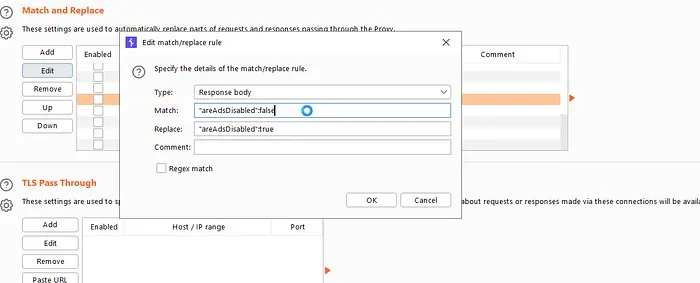
Match and Replace
Step 3: flip the flag in the response body
The rule targets the response body and replaces the value of the parameter:
{"areAdsDisabled":false}
with true. In other words, every response that carries this JSON fragment is rewritten on the fly so that the client receives {"areAdsDisabled":true}.
Step 4: refresh and browse
Refresh the site and browse it. No ads are shown. The author notes that he can now browse the site without ads as a premium user would, while using a regular user account.
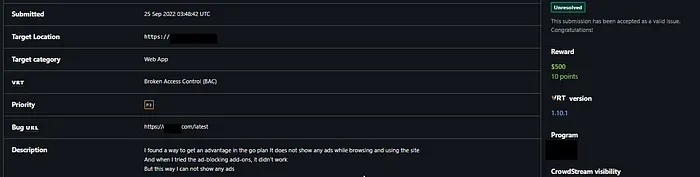
$$$
Root cause
The server sends the ad state to the client as a boolean field, areAdsDisabled. The decision is therefore made on data the user can modify, rather than on the server checking the user's subscription before serving or withholding ads. The report does not show any server-side check that would have caught the modified value, and it does not describe the client code, so the exact enforcement point is not stated.
Impact
The author frames the financial loss to the company in two ways:
- The company does not profit from the sponsored ads that appear on the site, because they are never displayed to this user.
- The user does not have to pay for a subscription to remove ads.
The author demonstrated both effects with his own regular account. The report does not quantify the loss or state how many users could be affected.
Fix
The report does not say what the program changed. The fix implied by the finding is to stop trusting the client with the decision: the server should determine whether the user has an active subscription and only then omit ads, rather than shipping a client-controlled boolean that the front end obeys.
Variants to test
- Look for other boolean flags in JSON responses that gate paid or privileged behaviour, such as feature toggles, trial flags or role markers. A positive result is that flipping the value in the response changes what the UI allows you to do.
- Apply the same Match and Replace technique to responses that carry plan or tier names. A positive result is that a normal account is treated as a higher tier by the client.
- Check whether the server enforces the same restriction when the corresponding action is requested directly, rather than only hiding it in the UI. A positive result is that the server accepts the action for a user who should not have it.
- Test other client-side gates on the same site, such as limits on exports, downloads or saved items. A positive result is that the limit disappears when the controlling value is changed in the response.
What happened, in plain words
A website sold a paid subscription. One of the things you got for paying was that the site stopped showing you advertisements. The author of this report had a free account, and he found a way to make the site behave as if he had paid, so the ads disappeared for him without paying.
The trick was simple. When the site sends a page to your browser, it also sends a small piece of data that says, in effect, "this user still has ads turned on". The browser receives that piece of data along with the page. The author used a tool that sits between his browser and the website and quietly rewrites that piece of data on its way in, changing "ads on" to "ads off". After the rewrite, the site showed no ads.
This is called a broken access control problem: the site let the browser, which the user controls, make a decision that should have been made by the site's own computers. The author reports it as a bug that lets a normal user obtain a premium feature, and he says it was his second valid report and reward in a public program on BugCrowd. He also says it took him three months to find it after his first bug.
The site is referred to as redacted.com because, at the time of writing, the report had not been disclosed. The author is Abdulrahman Badawi (@zikolaasec), a penetration tester and bug bounty hunter from Egypt.
The pieces you need to understand first
Before the steps, a few everyday ideas. If you already know them, skim.
A website and its server. When you visit a site, your browser (Chrome, Firefox, Safari) asks a computer somewhere else, called the server, for the page. The server sends back the page and the data that goes with it. Your browser then draws everything on your screen. The server is the site's own machine; your browser is your machine.
A response. The answer the server sends back is called a response. It contains the page itself and often extra data in a structured format, for example a small block of text that the page's code reads to know what to show. That structured format is often JSON, which is just a way of writing labelled values, like a shopping list with names next to each item.
A boolean flag. A boolean is a value that is either true or false, like a light switch. A flag is a named boolean that tells the page how to behave. In this report the flag is called areAdsDisabled. If it is false, ads are not disabled, so they are shown. If it is true, ads are disabled, so they are hidden.
A proxy. A proxy is a middleman. Normally your browser talks directly to the server. With a proxy, your browser talks to the proxy, and the proxy talks to the server, passing messages back and forth. This lets you look at, and change, everything going in both directions. Think of a postal worker who opens every letter, reads it, and can rewrite it before delivering it.
Burp Suite. Burp Suite is a well-known tool used by security testers. It acts as that middleman proxy. It also has a feature called Match and Replace, which is like a find-and-replace rule in a word processor, except it runs automatically on every message that passes through. You tell it: whenever you see this exact text in a response, swap it for that text. The report names Burp Suite as the only tool used.
Broken access control. Access control means deciding who is allowed to do what. A site should check, on its own server, whether you are a paying subscriber before it treats you like one. Broken access control means that check is missing or is done in the wrong place, for example in the browser, where the user can change the answer. A comparison: a nightclub where the bouncer asks you "are you on the guest list?" and believes whatever you say, instead of checking the list himself.
Premium feature. A feature that only paying subscribers get. Here it is the removal of ads.
Setting up
The only tool the report names is Burp Suite, used for its proxy and its Match and Replace feature. The precondition is a regular account on the site: the author logs in as a normal user, with no subscription, and browses the site through Burp. The report gives no versions, no endpoints, no parameters beyond the one shown, and no account details.
Finding it
The author first tried more than one browser extension that deletes ads, and the ads were not deleted. Extensions like this work inside your browser, trying to spot and hide ads after the page has loaded. They failed here.
He then recalled a piece of advice he repeats in the write-up:
"always change in response from false to true you can find a magic"
In plain words: look through the data the server sends to your browser, find values that are set to false, flip them to true, and see whether the page starts behaving differently. It is a quick experiment, not a guarantee, but it costs little to try.
Following that advice, he searched the response for anything containing the word false and changed it to true. He found many occurrences, but focused on one related to advertisements, which appeared in the response as:
{"areAdsDisabled":false}
Line by line: the outer curly braces { and } mark the start and end of a small block of data. Inside, "areAdsDisabled" is the name of the setting, written in double quotes because JSON names are text. The colon : separates the name from its value. The value false means the setting is switched off, so ads are not disabled and will be shown. If the value were true, ads would be disabled and hidden.
This looked wrong because the flag that controls whether ads are shown is delivered to, and trusted from, the client. In other words, the browser is the one deciding whether to draw ads, based on a value it receives. If the browser makes that decision, then whoever controls the browser controls the decision. The server should have checked the subscription itself and simply not sent the ads, or sent a page without them, for a free user.
Exploitation
Step 1: run Burp and log in
Run Burp and log in to the website as a normal user, so that traffic passes through the proxy. Why: you need every request and response to travel through Burp so that Burp can see the flag and rewrite it. Logging in as a normal user is the whole point, because the goal is to show that a free account can get a paid feature.
Step 2: open Match and Replace
Go to the proxy options and open Match and Replace. The author adjusted the settings as shown in the picture.
Match and Replace
The picture shows the Match and Replace settings in Burp Suite. Why this step: instead of editing every response by hand, which would be slow and easy to get wrong, you set one rule and Burp applies it automatically to every message that matches.
Step 3: flip the flag in the response body
The rule targets the response body and replaces the value of the parameter:
{"areAdsDisabled":false}
with true. In other words, every response that carries this JSON fragment is rewritten on the fly so that the client receives {"areAdsDisabled":true}.
Line by line: the text in the block is the exact fragment Burp looks for in the response body. The response body is the part of the server's answer that contains the page data, as opposed to the headers, which are the labels on the envelope. When Burp finds this fragment, it swaps it for the same fragment with true in place of false. The browser never sees the original; it only ever receives the rewritten version. Why this works: the browser trusts whatever value arrives, so it now believes ads are disabled.
Step 4: refresh and browse
Refresh the site and browse it. No ads are shown. The author notes that he can now browse the site without ads as a premium user would, while using a regular user account.
$$$
The picture is captioned with dollar signs. Why this step matters: refreshing shows the site without ads.
Why it happens
The server sends the ad state to the client as a boolean field, areAdsDisabled. The decision is therefore made on data the user can modify, rather than on the server checking the user's subscription before serving or withholding ads. The report does not show any server-side check that would have caught the modified value, and it does not describe the client code, so the exact enforcement point is not stated.
A comparison: a restaurant hands you a card that says "no dessert for this table" and trusts you to follow it, instead of the kitchen checking your order. You can cross out the line and write "dessert", and the kitchen will serve it because it never checks.
Impact
The author frames the financial loss to the company in two ways:
- The company does not profit from the sponsored ads that appear on the site, because they are never displayed to this user.
- The user does not have to pay for a subscription to remove ads.
The author demonstrated both effects with his own regular account. The report does not quantify the loss or state how many users could be affected.
Fix
The report does not say what the program changed. The fix implied by the finding is to stop trusting the client with the decision: the server should determine whether the user has an active subscription and only then omit ads, rather than shipping a client-controlled boolean that the front end obeys. In everyday terms, the bouncer should check the guest list himself, not ask you whether you are on it.
Other places to try the same idea
- Look for other boolean flags in JSON responses that gate paid or privileged behaviour, such as feature toggles, trial flags or role markers. A positive result is that flipping the value in the response changes what the UI allows you to do.
- Apply the same Match and Replace technique to responses that carry plan or tier names. A positive result is that a normal account is treated as a higher tier by the client.
- Check whether the server enforces the same restriction when the corresponding action is requested directly, rather than only hiding it in the UI. A positive result is that the server accepts the action for a user who should not have it.
- Test other client-side gates on the same site, such as limits on exports, downloads or saved items. A positive result is that the limit disappears when the controlling value is changed in the response.
Glossary
- Access control: the rules that decide who is allowed to do what on a site.
- Boolean: a value that is either true or false, like a light switch.
- Broken access control: when those rules are missing or checked in the wrong place, so someone can do something they should not be allowed to do.
- Browser: the program you use to visit websites, such as Chrome, Firefox or Safari.
- Burp Suite: a tool used by security testers that sits between the browser and the server and lets you inspect and change messages.
- Client: the user's side, normally the browser, as opposed to the server.
- Client-side gate: a restriction enforced in the browser rather than on the server, which the user can therefore change.
- Endpoint: a specific address on a server that a request is sent to.
- Extension: a small add-on you install in your browser to add features, such as blocking ads.
- Flag: a named true or false setting that tells a page how to behave.
- Front end: the part of a site that runs in your browser and draws what you see.
- Back end: the part of a site that runs on the server and holds the data and the rules.
- Headers: the labels attached to a request or response, separate from the body, carrying information about the message.
- JSON: a simple text format for writing labelled values, like a list with names next to each item.
- Match and Replace: a Burp Suite feature that automatically swaps one piece of text for another in messages passing through.
- Parameter: a named value sent with a request or response, such as
areAdsDisabled. - Premium feature: something only paying subscribers get, here the removal of ads.
- Proxy: a middleman that passes messages between your browser and the server so they can be inspected and changed.
- Request: the message your browser sends to the server asking for a page or data.
- Response: the message the server sends back, containing the page and its data.
- Response body: the part of the response that carries the page data, as opposed to the headers.
- Server: the computer that hosts the site and answers requests.
- Server-side check: a rule enforced on the server, which the user cannot change from their browser.
- Subscription: a paid plan that unlocks premium features.
- Traffic: the requests and responses travelling between your browser and the server.
- UI: the user interface, the part of the site you see and interact with.

