RFD Vulnerability And Content-Disposition Header Bypass Story!
A chat message history download feature reflected unsanitised user input into a file whose name was controlled by the attacker, allowing the attacker to change the file extension from .txt to .bat or .html. An attacker could send a message containing a command, delete it, and set their username to manipulate the filename so that when a victim downloads the history, the file executes the command or renders as HTML.

The original lives on kabilan1290.medium.com
We do not hold its text, so we link to it rather than copy it. The other two tabs are our own rewrites, checked against it.
Context
The target was a private programme, referred to in the write-up as REDACTED.COM. The programme covered only five domains in scope, but each domain carried a lot of functionality. The product is a platform that connects students, teachers and parents. Each role has its own unique domain, and teachers can connect a student and their parents into a class using a code or an invitation. The privilege order is Teachers > Parents > Students.
The feature involved is a chat between teachers and parents. It also has a download option: a teacher can download the message history of a conversation. The filename of that download is built from the names of the two participants, so the parent and the teacher both influence it through their usernames.
Setup
The researcher tested the chat from both sides, as a teacher and as a parent. The only tooling mentioned is a browser and an intercepting proxy, used to capture the download request. The confirmation step involved a second person, Robert, trying to reproduce the issue in his browser, and a comparison of browser versions. The researcher was on a somewhat older version of Firefox at the time; the report does not give the exact version numbers.
Finding it
The first attempt was to abuse the message box with XSS. As far as the initial analysis showed, everything was filtered, from both the teacher and the parent side, and everything was encoded.
The interesting behaviour appeared in the download of the message history. Intercepting that request showed that the payloads stored in the messages were not stripped in the generated file.
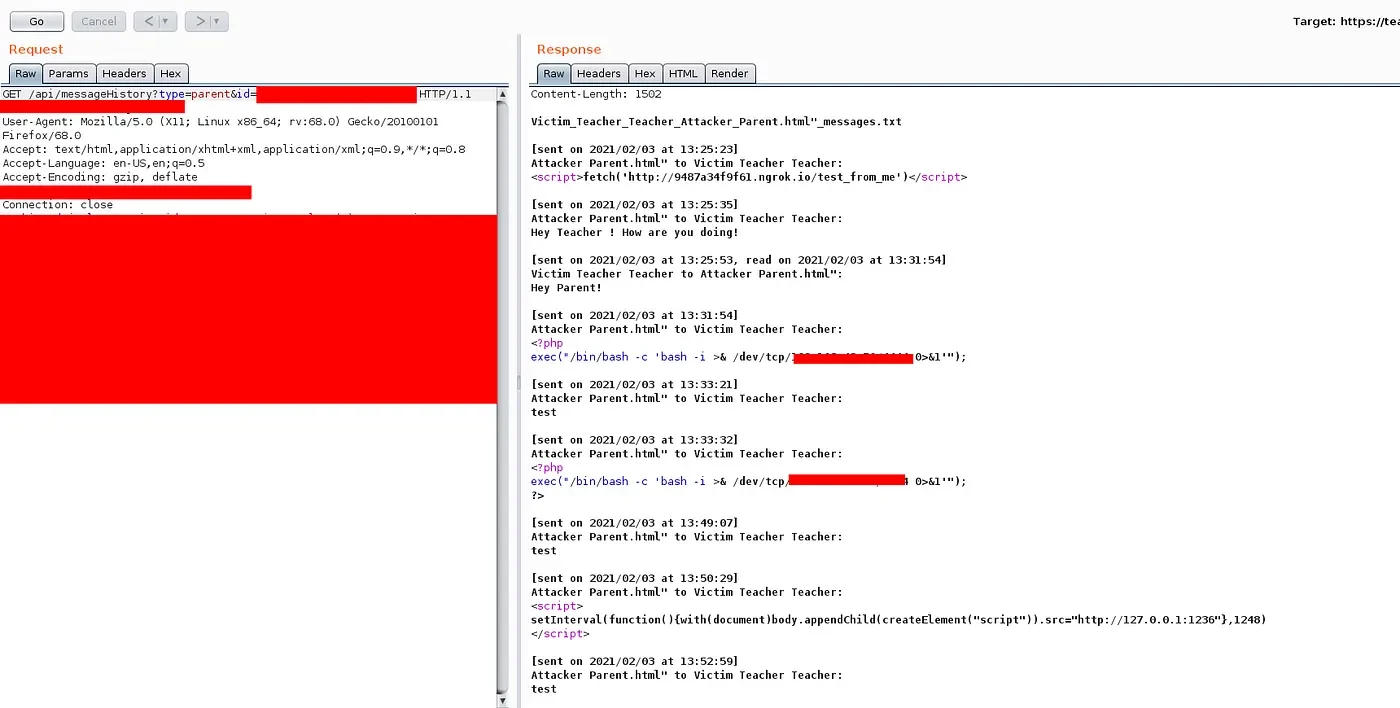
The interception screenshot shows the download request and the message content reflected in the response.
The natural next thought was that the payload would execute in the context of the domain, so the response was opened in the browser. It did not execute: it was downloaded as a text file.
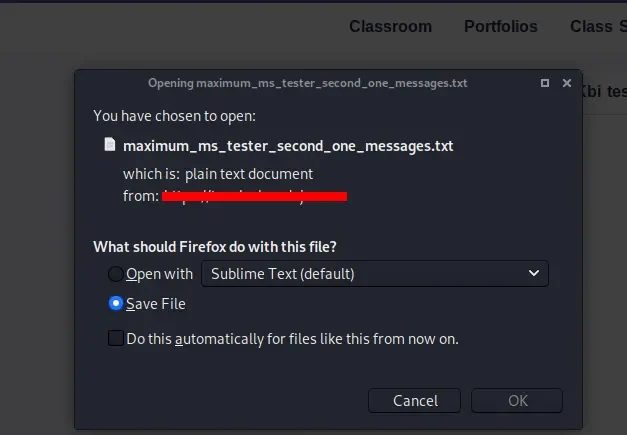
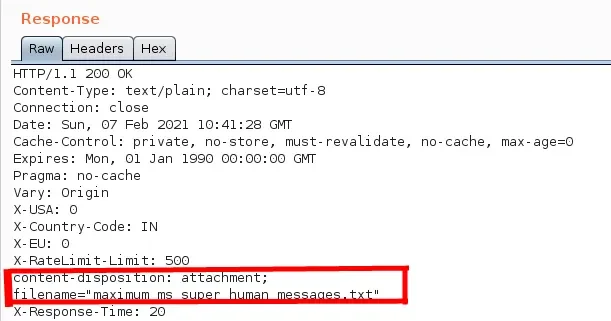
The obstacle is the Content-Disposition header, which forces the browser to download the content rather than render it. The report links to the MDN documentation for the header. Searching for a Content-Disposition bypass with the idea of getting the content rendered inline did not work.
The filename in the download, however, follows the pattern Teacher_name_parent_name_messages.txt, and both names come from the clients, the parent and the teacher. That makes the filename attacker-influenced, which opens the door to a file extension bypass: get rid of the .txt extension and land on an HTML extension.
Exploitation
Step 1: control the filename through the username
The parent username was manipulated with candidates such as username.html#, username.html/ and some others, in the hope of cutting off the .txt extension. The one that worked was username.html".
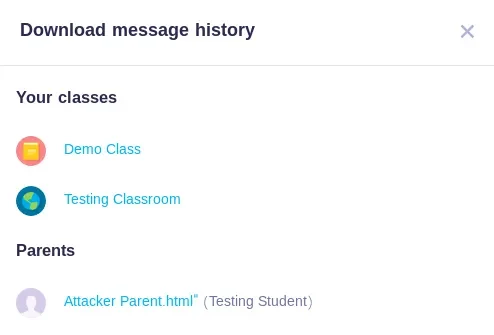
With that username, the message history file was downloaded as an HTML file.
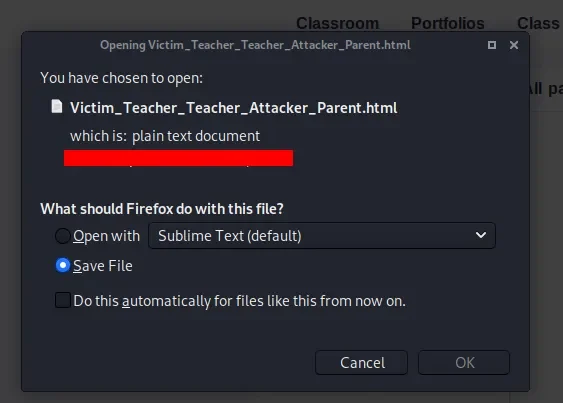
This is a Reflected File Download (RFD). The report describes RFD as an attack technique that might enable an attacker to gain complete access over a victim's machine by virtually downloading a file from a trusted domain, and credits its discovery to Oren Hafif of Trustwave SpiderLabs in 2014. The researcher notes that this is not a classic RFD; a classic one would have been closed as P5 by Bugcrowd.
Step 2: confirm, and find the browser dependency
Robert was asked to reproduce the issue in his browser and it did not work: the quotes were filtered and replaced by underscores in his browser.

Comparing browser versions showed the researcher was on a somewhat older version of Firefox. Checking several other browsers showed the same behaviour: quotes filtered and replaced by underscores. The researcher reported this to Mozilla, who filed a bug (bugzilla.mozilla.org bug 1695068). Mozilla's position, quoted in the write-up, was:
Clearly there's a bug on that site: they should not allow filenames with quotes and then not escape them. My concern here is that browser behaviour difference could contribute to cases where sites get into trouble and then just blame Firefox, leaving our users unprotected. We have made exceptions to strict
content-dispositionparsing in the past, it might be worth figuring out what heuristic other browsers are using here.
At this point the issue looked exploitable only in older browsers, and the researcher expected that Bugcrowd's ASE would not be able to reproduce it.
Step 3: the universal bypass
Playing around again produced a bypass that worked across browsers: "; is described as the universal bypass. With it, the quotes were no longer converted into underscores when the value reached the delimiter.

How it works, in the report's explanation: by changing the username to something.bat";, the header is effectively closed as filename="something.bat"; and everything after it, namely _messages.txt, is excluded. The resulting header value is:
filename="[redacted].bat";
The report is explicit that this is not a direct bypass of the header, but the header is bypassed nonetheless. With the filename under control, the attacker can get past Content-Disposition, thanks to poor handling of filename convention control.
Step 4: attack scenario
The parent is the attacker and the teacher is the victim. The parent sends the payload calc.exe and then deletes it, to make the teacher less suspicious.
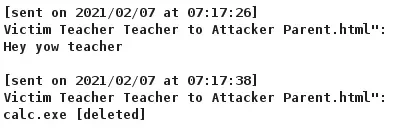
The deleted content is still rendered in the message history. Since the attacker, as the parent, controls the filename through the username, they change their name to parent.bat";. When the teacher downloads the message history file, it is downloaded as teacher_name_parent_name.bat, and inside the batch file is the calc.exe command.
When the teacher opens the file, the command is executed.
Root cause
The generated message history file reflects message content without stripping it, so attacker-supplied markup reaches the downloaded file. The download is served with Content-Disposition, which normally prevents the browser from rendering that content inline. The filename in that header is built from participant names, which the parent and the teacher control through their usernames, and the server does not sanitise the quote character in those names. Injecting "; closes the quoted filename parameter early, so the server's own suffix (_messages.txt) is discarded and the attacker chooses the extension. The filename in the header then ends in .bat rather than .txt.
The browser-side filtering of quotes into underscores, which stopped the first username.html" variant in other browsers, is sidestepped by the "; form.
Impact
An attacker acting as a parent can make a teacher download a file from the trusted platform domain with an attacker-chosen extension and attacker-controlled content, including a batch file containing commands. If the teacher opens the downloaded file, the command runs on the teacher's machine. The report frames this as potentially giving complete access over a victim's machine, and notes that the content is delivered from a trusted domain. The attack requires the victim to download the message history and then open the resulting file, and the attacker needs the ability to set a parent username containing the payload.
Fix
The report does not state what the vendor changed. Mozilla's quoted comment says the site should not allow filenames with quotes and then fail to escape them. Mozilla's quoted comment makes the same point: the site should not allow filenames with quotes and then fail to escape them.
Variants to test
- Look for any download whose filename is built from user-controlled fields (usernames, display names, group names, project titles). Set the field to a value ending in
";and check whether the saved file loses the server's extension. - Try the same field with
",#and/suffixes to see whether the extension can be cut off in browsers that filter quotes. - Check whether reflected message or comment content in exported files (chat history, transcripts, reports) is stripped or encoded, and whether the export is served with
Content-Disposition. - Test other filename parameters and headers that take a quoted value, such as
filename*, to see whether an early quote terminates parsing. - Try extensions that execute on open, such as
.bat,.cmd,.htaor.js, wherever the extension is attacker-influenced, and confirm what the browser actually saves.
A positive result is a downloaded file whose name and extension you chose, containing your content, served from the target's domain.
What happened, in plain words
A security researcher found a way to make a teacher download a file from a trusted school platform, where the file had a dangerous extension (like .bat) and contained commands chosen by an attacker. The trick relied on two things: the platform put message content into a downloadable file without cleaning it, and the filename of that file was built from usernames that the attacker could control. By putting special characters in a username, the attacker could cut off the safe .txt extension and replace it with .bat. When the teacher opened the downloaded file, the attacker's command ran on the teacher's computer. This kind of attack is called Reflected File Download (RFD). The researcher also had to work around browser differences that replaced quotes with underscores, and found a universal bypass using ";.
The programme and the feature
The target was a private bug bounty programme, called REDACTED.COM in the write-up. A bug bounty programme is an arrangement where a company invites security researchers to test its systems and pays for valid bugs. This programme had only five domains in scope (the websites the researcher was allowed to test), but each domain had many features.
The product is a platform that connects students, teachers and parents. Each role has its own unique domain (for example, teachers might use teachers.example.com and parents parents.example.com). Teachers can connect a student and their parents into a class using a code or an invitation. The privilege order is Teachers > Parents > Students, meaning teachers have the most access and students the least.
The feature involved is a chat between teachers and parents. It also has a download option: a teacher can download the message history of a conversation. The filename of that download is built from the names of the two participants, so both the parent and the teacher influence it through their usernames. That detail is important: if an attacker can choose their own username, they can influence the filename.
How the researcher found it
The researcher tried to abuse the message box with XSS (Cross-Site Scripting). XSS is a type of attack where you inject JavaScript code into a web page that other users will see, so the code runs in their browser. The goal is usually to steal cookies (small pieces of data that keep you logged in) or perform actions as the victim. The researcher tested from both sides, as a teacher and as a parent, but everything was filtered and encoded. Filtering means removing dangerous characters; encoding means converting them into a safe form (for example, < becomes <). So the chat itself seemed safe.
Then the researcher noticed that teachers have an option to download the message history. They intercepted the request that the browser sends when you click the download button. Intercepting means using a tool (a proxy) that sits between your browser and the server, letting you see and modify the traffic. The request is the message your browser sends to the server asking for a page or a file. When the researcher looked at the response (what the server sends back), they saw that the payloads (the malicious code they had typed into messages) were not stripped in the generated file. Stripping means removing dangerous content. So the download contained the raw, unfiltered messages.
The screenshot shows the intercepted request and the response containing the message content. The researcher then thought: if the payload is in the file, maybe it will execute in the context of the domain when opened in a browser. Executing in the context of the domain means the code runs as if it came from the platform's website, so it could access cookies and other data for that site. They opened the response in the browser, but instead of running, it was downloaded as a text file.
The obstacle is the Content-Disposition header. HTTP headers are extra pieces of information that come with every request and response. Content-Disposition tells the browser whether to display the content inline (in the browser window) or treat it as an attachment to download. When it says attachment, the browser saves the file instead of rendering it. The report links to the MDN documentation for this header. The researcher searched for ways to bypass Content-Disposition and get the content rendered inline, but found none.
However, the filename in the download follows the pattern Teacher_name_parent_name_messages.txt, and both names come from the clients (the parent and the teacher). That means the filename is attacker-influenced. This opens the door to a file extension bypass: get rid of the .txt extension and make it end with .html instead. If the file is saved as .html, the browser may open it as a web page.
Exploitation
Step 1: control the filename through the username
The researcher manipulated the parent username with candidates such as username.html#, username.html/ and some others, hoping to cut off the .txt extension. The one that worked was username.html" (a username ending with a double quote).
With that username, the message history file was downloaded as an HTML file.
This is a Reflected File Download (RFD). RFD is an attack technique that might enable an attacker to gain complete access over a victim's machine by virtually downloading a file from a trusted domain. It was discovered by Oren Hafif of Trustwave SpiderLabs in 2014. The researcher notes that this is not a classic RFD; a classic one would have been closed as P5 (the lowest severity) by Bugcrowd, the bug bounty platform used.
Step 2: confirm, and find the browser dependency
The researcher asked Robert, an advisor of his, to reproduce the issue in his browser. It did not work: the quotes were filtered and replaced by underscores in his browser.
Comparing browser versions showed the researcher was using a somewhat older version of Firefox. Checking several other browsers showed the same behaviour: quotes filtered and replaced by underscores. The researcher reported this to Mozilla, who filed a bug (bugzilla.mozilla.org bug 1695068). Mozilla's position, quoted in the write-up, was:
Clearly there's a bug on that site: they should not allow filenames with quotes and then not escape them. My concern here is that browser behaviour difference could contribute to cases where sites get into trouble and then just blame Firefox, leaving our users unprotected. We have made exceptions to strict
content-dispositionparsing in the past, it might be worth figuring out what heuristic other browsers are using here.
At this point the issue looked exploitable only in older browsers, and the researcher expected that Bugcrowd's ASE (Application Security Engineer) would not be able to reproduce it.
Step 3: the universal bypass
Playing around again produced a bypass that worked across browsers: "; is described as the universal bypass. With it, the quotes were no longer converted into underscores when the value reached the delimiter. A delimiter is a character that separates parts of a header value; here it is the semicolon that ends the filename parameter.
How it works, in the report's explanation: by changing the username to something.bat";, the header is effectively closed as filename="something.bat"; and everything after it, namely _messages.txt, is excluded. The resulting header value is:
filename="[redacted].bat";
This line is the Content-Disposition header's filename parameter. It sets the filename to [redacted].bat and ends with a semicolon. The semicolon is the delimiter that ends the parameter, so the server's own suffix _messages.txt is ignored.
The report is explicit that this is not a direct bypass of the header, but the header is bypassed nonetheless. With the filename under control, the attacker can get past Content-Disposition, thanks to poor handling of filename convention control.
Step 4: attack scenario
The parent is the attacker and the teacher is the victim. The parent sends the payload calc.exe and then deletes it, to make the teacher less suspicious.
The deleted content is still rendered in the message history. Since the attacker, as the parent, controls the filename through the username, they change their name to parent.bat";. When the teacher downloads the message history file, it is downloaded as teacher_name_parent_name.bat, and inside the batch file is the calc.exe command.
When the teacher opens the file, the command is executed.
Root cause
The generated message history file reflects message content without stripping it, so attacker-supplied markup reaches the downloaded file. The download is served with Content-Disposition, which normally prevents the browser from rendering that content inline. The filename in that header is built from participant names, which the parent and the teacher control through their usernames, and the server does not sanitise the quote character in those names. Injecting "; closes the quoted filename parameter early, so the server's own suffix (_messages.txt) is discarded and the attacker chooses the extension. The filename in the header then ends in .bat rather than .txt.
The browser-side filtering of quotes into underscores, which stopped the first username.html" variant in other browsers, is sidestepped by the "; form.
Impact
An attacker acting as a parent can make a teacher download a file from the trusted platform domain with an attacker-chosen extension and attacker-controlled content, including a batch file containing commands. If the teacher opens the downloaded file, the command runs on the teacher's machine. The report frames this as potentially giving complete access over a victim's machine, and notes that the content is delivered from a trusted domain. The attack requires the victim to download the message history and then open the resulting file, and the attacker needs the ability to set a parent username containing the payload.
Fix
The report does not state what the vendor changed. Mozilla's quoted comment says the site should not allow filenames with quotes and then fail to escape them. Mozilla's quoted comment makes the same point: the site should not allow filenames with quotes and then fail to escape them.
Variants to test
- Look for any download whose filename is built from user-controlled fields (usernames, display names, group names, project titles). Set the field to a value ending in
";and check whether the saved file loses the server's extension. - Try the same field with
",#and/suffixes to see whether the extension can be cut off in browsers that filter quotes. - Check whether reflected message or comment content in exported files (chat history, transcripts, reports) is stripped or encoded, and whether the export is served with
Content-Disposition. - Test other filename parameters and headers that take a quoted value, such as
filename*, to see whether an early quote terminates parsing. - Try extensions that execute on open, such as
.bat,.cmd,.htaor.js, wherever the extension is attacker-influenced, and confirm what the browser actually saves.
A positive result is a downloaded file whose name and extension you chose, containing your content, served from the target's domain.
Glossary
- Bug bounty programme: A scheme where organisations reward researchers for finding and reporting security bugs.
- Domain: A website address, like
example.com. - In scope: The parts of a system that a programme allows you to test.
- Privilege: The level of access a user has.
- XSS (Cross-Site Scripting): An attack that injects JavaScript into a page viewed by others.
- Filtering: Removing or blocking dangerous input.
- Encoding: Converting characters into a safe representation.
- Intercepting proxy: A tool that lets you see and modify HTTP traffic between your browser and a server.
- Request: A message from a browser to a server asking for a resource.
- Response: The server's reply to a request.
- Payload: The malicious code or data an attacker injects.
- Stripping: Removing dangerous content from data.
- Context of the domain: The security origin of a website; code running there can access that site's data.
- HTTP header: Extra information sent with requests and responses.
Content-Disposition: A header that tells the browser to download a file and suggests a filename.- Inline: Displayed directly in the browser, not downloaded.
- Attachment: A file to be downloaded and saved.
- File extension bypass: Tricking a system into using a different file extension than intended.
- RFD (Reflected File Download): An attack where a file is downloaded from a trusted domain with attacker-controlled content and name.
- P5: The lowest severity rating on Bugcrowd.
- Bugcrowd: A bug bounty platform.
- ASE: Application Security Engineer, a person who validates bug reports on Bugcrowd.
- Delimiter: A character that separates parts of a value, like a semicolon in a header.
- Batch file: A Windows script file with
.batextension that runs commands. calc.exe: The Windows calculator program; used here as a harmless proof of concept.- Sanitise: Clean input by removing or escaping dangerous characters.
- Escape: Convert a character into a safe form so it is not interpreted as code.
filename*: An extended parameter inContent-Dispositionfor encoding filenames.



