SAML Authentication Bypass Leading to Admin Panel Access
The SAML service provider accepted a modified SAML response with the digital signature removed, allowing the attacker to change the user identifier and email attributes. This let the attacker create an admin account without valid credentials.
 Published on medium.com
It’s your buddy Ahmed Tarek again with a new interesting finding. I’ve discovered a critical security flaw in the SAML authentication system.
The full write-up lives on its author's site
It belongs to its author, so we link to it rather than copy it. The other two tabs are our own rewrites, checked against it.
SAML is one of those protocols that most testers meet only as an opaque base64 blob in a POST body. This write-up walks through what that blob contains, and then through a real authentication bypass that turned a tampered, unsigned SAML response into an admin account. The target is referred to throughout as example.com, with the login flow living on a subdomain.
Context
The feature under test is SAML-based Single Sign-On. SAML (Security Assertion Markup Language) lets a user authenticate once with an Identity Provider (IdP) and then access multiple services without logging in again, the same way a session on facebook.com carries over to messenger.com. The IdP sends authentication data as XML to the Service Provider (SP), which asks the IdP for authentication and authorisation. Both ends must agree on the configuration for the exchange to work.
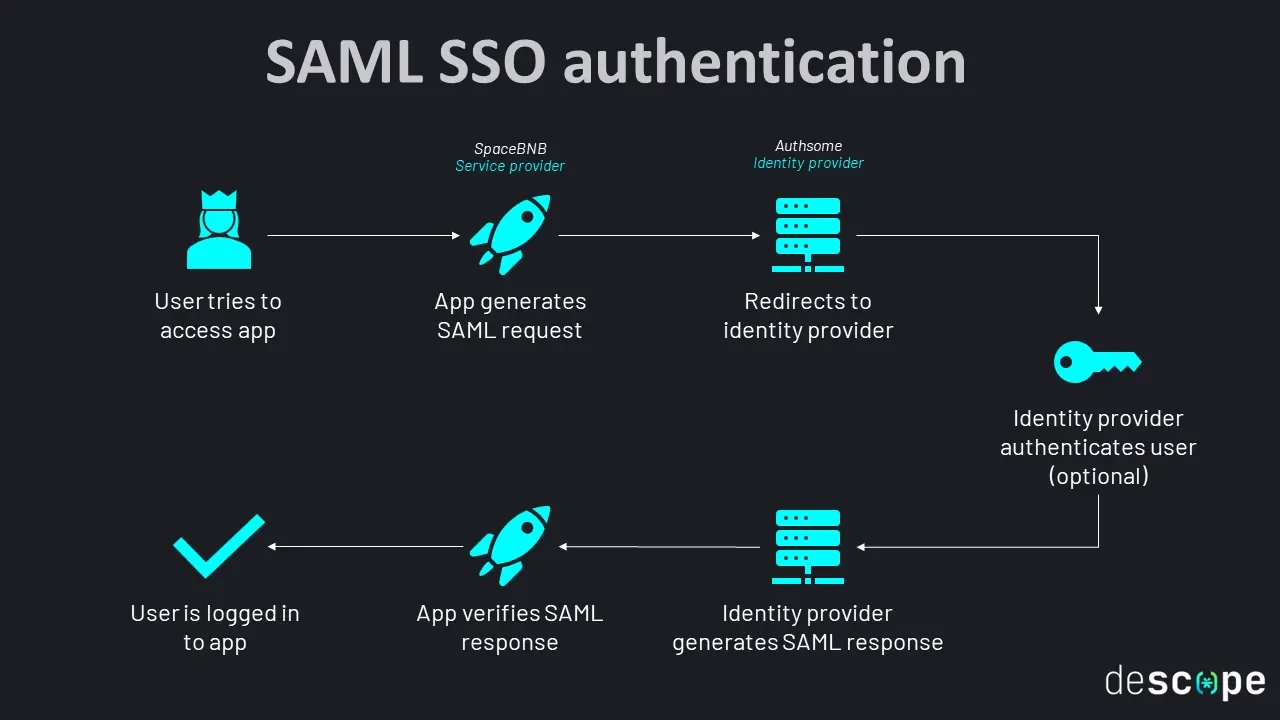
The diagram illustrates the relationship between the identity provider and the service provider during a SAML exchange.
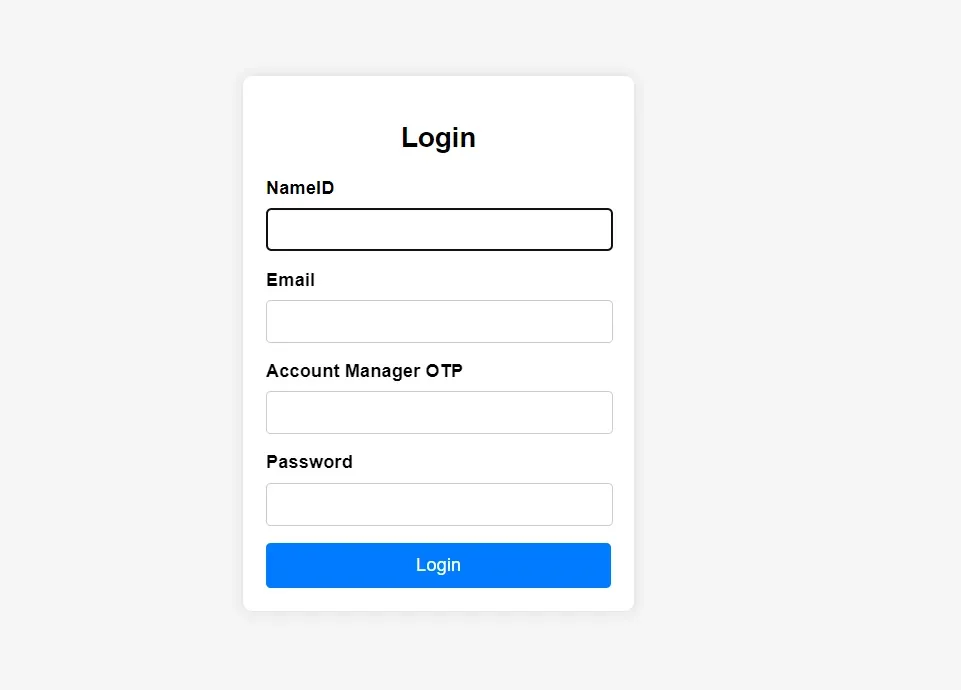
The target was a login page at login-otp.example.com/login, found through subdomain enumeration, reverse DNS lookup and Google dorks.
Setup
No special accounts or roles are described beyond the login page itself. The tooling was a browser for inspecting and replaying requests, and Python 3 for generating a new ID and for automating the tampering. The researcher also published a script, saml_injector.py, at https://github.com/0xxnum/saml_injector/blob/main/saml_injector.py, which takes a SAMLResponse as a command-line argument, decodes it from base64, parses the XML, removes the digital signature and modifies specified attributes (OTP, email and user identifier in this case), then re-encodes the result to base64 and prints it.
Before touching the target, it helps to know the anatomy of a SAML response, since every later step depends on it.
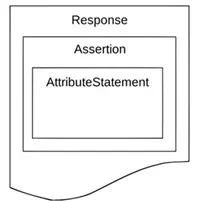
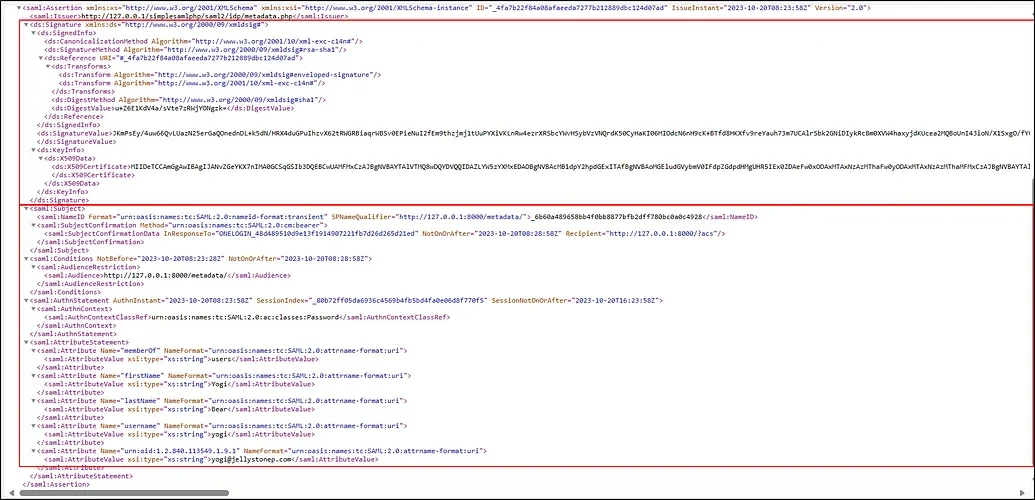
The response is an XML document wrapped in <samlp:Response> tags. Its attributes include ID (a unique identifier for the response), Version (for example 2.0), IssueInstant (when it was issued), Destination (the intended recipient, usually the SP) and InResponseTo (the ID of the request being answered). Inside, <saml:Issuer> names the entity that issued the response, normally the IdP, and matters for verifying authenticity. <samlp:Status> carries a <samlp:StatusCode> such as Success or Requester. One or more assertions follow: an authentication assertion (saml:AuthnStatement) describing when and how the user authenticated, and an attribute assertion (saml:AttributeStatement) carrying user attributes such as username or email. A <ds:Signature> element holds the cryptographic signature made with the IdP's private key, and <saml:Conditions> constrains validity with NotBefore and NotOnOrAfter. <saml:Subject> identifies the user through <saml:NameID>, and <saml:AudienceRestriction> names the intended audience, usually the SP's entity ID, which helps prevent assertion replay. Signature verification means checking the signature against the IdP's public key to confirm the response has not been tampered with.
A simplified identity assertion looks like this:
<samlp:Response xmlns:samlp="urn:oasis:names:tc:SAML:2.0:protocol" ID="_abc123" Version="2.0" IssueInstant="2023–10–18T14:30:00Z"> <saml:Issuer xmlns:saml="urn:oasis:names:tc:SAML:2.0:assertion">https://idp.example.com</saml:Issuer> <samlp:Status> <samlp:StatusCode Value="urn:oasis:names:tc:SAML:2.0:status:Success"/> </samlp:Status> <saml:Assertion xmlns:saml="urn:oasis:names:tc:SAML:2.0:assertion" ID="_def456" IssueInstant="2023–10–18T14:30:00Z"> <saml:AttributeStatement> <saml:Attribute Name="user"> <saml:AttributeValue>[redacted]</saml:AttributeValue> </saml:Attribute> <saml:Attribute Name="name"> <saml:AttributeValue>John Doe</saml:AttributeValue> </saml:Attribute> </saml:AttributeStatement> <ds:Signature xmlns:ds="http://www.w3.org/2000/09/xmldsig#"> <! - Signature data goes here → </ds:Signature> </saml:Assertion> </samlp:Response>
In real deployments these responses are usually base64-encoded for transmission.
Finding it
The first step on any login page is reading the source for leaks or useful information. Here there was little, except one detail: email addresses ending in the company's domain name were getting special treatment.
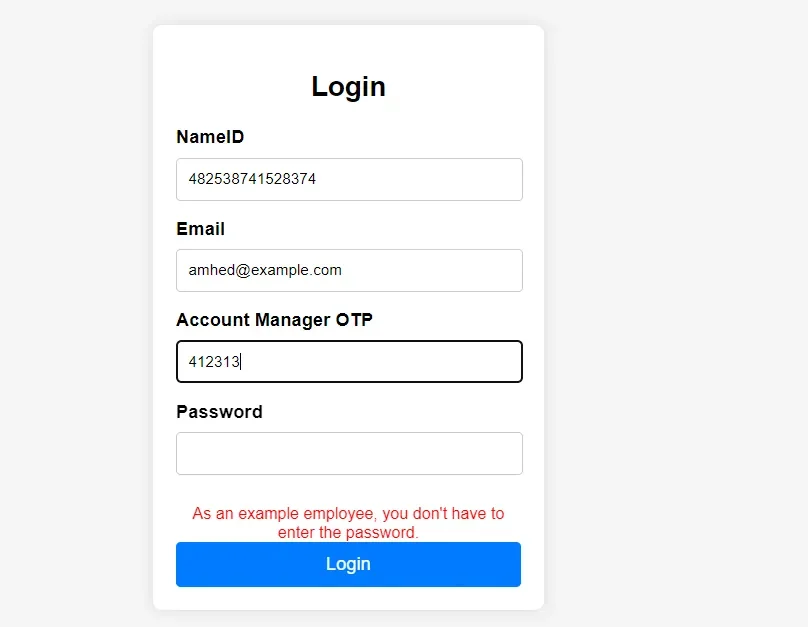
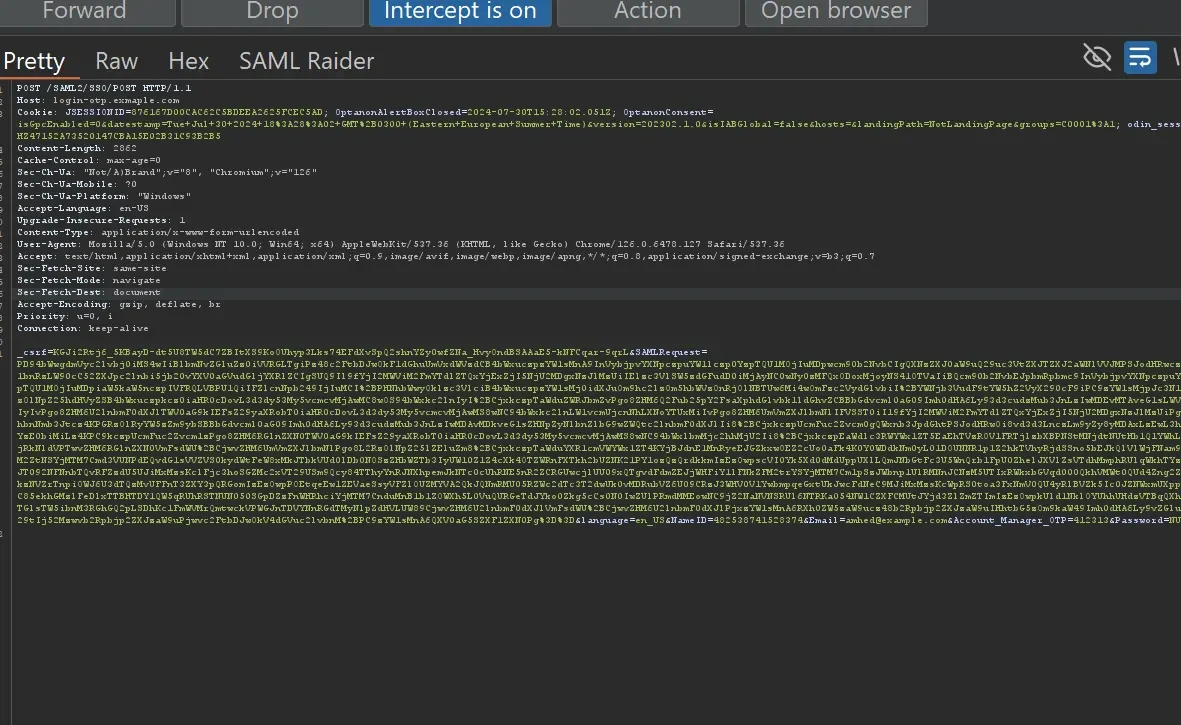
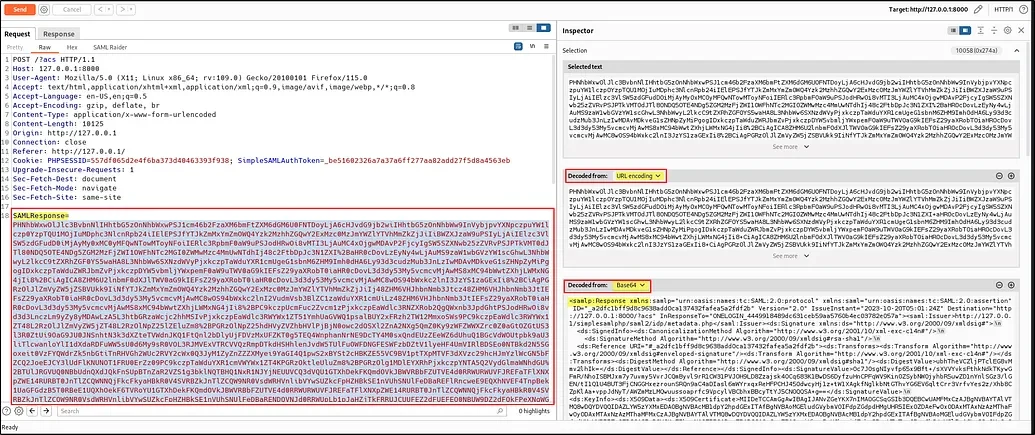
Entering random data and clicking login revealed the request to https://login-otp.example.com/SAML2/SSO/POST carrying a SAMLRequest parameter along with the entered data. Decoding that parameter exposed the full authentication request:
<?xml version="1.0" encoding="UTF-8"?><saml2p:AuthnRequest xmlns:saml2p="urn:oasis:names:tc:SAML:2.0:protocol" AssertionConsumerServiceURL="https://accounts-otp.exmaple.com/authenticated" ID="[redacted]" IssueInstant="2024-07-30T18:12:25.595Z" ProtocolBinding="urn:oasis:names:tc:SAML:2.0:bindings:HTTP-POST" Version="2.0"><saml2:Issuer xmlns:saml2="urn:oasis:names:tc:SAML:2.0:assertion">account_manager_otp_b</saml2:Issuer><ds:Signature xmlns:ds="http://www.w3.org/2000/09/xmldsig#"><ds:SignedInfo><ds:CanonicalizationMethod Algorithm="http://www.w3.org/2001/10/xml-exc-c14n#"/><ds:SignatureMethod Algorithm="http://www.w3.org/2001/04/xmldsig-more#rsa-sha512"/><ds:Reference URI="#[redacted]"><ds:Transforms><ds:Transform Algorithm="http://www.w3.org/2000/09/xmldsig#enveloped-signature"/><ds:Transform Algorithm="http://www.w3.org/2001/10/xml-exc-c14n#"/></ds:Transforms><ds:DigestMethod Algorithm="http://www.w3.org/2001/04/xmlenc#sha256"/><ds:DigestValue>DhHSW4NWQQN9smpO5+L67m5KGoT5ahKpOrUwsb4d6WU=</ds:DigestValue></ds:Reference></ds:SignedInfo><ds:SignatureValue>b0Ivq52trxBFfLp8FvqJ4hY8+F4X7d6m2/[redacted] gwUCOtD/[redacted]+mOcZ3C4+vI lqR4bNWwGLuJiQyKBbMlkEsu9Zt+[redacted]/DVsuNT rQcsxhHfLslUOoTJoPs/[redacted]/tWfdBcXqbcYE6FE3kka [redacted]/PQgOvWczPDj O8KjxL5dEZy+2TVe9FLaP6BBP6dLSNQeg6u77OgpRM/04nmVzSOBG2wXutWV0njjxlmRBppWMx/L [redacted]/[redacted] wn2puoVNYxy/EnADFy7IbJ4fH9p+47B0eIOFgL0J04/[redacted] [redacted]+BkprEOXbgL5X6tFu326ZYtuKQo=</ds:SignatureValue></ds:Signature><saml2p:Extensions><odin:version xmlns:odin="http://odin.vrsn.com">v3</odin:version></saml2p:Extensions></saml2p:AuthnRequest>
The Issuer is account_manager_otp_b. The researcher spent hours decoding the original SAML response and manipulating it.
Exploitation
Step 1: The password field
Nothing was done with the password. Because a company email address was entered, it was of no use.
Step 2: Change the ID
The original ID was [redacted]. Every request has a unique ID, and since a new request was being sent, it needed a new one. A UUID was generated:
import uuidnew_id = str(uuid.uuid4())print(new_id)
Step 3: Remove the signature
All <Signature> elements were stripped from the manipulated response:
for i in evilroot.xpath('//*[local-name(.)=\'Signature\']'): i.getparent().remove(i)
Removing the signature bypassed the validation mechanisms that would otherwise ensure the response's authenticity. This step is the critical one: it tests how the system handles tampered or unsigned responses.
Step 4: Modify attributes
The attributes were rewritten to test how the system handled altered data:
evilroot.xpath('//*[local-name(.)=\'Attribute\' and @Name=\'account_manager_otp\']')[0][0].text = 'new_otp_value'evilroot.xpath('//*[local-name(.)=\'Attribute\' and @Name=\'Email\']')[0][0].text = '[redacted]'evilroot.xpath('//*[local-name(.)=\'NameID\']')[0].text = '[redacted]'

Doing this by hand was described as more efficient, so the process was automated with the saml_injector.py script linked above. It decodes the SAMLResponse from base64, parses the XML, removes the original digital signature, modifies the specified attributes (OTP, email and user identifier), re-encodes to base64 and prints the new value. The attributes can be customised per target.
Step 5: Replay the tampered response
The script was run in Python 3 with the original SAMLResponse as the argument:
python3 script.py <OriginalSAMLResponse>
The parameter value in the request was replaced with the script's output and the request forwarded. The admin account had been created.
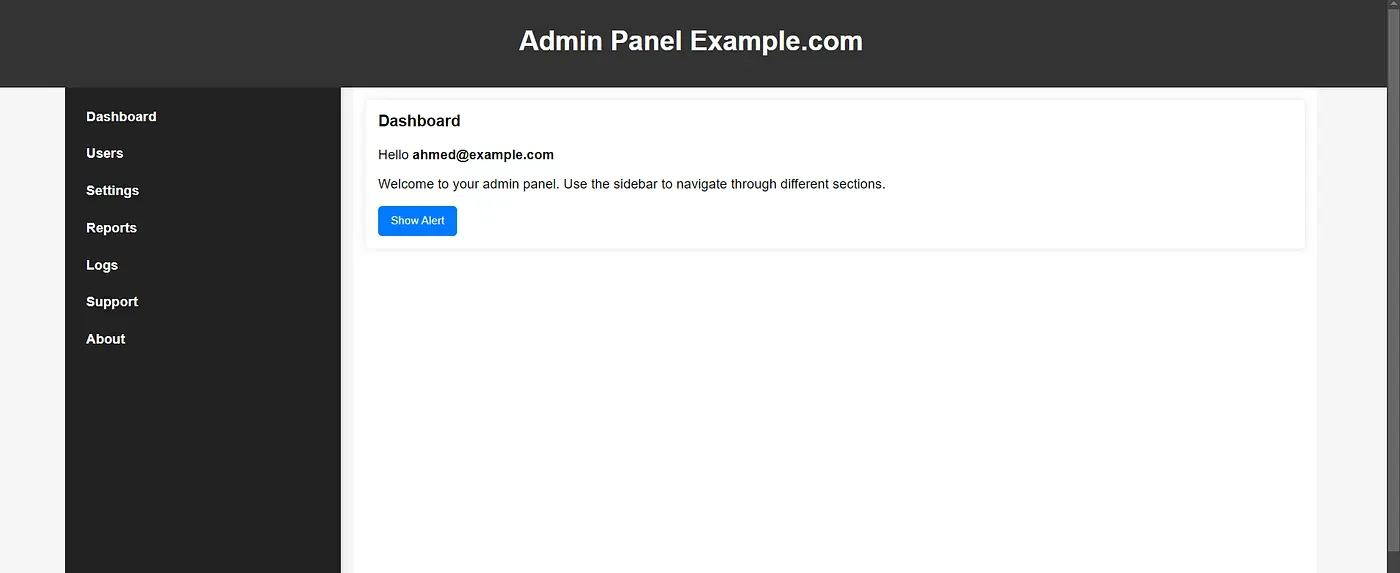

A detailed report with a proof of concept was submitted, and after a week the researcher was rewarded.
Root cause
The developer mistake was not implementing proper signature validation and verification for SAML responses. Because the SP accepted a response whose signature had been removed entirely, an attacker could modify the response, including changing IDs and attributes and deleting signature elements, and have it accepted.
Impact
The failure allows an attacker to modify the SAML response, including altering IDs and attributes and removing signature elements, enabling unauthorised access or privilege escalation. In this case the result was creation of an admin account.
Fix
Signature validation must be enforced rigorously. The SP must verify the signature against the IdP's public key and must not accept altered or unsigned responses, so that the integrity and authenticity of every SAML response are maintained.

Variants to test
- Strip the signature entirely. Remove every
<ds:Signature>element and replay. A positive result is the SP accepting the response and issuing a session. - Change the ID. Generate a fresh UUID for the response ID and replay. A positive result is acceptance without any signature error, showing the ID is not bound to a verified signature.
- Rewrite identity attributes. Change
Email,NameIDand any role or OTP attributes to values of your choosing. A positive result is a session or account reflecting the new values, especially an administrative one. - Replay an old response. Take a previously valid response and resend it later. A positive result is acceptance, which points at missing
InResponseTo,NotOnOrAfteror audience checks. - Signature wrapping. Move the signed assertion and insert a modified one alongside it. A positive result is the SP validating the original signature while consuming the injected assertion.
- Comment and encoding tricks. Insert XML comments or alter encoding inside attribute values. A positive result is the parser reading a different value than the one that was signed.
Each of these should be tried against a test account first, and any acceptance of an unsigned or altered response treated as a finding.
What happened, in plain words
A security researcher found a way to log into a company's system as an administrator without knowing any password. The system used a login technology called SAML, which is a way for one website to trust another website's confirmation that "yes, this person is who they say they are". The confirmation arrives as a small package of data, and that package is supposed to carry a tamper-proof seal (a digital signature). The researcher discovered that the system did not properly validate the seal. So they opened the package, changed the email and user identifier inside, deleted the seal entirely, and sent it back. The system accepted it and created an administrator account for them.
This article walks through the whole thing from zero: what SAML is, what the data package looks like, how the researcher found the login page, and every change they made to the package, with each piece of code explained line by line.
Background: what SAML is and why it exists
Single Sign-On in everyday terms
Imagine a large shopping centre with many shops inside. Instead of showing your ID at every single shop, you show it once at the entrance, get a wristband, and every shop inside trusts the wristband. That is Single Sign-On (SSO): you log in once, and many separate services accept that you are already logged in.
The article gives a familiar example: if you are logged into facebook.com, you do not have to type your password again to use messenger.com. Facebook has already confirmed who you are, and Messenger trusts that confirmation.
The two parties: IdP and SP
SAML (Security Assertion Markup Language) is the set of rules that makes this work. Two parties are involved:
- The Identity Provider (IdP) is the service that actually checks your password. Think of it as the security desk at the shopping centre entrance. It is the one that knows your credentials.
- The Service Provider (SP) is the application you want to use. Think of it as a shop inside the centre. It does not check your password itself; it asks the security desk to confirm you.
When you try to use the SP, the SP asks the IdP for authentication (proof of who you are) and authorisation (what you are allowed to do). The IdP sends back a package of data in a format called XML, which is just text with tags around it, a bit like a very structured letter.
Both ends must agree on the exact configuration for this exchange to work. If the IdP and the SP disagree about the format or the keys, the login fails.
The diagram shows the relationship between the identity provider and the service provider during a SAML exchange.
What is inside a SAML response
Before attacking anything, you need to know what the data package contains, because every later step depends on it. Here is the breakdown.
- XML structure: the whole thing is an XML document. It starts with a line declaring the XML version and character encoding, and the rest sits inside a pair of
<samlp:Response>tags. Tags are like labelled envelopes inside envelopes. - Response attributes: these are labels on the outer envelope:
ID: a unique identifier for this particular response.Version: which version of the SAML rules is being used, for example 2.0.IssueInstant: the date and time the response was created.Destination: the address of the intended recipient, usually the SP.InResponseTo: the ID of the request this response is answering, so the two can be matched up.
- Issuer: the
<saml:Issuer>element names the entity that created the response, normally the IdP. This matters because the SP needs to know whose signature to expect. - Status: the
<samlp:Status>element says how things went. Inside it,<samlp:StatusCode>can hold values such asSuccessorRequester(the latter meaning an error). - Assertions: these are the actual statements about the user, like sentences in a letter. There are two main kinds:
- Authentication assertion (
saml:AuthnStatement): says when and how the user authenticated. - Attribute assertion (
saml:AttributeStatement): carries facts about the user, such as username or email address.
- Authentication assertion (
- Signature: the
<ds:Signature>element holds a cryptographic signature made with the IdP's private key. This is the tamper-proof seal. A private key is a secret piece of data that only the IdP has; a public key is the matching piece that anyone can use to check the seal. - Conditions: the
<saml:Conditions>element sets limits on how long the assertion is valid, usingNotBefore(the earliest time it can be used) andNotOnOrAfter(the latest time it can be used). - Subject: the
<saml:Subject>element identifies the user. Inside it,<saml:NameID>holds a unique identifier for that user. - Audience restriction: the
<saml:AudienceRestriction>element says who the assertion is meant for, usually the SP's entity ID. This helps stop someone from taking a valid assertion and replaying it against a different service. - Conditions (again): the response defines the conditions under which the assertion is valid, such as the time window and the audience.
- Attribute statements: if present, the
<saml:AttributeStatement>section contains the user's attributes and their values. The SP uses these to decide what access to grant or to fill in the user's profile. - Signature verification: to validate the response, the SP must check the signature against the IdP's public key. This is how the SP confirms the response has not been tampered with.
Here is a simplified example of a SAML identity assertion. It communicates the user's identity through the username:
<samlp:Response xmlns:samlp="urn:oasis:names:tc:SAML:2.0:protocol" ID="_abc123" Version="2.0" IssueInstant="2023–10–18T14:30:00Z"> <saml:Issuer xmlns:saml="urn:oasis:names:tc:SAML:2.0:assertion">https://idp.example.com</saml:Issuer> <samlp:Status> <samlp:StatusCode Value="urn:oasis:names:tc:SAML:2.0:status:Success"/> </samlp:Status> <saml:Assertion xmlns:saml="urn:oasis:names:tc:SAML:2.0:assertion" ID="_def456" IssueInstant="2023–10–18T14:30:00Z"> <saml:AttributeStatement> <saml:Attribute Name="user"> <saml:AttributeValue>[redacted]</saml:AttributeValue> </saml:Attribute> <saml:Attribute Name="name"> <saml:AttributeValue>John Doe</saml:AttributeValue> </saml:Attribute> </saml:AttributeStatement> <ds:Signature xmlns:ds="http://www.w3.org/2000/09/xmldsig#"> <! - Signature data goes here → </ds:Signature> </saml:Assertion> </samlp:Response>
Line by line, in plain words:
<samlp:Response ...>opens the outer envelope. Thexmlns:samlppart is a namespace declaration, which is just a way of saying "these tags belong to the SAML protocol vocabulary".ID="_abc123"gives this response a unique name.Version="2.0"says which SAML version is in use.IssueInstantrecords when it was created.<saml:Issuer ...>https://idp.example.com</saml:Issuer>says which identity provider created this response. The SP will use this to know whose public key to check the signature against.<samlp:Status>and<samlp:StatusCode Value="...Success"/>say the authentication succeeded.<saml:Assertion ...>opens the block of statements about the user. It has its ownIDandIssueInstant.<saml:AttributeStatement>opens the list of facts about the user.<saml:Attribute Name="user">with<saml:AttributeValue>[redacted]</saml:AttributeValue>says the user's identifier is that email address.<saml:Attribute Name="name">with<saml:AttributeValue>John Doe</saml:AttributeValue>says the user's display name is John Doe.<ds:Signature ...>is where the tamper-proof seal would go. In this simplified example it is just a placeholder comment.- The closing tags (
</saml:AttributeStatement>,</saml:Assertion>,</samlp:Response>) close each envelope in the reverse order they were opened.
In real deployments, these responses are usually encoded in base64 before transmission. Base64 is a way of turning any data into plain letters and digits so it can travel safely through systems that only expect text. It is not encryption; anyone can decode it.
Finding the target
The researcher started by collecting subdomains of the target, which they refer to as example.com. A subdomain is a smaller address under a main domain, like shop.example.com under example.com. They used several methods: subdomain enumeration (systematically trying or discovering subdomain names), reverse DNS lookup (asking which name belongs to a given address), and Google dorks (clever search queries that surface pages not meant to be found easily). This led them to a login page at login-otp.example.com/login.
The first thing to do on any login page is read the source code for leaks or useful information. Source code is the text a browser receives to build the page; you can view it in the browser with a right-click and "View page source". Here there was not much, except one detail: email addresses ending in the company's own domain name were getting special treatment. That is a hint that the system treats company-domain email addresses differently.
The researcher then entered random data and clicked login, watching the request the browser sent. A request is the message your browser sends to a server asking for something; you can see these in the browser's developer tools, on the Network tab. The request went to https://login-otp.example.com/SAML2/SSO/POST and carried a SAMLRequest parameter along with the entered data. A parameter is a named value attached to a request, like a field on a form.
Decoding that parameter revealed the full authentication request:
<?xml version="1.0" encoding="UTF-8"?><saml2p:AuthnRequest xmlns:saml2p="urn:oasis:names:tc:SAML:2.0:protocol" AssertionConsumerServiceURL="https://accounts-otp.exmaple.com/authenticated" ID="[redacted]" IssueInstant="2024-07-30T18:12:25.595Z" ProtocolBinding="urn:oasis:names:tc:SAML:2.0:bindings:HTTP-POST" Version="2.0"><saml2:Issuer xmlns:saml2="urn:oasis:names:tc:SAML:2.0:assertion">account_manager_otp_b</saml2:Issuer><ds:Signature xmlns:ds="http://www.w3.org/2000/09/xmldsig#"><ds:SignedInfo><ds:CanonicalizationMethod Algorithm="http://www.w3.org/2001/10/xml-exc-c14n#"/><ds:SignatureMethod Algorithm="http://www.w3.org/2001/04/xmldsig-more#rsa-sha512"/><ds:Reference URI="#[redacted]"><ds:Transforms><ds:Transform Algorithm="http://www.w3.org/2000/09/xmldsig#enveloped-signature"/><ds:Transform Algorithm="http://www.w3.org/2001/10/xml-exc-c14n#"/></ds:Transforms><ds:DigestMethod Algorithm="http://www.w3.org/2001/04/xmlenc#sha256"/><ds:DigestValue>DhHSW4NWQQN9smpO5+L67m5KGoT5ahKpOrUwsb4d6WU=</ds:DigestValue></ds:Reference></ds:SignedInfo><ds:SignatureValue>b0Ivq52trxBFfLp8FvqJ4hY8+F4X7d6m2/[redacted] gwUCOtD/[redacted]+mOcZ3C4+vI lqR4bNWwGLuJiQyKBbMlkEsu9Zt+[redacted]/DVsuNT rQcsxhHfLslUOoTJoPs/[redacted]/tWfdBcXqbcYE6FE3kka [redacted]/PQgOvWczPDj O8KjxL5dEZy+2TVe9FLaP6BBP6dLSNQeg6u77OgpRM/04nmVzSOBG2wXutWV0njjxlmRBppWMx/L [redacted]/[redacted] wn2puoVNYxy/EnADFy7IbJ4fH9p+47B0eIOFgL0J04/[redacted] [redacted]+BkprEOXbgL5X6tFu326ZYtuKQo=</ds:SignatureValue></ds:Signature><saml2p:Extensions><odin:version xmlns:odin="http://odin.vrsn.com">v3</odin:version></saml2p:Extensions></saml2p:AuthnRequest>
Line by line, in plain words:
<?xml version="1.0" encoding="UTF-8"?>is the standard opening line of an XML document, saying which XML version and character encoding are used.<saml2p:AuthnRequest ...>opens the request. This is the message the SP sends to the IdP asking it to authenticate a user.AssertionConsumerServiceURL="https://accounts-otp.exmaple.com/authenticated"is the address the IdP should send the answer back to.ID="[redacted]"is the unique name of this request.IssueInstantis when it was created.ProtocolBindingsays how the answer should be delivered (here, by HTTP POST, which is a normal form submission).Version="2.0"is the SAML version.<saml2:Issuer ...>account_manager_otp_b</saml2:Issuer>names the entity that issued this request.<ds:Signature ...>opens the digital signature block. Inside it:<ds:SignedInfo>lists what is being signed and how.<ds:CanonicalizationMethod .../>says how the XML was normalised before signing, so both sides agree on the exact bytes.<ds:SignatureMethod .../>names the algorithm used to make the signature (here RSA with SHA-512).<ds:Reference URI="#[redacted]">says the signature covers the element whose ID is[redacted], which is the request itself.<ds:Transforms>lists the transformations applied before signing, such as the enveloped-signature transform (which removes the signature element itself from what is hashed) and canonicalisation.<ds:DigestMethod .../>names the hash algorithm used to summarise the content (SHA-256).<ds:DigestValue>...</ds:DigestValue>is the resulting summary, a short fingerprint of the content.
<ds:SignatureValue>...</ds:SignatureValue>is the actual signature, a long block of characters. The sequences are just line-break characters embedded in the text.<saml2p:Extensions>and<odin:version ...>v3</odin:version>carry an extra vendor-specific value inside the request.- The closing tags close each block in reverse order.
The researcher spent hours decoding the original SAML response and manipulating it.
The exploitation, step by step
Step 1: The password field
Nothing was done with the password. Because a company email address had been entered, the password was of no use. The point of the attack is not to guess a password; it is to forge the confirmation that comes after the password step.
Step 2: Change the ID
The original ID was [redacted]. Every request has a unique ID, and since a new request was being sent, it needed a new one. A UUID was generated. A UUID is simply a long random-looking identifier, designed so that two of them are practically never the same.
import uuidnew_id = str(uuid.uuid4())print(new_id)
Line by line:
import uuidloads Python's built-inuuidmodule, a toolbox for generating unique identifiers.new_id = str(uuid.uuid4())asks that module for a version 4 UUID, which is generated from random data, and converts it to a string of text.print(new_id)displays the new identifier on screen so it can be copied into the tampered response.
By generating a fresh one, the researcher tests whether that binding is actually enforced, and avoids reusing an identifier that might already be tracked.
Step 3: Remove the signature
All <Signature> elements were stripped from the manipulated response:
for i in evilroot.xpath('//*[local-name(.)=\'Signature\']'): i.getparent().remove(i)
Line by line:
for i in ...:starts a loop over every matching element.evilroot.xpath(...)searches the XML document, held in a variable calledevilroot, using XPath, which is a query language for picking elements out of XML.//*means "any element anywhere in the document".[local-name(.)='Signature']filters to elements whose local name isSignature, ignoring any namespace prefix. So the query finds every signature element in the document.i.getparent().remove(i)takes each found element, goes up to its parent (the element that contains it), and removes the signature from that parent.
Why this step: the signature is the tamper-proof seal. If the SP checked it, any change to the content would make the check fail. Removing the signature entirely tests whether the SP insists on a valid seal or simply accepts a package with no seal at all. This is the critical step: it tests how the system handles tampered or unsigned responses.
Step 4: Modify the attributes
The attributes were rewritten to test how the system handled altered data:
evilroot.xpath('//*[local-name(.)=\'Attribute\' and @Name=\'account_manager_otp\']')[0][0].text = 'new_otp_value'evilroot.xpath('//*[local-name(.)=\'Attribute\' and @Name=\'Email\']')[0][0].text = '[redacted]'evilroot.xpath('//*[local-name(.)=\'NameID\']')[0].text = '[redacted]'
Line by line:
- The first statement finds the element whose local name is
Attributeand whoseNameattribute equalsaccount_manager_otp. The[0]picks the first match, and the second[0]picks its first child, which is the value element. Setting.text = 'new_otp_value'replaces that value with a new one. This is the one-time-password attribute; an OTP is a short code, often sent by SMS or email, used as a second proof of identity. - The second statement does the same for the
Emailattribute, setting it to[redacted]. - The third statement finds the
NameIDelement, which is the unique identifier for the user, and sets its text to[redacted]as well.
Why this step: the whole point is to see whether the SP trusts the values inside the package. If it does, changing the email and the user identifier should make the SP treat the attacker as that user.
Doing this by hand was described as more efficient, but the process was automated anyway with a script called saml_injector.py, published at https://github.com/0xxnum/saml_injector/blob/main/saml_injector.py. The script takes a SAMLResponse as a command-line argument, decodes it from base64, parses the XML, removes the original digital signature, modifies the specified attributes (OTP, email and user identifier in this case), re-encodes the result to base64 and prints the new value. The attributes can be customised for each target.
Step 5: Replay the tampered response
The script was run in Python 3 with the original SAMLResponse as the argument:
python3 script.py <OriginalSAMLResponse>
Line by line:
python3runs the Python 3 interpreter, the program that reads and executes Python code.script.pyis the name of the script file to run.<OriginalSAMLResponse>is a placeholder for the original base64-encoded SAML response, passed to the script as an argument. The angle brackets are a convention meaning "put your own value here"; they are not typed literally.
The parameter value in the request was then replaced with the script's output, and the request was forwarded. Forwarding means resending the modified request, typically by intercepting it in a tool that lets you edit requests before they reach the server. The admin account had been created.
A detailed report with a proof of concept was submitted, and after a week the researcher was rewarded. A proof of concept is a minimal demonstration that the problem is real, usually screenshots or a recording showing the attack working.
Why it worked
The developer mistake was not implementing proper signature validation and verification for SAML responses. Because the SP accepted a response whose signature had been removed entirely, an attacker could modify the response, including changing IDs and attributes and deleting signature elements, and have it accepted.
What an attacker could do with this
The failure allows an attacker to modify the SAML response, including altering IDs and attributes and removing signature elements, enabling unauthorised access or privilege escalation. Privilege escalation means going from a low level of access to a higher one, such as from ordinary user to administrator. In this case the result was creation of an admin account.
How to fix it
Signature validation must be enforced rigorously. The SP must verify the signature against the IdP's public key and must not accept altered or unsigned responses, so that the integrity and authenticity of every SAML response are maintained. Integrity means the data has not been changed; authenticity means it really came from the IdP.
Other things to try
These are variations on the same idea, useful when testing a similar system:
- Strip the signature entirely. Remove every
<ds:Signature>element and replay. A positive result is the SP accepting the response and issuing a session. A session is the state of being logged in, usually represented by a cookie, which is a small piece of data the browser stores and sends back with each request. - Change the ID. Generate a fresh UUID for the response ID and replay. A positive result is acceptance without any signature error, showing the ID is not bound to a verified signature.
- Rewrite identity attributes. Change
Email,NameIDand any role or OTP attributes to values of your choosing. A positive result is a session or account reflecting the new values, especially an administrative one. - Replay an old response. Take a previously valid response and resend it later. A positive result is acceptance, which points at missing
InResponseTo,NotOnOrAfteror audience checks. - Signature wrapping. Move the signed assertion and insert a modified one alongside it. A positive result is the SP validating the original signature while consuming the injected assertion.
- Comment and encoding tricks. Insert XML comments or alter encoding inside attribute values. A positive result is the parser reading a different value than the one that was signed.
Each of these should be tried against a test account first, and any acceptance of an unsigned or altered response treated as a finding.
Glossary
- SAML (Security Assertion Markup Language): a set of rules that lets one service confirm a user's identity to another service, so the user logs in only once.
- Single Sign-On (SSO): logging in once and being trusted by several separate services.
- Identity Provider (IdP): the service that actually checks the user's credentials and vouches for them.
- Service Provider (SP): the application the user wants to use, which trusts the IdP's confirmation instead of checking the password itself.
- Authentication: proving who you are.
- Authorisation: deciding what you are allowed to do once you are identified.
- XML: a text format that uses tags to structure data, like nested labelled envelopes.
- Base64: an encoding that turns any data into plain letters and digits so it can travel as text; it is not encryption and anyone can decode it.
- Assertion: a statement inside a SAML response about the user, such as who they are or how they logged in.
- Attribute: a named fact about the user, such as an email address or a role.
- NameID: the element that holds the unique identifier for the user in a SAML assertion.
- Signature (digital signature): a cryptographic seal that proves data has not been changed and came from the expected party.
- Private key: a secret piece of data used to create a signature; only its owner has it.
- Public key: the matching piece of data that anyone can use to check a signature made with the private key.
- Signature verification: checking a signature against the expected public key to confirm the data is genuine and unaltered.
- Integrity: the property that data has not been modified.
- Authenticity: the property that data really came from the party it claims to come from.
- UUID: a long random-looking identifier designed to be practically unique.
- XPath: a query language for selecting elements out of an XML document.
- OTP (one-time password): a short code, often sent by SMS or email, used as a second proof of identity.
- Subdomain: a smaller address under a main domain, such as
login.example.comunderexample.com. - Subdomain enumeration: systematically discovering the subdomains that exist for a domain.
- Reverse DNS lookup: asking which name belongs to a given network address.
- Google dorks: carefully crafted search queries that surface pages not meant to be found easily.
- Source code: the text a browser receives to build a web page, viewable in the browser.
- Request: the message a browser sends to a server asking for something.
- Parameter: a named value attached to a request, like a field on a form.
- HTTP POST: a way of sending data to a server as part of a request, commonly used for forms and logins.
- Cookie: a small piece of data a browser stores and sends back with requests, often used to represent a logged-in session.
- Session: the state of being logged in on a service.
- Proof of concept: a minimal demonstration that a problem is real, such as screenshots or a recording.
- Privilege escalation: gaining a higher level of access than you are entitled to, such as becoming an administrator.
- Bounty: a reward paid by an organisation to someone who reports a security problem to it.
- Replay: resending a previously captured request or response.
- Signature wrapping: an attack that moves a valid signed element and inserts a modified one alongside it, hoping the system checks the original but uses the injected one.

