Setting Up Gitrob and using it to find Leaking Repository of an Employee in a hackerone private program.
A public GitHub repository belonging to an employee of a private HackerOne program contained a shell configuration file with an Okta API key and PostgreSQL commands referencing AWS instances. The author could potentially use the Okta key to obtain single sign-on access to the employee's accounts, including the program's.
 Published on medium.com
The only reason I am blogging about this finding is to help guys who are facing difficulty in setting up Gitrob since it has been rewritten in Go and not many people out there are familiar with go.So, lets begin:
The full write-up lives on its author's site
It belongs to its author, so we link to it rather than copy it. The other two tabs are our own rewrites, checked against it.
Context
This is a write-up of a finding made during a private HackerOne program, referred to throughout as abc.com. The target is not a web application endpoint but the public GitHub footprint of the company's staff: repositories, and in this case a personal dotfiles repository containing a shell configuration file. The feature that normally exists here is a developer's personal GitHub account, where configuration files such as .zshrc are published for convenience. Nothing in that feature is meant to hold production credentials, but shell configuration files routinely do.
The researcher's stated reason for publishing is narrower than the finding itself: to help people who struggle to install Gitrob, which was rewritten in Go, a language many people are unfamiliar with. The tooling section is therefore long, and I have kept it in full.
Setup
The only precondition described is a private program invitation on HackerOne. The tooling is Gitrob, run from source on a Linux machine, with a GitHub personal access token. The Go package used is the Linux amd64 build of Go 1.11.5.
Finding it
The researcher began with manual reconnaissance on github.com, searching for repositories linked to the program, before adding automation. The general GitHub search is shown below.

Searching Github[OSINT]
Gitrob was chosen to automate the search for sensitive content in repositories. Because the tool is written in Go, the first task was installing Go. The package was downloaded from the official install page:
https://golang.org/doc/install?download=go1.11.5.linux-amd64.tar.gz
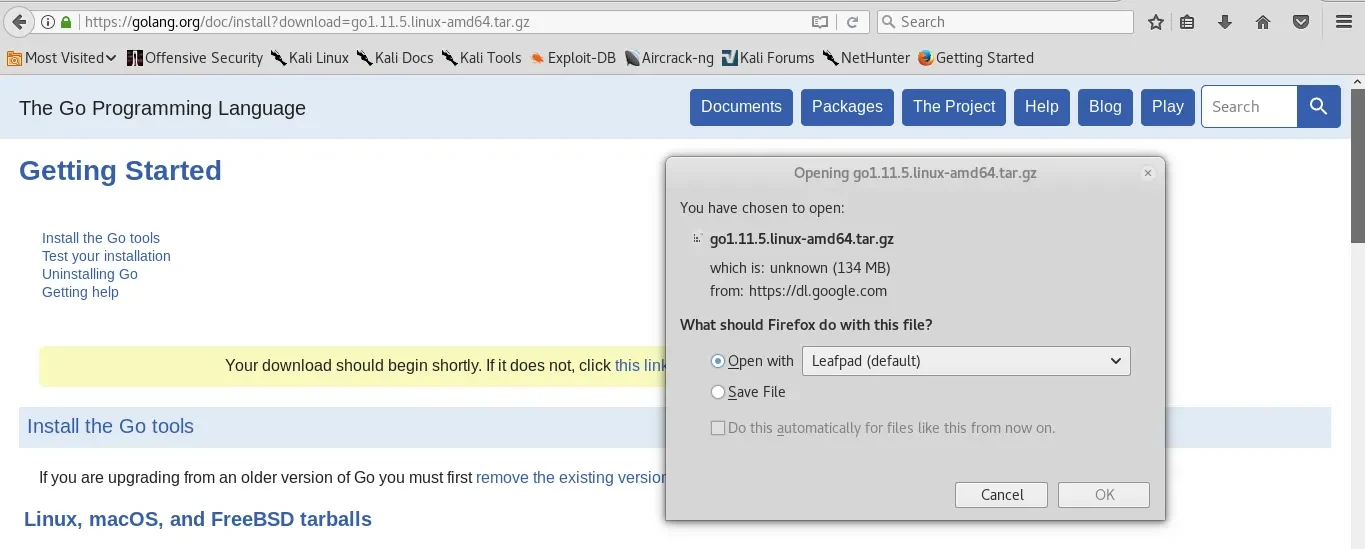
Go package for Linux
Step 1: extract Go into /usr/local
The archive was extracted into /usr/local under the root directory:
tar -C /usr/local -xvzf go1.11.5.linux-amd64.tar.gz
Step 2: put the go binary on the PATH persistently
The go executable lives in /usr/local/go/bin, and that directory has to be in $PATH for go get and go run to work from any shell. The researcher notes that running export PATH=$PATH:/../../../path/to/executable directly in a shell does not survive opening a new shell, so the change was made system-wide in /etc/profile:
1. cd /etc
2. nano profile
3. Add export PATH=$PATH:/usr/local/go/bin at the end of the file
4. ctrl+x the save the changes.
With that done, go ran from the command line.
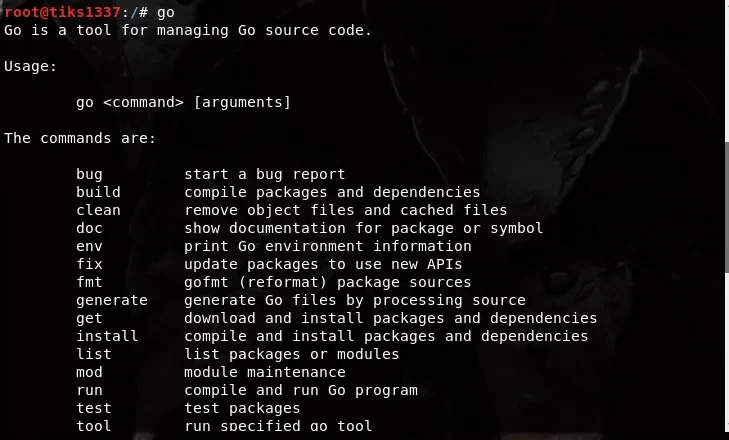
Running Go in bash
Step 3: set GOPATH and fetch Gitrob
The researcher explains that GOPATH is the default working directory of Go and is set automatically to $HOME/go for versions 1.7 to 1.11. If that does not work, the fallback is to create the directory tree by hand and fetch the repository with go get:
1. mkdir $HOME/go
2.cd ~/go
3. mkdir bin src
4.nano /etc/profile
5. export GOPATH=$HOME/go
6. export PATH=$PATH:/usr/local/go/bin:$GOPATH/bin
7. Save changes made to the profile with source /etc/profile
8. go get github.com/michenriksen/gitrob
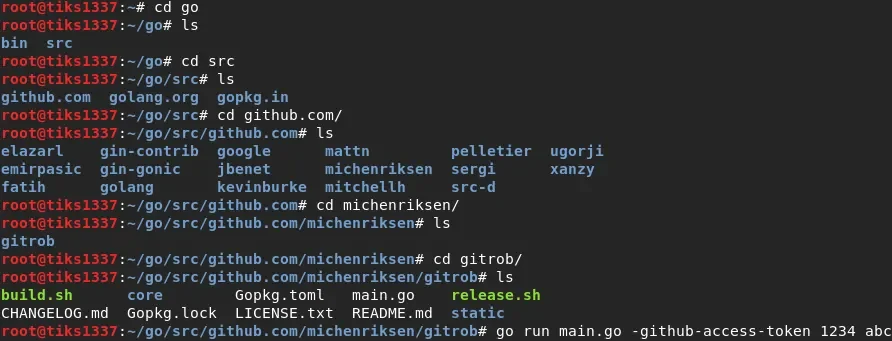
Step 4: run Gitrob against the organisation
Gitrob was then run from source with a GitHub access token and the organisation name:
go run main.go -github-access-token 1234 abc
1234 stands for the researcher's own GitHub access token, generated following GitHub's documentation on creating a personal access token for the command line. abc is the name given to the private program's organisation. After a few minutes Gitrob returned a large number of findings, and one of them stood out: a shell configuration file.

shell config file
Exploitation
Step 1: confirm the author is an employee
Before treating the file as a company leak, the researcher checked whether the repository's author actually worked for the company. Searching the author's name on LinkedIn showed the person was a software developer at that company. This is the step that turns a random personal repository into a finding against the program.
Step 2: read the .zshrc in the dotfiles folder
Opening the .zshrc file in the dotfiles folder revealed multiple Psql commands containing the names of some AWS instances, and one Okta API key. The researcher's assessment was that the Okta key could give SSO access to all of that person's accounts, which would include abc as well. That last part is hedged in the original with "thought so", and it is worth keeping that hedge: the report does not show the key being used to authenticate.
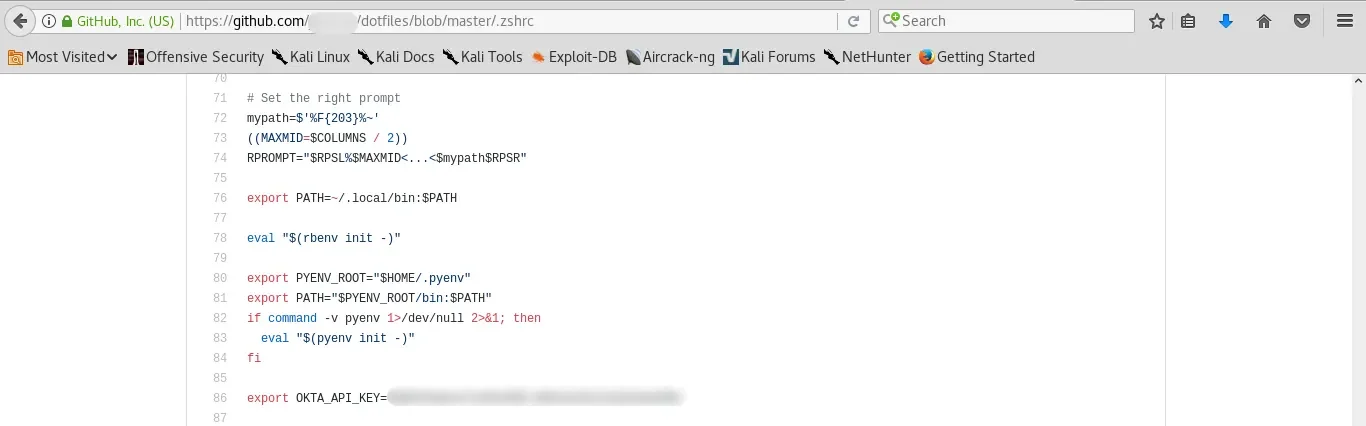
Okta Api Key Leakage
The PostgreSQL commands for the AWS instances are shown next.
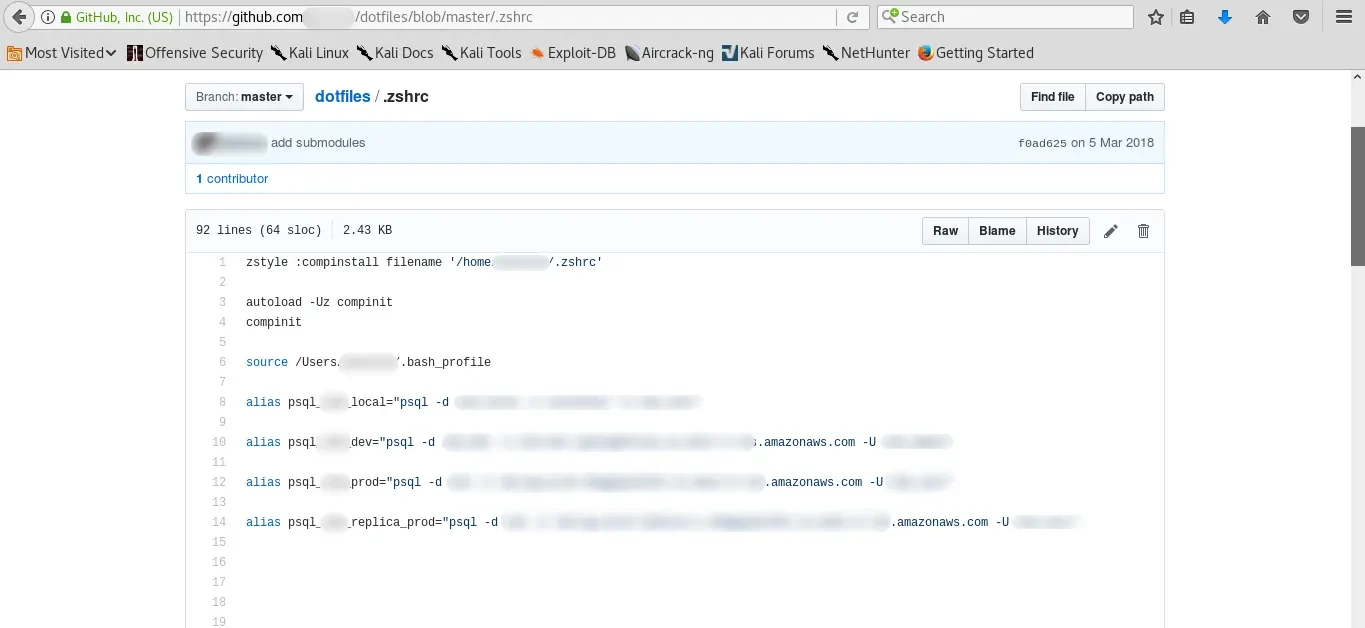
Psql commands in shell config file
Root cause
The mistake is publishing a personal shell configuration file to a public repository while it contains live credentials and internal host references. The .zshrc in a dotfiles repository is meant to be shared and copied between machines. Nothing in the report suggests a flaw in GitHub or in the program's own systems; the exposure is the developer's public repository. Why the existing defences did not stop it is not described in the report.
Impact
The exposed material is an Okta API key and PostgreSQL commands naming AWS instances. In the researcher's reading, the Okta key would allow SSO into all of the employee's accounts, including the program's. Both are stated as what the researcher believed the material allowed, not as something demonstrated. The exposure is limited to whatever that one employee's accounts and instances could reach.
Fix
The program took the repository down. The report does not describe any credential rotation, so the only remediation documented is removal of the public repository.
Variants to test
- Run Gitrob against the program's GitHub organisation with a personal access token, as above. A positive result is a hit on a shell configuration file,
.env, or similar file in a repository owned by a current employee. - Search GitHub manually for the organisation name and for employee names, then check personal
dotfilesrepositories. A positive result is a.zshrc,.bashrcor profile file containing credentials or internal hostnames. - For each candidate repository, confirm the author's employment through LinkedIn or similar before reporting. A positive result is a match between the repository author and the company.
- Read the configuration files for cloud and identity credentials: Okta keys, AWS instance names, database commands. A positive result is a key that authenticates, which the report here does not show.
At last the researcher reported the issue to the private program. The repository was taken down, but the finding was not eligible for a bounty; the reason is given in the program's response.

Hackerone response
What happened, in plain words
A security researcher received an invitation to a private bug bounty program on HackerOne. A bug bounty program is a deal offered by a company: if you find a security problem in their systems and report it responsibly, they may pay you a reward (a "bounty"). A private program means you can only take part if you are invited, and you are not allowed to talk publicly about what you find until the company agrees.
The researcher did not attack a website. Instead, he looked at what the company's employees had published on GitHub. GitHub is a website where programmers store and share code. Many programmers also keep their personal setup files there, in a public repository (a public folder of files that anyone can read). One employee had published a personal setup file that contained an Okta API key and database commands naming some AWS instances. Okta is a service companies use to manage logins, and an API key is a secret string that lets a program act on your behalf. The researcher believed the Okta key could be used to log in to all of that person's accounts.
The researcher reported it. The company deleted the repository, but the report was not eligible for a bounty. The reason is shown in the company's reply, which appears near the end of this article.
The researcher wrote this up mainly to help people who have trouble installing the tool he used, Gitrob, because it was rewritten in a programming language called Go that many people do not know. So a large part of this article is a step by step installation guide, and I have kept all of it.
Before you start
The only thing the researcher says he needed was the private invitation on HackerOne. Everything else is done on a normal Linux computer. Linux is an operating system, like Windows or macOS, but one that programmers often use. If you have never used a terminal (a text window where you type commands instead of clicking), that is the main new idea here: you type a command, press Enter, and the computer runs it.
The tool is Gitrob. Gitrob is a program that searches GitHub for files that look like they might contain secrets, such as passwords, keys or configuration files. It was later rewritten in Go. Go is a language created by Google; programs written in Go have to be "built" (compiled) on your machine before you can run them, which is why the installation steps below exist.
To use Gitrob you also need a GitHub personal access token. A token is a long random string that acts like a password for a program. Instead of typing your GitHub password into a tool, you create a token that the tool can use, and you can cancel the token later if you want. The researcher used the Linux 64-bit build of Go version 1.11.5.
Finding it
The researcher started by hand. He went to github.com and searched for repositories connected to the program. He calls the program abc.com throughout so the real company is not named. Searching GitHub by hand is sometimes called OSINT, which stands for Open Source Intelligence: gathering information from public sources. The screenshot below shows that manual search.
Searching Github[OSINT]
Manual searching works, but it is slow. So the next step was to add automation: let a program do the searching. The tool he chose was Gitrob. Because Gitrob is written in Go, the first job was to install Go itself. He downloaded the Go package from the official Go install page:
https://golang.org/doc/install?download=go1.11.5.linux-amd64.tar.gz
That address points to a compressed archive file (a single file that contains many files, like a zip). linux-amd64 means it is built for 64-bit Linux machines. The screenshot below shows the download.
Go package for Linux
Step 1: extract Go into /usr/local
After downloading, he unpacked the archive into the /usr/local folder. On Linux, folders are written with slashes, and /usr/local is a standard place for software installed by hand rather than by the system's package manager. The command was:
tar -C /usr/local -xvzf go1.11.5.linux-amd64.tar.gz
Line by line:
taris the program that handles archive files.-C /usr/localtells it to change into the/usr/localfolder before doing anything, so the files land there.-xmeans extract (unpack).-vmeans verbose: print each file name as it is unpacked, so you can see progress.-zmeans the archive is compressed with gzip, so it has to be decompressed first.-fmeans the next word is the file name of the archive.go1.11.5.linux-amd64.tar.gzis the archive that was downloaded.
Step 2: put the go binary on the PATH persistently
After unpacking, the go program (called a binary, meaning a ready-to-run program file) sits in /usr/local/go/bin. To run go from any folder, that folder has to be listed in an environment variable called $PATH. An environment variable is a named setting the shell (the program that reads your typed commands) keeps in memory. $PATH is a list of folders the shell searches, in order, whenever you type a command name. If the folder holding go is not in that list, typing go gives "command not found".
The researcher points out a common trap: if you run export PATH=$PATH:/../../../path/to/executable directly in a shell, it only lasts for that shell session. Close the window, open a new one, and the change is gone. To make it permanent for all users, he edited a system-wide settings file, /etc/profile, which the shell reads every time it starts:
1. cd /etc
2. nano profile
3. Add export PATH=$PATH:/usr/local/go/bin at the end of the file
4. ctrl+x the save the changes.
Line by line:
cd /etcchanges the current folder to/etc, where system configuration files live.cdmeans change directory.nano profileopens the file namedprofilein a text editor called nano. Nano is a simple editor that runs inside the terminal.- This line is the actual change: it appends
export PATH=$PATH:/usr/local/go/binto the end of the file.exportmakes the variable available to programs you launch, and$PATHmeans "the current value of PATH", so the new folder is added to the end of the existing list rather than replacing it. ctrl+xexits nano, and nano then asks whether to save; the researcher saved the changes.
With that done, go could be run from the command line, as the next screenshot shows.
Running Go in bash
Step 3: set GOPATH and fetch Gitrob
Next, the researcher explains GOPATH. This is Go's default working folder, where Go keeps the source code of programs you download with it. For Go versions 1.7 to 1.11 it is set automatically to $HOME/go, where $HOME is your personal home folder. If that automatic setup does not work, you can create the folders by hand and fetch Gitrob with go get, which downloads a program's source code from GitHub:
1. mkdir $HOME/go
2.cd ~/go
3. mkdir bin src
4.nano /etc/profile
5. export GOPATH=$HOME/go
6. export PATH=$PATH:/usr/local/go/bin:$GOPATH/bin
7. Save changes made to the profile with source /etc/profile
8. go get github.com/michenriksen/gitrob
Line by line:
mkdir $HOME/gomakes a new folder calledgoinside your home folder.mkdirmeans make directory.cd ~/gomoves into that folder. The tilde~is shorthand for your home folder.mkdir bin srccreates two subfolders inside it:bin(where compiled programs go) andsrc(where source code goes).nano /etc/profileopens the system profile file again for editing.export GOPATH=$HOME/gotells Go that its working folder is the one just created.export PATH=$PATH:/usr/local/go/bin:$GOPATH/binadds both the Go program folder and the folder where Go puts compiled programs to the search path, so you can run them by name.source /etc/profilere-reads the profile file in the current shell, so the changes take effect immediately without logging out.sourcemeans "run the contents of this file here".go get github.com/michenriksen/gitrobdownloads Gitrob's source code from its GitHub address into your Go folders.
After that, Gitrob's code is in your Go folder. The next screenshot shows the final steps.
Step 4: run Gitrob against the organisation
Now Gitrob could be run. The command was:
go run main.go -github-access-token 1234 abc
Line by line:
go run main.gotells Go to compile and run the filemain.go, which is the entry point of Gitrob's source code. Running from source means you do not have to build a separate program file first.-github-access-token 1234passes Gitrob your GitHub token.1234is a placeholder: you replace it with your own token. The researcher generated his token by following GitHub's documentation on creating a personal access token for the command line. An API (Application Programming Interface) is a way for one program to talk to another over the internet: you send a request to a specific address, and you get data back in a structured format. The token identifies you to that API.abcis the name of the organisation to scan. An organisation on GitHub is a shared account that groups a company's repositories. Hereabcstands for the private program's organisation.
After a few minutes, Gitrob returned many findings. One of them stood out: a shell configuration file. A shell configuration file is a file your shell reads at startup to set up your environment, for example to define shortcuts, set variables and load keys. The most common ones are .bashrc and .zshrc; the leading dot means the file is hidden by default in folder listings. The screenshot below shows the finding.
shell config file
Exploitation
Step 1: confirm the author is an employee
A random person's public file is not a finding against the company. Before treating the file as a company leak, the researcher checked whether the repository's author actually worked there. He searched the author's name on LinkedIn, a professional networking site, and found the person was a software developer at that company. This step is what turns a personal repository into a valid report: it connects the leaked secrets to the program's scope. Scope means the list of systems and assets a program agrees you may test.
Step 2: read the .zshrc in the dotfiles folder
He then opened the .zshrc file inside a folder called dotfiles. A dotfiles repository is a common practice among developers: they publish their personal configuration files so they can copy them onto any new machine, and so others can borrow settings. The file is meant to be shared and copied between machines.
Inside the file he found several psql commands and one Okta API key. psql is the command line client for PostgreSQL, a popular database system. The commands contained the names of some AWS instances. AWS (Amazon Web Services) is Amazon's cloud platform, where companies rent servers; an instance is one of those rented servers. The Okta key, in the researcher's assessment, could be used to log in through SSO to all of that person's accounts, which would include abc. SSO means Single Sign-On: log in once with one identity provider, and you are let into many separate services without typing a password again. Okta is one such identity provider. Note that the researcher hedges this with "thought so": the report does not show the key actually being used to log in.
Okta Api Key Leakage
The PostgreSQL commands for the AWS instances are shown next.
Psql commands in shell config file
Why it happened
The mistake is publishing a personal shell configuration file to a public repository while it contains live credentials and internal server names. The file is designed to be copied between machines, so it gets saved and shared without a secrets review. Nothing in the report suggests a flaw in GitHub or in the company's own systems: the exposure is the developer's public repository. The report does not explain why the company's existing protections did not catch it.
What the impact was
The exposed material is an Okta API key and PostgreSQL commands naming AWS instances. In the researcher's reading, the Okta key would allow SSO into all of the employee's accounts, including the program's. Both are stated as what he believed the material allowed, not as something he demonstrated. The exposure is limited to whatever that one employee's accounts and instances could reach.
How it was fixed
The program took the repository down. So the only remediation documented is removal of the public repository.
Things to try yourself
- Run Gitrob against the program's GitHub organisation with a personal access token, as above. A positive result is a hit on a shell configuration file, a
.envfile (a file that stores settings and secrets for an application) or a similar file in a repository owned by a current employee. - Search GitHub manually for the organisation name and for employee names, then check personal
dotfilesrepositories. A positive result is a.zshrc,.bashrcor profile file containing credentials or internal hostnames. - For each candidate repository, confirm the author's employment through LinkedIn or similar before reporting. A positive result is a match between the repository author and the company.
- Read the configuration files for cloud and identity credentials: Okta keys, AWS instance names, database commands. A positive result is a key that actually authenticates, which the report here does not show.
In the end the researcher reported the issue to the private program. The repository was taken down, but the finding was not eligible for a bounty. The reason is given in the program's reply.
Hackerone response
Glossary
- API: a way for one program to talk to another over the internet, sending requests to specific addresses and getting structured data back.
- API key: a secret string that lets a program act on your behalf, like a password for software.
- AWS (Amazon Web Services): Amazon's cloud platform, where companies rent servers and services.
- Bounty: a reward a company pays for a responsibly reported security problem.
- Bug bounty program: an agreement where a company invites people to find and report security problems in exchange for possible rewards.
- Binary: a ready-to-run program file.
- Commit: to save changes into a repository's history.
- Compile: to turn source code into a runnable program.
- Credential: any secret that proves identity, such as a password, key or token.
- Credential rotation: replacing a leaked secret with a new one so the old one stops working.
- dotfiles: a repository of personal configuration files, often published so they can be copied between machines.
- Environment variable: a named setting the shell keeps in memory and passes to programs.
- GitHub: a website where programmers store, share and collaborate on code.
- Gitrob: a tool that searches GitHub for files that may contain secrets.
- Go: a programming language created by Google; programs written in it are compiled before running.
- GOPATH: Go's default working folder, where it keeps downloaded source code and compiled programs.
- Instance: one rented server in a cloud platform such as AWS.
- Linux: an operating system commonly used on servers and by programmers.
- mkdir: the command that creates a folder (make directory).
- nano: a simple text editor that runs inside the terminal.
- Okta: an identity service companies use to manage logins and single sign-on.
- Organisation (GitHub): a shared account that groups a company's repositories.
- OSINT (Open Source Intelligence): gathering information from publicly available sources.
- PATH: the list of folders the shell searches when you type a command name.
- Personal access token: a long random string that acts like a password for a program, created so you do not share your real password.
- PostgreSQL: a popular open source database system.
- Private program: a bug bounty program you can only join by invitation, with no public discussion of findings.
- psql: the command line client for PostgreSQL.
- Remediation: the fix applied to close a security problem.
- Repository: a folder of files tracked by a version control system, often published on GitHub.
- Scope: the list of systems and assets a program agrees you may test.
- Shell: the program that reads the commands you type in a terminal and runs them.
- Shell configuration file: a file the shell reads at startup to set up your environment, such as
.bashrcor.zshrc. - source: a shell command that runs the contents of a file in the current shell, so changes take effect immediately.
- SSO (Single Sign-On): logging in once with one identity provider and being let into many services without logging in again.
- tar: the program that creates and unpacks archive files.
- Terminal: a text window where you type commands instead of clicking.
- Token: a secret string used by a program in place of a password.
- Vulnerability: a weakness that can be used to break security.