Bypassing Access Control in a Program on Hackerone !!
A member of a private leaderboard could still change the owner's display name after a role swap, even though the UI showed a forbidden error. The attacker could modify another user's profile name without owner privileges.
 Published on medium.com
This blog is about a vulnerability that I found in a program on hackerone i.e. Wakatime.It is a platform for developers and has an active bug bounty program on hackerone.
The full write-up lives on its author's site
It belongs to its author, so we link to it rather than copy it. The other two tabs are our own rewrites, checked against it.
Context
Wakatime is a platform for developers, and at the time of this write-up it ran a public bug bounty program on HackerOne. The feature involved here is the private Leaderboard, where a developer can see their own rankings. A private leaderboard has an owner, and the owner can invite other users to join the same leaderboard as members, so a single leaderboard can have several people under it.

The question I wanted to answer was simple: what can a member do to the owner? The feature is supposed to separate the two roles, so a member should not be able to act on the owner's account or settings.
Setup
I created two accounts on the platform using two different email addresses. Throughout the write-up the owner account is referred to as Anonymous and the member account as tikoo. The owner account is the one that creates the private leaderboard and sends the invitation; the second account accepts it and joins as a member.
No special tooling was needed beyond a browser. The important precondition is that both accounts are logged in and that the owner has already created a leaderboard and invited the second account, because the whole test depends on having one owner session and one member session available at the same time.
Finding it
Once the leaderboard existed with one owner and one member, I went to the members section of the leaderboard while logged in as the owner. The role assignment at that point was:
[redacted], , → Owner
[redacted], , →Member
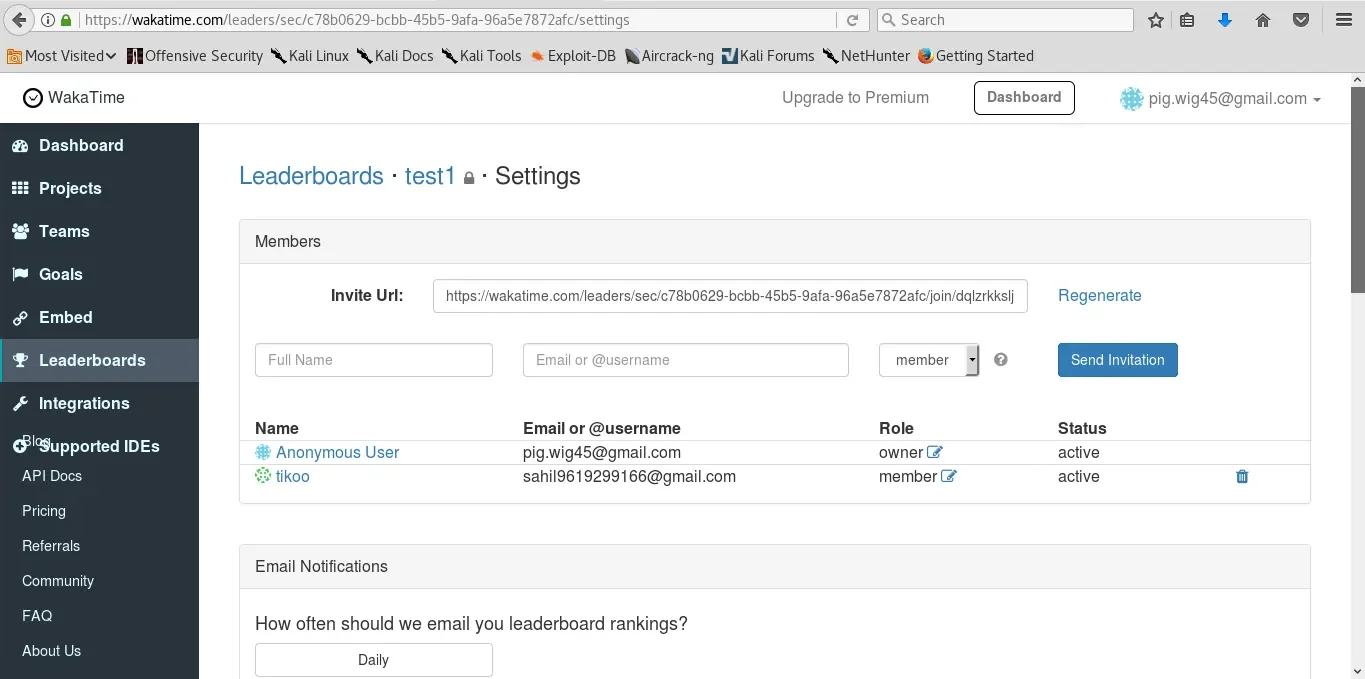
What I wanted to check was whether the role handling was enforced on the server or only reflected in the interface. The question was whether the role handling was enforced on the server or only reflected in the interface. That is the access control question I set out to test.
Exploitation
Step 1: swap the roles from the owner session
Using the owner account's privileges for Anonymous, I swapped the roles of both tikoo and Anonymous. The detail worth pointing out is that I made the change in a new tab: the browser had two test1 leaderboard tabs open at the same time, one per account.
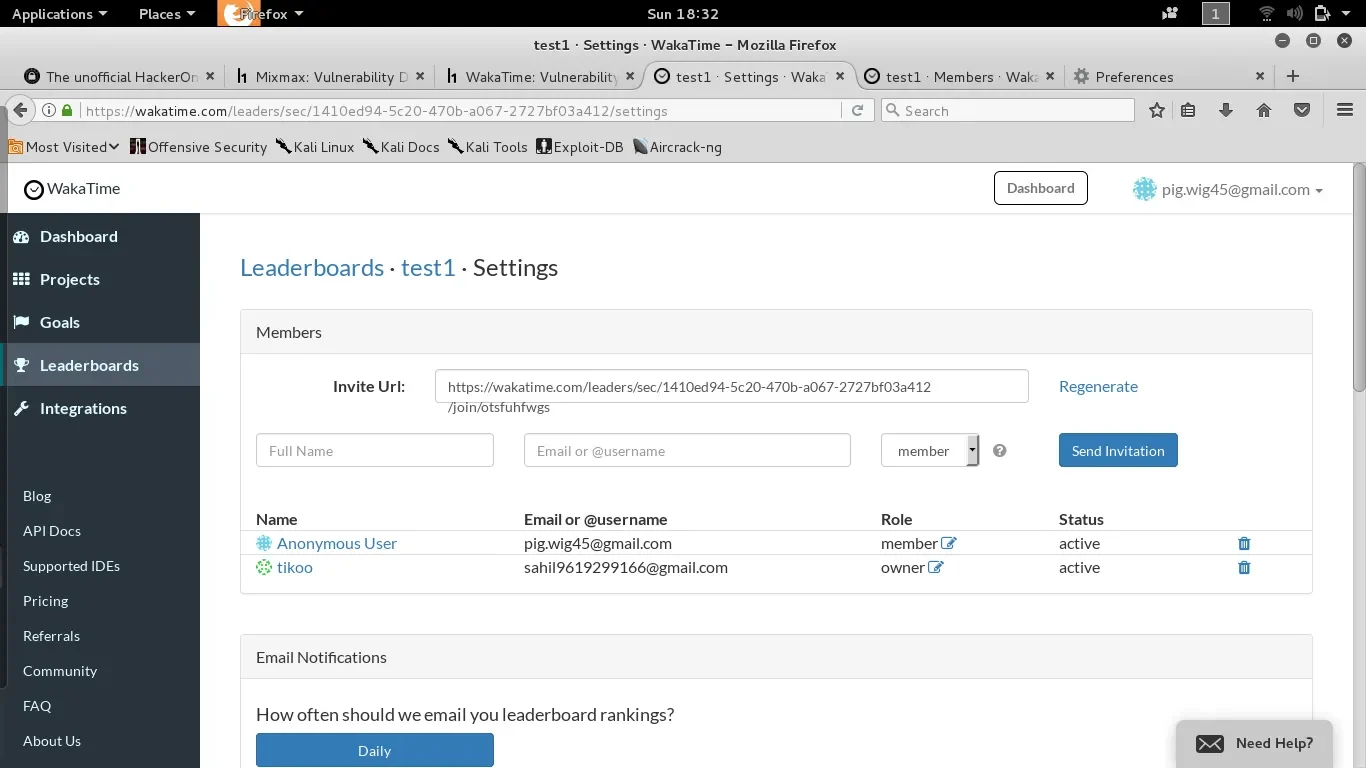
After the swap the roles were reversed:
[redacted], , → Member
[redacted], , →Owner
At this point I had two private leaderboard pages open, and in each one a different account was the owner. This is the state the rest of the test relies on: the same leaderboard, viewed from two sessions, with the roles inverted between them.
Step 2: try an owner-only action from the demoted session
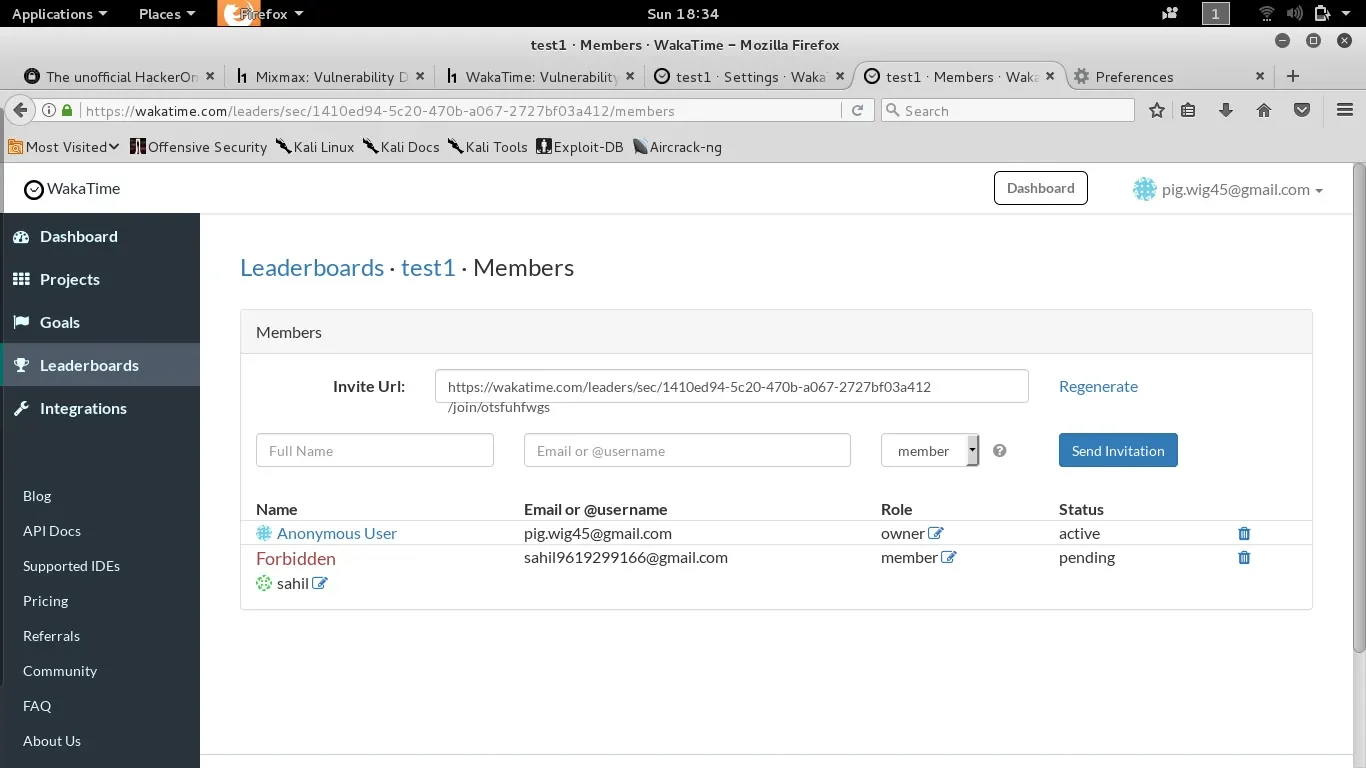
In the first POC image, where Anonymous was still shown as owner, I tried to change the name of user tikoo to "testing". The request came back with a Forbidden error, because in the second page Anonymous was no longer the owner. The server did reject that attempt.
Step 3: retry the same action after the error
After the forbidden message appeared, I tried to change the name again. This time the change went through, and the name of the owner of the private leaderboard was modified.
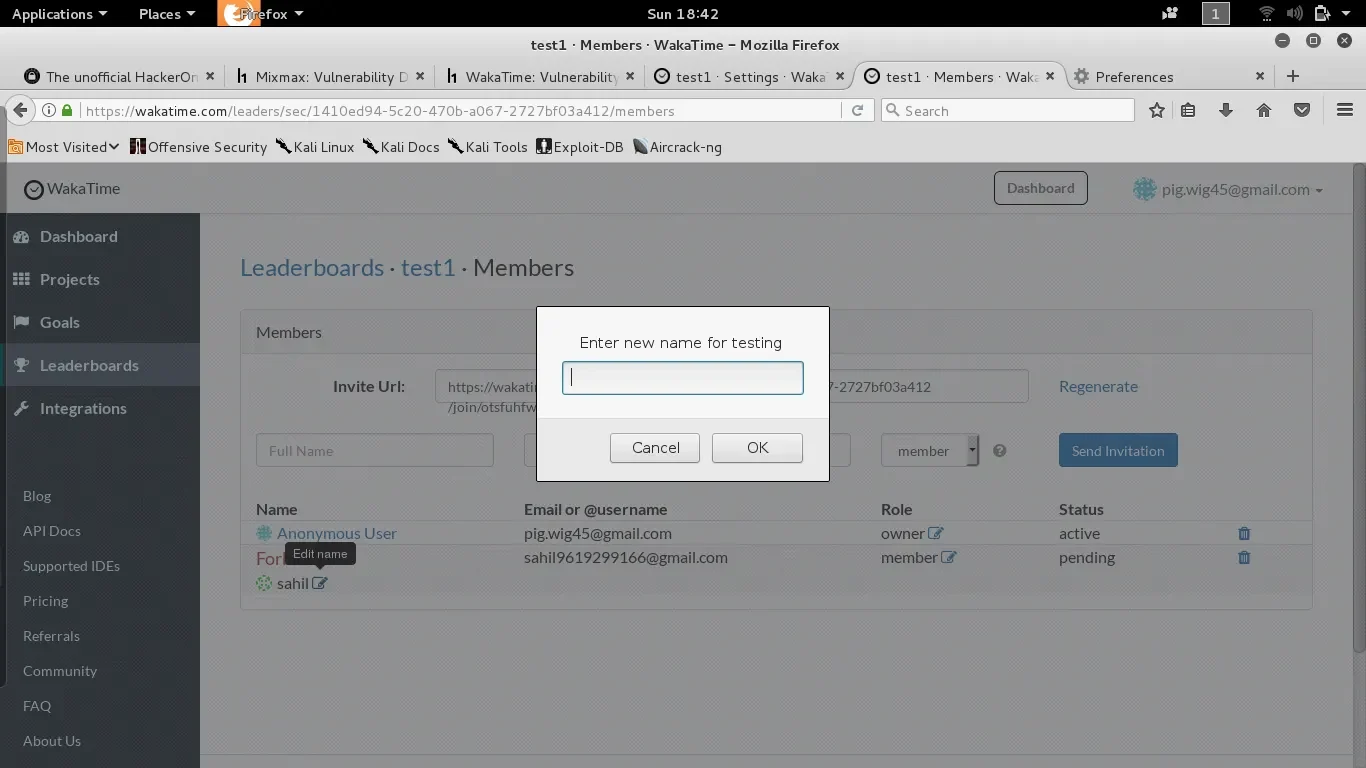
So the sequence is: the role swap succeeds, the first attempt to rename the new owner is refused with a Forbidden error, and a subsequent attempt from the same member-level session succeeds. The error message did not mean the action was blocked for good.
Root cause
The report does not include the server-side code or the request and response bodies, so the exact mistake is not shown. What the behaviour implies is that the authorisation check on the rename action is not applied consistently: the first call is refused, but the action is still reachable afterwards from a session that no longer holds owner privileges. The report does not explain why the first attempt was refused and the second succeeded. This is likely a broken authorisation problem rather than a missing authentication one, since the request was authenticated and was refused once.
Impact
A member of a private leaderboard could change the name of the owner of that leaderboard, using member privileges, after the owner had swapped the roles. The report does not describe any other action being possible, and does not state what else the member session could reach. The impact is therefore limited to what the report demonstrates: modification of another user's display name within a private leaderboard, by a user who should not have owner rights over that leaderboard.
Fix
The fix that follows from the behaviour is to evaluate the caller's current role on the server for every request to the role-management and rename actions, so that a session that has been demoted cannot perform owner-only changes, and so that a refused request cannot be followed by a successful one from the same session.
Variants to test
- Role swap followed by an owner-only action. Create a leaderboard, invite a second account as a member, swap the roles from the owner session, then attempt an owner-only action from the demoted session. A positive result is the action succeeding after the roles have been inverted.
- Retry after a Forbidden response. When an owner-only action returns a Forbidden error, repeat the same action from the same session. A positive result is the second attempt succeeding where the first was refused.
- Two tabs, two sessions. Keep the same leaderboard open in two browser tabs, one per account, and perform changes in one tab while observing the other. A positive result is the two views disagreeing about who holds which role.
- Member-initiated role changes.
If you have any doubts, ping me on Twitter (https://twitter.com/viperbluff).
What happened, in plain words
This is a story about a website for developers called Wakatime. At the time of this write-up it ran a public bug bounty program on HackerOne, which means the company invited people to look for security mistakes in its site and report them. The feature involved is the private Leaderboard, a place where a developer can see their own rankings.
A private leaderboard has an owner. The owner can invite other people to join the same leaderboard as members, so one leaderboard can have several people under it. The question I wanted to answer was simple: what can a member do to the owner? The feature is supposed to keep the two roles apart, so a member should not be able to act on the owner's account or settings.
The image above shows the Wakatime program page on HackerOne, the public program where this work was done.
To understand the rest, you only need a few everyday ideas. A role is a label attached to your account that says what you are allowed to do, like the difference between a guest and a host at a party. An owner is the person who created the leaderboard and controls it; a member is someone who was invited and should only be able to take part, not to run things. Access control is the set of rules that decides who may do what. When those rules are broken, security people call it broken authorisation: the site knows who you are, but lets you do something you should not be allowed to do.
Setting up two accounts
I created two accounts on the platform using two different email addresses. Throughout this write-up the owner account is called Anonymous and the member account is called tikoo. The owner account is the one that creates the private leaderboard and sends the invitation; the second account accepts it and joins as a member.
No special tooling was needed beyond a browser. The important precondition is that both accounts are logged in and that the owner has already created a leaderboard and invited the second account, because the whole test depends on having one owner session and one member session available at the same time. A session is simply the state of being logged in: your browser holds a small piece of data (often called a cookie or a token) that the site uses to recognise you on every request, like a wristband at an event that tells staff you are allowed in.
Finding it
Once the leaderboard existed with one owner and one member, I went to the members section of the leaderboard while logged in as the owner. The role assignment at that point was:
[redacted], , → Owner
[redacted], , →Member
The image above shows the private leaderboard before the roles were swapped, with the owner account listed as owner and the second account listed as member.
What I wanted to check was whether the role handling was enforced on the server or only reflected in the interface. This distinction matters. A server is the computer that actually stores the data and decides what happens; the interface is just the page your browser draws for you. If the page hides a button but the server would still accept the action behind it, then hiding the button protects nothing. The question was whether the role handling was enforced on the server or only reflected in the interface. That is the access control question I set out to test.
Exploitation
Step 1: swap the roles from the owner session
Using the owner account's privileges for Anonymous, I swapped the roles of both tikoo and Anonymous. The detail worth pointing out is that I made the change in a new tab: the browser had two test1 leaderboard tabs open at the same time, one per account.
The image above shows the private leaderboard after the swap, with the roles reversed.
After the swap the roles were reversed:
[redacted], , → Member
[redacted], , →Owner
At this point I had two private leaderboard pages open, and in each one a different account was the owner. This is the state the rest of the test relies on: the same leaderboard, viewed from two sessions, with the roles inverted between them. Keeping two tabs open is a simple way to see what each account is shown at the same moment, and to act from either one without logging out and back in.
Step 2: try an owner-only action from the demoted session
In the first POC image, where Anonymous was still shown as owner, I tried to change the name of user tikoo to "testing". The request came back with a Forbidden error, because in the second page Anonymous was no longer the owner. The server did reject that attempt.
The image above shows the Forbidden error that appeared when I tried to change the name of the new owner.
A Forbidden error is the server's way of saying "I know who you are, but you are not allowed to do this". It is different from being logged out: the site recognised the session, and still refused the action. On its own, that looks like the access control working correctly.
Step 3: retry the same action after the error
After the forbidden message appeared, I tried to change the name again. This time the change went through, and the name of the owner of the private leaderboard was modified.
The image above shows the name of the owner changed, even though the earlier attempt had been refused.
So the sequence is: the role swap succeeds, the first attempt to rename the new owner is refused with a Forbidden error, and a subsequent attempt from the same member-level session succeeds. The error message did not mean the action was blocked for good.
Why it happens
The report does not include the server-side code or the request and response bodies, so the exact mistake is not shown. What the behaviour implies is that the authorisation check on the rename action is not applied consistently: the first call is refused, but the action is still reachable afterwards from a session that no longer holds owner privileges. The report does not explain why the first attempt was refused and the second succeeded. This is likely a broken authorisation problem rather than a missing authentication one, since the request was authenticated and was refused once.
In everyday terms: imagine a door that refuses you the first time you push it, but opens on the second push because the guard only checked the list once and then stopped looking. The right behaviour is to check the list every single time.
What it means
A member of a private leaderboard could change the name of the owner of that leaderboard, using member privileges, after the owner had swapped the roles. The report does not describe any other action being possible, and does not state what else the member session could reach. The impact is therefore limited to what the report demonstrates: modification of another user's display name within a private leaderboard, by a user who should not have owner rights over that leaderboard.
How to fix it
The fix that follows from the behaviour is to evaluate the caller's current role on the server for every request to the role-management and rename actions, so that a session that has been demoted cannot perform owner-only changes, and so that a refused request cannot be followed by a successful one from the same session.
Other ways to test the same idea
- Role swap followed by an owner-only action. Create a leaderboard, invite a second account as a member, swap the roles from the owner session, then attempt an owner-only action from the demoted session. A positive result is the action succeeding after the roles have been inverted.
- Retry after a Forbidden response. When an owner-only action returns a Forbidden error, repeat the same action from the same session. A positive result is the second attempt succeeding where the first was refused.
- Two tabs, two sessions. Keep the same leaderboard open in two browser tabs, one per account, and perform changes in one tab while observing the other. A positive result is the two views disagreeing about who holds which role.
- Member-initiated role changes.
If you have any doubts, ping me on Twitter (https://twitter.com/viperbluff).
Glossary
- Bug bounty program: a scheme where a company invites people to find security problems in its systems and report them, sometimes for a reward.
- HackerOne: a platform that hosts bug bounty programs for companies.
- Wakatime: the developer platform where this issue was found.
- Private leaderboard: a rankings page that belongs to a group, with an owner and invited members.
- Owner: the account that created the leaderboard and controls it.
- Member: an invited account that takes part in the leaderboard but should not control it.
- Role: a label on an account that says what it is allowed to do.
- Access control: the rules that decide who may perform which actions.
- Broken authorisation: a flaw where the site knows who you are but lets you do something you should not be allowed to do.
- Session: the state of being logged in, kept alive by data your browser sends with each request.
- Cookie / token: a small piece of data your browser stores and sends so the site can recognise your session.
- Server: the computer that stores data and decides what actually happens.
- Interface: the page your browser draws for you; it can hide things without the server enforcing them.
- Request: a message your browser sends to the server asking it to do something.
- Response: the message the server sends back.
- Forbidden error: a response meaning the server recognised you but refused the action.
- Authentication: proving who you are, usually by logging in.
- Stateful check: a check that depends on something remembered from earlier, rather than being evaluated fresh each time.
- Cached: stored from an earlier moment and reused, so it may no longer match the current situation.
- POC (proof of concept): a demonstration that a problem is real, usually with screenshots or steps.
- Impact: what an attacker could actually do if the problem is real.