From N/A to Resolved For BackBlaze Android App[Hackerone Platform] Bucket Takeover
Hardcoded Backblaze application keys were found in the Android app's decompiled source, allowing an attacker to obtain an authorization token and create or list buckets in the associated account. The account was later found to be internal and used for test buckets, limiting the impact.
 Published on medium.com
This blog will help you understand the importance of never giving up and how you can turn things around in bug bounty.
The full write-up lives on its author's site
It belongs to its author, so we link to it rather than copy it. The other two tabs are our own rewrites, checked against it.
Context
Backblaze runs a public bug bounty program on HackerOne, and the researcher picked it up after noticing it already had around 150+ resolved reports. The target here is the Backblaze Android app, downloaded from the Google Play store; the APK's package name is com.backblaze.android. Backblaze also offers B2, a bucket storage service with a documented HTTP API, and the app talks to that API. The feature that matters for this write-up is how the app obtains credentials for B2: the researcher found a class named B2TemporaryCredentials that holds two hardcoded values, B2_APPLICATION_KEY and B2_APPLICATION_KEY_ID. Those are the credentials the B2 API expects when you call b2_authorize_account, which normally returns an authorisation token and the account's permissions.
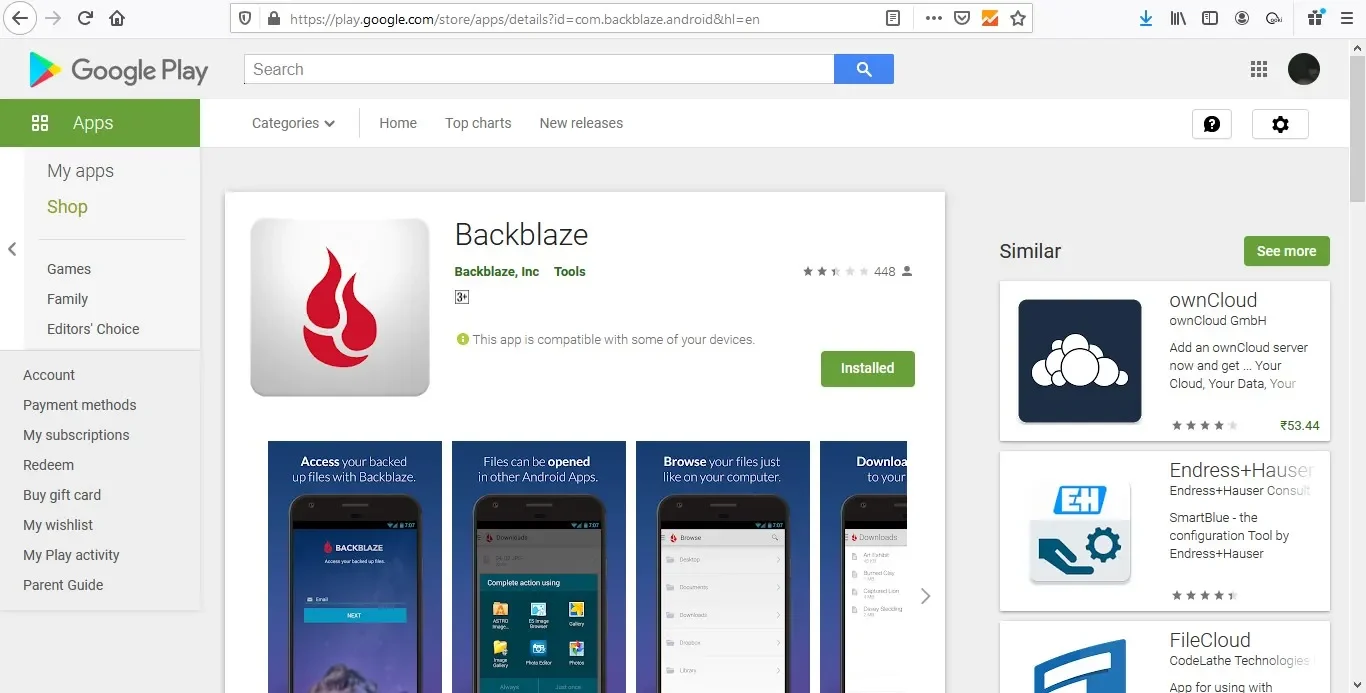
The screenshot shows the Backblaze app listing on the Google Play store, the starting point for the review.
Setup
The researcher worked from a local machine with an Android device attached over USB. The tools used were:
adb, to get a shell on the device and to pull the APK.dex2jar, to convert the DEX bytecode into a JAR.jd-GUI, to read the decompiled Java source.curl, to talk to the B2 API.
Finding it
The APK was downloaded from the Play store, then pulled from the device. The researcher opened /data/app/com.backblaze.android/base.apk through an adb shell session and fetched it locally with adb pull. The APK was unzipped, the classess.dex file was passed to dex2jar, and the resulting JAR was opened in jd-GUI.
Reading the decompiled source, the researcher found in B2TemporaryCredentials.class two hardcoded keys:
B2_APPLICATION_KEYB2_APPLICATION_KEY_ID
The first report to the program was closed as N/A because no impact had been demonstrated. The researcher was not convinced, since the names suggested the keys were meant to authenticate against something.

The brainstorming sketch captures the moment before the API angle was worked out.
Exploitation
Step 1: read the API documentation
The researcher looked up the B2 documentation and found the b2_authorize_account page, which shows the call pattern for exchanging an application key ID and application key for a token:
The -u flag sends the key ID and key as HTTP basic authentication, the pair the documentation expects.
Step 2: authorise with the extracted keys
Using the two values from B2TemporaryCredentials.class in place of APPLICATION_KEY_ID and APPLICATION_KEY, the researcher made the call. The response disclosed an auth_token, the accountID, and the permissions attached to the account for accessing files, buckets and similar resources.
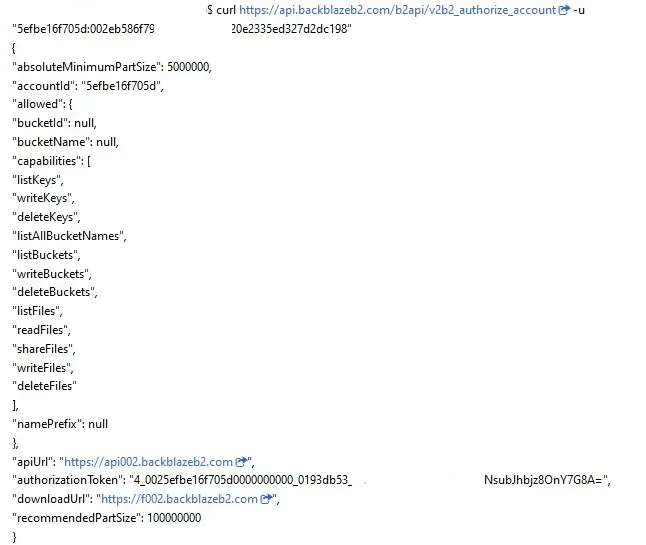
The screenshot shows the authorisation response with the token and the permission set.
Step 3: create a bucket to prove impact
When the triage team asked for more impact, the researcher used the auth_token and accountID from the previous response to create a bucket named sahil-bucket:
curl -H "Authorization:[redacted]***********************TEukBP1H7M=" "https://api002.backblazeb2.com/b2api/v2/b2_create_bucket?accountId=5efbe16f705d&bucketName=sahil-bucket&bucketType=allPrivate"
The Authorization header carries an authorisation value. The query string names the account (accountId), the new bucket (bucketName) and its visibility (bucketType=allPrivate). The response confirmed that sahil-bucket had been created and returned a bucket ID.
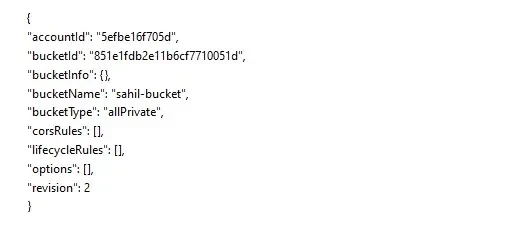
The screenshot shows the create-bucket response with the new bucket ID.
Step 4: list the buckets in the account
To verify the creation and to see what else the account held, the researcher followed the b2_list_buckets documentation and sent a second request:
curl -H 'Authorization: [redacted]-mAiYmKJH8Ihs=' -d '{"accountId": "5efbe16f705d", "bucketTypes": ["allPrivate","allPublic"]}' "https://api002.backblazeb2.com/b2api/v2/b2_list_buckets"
The JSON body asks for both private and public bucket types for the same account. The response listed all the buckets in the account.
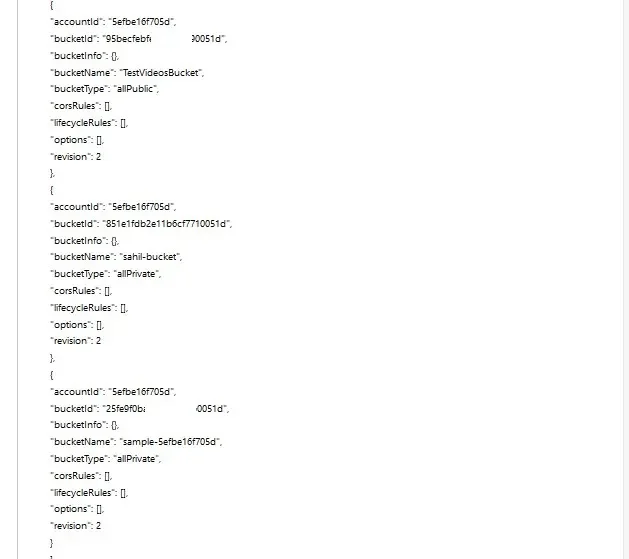
The screenshot shows the bucket listing returned by the API.
Step 5: stop and report
The researcher notes having had the privileges to delete buckets and to do more, but stopped at listing and waited for the triage decision. The account turned out to be an internal one used to host test buckets, which lowered the impact.

The screenshot shows the team's response on the report.
Root cause
The app shipped B2 application credentials inside the APK, in B2TemporaryCredentials.class. Anything compiled into an APK can be recovered by decompiling it, so the key ID and key were effectively public. The B2 API accepts those credentials directly at b2_authorize_account, and the token that comes back carries the account's real permissions, including bucket creation and listing. The extracted pair was accepted directly by b2_authorize_account, and the resulting token allowed bucket creation and listing. The first triage decision (N/A) reflected the absence of a demonstrated impact rather than the absence of the flaw.
Impact
The two values were recoverable from the downloaded app, and using them returned an authorisation token for the Backblaze account behind them. With that token, the researcher created a bucket and listed every bucket in the account, and states that deleting buckets and further actions were also possible. In this case the account was internal and used for test buckets, so the practical impact was limited. The severity of the same flaw would depend entirely on what the exposed account is allowed to reach.
Fix
The bug was patched with the release of Backblaze app version 5.0.2. The report does not describe the code change itself; the general remedy for this class of issue is to stop shipping long-lived application keys in the client and to issue credentials per user or per session from a backend instead.
Variants to test
- Decompile other Android apps that talk to a storage or cloud API and grep the sources for key-like constants (
*_KEY,*_KEY_ID,*_SECRET,*_TOKEN). A positive result is a pair that the vendor's ownauthorizeendpoint accepts. - Take any hardcoded credential found in a first report that was closed as N/A and map it to the vendor's public API documentation. A positive result is a token response that includes an account ID and a non-trivial permission set.
- Once a token is obtained, perform the least destructive write the API allows (for example creating a clearly named test bucket) and then a read that enumerates existing resources. A positive result is a successful creation plus a listing that shows resources you did not create.
- Check whether the same key pair appears in other clients of the same vendor (desktop, iOS, web bundles). A positive result is the same credentials working from a different platform.

The final screenshot shows the bounty award that followed the report.
What happened, in plain words
A security researcher found two hardcoded credentials inside the Backblaze Android app: an application key and an application key ID. These were not the passwords of a person; they were the keys the app itself uses to talk to Backblaze's storage service, called B2. Anyone who downloads the app can pull those keys out of it. With them, the researcher obtained an authorisation token for a Backblaze account, created a bucket and listed every bucket in that account. The first time he reported it, the company said "N/A", meaning not applicable, because he had not shown what damage could be done. He did not give up, worked out how to use the keys, proved the impact, and the bug was fixed in app version 5.0.2. He also received a bounty, a reward paid for finding the bug.
This article walks through the whole story slowly, explaining every term along the way. You only need to be able to use a browser and a computer to follow it.
Background: what Backblaze and B2 are
Backblaze is a company that offers online backup and cloud storage. One of its products is B2, short for Backblaze B2 Cloud Storage. Think of B2 as a very large online filing cabinet. Inside the cabinet there are drawers, and each drawer is called a bucket. You put files into buckets, and you can decide whether a bucket is public (anyone can read it) or private (only you can).
A bucket is just a named container for files in cloud storage. The name matters because it is how you refer to it later.
Backblaze runs a bug bounty program on a website called HackerOne. A bug bounty program is a deal offered by a company: if you find a security problem in our products and tell us privately, we may pay you a reward. The reward is called a bounty. The person doing the finding is a security researcher, sometimes called a bug hunter.
The researcher noticed that this particular program already had around 150+ resolved reports. That is a lot, which usually means the easy bugs are gone. He decided to try the Android app anyway.
The screenshot shows the Backblaze app on the Google Play store, which is where the researcher started.
Step 1: getting the app and looking inside it
An Android app is distributed as a file called an APK. You can think of an APK as a zip archive, like a folder compressed into a single file, containing the app's code and resources. The app in question has the package name com.backblaze.android. A package name is the unique identifier Android uses for an app, a bit like a surname for software.
The researcher downloaded the app from the Play store onto an Android device, then connected the device to a computer. He used a tool called adb (Android Debug Bridge) to talk to the phone from the computer. adb lets you run commands on the phone and copy files off it.
He opened a shell on the device with adb shell. A shell is a text interface where you type commands and the computer (or phone) runs them. Then he copied the app's APK file from the phone to his computer with adb pull. The file was at /data/app/com.backblaze.android/base.apk on the phone.
Once the APK was on his computer, he unzipped it. Inside he found a file called classess.dex. A DEX file is the compiled code of an Android app, the machine-readable instructions the phone runs. Humans cannot read it directly, so he used a tool called dex2jar to convert it into a JAR file, which is a standard Java archive. Then he opened the JAR in a program called jd-GUI, which displays the code in a readable, Java-like form. This whole process is called reverse engineering: taking apart a finished program to understand how it works.
Why do this? Because anything that ships inside an app can be read by anyone who has the app. If the developers left something secret in there, it is not secret at all.
Step 2: finding the keys
While reading the decompiled code, the researcher found a class named B2TemporaryCredentials. A class is a named block of code in an object-oriented program, roughly like a chapter in a book. Inside it were two hardcoded values:
B2_APPLICATION_KEYB2_APPLICATION_KEY_ID
Hardcoded means written directly into the program's source code as fixed text, rather than being fetched from somewhere safe at runtime. The two values together are a pair of credentials: an application key ID (a public identifier, like a username) and an application key (a secret, like a password). The B2 service uses this pair to recognise who is calling it.
He reported this straight away to the program on HackerOne. The company closed the report as N/A, short for "not applicable". In bug bounty language, N/A usually means the report was not accepted as a valid security issue. The reason given was that he had not shown the impact, meaning he had not demonstrated what harm could come from those keys.
He was not happy with that decision, because the names of the keys suggested they were meant to do something real.
The sketch shows the researcher thinking through what the keys could be used for.
Step 3: what an API is, and why the keys mattered
An API (Application Programming Interface) is a way for one piece of software to talk to another. A useful everyday comparison: a restaurant menu. You do not walk into the kitchen and cook; you choose an item from the menu, and the kitchen prepares it. An API is the menu of things a service lets you ask for, and each item on the menu is called an endpoint, which is a specific web address that performs one action.
Backblaze publishes documentation for its B2 API, meaning a public description of its menu. The researcher searched for it and found the page for b2_authorize_account. The word authorize here means "prove who you are and get permission". The documentation showed this example:
Let us go through it piece by piece.
curlis a command-line tool for sending requests to web servers. You can think of it as a browser without a window.https://api.backblazeb2.com/b2api/v2/b2_authorize_accountis the address being called. Theapi.backblazeb2.compart is the server, and the rest is the specific endpoint on that server.-utells curl to send a username and password. The text after it,"APPLICATION_KEY_ID:APPLICATION_KEY", is the pair, separated by a colon. This style of sending credentials is called HTTP basic authentication.
The documentation was effectively saying: if you have a key ID and a key, put them here and you will get something back. The researcher had exactly that pair, extracted from the app.
Step 4: using the keys to get a token
He replaced APPLICATION_KEY_ID and APPLICATION_KEY with the two values he had found in B2TemporaryCredentials.class, and sent the request. The server replied with several pieces of information, including:
- an
auth_token, which is an authorisation token; - the
accountID, an identifier for the account; - the permissions attached to that account, such as access to files and buckets.
A token is a short string that proves you have already logged in, so you do not have to send your password with every request. A common comparison is a cloakroom ticket: you hand over your coat once, get a ticket, and later the ticket alone is enough to get the coat back. The token here is the ticket, and the permissions are the list of what the ticket lets you collect.
The screenshot shows the response, with the token and the permissions it carries.
This was the turning point. The keys were not decorative; they opened a real door.
Step 5: proving impact by creating a bucket
The triage team, the people at the company who review reports, asked for more evidence of impact. So the researcher used the token and account ID from the previous response to create a bucket. He named it sahil-bucket.
curl -H "Authorization:[redacted]***********************TEukBP1H7M=" "https://api002.backblazeb2.com/b2api/v2/b2_create_bucket?accountId=5efbe16f705d&bucketName=sahil-bucket&bucketType=allPrivate"
Line by line:
curlagain sends a request.-Hadds a header to the request. Headers are extra pieces of information sent alongside the request, like the label on a parcel. This one is calledAuthorizationand carries the token from the previous step. The long string starting with4_0025...is that token.- The address is the
b2_create_bucketendpoint, which is the menu item for making a new bucket. - Everything after the
?is the query string, a way of passing parameters in the address itself.accountId=5efbe16f705dsays which account the bucket belongs to.bucketName=sahil-bucketgives the bucket its name.bucketType=allPrivatemakes it private.
The server replied confirming that sahil-bucket had been created, and returned a bucket ID, a unique identifier for the new bucket.
The screenshot shows the response with the new bucket's ID.
Why create a bucket? Because it is a concrete, visible action. Saying "I have a token" is abstract; saying "I made a bucket in your account" is proof.
Step 6: listing every bucket in the account
To double-check that the bucket really existed, and to see what else the account contained, he looked up another page of the documentation, for b2_list_buckets, and sent a second request:
curl -H 'Authorization: [redacted]-mAiYmKJH8Ihs=' -d '{"accountId": "5efbe16f705d", "bucketTypes": ["allPrivate","allPublic"]}' "https://api002.backblazeb2.com/b2api/v2/b2_list_buckets"
Line by line:
-H 'Authorization: ...'again sends the token, this time a slightly different one, in theAuthorizationheader.-dsends a body with the request. The body is the content of the message, as opposed to the address and headers. Here the body is in JSON, a common text format for structured data, using curly braces and quoted names.{"accountId": "5efbe16f705d", "bucketTypes": ["allPrivate","allPublic"]}asks for the buckets of that account, of both the private and the public kind. The square brackets mean "a list of these two values".- The address is the
b2_list_bucketsendpoint, the menu item for listing buckets.
The response listed all the buckets in the account.
The screenshot shows the bucket listing returned by the API.
Step 7: stopping and reporting
The researcher notes that he also had the privileges to delete buckets and to do more, but he stopped at listing and waited for the triage decision. This restraint matters: a good researcher proves the problem without causing damage.
The account turned out to be an internal one, used to host test buckets, which lowered the impact. The team's response is shown below.
The screenshot shows the team's reply on the report.
Why this happened
The app shipped B2 application credentials inside the APK, in B2TemporaryCredentials.class. Anything compiled into an APK can be recovered by decompiling it, so the key ID and key were effectively public. The B2 API accepts those credentials directly at b2_authorize_account, and the token that comes back carries the account's real permissions, including creating and listing buckets. The extracted pair was accepted directly by b2_authorize_account, and the resulting token allowed creating and listing buckets. The first N/A decision reflected the absence of a demonstrated impact, not the absence of the flaw.
What the impact was
The two values were recoverable from the downloaded app, and using them returned an authorisation token for the Backblaze account behind them. With that token, the researcher created a bucket and listed every bucket in the account, and states that deleting buckets and further actions were also possible. In this case the account was internal and used for test buckets, so the practical impact was limited. The severity of the same flaw would depend entirely on what the exposed account is allowed to reach.
How it was fixed
The bug was patched with the release of Backblaze app version 5.0.2. The report does not describe the code change itself. The general remedy for this class of issue is to stop shipping long-lived application keys in the client and to issue credentials per user or per session from a backend instead.
Similar things to look for
- Decompile other Android apps that talk to a storage or cloud API and search the sources for key-like constants (
*_KEY,*_KEY_ID,*_SECRET,*_TOKEN). A positive result is a pair that the vendor's own authorize endpoint accepts. - Take any hardcoded credential found in a first report that was closed as N/A and map it to the vendor's public API documentation. A positive result is a token response that includes an account ID and a non-trivial permission set.
- Once a token is obtained, perform the least destructive write the API allows, for example creating a clearly named test bucket, and then a read that enumerates existing resources. A positive result is a successful creation plus a listing that shows resources you did not create.
- Check whether the same key pair appears in other clients of the same vendor, such as desktop, iOS or web bundles. A positive result is the same credentials working from a different platform.
The final screenshot shows the bounty award that followed the report.
Glossary
- APK: the file format Android apps are distributed in; effectively a zip archive containing the app's code and resources.
- API: a defined way for one piece of software to ask another for something, like a menu of available actions.
- adb (Android Debug Bridge): a tool that lets a computer send commands to and copy files from an Android device.
- Authorisation token: a short string that proves you have already authenticated, so you can make further requests without resending your password.
- Basic authentication: a way of sending a username and password (or key ID and key) with a request, joined by a colon.
- Body: the main content of a request or response, as opposed to its address and headers.
- Bounty: a reward paid by a company for a valid security report.
- Bucket: a named container for files in cloud storage.
- Bug bounty program: a company's offer to review and possibly reward security problems reported privately.
- Class: a named block of code in an object-oriented program.
- Credentials: a pair of values that prove identity, such as a username and password, or a key ID and key.
- curl: a command-line tool for sending requests to web servers.
- dex2jar: a tool that converts Android DEX code into a Java JAR file.
- DEX file: the compiled code format used by Android apps.
- Endpoint: a specific web address that performs one action in an API.
- Hardcoded: written directly into the program's source as fixed text, rather than fetched safely at runtime.
- Header: extra information sent alongside a request or response, such as an authorisation token.
- HTTP: the protocol browsers and tools use to talk to web servers.
- JAR: a standard Java archive file.
- jd-GUI: a program that displays decompiled Java code in readable form.
- JSON: a common text format for structured data, using curly braces and quoted names.
- N/A: "not applicable"; in bug bounty, a report that was not accepted as a valid issue.
- Package name: the unique identifier Android uses for an app.
- Permissions: the list of actions an account or token is allowed to perform.
- Query string: the part of a web address after the
?, used to pass parameters. - Reverse engineering: taking apart a finished program to understand how it works.
- Shell: a text interface where you type commands and the computer runs them.
- Triage team: the people at a company who review incoming security reports.
- Vulnerability class: a category of security flaw, such as hardcoded credentials or information disclosure.