Simple Bugs 0x02: Overwritting Uploaded Files
A forum stored profile pictures at a path built from the username, and Unicode normalisation of certain characters caused two different usernames to map to the same file path. An attacker could overwrite another user's profile picture by registering a lookalike username and uploading a new image.
 Published on vitorfalcao.com
File upload bugs are not as common as before, but they’re still out there. They can provide all levels of priority, from informational to critical.
The full write-up lives on its author's site
It belongs to its author, so we link to it rather than copy it. The other two tabs are our own rewrites, checked against it.
File upload bugs are less common than they used to be, but they still turn up, and they can range from informational to critical in priority. This is a short account of one such bug on a forum: a profile picture upload that could be made to overwrite another user's file, through a username normalisation quirk rather than any flaw in the upload handling itself.
Context
The target was a forum that lets you create a profile and upload a picture. An ordinary feature, and the application was built on legacy technology (PHP) but hardened as much as possible. When that is the case, the standard techniques tend to fail, and you need to go beyond them. That does not mean the bug has to be complex; it may just need extra creativity.
Uploaded files were sent to an S3 bucket on AWS and served from a predictable path:
/profile_pics/{username}.png
That path is the interesting part. The username is an attribute the user controls, even though the application does not let you change it after registration: it is unique per user and must be chosen when you sign up.

Setup
The researcher registered usernames and uploaded profile pictures, and later used a payload generator for Unicode normalisation.
Finding it
The researcher started gradually, working through the file upload techniques documented on HackTricks and increasing complexity, and also read disclosed reports for the same bug class. All of those attempts failed. After failing multiple times, a minor detail stood out.
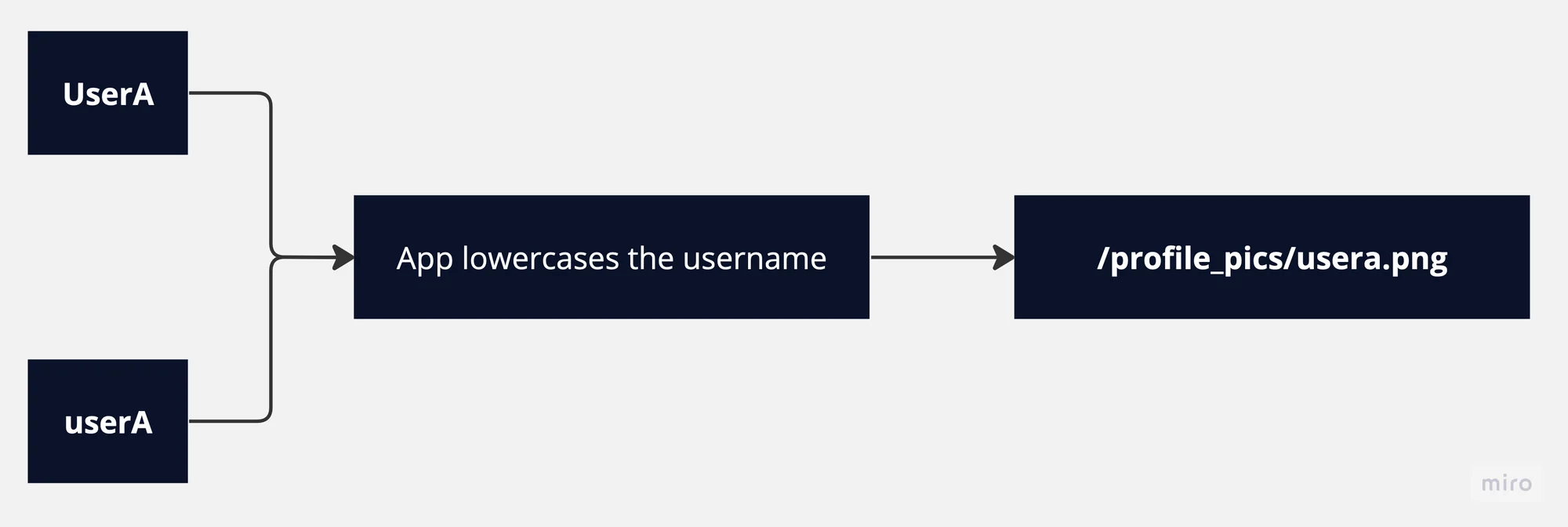
When a file was uploaded, it was stored under /profile_pics/{username}.png, and the application was transforming the username on the way to that path. A username of UserA became usera in the file path.

The first hypothesis was that username validation was case-sensitive. If it were, you could register userA while UserA already existed, upload a picture as userA, and overwrite UserA's file. That hypothesis was wrong: the check was case-insensitive.
Exploitation
Step 1: try Unicode lookalikes in the username
Having read a post about mysterious bugs by 0xacb, the researcher decided to try normalisation bugs, using his tool to generate payloads easily. The hypothesis was that the application would let him register one of the following usernames:
UserÀ
UseŕA
UsèrA
UśerA
ÙserA
The application did let him create the username UseŕA.
Step 2: check where the file lands
The second hypothesis was that uploading a picture as this user would store it at /profile_pics/useŕa. That was correct.
Step 3: change a letter that gets transformed
The researcher then changed one of the letters he knew would be transformed, an uppercase one, and created another user with the username ÙserA. The expected and correct output would have been /profile_pics/ùsera. Instead, the file was saved as /profile_pics/usera. That is the bug.
Step 4: confirm the overwrite
With two users in place, UserA and ÙserA, the researcher uploaded a dog photo as the profile picture for UserA. He then uploaded a cat image to the ÙserA profile page. UserA's profile picture was overwritten and was now a cat. The bug was confirmed and ready to report.
Root cause
The report does not establish the root cause. The researcher says he is still determining it, and that he will investigate further and update the post.
One hypothesis was ruled out: that Linux would not accept the ù letter in a file name. Running the following command showed that it does:
touch ùsera
So the filesystem is not the explanation. The report shows only the behaviour: a user named ÙserA had a file saved as /profile_pics/usera. Why the transformation collapses ÙserA all the way to usera while UseŕA survives as useŕa is not explained in the text.
Impact
An attacker who can register a username that normalises to another user's username can overwrite that user's profile picture. The report describes only the overwrite of another user's profile picture. The report does not describe any further impact, such as overwriting other users' files beyond profile pictures or affecting anything other than the image.
Fix
The report does not say what was changed.
Variants to test
- Register a username containing Unicode characters that normalise to an existing user's name, then upload a file and check whether the stored path matches the victim's. A positive result is the file appearing at the victim's path or the victim's picture changing.
- Test case variations (
UserAversususerA) where the registration check is case-sensitive but the storage path is lowercased. A positive result is two accounts existing whose files land on the same key. - Test other transformations applied to the username before it becomes a path: trimming, collapsing of repeated characters, removal of dots or slashes. A positive result is two distinct registered usernames producing the same stored path.
- Where the storage key is predictable, check whether the overwrite extends beyond images, for example to other per-user objects stored under the same naming scheme. A positive result is a non-image object being replaced.
What happened, in plain words
A forum let people create a profile and upload a picture. That is a very ordinary feature, the kind of thing you see on almost every website with user accounts. The forum was built on old technology (PHP), but it had been locked down as much as possible. When a site is hardened like that, the usual tricks tend to fail, and you have to go past them. That does not mean the bug has to be complicated. It may just need a bit of extra creativity.
The uploaded pictures were not kept on the forum's own server. They were sent to an S3 bucket on AWS. S3 is Amazon's online storage service: think of it as a giant shared locker room where each locker has a name, and anyone who knows the name can fetch what is inside. Each picture was then served from a predictable address:
/profile_pics/{username}.png
That address is the interesting part. The {username} placeholder is filled in with the name the user chose when signing up. The forum does not let you change your username later, and it must be unique, so no two people can have the same one. But you do choose it yourself at registration, which means you control part of the address where your file ends up.
The researcher registered usernames and uploaded profile pictures, and later used a small tool for generating Unicode payloads.
Finding it
The researcher started gradually, working through the file upload techniques documented on HackTricks and increasing the complexity step by step, and also read disclosed reports about the same kind of bug. All of those attempts failed. After failing several times, one small detail stood out.
When a file was uploaded, it was stored under /profile_pics/{username}.png, and the application was changing the username on the way to that path. A username of UserA became usera in the file path. In other words, the capital letters were being flattened to lowercase somewhere between the form you fill in and the address where the file is saved.
The first idea was that the username check was case-sensitive. If it were, you could register userA while UserA already existed, upload a picture as userA, and overwrite UserA's file. That idea was wrong: the check was case-insensitive.
Exploitation
Step 1: try Unicode lookalikes in the username
Having read a post about mysterious bugs by 0xacb, the researcher decided to try normalisation bugs, using his tool to generate payloads easily. The idea was that the application might let him register one of the following usernames:
UserÀ
UseŕA
UsèrA
UśerA
ÙserA
Each line is a candidate username. They look almost identical to UserA, but each one swaps a plain letter for a lookalike character from a wider set of characters (the accented letters À, ŕ, è, ś and Ù). The point of trying them is that a human, or a simple comparison, might treat them as different from UserA, while some later step in the application might quietly turn them back into something that matches UserA.
The application did let him create the username UseŕA.
Step 2: check where the file lands
The second idea was that uploading a picture as this user would store it at /profile_pics/useŕa. That was correct: the file went to /profile_pics/useŕa.
Step 3: change a letter that gets transformed
The researcher then changed one of the letters he knew would be transformed, an uppercase one, and created another user with the username ÙserA. The expected and correct output would have been /profile_pics/ùsera. Instead, the file was saved as /profile_pics/usera. That is the bug: the file was saved as /profile_pics/usera instead of /profile_pics/ùsera.
Step 4: confirm the overwrite
With two users in place, UserA and ÙserA, the researcher uploaded a dog photo as the profile picture for UserA. He then uploaded a cat image to the ÙserA profile page. UserA's profile picture was overwritten and was now a cat. The bug was confirmed and ready to report.
Root cause
The report does not establish the root cause. The researcher says he is still working it out, and that he will investigate further and update the post.
One idea was ruled out: that Linux would not accept the ù letter in a file name. Running the following command showed that it does:
touch ùsera
touch is a standard command that creates an empty file with the name you give it. Here it creates a file called ùsera, accented letter included. The command succeeding shows the operating system is happy with that character, so the filesystem is not the explanation.
What the report does show is the behaviour: a user named ÙserA had a file saved as /profile_pics/usera. Why the transformation collapses ÙserA all the way to usera while UseŕA survives as useŕa is not explained in the text.
Impact
An attacker who can register a username that normalises to another user's username can overwrite that user's profile picture. The report describes only the overwrite of another user's profile picture. The report does not describe any further impact, such as overwriting other users' files beyond profile pictures or affecting anything other than the image.
Fix
The report does not say what was changed.
Variants to test
- Register a username containing Unicode characters that normalise to an existing user's name, then upload a file and check whether the stored path matches the victim's. A positive result is the file appearing at the victim's path or the victim's picture changing.
- Test case variations (
UserAversususerA) where the registration check is case-sensitive but the storage path is lowercased. A positive result is two accounts existing whose files land on the same key. - Test other transformations applied to the username before it becomes a path: trimming, collapsing of repeated characters, removal of dots or slashes. A positive result is two distinct registered usernames producing the same stored path.
- Where the storage key is predictable, check whether the overwrite extends beyond images, for example to other per-user objects stored under the same naming scheme. A positive result is a non-image object being replaced.
Glossary
- File upload bug: a flaw in the part of a site that accepts files from users, for example letting someone store a file where they should not, or replace one that belongs to someone else.
- PHP: an older programming language widely used to build websites; here it just means the forum runs on long-established technology.
- S3 bucket: a storage container in Amazon's cloud storage service (AWS), where files are kept under names called keys.
- AWS: Amazon Web Services, Amazon's cloud platform.
- Path: the address of a file, such as
/profile_pics/usera.png. - Username: the unique name a user picks at registration and cannot change afterwards.
- Case-sensitive: a comparison where capital and lowercase letters count as different, so
UserAanduseraare not the same. - Case-insensitive: a comparison where capital and lowercase letters count as the same, so
UserAanduseramatch. - ASCII: the basic set of English letters, digits and punctuation that older systems assume; anything outside it is a wider character.
- Unicode: the much larger set of characters covering accented letters and other scripts.
- Normalisation: the process of converting characters that look or behave alike into one standard form, for example turning an accented letter into a plain one.
- Payload: the specific input an attacker sends to try to trigger a bug; here, a candidate username.
- Object key: the name a file is stored under in a bucket; two different usernames producing the same key means one file replaces the other.
- Overwrite: replacing an existing file with a new one of the same name.
- Root cause: the underlying reason in the code or design that makes the bug possible.
- Immutable identifier: a value that never changes and that the user cannot choose, such as an internal account number.
- Sanitise: to clean up input by removing or altering characters that could cause problems.
touch: a command that creates an empty file with a given name, used here to test whether the operating system accepts a character.- Linux: the operating system family the server runs on.



