SQL Injection - The File Upload Playground
A file upload feature accepted a filename containing a time-based SQL injection payload, causing the server to delay its response. An attacker could use this to slow the server and potentially extract database contents.
 Published on shahjerry33.medium.com
SQL injection is a web security vulnerability that allows an attacker to interfere with the queries that an application makes to its database. It generally allows an attacker to view data that they are not normally able to retrieve.
The full write-up lives on its author's site
It belongs to its author, so we link to it rather than copy it. The other two tabs are our own rewrites, checked against it.
Context
This write-up describes a SQL injection found in a file upload feature. The upload form accepted only a small set of image extensions, so the researcher first probed the filename field with an XSS payload, then moved to time-based SQL injection payloads placed in the filename itself. The report does not name the target application or the program it was reported through.
The feature under test is a standard image upload: the user picks a file, the server checks that it is an image, and stores it under the supplied name. The interesting part is that the filename is not only used as a path component; the sleep payloads suggest it reaches a database query.
Setup
The report does not describe any account, role, tool version or precondition beyond having access to the upload form. The only tool named is Burp, used to inspect the response after the SQLi payload was submitted. No request or response is reproduced verbatim in the report; the evidence is the screenshots of the upload form, the payloads and the delayed responses.
Finding it
The researcher started from the upload form itself.
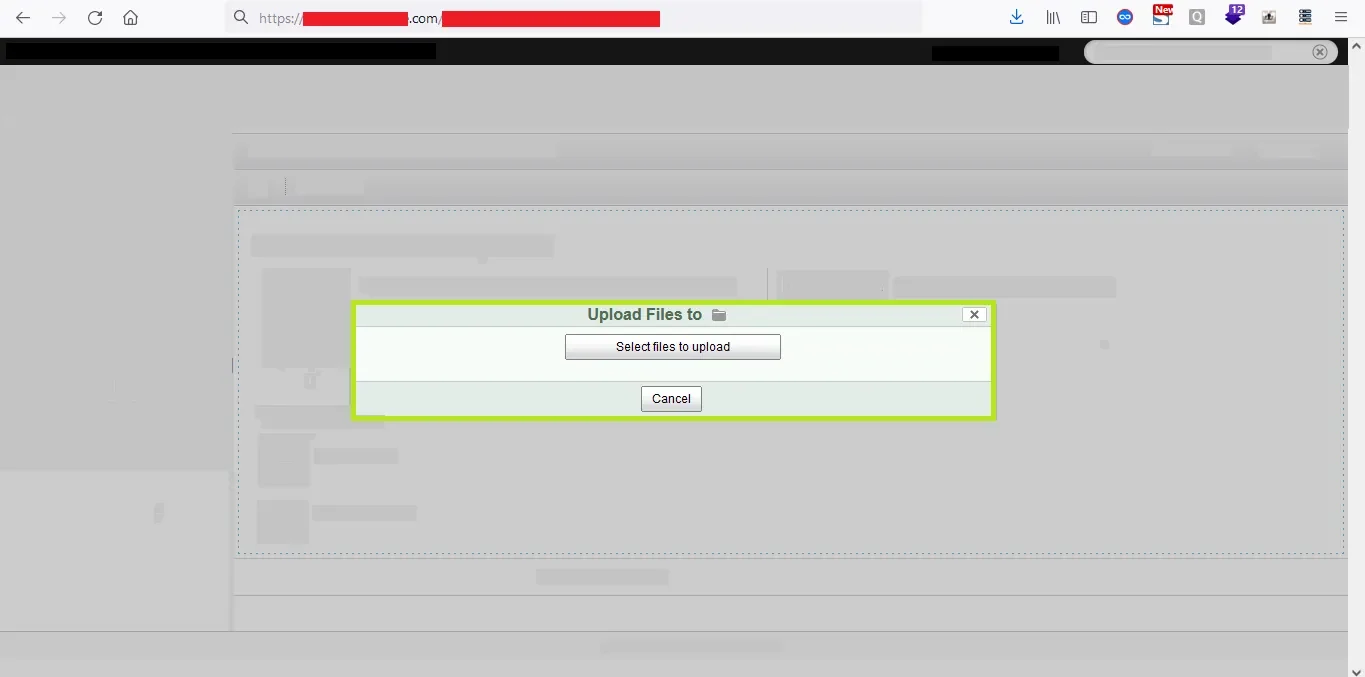
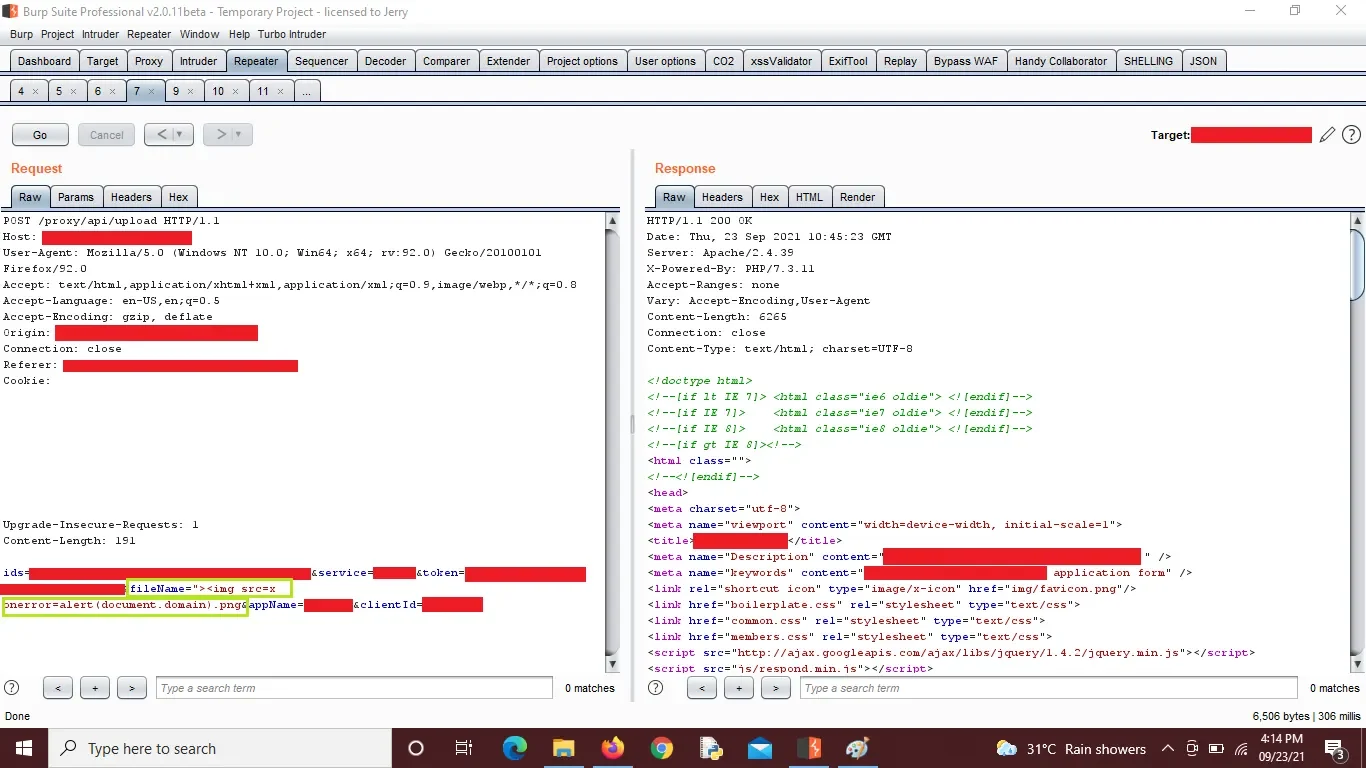
The form only allowed a few image extensions. Rather than attacking the file contents, the researcher used the filename as the injection point and submitted an XSS payload as the name:
"><img src=x onerror=alert(document.domain)>.png
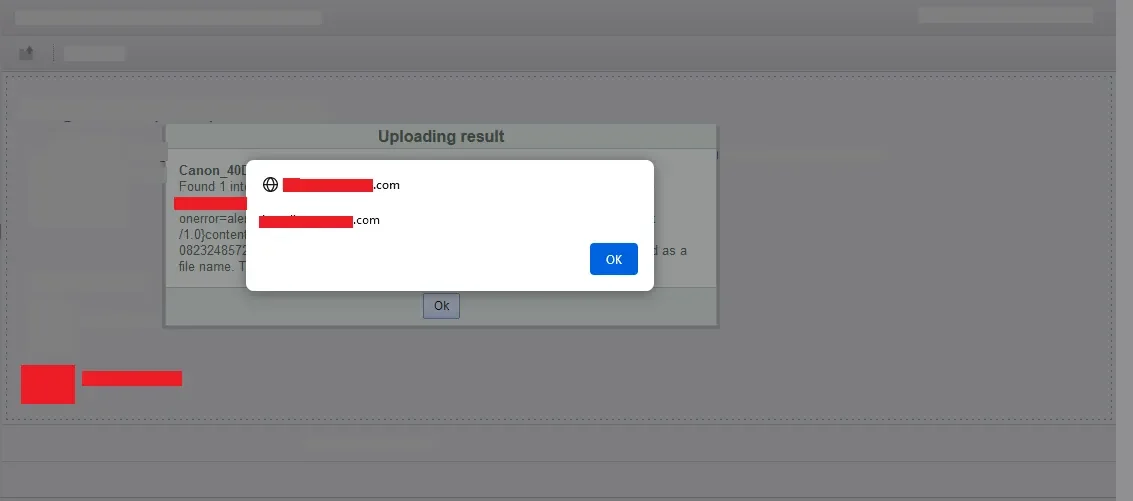
The payload executed, but only in the researcher's own browser session, so it was a self XSS and not directly useful.
What made the finding worth pursuing was the error the application returned when the payload was submitted. The message was:
This property must be a valid file name
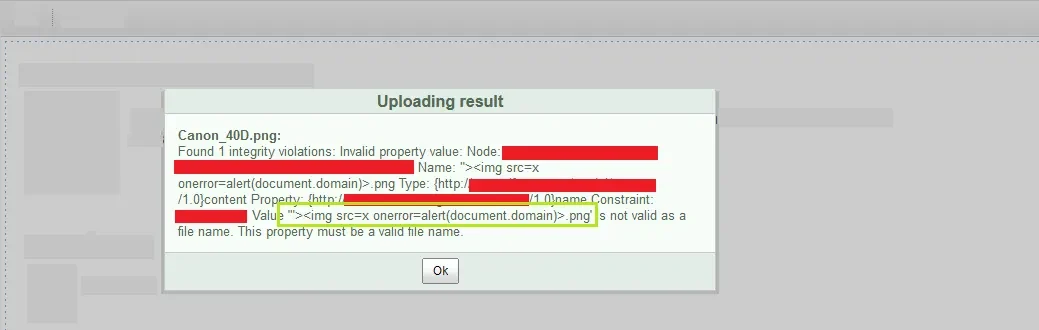
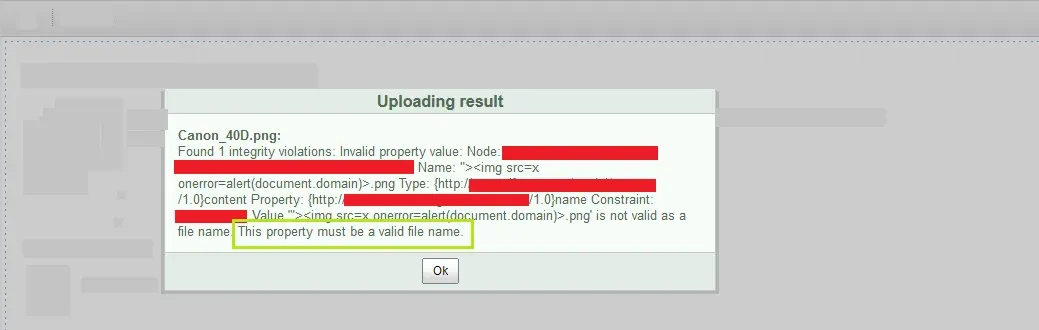
That message indicates the filename is validated or processed server-side, and the wording suggests it is passed into some backend logic rather than simply rejected by a client-side check. The researcher's reasoning was: if the filename reaches a query, a SQL payload in the same field should change the query's behaviour.
Exploitation
Step 1: Confirm the filename reaches a query
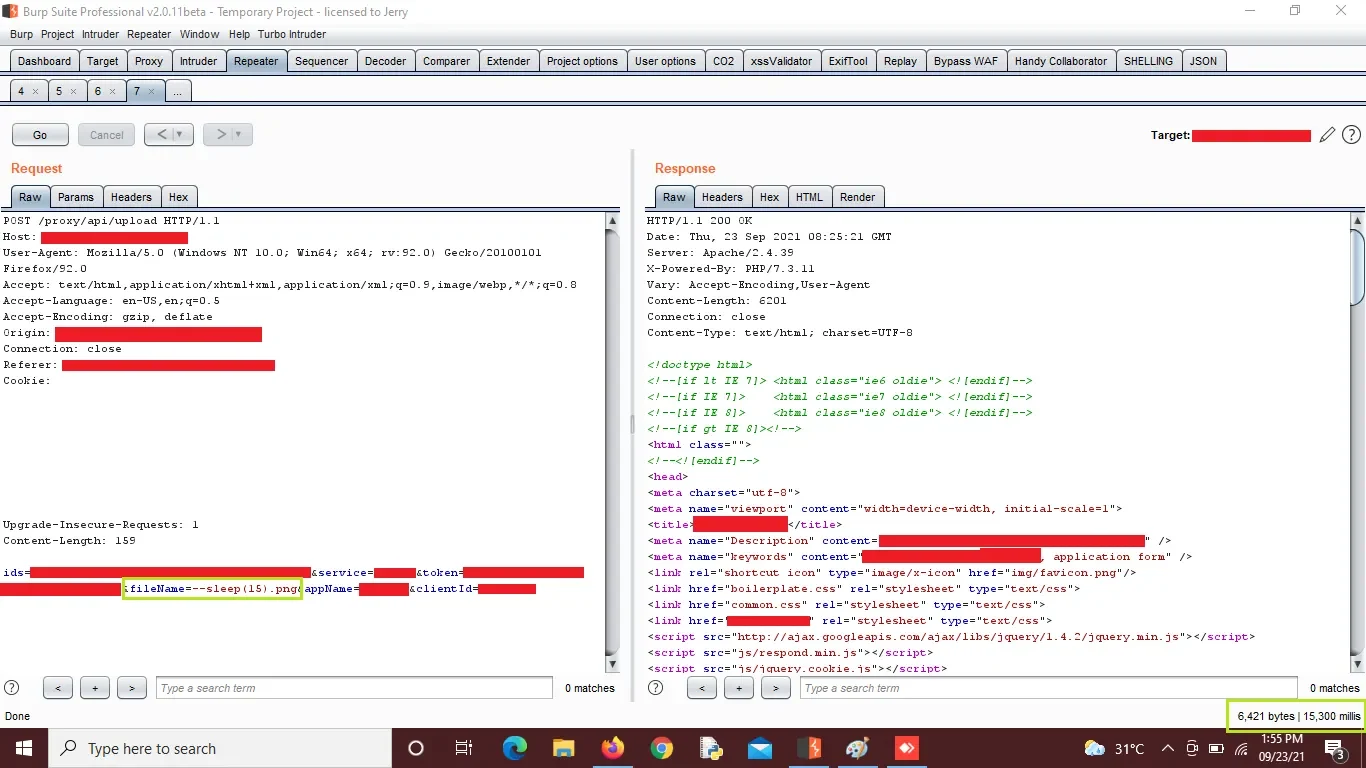
The researcher uploaded the file again, replacing the XSS payload with a time-based SQL injection payload in the filename, and checked the response in Burp.
--sleep(15).png
The -- sequence starts a SQL comment, which discards the rest of the query that the application appends after the filename, and sleep(15) asks the database to pause for 15 seconds. The .png suffix keeps the upload check happy about the extension. The response was delayed, which the researcher took as confirmation that the filename reaches a SQL statement.
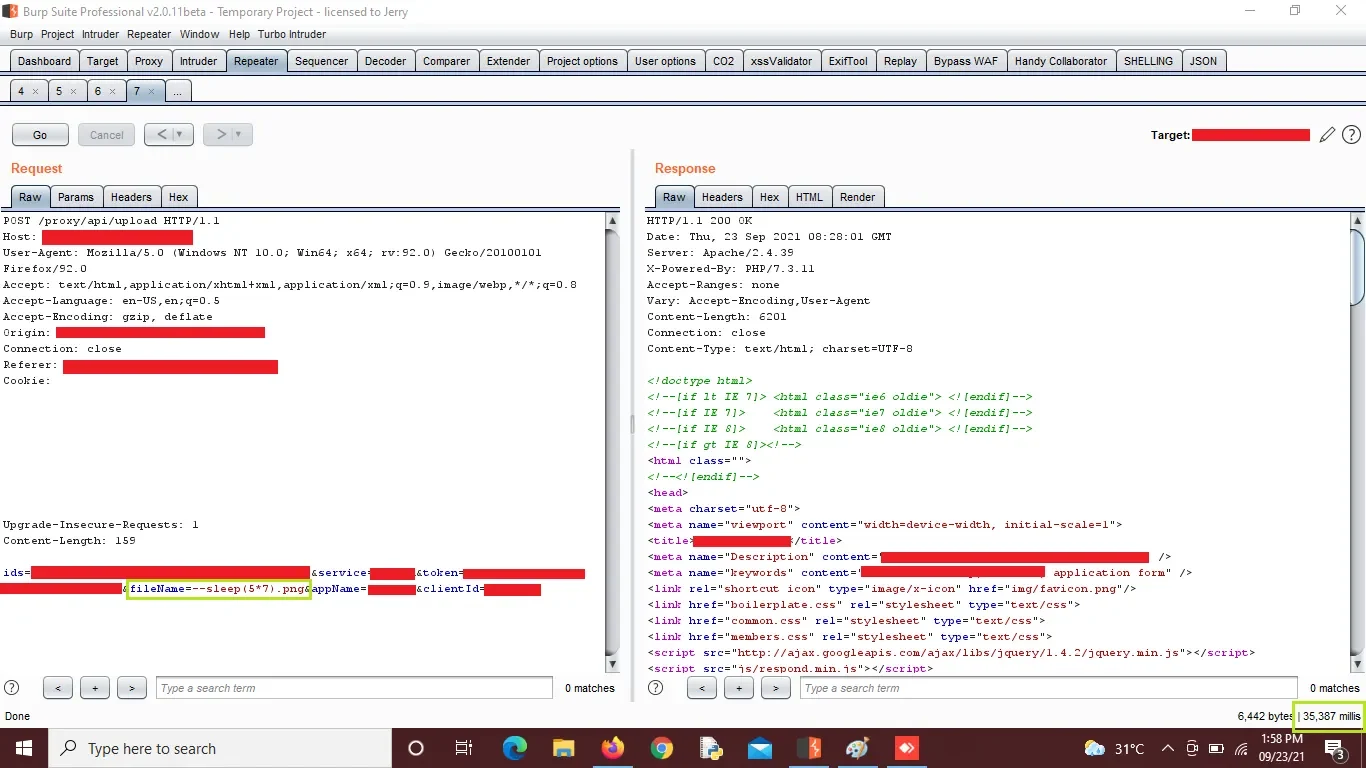
Step 2: Confirm with further sleep payloads
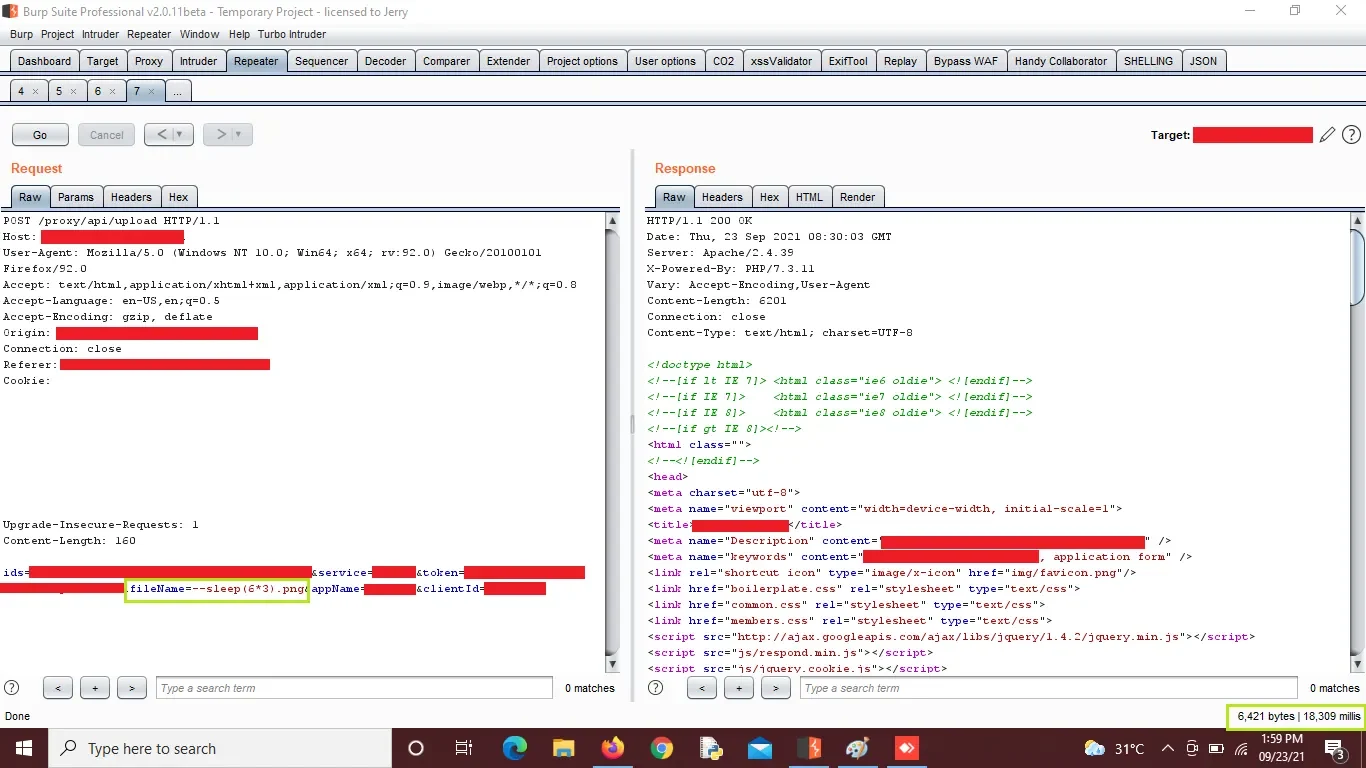
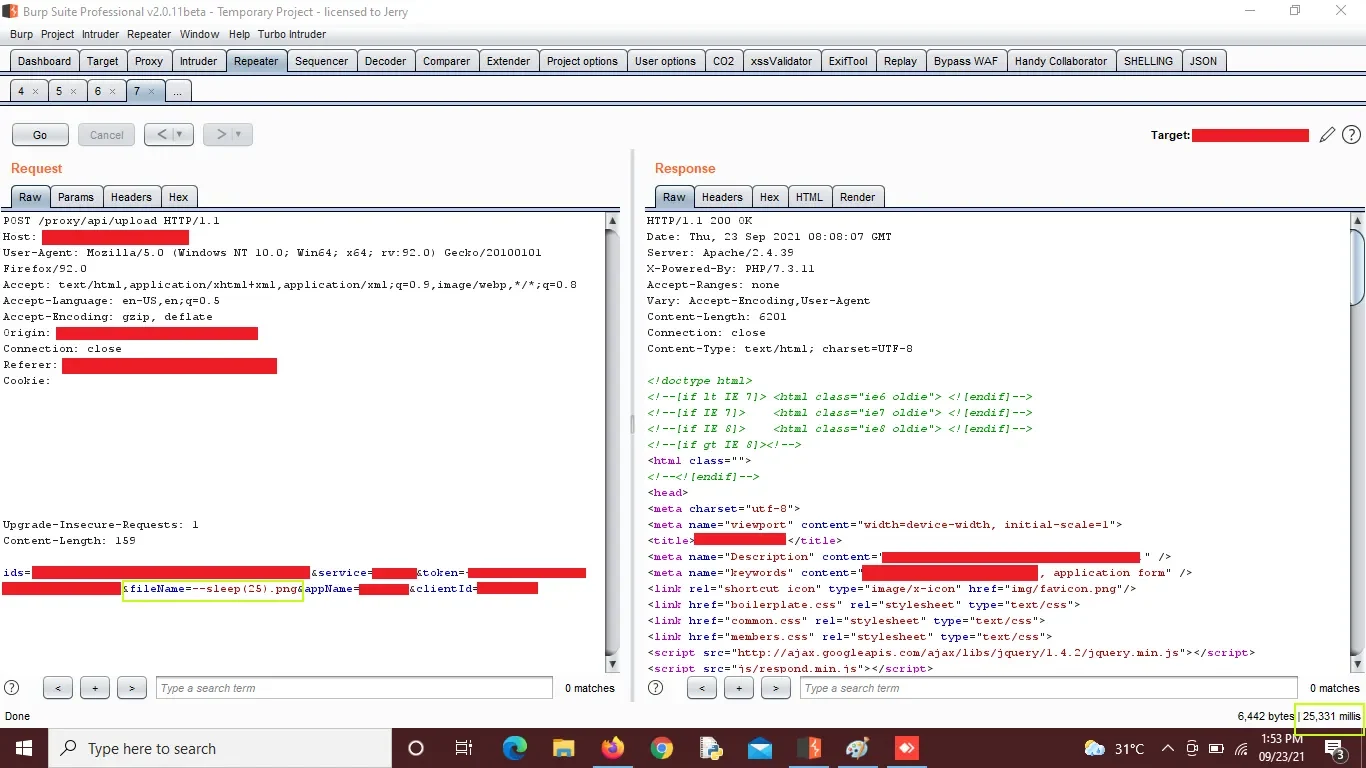
The researcher then tried additional sleep payloads and reports that they all worked too. The full list of payloads used is:
"><img src=x onerror=alert(document.domain)>--sleep(15).png--sleep(6*3).png--sleep(25).png--sleep(5*7).png
The researcher also tried arithmetic variants such as 6*3 and 5*7, and reports that they worked too.
Root cause
The researcher's explanation is that the PHP code behind the upload checks whether the uploaded file is an actual image, but never checks whether the filename is a valid filename or a payload. The code the researcher presents as the likely vulnerable logic is:
<?php
$target_dir = "uploads/";
$target_file = $target_dir . basename($_FILES["fileToUpload"]["name"]);
$uploadOk = 1;
$imageFileType = strtolower(pathinfo($target_file,PATHINFO_EXTENSION));
// Check if image file is a actual image or fake image
if(isset($_POST["submit"])) {
 $check = getimagesize($_FILES["fileToUpload"]["tmp_name"]);
 if($check !== false) {
 echo "File is an image - " . $check["mime"] . ".";
 $uploadOk = 1;
 } else {
 echo "File is not an image.";
 $uploadOk = 0;
 }
}
?>
In this code, $target_dir is the upload directory, $target_file is the full path built from the user-supplied name, $uploadOk is a flag used later, and $imageFileType holds the lower-cased extension. The only content check is getimagesize() on the temporary file, which says nothing about the name. The name is then used downstream, and the sleep payloads suggest it reaches a SQL query.
The researcher also proposes a filename validation check using a regular expression:
$filename = '../../test.jpg';
if (preg_match('/^[\/\w\-. ]+$/', $filename))
 echo 'VALID FILENAME';
else
 echo 'INVALID FILENAME';
The researcher proposes this regex as a way to check whether the uploaded file has a valid filename.
Impact
As described, time-based SQL injection lets an attacker make the database sleep on demand. The report notes that this increases consumption of CPU and memory resources such as RAM, cache and processor, and slows the server down. If the injection is exploited further, the researcher states it can be used to extract data from the database. The report does not demonstrate data extraction, only the delay.
The researcher calculated a CVSS 3.0 vector of:
CVSS:3.0/AV:L/AC:L/PR:N/UI:N/S:C/C:N/I:N/A:H
with a score of 7.1. The vector rates availability as high and confidentiality and integrity as none.
Fix
The report lists general mitigations and then a specific one for the sleep behaviour.
General mitigations:
- Prepared statements with parameterised queries, so the SQL structure does not change and the database can distinguish query from data.
- Input validation against a defined standard, from strict typing up to regular expressions or business logic.
- Escaping user input, prepending a backslash to characters such as
',",$and\so they are parsed as ordinary string content.
For the specific sleep issue, the researcher points at two MySQL parameters, interactive_timeout and wait_timeout, both defaulting to 28800 seconds (8 hours). They can be changed at runtime with:
SET GLOBAL interactive_timeout = 180;
SET GLOBAL wait_timeout = 180;
The same values should be added to the my.cnf file under the mysqld section so they survive a restart. The report also recommends calling mysql_close() at the end of every script so the connection is closed once the query is done.
With root access, the configuration file can be located and edited:
$Locate my.cnf
$vi /etc/my.cnf
and the following line added:
wait_timeout = 60
where the time is in seconds, so connections close automatically after 60 seconds of waiting.
Variants to test
- Put a time-based payload in the filename of any upload form and watch the response time. A positive result is a delay that scales with the value inside
sleep(), for example--sleep(5).pngversus--sleep(15).png. - Use arithmetic inside the sleep call, such as
--sleep(6*3).png. A positive result is a delay matching the evaluated expression, which shows the database is executing the expression rather than treating it as text. - Try the same filename field with a quote to break out of the surrounding statement. A positive result is a SQL error or a change in behaviour that the plain filename does not produce.
- Try the XSS payload in the filename and check whether the reflected value is rendered in another user's context, not just your own. A positive result is execution in a session you do not control, which turns the self XSS into a stored or reflected XSS.
- Submit filenames containing path traversal sequences such as
../../test.jpgand observe whether the stored path escapes the upload directory. A positive result is a file written outside the intended directory. - Test other fields that end up in the same query, such as a description or title submitted alongside the file. A positive result is the same delay behaviour from a field other than the filename.
What happened, in plain words
A security researcher was looking at a website that lets people upload pictures. When you upload a picture, you normally pick a file from your computer and the site saves it. The site only accepted a few picture file types, so the researcher could not simply upload a program disguised as a picture.
Instead of attacking the contents of the file, the researcher attacked the name of the file. The name of a file is just text, and text can contain characters that a website might treat as instructions rather than as a harmless label. The researcher first put a small piece of JavaScript (a script that runs in a browser) into the filename. That script ran, but only in the researcher's own browser, which is not very useful. What mattered was the error message the site returned: it said the filename had to be a valid file name. The error message was the interesting part, and the researcher moved on to a SQL payload in the same field.
So the researcher tried a different kind of text in the filename: a SQL injection payload. SQL is the language used to talk to databases, and a SQL injection is when an attacker slips SQL instructions into a place where the site expected ordinary data. The payload the researcher used was --sleep(15).png. The -- part tells the database to ignore the rest of the query, and sleep(15) tells it to wait for 15 seconds. If the site really was passing the filename into a database query, the response would be delayed. The researcher reports that the payload worked.
The rest of this article walks through the same steps the researcher took, explains what each payload does, and covers the fix the researcher recommended.
The feature under test
The feature is a standard image upload form. You click a button, choose a file from your computer, and the server checks that the file really is an image before storing it. The server checks that the file really is an image before accepting it.
The interesting part is that the filename is not only used as a label for the stored file. The sleep payloads in the filename worked, which suggests the filename reaches a database query somewhere on the server.
The report does not name the application or the bug bounty program it was reported through. The only tool mentioned is Burp, which is a program that lets you watch and change the requests your browser sends to a website. The researcher used it to inspect the response after submitting the SQL injection payload.
Finding it
The researcher started from the upload form itself.
The form only allowed a few image extensions. An extension is the part of a filename after the last dot, such as .png or .jpg. Rather than trying to hide malicious content inside a picture file, the researcher used the filename as the injection point and submitted an XSS payload as the name:
"><img src=x onerror=alert(document.domain)>.png
Here is what each part of that payload does:
">closes an HTML attribute and the tag it sits inside. If the filename is later placed inside an HTML page without being escaped, this breaks out of the surrounding markup.<img src=x onerror=alert(document.domain)>creates an image tag. Thesrc=xpoints to a file that does not exist, so the browser fires theonerrorevent. The event runsalert(document.domain), which pops up a box showing the domain of the page. That is a simple way to prove that JavaScript is running in the page's context..pngkeeps the upload check happy about the extension.
XSS stands for cross-site scripting. It is a vulnerability where an attacker gets their own JavaScript to run inside another user's browser session on a website. The script then runs with the same permissions as the site, so it can read cookies, change the page, or act as the user.
The payload executed, but only in the researcher's own browser session. That is called a self XSS: the script runs, but only for the person who submitted it. It is not directly useful to an attacker, because the attacker cannot make anyone else trigger it.
What made the finding worth pursuing was the error the application returned when the payload was submitted. The message was:
This property must be a valid file name
That message tells us the filename is being validated or processed on the server, not just in the browser. The wording also suggests the filename is passed into some backend logic rather than simply rejected by a client-side check. The researcher's reasoning was: if the filename reaches a database query, then a SQL payload in the same field should change the query's behaviour.
Exploitation
Step 1: Confirm the filename reaches a query
The researcher uploaded the file again, replacing the XSS payload with a time-based SQL injection payload in the filename, and checked the response in Burp.
--sleep(15).png
Here is what each part does:
--starts a SQL comment. In SQL, everything after--on the same line is ignored. This discards the rest of the query that the application appends after the filename, so the injected instruction is not broken by whatever comes next.sleep(15)asks the database to pause for 15 seconds before continuing. If the filename is really being placed inside a SQL query, the whole response will be delayed by 15 seconds.
The researcher reports that the payload worked, which he took as confirmation that the filename reaches a SQL statement.
Step 2: Confirm with further sleep payloads
The researcher then tried additional sleep payloads and reports that they all worked too. The full list of payloads used is:
"><img src=x onerror=alert(document.domain)>--sleep(15).png--sleep(6*3).png--sleep(25).png--sleep(5*7).png
The arithmetic variants (6*3, 5*7) are useful because they show the database is evaluating an expression rather than matching a literal string. The researcher reports that the arithmetic variants worked too. They also let the tester vary the delay without changing the shape of the payload.
Root cause
The researcher's explanation is that the PHP code behind the upload checks whether the uploaded file is an actual image, but never checks whether the filename is a valid filename or a payload. PHP is a programming language commonly used for websites. The code the researcher presents as the likely vulnerable logic is:
<?php
$target_dir = "uploads/";
$target_file = $target_dir . basename($_FILES["fileToUpload"]["name"]);
$uploadOk = 1;
$imageFileType = strtolower(pathinfo($target_file,PATHINFO_EXTENSION));
// Check if image file is a actual image or fake image
if(isset($_POST["submit"])) {
 $check = getimagesize($_FILES["fileToUpload"]["tmp_name"]);
 if($check !== false) {
 echo "File is an image - " . $check["mime"] . ".";
 $uploadOk = 1;
 } else {
 echo "File is not an image.";
 $uploadOk = 0;
 }
}
?>
Line by line, in plain words:
<?phpand?>mark the start and end of a block of PHP code inside a page.$target_dir = "uploads/";sets the folder where uploaded files will be stored. The variable name starts with$, which is how PHP marks a variable.$target_file = $target_dir . basename($_FILES["fileToUpload"]["name"]);builds the full path of the file to be saved.$_FILESis a special PHP array that holds information about uploaded files.["fileToUpload"]is the name of the form field, and["name"]is the original filename supplied by the user.basename()strips any directory part from that name. The dot.joins strings together in PHP.$uploadOk = 1;sets a flag that will be used later to decide whether the upload is allowed.$imageFileType = strtolower(pathinfo($target_file,PATHINFO_EXTENSION));extracts the file extension from the path and converts it to lower case.pathinfo()withPATHINFO_EXTENSIONreturns the part after the last dot, andstrtolower()makes it lower case so that.PNGand.pngare treated the same.if(isset($_POST["submit"])) {checks whether the form was submitted.$_POSTholds data sent by the form, andisset()checks whether a value exists.$check = getimagesize($_FILES["fileToUpload"]["tmp_name"]);asks PHP to inspect the temporary file that was uploaded and return information about it if it is a real image.tmp_nameis the temporary location the server gives the file before it is moved.if($check !== false) {runs if the file really is an image.echo "File is an image - " . $check["mime"] . ".";prints a message that includes the MIME type, which is a label for the file format, such asimage/png.$uploadOk = 1;keeps the upload allowed.} else {runs if the file is not an image.echo "File is not an image.";prints an error message.$uploadOk = 0;blocks the upload.
The key point is that the only content check is getimagesize() on the temporary file. That function says nothing about the name. The name is then used downstream, and the sleep payloads suggest it reaches a SQL query. The report does not show the query itself, so the exact statement is not known.
The researcher also proposes a filename validation check using a regular expression:
$filename = '../../test.jpg';
if (preg_match('/^[\/\w\-. ]+$/', $filename))
 echo 'VALID FILENAME';
else
 echo 'INVALID FILENAME';
Here is what each part does:
$filename = '../../test.jpg';is a sample filename to test against. The../parts are path traversal sequences, which try to move up out of the intended folder.preg_match('/^[\/\w\-. ]+$/', $filename)checks whether the filename matches a pattern. The pattern is written between slashes.^means the start of the string,$means the end, and[...]is a set of allowed characters. Inside the set,\/allows a forward slash,\wallows letters, digits and underscores,\-allows a hyphen,.allows a dot, and the space allows a space. The+means one or more of those characters. So the whole filename must consist only of those characters.echo 'VALID FILENAME';prints a message if the pattern matches.elseandecho 'INVALID FILENAME';print a different message if it does not.
The researcher proposes this regex as a way to check whether the uploaded file has a valid filename.
Impact
As described, time-based SQL injection lets an attacker make the database sleep on demand. The report notes that this increases consumption of CPU and memory resources such as RAM, cache and processor, and slows the server down. If the injection is exploited further, the researcher states it can be used to extract data from the database. The report does not demonstrate data extraction, only the delay.
The researcher calculated a CVSS 3.0 vector of:
CVSS:3.0/AV:L/AC:L/PR:N/UI:N/S:C/C:N/I:N/A:H
with a score of 7.1. CVSS is a standard way of scoring how serious a vulnerability is. The vector is a compact string that records the answers to a set of questions about the vulnerability. In this vector, availability is rated high (A:H), while confidentiality and integrity are rated none (C:N and I:N).
Fix
The report lists general mitigations and then a specific one for the sleep behaviour.
General mitigations:
- Prepared statements with parameterised queries. A prepared statement is a way of writing a SQL query where the structure is fixed in advance and the values are supplied separately. The database then treats the values as data, never as instructions, so a payload in a filename cannot change the query. It is like a form with boxes: the form itself does not change, only what you write in the boxes.
- Input validation against a defined standard. This means checking that what the user sent matches what the application expects, from strict typing (for example, a number field must contain a number) up to regular expressions or business logic.
- Escaping user input. Escaping means putting a backslash before characters such as
',",$and\so they are parsed as ordinary string content rather than as special characters. It is like putting quotation marks around a word so it is read as a word, not as an instruction.
For the specific sleep issue, the researcher points at two MySQL parameters, interactive_timeout and wait_timeout, both defaulting to 28800 seconds (8 hours). MySQL is a popular database system. These parameters control how long the database keeps an idle connection open before closing it. They can be changed at runtime with:
SET GLOBAL interactive_timeout = 180;
SET GLOBAL wait_timeout = 180;
Here is what each line does:
SET GLOBAL interactive_timeout = 180;changes the global setting for interactive connections to 180 seconds.SET GLOBAL wait_timeout = 180;changes the global setting for non-interactive connections to 180 seconds.
The same values should be added to the my.cnf file under the mysqld section so they survive a restart. my.cnf is the configuration file for MySQL, and mysqld is the section that applies to the database server process. The report also recommends calling mysql_close() at the end of every script so the connection is closed once the query is done.
With root access, the configuration file can be located and edited:
$Locate my.cnf
$vi /etc/my.cnf
Here is what each command does:
$Locate my.cnfsearches the system for the file calledmy.cnfand shows where it is.$vi /etc/my.cnfopens that file invi, a text editor that is available on most Unix-like systems.
and the following line added:
wait_timeout = 60
where the time is in seconds, so connections close automatically after 60 seconds of waiting.
Variants to test
- Put a time-based payload in the filename of any upload form and watch the response time. A positive result is a delay that scales with the value inside
sleep(), for example--sleep(5).pngversus--sleep(15).png. - Use arithmetic inside the sleep call, such as
--sleep(6*3).png. A positive result is a delay matching the evaluated expression, which shows the database is executing the expression rather than treating it as text. - Try the same filename field with a quote to break out of the surrounding statement. A positive result is a SQL error or a change in behaviour that the plain filename does not produce.
- Try the XSS payload in the filename and check whether the reflected value is rendered in another user's context, not just your own. A positive result is execution in a session you do not control, which turns the self XSS into a stored or reflected XSS.
- Submit filenames containing path traversal sequences such as
../../test.jpgand observe whether the stored path escapes the upload directory. A positive result is a file written outside the intended directory. - Test other fields that end up in the same query, such as a description or title submitted alongside the file. A positive result is the same delay behaviour from a field other than the filename.
Glossary
- API: a way for one piece of software to talk to another, like a menu of requests a program can make.
- Burp: a tool that lets you watch and change the requests your browser sends to a website.
- Cookie: a small piece of data a website stores in your browser so it can remember who you are between requests.
- Cross-site scripting (XSS): a vulnerability where an attacker gets their own JavaScript to run inside another user's browser session on a website.
- CVSS: a standard way of scoring how serious a vulnerability is.
- Database: a program that stores and organises data so it can be searched and changed quickly.
- Escaping: putting a backslash before special characters so they are read as ordinary text.
- Extension: the part of a filename after the last dot, such as
.png. - Filename: the name of a file, which is just text and can contain special characters.
- JavaScript: the programming language that runs in web browsers and makes pages interactive.
- MIME type: a label for a file format, such as
image/png. - MySQL: a popular database system.
- Parameterised query: a SQL query where the structure is fixed and the values are supplied separately, so the database treats them as data.
- PHP: a programming language commonly used for websites.
- Prepared statement: a SQL query written in advance so the structure cannot be changed by user input.
- Regular expression: a pattern used to check whether text matches a rule.
- Self XSS: an XSS that only runs in the browser of the person who submitted it.
- SQL: the language used to talk to databases.
- SQL injection: a vulnerability where an attacker slips SQL instructions into a place where the site expected ordinary data.
- Time-based SQL injection: a SQL injection where the attacker measures how long the database takes to respond to confirm the injection works.
- Token: a piece of data used to prove who you are, often stored in a cookie.
- XSS: see cross-site scripting.





