Stored XSS on Product Description [HIGH] — $400
A product description field on an e-commerce site rendered user input as Markdown and allowed HTML, and a web application firewall could be bypassed with Unicode-encoded characters. An attacker could store a link that runs script when a victim clicks it, stealing cookies.
 Published on emanuel-beni.medium.com
Disclaimer: I do not have permission to disclose the report, therefore I needed to heavily redact this writeup. Thank you and happy reading!
The full write-up lives on its author's site
It belongs to its author, so we link to it rather than copy it. The other two tabs are our own rewrites, checked against it.
Context
The target was one of the biggest e-commerce sites in Asia. The feature in question is the product description field that e-commerce platforms give sellers so they can add their own text to their product pages. That field is a natural attack surface for stored cross-site scripting: the seller's input is saved and later rendered to shoppers who view the product page.
The author opens with a short definition: stored cross-site scripting is a vulnerability where an application stores untrusted malicious code from users. He notes that the combination of being lethal while having low attack complexity places XSS at number 7 of the OWASP Top 10.
The write-up is heavily redacted because the author did not have permission to disclose the report, so the hostname, endpoint and account details are not shown.
Setup
The report does not describe the account creation process, the seller role setup, the browser or any tooling beyond the payloads themselves. The precondition is simply the ability to edit a product description as a seller. The author's workflow was to submit a set of payloads into the description field, save, and then view the product page to see what the application rendered.
Finding it
Because product descriptions are seller-controlled and displayed to other users, the author treated the field as a stored XSS vector and started with shallow testing. He submitted the following payloads:
- Polyglot payload:
" onclick=alert(1)//<button ' onclick=alert(1)//> */ alert(1)//
-
A second polyglot payload:
-
URL-encoded payload:
%7d%29%3b%7d%29%3balert%60xss%60;%3c%2f%73%63%72%69%70%74%3e
- HTML injection check:
'" ><a href='www.anything.com'>Click Here</a>
His reasoning is that it is basically impossible to test every payload that exists, so he relies on this set to check for possible reflection. The first thing he checks for is HTML injection, meaning executed HTML tags. If the application executes HTML tags, there is a good chance the behaviour can be leveraged into XSS.
In this case the application executed some of his HTML tags, but not his script tags. After a couple of hours of tampering with the endpoint, he reached three conclusions:
- The web application implements a WAF (Web Application Firewall).
- The WAF strips sensitive keywords such as
javascriptandalert. - The product description uses Markdown to parse the user's input.
He explains Markdown as a lightweight markup language used to add formatting elements to plaintext documents, and notes that because it offers high customisability for users, misconfiguration often happens.
Exploitation
Step 1: Bypass the keyword filter with Unicode encoding
He spent the next hour looking for payloads that would satisfy the conditions above. After reading multiple blog posts, he found that one of the most common bypasses is Unicode encoding, and tried the following payload in the product description:
<a href=javascript:alert(document.cookie)>ClickMe</a>
The author found that Unicode encoding is a common bypass and tried this payload; the application decoded it to plaintext and executed it when the anchor was clicked.
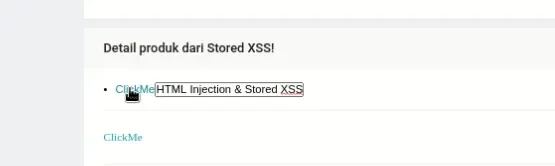
The screenshot shows the result: XSS and HTML injection are successful. The application decodes the Unicode to plaintext and executes the payload when the anchor tag is clicked.
Step 2: Confirm execution
Clicking the rendered anchor tag prompts document.cookie, confirming script execution in the context of the product page.
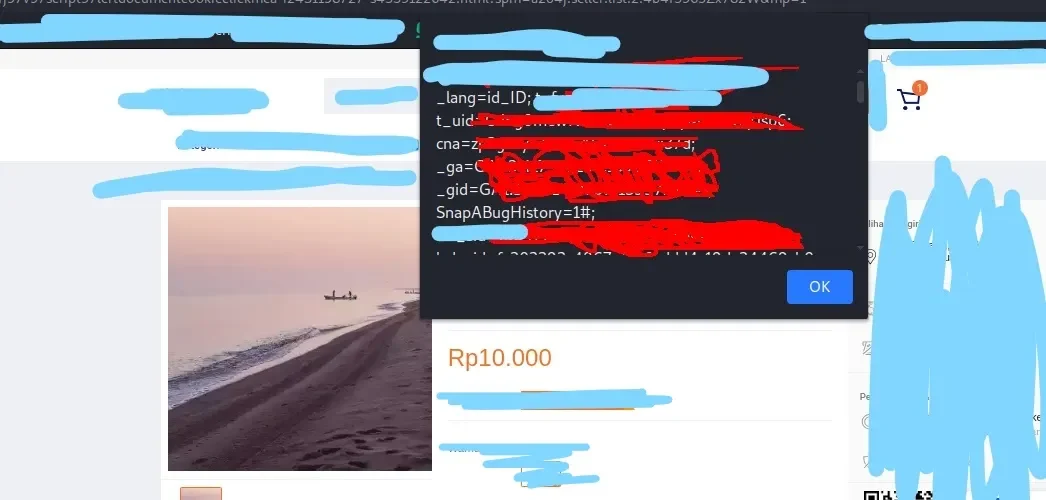
The second screenshot shows the prompt containing document.cookie after the anchor is clicked.
Root cause
Two weaknesses combined. First, the product description is parsed as Markdown, and the application executed some of the author's HTML tags. Second, the WAF stripped the keywords javascript and alert, and the Unicode-encoded payload got past it. The report does not show the server-side code, so the exact cause of the HTML execution is not stated.
Impact
The payload is stored in the product description and executes when a visitor clicks the anchor tag. The author rated it high severity given the impact and placement of the bug, and execution happens when a visitor clicks the anchor tag.
The security team agreed with the high severity rating and rewarded a total of $400 after 2 months of waiting.
Fix
Based on the root cause, the fix should be to sanitise the HTML produced from Markdown on the server side, allowing only a safe subset of tags and attributes and rejecting dangerous URL schemes such as javascript: after entity decoding, rather than relying on keyword blacklists in the WAF.
Variants to test
- Entity-encoded URL schemes. Submit an anchor whose
hrefuses decimal or hex character references forjavascript:and for the function name, as in the payload above. A positive result is the link executing script when clicked. - Markdown raw HTML. Put raw HTML tags in a Markdown field and check whether they render as markup rather than escaped text. A positive result is an executed tag such as
<marquee>or<a>appearing in the page source. - Keyword blacklist probing. Submit benign tags first to confirm HTML injection, then vary the encoding of blocked keywords. A positive result is a payload that renders and executes while the literal blocked strings are absent from the input.
- Other stored fields. Apply the same encoded-scheme payload to any seller-controlled field that is rendered to other users, such as descriptions, titles or profile text. A positive result is execution in another user's session.
What happened, in plain words
A security researcher found a way to make a shopping website run code that he wrote when a visitor clicked a link in a product description. The website let sellers type their own product descriptions. The site saved whatever the seller typed and showed it to shoppers. The researcher typed a special link into a product description, and when someone clicked that link, the site ran his code in that person's browser. The site's protection stripped keywords such as javascript and alert, but a Unicode-encoded payload got past it. The company agreed it was serious and paid him $400.
This kind of bug is called stored cross-site scripting, often shortened to stored XSS. Let us unpack that name.
- Scripting means running small programs inside a web page. Every website you visit runs programs in your browser; that is how buttons react, menus open and pages update without reloading. These programs are written in a language called JavaScript.
- Cross-site means the program did not come from the website's own developers. It came from somewhere else, in this case from another user's input, but the browser runs it as if it belonged to the site.
- Stored means the malicious text was saved on the server first, and then shown to everyone who later views the page. It is not a one-off trick that only affects the person who typed it.
A simple comparison: imagine a noticeboard in a shop where sellers can pin their own handwritten signs. If the shop simply pins whatever anyone hands over, a prankster can pin a sign that says "hand your wallet to the person at the door" and every customer will read it as if the shop wrote it. Stored XSS is the digital version: the site saves the attacker's text and serves it to everyone else, with the site's own authority behind it.
The researcher opens with a short definition: stored cross-site scripting is a vulnerability where an application stores untrusted malicious code from users. He also mentions the OWASP Top 10, a well-known list of the ten most common categories of web security problems, where XSS sits at number 7. He notes that XSS is dangerous while also being easy to attempt, which is why it stays on that list.
The write-up is heavily redacted because the author did not have permission to disclose the report. That means the website's name, the exact page address and the account details are not shown. You will see gaps where those details would be, and that is deliberate.
Setup
To understand the setup, you need to know what a seller account is on an e-commerce site. Big marketplaces are not one shop; they are many shops on one platform. Anyone can register as a seller, list products and write the text that describes them. That text is called the product description.
The report does not describe how the account was created, how the seller role was set up, which browser was used, or any tooling beyond the payloads themselves. A payload is simply the piece of text an attacker sends in the hope that the target will treat it as code rather than as ordinary words. The only precondition stated is the ability to edit a product description as a seller.
The workflow was straightforward: type a payload into the description field, save it, then open the product page as a visitor would and look at what the site rendered. Rendered means what the browser actually displays or runs after reading the page's instructions, as opposed to the raw text that was typed.
Finding it
Product descriptions are controlled by sellers and displayed to other users, so the researcher treated the field as a stored XSS vector. A vector is a route by which an attack gets in, like a door or window in a building. He started with shallow testing, meaning quick, broad probes rather than deep, targeted work. He submitted the following payloads:
- Polyglot payload:
" onclick=alert(1)//<button ' onclick=alert(1)//> */ alert(1)//
A polyglot payload is one string built to work in several different contexts at once, the way a phrasebook sentence might be understood in three languages. Reading this one piece by piece:
"is a double quote. It is there to close a quoted value if the site happens to place the input inside an HTML attribute, so that whatever follows is treated as new markup rather than as part of the value.onclick=alert(1)is an event handler: an instruction that says "when this element is clicked, runalert(1)".alert(1)is the simplest possible JavaScript command; it opens a small pop-up box showing the number 1. Seeing that box is the classic proof that code ran.//starts a comment in JavaScript, so anything after it on the same line is ignored. Attackers add it to swallow the leftover characters the site might append.<button ' onclick=alert(1)//>is an HTML button element with the same click handler, included in case the input lands in a place where a fresh tag is needed.*/ alert(1)//is there for contexts where the input ends up inside a comment block;*/closes the comment and the rest becomes live code.
- A second polyglot payload:
This is a much longer polyglot, a shotgun blast of many tricks in one string. The important parts to recognise:
'" >>are quote characters and angle brackets. Angle brackets are the characters<and>, and HTML uses them to mark where a tag begins and ends. Getting a>into the page can close whatever tag the site had opened and start a new one.<marquee>is an old HTML tag that scrolls text across the screen. It is used here because it is simple and often forgotten by filters.<img src=x onerror=confirm(1)>is an image tag.src=xpoints at an image that does not exist, so loading fails, andonerroris the handler that runs when loading fails.confirm(1)is likealert(1): it shows a pop-up asking you to confirm something. This trick fires without any click, because the failed image load happens automatically.<script>prompt(1)</script>is the most direct form: a script tag containingprompt(1), which opens a box asking for input. If a site ever runs this, the game is over.onmouseover=prompt(1)runs when the mouse pointer moves over the element.formaction=javascript:alert(/XSS/)is an attribute on a form submit button that changes where the form sends you; here it points at ajavascript:address, which runs code instead of navigating.(and)are HTML character references for the round brackets(and). We will come back to these, because they are the heart of the final bypass.- The trailing
<img src="http://i.imgur.com/P8mL8.jpg">is an ordinary image from an image hosting site, included as filler.
- URL-encoded payload:
%7d%29%3b%7d%29%3balert%60xss%60;%3c%2f%73%63%72%69%70%74%3e
URL encoding (also called percent encoding) is a way of writing characters that are awkward in a web address by replacing them with a percent sign and two hexadecimal digits. A hexadecimal digit is one of 0 to 9 or a to f. Decoding this string by hand: %7d is }, %29 is ), %3b is ;, %60 is a backtick, %3c is <, %2f is /, %73 is s, %63 is c, %72 is r, %69 is i, %70 is p, %74 is t. So the whole thing decodes to });});alertxss;</script>. The point of sending it encoded is that a filter looking for the plain words sees only harmless-looking percent signs.
- HTML injection check:
'" ><a href='www.anything.com'>Click Here</a>
This one is deliberately harmless. It tries to insert an anchor tag, which is HTML for a link: <a href="...">Click Here</a> shows the words "Click Here" and sends you to the address in href when clicked. Here the address is an ordinary website. If the page shows a real clickable link, the site is accepting raw HTML from users, which is called HTML injection. HTML injection alone is not code execution, but it is the foothold: if you can inject tags, you may be able to inject a tag that runs code.
His reasoning is that it is basically impossible to test every payload that exists, so he relies on this set to check for possible reflection. Reflection means the site sends your input back to the browser in the page it builds. The first thing he checks for is HTML injection, meaning executed HTML tags. If the application executes HTML tags, there is a good chance the behaviour can be leveraged into XSS.
In this case the application executed some of his HTML tags, but not his script tags. That is a very informative result: the door is partly open, but the most obvious way through is blocked.
After a couple of hours of tampering with the endpoint, he reached three conclusions. An endpoint is the specific address on a server that handles one particular action, like a counter in a shop that deals with one kind of transaction. Here it is the address that saves a product description.
- The web application implements a WAF (Web Application Firewall). A WAF is a filter that sits in front of a website and inspects incoming requests, blocking ones that look malicious. Think of a bouncer at the door who checks bags for known forbidden items.
- The WAF strips sensitive keywords such as
javascriptandalert. Stripping means removing those words from the input before it is saved. This is a blacklist approach: you list the bad things and block them, rather than listing the good things and allowing only those. - The product description uses Markdown to parse the user's input. Markdown is a lightweight markup language used to add formatting to plain text. You have probably used it without knowing: typing
**bold**to get bold text, or#at the start of a line for a heading. It is popular because it is easy to read as plain text and easy to write. Parsing means the site reads that Markdown and converts it into the HTML the browser displays.
He explains that because Markdown offers high customisability for users, misconfiguration often happens.
Exploitation
Step 1: Bypass the keyword filter with Unicode encoding
He spent the next hour looking for payloads that would satisfy the conditions above. After reading multiple blog posts, he found that one of the most common bypasses is Unicode encoding, and tried the following payload in the product description:
<a href=javascript:alert(document.cookie)>ClickMe</a>
Before explaining the trick, two ideas need unpacking.
HTML character references. HTML has a way of writing any character by its numeric code, using &# followed by a number and a semicolon. The number 97 is the code for the lowercase letter a. So a and a mean exactly the same thing to a browser. This exists so authors can write characters that are hard to type, but the browser decodes them before it interprets the page.
Cookies. A cookie is a small piece of text that a website asks your browser to store and send back on every request to that site. Cookies are how a site remembers that you are logged in: after you sign in, the site gives your browser a cookie containing a session identifier, a long random string that acts like a wristband at an event. Anyone holding that wristband is treated as you. document.cookie is the JavaScript expression that reads the cookies available to the current page. If an attacker can run code on a page and read document.cookie, they may be able to steal that wristband and act as the victim.
Now read the payload piece by piece:
<a href=...>ClickMe</a>is an anchor tag, a link, showing the words "ClickMe".- The
hrefvalue isjavascript:alert(document.cookie). Decoding the references:aisa, sojavascript:becomesjavascript:, andalertbecomesalert. The full decoded value isjavascript:alert(document.cookie). - A
javascript:address is a special kind of link. Instead of taking you to another page, it runs the JavaScript that follows the colon. So clicking this link runsalert(document.cookie), which pops up a box showing the page's cookies.
The literal strings javascript and alert never appear in the submitted input, which is why the WAF's keyword stripping did not catch them. The filter looked for the plain words; the browser, which decodes character references, saw the real thing.
The screenshot shows the result: XSS and HTML injection are successful. The application decodes the Unicode to plaintext and executes the payload when the anchor tag is clicked.
Step 2: Confirm execution
Clicking the rendered anchor tag prompts document.cookie, confirming script execution in the context of the product page. Context here means the browser's view of which site it is on. Code running in the product page's context is treated as coming from the shop itself, so it can read that shop's cookies and act with the victim's logged-in session.
The second screenshot shows the prompt containing document.cookie after the anchor is clicked.
Root cause
A root cause is the underlying reason a bug exists, as opposed to the symptom you see. Two weaknesses combined here.
First, the product description is parsed as Markdown, and the application executed some of the author's HTML tags. Sanitising means cleaning user-supplied HTML so that only a safe, known set of tags and attributes survives, and anything dangerous is removed or neutralised. Without that step, raw HTML such as an anchor tag with a javascript: URL survives into the page.
Second, the WAF stripped the keywords javascript and alert, and the Unicode-encoded payload got past it. The filter checks the parcel at the door, but the contents are assembled later, inside the house.
The report does not show the server-side code, so the exact cause of the HTML execution is not stated.
Impact
Impact means what an attacker could actually do with the bug, and to whom. The payload is stored in the product description and executes when a visitor clicks the anchor tag. The author rated it high severity given the impact and placement of the bug, and execution happens when a visitor clicks the anchor tag. Severity is the seriousness rating a bug gets, usually combining how much damage is possible with how easy it is to pull off.
That click requirement is what separates this from the worst-case version of stored XSS, where a page runs the attacker's code the moment it loads.
The security team agreed with the high severity rating and rewarded a total of $400 after 2 months of waiting. A bug bounty is a programme where companies pay researchers for reporting security problems responsibly instead of exploiting them.
Fix
Based on the root cause, the fix should be to sanitise the HTML produced from Markdown on the server side, allowing only a safe subset of tags and attributes and rejecting dangerous URL schemes such as javascript: after entity decoding, rather than relying on keyword blacklists in the WAF. In everyday terms: check the finished product, not just the raw ingredients, and allow only what is known to be safe instead of blocking a list of things known to be bad.
Variants to test
A variant is the same idea applied in a slightly different way, to see whether the fix covered every route or only the one that was reported.
- Entity-encoded URL schemes. Submit an anchor whose
hrefuses decimal or hex character references forjavascript:and for the function name, as in the payload above. A positive result is the link executing script when clicked. - Markdown raw HTML. Put raw HTML tags in a Markdown field and check whether they render as markup rather than escaped text. Escaped means shown as visible characters, so
<a>appears on screen as the text<a>instead of becoming a link. A positive result is an executed tag such as<marquee>or<a>appearing in the page source. The page source is the raw HTML the browser received, which you can view in your browser's developer tools. - Keyword blacklist probing. Submit benign tags first to confirm HTML injection, then vary the encoding of blocked keywords. A positive result is a payload that renders and executes while the literal blocked strings are absent from the input.
- Other stored fields. Apply the same encoded-scheme payload to any seller-controlled field that is rendered to other users, such as descriptions, titles or profile text. A positive result is execution in another user's session.
Glossary
- Anchor tag: the HTML element
<a>that creates a clickable link, with the destination in itshrefattribute. - Angle brackets: the characters
<and>, used in HTML to mark the start and end of tags. - Attribute: an extra setting written inside an HTML tag, such as
hrefon a link orsrcon an image. - Blacklist: a security approach that blocks a list of known-bad things, rather than allowing only known-good things.
- Bug bounty: a programme where companies pay researchers for responsibly reporting security problems.
- Character reference: an HTML way of writing a character by number, such as
afor the lettera, which the browser decodes before interpreting the page. - Context: the browser's view of which site code is running on, which determines what that code is allowed to access.
- Cookie: a small piece of text a site asks your browser to store and send back on each request, often used to remember that you are logged in.
- Endpoint: the specific address on a server that handles one particular action.
- Escaped: shown as visible characters rather than interpreted as markup.
- Event handler: an instruction attached to an HTML element that runs code when something happens, such as a click or a failed image load.
- Hexadecimal digit: one of
0to9oratof, used in URL encoding and character references. - HTML injection: getting raw HTML tags into a page that should only contain text; a foothold that can sometimes become XSS.
- Impact: what an attacker could actually do with a bug, and to whom.
- JavaScript: the programming language that runs inside web pages in your browser.
- Markdown: a lightweight markup language for formatting plain text, which sites convert into HTML.
- OWASP Top 10: a well-known list of the ten most common categories of web security problems.
- Page source: the raw HTML the browser received, viewable in developer tools.
- Parsing: reading text and converting it into a structured form, such as turning Markdown into HTML.
- Payload: the piece of text an attacker sends hoping it will be treated as code.
- Polyglot payload: one payload built to work in several different contexts at once.
- Reflection: when a site sends your input back to the browser in the page it builds.
- Rendered: what the browser actually displays or runs after reading the page's instructions.
- Root cause: the underlying reason a bug exists, as opposed to the symptom you see.
- Sanitising: cleaning user-supplied HTML so only a safe, known set of tags and attributes survives.
- Seller account: a registered account on a marketplace that lets a person list products and write their descriptions.
- Session identifier: a long random string in a cookie that acts like a wristband proving you are logged in.
- Severity: a seriousness rating for a bug, usually combining possible damage with ease of exploitation.
- Stored XSS: cross-site scripting where the malicious text is saved on the server and shown to later visitors.
- Stripping: removing certain words from input before it is saved.
- URL encoding: writing awkward characters as a percent sign plus two hexadecimal digits.
- Variant: the same attack idea applied in a slightly different way to test whether a fix is complete.
- Vector: a route by which an attack gets in.
- WAF (Web Application Firewall): a filter in front of a website that inspects incoming requests and blocks ones that look malicious.
- XSS (cross-site scripting): a vulnerability where a site runs code supplied by someone other than its own developers, in a visitor's browser.



