Why You Should Always Check The Audit Log [Medium] — $500
The audit log page disclosed full invitation links and was accessible to read-only users. A read-only user could use a disclosed invitation link to invite other users to the organisation, bypassing their lack of invitation privileges.
 Published on emanuel-beni.medium.com
Disclaimer: Due to the program’s policy, the company in this write-up will be redacted. Don’t forget to read my previous Bug Bounty Writeup —Privilege Escalation from Improper Access Control (Medium) — $700.
The full write-up lives on its author's site
It belongs to its author, so we link to it rather than copy it. The other two tabs are our own rewrites, checked against it.
Context
The target was a well-known cyber security company. The company's name is redacted in this write-up because of the program's policy, and the report was submitted through the program's page on HackerOne. The product is a web application with organisation accounts, administrator users, a Read-Only user role, an Audit Log feature and an Invitation Link feature.
The Audit Log records detailed historical information about events and changes made to an account. In this application almost every event is recorded together with its details: when a new user is invited, the log shows the event type along with the invited user's email address, name and time. The Invitation Link feature lets administrator users generate a link that can be used to invite other users to the organisation.
Setup
No specific tooling, versions or payloads are involved. The researcher surfed the application at the start of the engagement, took notes on its features, functions and flow, and worked with two kinds of account:
- An administrator account, used to generate invitation links and to look at the Audit Log.
- A newly created Read-Only account, used to check what a low-privilege user can reach.
The bug relied on the application having both features: an Audit Log that records invitation events, and an Invitation Link generator.
Finding it
While mapping the application the researcher found the Audit Log feature and noticed that almost all events are recorded with their details. That alone looked unremarkable. The second feature found was the Invitation Link generator, which administrators use to invite users to the organisation.
Knowing that the Audit Log records event details, the researcher generated a new invitation link and checked whether its details appear on the Audit Log page. The Audit Log does disclose the actual invitation link. That connected the two features: the log is not just a record of who was invited, it stores the invitation link itself.
At this point the researcher applied a "What Ifs" method, asking which scenarios would pose a security threat:
- What if an active invitation link is deleted and is still accessible from the audit log?
- What if an active invitation link is overridden and the overridden, presumably deleted, link is still accessible from the audit log?
- What if a lower privilege user, such as a Read-Only User, could view the Audit Log page and use the invitation link to escalate privilege?
Exploitation
Step 1: Generate an invitation link as an administrator
Using an administrator account, generate a new invitation link through the Invitation Link feature. The report does not show the request or the response for this step.
Step 2: Read the Audit Log
Open the Audit Log page and look at the entry for the invitation event. The log entry contains the actual invitation link, not just metadata about the event. This confirms that the link is disclosed on the Audit Log page.
Step 3: Test the What Ifs
The three scenarios above were tested one by one. The third one turned out to be true.
Step 4: Create a Read-Only account and open the Audit Log
A new Read-Only account was created. That account was able to access the Audit Log page. A read-only account should not have the ability to invite other users to the organisation, but because the full invitation link is disclosed on the Audit Log page and the Read-Only account can read that page, the Read-Only account can take the link and invite other users to the organisation.
Step 5: Report
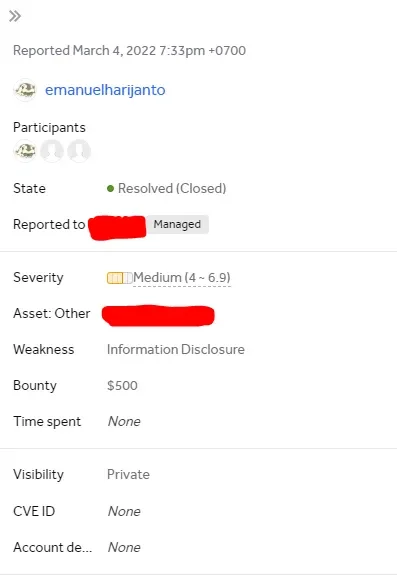
After confirming the vulnerability the researcher reported it to the program's page on HackerOne. The report was graded as Medium severity and rewarded with $500.
Root cause
The Audit Log stores and renders the full invitation link as part of the event details, and the Audit Log page is reachable by a role that is not authorised to invite users. The Read-Only user never uses the invitation feature directly; they simply read a link that an administrator generated and that the log kept. The report does not describe the code or the access-control model, so the exact mistake is likely a missing distinction between metadata about an invitation and the secret that the invitation carries, combined with an Audit Log page that is not restricted to roles allowed to perform the logged actions.
Impact
A Read-Only user, who should not be able to invite anyone, can read the invitation link from the Audit Log and use it to invite other users into the organisation. In this application the organisation used the Invitation Link feature and the Audit Log recorded the link. The researcher notes that information such as support PINs, recovery codes and invitation links can be sensitive when it reaches the wrong actor, even though it does not look like a password or an API key.
Fix
Based on the finding, the Audit Log should not store or display the full invitation link, or the Audit Log page should be restricted to the roles that are allowed to invite users.
Variants to test
- Generate an invitation link, then delete it, and check whether the deleted link is still readable from the Audit Log and still usable.
- Generate an invitation link, override it with a new one, and check whether the overridden link is still in the Audit Log and still works.
- Log in as the lowest-privilege role and open the Audit Log. A positive result is the page loading and showing event details, including any links or tokens.
What happened, in plain words
A security researcher found a bug in a well-known cyber security company's web application. The bug let a user with limited permissions (a "Read-Only" user) do something they should not be able to do: invite new people to the organisation. The researcher earned a $500 bounty, and the report was rated Medium severity. The company's name is hidden because of the bug bounty program's rules, and the report was submitted through the program's page on HackerOne.
The bug was not complicated. It came from two ordinary features working together in an unexpected way: an Audit Log (a record of what happened in the account) and an Invitation Link generator (a tool that creates links to invite people). The Audit Log showed the full invitation link, and a Read-Only user could see the Audit Log. So the Read-Only user could copy the link and use it to invite people, even though they were not supposed to have that power.
This article explains the story from scratch, for someone who has never done security testing.

Photo by Markus Spiske on Unsplash
What is Information Disclosure?
Information Disclosure (also called "Exposure of Sensitive Information to an Unauthorized Actor", catalogued as CWE-200) is a type of vulnerability where information that should be kept private is accidentally shown to people who should not see it. Think of it like a bank accidentally leaving a customer's account statement on the counter where any visitor can read it. The statement is not a password, but it still contains private details.
Sensitive information is not only passwords and secret API keys. It also includes things like a support PIN, a recovery code, or an invitation link. If the wrong person gets hold of any of these, they can use it to do things they should not be able to do. In this case, the invitation link was the sensitive information.
Understanding Your Target
Before you start testing, you need to understand the web application you are testing. This means spending time using it like a normal user: click around, try the features, and take notes on how it works. What can each type of user do? What happens when you create something? Where does the data go? This knowledge helps you spot when something is out of place. The researcher did this and found two features that turned out to be connected.
The Journey to $$$
The researcher explored the application and found a common feature: the Audit Log. An Audit Log is a record of events and changes in an account. For example, when someone invites a new user, the log shows the event type and details like the invited user's email address, name, and time. This seems harmless at first.
Then the researcher found another common feature: the Invitation Link feature. This lets an administrator generate a link that can be used to invite other users to the organisation.
Knowing that the Audit Log records details, the researcher generated a new invitation link and checked whether the link itself appeared in the Audit Log. It did. The Audit Log showed the actual invitation link, not just a note that an invitation was created. That connected the two features: the log stored the secret link.
Now the researcher asked a series of "What If" questions to find a security problem:
- What if we delete an active invitation link and are still able to access it from the audit log?
- What if we override an active invitation link and still be able to access the overridden, presumably deleted, invitation link from the audit log?
- What if a lower privilege user, i.e. Read-Only User, could view the Audit Log page and use the invitation link to escalate privilege?
The third question turned out to be true. The researcher created a new Read-Only account and was able to access the Audit Log page. A Read-Only account should not be able to invite users, but because the full invitation link was in the Audit Log and the Read-Only account could read it, that account could copy the link and invite users.
After confirming the vulnerability, the researcher reported it to the program's page on HackerOne. The report was graded Medium severity and rewarded with $500.
Step-by-step: what the researcher did
Step 1: Generate an invitation link as an administrator
Using an administrator account, the researcher generated a new invitation link through the Invitation Link feature. The report does not show the request or the response for this step. The goal was to create a link that could then be looked for in the Audit Log.
Step 2: Read the Audit Log
The researcher opened the Audit Log page and looked at the entry for the invitation event. The log entry contained the actual invitation link, not just metadata about the event. This confirmed that the link was disclosed on the Audit Log page.
Step 3: Test the What Ifs
The researcher tested the three scenarios one by one. The third one turned out to be true: a Read-Only user could access the Audit Log and use the invitation link.
Step 4: Create a Read-Only account and open the Audit Log
A new Read-Only account was created. That account was able to access the Audit Log page. A read-only account should not have the ability to invite other users to the organisation, but because the full invitation link was disclosed on the Audit Log page and the Read-Only account could read that page, the Read-Only account could take the link and invite other users to the organisation.
Step 5: Report
The report was graded as Medium severity and rewarded with $500.
Why this happened (root cause)
The Audit Log stores and displays the full invitation link as part of the event details, and the Audit Log page is reachable by a role that is not authorised to invite users. The Read-Only user never uses the invitation feature directly; they simply read a link that an administrator generated and that the log kept. The report does not describe the code or the access-control model, so the exact mistake is likely a missing distinction between metadata about an invitation and the secret that the invitation carries, combined with an Audit Log page that is not restricted to roles allowed to perform the logged actions.
Impact
A Read-Only user, who should not be able to invite anyone, can read the invitation link from the Audit Log and use it to invite other users into the organisation. In this application the organisation used the Invitation Link feature and the Audit Log recorded the link. The researcher notes that information such as support PINs, recovery codes and invitation links can be sensitive when it reaches the wrong actor, even though it does not look like a password or an API key.
Fix
Based on the finding, the Audit Log should not store or display the full invitation link, or the Audit Log page should be restricted to the roles that are allowed to invite users.
Variants to test
- Generate an invitation link, then delete it, and check whether the deleted link is still readable from the Audit Log and still usable.
- Generate an invitation link, override it with a new one, and check whether the overridden link is still in the Audit Log and still works.
- Log in as the lowest-privilege role and open the Audit Log. A positive result is the page loading and showing event details, including any links or tokens.
Glossary
- Audit Log: a record of events and changes in an account, like a diary of who did what and when.
- Invitation Link: a special web address that lets someone join an organisation; anyone with the link can use it.
- Read-Only User: a user role that can view information but is not supposed to change anything or invite others.
- Administrator: a user with full permissions, including the ability to invite users.
- Information Disclosure: a vulnerability where private information is shown to people who should not see it.
- CWE-200: a standard catalogue number for Information Disclosure vulnerabilities.
- Sensitive Information: any data that could cause harm if it falls into the wrong hands, such as passwords, API keys, PINs, recovery codes, or invitation links.
- API Key: a secret code that lets a program access a service, like a password for software.
- Support PIN: a short number used to verify your identity with customer support.
- Recovery Code: a backup code used to regain access to an account if you lose your password.
- HackerOne: a platform where security researchers report vulnerabilities to companies and receive bounties.
- Bounty: a reward, often money, paid by a company for finding and reporting a security bug.
- Severity: a rating of how serious a vulnerability is, often Low, Medium, High, or Critical.
- Escalate Privilege: to gain more permissions than you are supposed to have.
- Endpoint: a specific URL or address in a web application that performs a function, like a page or an API route.
- Metadata: data that describes other data, like the time an event happened or the name of the person involved, but not the content itself.
- Access Control: the rules that decide who can do what in an application.
- Role: a set of permissions assigned to a user, such as Administrator or Read-Only.
- Token: a piece of data, often a string of characters, that acts like a key to prove identity or grant access.
- Session Cookie: a small piece of data stored in your browser that keeps you logged in to a website.
- Payload: the part of a request that carries the actual data or attack code.
- What Ifs method: a technique of asking "what if" questions to imagine possible security weaknesses.

