Support supports a Hacker
The helpdesk systems of several organisations failed to verify that a support request (such as account deletion or takeover) actually came from the account owner. An attacker could send spoofed emails or use unauthenticated forms/chat to request deletion or takeover of another user's account.

While doing recon I have a habit of reading the support articles or documentation of that website. Once doing this on a website I found below
The full write-up lives on its author's site
It belongs to its author, so we link to it rather than copy it. The other two tabs are our own rewrites, checked against it.
Context
This write-up is about helpdesk and support channels as an attack surface. The target is not a single application but a pattern that many organisations share: account deletion, deactivation, reactivation and other account changes are handled by a support team rather than by a self-service feature. The researcher read the public support articles and documentation of a website and found that deleting an account required sending an account deletion request to the support team, who would review it and then delete the account. The report notes that e-commerce and financial websites commonly follow this method.
The report credits Inti's "Ticket Trick" research as the inspiration, and frames the whole exercise as attacking the humans who run support rather than the software itself.
Setup
The report does not describe a lab, specific software versions or a dedicated test environment. The tools and channels involved are:
- The target's public support documentation, read during recon.
- The target's support email address, shown in the report as
[redacted]. - A spoofing service, emkei.cz, used to send mail with a forged sender address.
- The target's unauthenticated support contact form.
- The target's support chat box.
- A phone call channel, which the report lists as a way to contact support but does not demonstrate.
The accounts used in the examples are [redacted] as the attacker-controlled account and [redacted] as the victim account. The researcher states that account deletion and takeover were tried on fewer than five organisations.
Finding it
While doing recon, the researcher reads support articles and documentation as a habit. On one website this revealed the account deletion procedure: the user sends a deletion request to support, support reviews it, and support deletes the account.
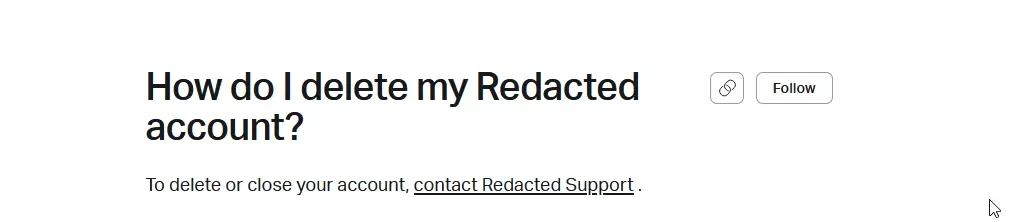
The screenshot shows the support article describing that a request must be sent to support in order to delete an account.
The researcher lists four ways users contact support: mail, forms, chatbox and phone call, and then works through them one by one. The reasoning is that the support team has to decide, from whatever the request contains, whether the person asking is really the account owner. Every weakness below is a failure of that decision.
Exploitation
Step 1: Mail with sender verification
The support documentation says a deletion request must be sent to the support mail address.
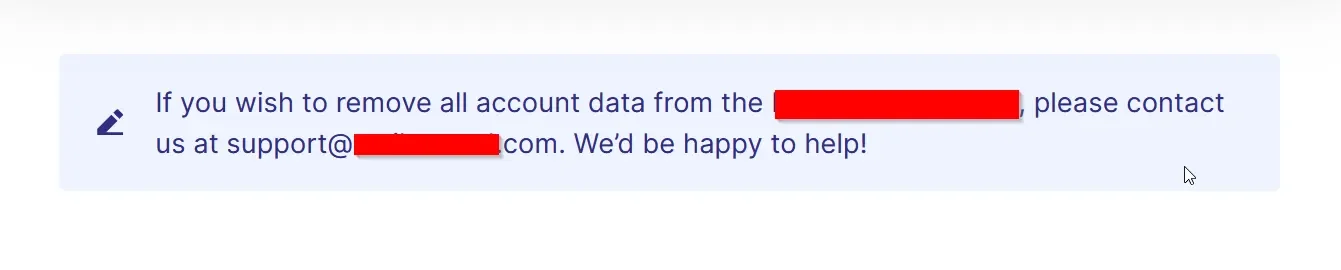
The screenshot shows the instruction to send an account deletion request to the support mail address.
The researcher identifies two mail scenarios: with verification and without verification. In the first, the support team checks that the sender address matches the address of the account named in the request. The request sent was:
Hi,I would like to delete my account from H1.Email: [redacted]
This asks support to delete the account belonging to [redacted]. Support then checks whether the mail came from the sender [redacted], and if so deletes the account attached to that address. The only check is that the sender and the requested account are the same address.
Step 2: Spoofing the sender
Because the check is only on the From address, the researcher used emkei.cz to send a spoofed mail to [redacted] on behalf of [redacted].
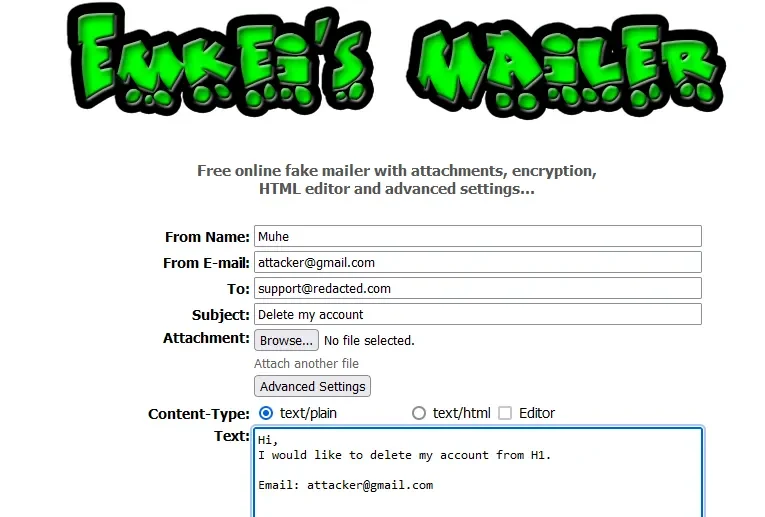
The screenshot shows the spoofed mail as it was sent.
The spoofed mail was accepted and turned into a ticket. The researcher received a "Ticket Confirmation" auto-reply at [redacted]. The report states plainly that the helpdesk failed to check the SPF records of incoming email, which is why the spoofed message became a ticket and why support, seeing that ticket, would delete the account belonging to [redacted].
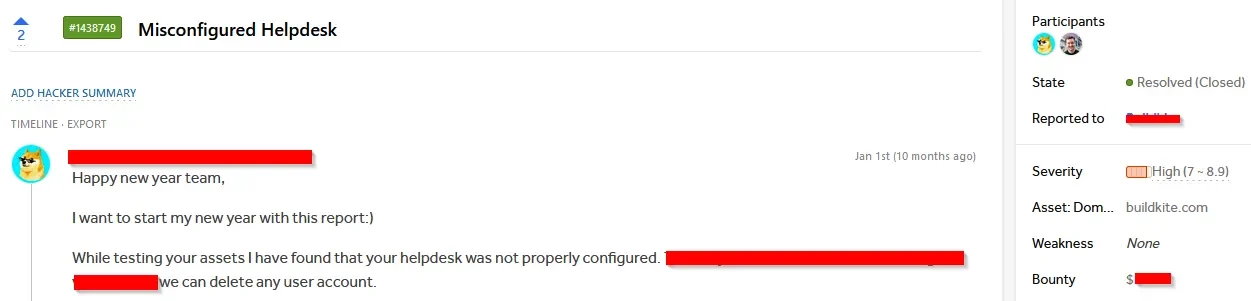
The screenshot shows the resulting ticket confirmation.
Step 3: Mail without verification
In the second scenario there is no check at all. The researcher sent a deletion request from an unrelated address, totmu***@gmail.com, asking to delete the account [redacted], and received a reply that the account was deactivated, with deletion following in two days.
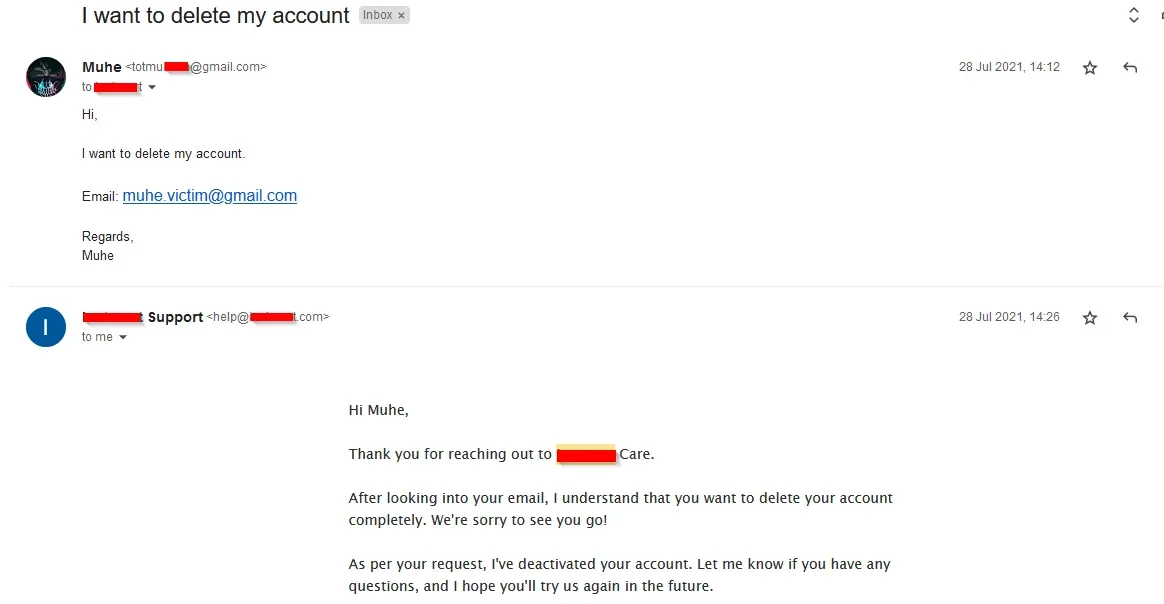
The screenshot shows the deletion being carried out without any verification of the requester.
In this case, a user's account could be deleted by someone who knew the address.
Step 4: Unauthenticated forms
Some websites use a contact form for support instead of, or in addition to, email. Where the form is unauthenticated and has no restrictions, it can be submitted on behalf of another user, and the helpdesk backend assigns the submission as a ticket to the original user. Support should verify that the request came from the respective user, but the researcher found that many organisations failed to do so.
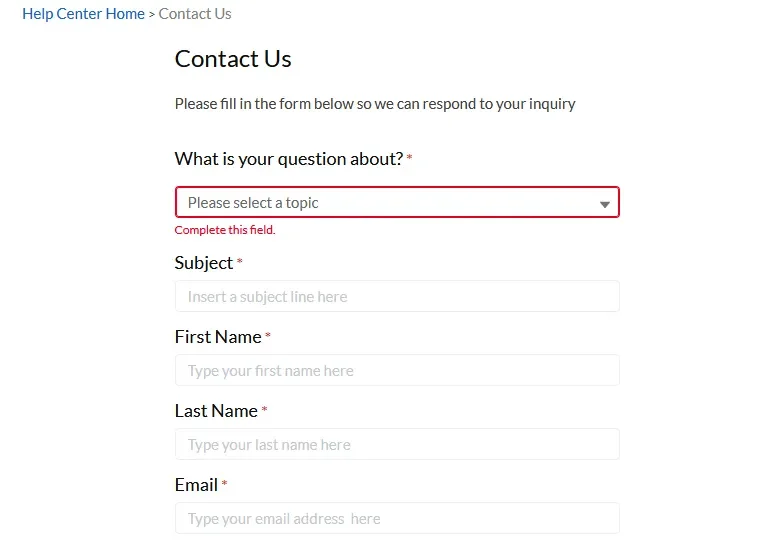
The screenshot shows the support contact form used for this.
The report states that this allowed deletion of user accounts on Glassdoor. It does not give the request, the form fields or the response for that case.
Step 5: Chat box
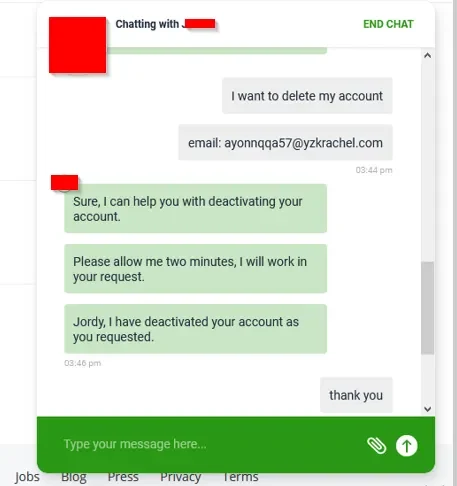
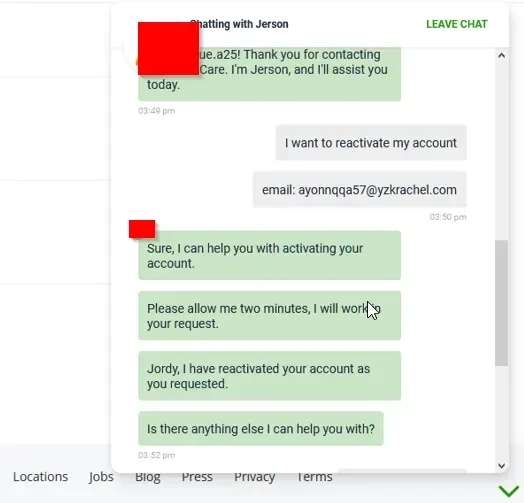
With a support chat box the researcher could interact directly with support staff. The report shows three outcomes from that channel:
- Deactivating a user account.
- Reactivating a user account.
- Account takeover.
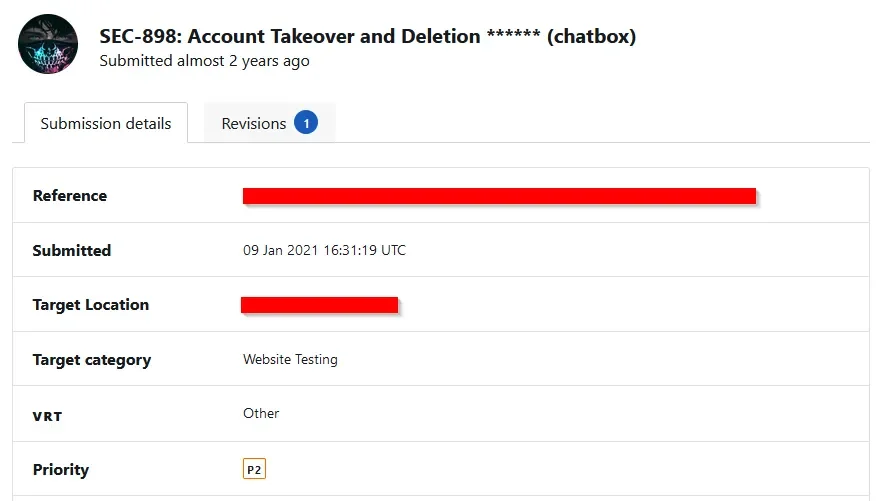
The researcher notes surprise that it ended in account takeover. The stated root cause is that the support team failed to verify the user.
Root cause
The common mistake is that the support workflow trusts the content of the request rather than authenticating the person making it. In the mail case with verification, the only check is that the From address equals the address of the account named in the request, and that check is defeated by sender spoofing because the helpdesk does not validate SPF records for incoming mail. In the mail case without verification, there is no check at all. In the unauthenticated form case, the backend assigns the submission to the original user's ticket without confirming that the submitter is that user. In the chat box case, support staff act on account state changes without verifying the identity of the person in the chat.
The researcher's own summary of the principle is that when an activity is associated with user data, the process should undergo an authentication check. Because organisations differ in their internal disciplines, the report says the handling has to fit each infrastructure.
Impact
Under the conditions shown, an attacker can delete another user's account by email or by unauthenticated form, deactivate and reactivate accounts through the chat box, and in at least one case take over an account through the chat box. The report states that account deletion and takeover were the only things tried, on fewer than five organisations, and that there are numerous other things that can be done via support. The report also notes that social engineering is out of scope in many bug bounty programs, which limits how such findings can be reported even where the underlying authorisation flaw is real.
Fix
What it argues for is an authentication check on any support action that touches user data: verify the requester's identity before acting, rather than trusting the From address, the form submission or the chat message. For mail specifically, the report's finding that SPF records were not checked points to validating sender authentication on inbound mail before a message is turned into a ticket.
Variants to test
- Send a deletion or change request to a support address from an unrelated mailbox and see whether it is actioned. A positive result is a confirmation that the account was changed.
- Spoof the From address of the account owner using a spoofing service and check whether the helpdesk creates a ticket. A positive result is a ticket confirmation arriving at the spoofed address.
- Check whether the helpdesk validates SPF on inbound mail before creating tickets. A positive result is a spoofed message being accepted as a ticket.
- Submit an unauthenticated support form naming another user's account and see whether the ticket is assigned to that user. A positive result is a ticket appearing against the victim's account.
- Open a support chat and ask for an account state change without proving ownership. A positive result is deactivation, reactivation or account takeover on the account.
- Try the same requests over the phone channel listed in the report. A positive result is an account change carried out on a call without identity verification.
Note that social engineering is out of scope in many programs, so check the program rules before testing these paths.
What happened, in plain words
This is a story about a researcher who found that many websites let you change or delete your account by asking a support person to do it, rather than by clicking a button yourself. The support person is a human being sitting at a helpdesk. The researcher worked out that if you can convince that human, or trick the system that delivers your message to that human, you can get somebody else's account deleted, switched off, switched back on, or even taken over.
The important idea is that the target here is not a piece of software with a bug in it. The target is a process: a company's support team, and the way requests reach them. The researcher read the public help pages of a website, saw that deleting an account meant emailing support and asking them to do it, and then tested whether support actually checked who was asking. In several cases they did not, or they checked in a way that could be faked.
The report credits a researcher called Inti and their "Ticket Trick" research as the inspiration. The whole exercise is framed as attacking the humans who run support rather than the software itself.
A quick word on the channels involved, because the report works through them one at a time. Companies let you contact support in four ways: by email, by a web contact form, by a live chat box, and by phone. Each of these is a door into the same room, the support team, and each door can be tested to see whether the person behind it checks who is knocking.
Setup
The report does not describe a lab, specific software versions or a dedicated test environment. The tools and channels involved are:
- The target's public support documentation, read during recon.
- The target's support email address, shown in the report as
[redacted]. - A spoofing service, emkei.cz, used to send mail with a forged sender address.
- The target's unauthenticated support contact form.
- The target's support chat box.
- A phone call channel, which the report lists as a way to contact support but does not demonstrate.
The accounts used in the examples are [redacted] as the attacker-controlled account and [redacted] as the victim account. The researcher states that account deletion and takeover were tried on fewer than five organisations.
A few of those terms deserve a plain explanation before we go further, because the rest of the article leans on them.
Recon, short for reconnaissance, just means looking around before you touch anything: reading the public pages, the help centre, the documentation, the FAQ. It is the online equivalent of walking around a building and reading the signs on the doors before you try any of them. The researcher says reading support articles is a habit of theirs, and that habit is what started this whole thing.
Spoofing means making a message look like it came from someone it did not. In email, the "From" line is just text that the sending side fills in. Nothing in the basic email protocol forces that text to be true, so a service like emkei.cz will happily send a message that claims to be from any address you type. Think of it like writing someone else's name and address on the back of an envelope: the postal system delivers it to where the front says, and the recipient sees the name you wrote, not your real one.
SPF stands for Sender Policy Framework. It is a DNS record, a small piece of public configuration attached to a domain, that lists which mail servers are allowed to send email for that domain. When a receiving mail server gets a message claiming to be from gmail.com, it can look up gmail.com's SPF record and check whether the server that delivered the message is on the allowed list. If it is not, the message is suspicious. A helpdesk that does not check SPF will accept a spoofed message as if it were genuine. (The report mentions SPF specifically; DKIM and DMARC are related email authentication mechanisms, but the report does not discuss them for this target.)
A ticket is the unit of work in a helpdesk system. When you email support, the helpdesk software turns your message into a ticket with a number, puts it in a queue, and assigns it to a support agent. The agent reads the ticket, acts on it, and closes it. The whole vulnerability in this report comes from the fact that a ticket is created from whatever arrives, and the agent trusts the ticket.
Unauthenticated means "without proving who you are". A login page is authenticated: you type a password and the site knows it is you. A public contact form that anyone can fill in without logging in is unauthenticated. The form does not know, and does not ask, who is submitting it.
Account takeover, often shortened to ATO, means an attacker gains control of somebody else's account, usually by changing the password or the email address on it so the real owner is locked out. It is the most serious outcome in this report.
Finding it
While doing recon, the researcher reads support articles and documentation as a habit. On one website this revealed the account deletion procedure: the user sends a deletion request to support, support reviews it, and support deletes the account.
The screenshot shows the support article describing that a request must be sent to support in order to delete an account. In other words, there is no "delete my account" button in the settings page. The only way to leave is to ask a human. The report notes that e-commerce and financial websites commonly follow this method.
The researcher lists four ways users contact support: mail, forms, chatbox and phone call, and then works through them one by one. The reasoning is that the support team has to decide, from whatever the request contains, whether the person asking is really the account owner. Every weakness below is a failure of that decision.
That is the key mental model for the whole article. Imagine a bank where, instead of a cashier checking your ID, you just post a letter saying "please close account number 1234". The bank's only defence is whatever is written on the letter. If the letter says it is from the account holder, and the bank believes the letter, the account gets closed. The researcher's question at every step is: what exactly does support check, and can that check be faked?
Exploitation
Step 1: Mail with sender verification
The support documentation says a deletion request must be sent to the support mail address.
The screenshot shows the instruction to send an account deletion request to the support mail address.
The researcher identifies two mail scenarios: with verification and without verification. In the first, the support team checks that the sender address matches the address of the account named in the request. The request sent was:
Hi,I would like to delete my account from H1.Email: [redacted]
Line by line, in plain words:
Hi,I would like to delete my account from H1.is the polite request. It says what the sender wants: delete the account. TheH1is just part of the message text as written.Email: [redacted]tells support which account to delete. This is the crucial line, because it names the account.
This asks support to delete the account belonging to [redacted]. Support then checks whether the mail came from the sender [redacted], and if so deletes the account attached to that address. The only check is that the sender and the requested account are the same address.
Why does that check exist at all? Because without it, anyone could email support saying "please delete [redacted]" and support would have no reason to refuse. The check is a reasonable idea: if the person asking is the same person whose account is being deleted, that is probably fine. The problem is that the check is on a piece of text, the From address, that the sender controls.
Step 2: Spoofing the sender
Because the check is only on the From address, the researcher used emkei.cz to send a spoofed mail to [redacted] on behalf of [redacted].
The screenshot shows the spoofed mail as it was sent. In other words, the message that arrived at support looked, on its face, exactly like a genuine request from the owner of [redacted]. The support agent reading it had no reason to doubt it, because the From line said what it was supposed to say.
The spoofed mail was accepted and turned into a ticket. The researcher received a "Ticket Confirmation" auto-reply at [redacted]. The report states plainly that the helpdesk failed to check the SPF records of incoming email, which is why the spoofed message became a ticket and why support, seeing that ticket, would delete the account belonging to [redacted].
The screenshot shows the resulting ticket confirmation. The auto-reply is the proof that the message was accepted: the helpdesk software read the incoming mail, decided it was a legitimate support request, created a ticket, and emailed the address in the From line to say so. That email went to [redacted] because that is what the From line said, even though the researcher was not sending from that mailbox.
This is the moment the vulnerability becomes concrete. The helpdesk did not ask "did this message really come from gmail.com's servers?" It only asked "what does the message say?" The SPF check would have answered the first question, and it was not done.
Step 3: Mail without verification
In the second scenario there is no check at all. The researcher sent a deletion request from an unrelated address, totmu***@gmail.com, asking to delete the account [redacted], and received a reply that the account was deactivated, with deletion following in two days.
The screenshot shows the deletion being carried out without any verification of the requester. Notice the difference from the previous step: there, the attacker had to make the From line match the target account. Here, the From line and the target account are completely different addresses, and support still acted. The only thing linking the request to the victim was the text of the message.
In this case, a user's account could be deleted by someone who knew the address: knowing an email address was enough to destroy the account behind it.
Step 4: Unauthenticated forms
Some websites use a contact form for support instead of, or in addition to, email. Where the form is unauthenticated and has no restrictions, it can be submitted on behalf of another user, and the helpdesk backend assigns the submission as a ticket to the original user. Support should verify that the request came from the respective user, but the researcher found that many organisations failed to do so.
The screenshot shows the support contact form used for this. The form is the same idea as the email, just with boxes instead of a message body: you type a name, an email address, a subject and a message, and press submit. The form does not require you to log in first, so it has no idea who you really are. It only knows what you typed.
The backend, meaning the server-side software behind the form, takes the submission and creates a ticket. If the form asks for an email address and the submitter types the victim's address, the helpdesk will treat the ticket as belonging to the victim. The support agent then sees a ticket that appears to come from the victim's account, and acts on it.
The report states that this allowed deletion of user accounts on Glassdoor. It does not give the request, the form fields or the response for that case.
Step 5: Chat box
With a support chat box the researcher could interact directly with support staff. The report shows three outcomes from that channel:
- Deactivating a user account.
- Reactivating a user account.
- Account takeover.
The researcher notes surprise that it ended in account takeover. The stated root cause is that the support team failed to verify the user.
A chat box is the most human of the channels, and that is exactly why it is the most dangerous. In email and forms, the attacker is limited to what the message says. In a live chat, the attacker can answer follow-up questions, adjust the story, and sound convincing. The support agent on the other end is trying to be helpful, and helpfulness is the thing being exploited. The report's three screenshots show the same pattern three times: a request for an account change, and the change being made, with no step in between where the agent proves the person in the chat owns the account.
Root cause
The common mistake is that the support workflow trusts the content of the request rather than authenticating the person making it. In the mail case with verification, the only check is that the From address equals the address of the account named in the request, and that check is defeated by sender spoofing because the helpdesk does not validate SPF records for incoming mail. In the mail case without verification, there is no check at all. In the unauthenticated form case, the backend assigns the submission to the original user's ticket without confirming that the submitter is that user. In the chat box case, support staff act on account state changes without verifying the identity of the person in the chat.
The researcher's own summary of the principle is that when an activity is associated with user data, the process should undergo an authentication check. Because organisations differ in their internal disciplines, the report says the handling has to fit each infrastructure.
In everyday terms: the support team is treating a letter as if it were a passport. A letter can say anything. A passport has to be issued by someone with the authority to issue it, and checked by someone trained to spot a fake. The fix is to make the support process ask for the equivalent of a passport, not just read the letter.
Impact
Under the conditions shown, an attacker can delete another user's account by email or by unauthenticated form, deactivate and reactivate accounts through the chat box, and in at least one case take over an account through the chat box. The report states that account deletion and takeover were the only things tried, on fewer than five organisations, and that there are numerous other things that can be done via support. The report also notes that social engineering is out of scope in many bug bounty programs, which limits how such findings can be reported even where the underlying authorisation flaw is real.
That last point is worth unpacking for a beginner. A bug bounty program is a company's offer to pay researchers for finding security problems in their systems. Each program has rules, called scope, that say what is and is not fair game. Social engineering, meaning tricking a person rather than exploiting a technical flaw, is often excluded, because it is hard to test safely and hard to measure. The researcher is flagging that even when the underlying problem is a real authorisation flaw, the way you demonstrate it may fall outside the rules. Always read the program rules before testing anything in this article.
Fix
What it argues for is an authentication check on any support action that touches user data: verify the requester's identity before acting, rather than trusting the From address, the form submission or the chat message. For mail specifically, the report's finding that SPF records were not checked points to validating sender authentication on inbound mail before a message is turned into a ticket.
In plain terms, the fix has two halves. The first half is technical: make the helpdesk check SPF on incoming mail, so a spoofed message is flagged or rejected before it becomes a ticket. The second half is procedural: make the support agent verify the person, not the message, before changing anything on an account. The report does not prescribe a specific mechanism; it states the principle.
Variants to test
If you want to look for this pattern yourself, here is the checklist the report implies. Remember to read the program rules first.
- Send a deletion or change request to a support address from an unrelated mailbox and see whether it is actioned. A positive result is a confirmation that the account was changed.
- Spoof the From address of the account owner using a spoofing service and check whether the helpdesk creates a ticket. A positive result is a ticket confirmation arriving at the spoofed address.
- Check whether the helpdesk validates SPF on inbound mail before creating tickets. A positive result is a spoofed message being accepted as a ticket.
- Submit an unauthenticated support form naming another user's account and see whether the ticket is assigned to that user. A positive result is a ticket appearing against the victim's account.
- Open a support chat and ask for an account state change without proving ownership. A positive result is deactivation, reactivation or account takeover on the account.
- Try the same requests over the phone channel listed in the report. A positive result is an account change carried out on a call without identity verification.
Note that social engineering is out of scope in many programs, so check the program rules before testing these paths.
Glossary
- Recon (reconnaissance): Looking around a target's public information, such as help pages and documentation, before testing anything.
- Attack surface: Everything an attacker can interact with to try to reach a system or process. Here it is the support channels: email, forms, chat and phone.
- Helpdesk: The software and team that receive, organise and answer support requests.
- Ticket: A single support request tracked by the helpdesk, with a number, a queue and an assigned agent.
- Spoofing: Making a message appear to come from someone other than the real sender, for example by forging the From address of an email.
- From address: The line in an email that says who sent it. It is filled in by the sender and is not proof of identity on its own.
- SPF (Sender Policy Framework): A public DNS record listing which mail servers are allowed to send email for a domain, used by receivers to spot forged senders.
- DKIM: An email authentication method that adds a cryptographic signature to a message so the receiver can check it was not altered and came from the claimed domain.
- DMARC: A policy that tells receiving mail servers what to do with messages that fail SPF or DKIM checks, and where to send reports.
- Unauthenticated: Without proving who you are. A form or endpoint that anyone can use without logging in is unauthenticated.
- Backend: The server-side software behind a website or form, which processes what the user submits.
- Authorisation: The check that a person is allowed to do the thing they are asking to do. A broken authorisation flaw means that check is missing or can be bypassed.
- Account takeover (ATO): Gaining control of another person's account, usually by changing its password or email address so the real owner is locked out.
- Social engineering: Tricking a person into doing something, rather than exploiting a technical flaw in software.
- Bug bounty program: A company's offer to pay researchers for finding and reporting security problems, governed by rules that define what is in scope.
- Scope: The part of a system or set of activities that a bug bounty program's rules allow you to test.
- Auto-reply: An automatic email sent by a system in response to an incoming message, such as a ticket confirmation.
- Deactivation: Switching an account off without deleting it, so it cannot be used but the data remains.
- emkei.cz: A public service that sends email with a forged sender address, used in the report to demonstrate spoofing.



