SYSTEM Privilege Escalation via Forged IPC in Foxit PDF Reader’s Update Service (CVE-2026–57239)
A SYSTEM-level Foxit update service treated a file writable by ordinary users as its command channel, and the messages in it were only encrypted with a key embedded in the client, so any local user could forge a command. Because the launched updater then loaded a library from a user-writable folder, a low-privileged attacker with existing code execution could escalate to SYSTEM.
 Published on medium.com
Cve
The full write-up lives on its author's site
It belongs to its author, so we link to it rather than copy it. The other two tabs are our own rewrites, checked against it.
Context
Foxit PDF Reader ships two related processes on Windows. The first is the updater itself, %APPDATA%\Foxit Software\Continuous\Addon\Foxit PDF Reader\FoxitPDFReaderUpdater.exe, which runs with the current user's privileges. The second is FoxitPDFReaderUpdateService.exe, a background service running as NT AUTHORITY\SYSTEM.
The service is the interesting half. It polls a set of files and, when an update check is triggered inside the Reader, it launches the updater as SYSTEM. CVE-2026-57239 is the result of that arrangement: a low-privileged Windows user who already has code execution can escalate to NT AUTHORITY\SYSTEM. It is not remote code execution. It is a post-exploitation privilege-escalation chain that turns "I can run code as a normal user" into "I own the box."

Three separate design flaws combine to make it work:
- A SYSTEM-level service trusts a user-writable file under
ProgramDataas its command channel. - That file's IPC command is AES-128-CBC encrypted with a key hardcoded in the client binary, so anyone can forge a valid message.
- The process the service ultimately launches is vulnerable to DLL (or in this case, DRV) sideloading.
Chain all three together and a standard user reaches SYSTEM code execution.
Setup
The precondition is code execution as a normal Windows user.
Watching the service in Procmon shows it repeatedly polling three files:
C:\ProgramData\Foxit Software\Foxit PDF Reader\Foxit Service\Log\log.libC:\ProgramData\Foxit Software\Foxit PDF Reader\FoxitData.txtC:\Program Files\Foxit Software\Foxit PDF Reader\ProfStore\ProfStore.xml
The Program Files path is off-limits to standard users. But C:\ProgramData\Foxit Software\Foxit PDF Reader\ is writable by the Users group by default, meaning any unprivileged process can freely create or modify FoxitData.txt.
Finding it
Triggering an update check inside the Reader produces this event sequence:
FoxitData.txtgets created or written.%APPDATA%\...\FoxitPDFReaderUpdater.exeis launched.- That process runs as SYSTEM.
In other words, whatever gets written to FoxitData.txt decides what the SYSTEM service executes, and with what arguments. The question then becomes how loosely that content is validated.
Foxit's own logs (log.lib) capture both the plaintext command written into FoxitData.txt and the hex blob preceding it. The plaintext is a pipe (||) delimited list of key=value pairs:
sessionid=1||strTempUpdaterPath=C:\Users\User\AppData\Roaming\Foxit Software\Continuous\Addon\Foxit PDF Reader\FoxitPDFReaderUpdater.exe||csCommandLine= -updater -type "Auto Updater" -hwnd 131494 -bnoshowtip -readerpath "C:\Program Files\Foxit Software\Foxit PDF Reader\" -regpath "HKEY_CURRENT_USER\Software\Foxit Software\Foxit PDF Reader\Continuous" -version "2026.1.0.36452" -readerlang "en-US" -UpdateMode "1" -SessionID "1"
The fields break down as follows:
sessionid: which Windows logon session (winlogon.exe) the SYSTEM service should associate the new process with.strTempUpdaterPath: the full path of the executable to run as SYSTEM.csCommandLine: the arguments passed to it.
Reverse engineering FoxitPDFReaderUpdateService.exe reveals the key setup:
BYTE encryption_key[0x10];memcpy(&encryption_key, "c6c7702dbcbf4678", 0x10u); AES_SetKey(&aes_ctx, encryption_key, 128 /* bits */);AES_CBC_Decrypt(&aes_ctx, iv_zero, ciphertext, ciphertext_len, plaintext_out);
The key is baked straight into the binary. A few quirks make reproducing the exact wire format tricky:
- The IV is fixed at all zero bytes (16 null bytes).
- Plaintext is padded to the 16-byte AES block size with null bytes, not PKCS#7.
- Capturing the actual bytes Foxit writes to disk in API Monitor shows a
00byte interleaved with every other byte, meaning the plaintext is encoded as UTF-16LE before encryption. Encoding as plain ANSI/UTF-8 produces ciphertext the service will never accept. - The final ciphertext is hex-encoded, and that hex string is itself re-encoded as UTF-16 before being written to
FoxitData.txt.
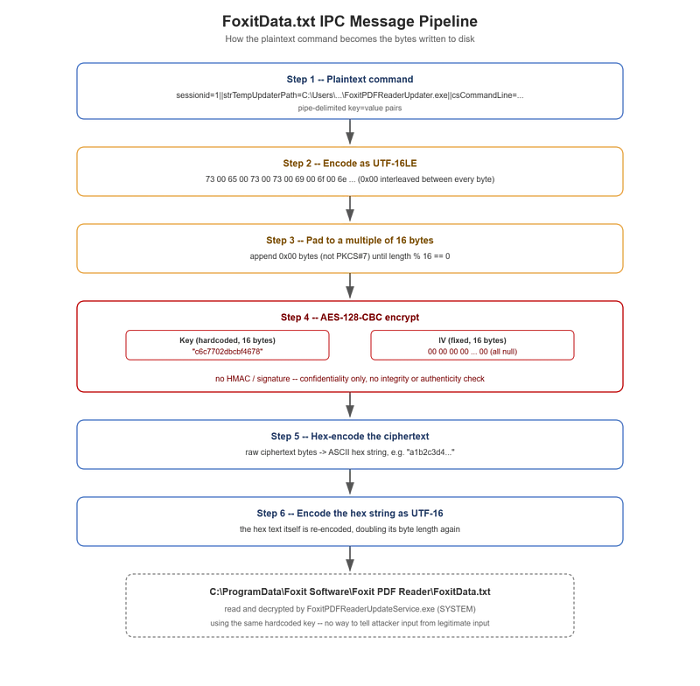
The full pipeline looks like this:
plaintext command string (key=value||key=value...) → UTF-16LE encode → pad with 0x00 to a multiple of 16 bytes → AES-128-CBC encrypt (key: "c6c7702dbcbf4678", IV: 0x00 * 16) → hex-encode ciphertext → UTF-16 encode the hex string → write to FoxitData.txt
Exploitation
Step 1: Drop a malicious winspool.drv
Watching FoxitPDFReaderUpdater.exe in Procmon shows a burst of CreateFile calls against several DLLs in the current working directory, which is the attacker-controlled %APPDATA%\...\Foxit PDF Reader\ folder. Most of these return PATH NOT FOUND. Most of them also carry anti-sideload checks, except one:
winspool.drv: referenced before every other library, and despite the.drvextension it is a regular PE that runsDllMainon load like any DLL.oleaccrc.dll, by contrast, is a resource-only DLL loaded withLOAD_LIBRARY_AS_DATAFILE, so it cannot execute code even if sideloaded.
Dropping a malicious winspool.drv in the attacker-writable path means that FoxitPDFReaderUpdater.exe, once running as SYSTEM, loads it directly, completing arbitrary code execution as SYSTEM.
Step 2: Assemble the IPC command
Build the key=value||key=value plaintext with a sessionid, a strTempUpdaterPath and a csCommandLine, as shown in the format above. The path should point at the real, legitimately signed Foxit updater binary, because an arbitrary binary fails the signature check described below.
Step 3: Encode, pad and encrypt
Encode the plaintext as UTF-16LE, pad with 0x00 to a multiple of 16 bytes, then AES-128-CBC encrypt with the hardcoded key c6c7702dbcbf4678 and a 16-byte null IV.
Step 4: Hex-encode and write to FoxitData.txt
Hex-encode the ciphertext, re-encode that hex string as UTF-16, and write it to C:\ProgramData\Foxit Software\Foxit PDF Reader\FoxitData.txt. The Users group can write this file by default.
Step 5: The service picks up the change
Reversing FoxitPDFReaderUpdateService.exe shows roughly this sequence after it reads FoxitData.txt:
- Extract
sessionidfrom the decrypted command. - Walk the process list to find the
winlogon.exebelonging to that session. - Open that process and duplicate its token (
DuplicateTokenEx). - Build an environment block from that token with
bInheritHandles = TRUE, apparently to reconstruct the target session's desktop and environment context. - Launch the executable named in
strTempUpdaterPathin the SYSTEM security context via theCreateProcessfamily, passingcsCommandLineverbatim.
Right before launch, two checks run:
- A filename check confirming the target matches an expected name (for example
FoxitPDFReaderUpdater.exe). - A certificate check confirming the binary carries a valid Foxit code-signing signature.
Pointing strTempUpdaterPath at cmd.exe or an arbitrary binary fails the signature check. But supplying the real, legitimately signed Foxit updater binary makes that check meaningless: it only verifies "did Foxit build this file", not "is everything this file loads also safe". That gap is exactly where the sideload comes in.
Step 6: SYSTEM code execution
FoxitPDFReaderUpdater.exe starts as SYSTEM, resolves winspool.drv from its own directory per the DLL search order, and loads the attacker's file. That completes arbitrary code execution as SYSTEM.
The full chain
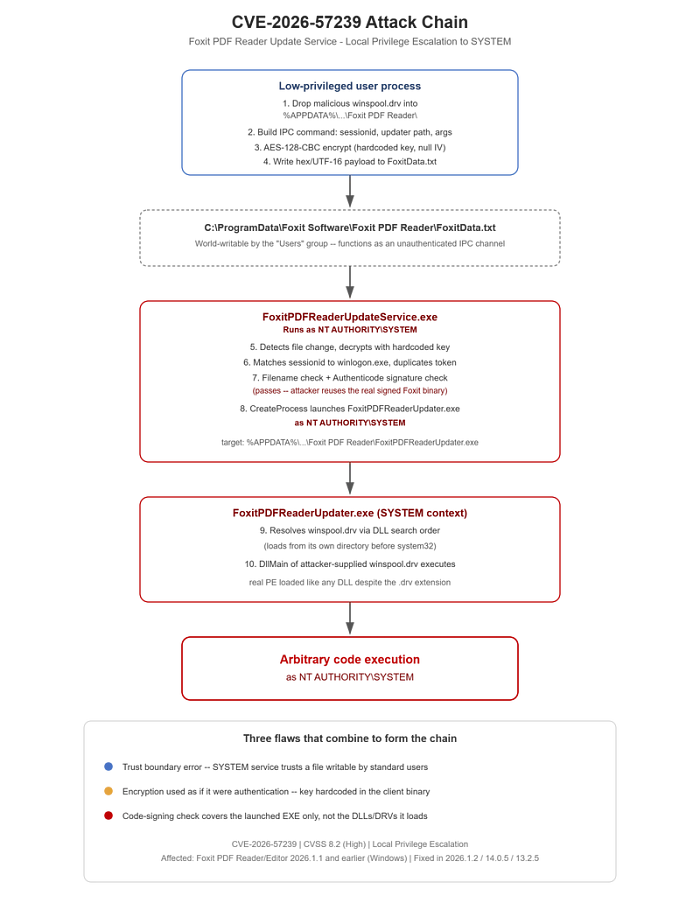
[low-privileged user process] │ ① Drop malicious winspool.drv in %APPDATA%\...\Foxit PDF Reader\ │ ② Assemble IPC command (session id, updater path, arguments) │ ③ UTF-16LE encode → 0x00 pad → AES-128-CBC encrypt (hardcoded key, null IV) │ ④ Ciphertext → hex → UTF-16, written to FoxitData.txt ▼[C:\ProgramData\Foxit Software\Foxit PDF Reader\FoxitData.txt] (writable by Users) │ ⑤ FoxitPDFReaderUpdateService.exe (SYSTEM) detects the file change ▼[FoxitPDFReaderUpdateService.exe : NT AUTHORITY\SYSTEM] │ ⑥ Decrypt with hardcoded key, match sessionid to winlogon.exe, duplicate token │ ⑦ Filename + signature checks pass (it │ ⑧ CreateProcess: launches %APPDATA%\...\FoxitPDFReaderUpdater.exe as SYSTEM ▼[FoxitPDFReaderUpdater.exe : NT AUTHORITY\SYSTEM] │ ⑨ Resolves winspool.drv from its own directory per DLL search order ▼[Attacker
Here is the same flow as a diagram:
And the AES-128-CBC message construction on its own:
Root cause
Three separate design mistakes had to overlap for this to work:
- Broken trust boundary: a SYSTEM service treated a file writable by the
Usersgroup as trusted IPC input. Filesystem ACLs should have defined the trust boundary here, and they did not. - Encryption mistaken for authentication: AES-128-CBC provides confidentiality, not integrity or authenticity, and since the key ships inside every client install, it was never actually secret to begin with. What this channel needed was a signature or HMAC the service alone could verify, not encryption.
- Misplaced scope of code-signing checks: verifying that the launched executable itself is Authenticode-signed says nothing about every module that executable subsequently loads. Without controlling DLL search order, even a signed binary can become a privileged code-execution primitive.
Impact
A low-privileged Windows user who already has code execution can escalate to NT AUTHORITY\SYSTEM. The chain does not grant initial access; it converts existing user-level code execution into SYSTEM code execution.
One detail worth noting: Foxit happened to close the winspool.drv entry point days after it was found, as part of an unrelated patch for two other bugs (CVE-2026-3775 and CVE-2026-3780). But the same DLL-search-order flaw resurfaced through a second trigger: clicking a hyperlink inside the updater's "check for update" dialog reopened the identical sideload primitive. The entry point moved; the root cause, a signed SYSTEM process resolving DLLs from a user-writable directory first, did not.
Fix
Foxit shipped a coordinated fix on July 8, 2026 covering 30+ vulnerabilities across Reader and Editor for Windows and macOS. CVE-2026-57239 is fixed in the 2026.1.2 build (2026.x line), plus 14.0.5 and 13.2.5 for the supported 14.x and 13.2 branches. Update via Help > Check for Update, or download a fresh installer from Foxit's official distribution channel and verify the reported version afterward.
Variants to test
- Other services polling user-writable files: look for SYSTEM services that watch paths under
ProgramDataor%APPDATA%and act on their contents. A positive result is a Procmon trace showing the service reading a file your user can write, followed by a process launch or privileged action. - Hardcoded keys in client binaries: search updater and helper binaries for AES key material and fixed IVs. A positive result is a key that lets you produce a message the service accepts, confirmed by the service acting on your forged input.
- Encryption without authentication on IPC channels: check whether a privileged channel verifies a signature or MAC, or only decrypts. A positive result is a modified ciphertext that the service processes without complaint.
- Signed binaries loading from user-writable directories: watch a signed, privileged process in Procmon for
CreateFilecalls against its working directory. A positive result is a library resolved from a path your user controls, especially one without an anti-sideload check. - Resource-only versus executable loads: distinguish libraries loaded with
LOAD_LIBRARY_AS_DATAFILEfrom those that runDllMain. A positive result is a sideloaded module whoseDllMainexecutes in the privileged process. - Alternative triggers for the same search-order flaw: if one entry point is patched, look for other UI actions that relaunch the vulnerable binary. A positive result is the same sideload primitive reached through a different code path.
What happened, in plain words
Foxit PDF Reader is a popular program for opening PDF documents on Windows. Like many programs, it keeps itself up to date automatically. To do that, it installs a small helper that runs in the background as a service. On Windows, background helpers like this are called services, and they usually run with far more power than a normal user account has.
This report describes a chain of three separate design mistakes in that update helper. Put together, they let someone who already has code execution as an ordinary, low-privilege user escalate to SYSTEM, the operating system's own identity. The report calls this privilege escalation: going from a small amount of power to a much larger amount.
It is important to be clear about what this is not. It is not remote code execution, meaning an attacker on the internet cannot simply break in through it. The attacker must already be able to run some code on the machine as a normal user. What this bug does is turn that modest foothold into SYSTEM code execution. Security people call that stage post-exploitation: what happens after the first break-in.
The three mistakes, in the report's own framing:
- A service running with the highest Windows privileges trusts a file that ordinary users are allowed to write to. That file is used as the channel for sending it commands.
- The commands in that file are encrypted, but with a password (a key) that is built into the program itself, so anyone who has the program can work out the password and create their own valid-looking commands.
- The program the service ends up launching can be tricked into loading an extra file supplied by the attacker, a technique called sideloading.
Each of these on its own would be a problem. Together they let a standard user run code as the most powerful account on the machine.
1. The target: FoxitPDFReaderUpdateService.exe
Foxit PDF Reader installs two related programs on Windows:
%APPDATA%\Foxit Software\Continuous\Addon\Foxit PDF Reader\FoxitPDFReaderUpdater.exe, the actual updater. It runs with the same limited permissions as the person using the computer.FoxitPDFReaderUpdateService.exe, a background service that runs asNT AUTHORITY\SYSTEM.
NT AUTHORITY\SYSTEM (often just called SYSTEM) is the most powerful account on a Windows machine. It is not a person; it is the operating system's own identity, and it can do essentially anything. %APPDATA% is a shortcut for the hidden folder where Windows keeps a user's personal settings, so the updater lives inside the current user's own area.
The report's author watched the service with a tool called Procmon (Process Monitor), which records every file, folder and process a program touches. That is how you observe a program's behaviour without reading its code. In Procmon, the service was seen repeatedly checking three files:
C:\ProgramData\Foxit Software\Foxit PDF Reader\Foxit Service\Log\log.libC:\ProgramData\Foxit Software\Foxit PDF Reader\FoxitData.txtC:\Program Files\Foxit Software\Foxit PDF Reader\ProfStore\ProfStore.xml
Line by line, in plain words:
- The first path is a log file inside a
Logfolder under Foxit's own area inProgramData. - The second path,
FoxitData.txt, is the file that will turn out to matter most. It sits in the same Foxit folder underProgramData. - The third path is inside
Program Files, the folder where installed programs normally live.
ProgramData is a shared folder on Windows where programs store data that applies to the whole machine rather than one user. Program Files is where installed applications are kept. Windows protects Program Files so that ordinary users cannot change what is in it. But the report notes that C:\ProgramData\Foxit Software\Foxit PDF Reader\ is, by default, writable by the Users group, which includes every normal account. That means any unprivileged program can create or change FoxitData.txt whenever it likes.
That is the first mistake in miniature: a file that a powerful service treats as instructions is stored somewhere ordinary users can edit.
When an update check is triggered inside the Reader, the report observed this sequence:
FoxitData.txtgets created or written.%APPDATA%\...\FoxitPDFReaderUpdater.exeis launched.- That process runs as SYSTEM.
In other words, whatever is written into FoxitData.txt decides what the SYSTEM service runs, and with what arguments. The natural next question is how carefully that content is checked before it is trusted.
2. The message format: AES-128-CBC with a hardcoded key
Foxit's own log file, log.lib, records both the readable command that goes into FoxitData.txt and the scrambled (hex) blob that comes before it. The readable command is a list of key=value pairs separated by a double pipe, ||:
sessionid=1||strTempUpdaterPath=C:\Users\User\AppData\Roaming\Foxit Software\Continuous\Addon\Foxit PDF Reader\FoxitPDFReaderUpdater.exe||csCommandLine= -updater -type "Auto Updater" -hwnd 131494 -bnoshowtip -readerpath "C:\Program Files\Foxit Software\Foxit PDF Reader\" -regpath "HKEY_CURRENT_USER\Software\Foxit Software\Foxit PDF Reader\Continuous" -version "2026.1.0.36452" -readerlang "en-US" -UpdateMode "1" -SessionID "1"
This is a simple text format. Think of it like a form with three fields, where each field is labelled and the labels are separated by || instead of being on separate lines. The fields mean:
sessionid: which Windows logon session the new process should belong to. A session is one logged-in user's slice of the machine;winlogon.exeis the Windows program that manages logins and desktops.strTempUpdaterPath: the full path of the program to run as SYSTEM.csCommandLine: the arguments handed to that program. Arguments are the extra instructions you give a program on the command line, like telling it which mode to run in.
So the file is effectively saying: "run this program, with these arguments, inside this user's session." If an attacker can write that file, they are choosing what the powerful service runs.
To stop just anyone writing it, Foxit encrypts the command. Encryption is scrambling data with a key so that only someone with the key can unscramble it. The report's author took the service program apart (a process called reverse engineering: reading a compiled program to understand what it does) and found how the key is set up:
BYTE encryption_key[0x10];memcpy(&encryption_key, "c6c7702dbcbf4678", 0x10u); AES_SetKey(&aes_ctx, encryption_key, 128 /* bits */);AES_CBC_Decrypt(&aes_ctx, iv_zero, ciphertext, ciphertext_len, plaintext_out);
Line by line:
BYTE encryption_key[0x10];reserves a small block of memory, 16 bytes long, to hold the key.0x10is hexadecimal for 16.memcpy(&encryption_key, "c6c7702dbcbf4678", 0x10u);copies the textc6c7702dbcbf4678into that block. That text is the key itself, written directly into the program.AES_SetKey(&aes_ctx, encryption_key, 128 /* bits */);tells the encryption routine, called AES, to use that key at a strength of 128 bits.AES_CBC_Decrypt(&aes_ctx, iv_zero, ciphertext, ciphertext_len, plaintext_out);unscrambles the stored message back into readable text.
AES is a widely used, well-regarded encryption standard. CBC is one particular way of using it, which needs a second value called an IV (initialisation vector) to get started. The crucial point is that the key is baked straight into the program. Anyone who installs Foxit has the key, so it is not a secret at all.
A few quirks make it tricky to reproduce exactly what the service expects:
- The IV is fixed at all zero bytes (16 null bytes).
- The readable text is padded out to a multiple of 16 bytes using null bytes, not the usual padding scheme called PKCS#7. Padding is filler added so the data fits the encryption routine's fixed block size.
- When the author captured the actual bytes Foxit writes to disk with a tool called API Monitor (which records the exact data passed between a program and Windows), every other byte was
00. That means the text is stored as UTF-16LE before encryption, a way of encoding text where each character takes two bytes. Encoding it as plain ANSI or UTF-8 (one byte per character) produces scrambled data the service will never accept. - The final scrambled result is turned into hex (a text representation of raw bytes using the characters 0 to 9 and a to f), and that hex text is itself re-encoded as UTF-16 before being written to
FoxitData.txt.
The full pipeline, as the report lays it out:
plaintext command string (key=value||key=value...) → UTF-16LE encode → pad with 0x00 to a multiple of 16 bytes → AES-128-CBC encrypt (key: "c6c7702dbcbf4678", IV: 0x00 * 16) → hex-encode ciphertext → UTF-16 encode the hex string → write to FoxitData.txt
Read left to right, this is a recipe with six steps:
- Start with the readable command text.
- Convert it to UTF-16LE so each character takes two bytes.
- Add null bytes until the length is a multiple of 16.
- Scramble it with AES-128-CBC using the built-in key and an all-zero IV.
- Turn the scrambled bytes into hex text.
- Convert that hex text to UTF-16 and save it in
FoxitData.txt.
Because the key is in every copy of the program, an attacker can follow the same recipe and produce a message the service will happily accept. Encryption here hides the message from a casual observer, but it does not prove who wrote it.
3. What the service does with the file
Reverse engineering FoxitPDFReaderUpdateService.exe shows roughly this sequence after it reads FoxitData.txt:
- Extract
sessionidfrom the unscrambled command. - Walk the list of running processes to find the
winlogon.exebelonging to that session. - Open that process and duplicate its token (
DuplicateTokenEx). - Build an environment block from that token with
bInheritHandles = TRUE, apparently to reconstruct the target session's desktop and environment context. - Launch the program named in
strTempUpdaterPathin the SYSTEM security context via theCreateProcessfamily, passingcsCommandLineverbatim.
Some of these need explaining from scratch:
- A process is a running program. A token is Windows' internal badge that says who a process is and what it is allowed to do. Duplicating a token means making a copy of that badge so a new process can carry the same identity.
- An environment block is a bundle of settings (such as folder locations) that Windows hands to a new process when it starts.
CreateProcessis the Windows function for starting a new program. "PassingcsCommandLineverbatim" means the arguments from the file are handed over exactly as written, with no cleaning or checking.
So the service reads the file, works out which logged-in session it is for, duplicates the token of that session's winlogon.exe, and starts the named program in the SYSTEM security context.
Right before launching, two checks run:
- A filename check confirming the target matches an expected name (for example
FoxitPDFReaderUpdater.exe). - A certificate check confirming the program carries a valid Foxit code-signing signature.
A code-signing signature is a cryptographic stamp that a software maker puts on its programs so Windows can confirm the file really came from them and has not been tampered with. It is like a wax seal on a letter.
Pointing strTempUpdaterPath at cmd.exe (the Windows command prompt) or any random program fails the signature check. But if the attacker simply supplies the real, properly signed Foxit updater, the check becomes meaningless. It only answers "did Foxit build this file?", not "is everything this file loads also safe?". That gap is exactly where the sideload comes in.
4. Sideloading in a privileged context
Sideloading is when a legitimate program is tricked into loading an extra file supplied by an attacker. Programs on Windows often load DLLs: shared libraries of code that many programs use, so the same code does not have to be written twice. Windows has a defined order in which it looks for a DLL, and if a program looks in a folder the attacker controls first, the attacker's file wins.
Watching FoxitPDFReaderUpdater.exe in Procmon shows a burst of CreateFile calls against several DLLs in the current working directory, which is the attacker-controlled %APPDATA%\...\Foxit PDF Reader\ folder. CreateFile is the Windows function for opening a file. Most of these calls return PATH NOT FOUND, meaning the file was not there. Most of them also carry anti-sideload checks, except one:
winspool.drv: referenced before every other library, and despite the.drvextension it is a regular program file that runs its startup code (DllMain) on load, just like any DLL.oleaccrc.dll, by contrast, is a resource-only DLL loaded withLOAD_LIBRARY_AS_DATAFILE, so it cannot execute code even if sideloaded. A resource-only library holds things like icons or text, not runnable code.
Dropping a malicious winspool.drv in the attacker-writable path means that FoxitPDFReaderUpdater.exe, once running as SYSTEM, loads it directly, completing arbitrary code execution as SYSTEM.
Interestingly, Foxit happened to close this exact entry point days after it was found, as part of an unrelated patch for two other bugs (CVE-2026-3775 and CVE-2026-3780). A CVE is a public catalogue number for a known security flaw, so people can refer to the same bug unambiguously. But the same DLL-search-order flaw resurfaced through a second trigger: clicking a hyperlink inside the updater's "check for update" dialog reopened the identical sideload primitive. The entry point moved; the root cause, a signed SYSTEM process resolving DLLs from a user-writable directory first, did not.
5. The full attack chain
[low-privileged user process] │ ① Drop malicious winspool.drv in %APPDATA%\...\Foxit PDF Reader\ │ ② Assemble IPC command (session id, updater path, arguments) │ ③ UTF-16LE encode → 0x00 pad → AES-128-CBC encrypt (hardcoded key, null IV) │ ④ Ciphertext → hex → UTF-16, written to FoxitData.txt ▼[C:\ProgramData\Foxit Software\Foxit PDF Reader\FoxitData.txt] (writable by Users) │ ⑤ FoxitPDFReaderUpdateService.exe (SYSTEM) detects the file change ▼[FoxitPDFReaderUpdateService.exe : NT AUTHORITY\SYSTEM] │ ⑥ Decrypt with hardcoded key, match sessionid to winlogon.exe, duplicate token │ ⑦ Filename + signature checks pass (it │ ⑧ CreateProcess: launches %APPDATA%\...\FoxitPDFReaderUpdater.exe as SYSTEM ▼[FoxitPDFReaderUpdater.exe : NT AUTHORITY\SYSTEM] │ ⑨ Resolves winspool.drv from its own directory per DLL search order ▼[Attacker
This is a map of the whole journey, read top to bottom. The numbered steps are:
- The attacker, running as a normal user, places the malicious
winspool.drvin the Foxit folder inside%APPDATA%. - The attacker builds the command text with a session id, the updater path and the arguments.
- The text is encoded, padded and encrypted with the built-in key and the all-zero IV.
- The scrambled result is turned into hex, then UTF-16, and written into
FoxitData.txt. - The SYSTEM service notices the file has changed.
- The service unscrambles it with the built-in key, finds the matching
winlogon.exe, and copies its token. - The filename and signature checks pass, because the target really is the genuine Foxit updater.
- The service starts
FoxitPDFReaderUpdater.exeas SYSTEM. - That updater looks for
winspool.drvin its own folder first, finds the attacker's file, and loads it.
The result is the attacker's code running as SYSTEM.
Here is the same flow as a diagram:
And the AES-128-CBC message construction on its own:
6. Root causes
Three separate design mistakes had to overlap for this to work:
- Broken trust boundary: a SYSTEM service treated a file writable by the
Usersgroup as trusted input. A trust boundary is the line between data you control and data you trust; here the line was drawn in the wrong place. Filesystem permissions (ACLs, access control lists) should have defined that boundary, and they did not. - Encryption mistaken for authentication: AES-128-CBC provides confidentiality, not integrity or authenticity. Confidentiality means keeping data secret; integrity means nobody changed it; authenticity means it came from who it claims to. Since the key ships inside every install, it was never actually secret. What this channel needed was a signature or an HMAC (a keyed fingerprint that proves a message is genuine) that only the service could verify, not encryption.
- Misplaced scope of code-signing checks: verifying that the launched program itself is signed says nothing about every module that program later loads. Without controlling the order in which DLLs are searched for, even a signed program can become a way to run privileged code.
7. Patch
Foxit shipped a coordinated fix on July 8, 2026 covering 30+ vulnerabilities across Reader and Editor for Windows and macOS. CVE-2026-57239 is fixed in the 2026.1.2 build (2026.x line), plus 14.0.5 and 13.2.5 for the supported 14.x and 13.2 branches. Update via Help > Check for Update, or download a fresh installer from Foxit's official distribution channel and verify the reported version afterward.
Glossary
- API: a defined way for one program to ask another program or the operating system to do something, like a service counter with set forms.
- API Monitor: a tool that records the exact data passed between a program and Windows.
- AES: a widely used standard for encrypting data.
- AES-128-CBC: a way of using AES with a 128-bit key and a starting value (the IV) to scramble data in blocks.
- ACL (access control list): the list of rules saying which users or groups may read, write or run a file.
- Arguments (command line): the extra instructions given to a program when it starts.
- Authenticode: Microsoft's system for signing Windows programs so their origin can be checked.
- CBC (cipher block chaining): a mode of encryption that chains blocks together using an IV.
- Ciphertext: data after it has been scrambled.
- Code-signing signature: a cryptographic stamp proving a program came from its maker and was not altered.
- CreateFile: the Windows function for opening a file.
- CreateProcess: the Windows function for starting a new program.
- CVE: a public catalogue number for a known security flaw.
- DLL: a shared library of code that many programs can load and use.
- DllMain: the startup function a DLL runs when it is loaded.
- DRV: a file extension traditionally used for drivers; here it is just a normal program file with that name.
- DuplicateTokenEx: the Windows function for copying a process's identity token.
- Encryption: scrambling data with a key so only someone with the key can unscramble it.
- Environment block: a bundle of settings Windows hands to a new process at startup.
- Hex: a text representation of raw bytes using the characters 0 to 9 and a to f.
- HMAC: a keyed fingerprint that proves a message is genuine and unaltered.
- IPC (inter-process communication): how separate programs pass messages to each other.
- IV (initialisation vector): a starting value used by some encryption modes; here it is all zeros.
- Key: the secret value used to scramble and unscramble data.
- LOAD_LIBRARY_AS_DATAFILE: a way of loading a library only for its data, without running its code.
- NT AUTHORITY\SYSTEM: the most powerful account on Windows, used by the operating system itself.
- Padding: filler added so data fits an encryption routine's fixed block size.
- PKCS#7: a common standard for padding.
- Plaintext: data before it is scrambled.
- Post-exploitation: what an attacker does after the first break-in.
- Privilege escalation: going from a small amount of power to a much larger amount.
- Procmon (Process Monitor): a tool that records every file, folder and process a program touches.
- Process: a running program.
- ProgramData: a shared Windows folder where programs store data for the whole machine.
- Remote code execution: running code on a machine over a network without already having access.
- Resource-only DLL: a library that holds data such as icons or text, not runnable code.
- Reverse engineering: reading a compiled program to understand what it does.
- Session: one logged-in user's slice of a Windows machine.
- Sideloading: tricking a legitimate program into loading an extra file supplied by an attacker.
- Token: Windows' internal badge saying who a process is and what it may do.
- Trust boundary: the line between data you control and data you trust.
- UTF-16LE: a way of encoding text where each character takes two bytes.
- UTF-8: a way of encoding text where most characters take one byte.
- winlogon.exe: the Windows program that manages logins and desktops.
- %APPDATA%: a shortcut for the hidden folder where Windows keeps a user's personal settings.


