The Jail That Gave Its Prisoner a Staff Badge: Escaping WordPress Playground’s Sandbox
The WordPress Playground host embedded the WordPress site in an iframe with both allow-same-origin and allow-scripts, and its Document Isolation Policy was only applied to responses that already carried a COEP header, so ordinary front-end pages were not isolated. An attacker could send a crafted blueprint link that made the embedded site's script reach into the host page, read its cookies and localStorage, and inject UI into the host application.
 Published on medium.com
Cybersecurity
The full write-up lives on its author's site
It belongs to its author, so we link to it rather than copy it. The other two tabs are our own rewrites, checked against it.
Context
WordPress Playground, at playground.wordpress.net, runs a complete WordPress site inside a browser tab using WebAssembly: no server, no install, no database. You click a link and get a WordPress instance. The site itself runs inside an <iframe> in the host application, and the host is what the researcher set out to attack.

The question that started the work was simple: a WordPress that lives in a browser tab, running in an iframe, what is keeping it in there?

Setup
No accounts, roles or special tooling are described. The precondition is the product's own design: Playground builds instances from blueprints, which are JSON configurations carried in a URL that construct a WordPress instance exactly as specified. Because a blueprint is just a link, anyone can send anyone a link that creates a WordPress containing attacker-chosen content. That is the delivery mechanism the whole attack rests on.
Finding it
The site runs inside an <iframe> with a sandbox attribute, the browser's version of a jail cell. Content inside a sandboxed iframe cannot touch the parent page unless the jailer hands out permission slips, and each permission is a flag. The researcher pulled the actual jail configuration, live from the host app at remote/remote.html:
<iframe sandbox="allow-same-origin allow-scripts allow-popups allow-forms allow-downloads allow-modals" ...>
Two flags stand out. allow-scripts lets the prisoner make calls. allow-same-origin treats the iframe content as the same website as the host app, so the browser treats it as staff. The combination is the well-known rule that allow-same-origin plus allow-scripts means the sandbox does not exist: the prisoner does not escape the jail, the prisoner becomes the jail.

The WordPress team does have a mitigation, the Document Isolation Policy (DIP), a modern browser feature that forces a page into its own isolated origin regardless of what the iframe says. It is applied in their service worker:
function applyCrossOriginIsolationHeaders(response) { if (response already carries a COEP header) { } }
The isolation is only applied to responses that already carry a COEP header, which are the editor and admin pages. Regular front-end pages, the default landing surface of any blueprint, get no isolation at all. The guard checks badges only at the VIP door; the main entrance is wide open.
Exploitation
The blueprint performs three steps.
Step 1: Write a page into the instance
The blueprint writes an innocent-looking page, /xss-demo.html, into the WordPress instance. The page is ordinary site content as far as the instance is concerned.
Step 2: Land the victim on it
The victim is sent to the crafted blueprint link and ends up on that page. No authentication is involved.
Step 3: Reach up into the host
The page's script, described as just site content, reaches up with window.top and pokes the host application itself:
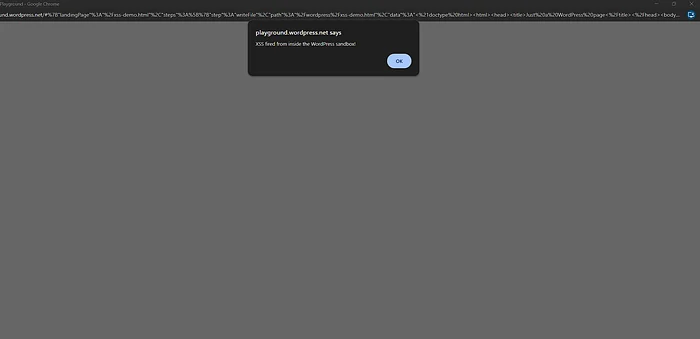
(function () { var top = window.top; top.document.title; Object.keys(top.localStorage); top.document.cookie; var box = top.document.createElement('div'); box.style.cssText = 'position:fixed;inset:0;z-index:2147483647;...'; box.innerHTML = '<h1>XSS — playground.wordpress.net</h1>…'; top.document.body.appendChild(box); top.alert('XSS fired from inside the WordPress sandbox!');})();
The script reads top.document.title, enumerates Object.keys(top.localStorage) and reads top.document.cookie. It then creates a div with a fixed, full-screen, maximum z-index style, fills it with an h1 reading XSS — playground.wordpress.net, appends it to top.document.body, and finally calls top.alert('XSS fired from inside the WordPress sandbox!'). All of this executes against the host origin, which is the proof: the alert fires from the host origin.
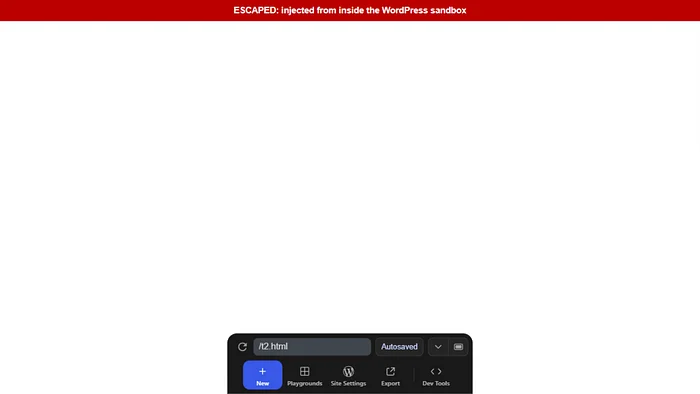
The red banner is the injected script inside the host application's UI, announcing the escape while the real Playground toolbar sits right underneath it:
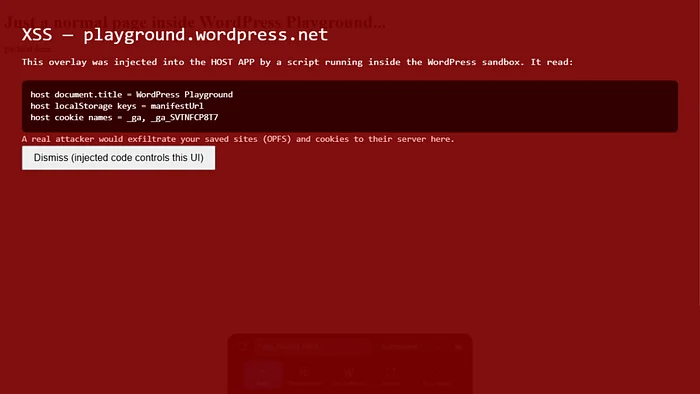
The full overlay shows everything read from the host: document.title, localStorage keys and cookie names, with a note about what a real attacker would do next.

Root cause
The design mistake is the iframe sandbox configuration: allow-same-origin and allow-scripts together mean the sandbox provides no origin boundary, so content inside the iframe is same-origin with the host and can script it directly. The existing defence, DIP, is correct by design but is applied only to responses that already carry a COEP header, which covers the editor and admin pages. Front-end pages, the default landing surface of any blueprint, receive no isolation, so the mitigation never applies to the surface an attacker controls. The service worker's conditional is the trapdoor: a correct mitigation applied to half the responses.
Impact
With the same steps, evil intent, one crafted link, one click and zero authentication, an attacker can:
- read and modify the host origin's cookies and localStorage;
- read the host's OPFS storage, where Playground's Site Manager keeps every site the user ever saved, files and databases included;
- inject convincing UI into the host app, for phishing or keylogging inside the app;
- exfiltrate everything anywhere.
The researcher rates severity as High. The report was closed as a duplicate: an earlier report by another researcher had been submitted a whole month before. The bounty was $0. The bounty was $0.
Fix
The report does not describe the fix that was applied. What it does establish is where the fix belongs: the iframe sandbox configuration, which should not combine allow-same-origin with allow-scripts, and the DIP application in the service worker, which should cover front-end responses and not only those that already carry a COEP header.
Variants to test
- Look for iframes whose
sandboxattribute contains bothallow-same-originandallow-scripts. A positive result is a script inside the frame readingwindow.top.document.cookieor callingwindow.top.alert()and seeing it execute against the parent origin. - Look for service workers that apply cross-origin isolation headers conditionally, for example only when a COEP header is already present. A positive result is a page that should be isolated but is served without the isolation headers, and whose content can then reach the parent.
- Look for products that accept a URL-carried configuration which builds user-controlled content, as blueprints do. A positive result is a single link that renders attacker-chosen content inside the product's own origin without authentication.
- Check whether storage reachable from the host origin, such as OPFS, holds data belonging to other sites or sessions. A positive result is reading records from the parent origin that the framed content should never see.
What happened, in plain words
WordPress Playground is a website that runs a whole WordPress site inside your browser tab. You do not need a server, you do not install anything, and there is no database sitting somewhere else. You open a link and a working WordPress appears. It does this with WebAssembly, a way of running full programs inside the browser at near-native speed.
The site you get does not fill the whole tab. It lives inside a smaller window embedded in a bigger page, called an <iframe>. The bigger page around it is the host application. The researcher's question was simple: the WordPress site is inside a frame, so what is actually stopping it from reaching out and touching the page around it?
The answer turned out to be: not enough. The frame had been given two permissions that, combined, cancel the protection entirely. A script inside the WordPress site could read and change things belonging to the host page, including cookies and stored data. The researcher proved it by making a pop-up alert appear from the host's own address.
The report was closed as a duplicate, because someone else had reported the same problem a month earlier. The bug was real, but the bounty was $0.
The setup: what Playground is and how it builds sites
Before the attack makes sense, you need to know how Playground creates a WordPress for you.
It uses something called a blueprint. A blueprint is a configuration written in JSON, a plain text format for describing data with curly braces, quotes and colons. The blueprint is carried inside a URL. When you open that URL, Playground reads the blueprint and builds a WordPress instance exactly the way the blueprint says: which pages exist, what they contain, how the site is set up.
This matters for one reason. A blueprint is just a link. Anyone can create a link and send it to anyone else. If a blueprint can describe page content, then the person who writes the blueprint decides what content appears inside the WordPress that the victim sees. That is the delivery mechanism for the whole attack: one crafted link, sent to a victim, no account needed on either side.
The report describes no accounts, no roles and no special tools. The only precondition is the product's own design.
Finding it: the jail and its permission slips
The WordPress site runs inside an <iframe> that carries a sandbox attribute. Think of sandbox as the browser's version of a jail cell. By default, content inside a sandboxed frame is locked away from the page around it. It cannot read the parent page, cannot run certain kinds of code, and cannot open windows or submit forms.
But the jailer can hand out permission slips. Each permission is a separate flag written inside the sandbox attribute, and each flag switches one restriction off. The researcher pulled the real configuration from the host application, from a file at remote/remote.html:
<iframe sandbox="allow-same-origin allow-scripts allow-popups allow-forms allow-downloads allow-modals" ...>
Line by line, in plain words:
<iframestarts an embedded frame, a window inside the page.sandbox="..."lists the permission slips being handed to whatever runs inside that frame.allow-same-origintells the browser to treat the frame's content as if it came from the same website as the host page. Normally a frame is treated as a stranger from another address; this flag removes that separation.allow-scriptslets JavaScript run inside the frame. JavaScript is the programming language of web pages; it is what makes a page do things rather than just sit there.allow-popups,allow-forms,allow-downloadsandallow-modalsallow the frame to open new windows, submit forms, trigger downloads and show dialog boxes such as alerts....stands for the rest of the tag, which the report does not show.
Two of those flags are the heart of the problem.
allow-scripts is like handing the prisoner a phone: the content can now make calls, meaning it can run code.
allow-same-origin is like handing the prisoner a staff uniform, a badge and access to the staff group chat: everyone now treats the content as staff, meaning the browser treats it as part of the host website rather than as an outsider.
There is a rule that every browser-security guide repeats: allow-same-origin plus allow-scripts means the sandbox does not exist. The reason is that "same origin" makes the frame count as the same website as the host, and "scripts" lets it act. Acting as the same website means it can reach the host page directly. The prisoner does not escape the jail; the prisoner becomes the jail.
You might think the WordPress team must know this and must have a clever mitigation. They do. It is called the Document Isolation Policy, or DIP. It is a modern browser feature that forces a page into its own isolated origin no matter what the iframe attributes say. It is applied in their service worker, a script that sits between the browser and the network and can rewrite responses before the page sees them.
Here is the relevant part of that service worker:
function applyCrossOriginIsolationHeaders(response) { if (response already carries a COEP header) { } }
Line by line:
function applyCrossOriginIsolationHeaders(response) {defines a function, a named block of code, that takes a response (something coming back from the network) and is meant to add the isolation headers to it.if (response already carries a COEP header) {is the condition. COEP stands for Cross-Origin Embedder Policy, a header a page can send to declare strict rules about what it will load. The isolation is only applied when the response already has that header.- The empty braces stand for the work the report does not show.
The consequence is that isolation is only applied to responses that already carry a COEP header, which are the editor and admin pages. Regular front-end pages, the default landing surface of any blueprint, get no isolation at all. The guard checks badges only at the VIP door; the main entrance is wide open, self-service, with complimentary cookies.
The proof: three steps
The researcher built a blueprint that does three things.
Step 1: Write a page into the instance
The blueprint writes an innocent-looking page, /xss-demo.html, into the WordPress instance. To the instance, this is ordinary site content, the same as any page an author might create. Nothing about it looks like an attack from the inside.
Step 2: Land the victim on it
The victim is sent the crafted blueprint link and ends up on that page. No authentication is involved: the victim does not log in, does not approve anything, and does not install anything. They click a link and see a page.
Step 3: Reach up into the host
The page's script, which is just site content as far as the WordPress instance is concerned, reaches up with window.top and pokes the host application itself:
(function () { var top = window.top; top.document.title; Object.keys(top.localStorage); top.document.cookie; var box = top.document.createElement('div'); box.style.cssText = 'position:fixed;inset:0;z-index:2147483647;...'; box.innerHTML = '<h1>XSS — playground.wordpress.net</h1>…'; top.document.body.appendChild(box); top.alert('XSS fired from inside the WordPress sandbox!');})();
Line by line, in plain words:
(function () {starts an anonymous function, a block of code that runs immediately and has no name.var top = window.top;grabs a reference to the topmost window, the outermost page in the tab, which here is the host application.windowis the browser's name for the current page;window.topclimbs out of every frame to the very top.top.document.title;reads the title of the host page.documentis the page itself;titleis the text shown in the tab.Object.keys(top.localStorage);lists the names of everything stored in the host's localStorage. localStorage is a small storage box the browser keeps for a website, where it can save data between visits.top.document.cookie;reads the host's cookies. A cookie is a small piece of text a website asks the browser to store and send back on later requests, often used to remember who you are.var box = top.document.createElement('div');creates a newdivelement, a generic rectangular container on a page, inside the host document.box.style.cssText = 'position:fixed;inset:0;z-index:2147483647;...';styles that box:position:fixedpins it in place,inset:0stretches it to all four edges of the screen, andz-index:2147483647puts it on top of everything else.box.innerHTML = '<h1>XSS — playground.wordpress.net</h1>…';fills the box with a large heading readingXSS — playground.wordpress.net. XSS stands for cross-site scripting, the general name for getting your own code to run inside someone else's website.top.document.body.appendChild(box);attaches the box to the host page's body, so it actually appears on screen.top.alert('XSS fired from inside the WordPress sandbox!');shows a browser alert dialog with that message.})();closes the function and runs it straight away.
Every one of those lines runs against the host origin. That is the proof: the alert fires from the host origin, not from inside the WordPress frame.
The red banner is the injected script sitting inside the host application's own interface, announcing the escape while the real Playground toolbar sits right underneath it:
The full overlay shows everything the script read from the host: document.title, the names of the localStorage keys and the names of the cookies, with a note about what a real attacker would do next.
Why it works: the root cause
The design mistake is the iframe sandbox configuration. allow-same-origin and allow-scripts together mean the sandbox provides no origin boundary at all, so content inside the frame counts as the same origin as the host and can script it directly.
The existing defence, DIP, is correct by design, but it is applied only to responses that already carry a COEP header, which covers the editor and admin pages. Front-end pages, the default landing surface of any blueprint, receive no isolation. The mitigation therefore never applies to the surface an attacker controls. The service worker's condition is the trapdoor: a correct mitigation applied to half the responses.
What a real attacker gets
With the same steps, evil intent, one crafted link, one click and zero authentication, an attacker can:
- read and modify the host origin's cookies and localStorage;
- read the host's OPFS storage, where Playground's Site Manager keeps every site the user ever saved, files and databases included. OPFS stands for Origin Private File System, a storage area the browser gives a website for its own files;
- inject convincing interface into the host app, for phishing (tricking someone into entering details) or keylogging (recording what someone types) inside the app;
- exfiltrate everything anywhere, meaning send the stolen data off to a server the attacker controls.
The researcher rates severity as High. The report was closed as a duplicate: an earlier report by another researcher had been submitted a whole month before. The bounty was $0.
The fix
What it does establish is where the fix belongs: the iframe sandbox configuration, which should not combine allow-same-origin with allow-scripts, and the DIP application in the service worker, which should cover front-end responses and not only those that already carry a COEP header.
Variants to test
If you want to look for similar problems yourself, these are the places to start.
- Look for iframes whose
sandboxattribute contains bothallow-same-originandallow-scripts. A positive result is a script inside the frame readingwindow.top.document.cookieor callingwindow.top.alert()and seeing it execute against the parent origin. - Look for service workers that apply cross-origin isolation headers conditionally, for example only when a COEP header is already present. A positive result is a page that should be isolated but is served without the isolation headers, and whose content can then reach the parent.
- Look for products that accept a URL-carried configuration which builds user-controlled content, as blueprints do. A positive result is a single link that renders attacker-chosen content inside the product's own origin without authentication.
- Check whether storage reachable from the host origin, such as OPFS, holds data belonging to other sites or sessions. A positive result is reading records from the parent origin that the framed content should never see.
Glossary
- iframe: an embedded window inside a web page, used to show one page inside another.
- host application: the outer page that contains the iframe; here, the Playground app around the WordPress site.
- WebAssembly: a way of running full programs inside a browser at near-native speed.
- blueprint: a JSON configuration carried in a URL that tells Playground how to build a WordPress instance.
- JSON: a plain text format for describing data with curly braces, quotes and colons.
- sandbox attribute: an attribute on an iframe that restricts what the content inside it can do, unless specific permissions are granted.
- flag: one permission inside the sandbox attribute that switches one restriction off.
- allow-same-origin: a sandbox flag that treats the frame's content as the same website as the host page.
- allow-scripts: a sandbox flag that lets JavaScript run inside the frame.
- JavaScript: the programming language of web pages, used to make pages do things.
- origin: the combination of scheme, host and port that identifies a website to the browser; two pages with the same origin are allowed to touch each other.
- same origin: two pages sharing that combination, so the browser lets them read and change each other.
- Document Isolation Policy (DIP): a browser feature that forces a page into its own isolated origin regardless of iframe attributes.
- service worker: a script that sits between the browser and the network and can rewrite responses before the page sees them.
- COEP (Cross-Origin Embedder Policy): a header a page can send to declare strict rules about what it will load.
- header: a small piece of metadata sent alongside a web request or response.
- window.top: in JavaScript, a reference to the outermost page in the tab, climbing out of every frame.
- document: in JavaScript, the page itself, including its title, body and cookies.
- localStorage: a small storage box the browser keeps for a website, where it can save data between visits.
- cookie: a small piece of text a website asks the browser to store and send back on later requests, often used to remember who you are.
- div: a generic rectangular container element on a web page.
- z-index: a CSS property that decides which element sits on top when elements overlap.
- XSS (cross-site scripting): the general name for getting your own code to run inside someone else's website.
- alert: a browser dialog box that shows a message.
- OPFS (Origin Private File System): a storage area the browser gives a website for its own files.
- phishing: tricking someone into entering their details into something that looks trustworthy.
- keylogging: recording what someone types.
- exfiltrate: send stolen data off to a server the attacker controls.
- duplicate: a bug report for a problem that has already been reported.
- bounty: a payment a company makes to someone who reports a valid security problem.




