The Password Was in the JSON: A WordPress REST API Access-Control Bug in Secure Custom Fields
Secure Custom Fields 6.9.6 used a post-level read permission check that ignored password protection when expanding referenced posts in REST responses, so an unauthenticated visitor could retrieve the full post object including its plaintext password and content. The issue was fixed in 6.9.7 by adding a password-required check.
 Published on medium.com
Bug Bounty
The full write-up lives on its author's site
It belongs to its author, so we link to it rather than copy it. The other two tabs are our own rewrites, checked against it.
Context
WordPress's REST API is often the public face of a site. Headless front ends, mobile apps and integrations consume /wp-json/wp/v2/... directly. When a plugin extends those responses with custom fields, it inherits a simple responsibility: do not return data the caller is not allowed to see.
Secure Custom Fields (SCF) is the WordPress.org fork of Advanced Custom Fields and powers custom fields on more than 100,000 sites. It lets editors attach fields to posts, terms, users and options pages. A Post Object field stores the referenced post's ID. On the front end, get_field() can return a full WP_Post object; in REST, the field can be returned in two shapes:
- light (the default): numeric IDs;
- standard (
?acf_format=standard): the formatted value, which for a Post Object field with the defaultPost Objectreturn format is the full object.
Every REST response also includes a _source entry with metadata about the field, including formatted_value. That detail matters: the _source value is formatted in standard mode even when the main field value is in light mode.
In version 6.9.6, a reference-expansion feature missed part of that responsibility. A public post could reference a password-protected post through a Post Object field in a REST-exposed field group, and an unauthenticated REST request would receive the protected post's full WP_Post object, including its content and its plaintext post_password. The interesting part is not that a permission check was missing. SCF had one. The interesting part is that it checked the wrong boundary.
Setup
The lab ran WordPress 7.1.3, SCF 6.9.6 and PHP 8.2 on a disposable WordPress instance. No third-party data was accessed.
For the issue to be reachable, the field group must have Show in REST API enabled. That setting is off by default, but it is commonly enabled for headless WordPress, mobile apps and API-driven integrations. The source post must be public, and it must reference a published password-protected post.

The screenshot is cropped to the plugin row; the site name and hosting chrome are not included.
Finding it
In 6.9.6, SCF added acf_rest_reference_is_exposable() to decide whether a referenced object should be expanded. It was a security hardening change intended to stop references to posts the caller could not read. The function resolves the target post, checks that its post type is REST-exposed, and asks the post type's REST controller whether the caller can read it:
$controller = new $controller_class( $post->post_type );if ( method_exists( $controller, 'check_read_permission' ) ) { $exposable = (bool) $controller->check_read_permission( $post );}
On the surface, this looks right. check_read_permission() is the same method WordPress core uses when you request a post directly. But it answers a narrower question than the one SCF needed. Here is the core implementation, simplified:
public function check_read_permission( $post ) { $post_type = get_post_type_object( $post->post_type ); if ( ! $this->check_is_post_type_allowed( $post_type ) ) { return false; } if ( 'publish' === $post->post_status || current_user_can( 'read_post', $post->ID ) ) { return true; } }
A published post is readable. Password protection is not part of this method.
WordPress enforces the password later, while preparing the response:
$data['content']['rendered'] = post_password_required( $post ) ? '' : apply_filters( 'the_content', $post->post_content );
and:
public function can_access_password_content( $post, $request ) { if ( empty( $post->post_password ) ) { return false; } if ( 'edit' === $request['context'] && current_user_can( 'edit_post', $post->ID ) ) { return true; } if ( empty( $request['password'] ) ) { return false; } return hash_equals( $post->post_password, $request['password'] );}
That second stage is what blanks content.rendered, sets content.protected to true, and keeps the password out of the response. SCF's reference formatter never went through it. It took the raw WP_Post object and serialised it.
Exploitation
Step 1: create the protected target
Create a published post with a password and a unique body. Call it the protected target (ID 11).
Step 2: create the public source
Create a public post with no password. Call it the public source (ID 12).
Step 3: create the field group
Create a field group with a Post Object field:
- Return format: Post Object
- Location: Post Type = Post
- Show in REST API: enabled
Step 4: wire the reference
Assign the field group to the Post post type, edit the public source, and select the protected target.
Step 5: request the public source as an unauthenticated visitor
Two requests are enough to see the leak:
GET /wp-json/wp/v2/posts?search=SCF%20public%20sourceGET /wp-json/wp/v2/posts/12?acf_format=standard
A sanitised excerpt from the first response:
"related_post_demo_source": { "label": "Related post", "type": "post_object", "formatted_value": { "ID": 11, "post_title": "SCF protected target", "post_status": "publish", "post_password": "[REDACTED]", "post_content": "[REDACTED]" }}
The acf_format=standard response contains the same object under related_post_demo. The _source value is formatted in standard mode even when the main field value is in light mode.
The control request tells a different story:
GET /wp-json/wp/v2/posts/11
{ "id": 11, "content": { "rendered": "", "protected": true }, "excerpt": { "rendered": "", "protected": true }}
No post_password field. The content is empty. Core is doing exactly what it should. SCF is not.
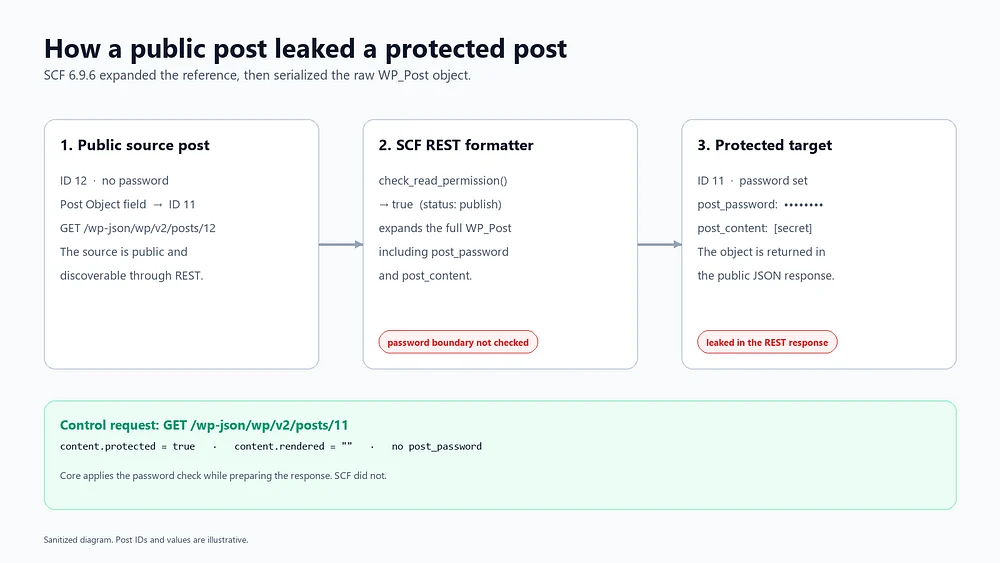
The public source post exposes a reference. SCF's formatter expands it without applying the password boundary that core applies on direct requests.
Root cause
The bug is a mismatch between the permission check and the shape of the data being returned. check_read_permission() answers: "Can this caller read this post at all?" For a published post, the answer is yes, even when the post is password-protected. The password check is a second, content-level boundary:
- Can the caller see the protected body?
- Can the caller see the password?
SCF asked the first question and then returned data that required the second.
Because the formatter returns the raw WP_Post, the leak includes every public property of the object. post_password is stored in plaintext in the database and is part of WP_Post. Even if the response had only included the password and not the body, the impact would be significant: the attacker could use the password to view the protected post normally.
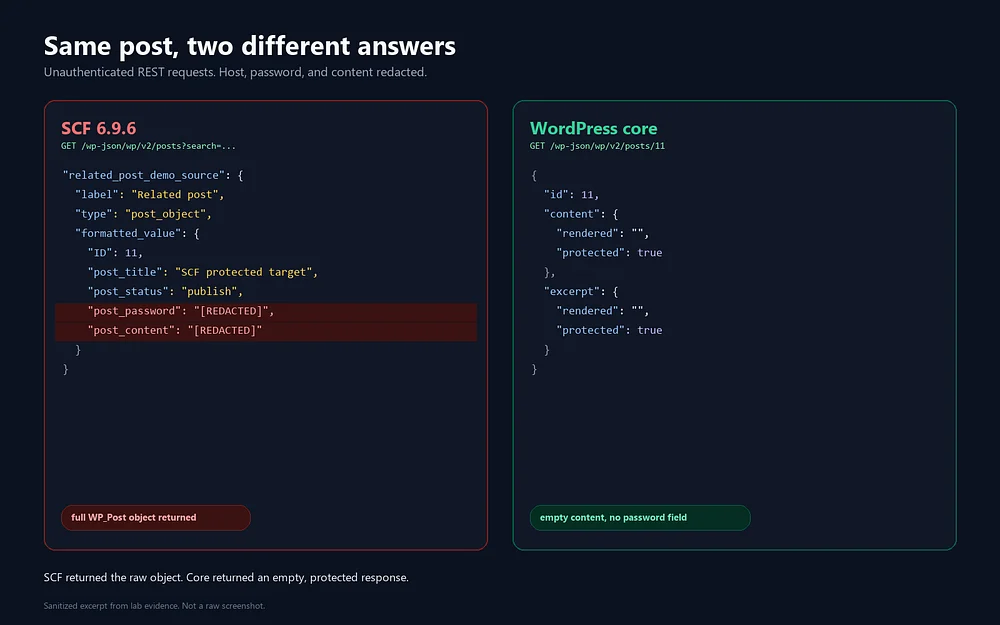
Sanitised excerpts from the two responses. The host, password and content are redacted. The SCF response includes the full object; the core response is empty and protected.
Impact
Impact: confidentiality. An unauthenticated visitor can read the body of a password-protected post and its plaintext password, then use the password through the normal WordPress UI. Public posts are enumerable through the REST API, so no privileged access is required. The data could include PII, internal documents or business content.
Preconditions: a REST-exposed field group containing a Post Object (or similar reference) field, with the default Post Object return format, and a public post that references a published password-protected post. The show_in_rest setting defaults to false. This is not a default-install vulnerability, but it is a realistic configuration for API-driven sites. Relationship fields that expand objects can follow the same pattern.
Affected version tested: SCF 6.9.6. Earlier 6.9.x releases should be treated as affected until verified; the safest course is to update to 6.9.8 or later.
No integrity or availability impact was observed.
Fix
SCF 6.9.7, released on October 21, 2026, adds the missing boundary:
$controller = $post_type_obj->get_rest_controller();if ( $controller && method_exists( $controller, 'check_read_permission' ) ) { $exposable = (bool) $controller->check_read_permission( $post );}if ( $exposable && post_password_required( $post ) && ! current_user_can( 'edit_post', $post->ID ) ) { $exposable = false;}
Two details matter:
post_password_required( $post )respects the normal password flow. A visitor who has entered the password can still see the content; everyone else cannot.current_user_can( 'edit_post', $post->ID )preserves the editor experience. Users who can edit the post are not blocked by a password they could remove anyway.
The check sits in acf_rest_reference_is_exposable(), which is shared by the standard-format sanitizer and the _source path, so the fix covers both. The 6.9.7 changelog explicitly names Post Object and Relationship fields, and the shared helper applies the same boundary to both. The function also switched to get_rest_controller(), which avoids instantiating a controller manually and keeps the behaviour aligned with core.
SCF 6.9.8, released on November 3, 2026, includes additional hardening. The current recommendation is to run 6.9.8 or later.
Remediation and detection
- Update SCF to 6.9.8 or later.
- If you cannot update immediately:
- If you do not need them over REST, disable Show in REST API on field groups that contain Post Object, Relationship, Page Link, Image, Gallery or File fields.
- Avoid referencing password-protected posts from public posts.
- Add a temporary filter:
add_filter( 'acf/rest/expose_reference_target', function( $exposable, $target_id ) { $target = get_post( $target_id ); if ( $target && post_password_required( $target ) && ! current_user_can( 'edit_post', $target->ID ) ) { return false; } return $exposable;}, 10, 2 );
- Audit REST responses for
post_password. Do not log full responses in production; if you must, redact the field. - Review access logs for unusual
acf_format=standardor_sourcerequests against public posts. A WAF rule can help, but it may break legitimate clients; fixing the plugin is better. - Inventory exposed field groups. Export your field groups and look for
"show_in_rest": trueon groups that containpost_objectorrelationshipfields. Then check whether any public post references a password-protected post.
Lessons for plugin developers
- A permission check is only correct if it covers the data you are about to return.
check_read_permission()is a post-level check; password protection is a content-level check. - Returning a raw data object is a risk.
WP_Postcontains fields the REST layer normally filters. If you serialise it directly, you bypass those filters. - Share the check, not just the code path. The fix belongs in the shared
acf_rest_reference_is_exposable()function so every reference format inherits it. - Configuration-dependent bugs still matter.
show_in_restis off by default, but the sites that turn it on are exactly the ones exposing data to the public API.
Variants to test
- Relationship fields. The 6.9.7 changelog names Relationship fields alongside Post Object, and the shared helper applies the same boundary to both. On an older version, create a public post with a Relationship field pointing at a password-protected post and request it with
acf_format=standard. A positive result is the protected post's object, includingpost_password, in the response. - The
_sourcepath in light mode. Even withoutacf_format=standard, the_sourcemetadata carriesformatted_value. Request a public post with the default format and look for the referenced object under_source. A positive result is the full object appearing where only IDs were expected. - Other reference-bearing field types. The remediation advice lists Page Link, Image, Gallery and File fields as candidates for the same treatment. Point one at a password-protected target and check whether the response expands it.
- Other plugins that expand references over REST. The general pattern is a plugin that resolves a stored ID to a full object and serialises it without re-applying the content-level checks core performs. A positive result is any response where a protected object's fields appear in full while the direct core endpoint for the same object returns empty content with
protected: true.
Disclosure note
This issue was independently reproduced in a lab and reported upstream. It was closed as a duplicate of an earlier report covering the same reference-expansion problem; credit for the original finding belongs to the earlier reporter. The fix shipped in SCF 6.9.7 on October 21, 2026. No third-party data was accessed, and this writeup does not contain any private report contents.
What happened, in plain words
A WordPress plugin called Secure Custom Fields (SCF) lets a site owner add extra pieces of information to a post, such as a link to another post. In version 6.9.6, that link could be used to read a post that was supposed to be locked behind a password, and the response even contained the password itself in plain text. Anyone on the internet could do this without logging in. The problem was fixed in 6.9.7, and the author recommends running 6.9.8 or later.
To follow the rest of this article you only need to know how to use a browser. Every technical word is explained where it first appears, and there is a glossary at the end.
A few basics first:
- WordPress is a popular system for building websites. People write posts in it, and visitors read them.
- A plugin is an add-on that gives WordPress extra abilities, like a browser extension gives a browser extra abilities.
- Secure Custom Fields (SCF) is one such plugin. It lets an editor attach extra fields to a post. A field is just a named box of information, for example "Related post" or "Cover image". SCF is the WordPress.org version of a well-known plugin called Advanced Custom Fields, and it is used on more than 100,000 sites.
- A REST API is a way for one computer program to ask a website for data, instead of a human clicking pages in a browser. Think of a restaurant: the menu is the website, and the waiter who takes your order and brings a specific dish is the API. You ask for exactly what you want, and you get data back, usually in a text format called JSON. JSON looks like a shopping list with labels:
"name": "value". - An endpoint is one specific address in that API. For WordPress, addresses usually start with
/wp-json/wp/v2/.... Requesting an endpoint is like ordering one particular dish from the waiter. - Authentication means proving who you are, usually by logging in. An unauthenticated request is one made by a visitor who has not logged in, exactly like a stranger browsing your site.
Now the story. WordPress's REST API is often the public face of a site: mobile apps, separate front-end websites and other integrations fetch data from /wp-json/wp/v2/... directly. When a plugin adds its own fields to those responses, it takes on a simple duty: do not hand out data the caller is not allowed to see.
SCF lets editors attach fields to posts, terms (categories and tags), users and options pages. One field type is the Post Object field. It stores the ID of another post, the way a bookmark stores the address of a page rather than the page itself. When the site displays that field, SCF can either show just the number (the ID) or go and fetch the whole referenced post and show it in full.
In the API, the field can come back in two shapes:
- light (the default): just the numeric IDs;
- standard (requested with
?acf_format=standard): the formatted value, which for a Post Object field with the defaultPost Objectreturn format is the full object, meaning all the details of the referenced post.
Every API response also includes a _source entry, which is a small block of information about the field itself, including something called formatted_value. That detail matters a lot: the _source value is formatted in standard mode even when the main field value is in light mode. In plain words, even if you asked for the short version, a hidden part of the answer quietly contains the long version.
In version 6.9.6, this reference-expansion feature (the part that goes and fetches the referenced post) missed part of that duty. A public post could reference a password-protected post through a Post Object field in a field group that was exposed over the API, and an unauthenticated request would receive the protected post's full details, including its content and its plaintext password. The interesting part is not that a permission check was missing. SCF had one. The interesting part is that it checked the wrong boundary, like a guard who checks that you are allowed into the building but not that you are allowed into the locked room inside.
Setting up the test
The lab ran WordPress 7.1.3, SCF 6.9.6 and PHP 8.2 on a disposable WordPress instance. PHP is the programming language WordPress is written in, and a disposable instance is a throwaway copy of a site used only for testing. No third-party data was accessed.
For the issue to be reachable, the field group must have Show in REST API enabled. A field group is a collection of fields that SCF shows together on a post. That setting is off by default, but it is commonly enabled for headless WordPress (a site where the visible pages are built by a separate program that pulls data through the API), mobile apps and API-driven integrations. The source post must be public, and it must reference a published password-protected post.
The screenshot shows the plugin row in the test lab, confirming SCF 6.9.6 on WordPress 7.1.3. It is cropped to the plugin row; the site name and hosting chrome are not included.
Finding it
In 6.9.6, SCF added a function called acf_rest_reference_is_exposable() to decide whether a referenced object should be expanded. A function is a named block of code that does one job; you can think of it as a recipe with a name. This one was a security hardening change intended to stop references to posts the caller could not read. The function looks up the target post, checks that its post type is exposed over the API, and asks the post type's REST controller whether the caller can read it. A controller here is the piece of WordPress code responsible for answering API requests about one kind of content, such as posts.
$controller = new $controller_class( $post->post_type );if ( method_exists( $controller, 'check_read_permission' ) ) { $exposable = (bool) $controller->check_read_permission( $post );}
Line by line:
$controller = new $controller_class( $post->post_type );creates the controller object for the kind of content the referenced post belongs to. The$sign marks a variable, which is a named storage box for a value.if ( method_exists( $controller, 'check_read_permission' ) ) {asks whether that controller has a particular ability, a method (a function attached to an object) calledcheck_read_permission. If it does not, the code inside the braces is skipped.$exposable = (bool) $controller->check_read_permission( $post );calls that method and stores the answer as true or false in$exposable. The(bool)part forces the answer into a yes/no value.
On the surface, this looks right. check_read_permission() is the same method WordPress core uses when you request a post directly. WordPress core means the main WordPress software, without plugins. But it answers a narrower question than the one SCF needed. Here is the core implementation, simplified:
public function check_read_permission( $post ) { $post_type = get_post_type_object( $post->post_type ); if ( ! $this->check_is_post_type_allowed( $post_type ) ) { return false; } if ( 'publish' === $post->post_status || current_user_can( 'read_post', $post->ID ) ) { return true; } }
Line by line:
public function check_read_permission( $post ) {starts the definition of the method.publicmeans other code is allowed to call it, and$postis the post being asked about.$post_type = get_post_type_object( $post->post_type );fetches the description of the post's type (for example, a normal post or a page) and stores it.if ( ! $this->check_is_post_type_allowed( $post_type ) ) {checks whether this type of content is allowed over the API at all. The!means "not". If it is not allowed, the next line runs.return false;answers no and stops.if ( 'publish' === $post->post_status || current_user_can( 'read_post', $post->ID ) ) {asks whether the post is published, or whether the current user has permission to read this specific post. The||means "or".return true;answers yes.
A published post is readable. Password protection is not part of this method. That is the whole problem in one sentence: the method only asks "is this post published?", not "is this post locked?".
WordPress enforces the password later, while preparing the response:
$data['content']['rendered'] = post_password_required( $post ) ? '' : apply_filters( 'the_content', $post->post_content );
Line by line:
$data['content']['rendered'] =sets the field that holds the post's body in the response.$datais the response being built,['content']is the content section, and['rendered']is the finished, display-ready body.post_password_required( $post )asks a simple question: does this post need a password that the visitor has not yet supplied?? ''means: if the answer is yes, put an empty string there, so the body is blank.: apply_filters( 'the_content', $post->post_content );means: otherwise, run the post's raw content through WordPress's normal content filters and use the result. A filter is a hook that lets other code adjust a value on its way through.
and:
public function can_access_password_content( $post, $request ) { if ( empty( $post->post_password ) ) { return false; } if ( 'edit' === $request['context'] && current_user_can( 'edit_post', $post->ID ) ) { return true; } if ( empty( $request['password'] ) ) { return false; } return hash_equals( $post->post_password, $request['password'] );}
Line by line:
public function can_access_password_content( $post, $request ) {defines a method that decides whether the caller may see password-protected content. It receives the post and the incoming request.if ( empty( $post->post_password ) ) {checks whether the post has no password at all.return false;if there is no password, there is nothing to unlock, so the answer is no.if ( 'edit' === $request['context'] && current_user_can( 'edit_post', $post->ID ) ) {checks whether the request is in editing context and the current user is allowed to edit this post. The&&means "and".return true;editors may see the content.if ( empty( $request['password'] ) ) {checks whether the caller supplied no password in the request.return false;without a password, no access.return hash_equals( $post->post_password, $request['password'] );compares the stored password with the supplied one in a way designed to avoid leaking timing information, and returns whether they match.
That second stage is what blanks content.rendered, sets content.protected to true, and keeps the password out of the response. SCF's reference formatter never went through it. It took the raw WP_Post object and serialised it. To serialise means to turn a program's internal object into text that can be sent over the network. WP_Post is WordPress's internal representation of a post, and it contains every stored property, including the password.
Reproducing the leak
Step 1: create the protected target
Create a published post with a password and a unique body. Call it the protected target (ID 11). The ID is the number WordPress gives every post; it is how other parts of the site refer to it.
Step 2: create the public source
Create a public post with no password. Call it the public source (ID 12). This is the post a stranger is allowed to see, and it will be the doorway to the protected one.
Step 3: create the field group
Create a field group with a Post Object field:
- Return format: Post Object
- Location: Post Type = Post
- Show in REST API: enabled
Return format decides what the field hands back: here, the whole referenced post rather than just its number. Location decides where the field group appears, here on normal posts. Show in REST API decides whether the field is included in API answers at all.
Step 4: wire the reference
Assign the field group to the Post post type, edit the public source, and select the protected target. In other words, the public post now points at the locked post, like a public noticeboard with a note saying "see the document in the safe".
Step 5: request the public source as an unauthenticated visitor
Two requests are enough to see the leak:
GET /wp-json/wp/v2/posts?search=SCF%20public%20sourceGET /wp-json/wp/v2/posts/12?acf_format=standard
Line by line:
GET /wp-json/wp/v2/posts?search=SCF%20public%20sourceasks the API for posts matching a search term.GETis the request type used to fetch something, like opening a page.%20is how a space is written inside a web address. This request finds the public source post.GET /wp-json/wp/v2/posts/12?acf_format=standardasks for post number 12 specifically, withacf_format=standard, which tells SCF to return the formatted value of the field, that is, the full referenced object.
A sanitised excerpt from the first response. Sanitised means sensitive values were replaced before publishing:
"related_post_demo_source": { "label": "Related post", "type": "post_object", "formatted_value": { "ID": 11, "post_title": "SCF protected target", "post_status": "publish", "post_password": "[REDACTED]", "post_content": "[REDACTED]" }}
Line by line:
"related_post_demo_source": {is the name of the field in the response, and the opening brace starts its contents."label": "Related post",is the human-friendly name shown to editors."type": "post_object",says this is a Post Object field."formatted_value": {starts the expanded, full version of the referenced post."ID": 11,is the referenced post's number, the protected target."post_title": "SCF protected target",is its title."post_status": "publish",says it is published."post_password": "[REDACTED]",is the password field. In the real response this held the plaintext password; here it is redacted."post_content": "[REDACTED]"is the body of the protected post, also redacted here.
The acf_format=standard response contains the same object under related_post_demo. The _source value is formatted in standard mode even when the main field value is in light mode.
The control request tells a different story. A control request is a comparison request made the normal way, to show what should have happened:
GET /wp-json/wp/v2/posts/11
{ "id": 11, "content": { "rendered": "", "protected": true }, "excerpt": { "rendered": "", "protected": true }}
Line by line:
{starts the response object."id": 11,is the post number."content": {starts the body section."rendered": "",is an empty string: no body text."protected": truesays the content is protected."excerpt": {starts the short summary section."rendered": "",again empty."protected": trueagain protected.
No post_password field. The content is empty. Core is doing exactly what it should. SCF is not.
The public source post exposes a reference. SCF's formatter expands it without applying the password boundary that core applies on direct requests.
The root cause
The bug is a mismatch between the permission check and the shape of the data being returned. check_read_permission() answers: "Can this caller read this post at all?" For a published post, the answer is yes, even when the post is password-protected. The password check is a second, content-level boundary:
- Can the caller see the protected body?
- Can the caller see the password?
SCF asked the first question and then returned data that required the second. It is like a receptionist who confirms you are allowed into the building and then hands you the keys to every office.
Because the formatter returns the raw WP_Post, the leak includes every public property of the object. post_password is stored in plaintext in the database and is part of WP_Post. Plaintext means not encrypted or hashed, just the characters as typed. Even if the response had only included the password and not the body, the impact would be significant: the attacker could use the password to view the protected post normally.
Sanitised excerpts from the two responses. The host, password and content are redacted. The SCF response includes the full object; the core response is empty and protected.
The fix
SCF 6.9.7, released on October 21, 2026, adds the missing boundary:
$controller = $post_type_obj->get_rest_controller();if ( $controller && method_exists( $controller, 'check_read_permission' ) ) { $exposable = (bool) $controller->check_read_permission( $post );}if ( $exposable && post_password_required( $post ) && ! current_user_can( 'edit_post', $post->ID ) ) { $exposable = false;}
Line by line:
$controller = $post_type_obj->get_rest_controller();asks WordPress for the controller that handles API requests for this kind of content, instead of building one by hand.if ( $controller && method_exists( $controller, 'check_read_permission' ) ) {runs the next line only if a controller exists and has the read-permission method.$exposable = (bool) $controller->check_read_permission( $post );stores the read-permission answer as true or false.if ( $exposable && post_password_required( $post ) && ! current_user_can( 'edit_post', $post->ID ) ) {is the new boundary: if the post was considered exposable, but it needs a password the visitor has not supplied, and the visitor is not allowed to edit it, then carry on to the next line.$exposable = false;mark it as not exposable, so it is not expanded.
Two details matter:
post_password_required( $post )respects the normal password flow. A visitor who has entered the password can still see the content; everyone else cannot.current_user_can( 'edit_post', $post->ID )preserves the editor experience. Users who can edit the post are not blocked by a password they could remove anyway.
The check sits in acf_rest_reference_is_exposable(), which is shared by the standard-format sanitizer and the _source path, so the fix covers both. A sanitizer here is the code that cleans up a value before it goes into the response. The 6.9.7 changelog explicitly names Post Object and Relationship fields, and the shared helper applies the same boundary to both. A changelog is the list of changes published with each release. The function also switched to get_rest_controller(), which avoids instantiating a controller manually and keeps the behaviour aligned with core.
SCF 6.9.8, released on November 3, 2026, includes additional hardening. The current recommendation is to run 6.9.8 or later.
Impact and preconditions
Impact: confidentiality. In security terms, confidentiality means keeping data secret; this bug broke that. An unauthenticated visitor can read the body of a password-protected post and its plaintext password, then use the password through the normal WordPress UI. The UI is the ordinary web interface a person uses in a browser. Public posts are enumerable through the API, meaning they can be listed one by one, so no privileged access is required. The data could include PII (personally identifiable information, data that identifies a real person), internal documents or business content.
Preconditions: a REST-exposed field group containing a Post Object (or similar reference) field, with the default Post Object return format, and a public post that references a published password-protected post. The show_in_rest setting defaults to false. This is not a default-install vulnerability, but it is a realistic configuration for API-driven sites. Relationship fields that expand objects can follow the same pattern.
Affected version tested: SCF 6.9.6. Earlier 6.9.x releases should be treated as affected until verified; the safest course is to update to 6.9.8 or later.
No integrity or availability impact was observed. Integrity means data cannot be altered by an attacker, and availability means the site keeps working for legitimate users; neither was affected here.
Remediation and detection
- Update SCF to 6.9.8 or later.
- If you cannot update immediately:
- If you do not need them over REST, disable Show in REST API on field groups that contain Post Object, Relationship, Page Link, Image, Gallery or File fields.
- Avoid referencing password-protected posts from public posts.
- Add a temporary filter:
add_filter( 'acf/rest/expose_reference_target', function( $exposable, $target_id ) { $target = get_post( $target_id ); if ( $target && post_password_required( $target ) && ! current_user_can( 'edit_post', $target->ID ) ) { return false; } return $exposable;}, 10, 2 );
Line by line:
-
add_filter( 'acf/rest/expose_reference_target', function( $exposable,registers a function to run on a specific hook, the point where SCF decides whether a reference may be exposed. The function receives two values: whether it is exposable, and the target post's ID. -
$target = get_post( $target_id );fetches the referenced post. -
if ( $target && post_password_required( $target ) && ! current_user_can( 'edit_post', $target->ID ) ) {checks that the post exists, needs a password, and the visitor cannot edit it. -
return false;if all three are true, refuse to expose it. -
return $exposable;otherwise leave the original answer unchanged. -
}, 10, 2 );closes the function and tells WordPress the priority (10, the normal one) and that the function takes two arguments. -
Audit REST responses for
post_password. To audit means to check systematically. Do not log full responses in production; if you must, redact the field. Logging means recording requests and responses for later review, and production means the live site real visitors use. -
Review access logs for unusual
acf_format=standardor_sourcerequests against public posts. Access logs are the records a web server keeps of every request it received. A WAF rule can help, but it may break legitimate clients; fixing the plugin is better. A WAF, or web application firewall, is a filter placed in front of a site that blocks suspicious requests. -
Inventory exposed field groups. Export your field groups and look for
"show_in_rest": trueon groups that containpost_objectorrelationshipfields. Then check whether any public post references a password-protected post.
Lessons for plugin developers
- A permission check is only correct if it covers the data you are about to return.
check_read_permission()is a post-level check; password protection is a content-level check. - Returning a raw data object is a risk.
WP_Postcontains fields the REST layer normally filters. If you serialise it directly, you bypass those filters. - Share the check, not just the code path. The fix belongs in the shared
acf_rest_reference_is_exposable()function so every reference format inherits it. - Configuration-dependent bugs still matter.
show_in_restis off by default, but the sites that turn it on are exactly the ones exposing data to the public API.
Variants to test
- Relationship fields. The 6.9.7 changelog names Relationship fields alongside Post Object, and the shared helper applies the same boundary to both. On an older version, create a public post with a Relationship field pointing at a password-protected post and request it with
acf_format=standard. A positive result is the protected post's object, includingpost_password, in the response. - The
_sourcepath in light mode. Even withoutacf_format=standard, the_sourcemetadata carriesformatted_value. Request a public post with the default format and look for the referenced object under_source. A positive result is the full object appearing where only IDs were expected. - Other reference-bearing field types. The remediation advice lists Page Link, Image, Gallery and File fields as candidates for the same treatment. Point one at a password-protected target and check whether the response expands it.
- Other plugins that expand references over REST. The general pattern is a plugin that resolves a stored ID to a full object and serialises it without re-applying the content-level checks core performs. A positive result is any response where a protected object's fields appear in full while the direct core endpoint for the same object returns empty content with
protected: true.
Disclosure note
This issue was independently reproduced in a lab and reported upstream. It was closed as a duplicate of an earlier report covering the same reference-expansion problem; credit for the original finding belongs to the earlier reporter. The fix shipped in SCF 6.9.7 on October 21, 2026. No third-party data was accessed, and this writeup does not contain any private report contents.
Glossary
- API: a way for one program to ask another for data, instead of a person clicking pages.
- Access log: a record a web server keeps of every request it receives.
- Authentication: proving who you are, usually by logging in.
- Changelog: the list of changes published with each software release.
- Confidentiality: keeping data secret from people who should not see it.
- Controller: the piece of WordPress code that answers API requests for one kind of content.
- Control request: a comparison request made the normal way, to show what should have happened.
- Endpoint: one specific address in an API that returns one specific thing.
- Field: a named box of information attached to a post, such as "Related post".
- Field group: a collection of fields that SCF shows together on a post.
- Filter: a hook that lets other code adjust a value on its way through.
- Function: a named block of code that does one job.
- GET: the request type used to fetch something, like opening a page.
- Headless WordPress: a site where the visible pages are built by a separate program that pulls data through the API.
- Integrity: the property that data cannot be altered by an attacker.
- JSON: a text format for data that looks like a labelled shopping list,
"name": "value". - Light mode: the default way SCF returns a reference field, as numeric IDs only.
- Logging: recording requests and responses for later review.
- Method: a function attached to an object.
- PHP: the programming language WordPress is written in.
- PII: personally identifiable information, data that identifies a real person.
- Plaintext: not encrypted or hashed, just the characters as typed.
- Plugin: an add-on that gives WordPress extra abilities.
- Post: a piece of content on a WordPress site, such as an article.
- Post Object field: an SCF field that stores the ID of another post and can expand it into the full post.
- Precondition: a condition that must be true for a bug to be exploitable.
- Production: the live site real visitors use.
- REST API: an API built around web addresses and standard request types such as GET.
- Sanitised: sensitive values replaced before publishing.
- Sanitizer: code that cleans up a value before it goes into a response.
- SCF: Secure Custom Fields, the WordPress.org fork of Advanced Custom Fields, used to add custom fields to a site.
- Serialise: turn a program's internal object into text that can be sent over the network.
- Standard mode: the way SCF returns a reference field when asked with
acf_format=standard, as the full referenced object. - Unauthenticated: made by a visitor who has not logged in.
- UI: the ordinary web interface a person uses in a browser.
- Variable: a named storage box for a value in code.
- WAF: web application firewall, a filter placed in front of a site that blocks suspicious requests.
- WordPress core: the main WordPress software, without plugins.
- WP_Post: WordPress's internal representation of a post, containing every stored property, including the password.

