The story of a [P5] that lead me to a [P3] find
The add-user feature let an attacker add an email they controlled, verify it, then change that account's email to a victim's address without re-verification, and set a password. The attacker could then log in as the victim, achieving pre-account takeover.
 Published on medium.com
To all my fellow hackers and bug hunters. This is my third writeup and i assure you this will be a lot intersting one.
The full write-up lives on its author's site
It belongs to its author, so we link to it rather than copy it. The other two tabs are our own rewrites, checked against it.
Context
The target is a web application the author refers to as bluedacted.com, and the feature at the centre of the story is a button labelled ADD USER. The feature lets an account owner add other people to their work or project with one of three privileges: Administrator, User, or Single Server Access.
The intended behaviour, as the author describes it, is this: you enter the email address of the person you want to grant access to, choose a privilege, and submit. If that email belongs to an existing user of the application, the user is listed and receives the privilege. If the email does not belong to an existing user, an invitation to open an account on the application is sent to that address instead.
Setup
The author does not describe any special tooling, versions or configuration. The work was done against the author's usual target while hunting, using the application's own interface: the ACCOUNTS tab, then the USERS tab, then the ADD USER feature. The only precondition that matters for the later steps is control of an email inbox, because the flow depends on receiving and clicking an invitation.
Finding it
When the author first tested the feature it was, in their words, clearly malfunctioning. Entering an email that was already registered on the platform produced an error:
Enter a valid email
Entering an email that did not exist in the application, on the other hand, added it with the chosen privilege, and the corresponding inbox received an invitation to open an account. The two branches were effectively swapped: registered addresses were rejected and unregistered addresses were accepted directly.
The author reported it, but considered it a low-value bug because it appeared to have no security impact. The response confirmed that reading:
Hello,
Thank you for reporting this bug. It has been fixed. This has no security impact, so we are not paying any bounty on this.
Regards
Later, while travelling, the author decided to look at the feature again. Back at the laptop, the path was ACCOUNTS tab, then USERS tab, and the feature was retested. It had been fixed.
Exploitation
Step 1: add an address you control
With the fix in place, the author entered an email in the ADD USER column. This time the address was listed, flagged as unverified.
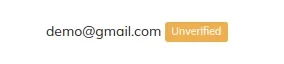
As before, an invitation was sent to that inbox. The author clicked it and verified the account, and the "Unverified" flag disappeared.
Step 2: open the new user's edit form
Clicking the newly created user account opens a form where the email and password of that account can be edited.
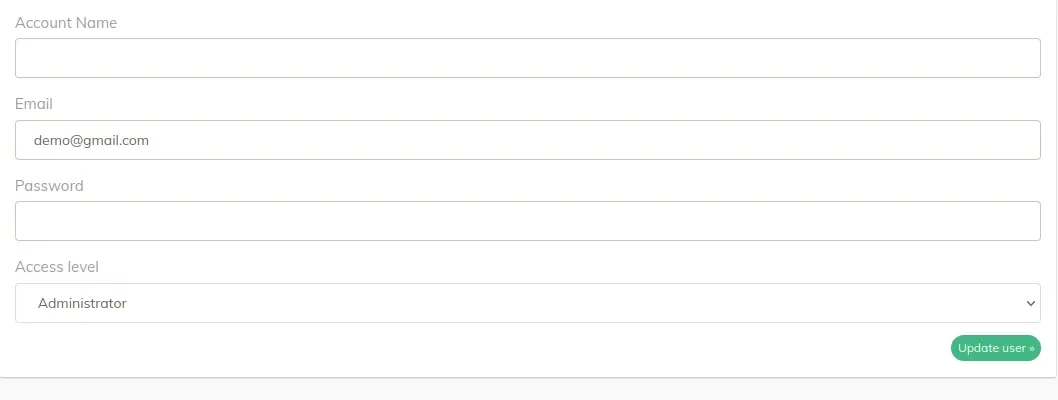
Step 3: swap the email and set a password
In that form the author changed the email to a different address and typed their usual password into the password field. The email changed to the new address, and no "Unverified" flag appeared for it.
No unverified flag
Step 4: log in as the new address
The author went to the LOGIN page and used the credentials just created:
- Email: the new email, that is the victim's email address that had been substituted in.
- Password: the password typed into the form in the previous step.
The login succeeded. As the author puts it: no registration, no email verification and no password setting were needed.
Root cause
The author's explanation is that the ADD USER feature allowed them to verify an email address they controlled, and when the email on that account was later changed to a victim's address, the victim's address inherited the verified state. The update form also carried a password field, so the same request that changed the email also set the password for the new address. The result was a set of working credentials for an account bearing the victim's email, without any verification of that address.
The author's explanation is that the verified state carried over to the new address when the email was changed, and the form did not require verification of it. The password field on the same form turned that gap into full credentials. The report does not show the underlying request or code, so the exact implementation mistake is not documented; the description above is the behaviour the author observed.
Impact
The author characterises the result as a pre-account takeover: an attacker can create credentials for an account carrying a victim's email address, before the victim has any account of their own, and log in with them. The author's steps were to add an address they controlled, verify it, then edit the account's email and password. The report does not describe what happens if the victim already has an account, nor any further actions possible once logged in.
Fix
The first, reversed-validation bug was fixed before the second was found, and the author confirms that fix by retesting. For the second issue, the behaviour described implies that changing an account's email should invalidate its verified state and require verification of the new address, and that a password should not be settable through the same path without that verification.
Variants to test
- Email change without re-verification. On any application with an invitation or team-member flow, verify an address you control, then change the account's email to another address and check whether the verified flag persists. A positive result is the new address showing as verified with no confirmation email sent to it.
- Password set alongside email change. Look for an edit form that accepts both an email and a password for a member account. A positive result is being able to log in with the new email and the chosen password immediately after the change.
- Reversed validation in invite flows. Submit an address that already has an account and one that does not, and compare the responses. A positive result is the registered address being rejected while the unregistered one is added directly, which is the original P5 behaviour.
- Pre-registration of a victim's address. Where an invite flow marks an address as pending or unverified, try to complete registration for an address you do not control and observe whether the record is created anyway. A positive result is a usable account record for an address whose inbox you cannot read.
What happened, in plain words
A security researcher was testing a website (which they call bluedacted.com) that lets you add other people to your projects. The feature is called ADD USER. You type in someone's email address, choose what level of access they should have (Administrator, User, or Single Server Access), and submit. If the email belongs to someone who already has an account, that person gets added. If not, the site sends an invitation to that email address so the person can sign up.
The researcher first found a bug where the site did the opposite: it rejected emails that already had accounts and accepted emails that did not. That was a bug, but it did not seem to let an attacker do anything harmful, so the company fixed it but paid no reward.
Later, the researcher looked again and found something much more serious. They could add an email they controlled, verify it, then change that account's email to someone else's address and set a password at the same time. The site marked the new address as verified without sending any confirmation to it. The researcher could then log in as that new email address, effectively taking over an account before the victim even had one. This is called a pre-account takeover.
This article explains every step in plain language, assuming you know how to use a browser but nothing about security.
Context
The target is a web application the author refers to as bluedacted.com. The feature at the centre of the story is a button labelled ADD USER. This feature lets an account owner add other people to their work or project with one of three privileges: Administrator, User, or Single Server Access.
Think of it like adding members to a shared online document: you can give each person different rights, such as full control (Administrator), basic editing (User), or access to just one part (Single Server Access).
The intended behaviour, as the author describes it, is this: you enter the email address of the person you want to grant access to, choose a privilege, and submit. If that email belongs to an existing user of the application, the user is listed and receives the privilege. If the email does not belong to an existing user, an invitation to open an account on the application is sent to that address instead.
In other words, the site should check whether the email is already registered. If it is, the person is added directly. If not, the site sends an email inviting them to sign up.
Setup
The author does not describe any special tooling, versions or configuration. The work was done against the author's usual target while hunting, using the application's own interface: the ACCOUNTS tab, then the USERS tab, then the ADD USER feature. The only precondition that matters for the later steps is control of an email inbox, because the flow depends on receiving and clicking an invitation.
You do not need any hacking tools for this. Everything happens through the normal website interface, just like a regular user would do. The only extra thing you need is an email address you can access, because the site sends an invitation that you must click to verify.
Finding it
When the author first tested the feature it was, in their words, clearly malfunctioning. Entering an email that was already registered on the platform produced an error:
Enter a valid email
This error message is shown when you try to add an email that already has an account. The site should have accepted it, but instead it rejected it with a message saying the email is not valid.
Entering an email that did not exist in the application, on the other hand, added it with the chosen privilege, and the corresponding inbox received an invitation to open an account. The two branches were effectively swapped: registered addresses were rejected and unregistered addresses were accepted directly.
So the site did the opposite of what it should: it refused to add existing users and instead added non-existing ones, sending them an invite. This is like a bouncer who turns away people on the guest list but lets in strangers.
The author reported it, but considered it a low-value bug because it appeared to have no security impact. The response confirmed that reading:
Hello,
Thank you for reporting this bug. It has been fixed. This has no security impact, so we are not paying any bounty on this.
Regards
The company fixed the bug but did not pay a reward because they did not see how it could be abused. The author was not too happy about it, but moved on.
Later, while travelling, the author decided to look at the feature again. Back at the laptop, the path was ACCOUNTS tab, then USERS tab, and the feature was retested. It had been fixed.
The author retested the feature and found it had been fixed.
Exploitation
Step 1: add an address you control
With the fix in place, the author entered an email in the ADD USER column. This time the address was listed, flagged as unverified.
The image shows the ADD USER feature with an email entered, and the email appears in a list with an "Unverified" label next to it. This means the site accepted the email but has not yet confirmed that the person owns it.
As before, an invitation was sent to that inbox. The author clicked it and verified the account, and the "Unverified" flag disappeared.
When you click the link in the invitation email, the site marks your email as verified. The "Unverified" label goes away, indicating that the site now trusts that you own that email address.
Step 2: open the new user's edit form
Clicking the newly created user account opens a form where the email and password of that account can be edited.
The image shows a form where the email and password of the newly created user account can be edited.
Step 3: swap the email and set a password
In that form the author changed the email to a different address and typed their usual password into the password field. The email changed to the new address, and no "Unverified" flag appeared for it.
No unverified flag
The image shows the account after the email change, with no "Unverified" label next to the new email.
Step 4: log in as the new address
The author went to the LOGIN page and used the credentials just created:
- Email: the new email, that is the victim's email address that had been substituted in.
- Password: the password typed into the form in the previous step.
The login succeeded. As the author puts it: no registration, no email verification and no password setting were needed.
In other words, the author could log in as the victim's email address without the victim ever registering or verifying that address. The login succeeded with the new email and the password typed into the form.
Root cause
The author's explanation is that the ADD USER feature allowed them to verify an email address they controlled, and when the email on that account was later changed to a victim's address, the victim's address inherited the verified state. The update form also carried a password field, so the same request that changed the email also set the password for the new address. The result was a set of working credentials for an account bearing the victim's email, without any verification of that address.
Think of it like a gym membership: you show your ID to get a verified member card. Later, you change the name on the card to someone else's without showing their ID, and the card still says "verified". Now you can use the gym under their name.
In design terms, the verified flag was attached to the account record rather than to the address it was proven against, and the email change path did not re-trigger verification. The password field on the same form turned that gap into full credentials. The report does not show the underlying request or code, so the exact implementation mistake is not documented; the description above is the behaviour the author observed.
Impact
The author characterises the result as a pre-account takeover: an attacker can create credentials for an account carrying a victim's email address, before the victim has any account of their own, and log in with them. The conditions are that the attacker can reach the ADD USER feature, can receive mail at an address they control in order to verify it, and can then edit the account's email and password. The report does not describe what happens if the victim already has an account, nor any further actions possible once logged in.
The author calls this a pre-account takeover: credentials for an account carrying the victim's email address were created and used to log in.
Fix
The first, reversed-validation bug was fixed before the second was found, and the author confirms that fix by retesting. For the second issue, the behaviour described implies that changing an account's email should invalidate its verified state and require verification of the new address, and that a password should not be settable through the same path without that verification.
In simple terms, the site should send a verification email whenever an email address is changed, and should not allow setting a password for an unverified address.
Variants to test
- Email change without re-verification. On any application with an invitation or team-member flow, verify an address you control, then change the account's email to another address and check whether the verified flag persists. A positive result is the new address showing as verified with no confirmation email sent to it.
- Password set alongside email change. Look for an edit form that accepts both an email and a password for a member account. A positive result is being able to log in with the new email and the chosen password immediately after the change.
- Reversed validation in invite flows. Submit an address that already has an account and one that does not, and compare the responses. A positive result is the registered address being rejected while the unregistered one is added directly, which is the original P5 behaviour.
- Pre-registration of a victim's address. Where an invite flow marks an address as pending or unverified, try to complete registration for an address you do not control and observe whether the record is created anyway. A positive result is a usable account record for an address whose inbox you cannot read.
Glossary
- API: Application Programming Interface; a set of rules that lets different software talk to each other, like a waiter taking your order to the kitchen.
- Cookie: A small piece of data stored by your browser that a website uses to remember you, like a coat check ticket.
- Token: A piece of data used to prove who you are, similar to a temporary password or a wristband at an event.
- Vulnerability: A weakness in a system that can be exploited to cause harm.
- Exploit: Taking advantage of a vulnerability to do something unintended.
- Pre-account takeover: An attack where someone creates an account using another person's email address before that person registers, effectively reserving it.
- Privilege: A level of access or permission, such as Administrator or User.
- Verification: The process of confirming that you own an email address, usually by clicking a link sent to it.
- Unverified flag: A label indicating that an email address has not been confirmed.
- Payload: The part of an attack that delivers the harmful action, like the contents of a package.
- Request: A message sent from your browser to a website asking for something, like ordering food.
- Response: The website's reply to a request.
- Root cause: The underlying reason why a vulnerability exists.
- Impact: The potential damage or consequence of a vulnerability.
- P5, P3: Severity ratings; P5 is very low, P3 is medium.
- Bug bounty: A program where companies reward people for finding and reporting security bugs.
- 2FA: Two-factor authentication; a second step to prove identity, like a code sent to your phone.
- Bypass: To get around a security control.
- Inbox: The folder in your email where you receive messages.
- Invitation: An email inviting you to create an account.
- Credentials: A username and password used to log in.
- Login page: The page where you enter your credentials to access an account.
- Form: A web page with fields where you can type information.
- Field: A box on a form where you type something, like email or password.
- Submit: To send the information you typed in a form to the website.
- Error message: A message telling you something went wrong.
- Malfunctioning: Not working as intended.
- Reversed validation: When a system accepts what it should reject and rejects what it should accept.
- Security impact: The potential harm that could result from a bug.
- Bounty: A reward, usually money, given for finding a bug.
- Fixed: Repaired or corrected.
- Retest: To test again to confirm a fix.
- Account: A record on a website that represents you, with a username and password.
- Email address: A unique address for sending and receiving email, like [redacted]
- Password: A secret word or phrase used to log in.
- Log in: To enter your credentials to access an account.
- Registration: The process of creating a new account.
- Sign up: Same as registration.
- Administrator: A user with full control over a system or project.
- User: A regular user with limited permissions.
- Single Server Access: A privilege allowing access to only one server.
- Project: A workspace or container for work.
- Work: A project or task.
- ACCOUNTS tab: A section of the website for managing accounts.
- USERS tab: A section for managing users.
- ADD USER: A button or feature to add a new user.
- Column: A vertical section of a table or list.
- Listed: Shown in a list.
- Flag: A marker or indicator.
- Disappeared: No longer visible.
- Edit form: A form for changing information.
- Update form: Same as edit form.
- Credentials: A username and password.
- Victim: The person being attacked.
- Attacker: The person trying to cause harm.
- Precondition: Something that must be true before something else can happen.
- Inbox: The place where emails are received.
- Click: To press a button on a mouse or tap on a screen.
- Link: A clickable text or button that takes you to another page.
- Verify: To confirm ownership.
- Marked as verified: Indicated as confirmed.
- Inherited: Received from a previous state.
- Re-trigger: To start again.
- Invalidate: To make invalid.
- Require: To demand as necessary.
- Settable: Able to be set.
- Path: A route or way.
- Behaviour: The way something acts.
- Observed: Seen or noticed.
- Documented: Recorded in writing.
- Implementation: The way something is built.
- Mistake: An error.
- Design: The plan or structure.
- Record: A row of data in a database.
- Database: An organised collection of data.
- Server: A computer that provides services to other computers.
- Browser: A program for accessing websites, like Chrome or Firefox.
- Website: A collection of web pages.
- Web application: A website that behaves like an application, with interactive features.
- Interface: The visual part of a program you interact with.
- Tooling: Tools used.
- Configuration: Settings.
- Version: A specific release of software.
- Hunting: Searching for vulnerabilities.
- Target: The website being tested.
- Domain: A website's address, like example.com.
- Bluedacted.com: A placeholder name for the target website.
- POC: Proof of Concept; a demonstration that a vulnerability exists.
- Video POC: A video recording showing the steps to exploit a vulnerability.
- Impact: The effect or consequence.
- Rewarded: Given a reward.
- Writeup: A written report of a vulnerability.
- Fellow hackers: Other security researchers.
- Bug hunters: People who search for bugs.
- Intersting: Misspelling of "interesting".
- Ready: Misspelling of "read".
- Profile: A page with information about a user.
- 2FA bypass: Getting around two-factor authentication.
- Slow internet: A slow connection.
- 50$: 50 US dollars.
- Domain: A website address.
- Button: A clickable element.
- Privileges: Permissions.
- Administrator: Full access.
- User: Regular access.
- Single Server Access: Limited access to one server.
- Email: Electronic mail.
- Valid: Correct or acceptable.
- Connected: Associated.
- Application: A program or website.
- Invite: Invitation.
- Open an account: Create an account.
- Malfunctioning: Not working properly.
- Error: A mistake or fault.
- Enter a valid email: A message indicating the email is not acceptable.
- Non existing: Not existing.
- Inbox: Email inbox.
- Corresponding: Matching.
- Actions are reversed: The opposite of what should happen.
- Security impact: Potential harm.
- Reported: Told the company.
- Response: Reply.
- Fixed: Repaired.
- Bounty: Reward.
- Regards: A polite closing.
- College: University.
- Travelling: Going on a journey.
- Fired up: Started.
- Rushed: Went quickly.
- ACCOUNTS tab: A tab for accounts.
- USERS tab: A tab for users.
- Tested: Checked.
- Feature: A function or capability.
- Column: A vertical section.
- Listed: Shown.
- Unverified: Not confirmed.
- Flag: A marker.
- Disappeared: Went away.
- Form: A web form.
- Edit: Change.
- Password field: A box for typing a password.
- GUESS WHAT: An expression of surprise.
- BOOM: An exclamation.
- No unverified flag: No marker indicating unverified.
- Hopes too high: Expectations too high.
- LOGIN page: The page for logging in.
- Credentials: Email and password.
- Victim's email: The email of the person being attacked.
- WOW: An exclamation.
- Logged into: Signed in to.
- Registration: Signing up.
- Email verification: Confirming email ownership.
- Password setting: Choosing a password.
- TIME TO BE HAPPY: An expression of joy.
- Basically: In simple terms.
- Allowed: Permitted.
- Known to me: That I control.
- Thanks to: Because of.
- Update form: A form for updating.
- Set the password: Choose the password.
- Therefore: So.
- Created the credentials: Made the email and password.
- Pre-account takeover: Taking over an account before it exists.
- SOON: Quickly.
- Proper video POC: A good video proof of concept.
- Impact: Effect.
- Rewarded: Given a reward.
- IF U HAD MADE THIS FAR: If you have read this far.
- Writeup: Report.
- More to come: More will come.
- THANK YOU: Expression of gratitude.



