Unauthenticated Next.js Server Actions Leading to Zero Click Account Takeover
Two Next.js Server Actions on a subscription portal had no authentication or authorisation checks. An unauthenticated attacker could look up any user's Auth0 account details by email, then set that user's password or email address, taking over the account.
 Published on medium.com
Bug Bounty
The full write-up lives on its author's site
It belongs to its author, so we link to it rather than copy it. The other two tabs are our own rewrites, checked against it.
Context
A subscription portal built on the Next.js App Router exposed two Server Actions with no authentication or authorisation checks. Server Actions are server functions called directly from React components: the framework gives each one a 40-hex-character ID, ships that ID to the browser in the client bundle, and turns the call into a POST carrying a Next-Action header.
The first action accepts an email address and returns the corresponding user's Auth0 account information. The second lets an unauthenticated caller set the password of any user ID they supply, which results in account takeover. The portal is described as a subscription portal; one request path is /particuliers/integrale-web-mensuel-2116 and another request uses the host subscribe.target.com.
Setup
The researcher worked against a target whose host is referred to as subdomain.target.com (one request in the report uses subscribe.target.com). The report does not describe the tooling used beyond the raw HTTP requests shown. The attack relies on the application being a Next.js App Router deployment whose Server Action IDs are present in the client bundle.
Finding it
The reasoning starts from how Server Actions are dispatched. The Next-Action header, not the path, decides which function runs, and the request body is simply the function's arguments, positionally. There is no route file to wrap in middleware, so if the authorisation check is not inside the function body, there is no check at all.
With that in mind the researcher pulled the action IDs out of the client bundle, worked out each function's arguments from the minified call sites around them, and replayed the calls with cookies stripped. Two of them answered.
Exploitation
Step 1: email in, Auth0 user out
The first action was called with no cookies and no Authorization header:
POST /particuliers/integrale-web-mensuel-2116 HTTP/2Host: subdomain.target.comUser-Agent: Mozilla/5.0 (X11; Linux x86_64) AppleWebKit/537.36 (KHTML, like Gecko) Chrome/[redacted] Safari/537.36Next-Action: [redacted]-Type: text/plain;charset=UTF-8Accept: text/x-component["[redacted]",true]
The Next-Action header selects the function; the body is a positional argument list whose first element is the victim's email address. The response returned the account:
{"user_id": "auth0|000000000000000000000001","email": "[redacted]","identities": [{ "provider": "auth0", "connection": "www-target-com" }],"app_metadata": {"subscriber_number": "900000000","custom_user_id": "00000000–0000–4000–8000–000000000000"}}
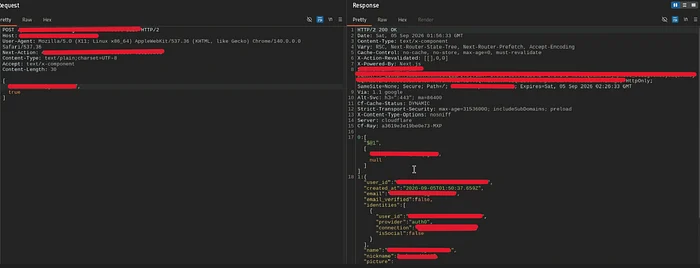
The presence of identities and app_metadata is the key observation: those fields do not come from Auth0's public Authentication API. They come from the Management API, the admin one, reached with a machine-to-machine token holding scopes such as read:users and update:users. That means a privileged Auth0 token sits on the server and an unauthenticated function the researcher controls is holding it. On its own that is already a finding, but it also hands over the two values the next action needs: a user_id and a connection.
Step 2: the takeover
The second action took an object and a string. The object carried password and connection; the string was a user id. Against the researcher's own test account, still unauthenticated:
POST / HTTP/2Host: subdomain.target.comNext-Action: [redacted]-Type: text/plain;charset=UTF-8Accept: text/x-component[{"password":"<REDACTED>","connection":"www-target-com"},"auth0|000000000000000000000001"]
No cookie, no current password, no reset token, no email confirmation, no step-up. The server answered 200 OK with the updated user object in the response.
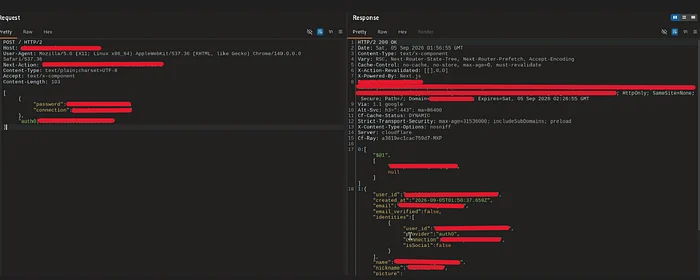
The important detail is where the user id lives: it is argument two. It is not read from a session and not taken from a JWT sub claim; it is supplied by the caller. The server changes whichever account it is told to. The researcher logged out, went to the login page, and signed in with the password just set. It worked.
The same action takes an email
The first argument is passed straight through to the Auth0 user update, so whichever field is put in it is the field that changes. Swapping password for email:
POST / HTTP/2Host: subscribe.target.comNext-Action: [redacted]-Type: text/plain;charset=UTF-8Accept: text/x-component[{"email":"[redacted]","connection":"www-target-com"},"auth0|000000000000000000000001"]
Same 200, same absence of any check that the caller owns the account being edited.
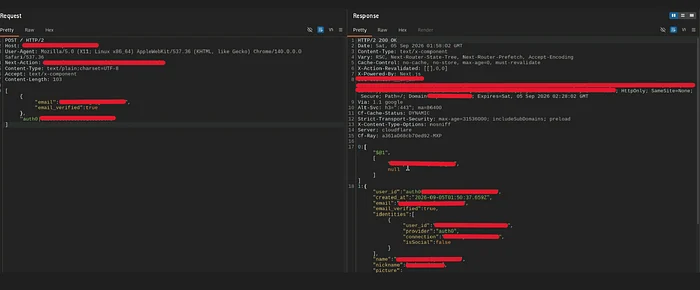
This variant matters more than it looks. The address on the account is where password resets are delivered, so once it is the attacker's address, the owner's own recovery path no longer leads back to them.
Root cause
The authorisation check, if any was intended, was not inside the Server Action function bodies. Because dispatch is driven by the Next-Action header and the body is just the positional argument list, there is no route-level middleware boundary that would catch the call: the framework exposes the function to anyone who knows its ID, and the ID ships to every browser in the client bundle. Both actions then trusted caller-supplied input for identity: the first accepted an arbitrary email and returned the matching Auth0 record, and the second accepted the target user_id as an argument rather than deriving it from the authenticated session. The server-side Auth0 Management API token with read:users and update:users scopes turned that missing check into full read and write access to user records.
Impact
This is an account takeover: at the end of it the attacker is signed in as the victim with a password they chose.
- Who is affected: any subscriber, identified only by their email address.
- What the attacker needs: nothing else, no session, no password, no token and no click from the victim.
- What they get: the account and whatever a signed-in customer can see and do in it, including personal details and subscription and billing state.
Because the password is set rather than a session borrowed, the access does not expire on its own. Changing the email address additionally redirects the victim's password reset flow to the attacker.
Fix
The report does not describe a fix or a retest. What it implies is that the authorisation check has to live inside each Server Action: derive the target user from the authenticated session rather than from a caller-supplied user_id, and require authentication before either action touches the Auth0 Management API.
Variants to test
- Enumerate Server Action IDs from the client bundle and replay each one with cookies stripped.
- Look for actions that take an identity argument (user id, email, account number) rather than reading it from the session.
- Try field substitution in update-style actions: swap
passwordforemail,phoneor similar keys in the first argument. - Check whether responses leak Management API fields such as
identitiesorapp_metadata. - Confirm the takeover end to end by logging out and signing in with the value just set.
What happened, in plain words
A website that lets customers manage a subscription plan had two hidden doors left unlocked. Both doors are pieces of code that run on the company's server, and both could be used by anyone on the internet, without logging in at all.
The first door takes an email address and hands back the Auth0 account information of whoever owns that email, including internal identifiers. The second door takes a user identifier and a new password, and changes that user's password. Put the two together and an attacker can take over any customer account: look up the account by email, then set a password of their choosing, then log in as the victim. No email to the victim, no link to click, no old password needed.
This article walks through how that was found and proven, step by step, explaining each concept as it comes up.
The pieces you need to know first
Before the steps make sense, here are a few ideas in everyday terms.
A server and a browser. When you visit a website, your browser (Chrome, Firefox, Safari) asks a computer somewhere else, called the server, for pages and data. The server is the one holding the database and the customer records. Anything the server decides to do, it does on the company's side, not on your machine.
An API. Think of an API as a service counter. You do not walk into the kitchen yourself; you go to the counter, say what you want in a fixed format, and someone brings it out. Websites are built out of many such counters: one to fetch your profile, one to change your address, one to start a subscription. Each counter has an address (a URL) and expects a particular kind of request.
A cookie. A cookie is a small note your browser keeps for a website and sends back with every request. The most common use is to prove who you are: after you log in, the server gives your browser a cookie saying "this is customer 12345, already checked". If a request arrives without that note, the server should treat it as coming from a stranger.
A token. A token is similar in spirit but usually used between programs rather than between a browser and a site. It is a string that grants permission, like a wristband at an event. Some tokens are short-lived and belong to a user; others are powerful, long-lived and belong to a system, letting one server talk to another on your behalf.
Authentication and authorisation. Authentication is proving who you are (logging in). Authorisation is deciding what you are allowed to do once you are known. A request can be authenticated but not authorised (a logged-in customer trying to edit someone else's account), or neither. The bug here is that both checks were missing entirely.
Account takeover. This is the name for the outcome where an attacker ends up in control of someone else's account: reading their data, changing their settings, acting as them. It is one of the most serious outcomes a web bug can produce, because the victim's own account is the thing being abused.
Next.js and Server Actions. Next.js is a popular toolkit for building websites with React, a JavaScript library for user interfaces. Newer versions of Next.js have a feature called Server Actions: small functions that live on the server but are called directly from the code that runs in your browser. When you click a button, the browser can call one of these server functions as if it were local. The framework handles the plumbing.
That plumbing is where the story starts. Next.js gives every Server Action a 40-character hexadecimal ID (hexadecimal means the characters are 0 to 9 and a to f). It ships those IDs to the browser inside the JavaScript bundle, the collection of files your browser downloads to run the site. When the browser calls an action, Next.js turns it into an ordinary HTTP POST request carrying a special header called Next-Action, whose value is the ID. The body of the request is simply the function's arguments, in order.
Why that matters. In a traditional web app, each URL maps to a file on the server, and you can put a security check in front of a whole folder of URLs. With Server Actions there is no such file: the server decides which function to run purely from the Next-Action header, not from the path in the URL. So if the developer did not put an authorisation check inside the function itself, there is no check anywhere. And because the IDs are shipped to every visitor's browser, anyone can read them.
Auth0. Auth0 is a third-party service many companies use to store user accounts and handle logins. It has two faces. The public one, the Authentication API, is what a login page talks to: check this email and password, issue a session. The admin one, the Management API, is far more powerful: read any user's record, change any user's password or email. The Management API is meant to be called only by the company's own servers, using a machine-to-machine token with specific permissions, called scopes, such as read:users and update:users.
How it was found
The researcher started from the observation above: in a Next.js App Router app, the Next-Action header decides which function runs, and the body is just the argument list. There is no route file to wrap in middleware (a layer that inspects requests before they reach the application), so if the authorisation check is not inside the function body, there is no check at all.
So the plan was:
- Download the JavaScript bundle the site sends to every visitor.
- Pull the Server Action IDs out of it.
- Work out, from the minified code around each call, what arguments each function expects. Minified means the code has been shrunk for delivery: variable names shortened, whitespace removed, but the structure still readable.
- Replay each call by hand, with all cookies removed, to see which ones answered without a login.
Two of them answered. The rest of the article is what those two did.
Step 1: an email goes in, an Auth0 user comes out
The first action was called with no cookies and no Authorization header (a header is a line of extra information attached to a request; Authorization is the conventional one for carrying credentials). In other words, the request was sent as a complete stranger.
POST /particuliers/integrale-web-mensuel-2116 HTTP/2Host: subdomain.target.comUser-Agent: Mozilla/5.0 (X11; Linux x86_64) AppleWebKit/537.36 (KHTML, like Gecko) Chrome/[redacted] Safari/537.36Next-Action: [redacted]-Type: text/plain;charset=UTF-8Accept: text/x-component["[redacted]",true]
Line by line:
POST /particuliers/integrale-web-mensuel-2116 HTTP/2is the request line.POSTmeans "I am sending data". The path looks like a page for a monthly subscription plan, which is a hint about what the site does, but as explained above the path is not what selects the function.HTTP/2is the version of the web protocol being used.Host: subdomain.target.comsays which site the request is for. The real hostname has been replaced with a placeholder.User-Agent: ...identifies the browser. Here it is a normal Chrome string, so the request looks like ordinary traffic.Next-Action: [redacted]is the important line. This 40-character ID is the name of the server function being invoked. It was copied out of the site's JavaScript bundle.Content-Type: text/plain;charset=UTF-8says the body is plain text in UTF-8 encoding. Server Action calls are sent this way rather than as a form submission.Accept: text/x-componenttells the server the client can handle Next.js's component response format.- The body,
["[redacted]",true], is the argument list. It is a JSON-style array: first argument is an email address, second is the boolean valuetrue. The researcher had worked out from the bundle that the first argument is the email to look up.
The server answered with the account:
{"user_id": "auth0|000000000000000000000001","email": "[redacted]","identities": [{ "provider": "auth0", "connection": "www-target-com" }],"app_metadata": {"subscriber_number": "900000000","custom_user_id": "00000000–0000–4000–8000–000000000000"}}
What each part means:
user_idis Auth0's internal identifier for the account. Theauth0|prefix marks which system the ID belongs to.emailis the address on the account.identitieslists how the user can log in. Here there is one entry, withproviderset toauth0andconnectionset towww-target-com. A connection is Auth0's name for a configured login source, in this case the site's own username-and-password store.app_metadatais a free-form box of extra data the application attached to the user. Here it holds asubscriber_numberand acustom_user_id.
Why this response is the key observation: identities and app_metadata are not fields the public Authentication API returns. They come from the Management API, the admin one, which is reached with a machine-to-machine token holding scopes such as read:users and update:users. That tells you two things. First, a privileged Auth0 token is sitting on that server. Second, an unauthenticated function that anyone can call is holding it and using it on the caller's behalf.
On its own, that is already a finding: a stranger can look up any customer's account details by email. But it also hands over the two values the next action needs: a user_id and a connection.
Step 2: the takeover
The second action took two arguments: an object and a string. The object carried password and connection; the string was a user id. The researcher tested it against their own test account, still with no login:
POST / HTTP/2Host: subdomain.target.comNext-Action: [redacted]-Type: text/plain;charset=UTF-8Accept: text/x-component[{"password":"<REDACTED>","connection":"www-target-com"},"auth0|000000000000000000000001"]
Line by line:
POST /goes to the site root. Again, the path is irrelevant; the header decides.Next-Action: [redacted]is the ID of the second function, taken from the bundle.- The body is the argument list. Argument one is an object with two fields:
password, the new password to set (redacted here), andconnection, which tells Auth0 which login store the user belongs to. Argument two is the target user'suser_id, copied from the response in step 1.
What came back: no cookie was needed, no current password was asked for, no reset token, no email confirmation, no step-up (an extra verification step such as a code). The server answered 200 OK, the standard "everything went fine" status code, with the updated user object in the response.
Look at where the user id lives: it is argument two. It is not read from a session, and it is not taken from a JWT sub claim (a JWT is a signed token; sub is its standard field for "subject", the user it belongs to). It is supplied by the caller. The server changes whichever account it is told to change.
To prove the takeover end to end, the researcher logged out, went to the login page, and signed in with the password just set. It worked.
The same action takes an email
The first argument is passed straight through to the Auth0 user update, so whichever field you put in it is the field that changes. Swapping password for email:
POST / HTTP/2Host: subscribe.target.comNext-Action: [redacted]-Type: text/plain;charset=UTF-8Accept: text/x-component[{"email":"[redacted]","connection":"www-target-com"},"auth0|000000000000000000000001"]
Line by line:
- The request is the same shape as before, with the same action ID. The host here is written as
subscribe.target.com. - The body's first argument now has
emailinstead ofpassword, set to the attacker's address. The second argument is still the victim'suser_id.
Same 200, same absence of any check that the caller owns the account being edited.
This variant matters more than it looks. The address on the account is where password resets are delivered. Once it is the attacker's address, the owner's own recovery path no longer leads back to them: a reset request goes to the attacker's inbox.
Why it worked
The authorisation check, if any was intended, was not inside the Server Action function bodies. Because dispatch is driven by the Next-Action header and the body is just the positional argument list, there is no route-level middleware boundary that would catch the call. The framework exposes the function to anyone who knows its ID, and the ID ships to every browser in the client bundle.
Both actions then trusted caller-supplied input for identity. The first accepted an arbitrary email and returned the matching Auth0 record. The second accepted the target user_id as an argument rather than deriving it from the authenticated session. The server-side Auth0 Management API token with read:users and update:users scopes turned that missing check into full read and write access to user records.
Impact
This is an account takeover: at the end of it the attacker is signed in as the victim with a password they chose.
- Who is affected: any subscriber, identified only by their email address.
- What the attacker needs: nothing else, no session, no password, no token and no click from the victim.
- What they get: the account and whatever a signed-in customer can see and do in it, including personal details and subscription and billing state.
Because the password is set rather than a session borrowed, the access does not expire on its own. Changing the email address additionally redirects the victim's password reset flow to the attacker.
Fix
The report does not describe a fix or a retest. What it implies is that the authorisation check has to live inside each Server Action: derive the target user from the authenticated session rather than from a caller-supplied user_id, and require authentication before either action touches the Auth0 Management API.
Variants to test
If you want to look for the same class of bug on other Next.js sites, these checks follow from the report.
- Enumerate Server Action IDs from the client bundle and replay each one with cookies stripped.
- Look for actions that take an identity argument (user id, email, account number) rather than reading it from the session.
- Try field substitution in update-style actions: swap
passwordforemail,phoneor similar keys in the first argument. - Check whether responses leak Management API fields such as
identitiesorapp_metadata. - Confirm the takeover end to end by logging out and signing in with the value just set.
Glossary
- API: a defined way for one piece of software to ask another for data or actions, like a service counter with fixed requests.
- Account takeover: an attack in which someone else gains control of a user's account and can act as them.
- Authentication: proving who you are, usually by logging in.
- Authorisation: deciding what a known user is allowed to do.
- Auth0: a third-party service that stores user accounts and handles logins, with a public API for logins and an admin API for management.
- Authentication API (Auth0): the public part of Auth0 used by login pages to check credentials.
- Management API (Auth0): the admin part of Auth0, used to read and modify any user record, reachable only with a privileged token.
- Machine-to-machine token: a credential issued to a program rather than a person, letting one server call another's API.
- Scope: a named permission attached to a token, such as
read:usersorupdate:users. - Cookie: a small piece of data a browser stores for a site and sends back with each request, often used to keep you logged in.
- Token: a string that grants access, used by software to prove it is allowed to do something.
- JWT: a signed token format; its
subfield names the user the token belongs to. - Header: an extra line of information attached to an HTTP request or response, such as
Next-ActionorContent-Type. - HTTP: the protocol browsers and servers use to exchange requests and responses.
- POST: an HTTP method used to send data to the server.
- Status code: a number in the response saying how it went; 200 means success.
- Next.js: a toolkit for building websites with React, including server-side features.
- React: a JavaScript library for building user interfaces.
- App Router: the newer routing system in Next.js.
- Server Action: a function that lives on the server but is called from browser code, identified by an ID and invoked through a
Next-Actionheader. - Client bundle: the JavaScript files a site sends to the browser to make it work.
- Minified: code shrunk for delivery by shortening names and removing whitespace.
- Middleware: a layer that inspects requests before they reach the application, often used for security checks.
- Hexadecimal: a number system using the characters 0 to 9 and a to f.
- JSON: a text format for structured data, using objects
{}and arrays[]. user_id: the unique identifier of an account.connection: Auth0's name for a configured login source, such as a site's own username-and-password store.identities: the list of login sources attached to an Auth0 user.app_metadata: a free-form box of extra data an application attaches to an Auth0 user.- Step-up: an extra verification step, such as a code, required before a sensitive action.
- Reset token: a one-time value sent to a user's email to prove they control that address when resetting a password.
- Session: the server-side record of a logged-in user, usually referenced by a cookie.
- Unauthenticated: sent without any proof of identity.
- Zero click: an attack that needs no action from the victim, such as clicking a link.



