When a Security Product Can’t Protect Itself: My Responsible Disclosure Story with the Endpoint Central Agent
The Endpoint Central agent could be completely removed by manipulating its MSI and registry components even with Self-Defense and Uninstall Password Protection enabled. An attacker with administrator privileges could disable the agent, removing patch management, application control, device control and browser policies.
 Published on medium.com
Cybersecurity
The full write-up lives on its author's site
It belongs to its author, so we link to it rather than copy it. The other two tabs are our own rewrites, checked against it.
Context
ManageEngine Endpoint Central is a unified endpoint management product. Its agent runs on managed machines and delivers patch management, application control, device control and browser policies, and it is also the enforcement point for the vendor's malware and ransomware protection and DLP claims. Because the agent is the thing that carries those controls to the endpoint, it ships with self-protection features: Self-Defence, Uninstall Password Protection, and settings such as Prevent Agent Uninstallation, Prevent Agent Termination and Prevent Agent Data Tampering. The promise those features make is simple: the agent cannot be removed or tampered with by the user of the machine.
The finding in this write-up is that the promise did not hold under certain conditions. On agent version v11.4.2516.37.W, the agent could be completely removed by manipulating its MSI and registry components, even with Self-Defence and Uninstall Password Protection enabled. Once the agent was gone, so were the policies and protections it delivered.
Setup
The testing was done against the Endpoint Central Agent at version v11.4.2516.37.W, with Self-Defence and Uninstall Password Protection turned on. Verification later used agent version 11.5.2616.20.W. The report does not describe the test machine, the account used, or any tooling beyond the fact that the manipulation targeted the agent's MSI and registry components.
The author deliberately withholds the technical steps, on the grounds that the issue is fixed in current versions but some environments may still run older ones. That means there are no requests, payloads or commands to reproduce here: the report contains none.
Finding it
What made the behaviour look wrong was the gap between the product's stated guarantee and its observed behaviour. The agent advertises that it cannot be removed, and the console exposes dedicated settings to enforce that. Yet by working on the MSI and registry side of the installation, the agent could be removed entirely while those settings were enabled. The removal was complete, not partial: the patch management, application control, device control and browser policies delivered through the agent disappeared with it.
Exploitation
The report does not publish the exploitation steps, so this section can only describe the shape of the attack as the author characterises it.
Step 1: Manipulate the MSI and registry components
The agent's installation is driven by its MSI package and by registry state. The author found that these components could be manipulated in a way that removed the agent despite Self-Defence and Uninstall Password Protection being enabled. No commands, paths or registry keys are given in the report.
Step 2: Observe the agent disappear
After the manipulation, the agent was completely removed from the machine. The agent was completely removed despite Self-Defence and Uninstall Password Protection being enabled.
Step 3: Note what goes with it
With the agent gone, the controls it enforced stopped applying: patch management, application control, device control and browser policies.
Root cause
The report does not analyse the code or name a specific defect. The report does not analyse the code or name a specific defect; it shows the agent could be removed by manipulating its MSI and registry components. Why the existing defences did not stop it is not stated; the most that can be said is that the tamper protection in this version did not extend to the components that were manipulated.
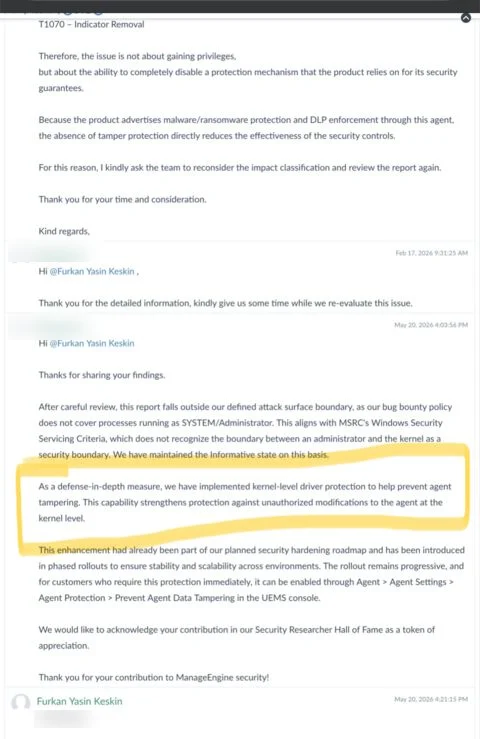
The vendor's position was that the behaviour requires SYSTEM/Administrator privileges, which falls outside the bug bounty program's scope, and that Microsoft's servicing criteria do not treat the boundary between an administrator and the kernel as a security boundary. The author's counter-argument is worth recording because it frames the root cause differently: the issue is not about gaining privileges, it is about being able to completely disable the protection mechanism that the product's security guarantees rely on. If a product advertises malware and ransomware protection and DLP enforcement through this agent, an agent without tamper protection directly reduces the effectiveness of those controls. The author maps this to the MITRE ATT&CK techniques for impairing defences and indicator removal, and notes that disabling security agents is usually one of the first things ransomware operators do.
Impact
An attacker who already holds SYSTEM or Administrator on the endpoint can remove the agent entirely, despite Self-Defence and Uninstall Password Protection, and thereby strip the machine of patch management, application control, device control and browser policies. The precondition matters: this is not a privilege escalation, and the vendor classified it accordingly. The impact is on the controls that depend on the agent being present: patch management, application control, device control and browser policies.
Disclosure timeline
The finding was reported through Zoho's bug bounty program as a responsible disclosure.
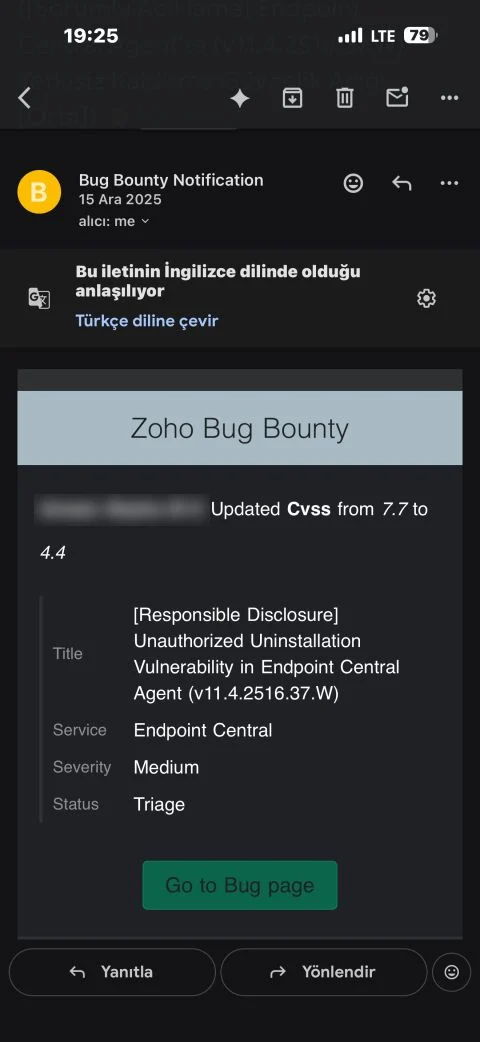
In December 2025 the report entered triage and its CVSS score was lowered from 7.7 to 4.4. The longest part of the process was deciding how to classify the impact, along the lines set out above.
The response in May 2026 kept the report as Informative, but it also carried news: kernel-level driver protection against agent tampering had been implemented. It was being rolled out in phases, and customers who needed it right away could enable it from the console.
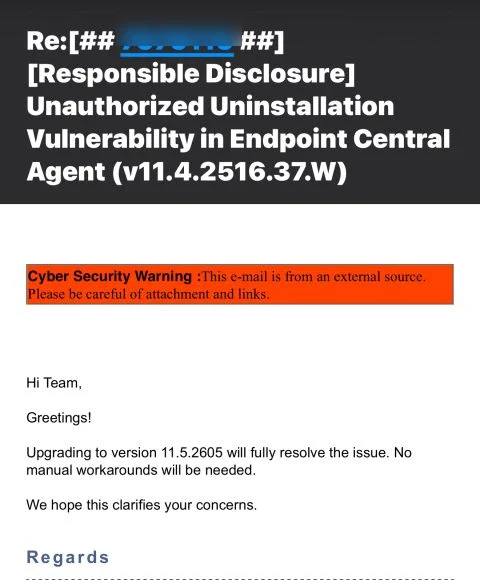
The support team also confirmed that upgrading to version 11.5.2605 fully resolves the issue, with no manual workarounds needed.
Verification
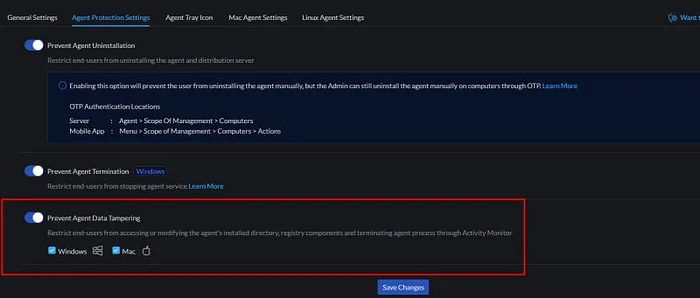
The author repeated the same tests on agent version 11.5.2616.20.W. Agent Protection now works as expected against third-party uninstall and tampering attempts, with one condition: the setting has to be enabled for the protection to fully take effect.
Agent Settings → Agent Protection Settings → Prevent Agent Data Tampering
Fix
The fix that shipped is kernel-level driver protection against agent tampering, rolled out in phases, with customers who needed it right away able to enable it from the console. Upgrading to 11.5.2605 fully resolves the issue according to the support team, with no manual workarounds needed. Verification on 11.5.2616.20.W confirmed that Agent Protection works against third-party uninstall and tampering attempts, provided the Prevent Agent Data Tampering setting is enabled.
One point the author raises about the fix: such an important self-protection improvement is neither clearly mentioned nor highlighted in the release notes, so many organisations running Endpoint Central may not know the protection exists or that it has to be enabled separately.
Checklist for Endpoint Central users
- Confirm your agents are on 11.5.2605 or later.
- Check that Prevent Agent Uninstallation, Prevent Agent Termination and Prevent Agent Data Tampering are all enabled.
- Remove local admin rights from users wherever possible. Kernel protection is a good layer, but it should not be the only one.
- Set up console alerts for agents that stop reporting. An agent quietly disappearing is an incident in itself.
Variants to test
These are directions suggested by the shape of the finding, not things the report tested.
- Other installation-layer paths on managed agents. Try to remove or disable an agent through its installer package, its registry state or its service configuration while tamper protection is on. A positive result is the agent disappearing or ceasing to report while tamper protection is on.
- Self-protection settings that are off by default. Check whether the protection only takes effect once a specific setting is enabled, as with Prevent Agent Data Tampering here. A positive result is a bypass that works before the setting is turned on but not after.
- Silent disappearance detection. Remove an agent by any means and watch the console. A positive result is the endpoint dropping out of management without an alert, which is the detection gap the author warns about.
- Release-note coverage. Compare security-relevant self-protection changes against the published release notes. A positive result is a shipped protection that customers cannot discover from the documentation.
What happened, in plain words
Imagine you hire a security guard to sit in your building every night. You pay for the guard, you trust the guard, and the guard's whole job is to keep the doors locked and the alarms on. Now imagine someone walks up to the guard, sends them home, and the building is left wide open, while the alarm panel in your office still shows "protected". That is roughly the story in this report.
ManageEngine Endpoint Central is a product that companies install on their employees' computers. A small program called an agent runs on each computer and does the company's bidding: it installs software updates, blocks certain apps, controls things like USB sticks, and enforces browsing rules. The agent is also the thing that carries the vendor's claims about malware and ransomware protection and about DLP (data loss prevention, meaning stopping sensitive files from leaving the company).
Because the agent is so important, the product ships with features meant to stop anyone removing it. The author of this report found that on one version of the agent, those features could be bypassed: the agent could be removed completely, and with it went all the protections it was delivering. He reported it responsibly, the process took roughly six months, and the vendor eventually shipped a stronger, deeper protection. The report itself was closed as "Informative", which is a classification meaning the vendor did not treat it as a security vulnerability in their program, but the fix still arrived.
This article walks through the whole story for someone who has never done security work. Every technical term is explained the first time it appears, and there is a glossary at the end.
The background: what the product is and what it promises
Endpoint Central and its agent
An endpoint is any device at the edge of a company network: a laptop, a desktop, a phone. Endpoint management software lets an IT team control many endpoints from one central console, like a dashboard. ManageEngine Endpoint Central is one such product.
The part that runs on each individual machine is called the agent. Think of the agent as a resident caretaker in each building: it lives there, follows instructions from head office, and carries out the day-to-day work. Specifically, the agent delivers:
- Patch management: installing security updates for software.
- Application control: deciding which programs are allowed to run.
- Device control: deciding which hardware, such as USB drives, may be plugged in.
- Browser policies: rules about what employees can do in their web browser.
Because the agent is the delivery mechanism for all of this, it also carries the vendor's malware and ransomware protection and DLP claims. If the agent is not there, none of those controls reach the machine.
Self-protection features
To stop the agent being removed, the product includes self-protection features. The report names these:
- Self-Defence: a general mode that is supposed to stop the agent being tampered with.
- Uninstall Password Protection: a requirement that a password be supplied before the agent can be uninstalled.
- Settings such as Prevent Agent Uninstallation, Prevent Agent Termination and Prevent Agent Data Tampering.
The promise these features make is simple: the user of the machine cannot remove or tamper with the agent. That promise is the whole point. A guard who can be sent home by anyone is not a guard.
The finding in one sentence
On agent version v11.4.2516.37.W, the agent could be completely removed by manipulating its MSI and registry components, even with Self-Defence and Uninstall Password Protection enabled. Once the agent was gone, so were the policies and protections it delivered.
Two terms need explaining here.
- MSI stands for Microsoft Installer. It is the standard package format Windows uses to install, repair and remove software. Think of it as the flat-pack furniture box plus the instruction sheet: it contains the pieces and the steps to assemble or disassemble the product.
- The registry is a central database inside Windows where programs store settings. Think of it as the building's filing cabinet: every program keeps notes there about how it is configured.
The author found that by working on these two things, the installer package and the filing cabinet, he could remove the agent even though the self-protection settings were switched on. The removal was complete, not partial. The patch management, application control, device control and browser policies delivered through the agent disappeared with it.
Setup: what was tested
The testing was done against the Endpoint Central Agent at version v11.4.2516.37.W, with Self-Defence and Uninstall Password Protection turned on. Verification later used agent version 11.5.2616.20.W.
The report does not describe the test machine, the account used, or any tooling beyond the fact that the manipulation targeted the agent's MSI and registry components.
The author deliberately withholds the technical steps, on the grounds that the issue is fixed in current versions but some environments may still run older ones. That means there are no requests, payloads or commands to reproduce here: the report contains none. This is a normal and responsible choice in disclosure: publishing exact steps while some customers are still on the old version would hand attackers a recipe.
Finding it: why the behaviour looked wrong
What made the behaviour look wrong was the gap between the product's stated guarantee and its observed behaviour. The agent advertises that it cannot be removed, and the console exposes dedicated settings to enforce that. Yet by working on the MSI and registry side of the installation, the agent could be removed entirely while those settings were enabled.
A useful comparison: a shop puts a sign on the door saying "this door cannot be opened from outside", and installs a lock to match. If you can still get in by unscrewing the hinges, the sign and the lock were not wrong about the door, they just did not cover the hinges. The agent could be removed by manipulating its MSI and registry components even with the self-protection settings enabled.
Exploitation: the shape of the attack
The report does not publish the exploitation steps, so this section can only describe the shape of the attack as the author characterises it. There is no code to show, because the report contains none.
Step 1: Manipulate the MSI and registry components
The agent's installation is driven by its MSI package and by registry state. The author found that these components could be manipulated in a way that removed the agent despite Self-Defence and Uninstall Password Protection being enabled. No commands, paths or registry keys are given in the report.
Why this step matters: the self-protection features were guarding the front door (the normal uninstall process, the running process), but the MSI and registry are more like the building's service corridor. If the protection does not watch the corridor, someone who knows the building can walk out through it.
Step 2: Observe the agent disappear
After the manipulation, the agent was completely removed from the machine. The self-protection settings that were supposed to block exactly this did not prevent it.
Why this step matters: the test is not "did something look odd" but "did the guard actually leave the building". The author confirmed the agent was completely removed from the machine.
Step 3: Note what goes with it
With the agent gone, the controls it enforced stopped applying: patch management, application control, device control and browser policies. This is the part that turns a local uninstall into a security event, because the endpoint silently drops out of management and out of the protections the organisation believes are in place.
Why this step matters: the damage is not the missing agent itself. The damage is that the machine is no longer managed and no longer receives the protections the organisation believes are in place. That gap between what you believe and what is true is where attackers live.
Root cause: what the report does and does not say
The report does not analyse the code or name a specific defect. What it establishes is that the self-protection mechanism did not cover the MSI and registry path used to remove the agent, so the enforcement the product advertises could be bypassed at the installation layer. Why the existing defences did not stop it is not stated; the most that can be said is that the tamper protection in this version did not extend to the components that were manipulated.
The vendor's position
The vendor's position was that this behaviour requires SYSTEM/Administrator privileges, which falls outside the bug bounty program's scope, and that Microsoft's servicing criteria do not treat the boundary between an administrator and the kernel as a security boundary.
Two terms here:
- Administrator (or SYSTEM, an even more powerful Windows account) is a user account with full control over the machine. Think of it as the building manager's master key. Most ordinary employees do not have it.
- The kernel is the core of the operating system, the part that talks directly to hardware and enforces the rules. Think of it as the building's foundation and load-bearing walls, as opposed to the furniture inside.
A bug bounty program is a scheme where a company invites outside researchers to report security problems and pays them for valid findings. Each program has a scope, a written definition of what counts. The vendor argued that because you already need the master key to do this, it is not a security boundary being crossed, so it is out of scope.
The author's counter-argument
The author's counter-argument is worth recording because it frames the root cause differently: the issue is not about gaining privileges, it is about being able to completely disable the protection mechanism that the product's security guarantees rely on. If a product advertises malware and ransomware protection and DLP enforcement through this agent, an agent without tamper protection directly reduces the effectiveness of those controls.
The author maps this to the MITRE ATT&CK techniques for impairing defences and indicator removal, and notes that disabling security agents is usually one of the first things ransomware operators do.
MITRE ATT&CK is a public catalogue of attacker techniques, a shared vocabulary of "here is a thing attackers do". Two entries in that catalogue are relevant: impairing defences (switching off the protections) and indicator removal (covering your tracks). The author's point is that this behaviour matches a known, named attacker step, which is why it matters even if it does not grant new powers.
Impact: who is affected and how
An attacker who already holds SYSTEM or Administrator on the endpoint can remove the agent entirely, despite Self-Defence and Uninstall Password Protection, and thereby strip the machine of patch management, application control, device control and browser policies.
The precondition matters: this is not a privilege escalation, meaning it does not let a low-privileged user become an administrator. The vendor classified it accordingly. The impact is on the controls that depend on the agent being present and healthy, and on the organisation's visibility of the endpoint, which quietly stops being managed.
A comparison: this is not someone picking the lock to get into the building. It is the building manager, or someone who has stolen the manager's keys, quietly removing the smoke detectors. The detectors were working; the problem is that they could be taken away without anyone noticing.
Disclosure timeline: how the report travelled
The finding was reported through Zoho's bug bounty program as a responsible disclosure. Responsible disclosure means telling the vendor privately first, giving them time to fix the problem, and only then talking about it publicly.
The image shows the state of the report in December 2025: it entered triage and its CVSS score was lowered from 7.7 to 4.4.
Two terms:
- Triage is the first stage of handling a report, where the vendor's team reads it, confirms it is real, and decides how serious it is. Think of it as the hospital intake desk: before treatment, someone assesses how urgent the case is.
- CVSS (Common Vulnerability Scoring System) is a standard 0 to 10 scale for how severe a security flaw is. Higher is worse. A score being lowered from 7.7 to 4.4 means the vendor re-assessed the issue as less severe than the reporter first suggested.
In December 2025 the report entered triage and its CVSS score was lowered from 7.7 to 4.4. Then came the longest part: deciding how to classify the impact. This is the argument described in the previous section: is this a security boundary being crossed, or is it something an administrator can already do?
The response in May 2026 kept the report as Informative, but it also carried news: kernel-level driver protection against agent tampering had been implemented. It was being rolled out in phases, and customers who needed it right away could enable it from the console.
The image shows the vendor's reply: the report stayed Informative, but kernel-level protection arrived.
"Informative" is a classification used in bug bounty programs for reports that are acknowledged but not treated as a qualifying vulnerability under the program's rules. It is not the same as "not real"; it is a statement about scope and severity.
Kernel-level driver protection deserves a plain explanation. A driver is a small piece of software that runs with deep access to the operating system, close to the kernel. Because it sits at that level, it can enforce rules that ordinary programs cannot easily override. Think of it as moving the guard from the lobby into the foundation of the building: harder to send home.
The support team also confirmed that upgrading to version 11.5.2605 fully resolves the issue, with no manual workarounds needed.
The image shows the support team's confirmation: upgrading to 11.5.2605 fully resolves the issue.
Verification: checking the fix rather than trusting it
The author repeated the same tests on agent version 11.5.2616.20.W. Agent Protection now works as expected against third-party uninstall and tampering attempts, with one condition: the setting has to be enabled for the protection to fully take effect.
Agent Settings → Agent Protection Settings → Prevent Agent Data Tampering
The image shows the setting you need to enable to get the full protection.
That line is a path through the product's menus, read left to right: open Agent Settings, then Agent Protection Settings, then switch on Prevent Agent Data Tampering. The arrow is just "then".
Why verification matters: a vendor saying "fixed" and a researcher confirming "fixed" are two different things. Re-running the same test on the new version is how you turn a claim into a fact. The condition is important too: the protection only fully takes effect once the setting is enabled.
Fix: what shipped
The fix that shipped is kernel-level driver protection against agent tampering, rolled out in phases, with customers who needed it right away able to enable it from the console. Upgrading to 11.5.2605 fully resolves the issue according to the support team, with no manual workarounds needed. Verification on 11.5.2616.20.W confirmed that Agent Protection works against third-party uninstall and tampering attempts, provided the Prevent Agent Data Tampering setting is enabled.
"Rolled out in phases" means the vendor released the change gradually rather than to everyone at once, which is common for deep changes like a kernel driver because they touch the most sensitive part of the system. Customers who needed it right away could enable it from the console.
One point the author raises about the fix: such an important self-protection improvement is neither clearly mentioned nor highlighted in the release notes, so many organisations running Endpoint Central may not know the protection exists or that it has to be enabled separately. Release notes are the document a vendor publishes with each new version describing what changed. If a security improvement is not in there, customers have no easy way to learn about it.
Checklist for Endpoint Central users
If you run this product, the author's advice is short and practical:
- Confirm your agents are on 11.5.2605 or later.
- Check that Prevent Agent Uninstallation, Prevent Agent Termination and Prevent Agent Data Tampering are all enabled.
- Remove local admin rights from users wherever possible. Kernel protection is a good layer, but it should not be the only one.
- Set up console alerts for agents that stop reporting. An agent quietly disappearing is an incident in itself.
Why each item matters:
- The version check makes sure the fix is actually present.
- The three settings are the switches that make the protection real; a feature that is off protects nothing.
- Removing local admin rights means fewer people hold the master key, so fewer people can even attempt the removal path.
- Alerts turn a silent disappearance into a visible event. If the guard leaves, you want the alarm to ring, not to find out weeks later.
Variants to test: where a curious beginner could look next
These are directions suggested by the shape of the finding, not things the report tested. They are written for someone learning, not as instructions to attack anything you do not own.
- Other installation-layer paths on managed agents. Try to remove or disable an agent through its installer package, its registry state or its service configuration while tamper protection is on. A positive result is the agent disappearing or ceasing to report while the console still shows the protection settings as enabled.
- Self-protection settings that are off by default. Check whether the protection only takes effect once a specific setting is enabled, as with Prevent Agent Data Tampering here. A positive result is a bypass that works before the setting is turned on but not after.
- Silent disappearance detection. Remove an agent by any means and watch the console. A positive result is the endpoint dropping out of management without an alert, which is the detection gap the author warns about.
- Release-note coverage. Compare security-relevant self-protection changes against the published release notes. A positive result is a shipped protection that customers cannot discover from the documentation.
A word of caution for a beginner: testing on systems you do not own or administer is not research, it is unauthorised access. The safe way to learn is a lab machine you control, or a vendor's own bug bounty program with its written scope.
Final word
Credit where credit is due: even though the report stayed "Informative", the ManageEngine team took the feedback seriously, kept the author updated throughout, and shipped a real improvement.
Sometimes the most important update is not a new feature, but a security product getting better at protecting itself.
Glossary
- Agent: a small program installed on each managed computer that carries out the company's instructions and enforces its policies.
- Administrator: a Windows account with full control over a machine, able to change anything on it.
- Application control: a policy deciding which programs are allowed to run on a machine.
- Browser policies: rules controlling what users can do in their web browser.
- Bug bounty program: a scheme where a company invites outside researchers to report security problems, usually with rules defining what is in scope and sometimes with payment.
- Console: the central dashboard an IT team uses to manage many endpoints.
- CVSS: Common Vulnerability Scoring System, a standard 0 to 10 scale for the severity of a security flaw, where higher is worse.
- Device control: a policy deciding which hardware, such as USB drives, may be used on a machine.
- DLP: data loss prevention, controls aimed at stopping sensitive data leaving an organisation.
- Driver: a piece of software that runs with deep access to the operating system, close to the kernel, so it can enforce rules ordinary programs cannot easily override.
- Endpoint: any device at the edge of a network, such as a laptop, desktop or phone.
- Endpoint management: software that lets an IT team control many endpoints from one central place.
- Informative: a bug bounty classification for a report that is acknowledged but not treated as a qualifying vulnerability under the program's rules.
- Kernel: the core of the operating system, which talks directly to hardware and enforces the system's rules.
- Kernel-level driver protection: tamper protection implemented in a driver that runs at kernel level, making it harder for ordinary programs to override.
- MITRE ATT&CK: a public catalogue of attacker techniques, used as a shared vocabulary for describing what attackers do.
- MSI: Microsoft Installer, the standard Windows package format used to install, repair and remove software.
- Opt-in: a feature that a customer must choose to enable rather than receiving it automatically.
- Patch management: installing security updates for software across managed machines.
- Privilege escalation: an attack that lets a low-privileged user gain higher privileges, such as becoming an administrator.
- Registry: a central database in Windows where programs store their settings.
- Release notes: the document a vendor publishes with each version describing what changed.
- Responsible disclosure: reporting a security problem privately to the vendor first, allowing time to fix it before discussing it publicly.
- Ransomware: malicious software that encrypts a victim's files and demands payment to unlock them.
- Scope: the written definition, in a bug bounty program, of which findings count.
- Self-Defence: a self-protection mode in the product intended to stop the agent being tampered with.
- SYSTEM: a Windows account more powerful than an ordinary administrator, used by the operating system itself.
- Triage: the first stage of handling a security report, where the vendor confirms it and assesses its severity.
- Uninstall Password Protection: a feature requiring a password before the agent can be uninstalled.



