Windows Active Directory(AD) Penetration Testing: Account Takeover leading to full compromise
The report describes a simulated Active Directory attack where weak passwords and legacy protocols allowed credential capture, privilege escalation, and full domain compromise. An attacker could crack a captured NTLM hash, relay credentials to escalate a user to domain admin, and then dump all domain password hashes.

In this exercise, I'll demonstrate how to fully compromise an active directory environment. This demonstration was carried out in an environment set up specifically for testing.
The full write-up lives on its author's site
It belongs to its author, so we link to it rather than copy it. The other two tabs are our own rewrites, checked against it.
Context
This is a walkthrough of a full Active Directory compromise, run as a blackbox penetration test against a lab the author built for the purpose. The target is an AD forest with a root domain, [redacted], and a child domain, kenya.[redacted]. The goal is to move through four stages: reconnaissance, gaining access, privilege escalation and lateral movement.
The author is explicit that this is a simplified lifecycle. The techniques shown are a small subset of what is available, particularly in large enterprise environments. The lab is isolated to reduce noise and make sniffing and monitoring manageable.
Setup
The environment is described as follows:
- 1 forest root domain:
[redacted] - 1 root domain controller (Windows Server 2022):
DC0 - 1 child domain:
kenya.[redacted] - 2 child domain controllers (Windows Server 2022):
DC1andDC2 - Organisational Units for departments in the child domain (management, legal, marketing, engineering, HR and others), each with at least two users (a department head and normal employee(s)) and a department-specific security group
- 2 Windows 10 Pro machines on the same network for logging into user accounts
Resources listed for building the lab are Windows Server, Windows 10 and Oracle VirtualBox. The author warns that penetration tests should only be run against environments with full written consent.
Tools used across the exercise:
| Stage | Tools |
|---|---|
| Recon | Wireshark, nmap, dig, dnsrecon |
| Gaining access | responder, hashcat |
| Privilege escalation | mitm6, impacket |
| Lateral movement | impacket (secretsdump) |
Finding it
The exercise starts from a position on the LAN. The author notes that an attack would typically begin by bypassing Network Access Controls (NAC), but there are none here because the lab was self-built.
The first task is to learn as much as possible about the victim. The IP range comes from ifconfig:
ifconfig


This gives the subnet mask and therefore the IP range of the network.
Network sniffing with tcpdump or Wireshark then reveals the shape of the domain. The author lists what the captured traffic shows:
- a domain controller
DC0at[redacted] - another domain controller
DC2at[redacted], the authoritative DNS server for the subdomain in the query, identified from its FQDNdc2.kenya.[redacted]as a controller of the child domainkenya.[redacted] - confirmation that at least one child domain,
kenya.[redacted], exists - a second domain controller
DC1in the child domain at[redacted] - a computer at
[redacted]that is part of thekenyachild domain - evidence that Kerberos is used for authentication
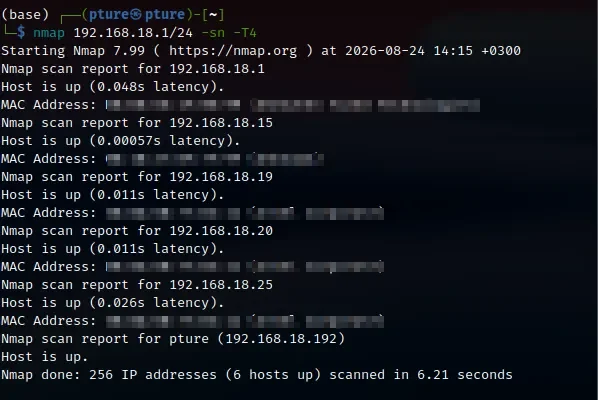
With the subnet mask known, a ping sweep maps the network:
nmap <subnet> -sn -T4
The LAN has 6 devices, including the attack device at [redacted] and the default gateway at [redacted].

A deeper scan follows:
nmap <subnet> -A -T4
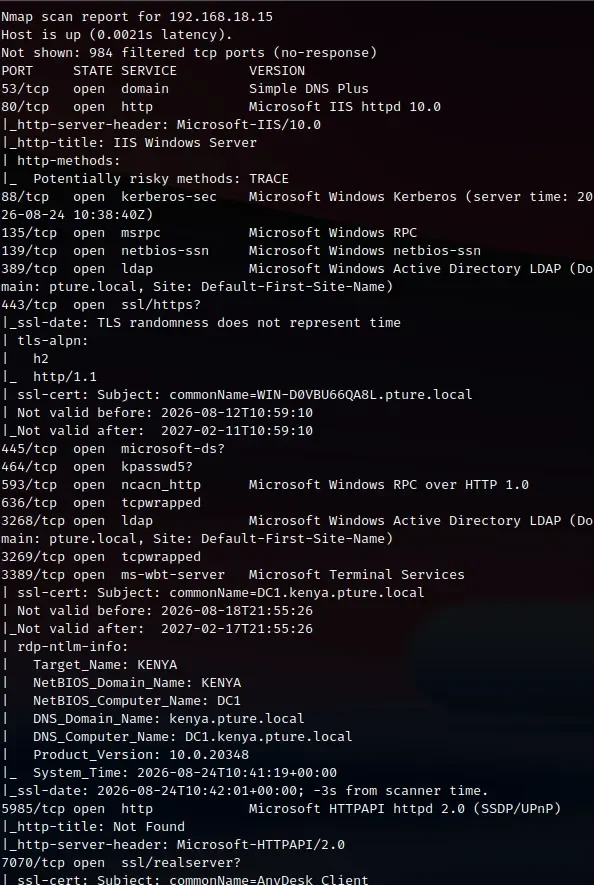
The author would not recommend an aggressive scan where detection evasion matters. The scan of [redacted] shows the services running and more detail about the machine.
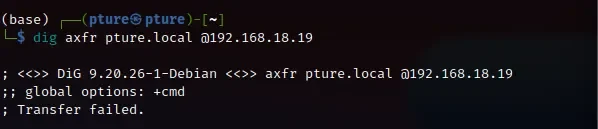
DNS zone transfer is attempted with two tools:
dig axfr <domain name> @<domain controller ip>
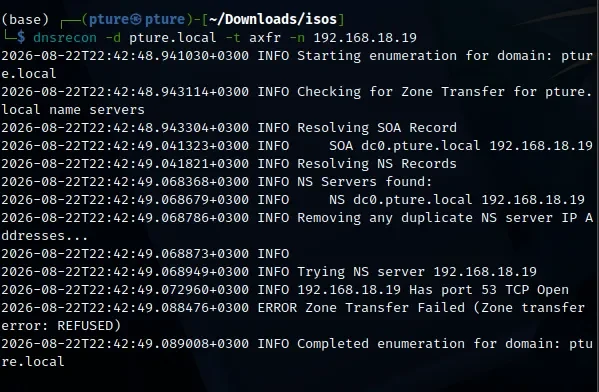
dnsrecon -d <domain name> -t axfr -n <domain controller ip>
Secure configuration on all domain controllers prevents DNS zone transfer, and the author shows the setting that enforces it.
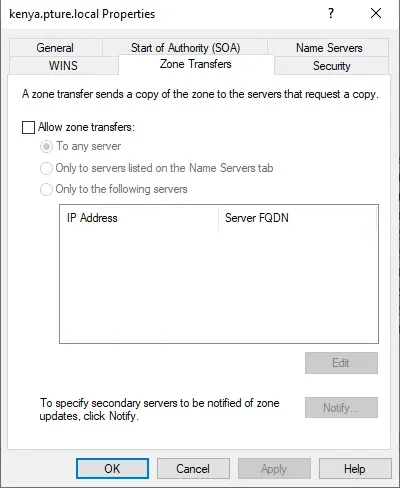
Zone transfer is disallowed on every domain controller, which the author calls secure configuration.
The reconnaissance findings are summarised as:
- a root domain with one root domain controller,
dc0([redacted]) - one child domain with two domain controllers,
dc1([redacted]) anddc2([redacted]) - one computer in the child domain (
[redacted])
Exploitation
Step 1: Gaining access through LLMNR, mDNS and NBT-NS poisoning
The next stage is unauthorised access to internal systems such as servers, file shares, user accounts and databases. In this simple lab the target is user account(s).
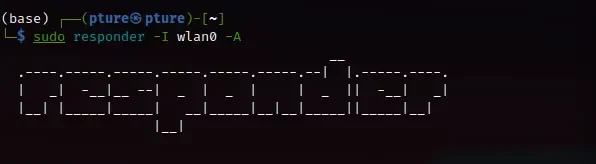
Responder is first started in analyse mode:
sudo responder -I <interface> -A

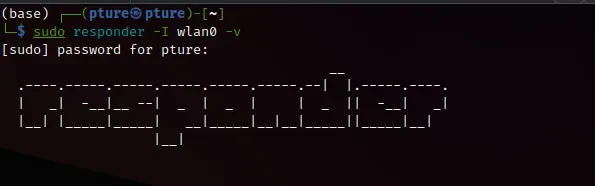
Then basic poisoning is enabled:
sudo responder -I <interface> -v

Because the lab is self-built, the author had to trigger the capture manually: opening File Explorer and attempting to reach a non-existent file share. In the wild this happens organically, for example when a user makes a typo or tries to reach a share that no longer exists.
The author adds a troubleshooting tip: if responder is poisoning requests but no hashes are captured, a firewall may be blocking incoming requests.
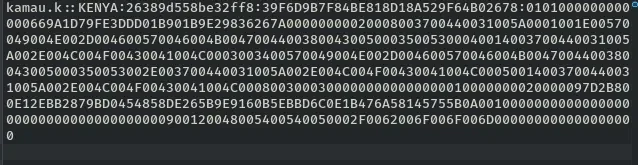
The poisoning is visible in Wireshark. Once a hash is captured, responder displays something like the following, giving the username and hash of the account. A high-privilege account would be ideal, but here it was not.
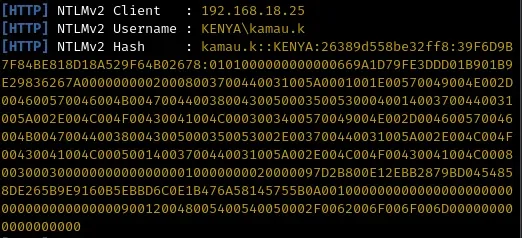
The hash is saved to a text file.
Hashcat is then run against it (john or another cracker works too):
hashcat -m<mode> <document containing hash> <wordlist>

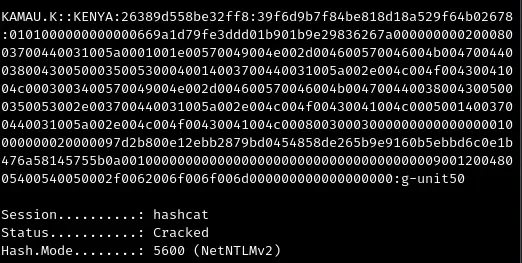
The recovered password is g-unit50, which gives access to the account. The author uses this to underline the importance of strong password policies, and notes that an attacker would typically keep capturing hashes to compromise as many accounts as possible.
Step 2: Privilege escalation
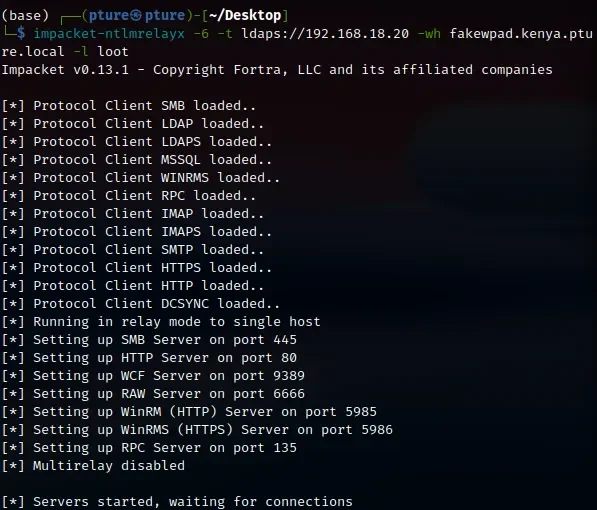
Domain information is enumerated by relaying to LDAP over a fake WPAD name and writing the results to a loot directory:
impacket-nlmrelayx -6 -t ldaps://<domain controller ip> -wh < fake wpad domain> -l <loot dir>
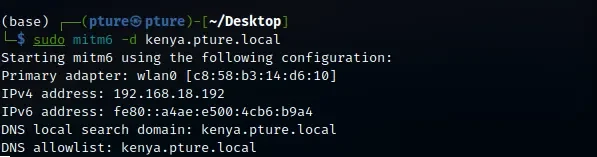
mitm6 is started against the domain:
sudo mitm6 -d <domain>
The attack waits for a user to log in or restart their computer so that mitm6 can configure itself as the IPv6 DNS server. The author restarted the victim machine to simulate this. From the victim's perspective the poisoned IPv6 DNS configuration looks like this:
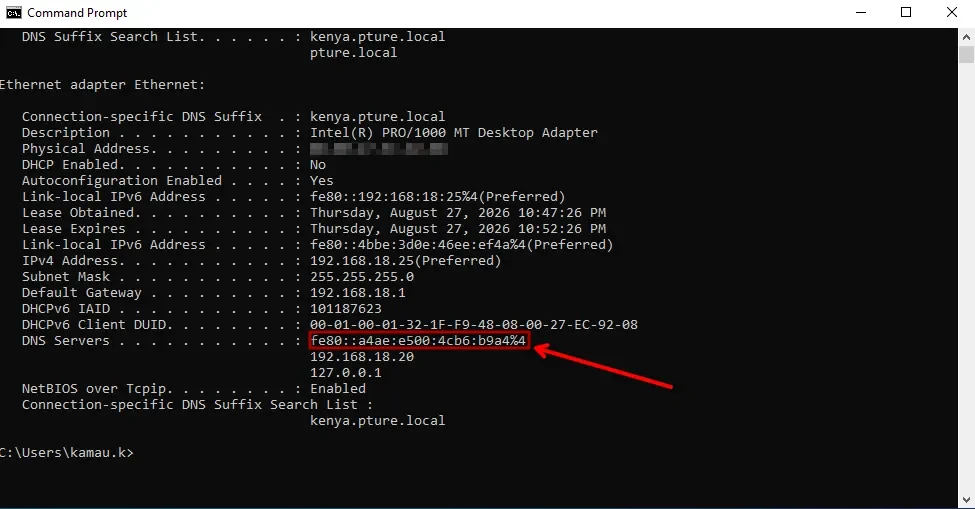
Once the victim's DNS configuration is poisoned, its WPAD requests go to the attacker's machine, which allows a relay attack against the LDAP server using the victim's credentials (NTLM hash). ntlmrelayx authenticates with the stolen credentials, enumerates domain information and dumps it into the specified loot directory.

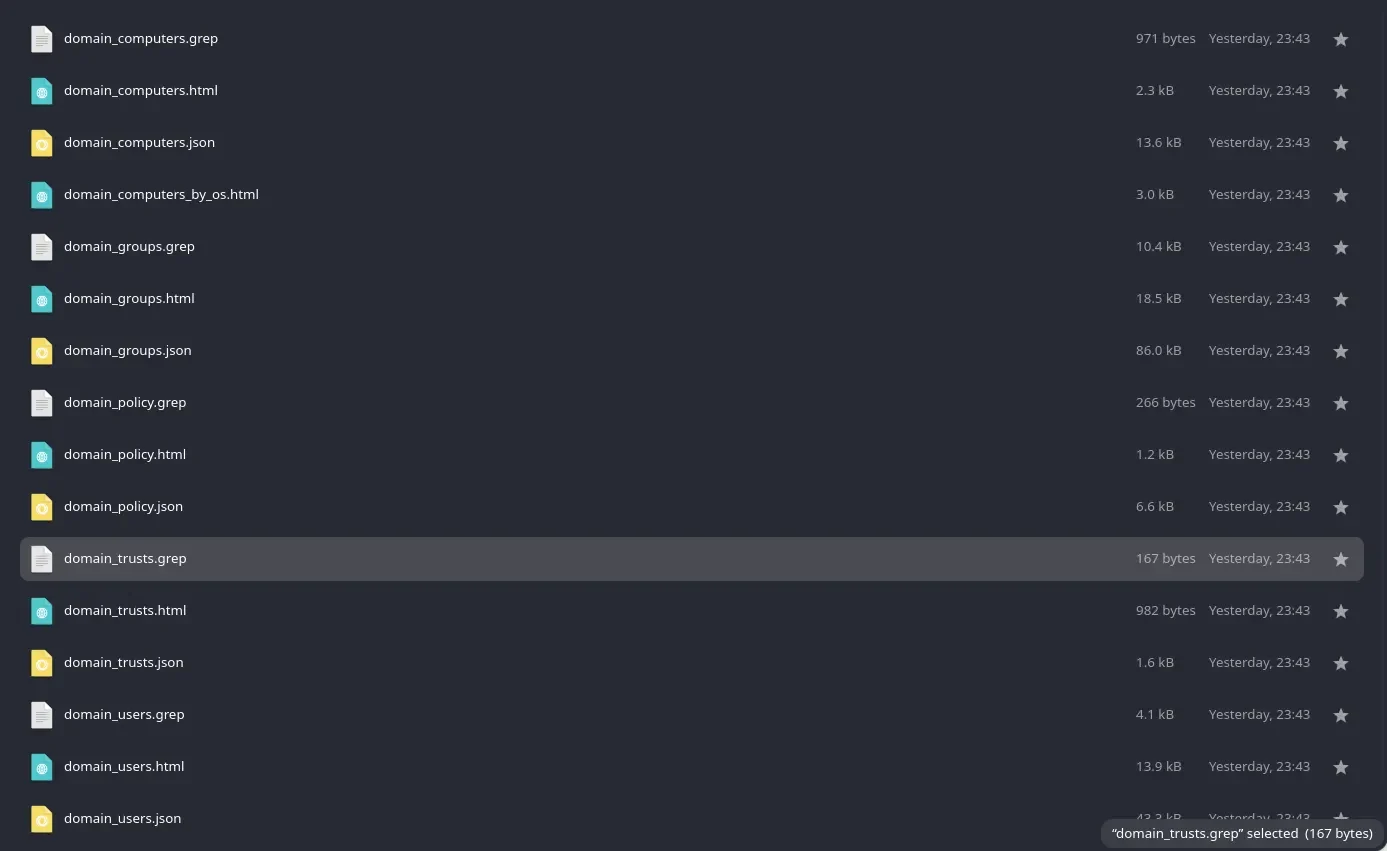
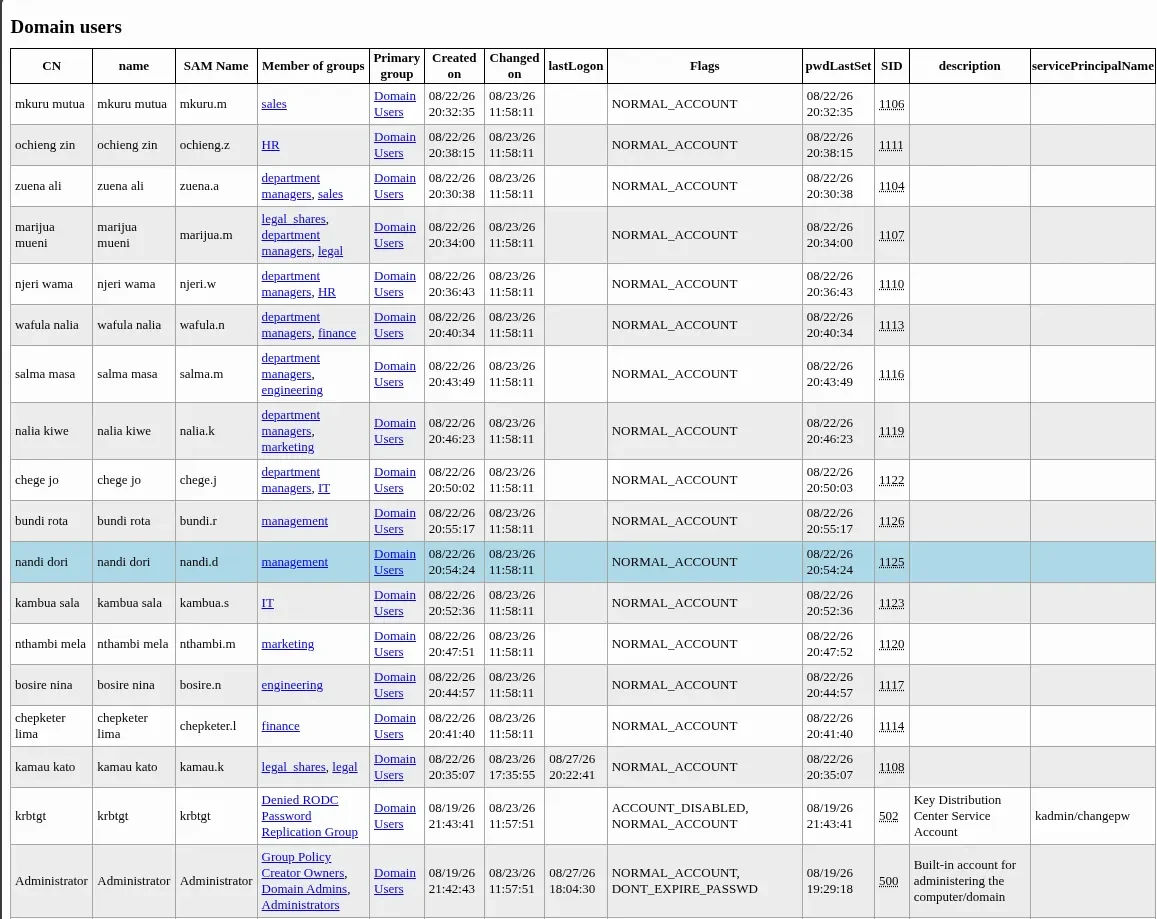
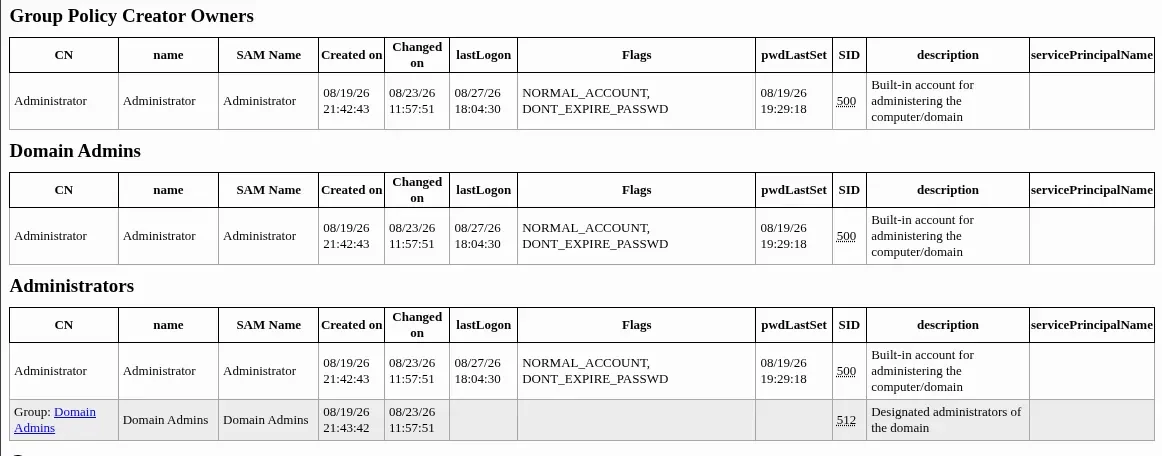
The author notes that this information can be used for password spray attacks and more.
To escalate the already compromised normal user kamau.k, the same tools are started again, this time with an escalation target:
impacket-ntlmrelayx -6 -t ldap://<domain controller ip> -wh <wpad domain> -l <loot dir> --escalate-user <username>

sudo mitm6 -d <domain>
When a domain admin logs into an account from a machine on the network, ntlmrelayx uses those credentials to elevate the privileges of the specified user.
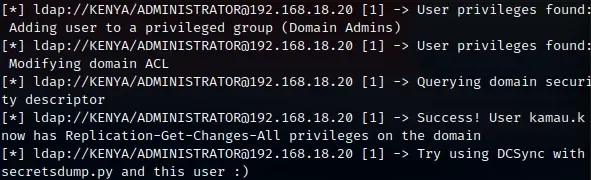
kamau.k is added to the Domain Admins group, giving access to an account with admin privileges.
Step 3: Lateral movement with DCSYNC
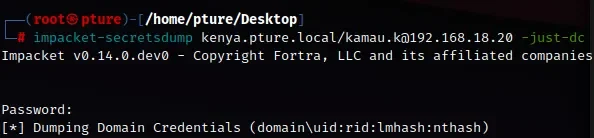
With a domain admin account, a DCSYNC attack can be attempted. The attacker pretends to be a domain controller asking to sync information with a real domain controller, which yields sensitive data including password hashes of any user, among them the Domain Administrator and krbtgt:
impacket-secretsdump <domain name>/<username>@<domain controller ip> -just-dc
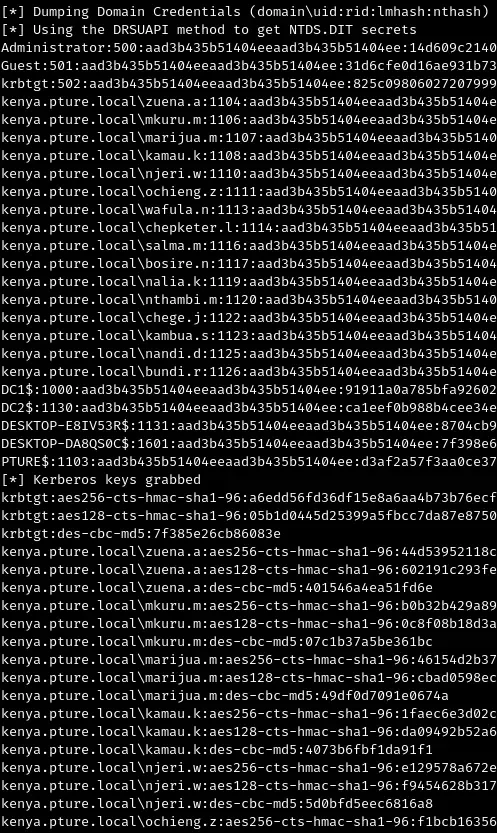
The author lists what the hashes enable:
- Pass The Hash (PTH) attacks
- offline cracking to recover plaintext passwords
- a Golden Ticket attack using the
krbtgthash
At this point, the author says, an attacker is already far too deep into the AD environment and has everything needed to go further.
Root cause
The compromise chains together several weaknesses in the environment rather than a single code flaw:
- Weak password policy: the captured hash cracked to
g-unit50, giving a working credential. - Legacy name resolution protocols: LLMNR, mDNS and NBT-NS are enabled, so responder can answer broadcast queries and harvest NTLM hashes.
- IPv6 and WPAD: mitm6 can become the IPv6 DNS server for a victim, and WPAD requests are then relayed to LDAP, allowing authentication relay without cracking anything.
- Admin logons: a domain admin logging into a machine on the network lets ntlmrelayx relay those credentials and add a normal user to Domain Admins.
- Domain admin access: once a domain admin is available, DCSYNC can pull hashes for every account, including
krbtgt.
The one control that did hold was DNS zone transfer, which was disallowed on all domain controllers.
Impact
Starting from the LAN, the chain ends in full domain compromise: a normal user is elevated to Domain Admins, and DCSYNC yields password hashes for any user, including the Domain Administrator and krbtgt. Those hashes support Pass The Hash, offline cracking and Golden Ticket attacks. The author frames the result as an attacker being far too deep into the environment, with everything needed to go further.
Fix
The author's lessons learnt:
- enforce strong password policies
- disable outdated protocols and services such as NBNS and LLMNR
- disable services that are not required, such as DNS zone transfers and IPv6
- do not use administrator accounts for anything other than managing Windows servers, and do not log into other machines with admin accounts
- enforce least privilege, limiting domain replication rights to a few highly secure accounts
Variants to test
- LLMNR/NBT-NS poisoning on other segments. Run responder in analyse mode first; a positive result is broadcast name queries appearing in the output, followed by captured NTLM hashes once poisoning is enabled.
- WPAD relay to LDAP. Start mitm6 and ntlmrelayx against LDAP or LDAPS with a fake WPAD name; a positive result is a victim adopting the attacker as its IPv6 DNS server and domain information landing in the loot directory.
- Privilege escalation via relay. Add
--escalate-userfor a known low-privilege account and wait for an admin logon; a positive result is that account appearing in Domain Admins. - DCSYNC with a domain admin account. Run secretsdump with
-just-dc; a positive result is hashes for all accounts, includingkrbtgt. - DNS zone transfer. Try
dig axfranddnsrecon -t axfragainst each domain controller; a positive result is a full zone listing, which in this lab was correctly refused.
What happened, in plain words
Imagine a company building with several floors, a reception desk, and a set of master keys that open every door. Someone who is not supposed to be in the building gets in, finds a key lying on a desk, copies it, then tricks a manager into handing over their master key, and finally walks into the room where copies of every key in the building are kept. That is roughly what this article walks through, but for a computer network instead of a building.
The network in question is an Active Directory environment. Active Directory (AD) is Microsoft's system for managing users, computers and permissions inside an organisation. Think of it as the company's directory of staff and the rules about which doors each person may open. When you log in at work with a username and password and you can reach shared folders and printers, AD is usually the thing behind that.
The author built a small practice AD network and then attacked it, step by step, to show how a real intruder might move through such a network. The whole exercise is a penetration test: an authorised attempt to break in, done so that the weaknesses can be found and fixed. The author is very clear that you must only do this on systems you own or have written permission to test.
The attack follows four stages:
- Reconnaissance: looking around and learning as much as possible about the network without touching anything harmful.
- Gaining access: getting hold of a real username and password (or something equivalent).
- Privilege escalation: turning an ordinary account into a powerful administrator account.
- Lateral movement: using that power to reach further, in this case to steal the secret material that protects every account in the domain.
The author also stresses that this is a simplified version. Real attackers have many more tricks, especially in big companies, and this article shows only a small sample.
The practice network
The author set up the following:
- 1 forest root domain:
[redacted] - 1 root domain controller (Windows Server 2022):
DC0 - 1 child domain:
kenya.[redacted] - 2 child domain controllers (Windows Server 2022):
DC1andDC2 - Organisational Units for various departments in the child domain (management, legal, marketing, engineering, HR and others), each with at least two users (a department head and normal employee(s)) and a department-specific security group
- 2 Windows 10 Pro machines on the same network for logging into user accounts
A few of those words need unpacking.
A domain is a named group of computers and accounts that share one set of rules and one login system. [redacted] is the main domain here. A child domain is a sub-group inside it, with its own name (kenya.[redacted]) but still connected to the parent. Think of a company with a head office and a regional branch: same company, separate local administration.
A domain controller is the server that holds the accounts and checks passwords. When you log in, your computer asks a domain controller whether the password is right. Because it is so central, a domain controller is a very valuable target. Having several of them (one for the root, two for the child) is normal, because it spreads the load and provides backups.
An Organisational Unit (OU) is like a folder inside AD used to group users and computers, usually by department. A security group is a list of accounts that are granted some permission together, so you do not have to grant it person by person.
The author placed all these machines on an isolated network, separate from other traffic. The reason is practical: it reduces "noise" (unrelated traffic) and makes it easier to watch what is happening.
Resources listed for building the lab:
- Windows Server
- Windows 10
- Oracle VirtualBox (if you want to set up some of these machines as VMs)
CAUTION!!!: Unless you like prison food, only attempt penetration tests on environments you have full written consent to test.
That warning is not decoration. Breaking into a computer you do not own is a crime in most countries, even if you mean no harm and even if the system is badly protected.
Step 1: Recon
Resources:
Reconnaissance (recon) is the information-gathering phase. Before trying to break anything, an attacker wants to know what is there: which machines exist, what they are called, what services they run, and who logs in where. It is the equivalent of walking around a building and noting the doors, cameras and signs before trying any handles.
The author notes that a real attack would typically start with bypassing Network Access Controls (NAC). NAC is a set of rules that decides which devices are allowed to connect to a network at all, a bit like a receptionist who checks your badge before letting you past the lobby. In this lab there is none, because the author built it themselves.
Once connected to the LAN (the Local Area Network, the network of devices in one place), the first step is to gather as much information about the victim as possible.
IP range
ifconfig
Line by line:
ifconfigis a command that lists the network settings of your own computer. You type it into a terminal (a text window where you type commands instead of clicking).- The output includes your own IP address and the subnet mask.
An IP address is the number that identifies a device on a network, like a postal address for a computer. The addresses in this article look like [redacted], which is a typical private address used inside a home or office network.
A subnet mask is a number that tells you which part of an IP address identifies the network and which part identifies the individual device. From it you can work out the IP range: the full set of addresses that belong to this network. Knowing the range tells you how many devices could be there and which addresses to look at. That is why this is the first command: it defines the playing field.
Network sniffing
Using tools like tcpdump or Wireshark we can capture and monitor network traffic to learn more about connected devices.
Sniffing means listening to the traffic that passes on the network. On a network where traffic is not encrypted, or where devices broadcast announcements, this can reveal a lot. Wireshark is a program that shows captured traffic in a readable list, packet by packet. A packet is one small chunk of data travelling on the network.
The author lists what the captured traffic reveals:
- a domain controller
DC0at[redacted] - another domain controller
DC2at[redacted], which is the authoritative DNS server for the subdomain in the query. Its full name,dc2.kenya.[redacted], shows it belongs to the child domainkenya.[redacted] - confirmation that at least one child domain,
kenya.[redacted], exists - a second domain controller
DC1in the child domain at[redacted] - a computer at
[redacted]that is part of thekenyachild domain - evidence that Kerberos is used for authentication
DNS is the system that turns names into IP addresses, like a phone book for the internet and internal networks. An authoritative DNS server is the one that holds the official records for a name, as opposed to one that just passes the question along. A subdomain is a name nested under another, so kenya.[redacted] sits under [redacted].
FQDN stands for Fully Qualified Domain Name: the complete name of a machine, including the domain. dc2.kenya.[redacted] is an FQDN. Seeing that name in traffic tells you both the machine's short name (dc2) and which domain it belongs to.
Kerberos is an authentication system, a way for computers to prove who they are to each other using tickets instead of sending passwords around. Seeing Kerberos traffic is a strong hint that you are looking at a Windows AD network.
Network scanning
From the subnet mask we can then use nmap to do a network-wide scan to discover more information about connected devices.
nmap <subnet> -sn -T4
Line by line:
nmapis a tool that probes machines to see which are alive and which services they offer.<subnet>is a placeholder for the address range you found earlier. The angle brackets mean "put your own value here".-sntells nmap to do a ping sweep: just check which addresses respond, without probing services in depth. A ping is a small "are you there?" message.-T4sets the speed and aggressiveness of the scan. Higher numbers are faster and noisier.
The LAN has 6 devices including our attack device ([redacted]) and the default gateway ([redacted]).
The default gateway is the device (usually the router) that connects this network to other networks. The attack device is the machine the author is running the tools from.
Let's dig deeper:
nmap <subnet> -A -T4
Line by line:
-Ameans aggressive: nmap tries to identify the operating system, the exact versions of services, and runs some extra checks. It gathers much more detail but is far more noticeable.-T4again controls speed.
I wouldn't recommend an aggressive scan in an environment where you need to evade detection.
That is an important practical point. A loud scan can trigger alarms and get you blocked. In a real test where staying unnoticed matters, you would use slower, quieter options.
From the nmap scan (for [redacted]) we see the services running and more info about the machine.
A service is a program on a machine that listens for connections, for example a web server or a file-sharing service. Knowing which services run on which machine tells an attacker where to look next.
DNS zone transfer
dig axfr <domain name> @<domain controller ip>
Line by line:
digis a command-line tool for asking DNS questions.axfris a type of DNS request that asks for a zone transfer: the complete list of all records in a DNS zone, meaning every machine name and address in the domain.<domain name>is the domain you want the list for.@<domain controller ip>tells dig which DNS server to ask.
A zone transfer is a legitimate feature used to copy DNS data between servers. If a server allows anyone to ask for one, it hands over a complete map of the network. That is why attackers try it early.
dnsrecon -d <domain name> -t axfr -n <domain controller ip>
Line by line:
dnsreconis a tool that automates DNS reconnaissance.-d <domain name>sets the domain to look at.-t axfrselects the zone transfer test.-n <domain controller ip>sets the DNS server to query.
Secure configuration on all domain controllers prevents DNS zone transfer. This is how that configuration looks in the settings:
DNS zone transfer is disallowed on all domain controllers, which is secure configuration.
It is worth noticing: the defenders got this one right, and the attacker simply moved on.
Findings summary
- A root domain with 1 root domain controller called
dc0([redacted]) - 1 child domain with two domain controllers called
dc1([redacted]) anddc2([redacted]) - 1 computer in the child domain (
[redacted])
At this point the attacker has not broken anything. They have a map: which machines are domain controllers, which domain they belong to, and roughly how the network is laid out. That map is what makes the next stage possible.
Step 2: Gaining access
After gathering info, the next step is to attempt to gain unauthorised access to internal systems such as servers, file shares, user accounts and databases. In this case, because it's a simple lab environment, we'll be attempting to gain access to user account(s).
A file share is a folder on a server that other computers can open over the network, like a shared drive at work. A database is an organised store of data that programs query.
LLMNR, mDNS and NBT-NS poisoning
Resources:
This step needs some background, because the names are unfriendly.
When a Windows computer wants to reach another machine by name and the normal DNS lookup fails, it falls back to asking the local network directly: it shouts "who is called X?" to every device nearby. Three protocols do this:
- LLMNR (Link-Local Multicast Name Resolution): asks nearby machines by name.
- mDNS (multicast DNS): a similar broadcast-style lookup, also used by printers and Apple devices.
- NBT-NS (NetBIOS Name Service): an older Windows naming protocol that does the same kind of broadcast.
The problem is that anyone on the network can answer. If an attacker's machine answers "that's me", the victim's computer will try to authenticate to the attacker. Windows, when authenticating, sends a value derived from the user's password called an NTLM hash. A hash is a one-way scrambled form of a password: you cannot read the password from it directly, but you can guess passwords and check whether the guess produces the same hash.
Poisoning here means answering those broadcast questions with a lie, so that the victim talks to the attacker instead of the real machine. Responder is a tool that does exactly this: it listens for these broadcasts and answers them.
Starting responder in analyse mode:
sudo responder -I <interface> -A
Line by line:
sudoruns the command with administrator rights, which responder needs to listen on the network.responderis the tool.-I <interface>picks the network card to listen on. An interface is one network connection of your computer, for example a Wi-Fi card or a wired card.-Ameans analyse mode: responder only watches and reports what it sees, without answering or poisoning anything. It is a safe way to check whether these broadcasts happen on the network at all.
Let's try some basic poisoning:
sudo responder -I <interface> -v
Line by line:
- Same as before, but without
-A, so responder now actively answers the broadcasts. -vmeans verbose: show more detail in the output.
Because this is a lab I have set up myself, I had to take initiative and do some user actions to trigger an NTLM hash capture. I went into file explorer and attempted to access a non-existent file share. The organic way this would happen is when, for example, a user makes a typo or tries to access shared resources that no longer exist.
This is a nice illustration of how these attacks work in practice: they depend on a victim doing something ordinary. A mistyped server name, an old shortcut, a printer that has been removed, all produce the same broadcast question, and the attacker is there to answer it.
Tip: If your responder is poisoning requests but no hash captures are happening, your firewall might be blocking incoming requests.
A firewall is a filter that decides which network connections are allowed in or out of a machine. If it blocks the connection the victim tries to make back to the attacker, the hash never arrives.
Here's what the poisoning looks like in Wireshark. Once a hash has been captured, responder will show something similar to the following:
This gives us the username and hash of the account. If you're lucky it will be a high-privilege account, but in this case we weren't so lucky.
A high-privilege account is one with lots of permissions, such as an administrator. Getting one of those straight away would shortcut much of the work. Here the captured account was ordinary.
The next step is to crack the hash using hashcat. You can also use john or whatever you prefer.
Cracking means guessing passwords repeatedly and checking each guess against the hash until one matches. It is only feasible if the password is weak or common. Hashcat is a popular tool for this; john (John the Ripper) is another.
We start by saving the captured hash to a text file:
Then we let hashcat loose on it:
hashcat -m<mode> <document containing hash> <wordlist>
Line by line:
hashcatis the cracking tool.-m<mode>tells hashcat which kind of hash it is looking at. Different hash formats need different handling, so the mode must match. The angle brackets mean you supply the number.<document containing hash>is the file where you saved the captured hash.<wordlist>is a file full of candidate passwords, which hashcat tries one by one. A wordlist is exactly that: a long list of common passwords and words.
password: g-unit50
And with that we have compromised an account and gained access.
This highlights the importance of strong password policies. An attacker would typically wait to compromise as many accounts as possible by capturing as many hashes as possible.
A password policy is the set of rules a company enforces about passwords: minimum length, complexity, how often they change, and whether common passwords are banned. The password here was weak enough to be recovered, which is exactly what a strong policy is meant to prevent.
Step 3: Privilege escalation
Resources:
Privilege escalation means going from a low-power account to a high-power one. The attacker already has one ordinary account. Now they want administrator rights.
This stage uses a different trick, based on IPv6, the newer version of the internet addressing system. Most networks run IPv4 (the older system) and IPv6 side by side, but many companies do not carefully manage IPv6. Windows machines will happily ask the network for an IPv6 configuration, and whoever answers first gets to tell the machine where to send its DNS queries.
mitm6 is a tool that answers those IPv6 configuration requests, so the victim starts using the attacker as its DNS server. mitm stands for man-in-the-middle: the attacker sits between the victim and the real services.
WPAD (Web Proxy Auto-Discovery) is a Windows feature where a machine asks the network "is there a proxy I should use?" A proxy is an intermediary that forwards web traffic. If the attacker controls DNS, the WPAD question goes to the attacker, and the victim authenticates to the attacker to get its answer.
LDAP is the protocol used to query and modify directory data, which is exactly what AD is. LDAPS is the same thing over an encrypted connection.
Relaying is the key idea: the attacker does not crack the victim's password at all. Instead, they take the authentication attempt the victim makes and pass it on to a real server, letting the victim's own credentials do the work. ntlmrelayx, part of the impacket toolkit, is the tool that performs this relay.
Domain info enumeration
impacket-nlmrelayx -6 -t ldaps://<domain controller ip> -wh < fake wpad domain> -l <loot dir>
Line by line:
impacket-nlmrelayxis the relay tool.-6makes it listen on IPv6, matching the mitm6 trick.-t ldaps://<domain controller ip>sets the target: the domain controller, over encrypted LDAP.-wh < fake wpad domain>sets a fake WPAD hostname that the tool will claim to be, so victims asking for WPAD come to it.-l <loot dir>sets a folder where the collected results (the "loot") are saved.
sudo mitm6 -d <domain>
Line by line:
sudoagain for administrator rights.mitm6is the IPv6 takeover tool.-d <domain>tells it which domain to attack, so it can answer requests aimed at that domain.
Now we wait for a user to log in or restart their computer so that mitm6 can configure itself as the IPv6 DNS server. I restarted the victim machine to simulate this.
Here's what the poisoned IPv6 DNS looks like from the victim's perspective:
After the victim's DNS configuration has been poisoned, it will send its WPAD requests to the attacker's machine, which will then allow us to perform a relay attack against the LDAP server using their credentials (NTLM hash). ntlmrelayx then enumerates domain information after authenticating with the stolen credentials and dumps the enumerated info in the loot directory specified.
Enumeration means listing things out: users, groups, computers, policies. Once the attacker can query the directory as a legitimate user, they can read a great deal of information about the organisation.
We can use this info to perform password spray attacks and more.
A password spray is the opposite of brute force: instead of trying many passwords against one account, you try one common password against many accounts. It avoids lockouts, which usually trigger after several failures on a single account.
Escalating a compromised user's privileges
Let's see what happens when instead of a normal user, a domain admin logs into a machine.
A domain admin is the most powerful kind of account in an AD domain. It can manage the domain controllers and change almost anything.
We start mitm6 and ntlmrelayx as before but this time we attempt to escalate the privileges of the normal user we already compromised (kamau.k):
impacket-ntlmrelayx -6 -t ldap://<domain controller ip> -wh <wpad domain> -l <loot dir> --escalate-user <username>
Line by line:
- Most of the options are the same as before.
-t ldap://this time uses plain LDAP rather than LDAPS. The relay needs to be able to modify the directory, and the tool is configured accordingly.--escalate-user <username>is the new part: it tells ntlmrelayx to use whatever powerful credentials it captures to give extra rights to the named user.
sudo mitm6 -d <domain>
Line by line:
- Same as before: start the IPv6 takeover against the domain.
Once an admin logs into their account from a machine on the network, ntlmrelayx will then use their credentials to elevate the privileges of the user we specified.
And just like that we have access to a user account with admin privileges. We now see that kamau.k has been added to the domain admins group.
This is the heart of the attack. The administrator simply logged in on a machine that had been tricked into trusting the attacker. The administrator logged in on a machine on the network, and the attacker relayed that login to the directory and used it to grant rights to an account they already controlled.
Step 4: Lateral movement
Lateral movement means moving from one machine or account to another, getting closer to the most valuable systems. Here it means using the new admin account to reach the domain controller itself.
DCSYNC attack
Since we now have access to a domain admin account, we can now try to perform a DCSYNC attack to obtain sensitive info including password hashes of any user (including the Domain Administrator and krbtgt) by pretending to be a domain controller asking to sync information with an actual domain controller on the network.
DCSYNC (directory service replication) abuses a legitimate feature. Domain controllers regularly copy (replicate) their data to each other so they all stay in step. One domain controller can ask another for the password hashes of accounts, because that is how replication works. If an attacker can pretend to be a domain controller, the real one will hand over the hashes.
krbtgt is a special built-in account used by Kerberos. Its hash is extremely sensitive: with it, an attacker can forge authentication tickets that are accepted as valid, which is the basis of the Golden Ticket attack.
impacket-secretsdump <domain name>/<username>@<domain controller ip> -just-dc
Line by line:
impacket-secretsdumpis the impacket tool that extracts secrets from a Windows system.<domain name>/<username>@<domain controller ip>says who to authenticate as and which machine to talk to. The format is domain, slash, username, at sign, target address.-just-dclimits the extraction to the domain controller's account data, which is what the DCSYNC technique targets.
We can use these hashes to:
- Perform Pass The Hash (PTH) attacks
- Find the plain text passwords by cracking them offline
- Perform Golden Ticket Attack using the
krbtgthash
Pass The Hash means logging in using the hash itself, without ever knowing the password. Some Windows authentication accepts the hash as proof, so stealing the hash is as good as stealing the password.
Offline cracking means taking the hashes to your own machine and guessing at leisure, without touching the victim's network again, so there is no risk of lockouts or alarms.
A Golden Ticket is a forged Kerberos ticket made with the krbtgt hash. Because the domain trusts tickets signed with that key, the attacker can create a ticket claiming to be any user, including an administrator, and it will be accepted.
At this point an attacker would already be way too far into an active directory environment and already has everything they need to go even further, but that's a story for another article.
Lessons learnt
- Strong password policies should be enforced
- Disable outdated protocols and services such as NBNS and LLMNR
- Disable services that are not required such as DNS Zone Transfers and IPv6
- Do not use administrator accounts for any other activities aside from managing windows server and do not log into other machines with admin accounts
- Enforce Least Privilege: limit domain replication rights to only a few highly secure accounts
Least privilege is the principle that every account should have only the permissions it actually needs, and no more. It limits how much damage any single stolen account can do.
Each lesson maps to a step in the attack. The weak password made the hash crackable. The broadcast name protocols let responder answer questions that should never have been asked. Unmanaged IPv6 let mitm6 take over DNS. An administrator logging into a machine on the network handed over admin credentials. Broad replication rights let DCSYNC pull every hash at once.
Glossary
- Active Directory (AD): Microsoft's system for managing users, computers and permissions in an organisation.
- Attack device: the machine the attacker runs their tools from.
- Authoritative DNS server: the DNS server that holds the official records for a name.
- Child domain: a domain nested inside a parent domain, with its own name and administration.
- Cracking: guessing passwords repeatedly and checking each guess against a captured hash.
- Database: an organised store of data that programs can query.
- DCSYNC: abusing domain controller replication to obtain password hashes.
- Default gateway: the device that connects a local network to other networks.
- DNS: the system that turns names into IP addresses.
- Domain: a named group of computers and accounts sharing one set of rules and one login system.
- Domain admin: the most powerful kind of account in an AD domain.
- Domain controller: the server that holds accounts and checks passwords.
- Enumeration: listing out users, groups, computers and other directory information.
- File share: a folder on a server that other computers can open over the network.
- Firewall: a filter that decides which network connections are allowed.
- FQDN: Fully Qualified Domain Name, the complete name of a machine including its domain.
- Golden Ticket: a forged Kerberos ticket made with the
krbtgthash, accepted as valid by the domain. - Hash: a one-way scrambled form of a password; you cannot read the password from it, but you can test guesses against it.
- High-privilege account: an account with extensive permissions, such as an administrator.
- Interface: one network connection of a computer, such as a Wi-Fi or wired card.
- IP address: the number identifying a device on a network.
- IP range: the full set of addresses belonging to a network.
- IPv6: the newer version of the internet addressing system.
- Kerberos: an authentication system that uses tickets instead of sending passwords around.
- krbtgt: a built-in Kerberos account whose hash can be used to forge tickets.
- LAN: Local Area Network, the network of devices in one place.
- LDAP / LDAPS: the protocol for querying and modifying directory data, plain and encrypted respectively.
- Least privilege: the principle that accounts should have only the permissions they need.
- LLMNR: a Windows protocol that asks nearby machines to resolve a name by broadcast.
- Lateral movement: moving from one machine or account to another to get closer to valuable systems.
- mDNS: a broadcast-style name lookup protocol, also used by printers and Apple devices.
- mitm6: a tool that answers IPv6 configuration requests so the attacker becomes the victim's DNS server.
- NAC: Network Access Control, rules deciding which devices may connect to a network.
- NBT-NS: an older Windows naming protocol that broadcasts name queries.
- NTLM hash: the value Windows derives from a password during authentication.
- Offline cracking: guessing passwords against stolen hashes on your own machine, away from the victim network.
- Organisational Unit (OU): a folder-like grouping of users and computers in AD, usually by department.
- Packet: one small chunk of data travelling on a network.
- Pass The Hash: logging in using a stolen hash without knowing the password.
- Password policy: a company's rules about password length, complexity and reuse.
- Password spray: trying one common password against many accounts to avoid lockouts.
- Penetration test: an authorised attempt to break into a system so weaknesses can be found and fixed.
- Ping sweep: checking which addresses on a network respond, without probing services in depth.
- Poisoning: answering network broadcast questions with a lie so the victim talks to the attacker.
- Privilege escalation: going from a low-power account to a high-power one.
- Proxy: an intermediary that forwards web traffic.
- Reconnaissance: the information-gathering phase before an attack.
- Relaying: passing a victim's authentication attempt on to a real server so their own credentials do the work.
- Responder: a tool that answers LLMNR, mDNS and NBT-NS broadcasts to capture authentication.
- Security group: a list of accounts granted a permission together.
- Service: a program on a machine that listens for connections.
- Sniffing: listening to traffic passing on the network.
- Subdomain: a name nested under another name.
- Subnet mask: a number that separates the network part of an IP address from the device part.
- Wordlist: a file of candidate passwords tried one by one during cracking.
- WPAD: a Windows feature where a machine asks the network for a proxy configuration.
- Zone transfer: a DNS request that returns the complete list of records in a zone.



