(ZOHO) Manage Engine Desktop Central – SQL Injection / Arbitrary File Write
A user with control over the reporting module could inject SQL queries that ran as a database superuser, allowing arbitrary file write via PostgreSQL's lo_import and lo_export functions. This enabled writing a malicious executable to a location that would be run as SYSTEM when the service restarted, leading to code execution.
 Published on labs.jumpsec.com
by tellson | Aug 2, 2022 | Uncategorized
The full write-up lives on its author's site
It belongs to its author, so we link to it rather than copy it. The other two tabs are our own rewrites, checked against it.
Context
Zoho ManageEngine Desktop Central (MEDC) is an endpoint management product, and this write-up covers its reporting module. The report shows that the query field of a report was passed to the server and executed against the underlying Postgres database. The affected versions are those before 10.0.662, and the issue is tracked as CVE-2021-46164, published 09/01/2022 with a CVSS 3.1 score of 8.8 (High). The attack vector is SQL injection leading to arbitrary file write. The research was carried out by Tom Ellson of JUMPSEC, and this is the first post in a two part series; all reported issues were acknowledged and resolved by ManageEngine.
The precondition is an authenticated user who has full control over the reporting module. From that position the researcher could reach the database directly, and the rest of the chain follows from what that database user is allowed to do.
Setup
The only access requirement stated is a logged-in account with full control over the reporting module. No other tooling, credentials or network position is described for the initial step. The database behind the reports is Postgres, and by default the queries are made by a user called dcuser. That account is a database administrator with unrestricted access to all tables and databases in the Postgres instance, which is the property the whole chain depends on.
Finding it
The starting observation was that the query field of a report was passed straight to the database. The researcher confirmed this by running SELECT 1 in the query field and seeing it evaluated. The field was directly querying the database, which turned a reporting feature into a SQL console.
Exploitation
Step 1: confirm the injection and identify the database user
With SELECT 1 accepted, the next step was to enumerate the Postgres service and find out which user the queries run as. The report shows the request used for this.
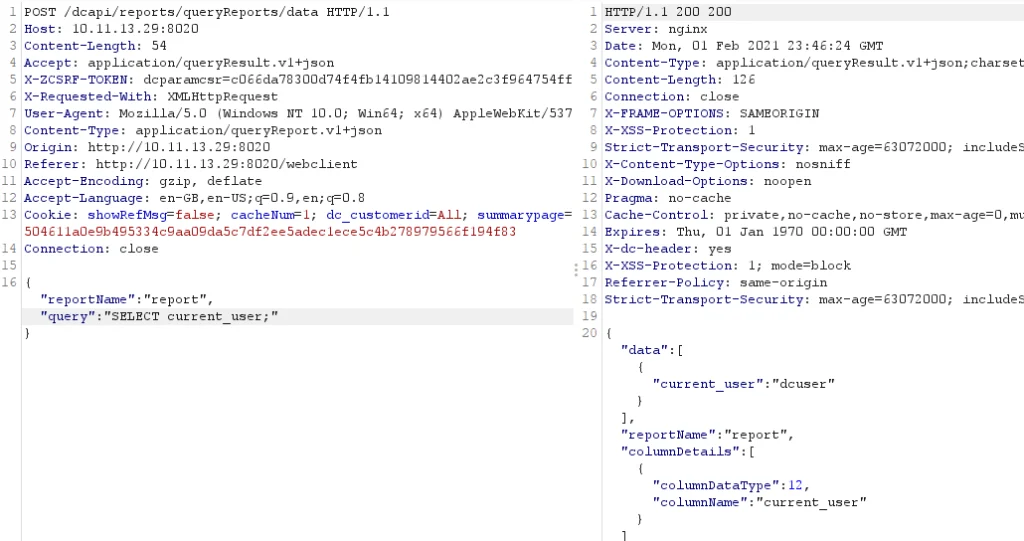
The request enumerates the current user. The result identified the account executing the queries as dcuser, who is a superadmin. The report describes dcuser as a superadmin with unrestricted access to all tables and databases.
Step 2: enumerate the Postgres users
The researcher then enumerated the Postgres users.
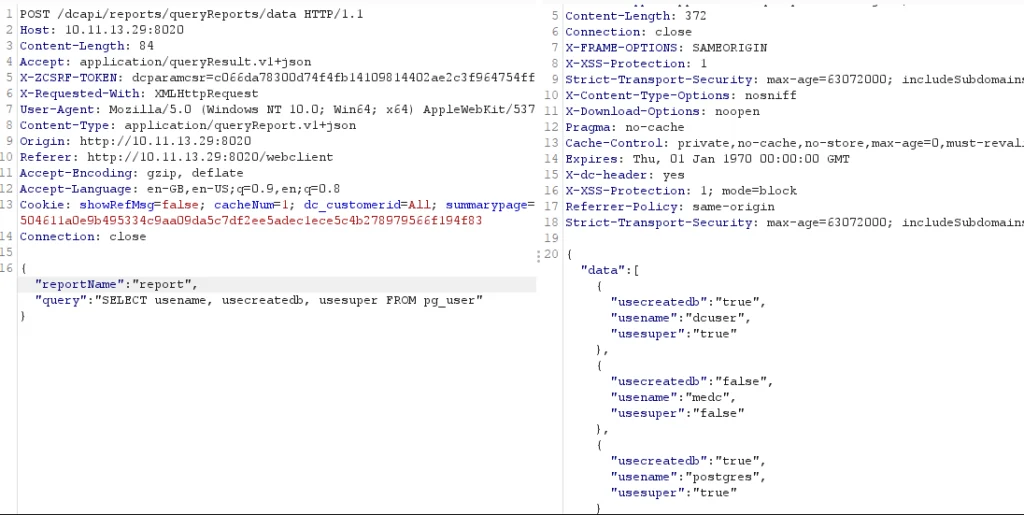
Step 3: attempt to read password hashes
One avenue was to pull the password hashes out of the pg_shadow table.
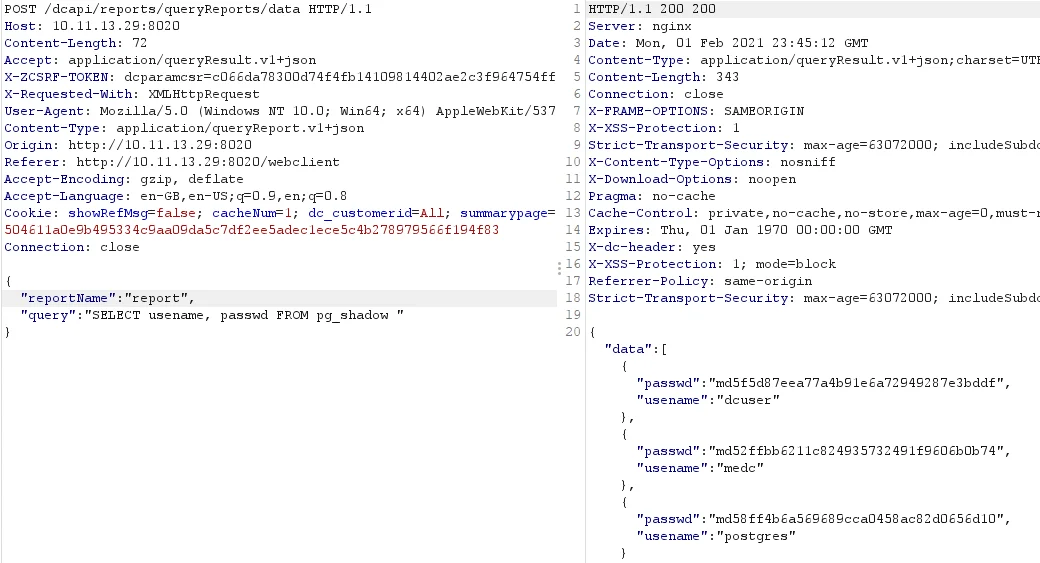
The report notes that this path would still require cracking the hashes or additional steps on the attack path, and that the Postgres service is likely limited to localhost. So hash extraction was not pursued as the route to code execution.
Step 4: work around the SELECT-only restriction
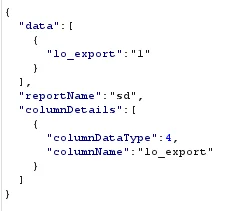
Creating a function to execute code was attempted and did not work: server-side validation ensures that only SELECT commands can be used within the query. That constraint pushed the researcher towards functionality built into Postgres itself, specifically lo_import and lo_export, the large object functions. These were a good candidate for reading and writing files.
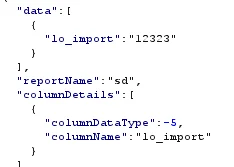
To test it, a file called secretfile.txt was dropped onto the administrator desktop and lo_import was used to pull it into a large object.
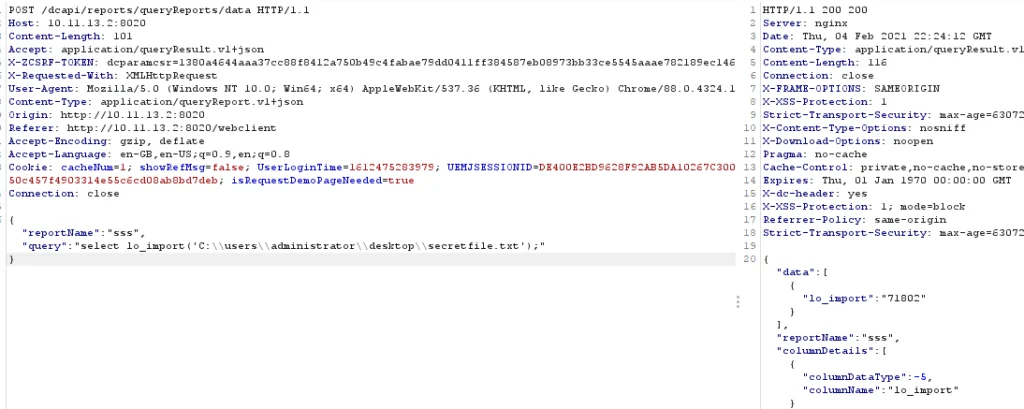
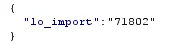
The response from the query was the OID number of the large object that had been imported. That OID is important because it is what identifies the object in the subsequent lo_export call.
Step 5: try to write to the web root
The obvious next step was to write the imported file to the web root. Writing a JSP shell there did not work. JUMPSEC determined this was due to restrictions in the Java configuration, and no further digging was done on that path.

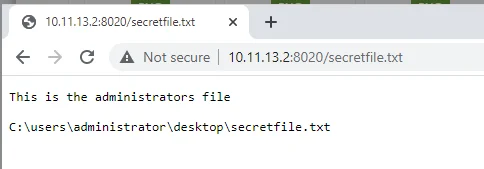
At this point arbitrary read and write was confirmed, but the attacker still needs to know the file name before it can be used with lo_import and moved with lo_export.
Step 6: find a file that is loaded at service start and stop
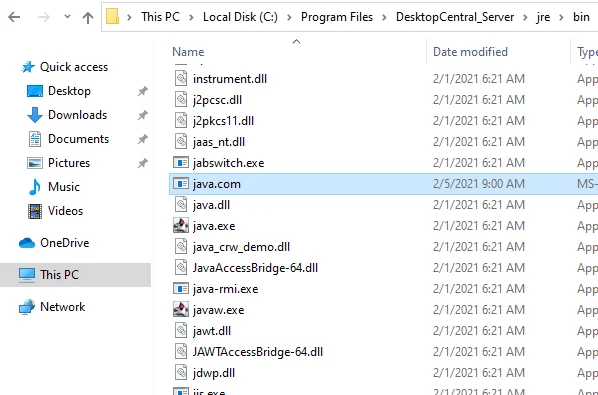
The researcher analysed what is loaded at service start and stop time to see if this could be abused to execute code leveraging the arbitrary file write. Surprisingly, the service attempted to load the java.com binary at both service start and stop time.

By placing a binary at that location and getting the service to stop and start, code execution was achieved. The remaining problem was getting a malicious file into large objects with lo_import.
Step 7: import from an attacker-controlled SMB share
UNC paths could be used to load a malicious file into large objects. If an attacker can host an SMB server on the same network as the MEDC server, lo_import can pull an executable from that SMB server and lo_export can write it to a location of the attacker's choosing.


Step 8: write the payload and trigger execution
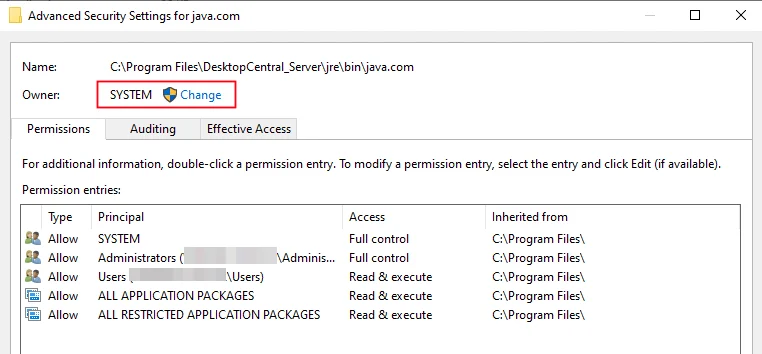
By this point the researcher had arbitrary file write as NT AUTHORITY SYSTEM and had identified a binary that is loaded at boot time and whenever the service stops or starts. The java.com binary is missing from the default standard build of MEDC, so writing an executable with that name into the JRE bin directory means it will be executed at service start time, as NT AUTHORITY SYSTEM, giving code execution at the highest integrity.
The attack path as summarised in the report:
- SQL injection executing
lo_importto import a malicious executable into the large objects on the Postgres DB, thenlo_exportto export it anywhere on the underlying operating system. - Writing the attacker-controlled executable to the
C:\program files\desktopcentral_server\jre\bin\directory asjava.com. - Waiting for the service to restart.
Step 9: forcing the restart through a denial of service
No way was found to directly trigger the service start and stop from the MEDC portal. Instead, it was trivial to cause a denial of service on the platform by writing the file bcrypt.dll to the Postgres bin directory. That completely kills the web portal and instructs an administrator to reboot the service. The service will not start again until that file has been removed, which can be incredibly tough for an administrator to unpick. Once the administrator restarts the service, the java.com binary is executed as SYSTEM.


JUMPSEC stopped the attack path here and reported the issue to ManageEngine (Zoho).
Root cause
The query field was directly querying the database. Validation restricts the statement to SELECT commands, but that is not enough: SELECT can still call server-side functions such as lo_import and lo_export. The deeper problem is privilege: the queries run as dcuser, a database administrator and superadmin with unrestricted access to all tables and databases, so the reporting feature effectively hands a database superuser session to anyone who controls the reporting module. Because the Postgres service runs as NT AUTHORITY SYSTEM, files written through lo_export are owned by SYSTEM with the highest integrity, and the missing java.com binary in the JRE bin directory is loaded at service start and stop.
Impact
An authenticated user with full control over the reporting module can query the underlying Postgres database directly. Under the conditions described, that leads to arbitrary file write as NT AUTHORITY SYSTEM, and then to code execution as SYSTEM once the service is restarted. The researcher also demonstrated a denial of service by writing bcrypt.dll into the Postgres bin directory, which kills the web portal and prevents the service from starting until the file is removed. The SMB variant requires the attacker to be able to host an SMB server on the same network as the MEDC server. The report does not describe any exploitation from an unauthenticated position.
Fix
ManageEngine addressed the issue quickly. The patch does not cover all aspects of the attack chain; it addresses the root cause by removing dcuser from the Postgres superadmins group, so server-side queries cannot be used to load large objects. The report notes that the service is still running as SYSTEM, the java.com binary is still missing on service start and stop, and bcrypt.dll still kills the entire service.
Variants to test
- Other report or query fields in management products. Submit
SELECT 1in any field that is described as a query, filter or report definition. A positive result is the value being evaluated by the database rather than rejected or escaped. - Privilege of the database account behind a feature. Enumerate the current user and the role membership, for example with
SELECT current_userand a query against the role tables. A positive result is a reporting or application account that is a superuser or member of a superuser group. - Large object functions under a SELECT-only filter. Where only
SELECTis allowed, trylo_importandlo_export. A positive result is an OID returned from an import, and a file appearing at a chosen path after an export. - UNC paths in import functions. Point
lo_importat a UNC path to an attacker-controlled SMB share. A positive result is the share being contacted and the file content landing in a large object. - Missing binaries loaded at service start and stop. Monitor what a service tries to load when it starts and stops, looking for a path inside a writable directory where the binary is absent. A positive result is a writable location that the service will execute from on restart.
- DLL or binary names in service directories. Try writing a DLL such as
bcrypt.dllinto a servicebindirectory. A positive result is the service failing to start until the file is removed, which confirms write access to a location the service loads from.
What happened, in plain words
Zoho ManageEngine Desktop Central (MEDC) is a piece of software that companies install on their own servers to manage all the computers and devices their staff use. Think of it as a control panel for a whole company's laptops and desktops: it keeps an inventory, pushes updates, and produces reports about what is installed where.
One of its features is the reporting module. A person with the right permissions can build a report by typing a question, called a query, into a field. The server takes that text and runs it against the database that sits behind Desktop Central. The database is Postgres, a popular free database program.
The query field was passed straight to the database and executed. That is the classic shape of a SQL injection: a place where a user is supposed to supply a value, but the program lets that value become part of the instruction the database executes. A useful comparison is a form at a bank where you write the amount you want to transfer. If the clerk reads your note out loud to the back office as an instruction rather than as a number, you can write "transfer 10 pounds, and also open the safe" and the back office will try to do both.
The queries ran as dcuser, a database administrator with unrestricted access to all tables and databases in the Postgres instance. From there the researcher used two built-in Postgres functions, lo_import and lo_export, to read files from the server and write files to it. That is arbitrary file write: the ability to create or overwrite any file the database process can reach.
The Postgres service on Windows ran as NT AUTHORITY SYSTEM, the most powerful local account on a Windows machine. Files it wrote were therefore owned by SYSTEM. The researcher found that the UEMS.exe service attempts to run the java.com executable from the JRE bin directory when it starts and stops, and that java.com is not present by default. Writing an executable with that name into that folder meant the service would run it as SYSTEM the next time it restarted. That is code execution: the attacker's own program running with the highest privileges on the machine.
To force the restart, the researcher wrote a file called bcrypt.dll into the Postgres bin directory. That broke the web portal completely, so an administrator would have to reboot the service, and the reboot would run the planted java.com. The researcher stopped there and reported the issue to Zoho. The fix removed dcuser from the Postgres superadmins group, so server-side queries cannot be used to load large objects.
The details of the report
The affected versions are those before 10.0.662. The issue is tracked as CVE-2021-46164, published 09/01/2022, with a CVSS 3.1 score of 8.8 (High). CVSS is a standard way of scoring how serious a vulnerability is, on a scale from 0 to 10. The attack vector is SQL injection leading to arbitrary file write. The research was carried out by Tom Ellson of JUMPSEC, and this is the first post in a two part series; all reported issues were acknowledged and resolved by ManageEngine.
The precondition is an authenticated user who has full control over the reporting module. "Authenticated" simply means logged in with a valid account. From that position the researcher could reach the database directly, and the rest of the chain follows from what that database user is allowed to do.
Setup
The only access requirement stated is a logged-in account with full control over the reporting module. No other tooling, credentials or network position is described for the initial step. The database behind the reports is Postgres, and by default the queries are made by a user called dcuser. That account is a database administrator with unrestricted access to all tables and databases in the Postgres instance, which is the property the whole chain depends on.
A database is organised into tables, which are like spreadsheets with rows and columns. A database user is an account inside the database, separate from the Windows account you log in with. Some database users can only read one table; others, called administrators or superusers, can do anything. dcuser was the second kind.
Finding it
The starting observation was that the query field of a report was passed straight to the database. The researcher confirmed this by running SELECT 1 in the query field and seeing it evaluated. SELECT is the database instruction for "give me this data", and SELECT 1 is the simplest possible query: it just asks the database for the number one. If the field had been treated as plain text, the server would have stored or displayed the string SELECT 1. Because the database actually answered, the field was being executed.
That is the classic sign of a query field that is concatenated into a statement rather than treated as data, and it turned a reporting feature into a SQL console. A SQL console is an interface where you type database commands and see the results, normally something only a database administrator would use.
Exploitation
Step 1: confirm the injection and identify the database user
With SELECT 1 accepted, the next step was to enumerate the Postgres service and find out which user the queries run as. "Enumerate" means to list out details systematically, the way you might list every account on a shared computer to see who has admin rights. The report shows the request used for this.
The request enumerates the current user. The request enumerates the current user. The result identified the account executing the queries as dcuser, who is a superadmin. That matters because a superadmin can reach server-side functions and every table in the instance. "Server-side functions" are pieces of code that run inside the database server itself, not in your browser, and some of them touch the filesystem.
Step 2: enumerate the Postgres users
The researcher then listed the Postgres users to understand the surrounding accounts. Knowing who else exists in the database helps you understand what the application is doing and whether there are other accounts worth reaching.
Step 3: attempt to read password hashes
One avenue was to pull the password hashes out of the pg_shadow table. A password hash is what a system stores instead of the real password: a scrambled value produced by a one-way function. If you steal the hash, you cannot read the password directly, but you can try guessing passwords, hashing each guess and comparing. That process is called cracking.
The report notes that this path would still require cracking the hashes or additional steps on the attack path, and that the Postgres service is likely limited to localhost. "Localhost" means the same machine; a database limited to localhost only accepts connections from programs running on that server, not from other computers on the network. So hash extraction was not pursued as the route to code execution.
Step 4: work around the SELECT-only restriction
Creating a function to execute code was attempted and did not work: server-side validation ensures that only SELECT commands can be used within the query. Validation here means the application inspects what you typed and rejects anything that is not a SELECT. That sounds safe, but it is not, because SELECT can call other functions as part of producing its answer.
That constraint pushed the researcher towards functionality built into Postgres itself, specifically lo_import and lo_export, the large object functions. A large object is Postgres's way of storing a big blob of data, such as a file, inside the database. lo_import reads a file from the server's filesystem into a large object; lo_export writes a large object back out to a file. These were a good candidate for reading and writing files.
To test it, a file called secretfile.txt was dropped onto the administrator desktop and lo_import was used to pull it into a large object.
The response from the query was the OID number of the large object that had been imported. OID stands for object identifier: a number the database assigns to each large object so it can be referred to later. That OID is important because it is what identifies the object in the subsequent lo_export call. Without it, lo_export would not know which blob to write out.
Step 5: try to write to the web root
The obvious next step was to write the imported file to the web root. The web root is the folder from which the web server serves pages; if you can put a file there, you can often browse to it in a browser and have the server run it. Writing a JSP shell there did not work. JSP stands for JavaServer Pages, a way of writing web pages that run Java code on the server; a JSP shell is a small JSP file that, once reachable, lets an attacker run commands on the server through the browser. JUMPSEC determined this was due to restrictions in the Java configuration, and no further digging was done on that path.
At this point arbitrary read and write was confirmed, but the attacker still needs to know the file name before it can be used with lo_import and moved with lo_export. In other words, lo_import needs a path to an existing file, and lo_export needs a destination path. You cannot ask the database to invent a file for you; you have to know what is already on disk.
Step 6: find a file that is loaded at service start and stop
The researcher analysed what is loaded when the service starts and stops, to see whether the arbitrary file write could be turned into code execution. A Windows service is a program that runs in the background without a logged-in user, and many services load extra files, such as DLLs (shared libraries) or helper executables, when they start. If one of those files is missing and the folder is writable, an attacker can supply their own.
Surprisingly, the service attempted to load the java.com binary at both service start and stop time. A binary is a compiled program file, the kind you double-click to run. The .com extension on Windows is an old format for executable programs.
By placing a binary at that location and getting the service to stop and start, code execution was achieved. The remaining problem was getting a malicious file into large objects with lo_import. The researcher could write files, but the file to write had to come from somewhere the database could read.
Step 7: import from an attacker-controlled SMB share
UNC paths could be used to load a malicious file into large objects. UNC stands for Universal Naming Convention, and it is the Windows way of writing the address of a shared folder on the network, in the form \\server\share\file. SMB is the protocol Windows uses to talk to those shared folders. If an attacker can host an SMB server on the same network as the MEDC server, lo_import can pull an executable from that SMB server and lo_export can write it to a location of the attacker's choosing. The attacker's own machine becomes the source of the payload, and the database server fetches it over the network.
Step 8: write the payload and trigger execution
By this point the researcher had arbitrary file write as NT AUTHORITY SYSTEM and had identified a binary that is loaded at boot time and whenever the service stops or starts. The java.com binary is missing from the default standard build of MEDC, so writing an executable with that name into the JRE bin directory means it will be executed at service start time, as NT AUTHORITY SYSTEM, giving code execution at the highest integrity. JRE stands for Java Runtime Environment, the set of files Java programs need in order to run; its bin folder holds the Java executables.
The attack path as summarised in the report:
- SQL injection executing
lo_importto import a malicious executable into the large objects on the Postgres DB, thenlo_exportto export it anywhere on the underlying operating system. - Writing the attacker-controlled executable to the
C:\program files\desktopcentral_server\jre\bin\directory asjava.com. - Waiting for the service to restart.
Step 9: forcing the restart through a denial of service
No way was found to directly trigger the service start and stop from the MEDC portal. Instead, it was trivial to cause a denial of service on the platform by writing the file bcrypt.dll to the Postgres bin directory. A denial of service, or DoS, means making a service unavailable to its legitimate users. bcrypt.dll is a shared library that Windows programs load for cryptography; writing a copy into the Postgres bin directory killed the web portal.
That completely kills the web portal and instructs an administrator to reboot the service. The service will not start again until that file has been removed, which can be incredibly tough for an administrator to unpick. Once the administrator restarts the service, the java.com binary is executed as SYSTEM.
JUMPSEC stopped the attack path here and reported the issue to ManageEngine (Zoho).
Root cause
The reporting module takes the query field and runs it against Postgres without preventing it from containing arbitrary SQL. Validation restricts the statement to SELECT commands, but that is not enough: SELECT can still call server-side functions such as lo_import and lo_export. The deeper problem is privilege: the queries run as dcuser, a database administrator and superadmin with unrestricted access to all tables and databases, so the reporting feature effectively hands a database superuser session to anyone who controls the reporting module. Because the Postgres service runs as NT AUTHORITY SYSTEM, files written through lo_export are owned by SYSTEM with the highest integrity, and the missing java.com binary in the JRE bin directory gives a reliable execution point at service start and stop.
Impact
An authenticated user with full control over the reporting module can query the underlying Postgres database directly. Under the conditions described, that leads to arbitrary file write as NT AUTHORITY SYSTEM, and then to code execution as SYSTEM once the service is restarted. The researcher also demonstrated a denial of service by writing bcrypt.dll into the Postgres bin directory, which kills the web portal and prevents the service from starting until the file is removed. The SMB variant requires the attacker to be able to host an SMB server on the same network as the MEDC server. The report does not describe any exploitation from an unauthenticated position.
Fix
ManageEngine addressed the issue quickly. The patch does not cover all aspects of the attack chain; it addresses the root cause by removing dcuser from the Postgres superadmins group, so server-side queries cannot be used to load large objects. The report notes that the service is still running as SYSTEM, the java.com binary is still missing on service start and stop, and bcrypt.dll still kills the entire service.
Variants to test
- Other report or query fields in management products. Submit
SELECT 1in any field that is described as a query, filter or report definition. A positive result is the value being evaluated by the database rather than rejected or escaped. - Privilege of the database account behind a feature. Enumerate the current user and the role membership, for example with
SELECT current_userand a query against the role tables. A positive result is a reporting or application account that is a superuser or member of a superuser group. - Large object functions under a SELECT-only filter. Where only
SELECTis allowed, trylo_importandlo_export. A positive result is an OID returned from an import, and a file appearing at a chosen path after an export. - UNC paths in import functions. Point
lo_importat a UNC path to an attacker-controlled SMB share. A positive result is the share being contacted and the file content landing in a large object. - Missing binaries loaded at service start and stop. Monitor what a service tries to load when it starts and stops, looking for a path inside a writable directory where the binary is absent. A positive result is a writable location that the service will execute from on restart.
- DLL or binary names in service directories. Try writing a DLL such as
bcrypt.dllinto a servicebindirectory. A positive result is the service failing to start until the file is removed, which confirms write access to a location the service loads from.
Glossary
- API: a defined way for one program to ask another program to do something, like a menu of requests a service accepts.
- Arbitrary file write: the ability to create or overwrite any file the vulnerable program can reach on the server.
- Authenticated: logged in with a valid account.
- Binary: a compiled program file that the computer can run directly.
- Code execution: getting your own program to run on someone else's machine.
- Cracking: guessing passwords by hashing each guess and comparing it with a stolen hash.
- CVSS: a standard 0 to 10 score for how serious a vulnerability is.
- Database: an organised store of data, usually made of tables of rows and columns.
- Database user: an account inside the database, separate from the Windows login, with its own permissions.
- Denial of service (DoS): making a service unavailable to its legitimate users.
- DLL: a shared library on Windows that programs load at runtime.
- Enumerate: to list out details systematically.
- Hash: a scrambled value produced from a password by a one-way function, stored instead of the password itself.
- JRE: the Java Runtime Environment, the files Java programs need in order to run.
- JSP: JavaServer Pages, a way of writing web pages that run Java code on the server.
- Large object: Postgres's way of storing a big blob of data, such as a file, inside the database.
- Localhost: the same machine; a service limited to localhost only accepts connections from programs on that server.
- lo_export: a Postgres function that writes a large object out to a file on the server.
- lo_import: a Postgres function that reads a file from the server into a large object.
- NT AUTHORITY SYSTEM: the most powerful local account on a Windows machine.
- OID: object identifier, a number the database assigns to a large object so it can be referred to later.
- Postgres: a popular free relational database program.
- Privilege: what an account is allowed to do.
- Query: a question or instruction sent to a database.
- SELECT: the database instruction for "give me this data".
- SMB: the protocol Windows uses to talk to shared folders on the network.
- Superadmin / superuser: a database account with unrestricted access to everything in the instance.
- UNC path: the Windows way of writing the address of a shared folder on the network, in the form
\\server\share\file. - Validation: the application inspecting what you typed and rejecting anything that does not match an expected pattern.
- Web root: the folder from which the web server serves pages.