Part-1 Dive into Zoom Applications
The report describes multiple vulnerabilities in Zoom applications, including CSRF misconfigurations, session fixation via cookie manipulation, and privilege escalation. An attacker could exploit these to perform unauthorised actions, take over accounts, or escalate privileges.
 Published on rakesh-thodupunoori.medium.com
A quick Introduction about Myself, I am Rakesh Thodupunoori working as a security consultant in a Reputed Company and a part-time bug bounty hunter.
The full write-up lives on its author's site
It belongs to its author, so we link to it rather than copy it. The other two tabs are our own rewrites, checked against it.
Context
This is a series of findings against Zoom applications, paid out at about 22,000 USD in total. The researcher, Rakesh Thodupunoori, started from a 2018 invitation to the Zoom programme with no prior knowledge of the product, and worked through the web application's account, developer and admin surfaces. The write-up covers six distinct issues: a CSRF header that the server never validated, a second CSRF gap on the developer API-key endpoints, a CSRF on user management that was only exploitable once a user_id value could be leaked, free use of paid features by replaying requests with trial cookies, a cookie-handling flaw that allowed one-click account takeover of a triager, and a role-change privilege escalation from a low-privileged member to owner.
The features involved are ordinary account features: profile editing, developer API key creation and disabling, user add/modify/disable by an account owner, subscription-gated functionality, login, and role management with admin, member and custom roles.
Setup
- A Zoom account, later a basic paid subscription, and trial accounts for comparison.
- Burp Suite as the intercepting proxy, with Repeater used for replaying captured requests.
- For the privilege escalation work, an owner account plus one admin and one member, and later two additional member accounts created from the owner.
- For the takeover, a crafted link sent to the triager, who was asked to click it while logged in.
No versions or specific endpoints beyond those quoted below are given.
Finding it
CSRF header present but not validated
The application sent a CSRF header with state-changing requests. The researcher removed the header and replayed the request, and the server still returned a successful response. The header was implemented on the client side but not checked on the server side. The same pattern appeared in several other functionalities.
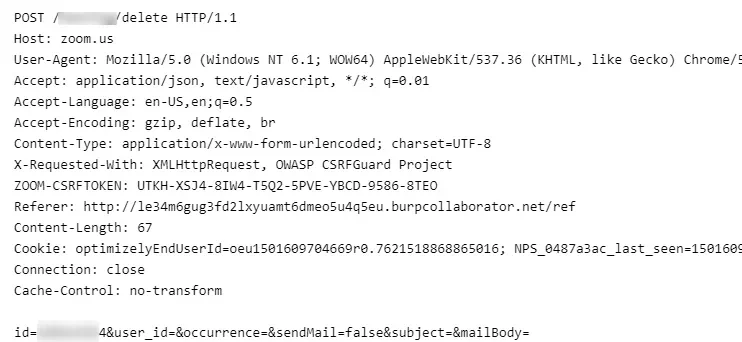
The screenshot shows the request with the CSRF header removed and the successful response observed in Burp Suite.
Developer endpoints with no CSRF token at all
An endpoint under /developers/* redirects to developers.zoom.us, where a user can register or start a trial as a developer and manage API keys. Two functionalities exist there: create an API and later disable it. Requests to these carried no CSRF token in the headers at all.
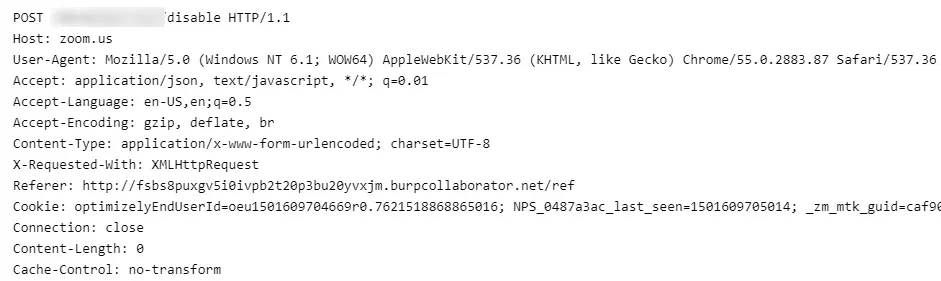
The screenshot shows the developer API-key functionality with the request lacking a CSRF token in its headers.
User management: token in header, random value in body
Adding, modifying, disabling and deleting users (admin, member and so on) by the owner all carried a CSRF token in the header, but the body also contained a user_id= parameter holding a random token. Removing the CSRF header still produced a successful response, but the random user_id value made the request non-exploitable on its own.
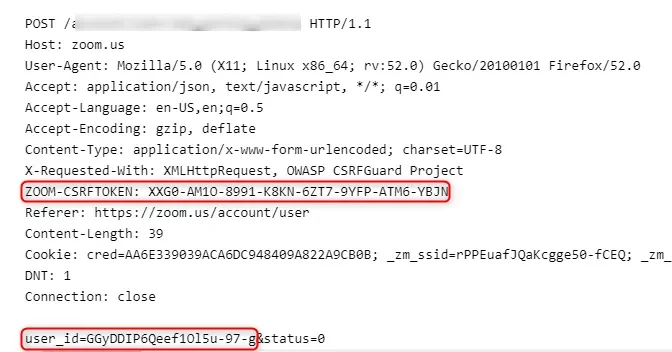
The screenshot shows the disable-user request as captured.
Duplicate cookies on login
While testing login, the researcher noticed duplicate cookies in the response. On login the server returned both the new cookie and the old cookie. After a refresh, the old cookie disappeared from the request. Logging out and back in produced the same pair again. Replacing the new cookie with the older one in an intercepted request and forwarding it left the session still logged in, which suggested session fixation.
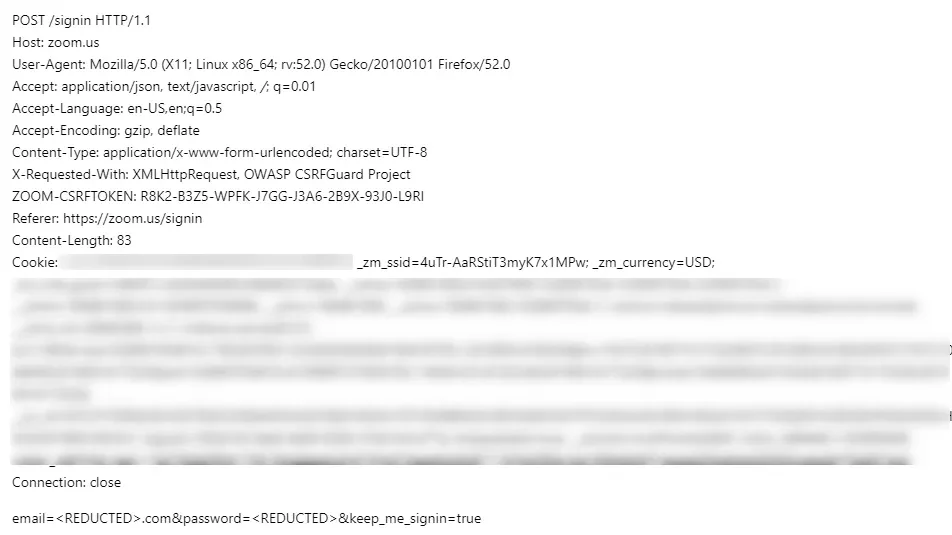
The login request as captured.
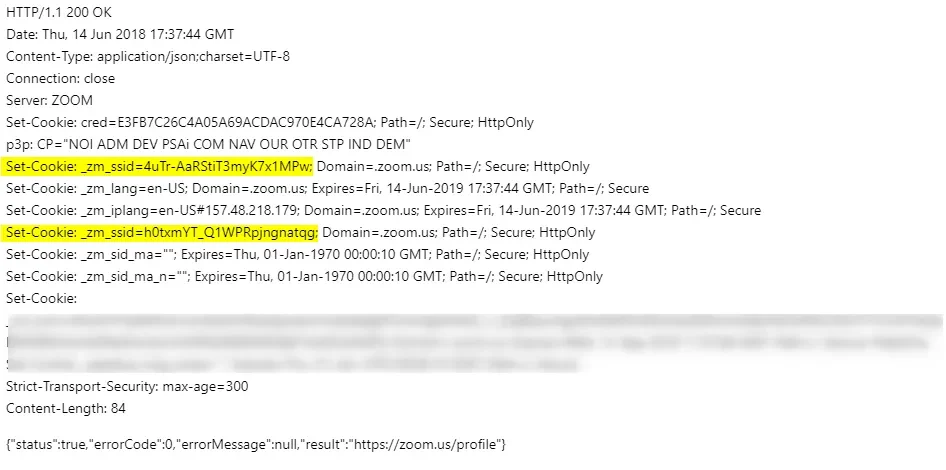
The login response, showing the duplicate Set-Cookie values.
Exploitation
Step 1: CSRF on a delete action
With the CSRF header removed and the request still succeeding, a proof of concept was built as an HTML form:
<html>
<body>
<form action=”https://zoom.us/reducted/delete" method=”POST”>
<input type=”hidden” name=”id” value=”reducted" />
<input type=”hidden” name=”user_id” value=”" />
<input type=”hidden” name=”occurrence” value=”" />
<input type=”hidden” name=”sendMail” value=”false" />
<input type=”hidden” name=”subject” value=”" />
<input type=”hidden” name=”mailBody” value=”" />
<input type=”submit” value=”Submit request" />
</form>
</body>
</html>
The form posts to the delete endpoint with the target id and the remaining fields left empty or at their defaults. Because the server did not check the CSRF header, a victim visiting the page would have the action performed with their session. The same issue was found in a few other functionalities and rewarded.
Step 2: CSRF on developer API keys
The create and disable API-key requests had no CSRF token in the headers, so they were directly forgeable. These were reported on different functionalities and rewarded. Zoom later fixed this by adding a wp-nonce parameter. The researcher bypassed that fix, but it was treated as out of scope, so no further fix was applied.
Step 3: Leaking user_id to make the user-management CSRF work
The disable-user request needed the random user_id value. After a day of looking, the researcher found that the value is disclosed in the profile image upload flow: when a user uploads a profile image and views it, the profile URL contains the value, in the form https://zoom.us/p/**GGyDDIP6Qeef1Ol5u-97-g**/<token2>. With that value known, the CSRF became exploitable:
<html>
<body>
<script>history.pushState(‘’, ‘’, ‘/’)</script>
<form action=”https://zoom.us/account/<Reducted>/<Reducted>" method=”POST”>
<input type=”hidden” name=”user_id” value=”****GGyDDIP6Qeef1Ol5u-97-g****” />
<input type=”hidden” name=”status” value=”0" />
<input type=”submit” value=”Submit request" />
</form>
</body>
</html>
The history.pushState call keeps the address bar looking like the site root after the page loads. The form posts the leaked user_id with status set to 0. This was found in multiple functionalities and rewarded.
Step 4: Paid features on a trial account
The researcher took a basic paid subscription and walked through the functionalities, noting which were not included in a trial account. A request was captured from the paid account and sent to Repeater, then the trial account's cookies, which were still valid, were substituted. The paid features worked on the trial account. A proof of concept was created and rewarded.
Step 5: One-click takeover of the triager's account
After the session-fixation report, Zoom's response was:

The researcher then worked out how to craft a URL that replaces a user's cookies with attacker-controlled ones. The result was:
https://zoom.us/<reducted>?firstName=rakesh&lastName=bugcrowd&<Reducted>&_zm_ssid=gVKn0WuETdSgJTfb6kvqzg

The link carries profile fields and, critically, a _zm_ssid value chosen by the attacker. The triager was asked to click it while logged in. When he did, the attacker-controlled _zm_ssid replaced the _zm_ssid stored in his browser. He saw no change in his account. The researcher then opened the same link without logging into Zoom and was able to access the triager's account.
A later note records that _zm_ssid accepts any string or integer as a cookie value, even 1 or a.
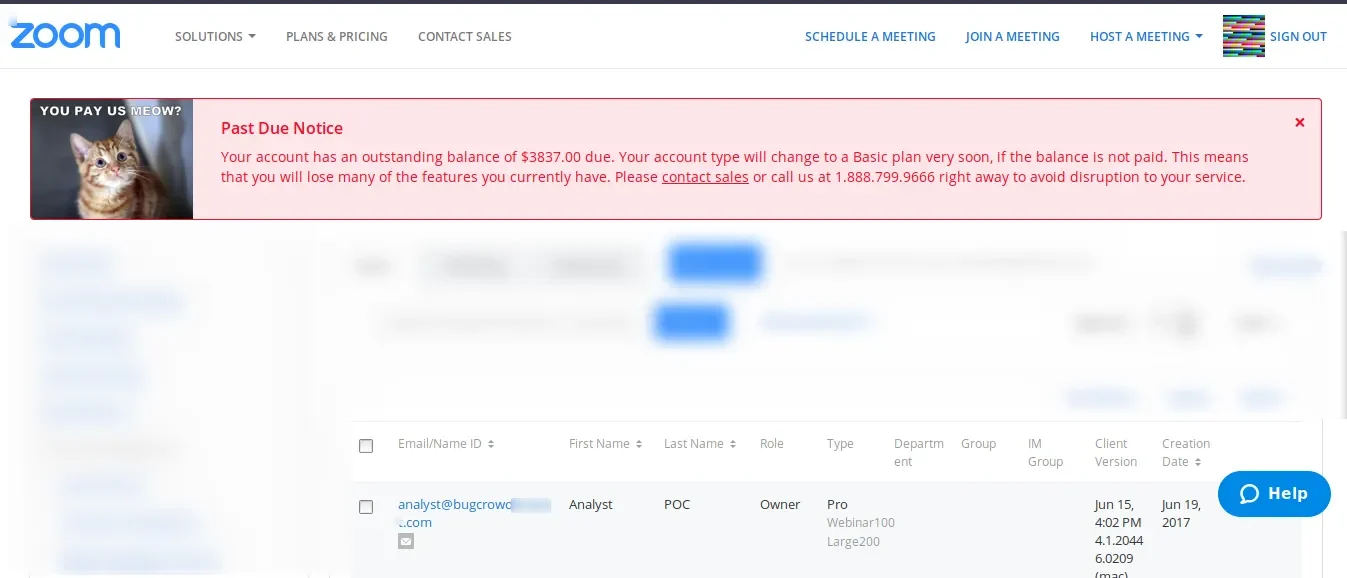
From inside the triager's account, the researcher added his own email address as an admin.
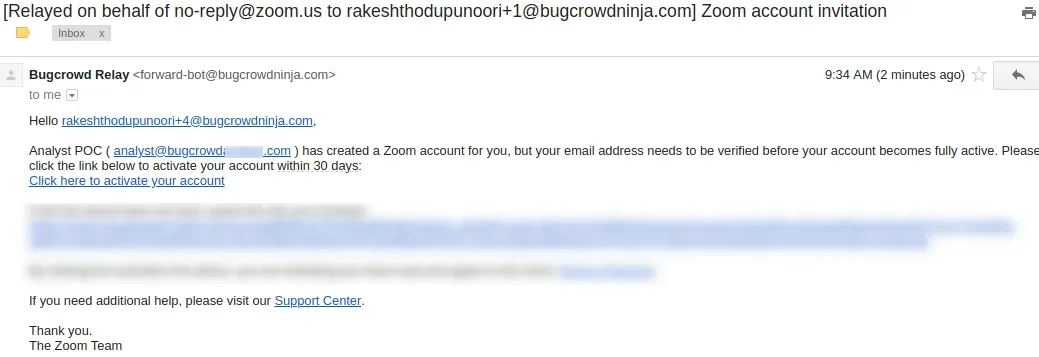
The report was triaged and rewarded after the screenshots were sent.
Step 6: Privilege escalation from member to owner
With access to the triager account, the researcher moved to role management. From the owner account he added one admin and one member. From the admin account he tried changing the member's role to admin and captured the request.
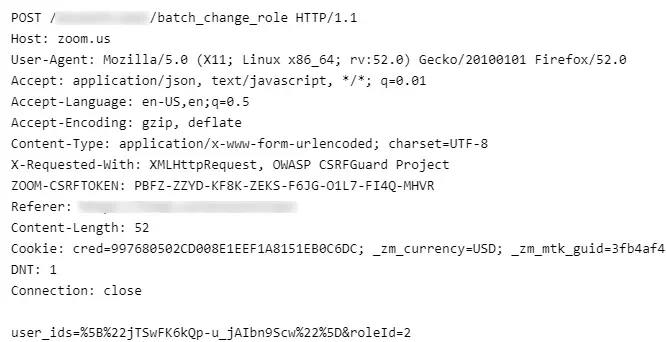
The captured request had roleId= set to 2, meaning admin. Changing it to 1 changed the member's role to owner. The impact was limited because the action was performed by a high-privileged admin, so the researcher looked for a lower-privileged path. He created two more member accounts from the owner account, logged into one member account, and reused the captured request's cookies with the other member's id in user_ids=. The server again returned a successful response. A proof of concept was made and rewarded.
Root cause
- CSRF header not validated: the token was added to requests by the client but never checked server-side, so removing it changed nothing. The developer endpoints had no token at all.
wp-noncefix: the first fix added awp-nonceparameter. The researcher bypassed it, but the bypass was ruled out of scope, so the underlying weakness remained.- Random
user_idas the only barrier: the user-management requests relied on a random value in the body rather than a validated CSRF token. Once the same value was exposed in the profile image URL, the barrier disappeared. - Duplicate cookies on login: the server returned both the old and the new cookie on login, and the old cookie remained valid.
_zm_ssidaccepted arbitrary values: the cookie accepted any string or integer, even1ora.- Role change trusted the client: the role change request accepted a
roleIdand auser_idsvalue from the client, and a member's cookies could change another member's role.
Impact
- Forged state-changing requests against logged-in users: deleting items, creating and disabling developer API keys, and disabling users, the last only once the
user_idvalue was known. - Use of paid subscription features on a trial account.
- One-click takeover of an account that clicked the crafted link, demonstrated against the triager's account, including adding an attacker-controlled email as admin.
- Role escalation: an admin could set a member to owner, and a low-privileged member could change another member's role by replaying the request with that member's id, which the server accepted.
Fix
- The developer endpoints were fixed by adding a
wp-nonceparameter. The bypass found afterwards was considered out of scope, so no further fix was applied there. - The report does not describe fixes for the other issues.
Variants to test
- Remove the CSRF header and replay. On any state-changing request, delete the CSRF header and resend. A successful response means the token is not validated server-side.
- Look for endpoints with no token at all. Check developer, API-key and integration endpoints for missing CSRF tokens, then check whether a later nonce fix can be bypassed.
- Hunt for leaked random values. Where a request needs a random
user_idor similar, look for it in profile image URLs, share links and other user-visible output. A positive result is the value appearing in a URL or response you can read. - Replay paid-account requests with trial cookies. Capture a request from a paid account, swap in trial cookies, and resend. A successful response means the feature is not gated server-side.
- Compare cookies across login and refresh. Log in, log out, log in again, and compare
Set-Cookievalues. If an old cookie is still accepted after a refresh, test replacing the new cookie with the old one. - Try attacker-chosen session cookie values. Set the session cookie to a known string and see whether the server accepts it. A positive result is being logged in as the account that value belongs to.
- Change role identifiers in role-management requests. Capture a role change, alter
roleId, and replay it with a low-privileged account's cookies and another user's id. A successful response with the new role applied is the escalation.
What happened, in plain words
A security researcher tested Zoom's websites and apps. He found several weaknesses and was paid about 22,000 US dollars in total. This article walks through each finding in the order he made them, explaining every technical idea from scratch. You only need to know how to use a browser and a computer to follow along.
The findings were:
- A security check called CSRF that the server never actually checked, so an attacker could make a logged-in user do things without knowing.
- A second CSRF gap on the pages where developers create and disable API keys.
- A CSRF on user management that only worked once a random value called
user_idcould be found elsewhere. - Using paid features on a free trial account by swapping cookies.
- A flaw in how cookies were handled that let the researcher take over a Zoom employee's account with a single click.
- A privilege escalation where a low-privileged member could change another member's role.
We will go through them one by one, with the exact requests and code the researcher used, and explain each line.
Background: what is Zoom and what did he test?
Zoom is a video conferencing service. You can create an account, hold meetings, and manage other users if you are an account owner. The researcher tested the web application: the pages you see in a browser when you log in to zoom.us. He also tested the developer portal, where you can create API keys, and the admin pages where an owner manages users and roles.
He started in 2018 after receiving an invitation to Zoom's bug bounty programme. A bug bounty programme is a scheme where a company pays people for reporting security bugs. He had no prior knowledge of Zoom, so he spent time learning the product first.
Tools and setup
He used Burp Suite, a program that sits between your browser and a website and lets you see and change every request and response. Think of it as a transparent proxy that records everything and lets you edit it before it reaches the server. He also used Burp's Repeater tab, which lets you take a captured request and send it again and again with changes.
He had a normal Zoom account, later a basic paid subscription, and trial accounts to compare. For the privilege escalation part, he had an owner account plus one admin and one member, and later two more member accounts.
No specific version numbers or endpoint names beyond those quoted below are given in the report.
Finding 1: A CSRF header that the server never checked
What is CSRF?
CSRF stands for Cross-Site Request Forgery. It is a trick where an attacker makes your browser send a request to a site you are logged in to, without you intending to. For example, if you are logged in to your bank and you visit a malicious page, that page can contain a hidden form that submits a transfer to your bank. Your browser automatically includes your bank cookies, so the bank thinks the request came from you.
To stop this, websites add a secret value called a CSRF token to each form or request. The server checks that the token is present and correct. If an attacker tries to forge a request from another site, they cannot know the token, so the request fails.
The flaw
Zoom's application did include a CSRF header in requests. A header is extra information sent along with a request, like a label on an envelope. But the researcher removed that header and sent the request again. The server still responded successfully. That means the server was not actually checking the header at all. The check existed only in the browser code, which an attacker can bypass.
He confirmed this in Burp Suite by deleting the header and seeing a successful response.
The screenshot shows the request with the CSRF header removed and the successful response observed in Burp Suite.
He built a proof of concept: a simple web page containing a form that submits to Zoom. If a logged-in Zoom user visited that page, the action would be performed with their account.
Here is the proof-of-concept HTML:
<html>
<body>
<form action=”https://zoom.us/reducted/delete" method=”POST”>
<input type=”hidden” name=”id” value=”reducted" />
<input type=”hidden” name=”user_id” value=”" />
<input type=”hidden” name=”occurrence” value=”" />
<input type=”hidden” name=”sendMail” value=”false" />
<input type=”hidden” name=”subject” value=”" />
<input type=”hidden” name=”mailBody” value=”" />
<input type=”submit” value=”Submit request” />
</form>
</body>
</html>
Line by line:
<html>and<body>are the usual tags that start a web page.<form action=”https://zoom.us/reducted/delete" method=”POST”>starts a form that will send data to the given URL using the POST method. POST is the way browsers send data that changes something on the server, like deleting an item. The URL is partly redacted in the report.<input type=”hidden” name=”id” value=”reducted" />creates a hidden field namedidwith a redacted value. Hidden fields are not shown to the user but are sent with the form. This is the identifier of the item to delete.<input type=”hidden” name=”user_id” value=”" />creates a hidden field nameduser_id(the_is an HTML code for an underscore) with an empty value.- The next lines create hidden fields named
occurrence,sendMail,subject, andmailBody, with values"",false,"", and"". These are other parameters the delete request expects. <input type=”submit” value=”Submit request” />is a button that submits the form. In a real attack, the page would submit automatically with JavaScript, but here the researcher left a button for demonstration.
Because the server did not check the CSRF header, a victim visiting this page would have the delete action performed with their session. The researcher found the same issue in a few other functionalities and was rewarded.
Finding 2: Developer API keys with no CSRF token at all
What is an API and an API key?
An API (Application Programming Interface) is a way for one program to talk to another. For example, a program can use Zoom's API to create meetings automatically. To use the API, you need an API key, which is like a password that identifies your program. If someone steals your API key, they can act as your program.
Zoom has a developer portal at developers.zoom.us where you can register as a developer, start a trial, and manage API keys. You can create an API key and later disable it.
The flaw
The researcher found an endpoint under /developers/* that redirects to the developer portal. He tested the create and disable API key requests for CSRF. This time, the requests did not contain any CSRF token in the headers at all. That means an attacker could forge these requests directly, without needing to bypass anything.
The screenshot shows the developer API-key functionality with the request lacking a CSRF token in its headers.
He reported this on different functionalities and was rewarded. Later, Zoom fixed it by adding a wp-nonce parameter. A nonce is a number used once, a random value that should be hard to guess. The researcher later found a way to bypass that fix, but Zoom considered it out of scope, so no further fix was applied.
Finding 3: User management CSRF with a random user_id
The setup
Zoom account owners can add, modify, disable, and delete users with roles like admin or member. The researcher tested these actions for CSRF. All the requests contained a CSRF token in the header, but the body also contained a user_id= parameter with a random value. The body is the part of the request that carries the actual data.
He removed the CSRF header and the request still succeeded. However, the random user_id value made the request non-exploitable on its own, because an attacker would not know that random value.
Here is what the disable-user request looked like:
The screenshot shows the disable-user request as captured.
Finding the leaked user_id
After a day of searching, he found that the user_id value is disclosed in the profile image upload flow. When a user uploads a profile image and views it, the profile URL contains the value, in the form:
https://zoom.us/p/**GGyDDIP6Qeef1Ol5u-97-g**/<token2>
This URL has two parts: a user identifier (GGyDDIP6Qeef1Ol5u-97-g) and a token. The user identifier is the same random value used in the user_id parameter. So an attacker who can see a user's profile image URL can learn the user_id and then forge the request.
With that value known, the CSRF became exploitable. Here is the proof-of-concept HTML:
<html>
<body>
<script>history.pushState(‘’, ‘’, ‘/’)</script>
<form action=”https://zoom.us/account/<Reducted>/<Reducted>" method=”POST”>
<input type=”hidden” name=”user_id” value=”****GGyDDIP6Qeef1Ol5u-97-g****” />
<input type=”hidden” name=”status” value=”0" />
<input type=”submit” value=”Submit request” />
</form>
</body>
</html>
Line by line:
<script>history.pushState(‘’, ‘’, ‘/’)</script>runs a small piece of JavaScript that changes the address bar to show the site root (/) without reloading the page. This makes the page look less suspicious to the victim.<form action=”https://zoom.us/account/<Reducted>/<Reducted>" method=”POST”>starts a form that posts to a redacted account URL.<input type=”hidden” name=”user_id” value=”****GGyDDIP6Qeef1Ol5u-97-g****” />sends the leakeduser_idvalue. The asterisks are just highlighting the value.<input type=”hidden” name=”status” value=”0" />sets thestatusparameter to0, which disables the user.<input type=”submit” value=”Submit request” />is the submit button.
This was found in multiple functionalities and rewarded.
Finding 4: Using paid features on a trial account
The idea
The researcher took a basic paid Zoom subscription and went through all the features, noting which ones were not available in a trial account. He captured a request from the paid account and sent it to Burp Repeater. Then he replaced the paid account's cookies with the trial account's cookies, which were still valid, and sent the request again. The paid feature worked on the trial account.
What are cookies?
Cookies are small pieces of data that a website stores in your browser. They are sent back to the server with every request, and they typically contain a session identifier that tells the server who you are. If you copy someone's cookies, you can impersonate them, as long as the server accepts those cookies.
In this case, the server did not check whether the trial account was allowed to use the paid feature. It only checked that the request came from a logged-in user. So by swapping cookies, the researcher could use paid features for free.
He created a proof of concept and was rewarded.
Finding 5: One-click takeover of the triager's account
The suspicious cookies
While testing the login functionality, the researcher noticed duplicate cookies in the response. On login, the server returned both the new cookie and the old cookie. This is unusual: normally the old cookie should be replaced. He found this suspicious.
Here is the login request:
The login request as captured.
And here is the login response:
The login response, showing the duplicate Set-Cookie values.
Set-Cookie is the header a server uses to tell the browser to store a cookie. Seeing two Set-Cookie headers for the same cookie name means the browser might store both, or one might overwrite the other depending on the order.
After a refresh, the old cookie disappeared from the request. Logging out and back in produced the same pair again. He then replaced the new cookie with the older one in an intercepted request and forwarded it. To his surprise, he was still logged in. This suggested a session fixation issue.
What is session fixation?
Session fixation is a vulnerability where an attacker can force a victim's browser to use a session identifier chosen by the attacker. If the server does not change the session identifier after login, the attacker can then use that same identifier to access the victim's account.
He reported this to Zoom as a possible session fixation issue. Zoom's response was:
The screenshot shows Zoom's response to the session fixation report.
Crafting the attack URL
After that, he started thinking about how to craft a URL that replaces a user's cookies with attacker-controlled cookies. After some trial and error, he succeeded. The crafted URL was:
https://zoom.us/<reducted>?firstName=rakesh&lastName=bugcrowd&<Reducted>&_zm_ssid=gVKn0WuETdSgJTfb6kvqzg
This URL has several parameters: firstName, lastName, some redacted parameters, and _zm_ssid. The _zm_ssid parameter is the important one: it sets a cookie named _zm_ssid to the value gVKn0WuETdSgJTfb6kvqzg. The URL replaces the _zm_ssid cookie stored in the browser with the value in the parameter.
The screenshot shows the crafted URL being used.
He asked the triager (the person at Zoom who handles bug reports) to click the link after logging into his Zoom account. When the triager clicked, the attacker-controlled _zm_ssid cookie replaced the _zm_ssid cookie stored in his browser. The triager did not notice any change in his account. But then the researcher opened the same link without logging into Zoom, and he was able to access the triager's account.
A later note records that _zm_ssid accepts any string or integer as a cookie value, even 1 or a. That means the cookie accepts any string or integer value.
The screenshot shows access to the triager's account.
From inside the triager's account, the researcher added his own email address as an admin.
The screenshot shows the researcher's email added as admin in the triager's account.
The report was triaged and rewarded after the screenshots were sent.
Finding 6: Privilege escalation from member to owner
The setup
With access to the triager account, the researcher moved to role management. Zoom owners can add multiple users with different roles: admin, member, and custom roles. He created an owner account, then from that owner account he added one admin and one member. Then he logged in as the admin and tried to change the member's role to admin. He captured that request.
The screenshot shows the captured request for changing a user's role.
The flaw
The captured request had roleId= set to 2, which means admin. He changed it to 1, and the member's role changed to owner. That is a privilege escalation: a lower-privileged user (admin) could assign a higher privilege (owner) to someone else. But the impact was limited because the action was performed by a high-privileged admin. He wanted to increase the impact by using a low-privileged user.
He created two more member accounts from the owner account. Then he logged into one member account and reused the captured request's cookies with the other member's id in user_ids=. The server again returned a successful response. That means a low-privileged member could change another member's role. He made a proof of concept and was rewarded.
Why these bugs happened
- CSRF header not validated: the token was added to requests by the browser code but never checked on the server. Removing it changed nothing. The developer endpoints had no token at all.
wp-noncefix: the first fix added awp-nonceparameter. The researcher bypassed it, but the bypass was ruled out of scope, so the underlying weakness remained.- Random
user_idas the only barrier: the user-management requests relied on a random value in the body rather than a validated CSRF token. Once the same value was exposed in the profile image URL, the barrier disappeared. - Duplicate cookies on login: the server returned both the old and the new cookie on login, and the old cookie remained valid.
_zm_ssidaccepted arbitrary values: the cookie accepted any string or integer, even1ora.- Role change trusted the client: the role change request accepted a
roleIdand auser_idsvalue from the client, and a member's cookies could change another member's role.
What was the impact?
- Forged state-changing requests against logged-in users: deleting items, creating and disabling developer API keys, and disabling users, the last only once the
user_idvalue was known. - Use of paid subscription features on a trial account.
- One-click takeover of an account that clicked the crafted link, demonstrated against the triager's account, including adding an attacker-controlled email as admin.
- Role escalation: an admin could set a member to owner, and a low-privileged member could change another member's role by replaying the request with that member's id, which the server accepted.
How were they fixed?
- The developer endpoints were fixed by adding a
wp-nonceparameter. The bypass found afterwards was considered out of scope, so no further fix was applied there. - The report does not describe fixes for the other issues.
Things to try if you are testing
- Remove the CSRF header and replay. On any state-changing request, delete the CSRF header and resend. A successful response means the token is not validated server-side.
- Look for endpoints with no token at all. Check developer, API-key and integration endpoints for missing CSRF tokens, then check whether a later nonce fix can be bypassed.
- Hunt for leaked random values. Where a request needs a random
user_idor similar, look for it in profile image URLs, share links and other user-visible output. A positive result is the value appearing in a URL or response you can read. - Replay paid-account requests with trial cookies. Capture a request from a paid account, swap in trial cookies, and resend. A successful response means the feature is not gated server-side.
- Compare cookies across login and refresh. Log in, log out, log in again, and compare
Set-Cookievalues. If an old cookie is still accepted after a refresh, test replacing the new cookie with the old one. - Try attacker-chosen session cookie values. Set the session cookie to a known string and see whether the server accepts it. A positive result is being logged in as the account that value belongs to.
- Change role identifiers in role-management requests. Capture a role change, alter
roleId, and replay it with a low-privileged account's cookies and another user's id. A successful response with the new role applied is the escalation.
Glossary
- API (Application Programming Interface): a way for one program to talk to another, like a waiter taking your order to the kitchen.
- API key: a secret string that identifies a program to an API, like a password for software.
- Burp Suite: a tool that intercepts and lets you modify web traffic between your browser and a server.
- Cookie: a small piece of data stored by your browser and sent with requests to identify you, like a wristband at an event.
- CSRF (Cross-Site Request Forgery): an attack that tricks your browser into sending a request to a site you are logged in to, without your knowledge.
- CSRF token: a secret value added to requests to prove they come from the site itself, not an attacker.
- Header: extra information sent with a web request or response, like a label on an envelope.
- Nonce: a number used once, often random, to prevent replay attacks.
- POST: an HTTP method used to send data that changes something on the server.
- Privilege escalation: gaining higher access rights than you are supposed to have.
- Proof of concept (POC): a demonstration that a vulnerability can be exploited.
- Repeater: a Burp Suite tool that lets you resend a request multiple times with changes.
- Session: a period of interaction between a user and a website, identified by a cookie.
- Session fixation: an attack where an attacker forces a victim to use a session identifier known to the attacker.
- Set-Cookie: the header a server uses to tell the browser to store a cookie.
- Trial account: a free account with limited features.
- Triager: the person who reviews bug reports at a company.
user_id: a parameter containing a user identifier, in this case a random value.wp-nonce: a parameter added as a fix, likely a nonce for WordPress or a similar system._zm_ssid: a cookie name used by Zoom, which in this case could be set to an arbitrary value.

