HTTP Request Smuggling on https://consumer.acronis.com
The website consumer.acronis.com was vulnerable to HTTP request smuggling, allowing an attacker to redirect users to an arbitrary domain. The report demonstrates this by manipulating the Host header and using a tab in the Transfer-Encoding header to cause a redirect to a Burp Collaborator domain.

- Triaged in 2 days
- Fixed in 5 months
- Disclosed after 11 months
Summary by the program
HTTP Request Smuggling was possible on https://consumer.acronis.com. An attacker could abuse this to redirect users to arbitrary resources. The issue was assigned low severity since the domain was not in use and other Acronis websites did not load any resources from there.
The report
Summary
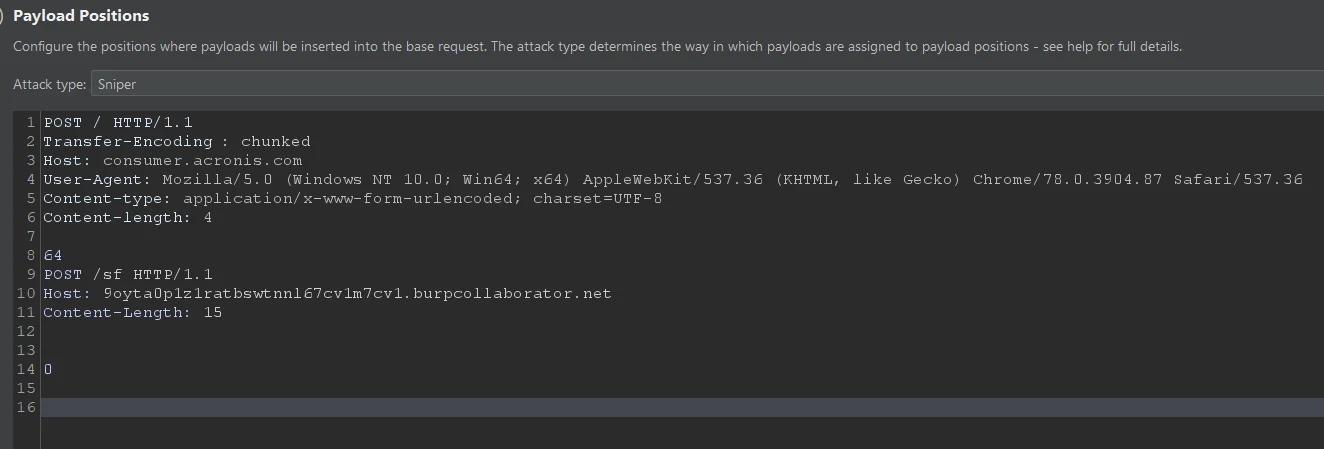
The website https://consumer.acronis.com is vulnerable to HTTP Request Smuggling which can be abused by an attacker to redirect all the users to a malicious website. A redirect can be forced by changing the Host request header using the path /sf but the website will redirect you to https://9oyta0p1z1ratbswtnnl67cv1m7cv1.burpcollaborator.net/sf/. To reproduce the attack use the configuration below in a Burp Intruder attack. Notice the header "Transfer-Encoding : chunked" is not using space but a tab. You can also use the base64 decoded form of this string below. The size of 64 bytes in hex on the request body must match with the size the second POST request. If you change the "Host: 9oyta0p1z1ratbswtnnl67cv1m7cv1.burpcollaborator.net" header you need to update the size.
UE9TVCAvIEhUVFAvMS4xDQpUcmFuc2Zlci1FbmNvZGluZwk6CWNodW5rZWQNCkhvc3Q6IGNvbnN1bWVyLmFjcm9uaXMuY29tDQpVc2VyLUFnZW50OiBNb3ppbGxhLzUuMCAoV2luZG93cyBOVCAxMC4wOyBXaW42NDsgeDY0KSBBcHBsZVdlYktpdC81MzcuMzYgKEtIVE1MLCBsaWtlIEdlY2tvKSBDaHJvbWUvNzguMC4zOTA0Ljg3IFNhZmFyaS81MzcuMzYNCkNvbnRlbnQtdHlwZTogYXBwbGljYXRpb24veC13d3ctZm9ybS11cmxlbmNvZGVkOyBjaGFyc2V0PVVURi04DQpDb250ZW50LWxlbmd0aDogNA0KDQo2NA0KUE9TVCAvc2YgSFRUUC8xLjENCkhvc3Q6IDlveXRhMHAxejFyYXRic3d0bm5sNjdjdjFtN2N2MS5idXJwY29sbGFib3JhdG9yLm5ldA0KQ29udGVudC1MZW5ndGg6IDE1DQoNCg0KMA0KDQo=
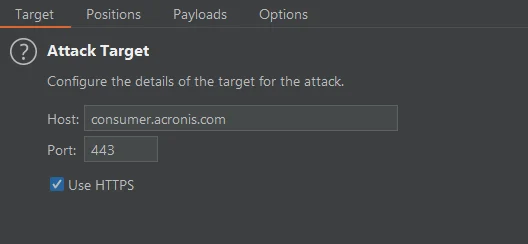
As soon as you start the Burp Intruder attack above you will see some redirects to Burp Collaborator domain.
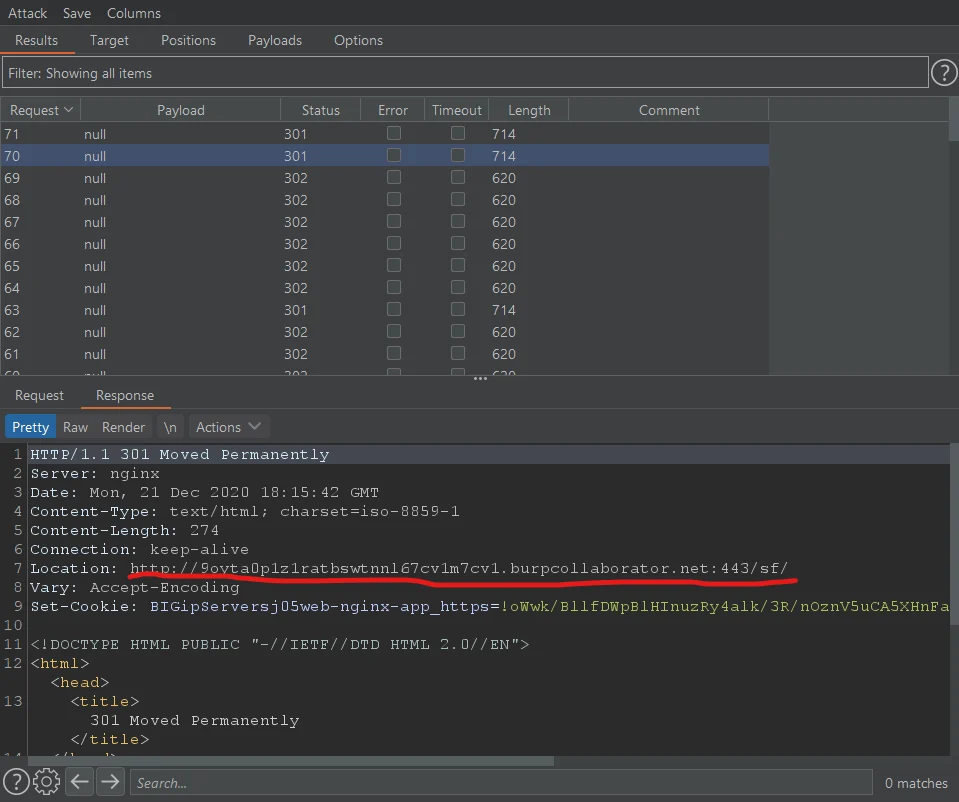
Start to receiving some connections on Burp Collaborator.
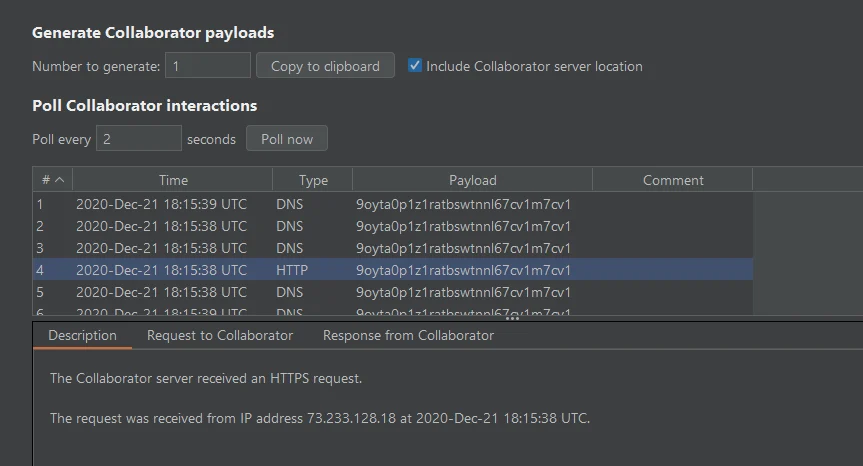
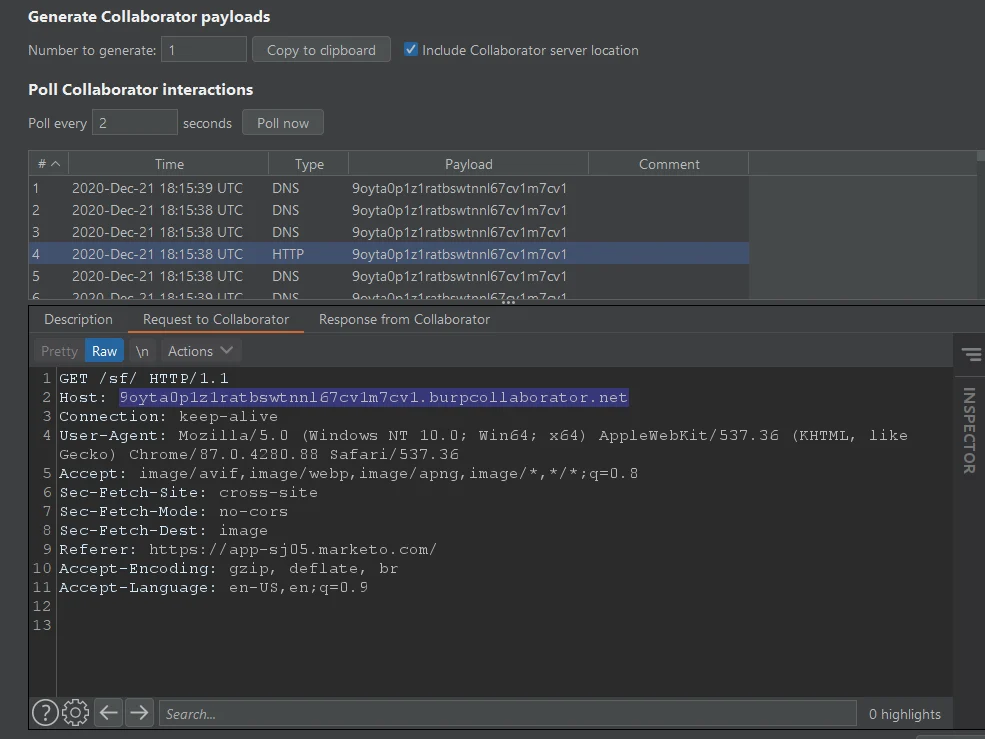
Recommendations
- https://medium.com/@ricardoiramar/the-powerful-http-request-smuggling-af208fafa142
- https://portswigger.net/research/http-desync-attacks-request-smuggling-reborn
- https://portswigger.net/web-security/request-smuggling
- https://blog.detectify.com/2020/05/28/hiding-in-plain-sight-http-request-smuggling/
Impact
HTTP request smuggling is a technique for interfering with the way a web site processes sequences of HTTP requests that are received from one or more users. Request smuggling vulnerabilities are often critical in nature, allowing an attacker to bypass security controls, gain unauthorized access to sensitive data, and directly compromise other application users. In this PoC I was able to massive redirect users to a domain under my control but other scenarios are also possible like the ones described here https://portswigger.net/web-security/request-smuggling/exploiting.
Context
The target is https://consumer.acronis.com, a host under the Acronis *.acronis.com scope. The report describes an HTTP request smuggling vulnerability on that host. The feature that matters here is the path /sf, which the researcher used to force a redirect: by changing the Host request header on a request to /sf, the site would redirect the visitor to the host named in that header. In the proof of concept the redirect pointed at a Burp Collaborator domain.
Acronis rated the issue low severity. The summary by the program explains why: the domain was not in use, and other Acronis websites did not load any resources from it. So although the smuggling primitive was real, the practical reach was limited at the time of the report.
Setup
The work was done with Burp Suite: a Burp Intruder attack to send the crafted requests, and Burp Collaborator to observe the out-of-band connections that the smuggled request produced. No accounts, roles or specific product versions are described in the report.
The key precondition is a front-end/back-end disagreement about how a request body is delimited. The crafted request relies on a Transfer-Encoding header whose value is separated from the header name by a tab rather than a space, so that one component in the chain treats the request as chunked while another does not.
Finding it
The researcher found that https://consumer.acronis.com was vulnerable to HTTP request smuggling, and that the smuggled request could be used to redirect users. The redirect is forced by changing the Host request header on a request to the path /sf. In the proof of concept, the site redirected to:
https://9oyta0p1z1ratbswtnnl67cv1m7cv1.burpcollaborator.net/sf/
The detail that makes the smuggling work is in the header line: Transfer-Encoding : chunked is written with a tab between the header name and the colon, not a space. That malformed header is what creates the disagreement between the components handling the request.
Exploitation
Step 1: build the smuggled request
The payload is given in the report as a base64 string. The researcher notes that you can use the base64 decoded form of this string directly:
[redacted]=
Decoded, the request is a POST / with a chunked body. The outer request carries Host: consumer.acronis.com, a browser User-Agent, Content-type: application/x-www-form-urlencoded; charset=UTF-8 and Content-Length: 4. The body declares a chunk of 64 bytes (hex), and those 64 bytes are themselves a complete second request:
The second request targets /sf and sets the Host header to the Collaborator domain. That is the request that, once smuggled past the front end, produces the redirect to the attacker-controlled host. The trailing 0 and blank line terminate the chunked body.
The researcher points out that the size of 64 bytes in hex on the request body must match the size of the second POST request. If you change the Host: 9oyta0p1z1ratbswtnnl67cv1m7cv1.burpcollaborator.net header, you need to update the size accordingly.
Step 2: send it with Burp Intruder
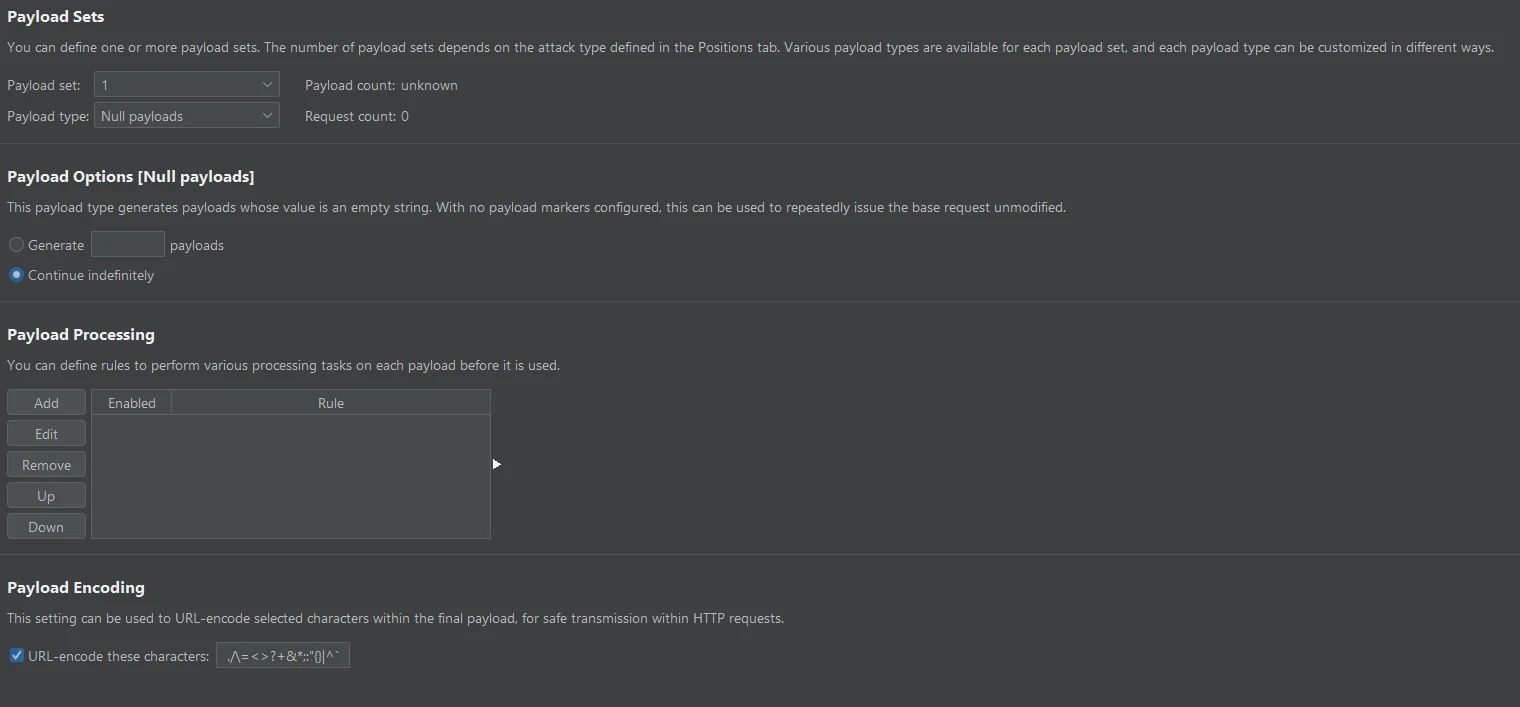
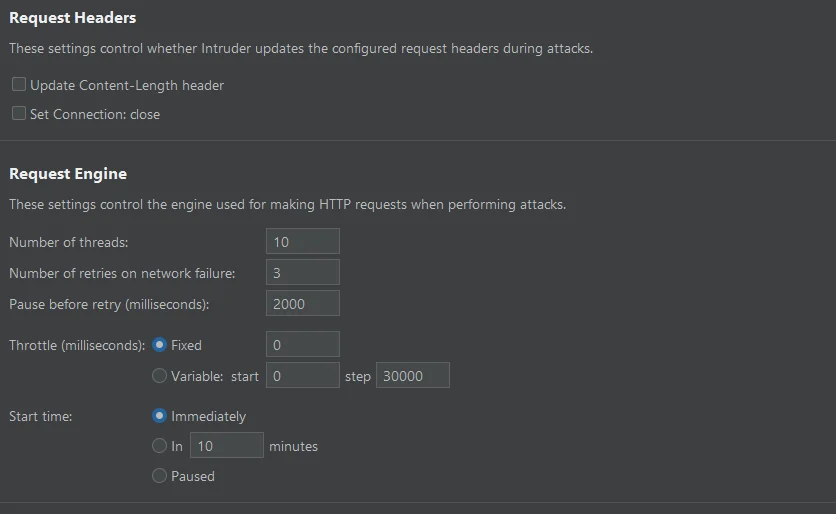
The configuration above is used in a Burp Intruder attack. The screenshots show the Intruder setup with the crafted request.
Step 3: observe the redirects
As soon as the Intruder attack starts, some redirects to the Burp Collaborator domain appear.
Step 4: confirm out-of-band
Connections then start arriving on Burp Collaborator, confirming that the smuggled request was processed and that the redirect was issued to the attacker-controlled host.
Root cause
The vulnerability is a classic request smuggling desync: the front end and the back end disagree about where one request ends and the next begins. The trigger is the Transfer-Encoding header written with a tab between the header name and the colon. One component accepts that as a valid chunked framing header, the other does not, so the bytes that the first component treats as the body of the first request are treated by the second as the start of a new request. The smuggled POST /sf with an attacker-chosen Host is then handled as a legitimate request by the back end.
The report does not describe the specific server software or the exact parsing rules on each side, so the precise reason each component accepted or rejected the tab-prefixed header is not stated. The redirect behaviour on /sf, which uses the Host header to choose the destination, is what turns the smuggling primitive into an open redirect.
Impact
HTTP request smuggling interferes with the way a site processes sequences of HTTP requests received from one or more users. The researcher notes that such vulnerabilities are often critical, allowing an attacker to bypass security controls, gain unauthorised access to sensitive data and directly compromise other application users.
In this proof of concept the researcher was able to massively redirect users to a domain under their control. Other exploitation scenarios are possible, as described in the linked PortSwigger material.
The program's own assessment tempers this: the issue was assigned low severity because consumer.acronis.com was not in use and other Acronis websites did not load any resources from it.
Fix
The report does not describe a specific fix that was applied. The recommendations section only lists background reading on request smuggling:
- https://medium.com/@ricardoiramar/the-powerful-http-request-smuggling-af208fafa142
- https://portswigger.net/research/http-desync-attacks-request-smuggling-reborn
- https://portswigger.net/web-security/request-smuggling
- https://blog.detectify.com/2020/05/28/hiding-in-plain-sight-http-request-smuggling/
Variants to test
- Tab or space variants in
Transfer-Encoding. TryTransfer-Encoding\t: chunked,Transfer-Encoding : chunkedand other whitespace variations on other hosts. Content-LengthversusTransfer-Encodingconflicts. Send a request with both headers and see whether the front end and back end pick different framings.- Host-header reflection on redirect paths. Look for paths like
/sfthat build aLocationheader from theHostheader. - Chunk size arithmetic. When you change the smuggled request, recompute the hex chunk size so it matches the byte length of the second request exactly, as the researcher did with
64for thePOST /sfrequest. - Out-of-band confirmation.
What happened, in plain words
A security researcher found a way to make the website https://consumer.acronis.com send visitors to a different website chosen by the attacker. The trick used a class of bug called HTTP request smuggling. In this case the practical damage was small, because the affected domain was not in use and other Acronis sites did not load anything from it. Acronis rated the issue low severity for that reason.
To follow the rest of this article you only need to know what a web page is and roughly what happens when your browser asks a server for one. Everything else is explained as it comes up.
The pieces you need first
What a request and a response are
When you type an address into your browser, the browser sends a short text message to a server asking for a page. That message is called an HTTP request. The server answers with another text message, the HTTP response, which contains the page or an instruction such as "go and look at this other address instead".
A request has a few parts:
- A method and a path, for example
POST /sf. The method is the verb (what kind of action), the path is the address of the thing on the server. - Headers: lines of the form
Name: valuethat carry extra information, such as which site name the browser was trying to reach (Host) or what kind of data is being sent (Content-type). - A body: optional extra data, for example the contents of a form you filled in.
Think of a request as a letter: the method and path are the address on the envelope, the headers are notes written on the outside, and the body is the letter inside.
What the Host header does
One server can host many websites. The Host header tells the server which website the browser wanted. It is like writing a company name on an envelope that goes to a shared office building: the building address gets the letter there, the company name decides who opens it.
What a redirect is
A redirect is a response that says "the thing you asked for is somewhere else, go here instead". The browser follows it automatically, so the visitor ends up on a different address without noticing. The address to go to is given in a response header called Location.
If a website chooses the redirect destination from the Host header the visitor sent, then whoever controls the Host header controls where the visitor is sent. That is called an open redirect, and the researcher found that changing the Host header on the path /sf forced a redirect.
What HTTP request smuggling is
Large websites often sit behind more than one piece of software. A front end (a proxy or load balancer) receives the request from your browser first, then passes it on to a back end (the application server) that does the real work. Think of a receptionist who takes your form and hands it to a clerk in the back office.
Normally both agree on where one request ends and the next begins. Request smuggling happens when they disagree. The attacker crafts a request whose ending is ambiguous, so the front end thinks the request stops at one point while the back end thinks it stops later. The extra bytes the back end reads are treated as a brand new request, one the attacker wrote but the front end never inspected. That hidden request is the smuggled one.
What chunked encoding is
When a request has a body, the server needs to know how long the body is. There are two common ways to say so:
Content-Length: 4means "the body is exactly 4 bytes long".Transfer-Encoding: chunkedmeans "the body arrives in pieces; each piece starts with its size written in hexadecimal (base 16), then the piece itself, and a piece of size0marks the end".
Hexadecimal is just a way of writing numbers using 0 to 9 and a to f. The hex number 64 equals 100 in ordinary decimal.
What Burp Suite, Intruder and Collaborator are
Burp Suite is a tool that sits between your browser and a website so you can look at and change the requests. Two parts of it matter here:
- Burp Intruder sends a request many times, optionally with small changes each time. It is useful for repeating a crafted request.
- Burp Collaborator gives you a unique domain name you control and records any connections made to it. If a server somewhere on the internet contacts that domain, Collaborator shows you. This is called out-of-band confirmation: you learn about the effect through a separate channel rather than through the response you got back.
In this report the Collaborator domain was 9oyta0p1z1ratbswtnnl67cv1m7cv1.burpcollaborator.net. If the target site redirects a visitor to that domain, the visitor's browser will try to connect to it, and Collaborator will record the connection. That is how the researcher proved the redirect really happened.
What the researcher found
The site https://consumer.acronis.com was vulnerable to HTTP request smuggling. The smuggled request could be used to redirect users. The redirect is forced by changing the Host request header on a request to the path /sf. In the proof of concept the site redirected to:
https://9oyta0p1z1ratbswtnnl67cv1m7cv1.burpcollaborator.net/sf/
The detail that makes the smuggling work is in one header line. The header is written as Transfer-Encoding : chunked with a tab between the header name and the colon, not a space. That malformed header is what creates the disagreement between the components handling the request: one of them accepts it as a valid chunked-framing header, the other does not.
Step 1: build the smuggled request
The payload is given in the report as a base64 string. Base64 is a way of writing arbitrary bytes using only ordinary letters, digits and a couple of symbols, so the data can be pasted around safely. The researcher notes that you can use the base64 decoded form of this string directly:
[redacted]=
Decoded, the request is a POST / with a chunked body. The outer request carries Host: consumer.acronis.com, a browser User-Agent, Content-type: application/x-www-form-urlencoded; charset=UTF-8 and Content-Length: 4. The body declares a chunk of 64 bytes (hex), and those 64 bytes are themselves a complete second request:
Line by line, in plain words:
POST /sf HTTP/1.1is the start of the hidden request: send a POST to the path/sfusing version 1.1 of the HTTP protocol.Host: 9oyta0p1z1ratbswtnnl67cv1m7cv1.burpcollaborator.nettells the server which site name this request is for. Because/sfbuilds its redirect from this header, the redirect will point at the Collaborator domain.Content-Length: 15says the body of this hidden request is 15 bytes long. In this payload those bytes are effectively empty, which is fine for the purpose: the redirect happens because of theHostheader, not because of any body content.- The blank line separates headers from body.
- The trailing
0and blank line terminate the chunked body of the outer request.
The second request targets /sf and sets the Host header to the Collaborator domain. That is the request that, once smuggled past the front end, produces the redirect to the attacker-controlled host.
The researcher points out that the size of 64 bytes in hex on the request body must match the size of the second POST request. If you change the Host: 9oyta0p1z1ratbswtnnl67cv1m7cv1.burpcollaborator.net header, you need to update the size accordingly. The reason is simple arithmetic: the chunk size is a promise about how many bytes follow, so if the hidden request gets longer or shorter, the number must change to match, otherwise the two components will disagree in a way you did not intend.
Step 2: send it with Burp Intruder
The configuration above is used in a Burp Intruder attack. The screenshots show the Intruder setup with the crafted request.
Intruder is used here because it lets you fire the same crafted request repeatedly and watch what comes back, which is convenient when you are testing whether a smuggling primitive is stable.
Step 3: observe the redirects
As soon as the Intruder attack starts, some redirects to the Burp Collaborator domain appear.
Seeing redirects to the Collaborator domain is the first sign that the smuggled request was processed.
Step 4: confirm out-of-band
Connections then start arriving on Burp Collaborator, confirming that the smuggled request was processed and that the redirect was issued to the attacker-controlled host.
The Collaborator hits are independent evidence that something on the target side actually reached out to the domain you control.
Why it works
The vulnerability is a classic request smuggling desync: the front end and the back end disagree about where one request ends and the next begins. The trigger is the Transfer-Encoding header written with a tab between the header name and the colon. One component accepts that as a valid chunked framing header, the other does not, so the bytes that the first component treats as the body of the first request are treated by the second as the start of a new request. The smuggled POST /sf with an attacker-chosen Host is then handled as a legitimate request by the back end.
The report does not describe the specific server software or the exact parsing rules on each side, so the precise reason each component accepted or rejected the tab-prefixed header is not stated. The redirect behaviour on /sf, which uses the Host header to choose the destination, is what turns the smuggling primitive into an open redirect.
Impact
HTTP request smuggling interferes with the way a site processes sequences of HTTP requests received from one or more users. The researcher notes that such vulnerabilities are often critical, allowing an attacker to bypass security controls, gain unauthorised access to sensitive data and directly compromise other application users.
In this proof of concept the researcher was able to massively redirect users to a domain under their control. Other exploitation scenarios are possible, as described in the linked PortSwigger material.
The program's own assessment tempers this: the issue was assigned low severity because consumer.acronis.com was not in use and other Acronis websites did not load any resources from it.
Fix
The report does not describe a specific fix that was applied. The recommendations section only lists background reading on request smuggling:
- https://medium.com/@ricardoiramar/the-powerful-http-request-smuggling-af208fafa142
- https://portswigger.net/research/http-desync-attacks-request-smuggling-reborn
- https://portswigger.net/web-security/request-smuggling
- https://blog.detectify.com/2020/05/28/hiding-in-plain-sight-http-request-smuggling/
Variants to test
- Tab or space variants in
Transfer-Encoding. TryTransfer-Encoding\t: chunked,Transfer-Encoding : chunkedand other whitespace variations on other hosts. Content-LengthversusTransfer-Encodingconflicts. Send a request with both headers and see whether the front end and back end pick different framings.- Host-header reflection on redirect paths. Look for paths like
/sfthat build aLocationheader from theHostheader. - Chunk size arithmetic. When you change the smuggled request, recompute the hex chunk size so it matches the byte length of the second request exactly, as the researcher did with
64for thePOST /sfrequest. - Out-of-band confirmation.
Glossary
- HTTP request: the text message a browser sends to a server to ask for something, made of a method, a path, headers and an optional body.
- HTTP response: the text message a server sends back, containing the page or an instruction such as a redirect.
- Method: the verb of a request, such as
GETorPOST, saying what kind of action is wanted. - Path: the part of the address that names the thing on the server, for example
/sf. - Header: a
Name: valueline in a request or response carrying extra information. - Body: the optional data carried inside a request or response, such as form contents.
Hostheader: the header that tells a server which website name the browser was trying to reach.- Redirect: a response telling the browser to go to a different address instead, given in the
Locationheader. Locationheader: the response header that holds the address a redirect points to.- Open redirect: a redirect where the destination is taken from user-controlled input, so an attacker can choose where visitors are sent.
- Front end: the first piece of software a request reaches, such as a proxy or load balancer, which passes it on.
- Back end: the application server behind the front end that does the real work.
- HTTP request smuggling: a bug where the front end and back end disagree about where one request ends, letting an attacker hide an extra request that the front end never inspected.
- Desync: the state where two components in the chain have different ideas about the state of the connection, which is what smuggling exploits.
- Chunked encoding: a way of sending a body in pieces, each piece preceded by its size in hexadecimal, ended by a piece of size
0. Content-Length: a header stating the exact size of the body in bytes.Transfer-Encoding: a header stating how the body is framed, for examplechunked.- Hexadecimal: a way of writing numbers using 0 to 9 and a to f;
64in hex equals 100 in decimal. - Base64: an encoding that turns arbitrary bytes into ordinary letters, digits and a couple of symbols so the data can be pasted around safely.
- Burp Suite: a tool that sits between your browser and a website so you can inspect and change requests.
- Burp Intruder: the part of Burp Suite that sends a request many times, optionally with small changes each time.
- Burp Collaborator: a service that gives you a domain you control and records any connections made to it, used to confirm effects out of band.
- Out-of-band: learning about an effect through a separate channel (such as a connection to your own domain) rather than through the response you received.
User-Agent: a header in which the browser describes itself.Content-type: a header stating what kind of data the body contains.- Proof of concept (PoC): a small demonstration that a vulnerability is real and can be exploited.
- Severity: a rating of how serious an issue is, here low because the affected domain was not in use.