AEM Bug in Adobe
Some AEM administrative paths on an Adobe domain were reachable without authentication because of a misconfiguration, so a regular user could open interfaces that should be limited to administrators. The author found one such path through fuzzing and reported it, and the report was accepted.
 Published on realm3ter.medium.com
When I was sleeping in bed, I got the idea to look for security vulnerabilities in Adobe Hunting them to find bugs
The full write-up lives on its author's site
It belongs to its author, so we link to it rather than copy it. The other two tabs are our own rewrites, checked against it.
Context
Adobe runs a bug bounty program on HackerOne, and the researcher, Muhammad Mater (@micro0x00), decided to hunt there. After reconnaissance across Adobe's domains and an analysis of the technologies behind the target-specific web applications, the technology that stood out was AEM, Adobe Experience Manager.
AEM is a content management solution used to create, manage and deliver digital experiences across websites, mobile apps and forms. It stores digital assets, content and configurations in an Apache Jackrabbit Oak content repository, runs on an OSGi framework for modular development, provides a web-based authoring environment for content creation and workflow management, uses a Dispatcher for caching and load balancing, serves published content from a publish environment, integrates with Adobe Marketing Cloud and exposes APIs for customisation and integration with external systems. It also supports horizontal scalability and cloud deployments.
The researcher's approach before hunting was to understand how the application works and what it does, exploring its features as a regular user first.
Setup
The only precondition described is a bug bounty program on HackerOne and a set of Adobe domains gathered through reconnaissance. The researcher analysed which technologies each target-specific web application used, finding PHP-run domains and Java-run domains, and singled out the ones running AEM. No accounts, roles or versions are mentioned.
The tools used were a wordlist of AEM paths from the clarkvoss/AEM-List GitHub repository, the nuclei template aem-cms.yaml from the projectdiscovery nuclei-templates repository for detecting the AEM CMS, and the scanners at 0ang3el/aem-hacker and 0ang3el/aem-rce-bundle.
Finding it
While testing paths in the web application, the researcher found that some paths lacked authentication because of a misconfiguration, allowing common users to make changes that should only be possible for granted administrators. The paths looked like this:
crx/decrx/de/index.jspcrx/explorer/browser/index.jspcrx/explorer/index.jspcrx/explorer/nodetypes/index.jspcrx/explorer/ui/search.jsp?Path=&Query=
The researcher then searched for a wordlist containing these endpoints and found the AEM-List repository, whose paths file lists AEM paths.
Exploitation
Step 1: fuzz the paths
With the wordlist in hand, the researcher started fuzzing paths and endpoints against the AEM targets. One of the paths found was:
target/crx/explorer/ui/namespace_editor.jsp
The researcher captured the result, then reported it.
Step 2: automate detection and scanning
To repeat the work at scale, the researcher suggests detecting the CMS first with the nuclei template aem-cms.yaml, then fuzzing all detected targets with the wordlist, and optionally running the aem-hacker and aem-rce-bundle scanners.
Root cause
The report attributes the exposure to a misconfiguration: some paths in the web application lack authentication, so common users can reach interfaces that should be restricted to granted administrators. The report does not describe the specific configuration setting involved.
Impact
The researcher states that the misconfiguration allows common users to make changes that should only be possible for granted administrators. The report does not enumerate which changes, which data, or which users were affected beyond that.
Fix
The report does not state what was changed after the report was accepted.
Variants to test
- Fuzz the AEM-List
pathswordlist against other AEM instances. A positive result is a response from an administrative path such ascrx/de,crx/explorerorcrx/explorer/ui/namespace_editor.jspthat is served without authentication. - Detect AEM with the nuclei
aem-cms.yamltemplate, then run the wordlist against every detected host. A positive result is any administrative endpoint reachable by an unauthenticated user. - Run the
aem-hackerscanner against detected AEM targets. A positive result is any finding it reports on the target. - Run the
aem-rce-bundlescanner against detected AEM targets.
What happened, in plain words
Adobe is a large software company, and like many large companies it invites outside people to look for security problems in its systems and report them. It does this through a bug bounty program, which is a scheme where a company publishes a set of its own websites and services and says: if you find a security weakness in one of these, tell us, and we may pay you a reward. The program in this story is hosted on HackerOne, a website that acts as the middleman between companies and the people hunting for bugs.
The researcher, Muhammad Mater (@micro0x00), decided to hunt on that program. He gathered a list of Adobe-owned domains (the web addresses of Adobe's sites and services), looked at what software each one was built with, and noticed that many of them ran a product called AEM, short for Adobe Experience Manager. AEM is a system companies use to build and run websites: it stores pages, images and settings, and lets staff edit content through a web interface. The researcher found that on the target, some paths lacked authentication because of a misconfiguration. He reported it, and the report was accepted as valid.
That is the whole story in one paragraph. The rest of this article walks through it slowly, explaining each idea as it appears, so that someone who has never done security work can follow along.
Background: what a bug bounty program is
A bug bounty program is a public offer. A company lists the systems that are in scope (the ones you are allowed to test) and the rules (what you may and may not do). In return, researchers who find and report real security problems can receive a reward, called a bounty, and recognition.
The important part for a beginner is the word in scope. Testing a company's website without permission can be illegal in many countries. A bug bounty program is the company giving permission, but only for the systems it lists and only under its rules. Everything in this story happened inside Adobe's program on HackerOne.

How the hunt started
The researcher describes getting the idea to look for security vulnerabilities in Adobe while lying in bed, and then going hunting for bugs.

He then checked Adobe's bug bounty program on HackerOne to see what was on offer.
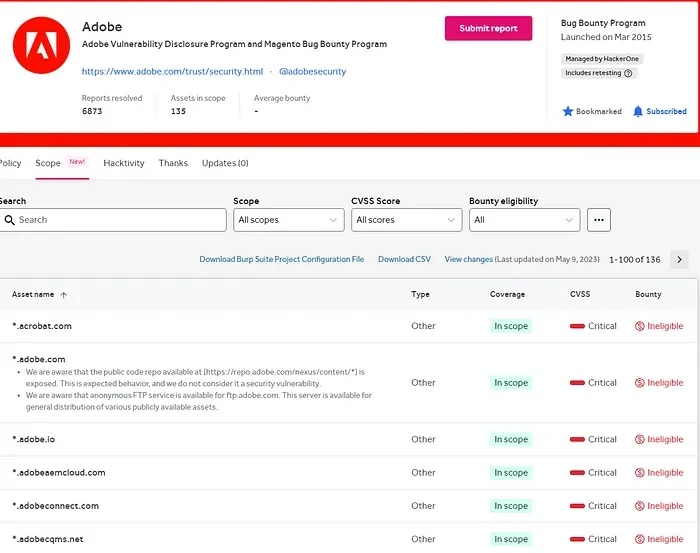
Why start here? Because the program page tells you what you are allowed to test. Without it, you would be poking at systems blindly, and possibly outside the rules.
Step 1: reconnaissance
Reconnaissance (often shortened to recon) is the information-gathering phase. Before touching anything, you find out what the company owns and what it is built with. The researcher says he did some good recon, and that the process itself will be covered in another post, so this write-up does not describe how the domains were collected.
What he did with the domains is the interesting part: he analysed the technologies used to build each target-specific web application. In plain terms, he looked at each site and tried to work out which software was running behind it, the way you might look at a car and work out from the badge and the shape what make and model it is.
He found many different web technologies across Adobe's domains: web servers, domains run by PHP, and domains run by Java. PHP and Java are programming languages commonly used to build websites; the language a site is written in often hints at which products it uses.
The technology that caught his attention was AEM, Adobe Experience Manager.
What AEM is
AEM stands for Adobe Experience Manager. It is a content management solution: software that lets an organisation create, manage and deliver digital experiences across channels such as websites, mobile apps and forms. It is designed to help businesses manage digital content, streamline workflows and personalise customer experiences.
A useful comparison: think of AEM as a very large, very capable filing cabinet plus a publishing desk. Staff put content into the cabinet, edit it, approve it, and the system then serves the approved version to visitors. Because the cabinet holds everything, the tools that open it directly are powerful, and they are meant to be locked.
The researcher lists the components of AEM as follows:
- Content Repository: stores digital assets, content and configurations using Apache Jackrabbit Oak. This is the filing cabinet itself.
- OSGi Framework: enables modular development and extensibility. Think of it as a plug-in system that lets the product be extended piece by piece.
- Authoring Environment: a web-based interface for content creation, editing and workflow management. This is the staff-facing side.
- Dispatcher: a caching and load balancing component that improves performance. Caching means keeping a copy of a page so it can be served faster; load balancing means spreading requests across several machines.
- Publish Environment: serves published content to end-users. This is the visitor-facing side.
- Integration and APIs: integrates with Adobe Marketing Cloud solutions and offers APIs for customisation and integration with external systems. An API (Application Programming Interface) is a way for one piece of software to talk to another, like a waiter taking your order to the kitchen: you do not go into the kitchen yourself, you use the agreed channel.
- Scalability and Deployment: supports horizontal scalability and cloud deployments. Horizontal scalability means adding more machines rather than bigger ones.
This architecture allows AEM to manage and deliver personalised digital experiences across multiple channels.
Step 2: understand the product before attacking it
The researcher states the first thing he does before starting to hunt: he tries to understand how a web application works and what it does, and explores all its features as a regular user first, to better understand its functionality and operations.
This is worth pausing on, because it is the habit that separates a careful tester from someone who just runs a tool. If you know what a normal user sees, you can recognise when you are seeing something a normal user should not see. It is like learning the layout of a building as a visitor before you start checking whether the staff-only doors are actually locked.
Step 3: the finding
While testing paths in the web application, the researcher found that some paths lacked authentication because of a misconfiguration, allowing common users to make changes that should only be possible for granted administrators.
Two terms need unpacking here.
Authentication is the process of proving who you are, usually by logging in with a username and password. A page that lacks authentication can be opened by anyone who knows its address, with no login at all.
A misconfiguration is a setting left in the wrong state. The software itself may be fine; someone set it up in a way that exposes more than intended. The everyday comparison is a house with a good lock that was never turned: the lock works, but the door is open.
The paths he found looked like this:
crx/decrx/de/index.jspcrx/explorer/browser/index.jspcrx/explorer/index.jspcrx/explorer/nodetypes/index.jspcrx/explorer/ui/search.jsp?Path=&Query=
crx/deandcrx/de/index.jsp: CRX DE is the developer environment for the content repository, a place where you can browse and edit the stored content directly.index.jspis simply the default page of that folder, the one you land on when you visit the folder itself.crx/explorer/browser/index.jsp: CRX Explorer is another interface for looking around the repository, and this is its browser view.crx/explorer/index.jsp: the main page of CRX Explorer.crx/explorer/nodetypes/index.jsp: the node types view. A node type describes what kind of item is stored in the repository, similar to a label on a folder saying whether it holds documents, images or something else.crx/explorer/ui/search.jsp?Path=&Query=: the search page of CRX Explorer. The part after the question mark is the query string, the place in a URL where you pass values to the page. HerePathandQueryare two parameters, both left empty in this example. A parameter is a named value you hand to a page, like filling in a field on a form.
Step 4: find a wordlist
Having seen these paths, the researcher had an idea.
A wordlist, in this context, is simply a text file with one candidate path or name per line. Tools can then try each line against a target automatically. It is the difference between knocking on one door and walking down a corridor knocking on every door in turn.
He searched for a wordlist that contains these endpoints and found one: the paths file in the clarkvoss/AEM-List repository on GitHub. GitHub is a website where people publish code and files; a repository is a project folder hosted there.
Step 5: fuzz the paths
He started fuzzing paths and endpoints. Fuzzing means sending many automatically generated or list-based requests to a target and watching the responses for something interesting, such as a page that loads when it should not.
One of the paths found was:
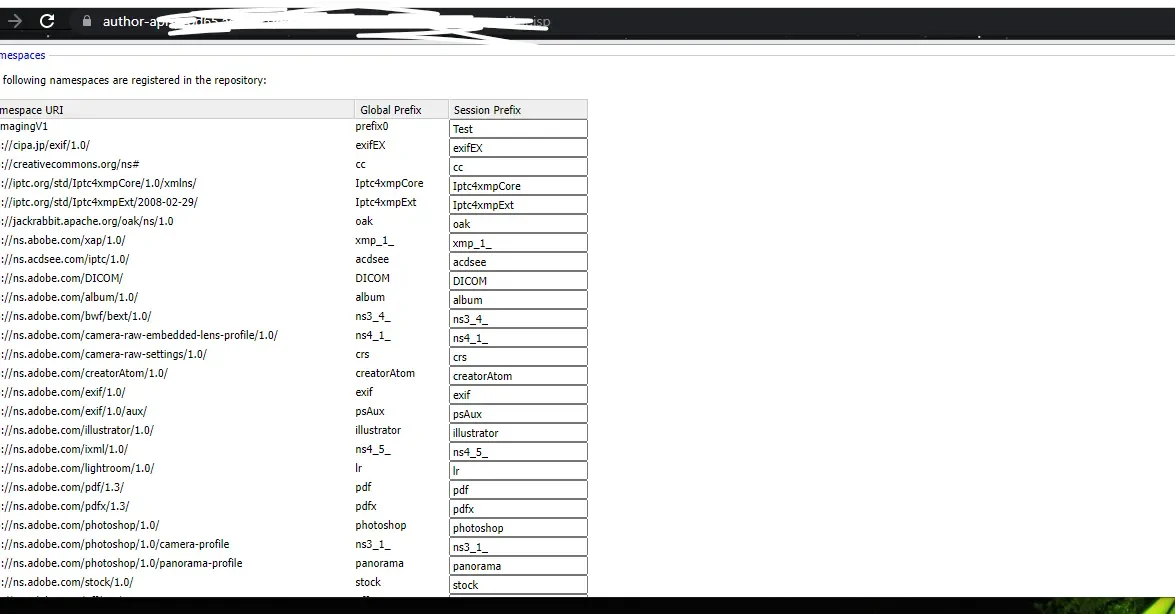
target/crx/explorer/ui/namespace_editor.jsp
targetstands for the host being tested, that is, the address of the site. It is a placeholder, not a literal word to type.crx/explorer/ui/is the folder path inside the AEM installation, the same CRX Explorer area seen earlier.namespace_editor.jspis the specific page: the namespace editor. A namespace, in a content repository, is a way of grouping names so that different parts of the system do not collide, similar to how two people in one office might be distinguished by their department as well as their name.
The researcher captured the result, then reported it.
Step 6: report it
With a reachable administrative page in hand, it was time to report.
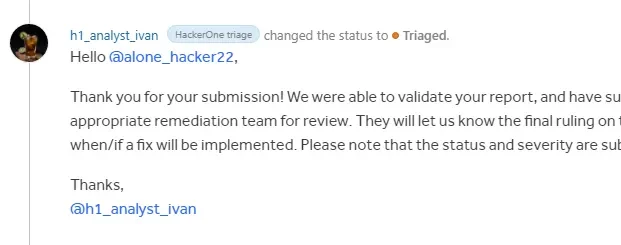
The researcher states the finding was valid.
Why does a reachable page count as a security problem? Because the page is a control panel. If an ordinary visitor can open a control panel meant for administrators, the protection the organisation intended is not there. The researcher's own description of the impact is that the misconfiguration allows common users to make changes that should only be possible for granted administrators. The report does not enumerate which changes, which data or which users were affected beyond that.
Step 7: automate it
Doing this by hand does not scale. The researcher's advice for repeating the work is to automate.
First, detect which targets are running AEM. He points to a nuclei template, aem-cms.yaml, in the projectdiscovery nuclei-templates repository. Nuclei is a scanner that runs small, reusable checks called templates against a target; a template is a recipe describing what to send and what to look for. This particular template checks whether a site is running the AEM content management system.
Second, after detecting the CMS, fuzz all targets with the wordlist. CMS stands for content management system, the general category that AEM belongs to.
Third, he suggests running scanners:
0ang3el/aem-hacker, a tool listed for AEM targets.0ang3el/aem-rce-bundle, another tool listed for AEM targets.
He closes with "happy hunting".
Why this worked, and what to take away
The root cause, as the report describes it, is a misconfiguration: some paths in the web application lack authentication, so common users can reach interfaces that should be restricted to granted administrators. The report does not describe the specific configuration setting involved.
The report does not state what was actually changed after it was accepted.
For a beginner, the transferable lessons are:
- Learn what the product looks like to a normal user before you test it. You cannot spot an exposed admin page if you do not know what an admin page is.
- Administrative paths are worth checking, because they are the ones that matter most if they are open.
- A wordlist plus a scanner turns one lucky guess into a repeatable process.
- Report what you found, clearly, and let the program decide.
Variants to test
These are the same ideas the researcher suggests, phrased as things to try:
- Fuzz the AEM-List
pathswordlist against other AEM instances. A positive result is a response from an administrative path such ascrx/de,crx/explorerorcrx/explorer/ui/namespace_editor.jspthat is served without authentication. - Detect AEM with the nuclei
aem-cms.yamltemplate, then run the wordlist against every detected host. A positive result is any administrative endpoint reachable by an unauthenticated user. - Run the
aem-hackerscanner against detected AEM targets. A positive result is any finding it reports on the target. - Run the
aem-rce-bundlescanner against detected AEM targets.
Glossary
- AEM (Adobe Experience Manager): Adobe's content management product for creating, managing and publishing digital content across websites, apps and forms.
- API (Application Programming Interface): an agreed way for one piece of software to request things from another, without needing to know its internals.
- Authentication: proving who you are, usually by logging in. A page that lacks authentication can be opened without logging in.
- Authoring environment: the staff-facing part of AEM where content is created, edited and approved.
- Bug bounty program: a company's public offer to reward people who find and report security problems in listed systems under stated rules.
- Caching: keeping a copy of something so it can be served again faster.
- CMS (content management system): software for building and running a website's content, of which AEM is one example.
- Content repository: the storage layer holding content, assets and settings; in AEM it is Apache Jackrabbit Oak.
- CRX DE: AEM's developer interface for browsing and editing the content repository directly.
- CRX Explorer: AEM's interface for exploring the content repository, including browsing, node types and search.
- Dispatcher: AEM's caching and load balancing component.
- Endpoint: a specific address on a server that responds to requests, such as a particular page or API path.
- Fuzzing: automatically sending many candidate inputs, often from a wordlist, and watching responses for something unexpected.
- HackerOne: a platform that hosts bug bounty programs and handles reports between companies and researchers.
- Horizontal scalability: handling more load by adding more machines rather than making one machine bigger.
- Java: a programming language commonly used for server-side web applications.
- Load balancing: spreading incoming requests across several machines so no single one is overwhelmed.
- Misconfiguration: a setting left in the wrong state, exposing more than intended even when the software itself is sound.
- Namespace: a grouping of names so that different parts of a system do not collide.
- Nuclei: a scanner that runs small reusable checks called templates against targets.
- OSGi framework: a modular system that lets AEM be extended piece by piece.
- Parameter: a named value passed to a page, usually in the query string of a URL.
- PHP: a programming language commonly used for server-side web applications.
- Publish environment: the part of AEM that serves published content to visitors.
- Query string: the part of a URL after the question mark, carrying parameters and their values.
- Reconnaissance (recon): the information-gathering phase before testing, finding out what a company owns and what it runs.
- Remote code execution (RCE): a situation where an attacker can make a server run code of their choosing.
- Repository (GitHub): a project folder hosted on GitHub containing code or files.
- Scanner: a tool that automatically checks a target for known issues.
- Template (nuclei): a recipe telling a scanner what to send and what response to look for.
- Web server: software that answers requests from browsers and returns web pages.
- Wordlist: a text file with one candidate name or path per line, used by tools to try many possibilities automatically.

