AWS Security Flaw which can grant admin access!
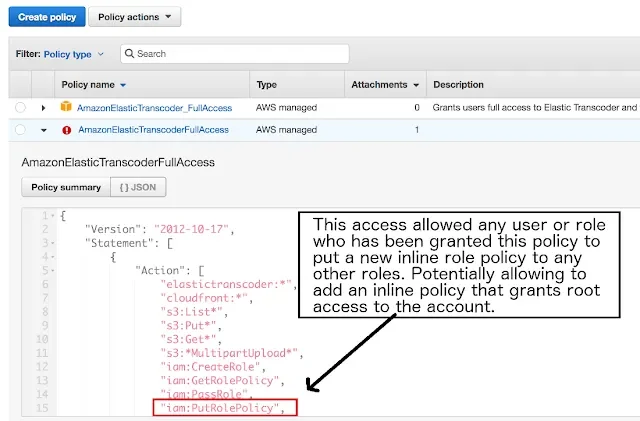
An AWS managed policy, AmazonElasticTranscoderFullAccess, granted the iam:PutRolePolicy permission, allowing a user with that policy to attach an inline policy granting admin access to any IAM role. An attacker with that policy could escalate their own privileges or grant admin access to other roles.
 Published on medium.com
I recently discovered an AWS Managed Policy that potentially allowed granting admin access to self or any other IAM role. This blog-post describes my findings and my interactions with AWS Security team on the same.
The full write-up lives on its author's site
It belongs to its author, so we link to it rather than copy it. The other two tabs are our own rewrites, checked against it.
Context
AWS IAM managed policies are pre-built policies maintained by AWS and attached to IAM users and roles. A managed policy such as AmazonElasticTranscoderFullAccess bundles the permissions a service needs so that customers do not have to write them by hand. The researcher found that one of these AWS-maintained policies granted a permission that let its holder escalate the privileges of other IAM roles, up to full admin.
The account in question was accessed through SSO: users logged in to the AWS account via Okta, and permissions were handed out through IAM roles rather than individual IAM users. The researcher held one such role with limited access.
Setup
The preconditions were modest:
- An AWS account with SSO login through Okta.
- An IAM role assigned to the researcher, intended to give limited access only.
- That role had the AWS managed policy
AmazonElasticTranscoderFullAccessattached, which the researcher did not know at the time.
No special tooling is described. The work was done through the IAM console and the ability to write inline policies.
Finding it
While working with the account, the researcher accidentally discovered that they were able to put any inline policy onto other IAM roles. That looked wrong, because the role was supposed to be limited. To check, the researcher went to the IAM console and reviewed the policies attached to their own role. None of them were related to the IAM service, and the role did not have admin access. Yet the role could grant admin privilege to any other IAM role.
For example, the researcher could add a new inline policy like the following, which grants the target role admin privileges:
{
 “Version”: “2012–10–17”,
 “Statement”: [{
 “Effect”: “Allow”,
 “Action”: “*”,
 “Resource”: “*”
 }]
}
The Effect: Allow with Action: * and Resource: * is the standard full-admin statement. The point is not the statement itself but that a role without IAM-related policies could attach it to another role.
Exploitation
Step 1: Notice the unexpected capability
The researcher observed that they could put an arbitrary inline policy on other IAM roles, despite their own role having no IAM service policies and no admin access.
Step 2: Confirm the gap in the console
They opened the IAM console and checked the policies attached to their role. None related to IAM, and no admin access was present. The capability to modify other roles was therefore coming from somewhere unexpected.
Step 3: Attach an admin inline policy to another role
Using the same capability, the researcher could add an inline policy to any other IAM role. The policy used was the JSON shown above, which grants * on * and therefore admin privileges to the role it is attached to.
Step 4: Report to AWS
The researcher sent the findings to the AWS security team on 19 March 2018. The team asked for more details: which IAM role was involved and detailed reproduction steps. The researcher followed up with the requested details.
Step 5: AWS identifies the cause
The AWS security team member acknowledged the issue and explained the cause:
“I've reviewed this, and I've found out why you're able to add an inline policy, the role you are using has the managed policy “AmazonElasticTranscoderFullAccess” attached. This grants (among other things) the “iam:PutRolePolicy” permission, which is what allows you to attach an inline policy to the role. I've reached out to the Elastic Transcoder team to review if this is necessary, and we'll take appropriate action as required.”
So the AWS managed policy AmazonElasticTranscoderFullAccess granted iam:PutRolePolicy. That permission is what allowed the researcher to attach an inline policy to a role. The policy was not related to IAM, but it allowed changing access on other IAM roles.
Step 6: Follow up and coordinate disclosure
The researcher mailed AWS on 3 April 2018 asking for details on any action being taken. The security team member replied:
“My apologies for the delay in the response! I'll check up on this and update you before the end of the week.”
On 6 April 2018 the team member wrote:
“The ETS team is in the processing of reviewing their managed policy to see how they can better scope the permissions to narrow down the granted access, and to ensure that scenarios like the one you reported are no longer possible. Once they have finalised a new policy, we'll push out the update and it will be visible in the managed policies for the service. Thank you again for your report!”
The researcher then said they wanted to do a responsible disclosure. The team member responded:
“The service team proposed a change to correct the issue that you reported but as this is a complex issue we are carefully considering the side effects of that change. If you would not mind, please send us a draft copy of your disclosure document so we can review it prior to publication. We will, of course, let you know when the fix is complete.”
Step 7: Publication after the fix
The researcher published the blog after sharing a draft with AWS and after AWS sent an email notification to all users of the old policy. The notification read:
Subject: Managed Policy AmazonElasticTranscoderFullAccess Has Been Replaced [AWS Account: XXXXXXXXXXXX]* Hello, Your AWS account has one or more IAM users or roles currently using the “AmazonElasticTranscoderFullAccess” managed policy. We have released a new managed policy with improved access restrictions. Existing IAM users and roles can continue to use the previous policy without interruption, however new IAM users and roles will use the new replacement policy. For any previous IAM users and roles using the original managed policy described above, we strongly encourage you to update those users and roles to use the new replacement policy called “AmazonElasticTranscoder_FullAccess” (note the underscore difference). This new managed policy has the improved access restrictions as mentioned. Naturally, with improved access restrictions, the new policy does not include all the permissions that are included in the original policy. Before you migrate any user or role to the new replacement policy, we recommend you review their differences in the Policy section of AWS IAM console. If you require one or more of the removed permissions, please add them separately to any user or role. If you require assistance or more information, please contact AWS Support:https://aws.amazon.com/support. Sincerely, Amazon Web Services
Root cause
The root cause was an over-broad AWS managed policy. AmazonElasticTranscoderFullAccess included iam:PutRolePolicy among its allowed actions, even though the policy was for the Elastic Transcoder service and not for IAM. iam:PutRolePolicy lets the holder attach an inline policy to a role, and because the inline policy can contain any statement, the holder can grant that role any permission, including full admin.
The researcher's own role had no IAM-related policies and no admin access, so the capability came from the managed policy itself. The existing defence, the separation between the role's intended limited scope and IAM administration, did not hold because the managed policy silently carried an IAM write permission.
Impact
Any principal holding the AmazonElasticTranscoderFullAccess managed policy could grant admin access, or any other access, to any other IAM role. That is privilege escalation from a limited role to full admin on other roles. The researcher notes that the policy was not related to IAM, yet it allowed changing access to other IAM roles.
The impact applies to accounts where the old managed policy is still attached to users or roles. AWS's notification says existing users and roles can continue to use the previous policy without interruption.
Fix
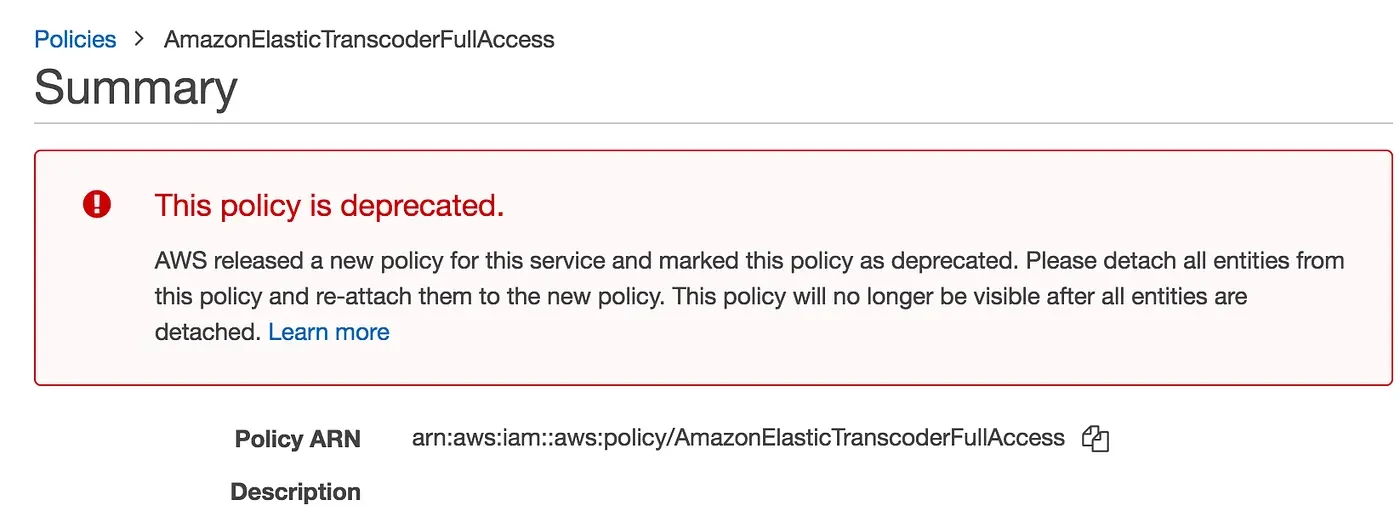
AWS deprecated AmazonElasticTranscoderFullAccess and created a replacement named AmazonElasticTranscoder_FullAccess, with an underscore added to the name. The new policy does not include iam:PutRolePolicy in its allowed actions, which should resolve the issue reported. AWS emailed users of the old policy to migrate, and warned that the new policy does not include all the permissions of the original, so removed permissions must be added separately where needed.
The screenshots of the deprecated policy show the iam:PutRolePolicy permission and the red deprecation icon:
Users still on the old managed policy should migrate to the replacement and review the differences in the IAM console.
Variants to test
- Enumerate every AWS managed policy attached to a role and check for IAM write actions such as
iam:PutRolePolicy,iam:AttachRolePolicy,iam:CreatePolicyVersionoriam:PassRole. A positive result is a service policy that carries an IAM write permission unrelated to that service. - For each such permission, attempt to attach an inline admin policy to a separate role and confirm the role gains the new permissions. A positive result is a role that can modify another role's policy without holding an IAM policy of its own.
- Check custom policies copied from AWS managed policies for the same over-broad grants. A positive result is a customer-managed policy that includes
iam:PutRolePolicyalongside unrelated service permissions. - Review accounts that have not migrated from deprecated managed policies. A positive result is a user or role still attached to
AmazonElasticTranscoderFullAccess.
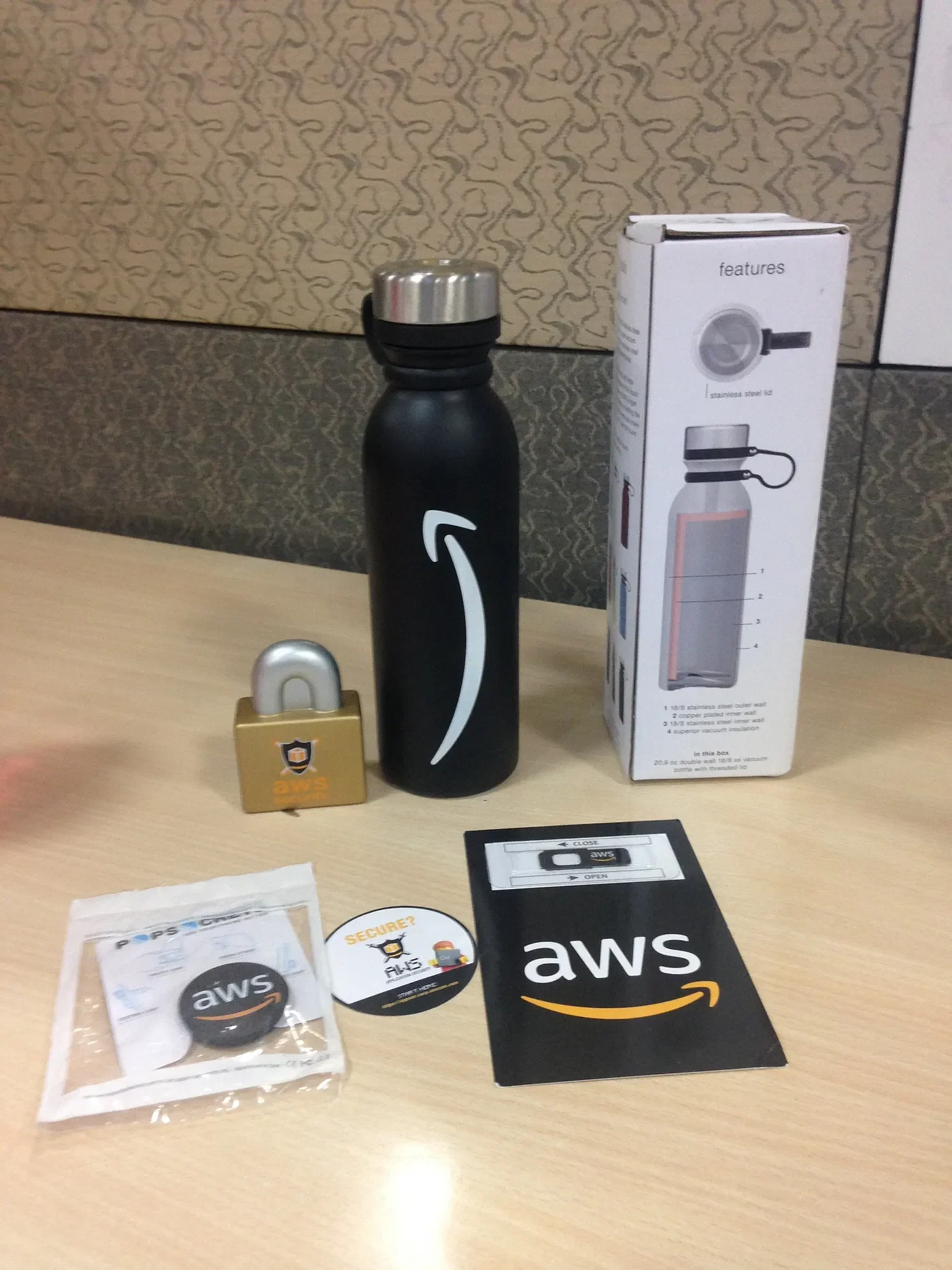
As a token of appreciation for the responsible disclosure, the AWS security team sent a water bottle, a web cam cover, a popsocket and a lock sponge.
What happened, in plain words
A security researcher found a mistake in a ready-made permission bundle that Amazon Web Services (AWS) hands out to its customers. That bundle was meant to let people use one particular AWS service, a video processing tool called Elastic Transcoder. Instead, it quietly carried an extra permission that let anyone holding it grant admin access, or any other access, to themselves or any other IAM role. The researcher reported it, AWS eventually replaced the bundle with a corrected one, and the researcher disclosed the findings after giving AWS 60 days to address the issue.
To follow the story you only need to understand a handful of ideas, which I explain as they come up. The most important one is that in cloud computing you do not usually log in as a single all-powerful user. You log in as a role, and a role is a named set of permissions, like a keycard that opens some doors and not others.
The building blocks, explained from zero
Before the details, here is the vocabulary the rest of the article uses.
- AWS (Amazon Web Services): Amazon's collection of rented computing services. Instead of buying servers, companies rent them by the hour over the internet.
- IAM (Identity and Access Management): the part of AWS that decides who is allowed to do what. Think of it as the building's security desk: it issues keycards and keeps the list of which card opens which door.
- IAM user: a named identity for a person or program, with its own long-term credentials.
- IAM role: an identity that is not tied to one person. You assume a role, and while you are wearing it you have exactly the permissions attached to it. It is like a temporary badge you pick up at reception: it opens certain doors, and when you hand it back you lose those permissions.
- Policy: a document, written in JSON (a plain text format for structured data), that lists what is allowed or denied. A policy is the actual text printed on the keycard's magnetic strip.
- Managed policy: a policy that AWS itself writes and maintains, so customers do not have to. AWS keeps a library of these, one per service, bundling the permissions that service normally needs.
- Inline policy: a policy written directly onto a single user or role, rather than stored in the shared library. It is like a handwritten note taped to one specific keycard.
- SSO (Single Sign-On): logging in once with a company account and then being let into many systems without typing a separate password for each. Here, staff logged in to AWS through a service called Okta.
- Okta: a third-party service that companies use to manage logins and hand out access.
- Admin access: permission to do essentially everything in the account. In AWS, admin is powerful but is not the same as the root account, which has a few extra privileges that even admin users do not have.
- Privilege escalation: a security flaw where someone with modest permissions finds a way to obtain greater ones. The everyday comparison is a junior employee whose staff card somehow opens the server room.
- Broken authorization: the general name for this class of bug. Authentication asks who are you; authorization asks what are you allowed to do. Broken authorization means the second question is answered wrongly.
- API: the set of commands one program uses to talk to another. When you click a button in a web console, the console is really sending an API request behind the scenes, much like ordering from a menu rather than walking into the kitchen.
- Console: the graphical website where you click around to manage AWS.
- Deprecated: officially marked as outdated and discouraged, usually because something better has replaced it. The old thing often keeps working for a while, which is exactly the danger here.
- Responsible disclosure: telling the vendor about a security flaw privately, giving them time to fix it, and only then publishing the details.
The setup
For a particular project, the team was using SSO for AWS account login through Okta. Permissions were handed to people through IAM roles rather than individual IAM users. The researcher held one of those roles, and it was supposed to give limited access only.
The preconditions were modest:
- An AWS account with SSO login through Okta.
- An IAM role assigned to the researcher, intended to give limited access only.
- That role had the AWS managed policy
AmazonElasticTranscoderFullAccessattached, which the researcher did not know at the time.
No special tooling is described. The work was done through the IAM console and the ability to write inline policies.
Finding it
While working with the account, the researcher accidentally discovered that they were able to put any inline policy onto other IAM roles. That looked wrong, because the role was supposed to be limited. To check, the researcher went to the IAM console and reviewed the policies attached to their own role. None of them were related to the IAM service, and the role did not have admin access. Yet the role could grant admin privilege to any other IAM role.
Why does that matter? If you can write a policy onto another role, you can write any policy onto it, including one that says "allow everything". You do not need to be an administrator yourself; you only need the ability to edit someone else's keycard.
For example, the researcher could add a new inline policy like the following, which grants the target role admin privileges:
{
 “Version”: “2012–10–17”,
 “Statement”: [{
 “Effect”: “Allow”,
 “Action”: “*”,
 “Resource”: “*”
 }]
}
Line by line, in plain words:
Versionnames the version of the policy language being used. It is a label, not a date you need to act on.Statementis the list of rules. Here there is only one rule, wrapped in square brackets.Effect: Allowsays this rule grants something rather than denies it.Action: *means every possible action. The asterisk is a wildcard, like "any item on the menu".Resource: *means every possible object in the account. Together with the previous line, this is the standard full-admin statement: do anything to anything.
The point is not the statement itself but that a role without IAM-related policies could attach it to another role.
Exploitation, step by step
Step 1: Notice the unexpected capability
The researcher observed that they could put an arbitrary inline policy on other IAM roles, despite their own role having no IAM service policies and no admin access. The reason to pause here is that a limited role should not be able to edit other roles at all. Something was granting that ability invisibly.
Step 2: Confirm the gap in the console
They opened the IAM console and checked the policies attached to their role. None related to IAM, and no admin access was present. The capability to modify other roles was therefore coming from somewhere unexpected. This step matters because it rules out the obvious explanation: the researcher was not simply an admin who had forgotten.
Step 3: Attach an admin inline policy to another role
Using the same capability, the researcher could add an inline policy to any other IAM role. The policy used was the JSON shown above, which grants * on * and therefore admin privileges to the role it is attached to. In everyday terms: the researcher could not open the vault, but could rewrite the label on someone else's key so that it opened the vault.
Step 4: Report to AWS
The researcher sent the findings to the AWS security team on 19 March 2018. The team asked for more details: which IAM role was involved and detailed reproduction steps. The researcher followed up with the requested details. Reproduction steps are simply the exact sequence of clicks and inputs that lets someone else see the same behaviour, so the vendor can confirm the bug rather than guess.
Step 5: AWS identifies the cause
The AWS security team member acknowledged the issue and explained the cause:
“I've reviewed this, and I've found out why you're able to add an inline policy, the role you are using has the managed policy “AmazonElasticTranscoderFullAccess” attached. This grants (among other things) the “iam:PutRolePolicy” permission, which is what allows you to attach an inline policy to the role. I've reached out to the Elastic Transcoder team to review if this is necessary, and we'll take appropriate action as required.”
So the AWS managed policy AmazonElasticTranscoderFullAccess granted iam:PutRolePolicy. That permission is what allowed the researcher to attach an inline policy to a role. The policy was not related to IAM, but it allowed changing access on other IAM roles.
iam:PutRolePolicy is worth spelling out. It is one specific action in the IAM service, and its name says what it does: put a policy onto a role. Whoever holds it can write a permission document onto a role. If that document can say "allow everything", then the holder can create an all-powerful role.
Step 6: Follow up and coordinate disclosure
The researcher mailed AWS on 3 April 2018 asking for details on any action being taken. The security team member replied:
“My apologies for the delay in the response! I'll check up on this and update you before the end of the week.”
On 6 April 2018 the team member wrote:
“The ETS team is in the processing of reviewing their managed policy to see how they can better scope the permissions to narrow down the granted access, and to ensure that scenarios like the one you reported are no longer possible. Once they have finalised a new policy, we'll push out the update and it will be visible in the managed policies for the service. Thank you again for your report!”
The researcher then said they wanted to do a responsible disclosure. The team member responded:
“The service team proposed a change to correct the issue that you reported but as this is a complex issue we are carefully considering the side effects of that change. If you would not mind, please send us a draft copy of your disclosure document so we can review it prior to publication. We will, of course, let you know when the fix is complete.”
This back-and-forth is the heart of responsible disclosure. The researcher could have published immediately, but publishing a working escalation path before a fix exists would hand it to attackers. Instead the researcher waited, and AWS asked to see the draft first so it could check that nothing in it made the problem worse.
Step 7: Publication after the fix
The researcher published the blog after sharing a draft with AWS and after AWS sent an email notification to all users of the old policy. The notification read:
Subject: Managed Policy AmazonElasticTranscoderFullAccess Has Been Replaced [AWS Account: XXXXXXXXXXXX]* Hello, Your AWS account has one or more IAM users or roles currently using the “AmazonElasticTranscoderFullAccess” managed policy. We have released a new managed policy with improved access restrictions. Existing IAM users and roles can continue to use the previous policy without interruption, however new IAM users and roles will use the new replacement policy. For any previous IAM users and roles using the original managed policy described above, we strongly encourage you to update those users and roles to use the new replacement policy called “AmazonElasticTranscoder_FullAccess” (note the underscore difference). This new managed policy has the improved access restrictions as mentioned. Naturally, with improved access restrictions, the new policy does not include all the permissions that are included in the original policy. Before you migrate any user or role to the new replacement policy, we recommend you review their differences in the Policy section of AWS IAM console. If you require one or more of the removed permissions, please add them separately to any user or role. If you require assistance or more information, please contact AWS Support:https://aws.amazon.com/support. Sincerely, Amazon Web Services
The account number in the subject line is blanked out in the message as published, which is why it appears as a row of X characters.
Root cause
The root cause was an over-broad AWS managed policy. AmazonElasticTranscoderFullAccess included iam:PutRolePolicy among its allowed actions, even though the policy was for the Elastic Transcoder service and not for IAM. iam:PutRolePolicy lets the holder attach an inline policy to a role, and because the inline policy can contain any statement, the holder can grant that role any permission, including full admin.
The researcher's own role had no IAM-related policies and no admin access, so the capability came from the managed policy itself. The existing defence, the separation between the role's intended limited scope and IAM administration, did not hold because the managed policy silently carried an IAM write permission.
A useful comparison is a toolbox sold for fixing bicycles that, without saying so, also contains the master key to the building. Nobody reading the label would expect it, and the person using the toolbox would never know unless they tried the key.
Impact
Any principal holding the AmazonElasticTranscoderFullAccess managed policy could grant admin access, or any other access, to any other IAM role. That is privilege escalation from a limited role to full admin on other roles. The researcher notes that the policy was not related to IAM, yet it allowed changing access to other IAM roles.
The impact applies to accounts where the old managed policy is still attached to users or roles. AWS's notification says existing users and roles can continue to use the previous policy without interruption.
Fix
AWS deprecated AmazonElasticTranscoderFullAccess and created a replacement named AmazonElasticTranscoder_FullAccess, with an underscore added to the name. The new policy does not include iam:PutRolePolicy in its allowed actions, which should resolve the issue reported. AWS emailed users of the old policy to migrate, and warned that the new policy does not include all the permissions of the original, so removed permissions must be added separately where needed.
The screenshots of the deprecated policy show the iam:PutRolePolicy permission and the red deprecation icon:
Users still on the old managed policy should migrate to the replacement and review the differences in the IAM console.
Variants to test
If you want to look for the same kind of mistake in your own account, these are the checks to run. Each one is a question with a clear yes or no answer.
- Enumerate every AWS managed policy attached to a role and check for IAM write actions such as
iam:PutRolePolicy,iam:AttachRolePolicy,iam:CreatePolicyVersionoriam:PassRole. A positive result is a service policy that carries an IAM write permission unrelated to that service. In plain terms: read the label on every keycard and look for one that mentions the security desk. - For each such permission, attempt to attach an inline admin policy to a separate role and confirm the role gains the new permissions. A positive result is a role that can modify another role's policy without holding an IAM policy of its own.
- Check custom policies copied from AWS managed policies for the same over-broad grants. A positive result is a customer-managed policy that includes
iam:PutRolePolicyalongside unrelated service permissions. Copies inherit the mistakes of what they were copied from. - Review accounts that have not migrated from deprecated managed policies. A positive result is a user or role still attached to
AmazonElasticTranscoderFullAccess.
As a token of appreciation for the responsible disclosure, the AWS security team sent a water bottle, a web cam cover, a popsocket and a lock sponge.
Glossary
- Admin access: permission to do almost everything in an AWS account, though not identical to the root account.
- API: the set of commands one program uses to talk to another; the console uses it behind the scenes.
- AWS: Amazon Web Services, Amazon's collection of rented cloud computing services.
- Broken authorization: a flaw where a system lets someone do something they should not be allowed to do, even though it knows who they are.
- Console: the graphical website used to manage AWS by clicking.
- Deprecated: officially marked as outdated and discouraged, often while still working.
- Elastic Transcoder: the AWS service for processing video files, which the affected policy was written for.
- IAM: Identity and Access Management, the AWS component that decides who may do what.
- IAM role: an identity you assume temporarily, carrying a defined set of permissions.
- Inline policy: a policy written directly onto one user or role rather than stored in the shared library.
- JSON: a plain text format for structured data, used to write policies.
- Managed policy: a policy written and maintained by AWS and attached to users or roles.
- Okta: a third-party service companies use to manage logins and access.
- Policy: a document listing what is allowed or denied.
- Privilege escalation: a flaw that lets someone with modest permissions obtain greater ones.
- Responsible disclosure: reporting a flaw privately, giving the vendor time to fix it, then publishing.
- Root account: the original owner account in AWS, which has a few privileges that admin users do not have.
- SSO (Single Sign-On): logging in once and being let into several systems without separate passwords.
- Wildcard: the asterisk character, meaning "any" or "all" in a policy.

