Laravel debug mode left on at Zouikwatzeggen.nl leaks admin credentials & potentially submitted reports of improper behaviour at Amsterdam University Medical Centers
The Laravel debug bar was left enabled on the API server, exposing all recent requests including submitted reports and administrator login credentials. An attacker could read sensitive reports and obtain admin access without authentication.
 Published on medium.com
Let's have a closer look at the app that allows one to report improper behaviour at work; the #zouikwatzeggen-app (translated: ‘#wouldIsaysomething-app’). Is that app safe to use?
The full write-up lives on its author's site
It belongs to its author, so we link to it rather than copy it. The other two tabs are our own rewrites, checked against it.
Context
The target is the #zouikwatzeggen app (translated: ‘#wouldIsaysomething-app’), published by Amsterdam UMC. The app raises awareness about improper behaviour at work and shows how to make it discussable. Its central feature is a report button that lets an employee report undesirable behaviour, anonymously, directly to the right person. The app is part of a larger package of e-learning about preventing undesirable behaviour and workshops on the subject. The announcement shown in the report says the app is available to all 15k employees.
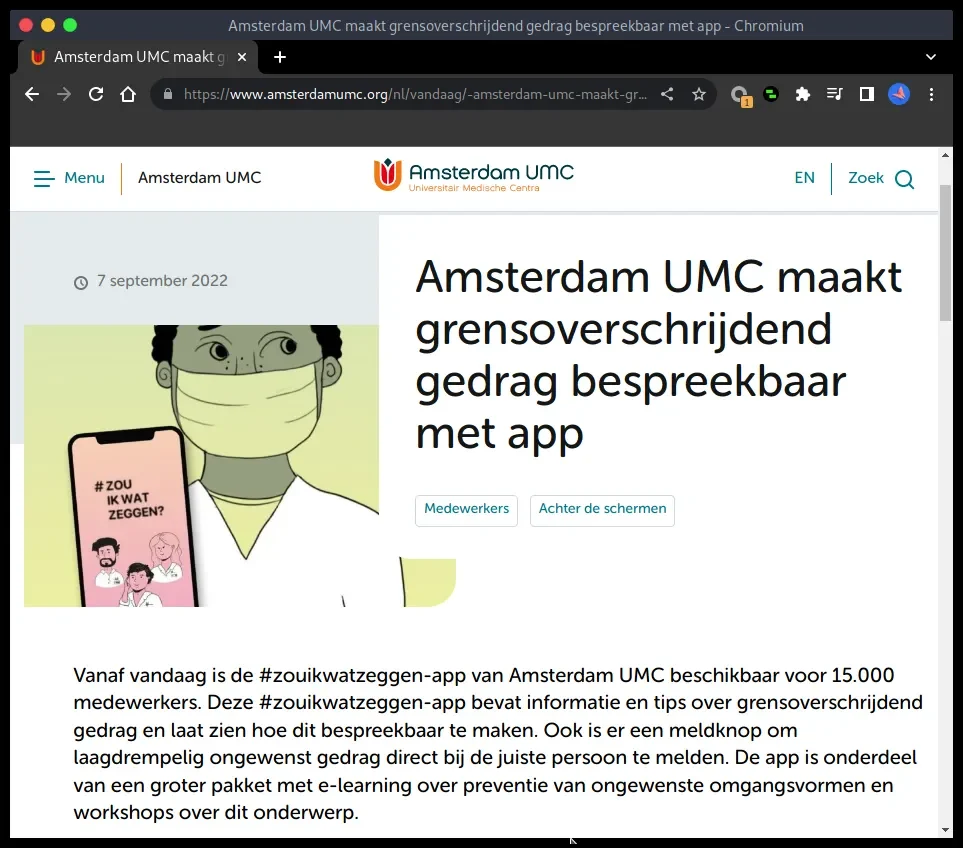
The release announcement of the app “#zouikwatzeggen”, now available to all 15k employees.
The researcher's interest was in the ‘sending reports using the app’ functionality: how does it work, does some form relay data to an email, what parameters are involved, where is the supporting code hosted and is that server properly secured? The app handles highly sensitive data, so the question was whether the app itself is as safe as possible.
Setup
The starting point was the Android app, which can be downloaded and patched so that its traffic can be intercepted. All apps use HTTPS, and patching disables those certificate checks; after the patch the app's traffic can be routed through Burp Suite and inspected or manipulated.
There are multiple ways to obtain the APK installation file:
- Install the app on an Android phone from the Google Play store and use the method described on Stack Overflow (how do I get an APK file from an Android device).
- Trust a third party download website and download the APK, for example the apkpure.com deeplink for
nl.frismedia.zouikwatzeggen.
Finding it
Intercepting the app's traffic
After obtaining the APK, the researcher used APK-MITM to patch it so that it no longer checks HTTPS certificates and accepts the Burp-enforced certificate. With apk-mitm installed, the patch is applied with:
apk-mitm \#Zouikwatzeggen_2.2.2_Apkpure.apk
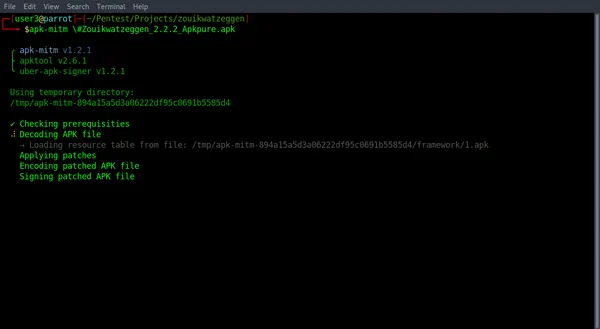
Patching the APK file using apk-mitm so we can intercept the internet traffic
The patched app is then installed on the mobile device using ADB. The report recommends scrcpy to capture the phone screen on the desktop, which is handy when both screens need to be captured at the same time.
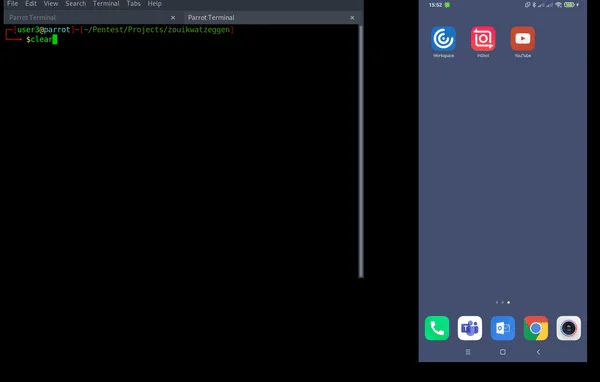
Install the patched APK on our test device.
The phone then has to be prepared to work together with Burp Suite. If intercepting traffic still fails, the Burp Suite certificate can be injected directly into the patched APK:
apk-mitm \#Zouikwatzeggen_2.2.2_Apkpure.apk --certificate cacert.pem
The cacert.pem file is created by running:
curl --proxy http://[redacted]:8080 -o cacert.der http://burp/cert && openssl x509 -inform DER -in cacert.der -out cacert.pem
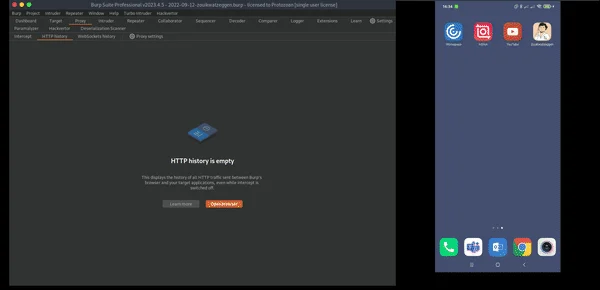
Interception of the app traffic works after injecting the Burp Certificate in the APK. On the left you see the request made by the app.
With interception working, the traffic between the app and its backend systems can be read. Submitting a new report produces an interceptable request.
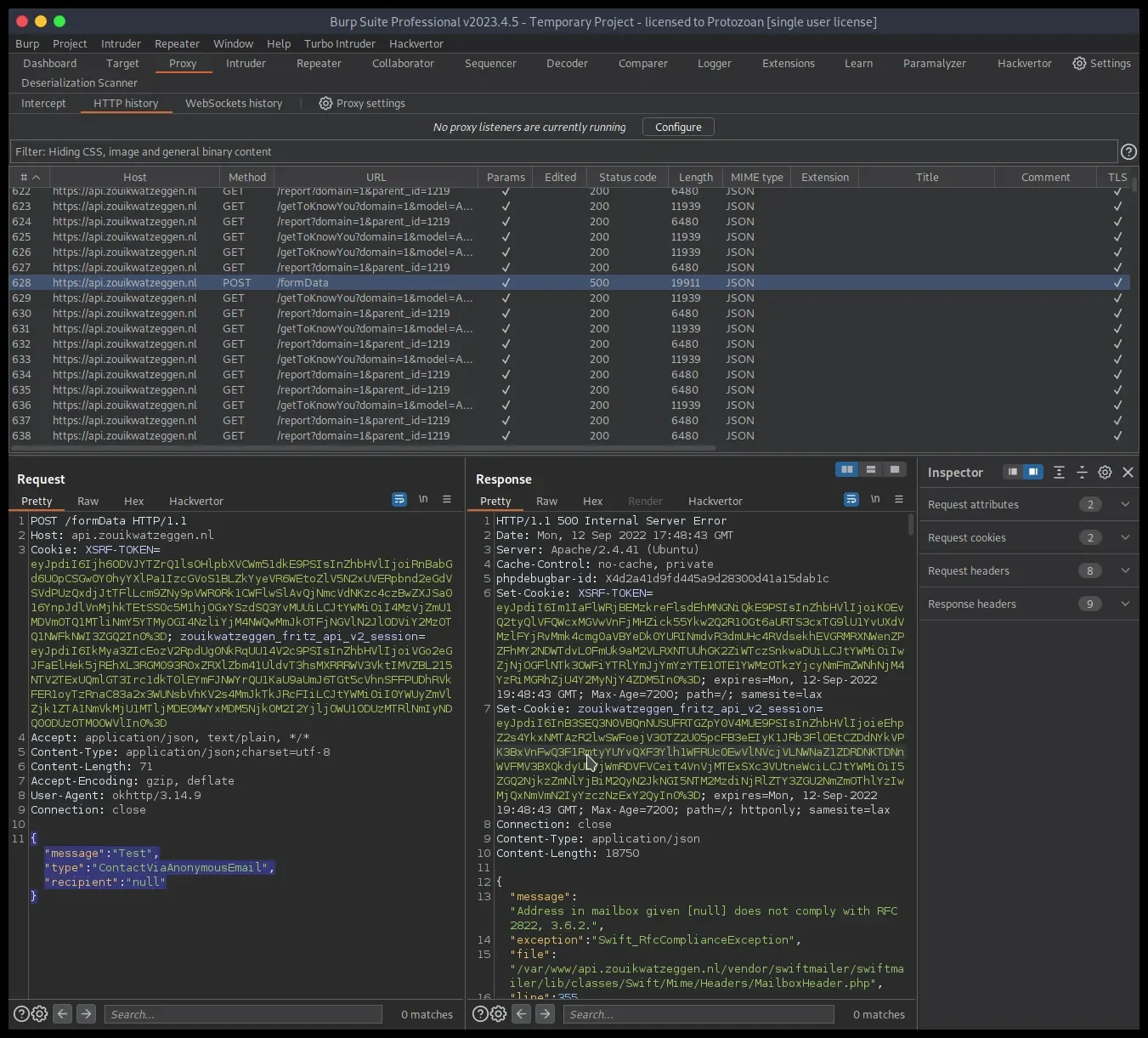
Request send to the server when submitting a new report. It returns an error message including a stack trace.
A broken submit and a very detailed error
The report submission was broken and the app returned an error. Looking at the request, the cause is visible: "recipient”: “null". The developer forgot to set the email address when sending the form.
More importantly, the error that came back was extremely detailed: it reflected the exact source code file and line of code that triggered the error. That suggested the functionality had not been properly tested before publication and that debug messages had been left on.
Exploitation
Step 1: fix the request and send mail to an arbitrary recipient
The researcher first tried to repair the request by injecting an own email address as recipient:
POST /formData HTTP/1.1
Host: api.zouikwatzeggen.nl
Cookie: XSRF-[redacted] [redacted]=[redacted]
Accept: application/json, text/plain, */*
Content-Type: application/json;charset=utf-8
Content-Length: 112
Accept-Encoding: gzip, deflate
User-Agent: okhttp/3.14.9
Connection: close

{"message":"https://test.nl <h1>test</h1>","type":"ContactViaAnonymousEmail","recipient":"[redacted]"}
The body carries the report text in message, a type of ContactViaAnonymousEmail and the recipient address. The message field also shows that HTML in the message is passed through as-is.
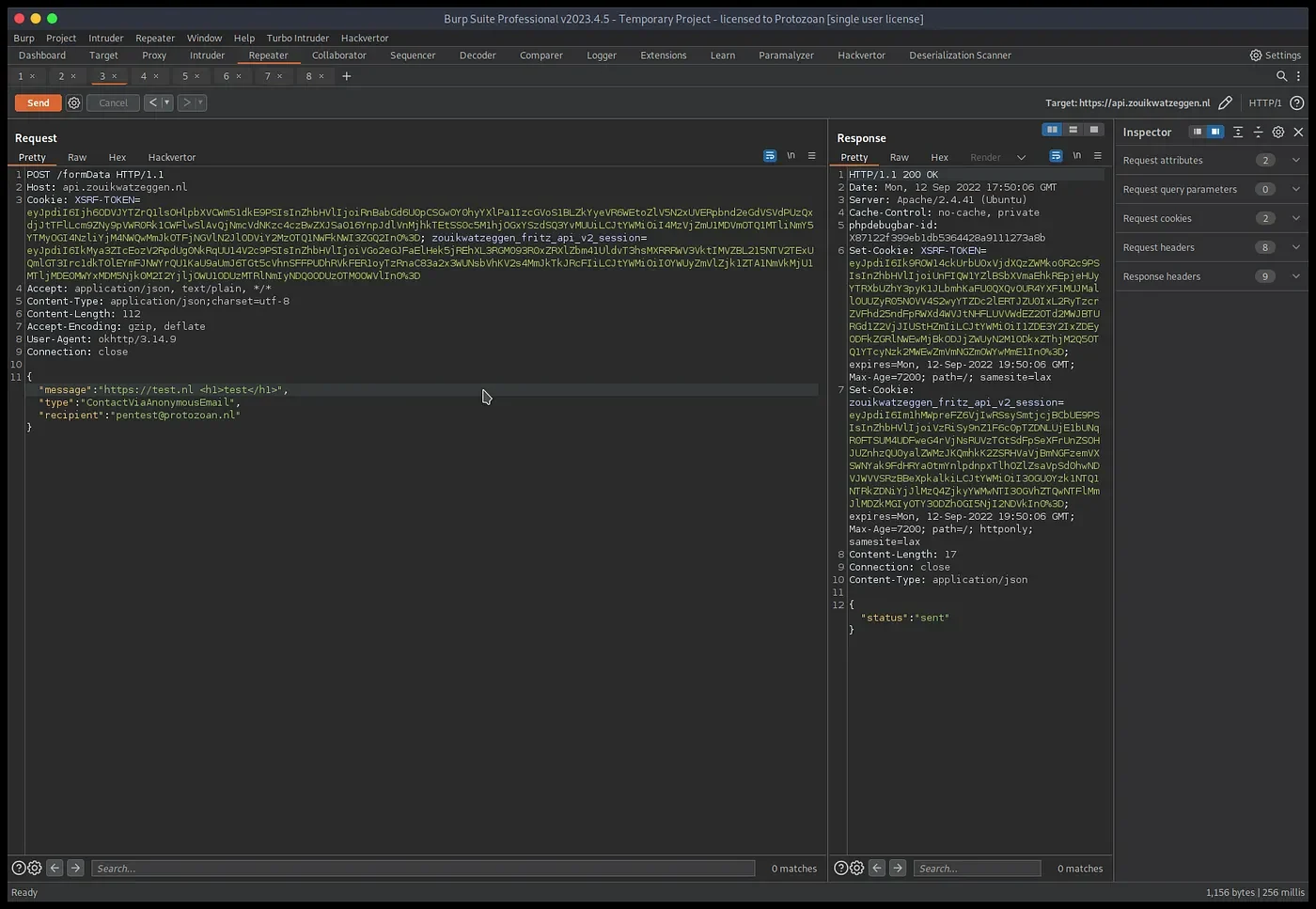
Injecting our own email as the recipient.
A few seconds later the email arrived.
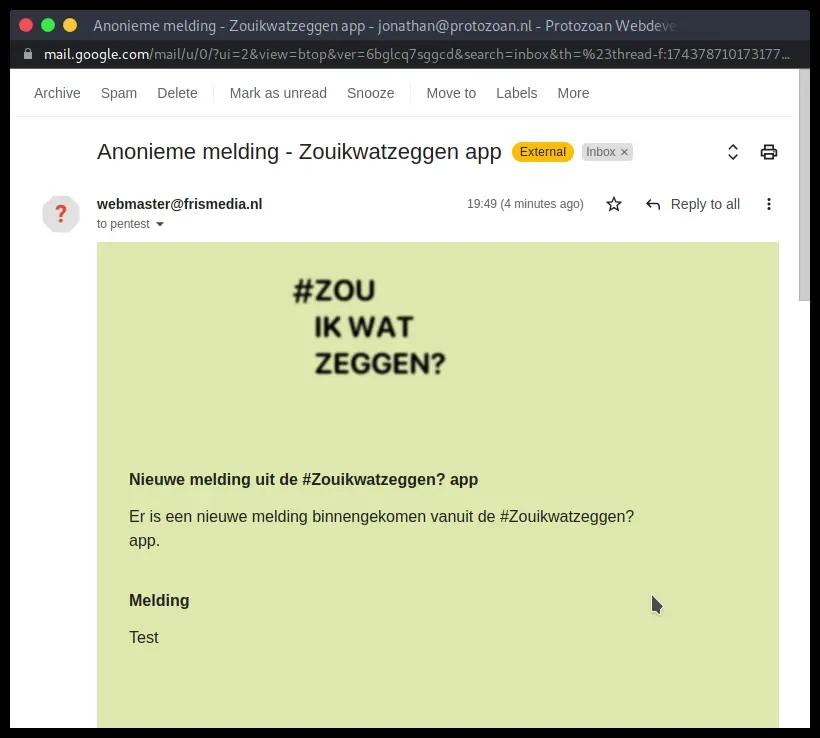
Bug 1: Being able to send emails from the #zouikwatzeggen-app to anyone
This is the first bug: email spoofing. The impact is limited, but the app can be used to send emails with a custom text to anyone, which is handy for phishing campaigns or simply to spam users on the internet.
Step 2: read the response headers and spot the debug bar
The headers returned on the email form submit were:
HTTP/1.1 200 OK
Date: Mon, 12 Sep 2022 17:50:06 GMT
Server: Apache/2.4.41 (Ubuntu)
Cache-Control: no-cache, private
phpdebugbar-id: [redacted]
Set-Cookie: XSRF-[redacted] expires=Mon, 12-Sep-2022 19:50:06 GMT; Max-Age=7200; path=/; samesite=lax
Set-Cookie: [redacted]=[redacted]; expires=Mon, 12-Sep-2022 19:50:06 GMT; Max-Age=7200; path=/; httponly; samesite=lax
Content-Length: 17
Connection: close
Content-Type: application/json

{"status":"sent"}
The phpdebugbar-id header points to a tool used by PHP developers to debug problems on deployed applications. That explains the extensive error messages: the debug mode of the application was left on, and it includes a PHP debug bar.
Step 3: trigger the debug bar UI in a desktop browser
To reach the debug bar user interface on a desktop, an easy route is to trigger an error by visiting one of the endpoints the app uses. The researcher picked a URL from the Burp history and opened it in the browser:
https://api.zouikwatzeggen.nl/getToKnowYou?domain=1&model=App%5CCms%5CModels%[redacted]
The Holxder piece is a typo that triggers an error.
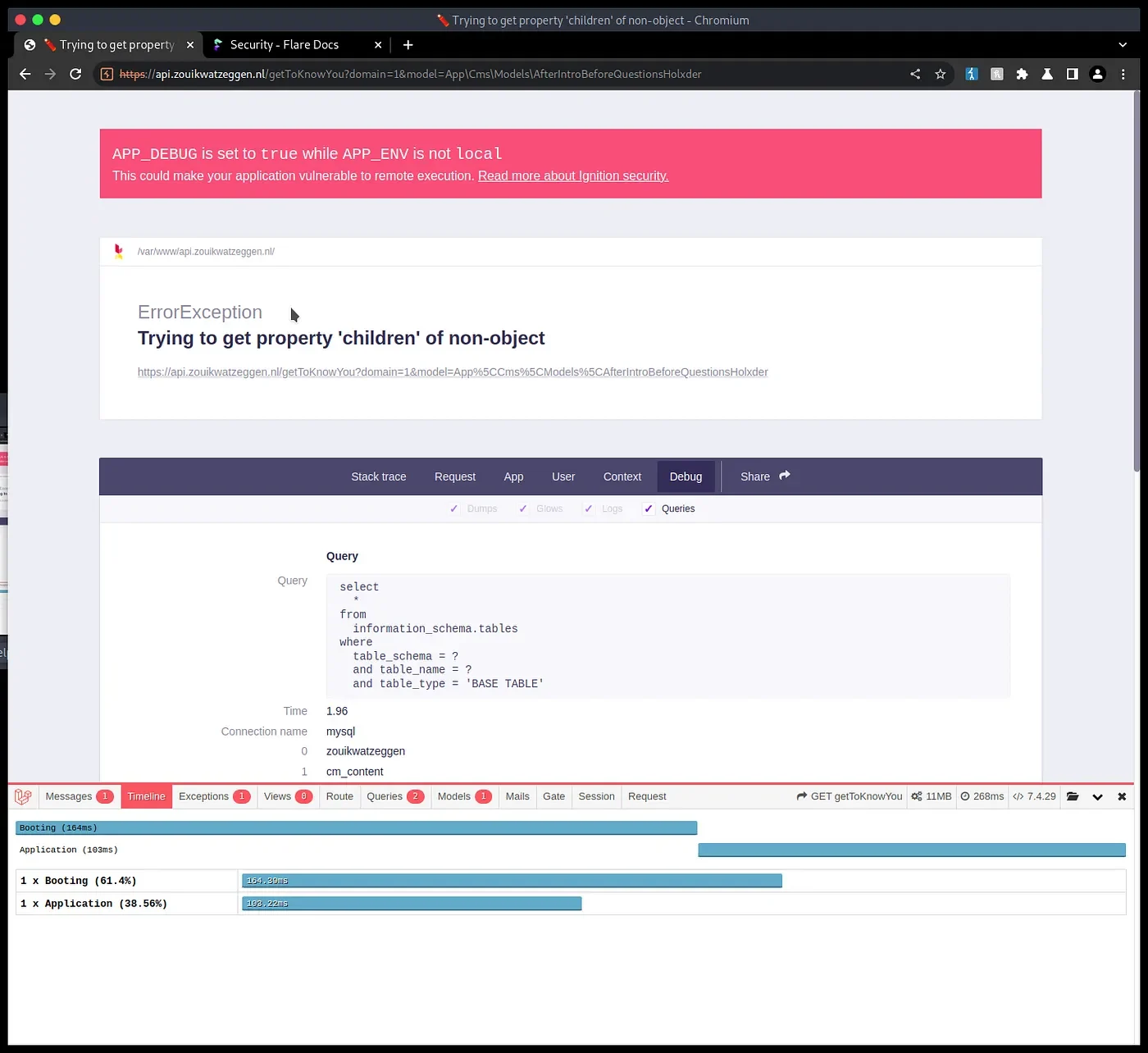
We got access to the debugbar!
This is bug number 2: exposure of the PHP debug bar. It gives insight into the code behind the app, its settings and active user sessions and their data.
Step 4: prove the impact on submitted reports
A bug like this needs a proof of concept that everyone in the organisation can understand, because telling a board ‘PHP Debug Bar is left on!’ will not land. The researcher also wanted to limit the damage done while proving it, so the question became: can one of our own submitted reports on inappropriate behaviour be leaked through this debug bar?
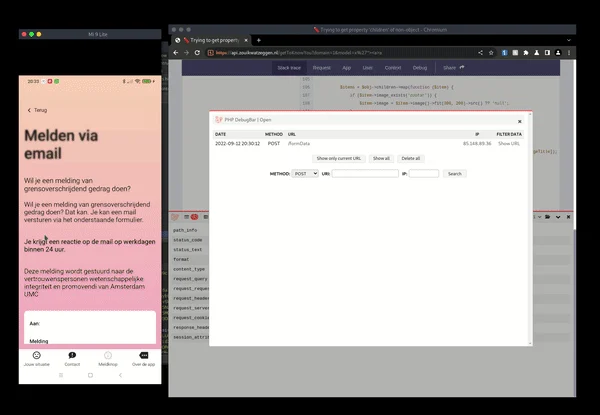
On the left our mobile phone that just sent a report, on the right the exposed debugbar. In grey Burp Suite used to search for the leakage of our just sent report. In blue we mark the actual leak.
The debug bar allows one to list the latest requests of all visitors to the server, including the submission of inappropriate behaviour reports. The debug bar UI itself does not reflect the exact details of those reports, but when the debug bar traffic is intercepted (for example with Burp Browser) it reflects all the report details.
- Open the Request modal.
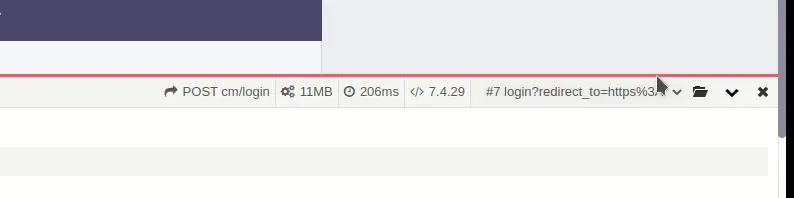
Press the Folder icon to open the model of active sessions
- Open the incoming POST request from the app.
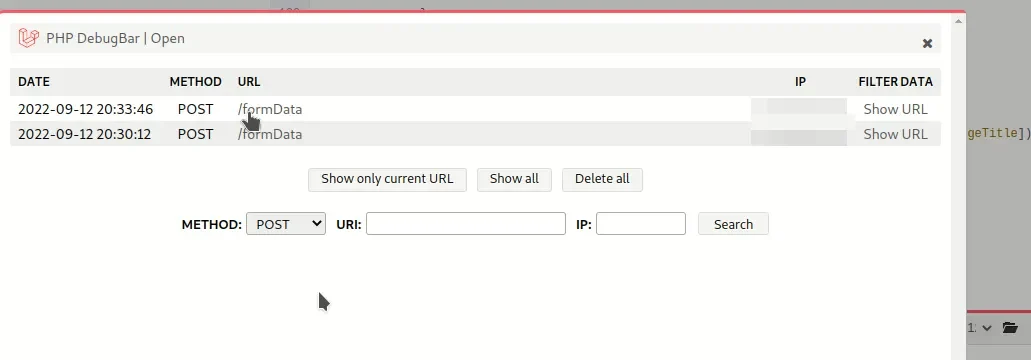
Open the request /formData
- Intercept the request made by the PHP Debug Bar about this request, inspect the response in Burp and search for the string
Serieuzeto see whether a piece of the report can be found, confirming the leak.
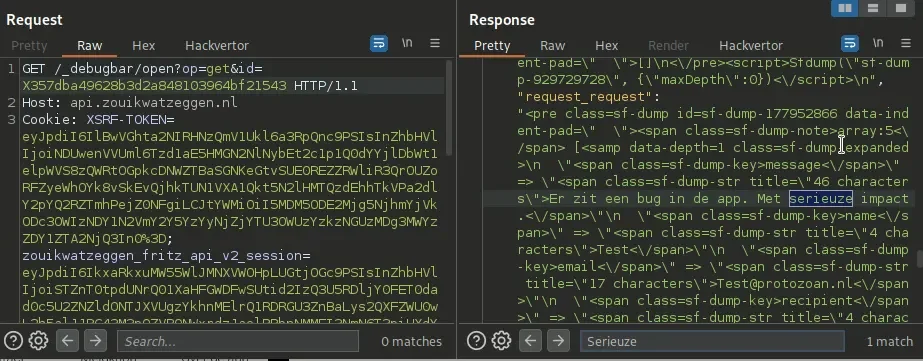
Bug 2: The response contains the inappropriate behaviour report message
In other words, the endpoint below can be monitored, with no authentication needed, every few seconds, and its output stored. That allows one to capture all the reports sent by employees in near real time:
https://api.zouikwatzeggen.nl/_debugbar/open?op=get
Step 5: check for remote code execution
Digging a little deeper, the researcher found that in the past the debug bar could be abused to achieve remote code execution (RCE), referring to the Laravel (<=v8.4.2) debug mode RCE attempts for CVE-2021-3129. In this case the Laravel installation was properly patched and no way to bypass the bugfix was found.
Step 6: leak the administrator credentials
The next question was whether a system administrator uses the same web application to access the administration panel, and whether that password could be leaked. The incoming requests on the server were monitored for a few hours to see whether an administrator login could be observed.

Captured server request, someone trying to login.
The path /cm/login was requested by another user. Looking at the credentials used for that login:
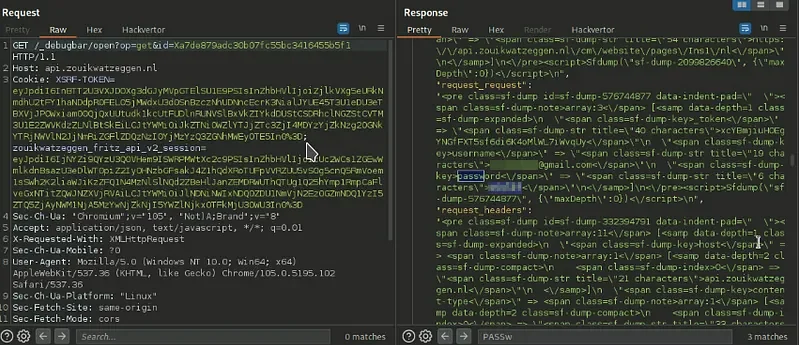
Bug 3: The administrator username & password is leaked (blurred in the above picture)
This demonstrates that the bug gives the credentials needed to access the administrator dashboard. At that point the research stopped and all insights were shared with the CERT.
Root cause
The application was running with Laravel debug mode left on, which includes the PHP debug bar. The debug bar keeps a record of recent requests, including their full details, and exposes that record through an endpoint that requires no authentication. The UI hides the request details, but the underlying debug bar traffic contains them, so anyone who intercepts that traffic sees the report contents. The same debug mode produced the detailed stack traces that revealed source file and line numbers.
The email spoofing is a separate design mistake: the submit endpoint accepts a recipient value from the client and sends the message to it, so the sender controls the destination. The recipient was null in the shipped app, which is what broke the normal flow and surfaced the stack trace in the first place.
The report does not describe any server-side control that would have stopped the debug bar exposure. The Laravel installation was properly patched against the known debug-mode RCE, and no bypass of the bugfix was found.
Impact
- Email spoofing: the app can send emails with a custom text to anyone. The report calls the impact limited, but notes the usefulness for phishing campaigns or spamming users.
- Debug bar exposure: insight into the code behind the app, its settings, and active user sessions and their data.
- Report leakage: the debug bar lists the latest requests of all visitors, including submissions of inappropriate behaviour reports. The UI does not show the details, but intercepting the debug bar traffic reflects all report details. Monitoring
/_debugbar/open?op=getwithout authentication every few seconds and storing the output captures all reports sent by employees in near real time. - Administrator credentials: monitoring incoming requests for a few hours captured a login on
/cm/login, including the username and password, which gives access to the administrator dashboard.
The app is available to all 15k employees at AmsterdamUMC, and the data is highly sensitive: the report asks what a leak of the submitter's data or of a report about an unaware subject would do to trust.
Fix
After the report, the CERT confirmed the compromise and ordered the vendor to shut down the server, and the CERT reported the data leak. The report does not describe any code change to the app itself.
The report's own recommendations go further:
- Perform a proper pentest upfront, fix the found bugs, and then do a systematic threat modelling exercise (the report points to includesnodirt.com) with a hacker, developer, privacy officer, end user and CERT member.
- Present the results to a small committee, comparable to a Research Ethics Committee and including ethicists if possible, and decide whether the risk is worth the potential benefit.
- Implement client-side encryption of the most sensitive data, for example with OpenPGP, so the message is encrypted before it leaves the device. The receiver then needs OpenPGP to decrypt with a private key known only to the people who should view the reports. The remaining risks named are a supply chain attack, a rogue app imitating the original, a compromised receiver mailbox, and an email bouncing back to the sender address, which the report shows as
webmaster@<app-developer-name>.nlin the Bug 1 screenshot.
The report also notes that the message travels from the app to the external vendor's webserver, from there to the vendor's internal mail server and on to the email server of AmsterdamUMC or another hospital using the app, and that email is not encrypted by default, which creates a risk if any involved server is compromised.
Variants to test
- Look for
phpdebugbar-idin response headers on any Laravel-backed target. A positive result is the header present on ordinary responses, which means the debug bar is active in production. - Trigger an error on an app endpoint by altering a parameter value (the report used a typo in a model name). A positive result is a stack trace naming source files and line numbers.
- Request the debug bar open endpoint without credentials, for example
/_debugbar/open?op=get. A positive result is a JSON response listing recent requests. - Intercept the debug bar traffic rather than reading the UI, and search the response for a string you submitted yourself. A positive result is your own input appearing in the debug bar response, which proves full request details are exposed.
- Submit a form that takes a recipient or destination field and replace it with your own address. A positive result is delivery to your address, which indicates email spoofing.
- Check whether the framework version is vulnerable to the known debug-mode RCE (CVE-2021-3129 for Laravel <=v8.4.2). A positive result is a version in the vulnerable range; a patched version means the known exploit path is closed.
- Monitor the debug bar over time for authentication requests such as a login path. A positive result is credentials for an administrative interface appearing in captured request data.
What happened, in plain words
Amsterdam UMC published an app called #zouikwatzeggen (roughly: ‘#wouldIsaysomething-app’). It is meant to help employees talk about improper behaviour at work, and its main feature is a report button: an employee can report undesirable behaviour, anonymously, straight to the right person. The app is part of a wider package of e-learning and workshops about preventing undesirable behaviour. The announcement shown in the report says the app is available to all 15k employees.
The release announcement of the app “#zouikwatzeggen”, now available to all 15k employees.
The researcher got interested in the ‘sending reports using the app’ part. How does a report actually leave the phone? Is there a form that relays the text to an email address? What information is sent along with it? Where does the code that handles it run, and is that server properly secured? The app deals with highly sensitive data, so the real question was whether the app itself is as safe as it could be.
What follows is the story of how that question was answered, step by step, using nothing more exotic than a phone, a laptop and a few free tools. Along the way three problems turned up: the app could be made to send email to any address, a debugging tool had been left switched on in the live system, and through that tool the reports of employees, and even an administrator password, could be read.
Setting up: getting the app and watching its traffic
The starting point was the Android app. You can download it and then modify it slightly so that you can see the traffic it sends. Normally an app talks to its server over HTTPS, the encrypted version of the web. The encryption is what stops anyone in the middle from reading the conversation. To look inside, you have to make the app accept a certificate that you control, which is exactly what the patching does. After that, the app's traffic can be sent through Burp Suite, a tool that sits between the app and the server, shows every request and response, and lets you change them before they go out.
There are two ways to get the installation file of the app, called an APK:
- Install the app on an Android phone from the Google Play store and then pull the APK off the device, using the method described on Stack Overflow (how do I get an APK file from an Android device).
- Download the APK from a third party download site, for example the apkpure.com deeplink for
nl.frismedia.zouikwatzeggen.
Intercepting the app's traffic
Once you have the APK, the researcher used a tool called APK-MITM to patch it. The patch removes the app's check on HTTPS certificates, so the app will accept the certificate that Burp Suite presents. With apk-mitm installed, the patch is applied with:
apk-mitm \#Zouikwatzeggen_2.2.2_Apkpure.apk
Line by line: apk-mitm is the name of the program being run. Everything after it is the file it should work on, here the APK file named #Zouikwatzeggen_2.2.2_Apkpure.apk. The backslash before the # is there because in a command line a # normally starts a comment; the backslash tells the shell to treat it as an ordinary character in the file name. The tool reads that file and writes a modified copy that no longer insists on the original certificate.
Patching the APK file using apk-mitm so we can intercept the internet traffic
The patched app is then installed on the phone using ADB, the official tool for talking to an Android device from a computer. The report also recommends scrcpy, a program that shows the phone's screen on the desktop, which is handy when you want to capture the phone and the laptop screen at the same time.
Install the patched APK on our test device.
The phone then has to be prepared to work together with Burp Suite. If intercepting the traffic still fails, the Burp Suite certificate can be built directly into the patched APK:
apk-mitm \#Zouikwatzeggen_2.2.2_Apkpure.apk --certificate cacert.pem
Here the same patch command is run, but with an extra option: --certificate cacert.pem tells the tool to also embed the certificate stored in the file cacert.pem into the app. That way the app trusts Burp Suite from the moment it starts, without any manual steps on the phone.
The cacert.pem file itself is created by running:
curl --proxy http://[redacted]:8080 -o cacert.der http://burp/cert && openssl x509 -inform DER -in cacert.der -out cacert.pem
This is two commands joined by &&, which means: run the first, and only if it succeeds run the second. The first command, curl, is a program for fetching things over the web. --proxy http://[redacted]:8080 sends the request through Burp Suite, which listens on the local machine at port 8080. -o cacert.der saves the result into a file called cacert.der. The address being fetched, http://burp/cert, is a special address that Burp Suite answers with its own certificate. The second command, openssl x509, converts that certificate from the DER format into the PEM format, reading cacert.der with -inform DER -in cacert.der and writing cacert.pem with -out cacert.pem. In short: ask Burp for its certificate, save it, and convert it into the format the patching tool expects.
Interception of the app traffic works after injecting the Burp Certificate in the APK. On the left you see the request made by the app.
With interception working, the conversation between the app and its servers can be read. Submitting a new report produces a request that can be caught.
Request send to the server when submitting a new report. It returns an error message including a stack trace.
A broken submit and a very detailed error
Submitting a report did not work: the app returned an error. Looking at the request, the cause is visible in the data being sent: "recipient”: “null". The developer forgot to fill in the email address when sending the form.
More interesting than the broken form was the error itself. It was extremely detailed: it showed the exact source code file and the line of code where the error happened. That is a strong hint that the functionality had not been properly tested before the app was published, and that debug messages had been left switched on.
Exploitation
Step 1: fix the request and send mail to any address
The first thing the researcher tried was to repair the request by putting an own email address in as the recipient:
POST /formData HTTP/1.1
Host: api.zouikwatzeggen.nl
Cookie: XSRF-[redacted] [redacted]=[redacted]
Accept: application/json, text/plain, */*
Content-Type: application/json;charset=utf-8
Content-Length: 112
Accept-Encoding: gzip, deflate
User-Agent: okhttp/3.14.9
Connection: close

{"message":"https://test.nl <h1>test</h1>","type":"ContactViaAnonymousEmail","recipient":"[redacted]"}
Line by line. POST /formData HTTP/1.1 is the first line of an HTTP request: POST means ‘I am sending data to the server’, /formData is the address on the server being called, and HTTP/1.1 is the version of the protocol. Host: api.zouikwatzeggen.nl names the server being talked to. Cookie: carries two cookies, which are small pieces of data the server gave the app earlier and which the app sends back on every request so the server can recognise the session; here they are the XSRF-TOKEN and a session cookie named [redacted], and their values are redacted. Accept: says which kinds of answer the app can handle. Content-Type: application/json;charset=utf-8 says the body is JSON text, a simple structured format of names and values. Content-Length: 112 is the size of the body in bytes. Accept-Encoding: gzip, deflate says compressed answers are fine. User-Agent: okhttp/3.14.9 identifies the app's networking library. Connection: close asks to close the connection after this one exchange. Then comes a blank line, and after it the body: message holds the report text, type is ContactViaAnonymousEmail, and recipient is the address the mail should go to. The message field also shows that HTML, the markup language of web pages, is passed through untouched: the <h1>test</h1> in the message is a heading tag.
Injecting our own email as the recipient.
A few seconds later the email arrived.
Bug 1: Being able to send emails from the #zouikwatzeggen-app to anyone
That is the first bug: email spoofing. The impact is limited, but the app can be used to send emails with a text of your choosing to anyone, which is handy for phishing campaigns, where a convincing message is used to trick people into clicking something, or simply to spam people on the internet.
Step 2: read the response headers and spot the debug bar
The answer the server sent back on the email form submit was:
HTTP/1.1 200 OK
Date: Mon, 12 Sep 2022 17:50:06 GMT
Server: Apache/2.4.41 (Ubuntu)
Cache-Control: no-cache, private
phpdebugbar-id: [redacted]
Set-Cookie: XSRF-[redacted] expires=Mon, 12-Sep-2022 19:50:06 GMT; Max-Age=7200; path=/; samesite=lax
Set-Cookie: [redacted]=[redacted]; expires=Mon, 12-Sep-2022 19:50:06 GMT; Max-Age=7200; path=/; httponly; samesite=lax
Content-Length: 17
Connection: close
Content-Type: application/json

{"status":"sent"}
Line by line. HTTP/1.1 200 OK is the status line: 200 means the request was handled successfully. Date: is when the answer was produced. Server: Apache/2.4.41 (Ubuntu) tells which web server software and version is answering. Cache-Control: no-cache, private tells browsers and caches not to store the answer. phpdebugbar-id: is the interesting one: it is an identifier for a debugging tool, and its presence means that tool is active. The two Set-Cookie: lines hand the app fresh cookies, with an expiry time, a maximum age of 7200 seconds, a path, and flags such as httponly, which hides the cookie from page scripts, and samesite=lax, which limits when the cookie is sent along. Content-Length: 17 is the size of the body. Content-Type: application/json says the body is JSON. The body itself is {"status":"sent"}, a short confirmation.
The phpdebugbar-id header points to a tool that PHP developers use to debug problems on applications that are already running. PHP is a programming language commonly used for websites, and Laravel is a popular framework built with it. That explains the very detailed error messages: the debug mode of the application had been left on, and it includes a PHP debug bar, a panel that records what the server did while handling requests.
Step 3: open the debug bar in a desktop browser
To get the debug bar's user interface on a desktop, an easy route is to cause an error by visiting one of the addresses the app uses. The researcher picked a URL out of the Burp history and opened it in the browser:
https://api.zouikwatzeggen.nl/getToKnowYou?domain=1&model=App%5CCms%5CModels%[redacted]
Reading it: https:// is the encrypted web, api.zouikwatzeggen.nl is the server, /getToKnowYou is the page or function being called, and everything after the ? is the data handed to it. domain=1 is one such value. model= is another, and its value is a class name from the application's code, written with %5C in place of each backslash because a URL cannot contain a raw backslash. The last part, Holxder, is a deliberate typo: the real name would end in Holder, and the wrong letter makes the application fail, which is exactly what is wanted.
We got access to the debugbar!
That is bug number 2: the PHP debug bar is exposed. It gives insight into the code behind the app, its settings, and the active user sessions and their data.
Step 4: prove the impact on submitted reports
A bug like this needs a proof that everyone in the organisation can understand, because telling a board ‘PHP Debug Bar is left on!’ will not land. The researcher also wanted to keep the damage done while proving it as small as possible. So the question became: can one of our own submitted reports about inappropriate behaviour be leaked through this debug bar?
On the left our mobile phone that just sent a report, on the right the exposed debugbar. In grey Burp Suite used to search for the leakage of our just sent report. In blue we mark the actual leak.
The debug bar lets you list the most recent requests made by all visitors to the server, and that includes the submission of reports about inappropriate behaviour. The debug bar's own screen does not show the exact details of those reports. But when the traffic the debug bar itself uses is intercepted, for example with the browser built into Burp Suite, all the report details appear in it.
- Open the Request modal.
Press the Folder icon to open the model of active sessions
- Open the incoming POST request from the app.
Open the request /formData
- Intercept the request that the PHP Debug Bar makes about this request, inspect the response in Burp, and search for the string
Serieuzeto see whether a piece of the report can be found, which would confirm the leak.
Bug 2: The response contains the inappropriate behaviour report message
In other words, the address below can be checked every few seconds, with no login needed, and its output saved. That captures all the reports sent by employees almost as they happen:
https://api.zouikwatzeggen.nl/_debugbar/open?op=get
Here api.zouikwatzeggen.nl is the server, /_debugbar/open is the debug bar's own address for fetching recorded requests, and ?op=get is a parameter telling it which operation to perform, in this case ‘get’.
Step 5: check for remote code execution
Digging a little deeper, the researcher found that in the past the debug bar could be abused to achieve remote code execution, usually shortened to RCE: making the server run commands of your choosing. The report refers to the Laravel (<=v8.4.2) debug mode RCE attempts for CVE-2021-3129, a publicly catalogued vulnerability. In this case the Laravel installation had been properly patched, and no way around the fix was found.
Step 6: leak the administrator credentials
The next question was whether a system administrator uses the same web application to reach the administration panel, and whether that password could be leaked. The incoming requests on the server were watched for a few hours to see whether an administrator login would pass by.
Captured server request, someone trying to login.
The path /cm/login was requested by another user. Looking at the credentials used for that login:
Bug 3: The administrator username & password is leaked (blurred in the above picture)
This shows that the bug hands over the credentials needed to reach the administrator dashboard. At that point the research stopped and all findings were shared with the CERT, the team that handles security incidents.
Root cause
The application was running with Laravel's debug mode left on, and that mode includes the PHP debug bar. The debug bar keeps a record of recent requests, including their full details, and serves that record from an address that needs no login. The screen hides the request details, but the traffic underneath contains them, so anyone who intercepts that traffic sees the report contents. The same debug mode produced the detailed error messages that revealed source file names and line numbers.
The email spoofing is a separate design mistake: the submit address accepts a recipient value from the client and sends the message there, so the sender decides where the mail goes. In the shipped app the recipient was null, which is what broke the normal flow and brought the detailed error to the surface in the first place.
The report does not describe any server-side control that would have stopped the debug bar exposure. The Laravel installation had been properly patched against the known debug-mode RCE, and no way around the fix was found.
Impact
- Email spoofing: the app can send emails with a text of your choosing to anyone. The report calls the impact limited, but notes how useful that is for phishing campaigns or for spamming people.
- Debug bar exposure: insight into the code behind the app, its settings, and active user sessions and their data.
- Report leakage: the debug bar lists the latest requests of all visitors, including submissions of reports about inappropriate behaviour. The screen does not show the details, but intercepting the debug bar traffic reveals all of them. Checking
/_debugbar/open?op=getwithout logging in, every few seconds, and saving the output captures all reports sent by employees almost in real time. - Administrator credentials: watching incoming requests for a few hours captured a login on
/cm/login, including the username and password, which gives access to the administrator dashboard.
The app is available to all 15k employees at AmsterdamUMC, and the data is highly sensitive: the report asks what a leak of the submitter's data or of a report about an unaware subject would do to trust.
Fix
After the report, the CERT confirmed the compromise and ordered the vendor to shut the server down, and the CERT reported the data leak. The report does not describe any code change to the app itself.
The report's own recommendations go further:
- Do a proper penetration test, a deliberate attempt to break in with permission, before publishing, fix what is found, and then do a systematic threat modelling exercise (the report points to includesnodirt.com) with a hacker, a developer, a privacy officer, an end user and a CERT member.
- Present the results to a small committee, comparable to a Research Ethics Committee and including ethicists if possible, and decide whether the risk is worth the potential benefit.
- Encrypt the most sensitive data on the device itself, for example with OpenPGP, so the message is unreadable before it even leaves the phone. The receiver then needs OpenPGP to decrypt it with a private key known only to the people who should see the reports. The remaining risks named are a supply chain attack, where someone replaces the app's code; a rogue app imitating the original; a compromised mailbox on the receiving side; and an email bouncing back to the sender address, which the report shows as
webmaster@<app-developer-name>.nlin the Bug 1 screenshot.
The report also notes that the message travels from the app to the external vendor's webserver, from there to the vendor's internal mail server and on to the email server of AmsterdamUMC or another hospital using the app, and that email is not encrypted by default, which is a risk if any of those servers is compromised.
Variants to test
- Look for
phpdebugbar-idin response headers on any Laravel-backed target. A positive result is the header appearing on ordinary responses, which means the debug bar is active in production. - Cause an error on an app address by changing a parameter value (the report used a typo in a model name). A positive result is an error message naming source files and line numbers.
- Request the debug bar's open address without credentials, for example
/_debugbar/open?op=get. A positive result is a JSON response listing recent requests. - Intercept the debug bar traffic rather than reading its screen, and search the response for a string you submitted yourself. A positive result is your own input appearing in the debug bar response, which proves full request details are exposed.
- Submit a form that takes a recipient or destination field and replace it with your own address. A positive result is delivery to your address, which points to email spoofing.
- Check whether the framework version is vulnerable to the known debug-mode RCE (CVE-2021-3129 for Laravel <=v8.4.2). A positive result is a version in the vulnerable range; a patched version means the known exploit path is closed.
- Watch the debug bar over time for login requests such as a login path. A positive result is credentials for an administrative interface appearing in captured request data.
Glossary
- APK: the installation file of an Android app.
- ADB: the official tool for controlling an Android device from a computer.
- HTTPS: the encrypted version of the web, so others cannot read the conversation between app and server.
- Certificate: a digital proof of identity that a server presents; apps check it before trusting the connection.
- Burp Suite: a tool that sits between an app and a server, showing and letting you change the traffic.
- APK-MITM: a tool that modifies an APK so it accepts a certificate of your choosing.
- scrcpy: a program that shows an Android phone's screen on a computer.
- Request: a message a client sends to a server, for example to submit a form.
- Response: the server's answer to a request.
- Header: a labelled line at the top of a request or response carrying information about it.
- Cookie: a small piece of data a server gives a client so it can recognise the session on later requests.
- Session: a server's memory of one visitor across several requests, identified by a cookie.
- Token: a value used to prove a request belongs to a session or is allowed; here the
XSRF-TOKENcookie. - JSON: a simple text format of names and values used to exchange data.
- HTML: the markup language used to structure web pages.
- API: the set of addresses a server offers so programs can talk to it.
- Endpoint: one such address on a server.
- Parameter: a value passed to an endpoint, usually after a
?in the address or inside the body. - URL encoding: writing characters that are not allowed in a URL in a coded form, such as
%5Cfor a backslash. - PHP: a programming language commonly used for websites.
- Laravel: a popular framework for building websites with PHP.
- Debug mode: a setting that makes an application show detailed internal information to help developers; it should be off in production.
- PHP debug bar: a panel that records what the server did while handling requests, used for debugging.
- Stack trace: a detailed error message showing which source file and line failed.
- Email spoofing: sending email that appears to come from the app or an address the sender does not own.
- Phishing: a convincing fake message used to trick people into clicking or handing over information.
- Remote code execution (RCE): making a server run commands of your choosing.
- CVE-2021-3129: a publicly catalogued vulnerability in older Laravel versions that allowed RCE through debug mode.
- Credentials: a username and password used to log in.
- CERT: a team that handles security incidents and reports.
- Penetration test: a deliberate, authorised attempt to break into a system to find its weaknesses.
- Threat modelling: systematically listing what could go wrong, who could cause it and what the impact would be, before building or publishing.
- Client-side encryption: encrypting data on the user's own device before it is sent anywhere.
- OpenPGP: an open encryption standard and set of tools for encrypting messages and files.
- Private key: the secret half of an encryption key pair, used to decrypt what was encrypted for you.
- Supply chain attack: an attack that replaces or corrupts software before it reaches the user.
- CVD (Coordinated Vulnerability Disclosure): a policy for reporting security problems responsibly and agreeing when they may be made public.