No, these XSSs are not so scary.
The ProtonMail iOS app rendered email content in a way that allowed three different cross-site scripting payloads to execute JavaScript in the applewebdata: or data: origins. An attacker could run script when a victim opened a crafted email, enabling phishing prompts, tracking, and a limited universal XSS.
 Published on medium.com
DOMPurify has great XSS tests with descriptions. These tests were sourced from real DOMPurify bypasses.
The full write-up lives on its author's site
It belongs to its author, so we link to it rather than copy it. The other two tabs are our own rewrites, checked against it.
Context
In ProtonMail for iOS, payloads in an email body fired in an applewebdata: origin, and one fired in a data: origin after the email's remote content was loaded. The security question this write-up explores is whether attacker-controlled HTML in an email can execute JavaScript in those origins, and what that execution is worth.
The author is explicit about the framing: these are three XSS findings of different categories, and none of them escalates to RCE or local file read. The title of the piece is a direct response to the vendor's position that the bugs were not so scary.
Setup
The work was done against ProtonMail for iOS. The payloads were taken from DOMPurify's test fixtures, which the author recommends because those tests were sourced from real DOMPurify bypasses and because DOMPurify is aware of browser-specific behaviour across all browsers. The reasoning is that a payload good enough to be a documented sanitizer bypass is a good starting point for testing a mail client's rendering.
No special accounts, roles or tooling beyond the iOS app and a way to send HTML email are described. The precondition for every finding is simply that the victim opens an attacker-supplied email, and for the third one that remote content is loaded.
Finding it
The author used XSS payloads taken from DOMPurify's tests. Three payloads fired, each in a different origin and each requiring a different level of interaction:
- Automatic execution in the
applewebdata:origin on email opening. - Execution on click, also in the
applewebdata:origin. - Execution in the
data:origin after the email's remote content is loaded.
The author notes that all three are of different categories, and that a fourth XSS would likely have been treated as a duplicate.
Exploitation
Step 1: automatic execution on open
<svg onload=alert()//
This fires in the applewebdata: origin as soon as the email is opened, with no user interaction. The onload handler on the SVG element runs when the element loads.
Step 2: execution on click
<a href="javascript:alert()">
This fires when the recipient clicks the link, again in the applewebdata: origin. A javascript: URI in an anchor fires on click in the applewebdata: origin.
Step 3: execution in the data: origin via embedded content
<embed src="data:text/html;base64,[redacted]+"></embed>
This is an iframe/embed whose src is a base64-encoded HTML document. Decoded, the payload is a script that calls prompt() with the text ProtonMail needs your password, which is the phishing angle: a prompt rendered from a document the user has no reason to distrust. This one fires in the data: origin after the email's remote content is loaded.
Root cause
The report does not describe the sanitisation code or the web view configuration that allowed these payloads through, so the precise defect is not stated. The report does not describe the sanitisation code or web view configuration that allowed these payloads through.
Impact
The author lists four consequences and is careful about their limits:
- JavaScript execution via email is already an issue in itself.
- Privacy violation: the attacker can track when the user opens the email, disclose the user's IP, and leak other information.
- Phishing via
prompt()andalert(). - What the author calls a "useless" UXSS.
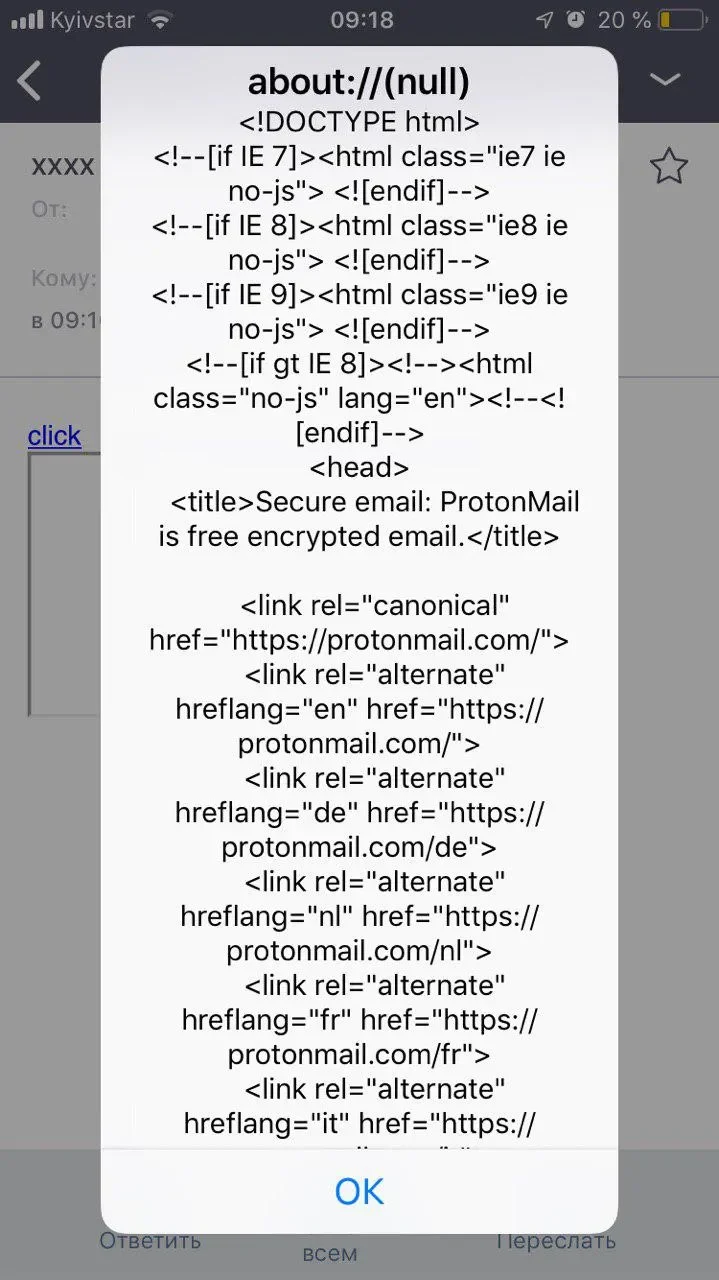
The UXSS point deserves the detail the author gives it. The initial hope was that XSS in applewebdata: would allow reading local files, by analogy with CVE-2016-1764 (XSS in iMessage via a javascript: URI that allowed reading local files), and applewebdata: had been highlighted in iOS browser security research on UXSS. Local file reading would have been significant for a mail app. The author says this flaw was patched in WebKit(?), and that applewebdata: now only allows UXSS, which he still considers better than nothing. WebKit also forbids requests to the file:// origin, which closes that route independently. The author credits Safiler and related research on XSS in HelpViewer for the background here.
It was not possible to escalate any of the three XSS findings into RCE or LFI; the author states plainly that he did not find such a way.
Fix
The vulnerabilities were patched in the stable release on Feb 15.
Reporting and timeline
The author says the vulnerabilities were reported on Dec 12, while his timeline begins on Dec 11. ProtonMail's security team responded quickly at first, then went quiet. The author describes a miscommunication on the vendor side: as he understands it, they incorrectly estimated the impact and missed that two of the XSS findings in applewebdata: were impactful. Later, ProtonMail iOS engineer Anatoly noticed the author's tweets and the vulnerabilities were reviewed again.
- Dec 11: Reported XSS in the
applewebdata:origin with no interaction via<svg onload=alert()// - Dec 11: Reported XSS via a
javascript:URI in theapplewebdata:origin - Dec 14: Response from the ProtonMail security team
- Dec 25: Found an XSS in the
data:origin via<embed src=[base64_payload]> - Dec 25: Reminded the security team about the findings
- Dec 29: The security team replied that the XSS findings were not so scary because they do not allow reading emails
- Jan 12: Emphasised that two of the XSS findings fire in
applewebdata: - Jan 13: Built a PoC UXSS in
applewebdata:to show that the XSS context could be considered privileged - Jan 14: ProtonMail: no email reading means not critical
- Feb 12-13: Posted a few tweets about the findings
- Feb 14: ProtonMail replied on Twitter
- Feb 15: Andy Yen emailed the author via ProtonMail: the team had made an additional review of the reported vulnerabilities and apologised for the miscommunication
- Feb 15: The vulnerabilities were patched in the stable release
- Feb 27: ProtonMail agreed to disclose the report
Variants to test
- Inline event handlers on other elements (
<img onerror>,<body onload>,<video onerror>) in the message body. A positive result is script execution in the message's origin with no user interaction, as with the SVG payload above. javascript:URIs in other navigable elements, such as<area>inside an image map or a form action. A positive result is execution in the message origin on click.- Other embedded-document schemes in
embed/iframe/object, includingdata:with different MIME types. A positive result is script running in the embedded document's origin after remote content loads. - The same payloads against other mail clients that render HTML in a web view, checking which origin the message document gets. A positive result is execution in a non-null origin that the app treats as trusted.
- Attempts to read local files from the resulting origin, for example via
file://requests or known WebKit UXSS techniques. A positive result would be any read of local content, which the author did not achieve here.
Thanks are due to the author's Twitter followers, Anatoly from the ProtonMail iOS team for noticing the tweets, the ProtonMail security team for their continued work and for making the disclosure possible, and Andy Yen for the personal review.
What happened, in plain words
ProtonMail is an email service that puts a lot of weight on privacy. It has an app for iPhones and iPads. When you open a message in that app, its HTML is displayed in a web view. A web view is the same engine as a browser tab, minus the address bar and the tabs, embedded inside another app. Every app that shows web content, from a news reader to a banking app, uses one.
The researcher, Vladimir Metnew, asked a simple question: if an attacker sends you an email whose body contains HTML, can that HTML run JavaScript (the programming language of web pages) inside the app? If it can, the attacker's code runs inside the app's rendering context. That class of bug is called XSS, short for cross-site scripting: the attacker gets their script to run in a page or context that belongs to someone else.
He found three ways to do it, each slightly different, and each needing a different amount of action from the victim. He could not escalate them into RCE or local file read, and the vendor said they do not allow reading emails. The vendor's security team initially said the bugs were not so scary, and the title of the write-up is his answer to that. The vulnerabilities were patched in the stable release, and ProtonMail agreed to disclose the report.
The tool he borrowed payloads from: DOMPurify
Before the findings, the write-up spends a moment on DOMPurify, a popular open-source tool made by a security firm called Cure53. Its job is to clean HTML: you give it a chunk of markup, and it removes anything dangerous, above all scripts. This process is called sanitising, and a tool that does it is a sanitiser. Think of it as a mailroom that opens every parcel and throws away anything that looks like a bomb before passing the rest on.
DOMPurify is used by many products to make sure user-supplied HTML cannot run code. It is also, by necessity, a catalogue of everything attackers have tried against it. Its test suite contains payloads (the snippets an attacker sends to trigger a bug) that once got past it, each with a description. The author's reasoning is straightforward: if a payload was good enough to defeat a well-tested sanitiser, it is a good candidate for testing a mail app's rendering. He also notes that DOMPurify is aware of how different browsers behave, so its tests cover browser-specific quirks.
He quotes a line that captures the dual nature of this material: any defensive research could be used in offensive purposes. The same knowledge that lets a defender block an attack lets an attacker build one.
The three payloads
All three are short pieces of HTML. Each one is listed below exactly as it appears in the report, followed by a plain explanation.
1. Runs as soon as the email is opened
<svg onload=alert()//
Line by line:
<svgstarts an SVG element. SVG is a format for drawing vector graphics (shapes, icons, diagrams) that browsers understand natively. It is not a script, but it can carry event handlers.onload=alert()is an event handler: an attribute that tells the browser what to do when something happens. Here, when the SVG finishes loading, runalert(), the built-in JavaScript function that pops up a small dialog box. In a real attack the dialog would be replaced by code that steals data or draws a fake login form.//starts a comment in JavaScript.
Why this matters: this one fires in the applewebdata: origin as soon as the message is opened, with no click, no scroll, nothing. An origin is the security boundary a browser uses to decide what a page is allowed to touch: scheme, host and port together. Pages from different origins are kept apart, like guests from different hotels who cannot enter each other's rooms. applewebdata: is the origin in which two of the payloads fired.
2. Runs when the recipient clicks
<a href="javascript:alert()">
Line by line:
<astarts a link (anchor), the element behind every clickable piece of text on the web.href="javascript:alert()"sets the link's destination. Normallyhrefholds a web address such ashttps://example.com. Here it holdsjavascript:followed by code. Ajavascript:URI is a way of saying: instead of navigating somewhere, run this script. Browsers have restricted this over the years, but a web view that does not block it will execute the code in the context of the page that contains the link.- The link has no visible text in the snippet, so in a real message the attacker would put something enticing between the opening and closing tags.
This one also fires in the applewebdata: origin, but only after the recipient clicks. That extra click is the difference between a bug that needs no interaction and one that needs a little social engineering (tricking a person into doing something).
3. Runs in a separate embedded document
<embed src="data:text/html;base64,[redacted]+"></embed>
Line by line:
<embedis an element that pulls another document or media file into the current page, like a picture frame hung on a wall.iframeandobjectare close relatives.src=is where the embedded content comes from.data:text/html;base64,...is a data URI: a way of putting a whole file inside the address itself, with no server involved.text/htmlsays the content is a web page, andbase64says the bytes are encoded in base64, a text-only encoding that turns arbitrary bytes into letters and digits so they can travel safely inside a string.- The long string is the base64-encoded page. Decoded, it is a script that calls
prompt()with the textProtonMail needs your password.prompt()is the browser's built-in input dialog: it shows a message and a text field. A dialog that appears to come from the mail app, asking for your password, is a phishing attack: tricking someone into handing over credentials by imitating a trusted party. </embed>closes the element.
This one fires in the data: origin, and only after the email's remote content is loaded.
The author points out that all three are of different categories. That matters in bug bounty programmes, where the same root cause reported twice is usually closed as a duplicate and only the first report is rewarded. Even a fourth XSS, he says, would likely have been treated as a duplicate.
What an attacker could actually do
The author is careful not to oversell. He states plainly that he could not escalate any of the three into RCE (remote code execution, running commands on the victim's device) or LFI (local file inclusion, reading files stored on the device). At least, he says, he did not find such a way. What remains is still worth listing:
- JavaScript execution via email is already an issue.
- Privacy violation: the attacker can track when the user opens the email, disclose the user's IP address (the number that identifies their connection, and roughly where they are), and leak other information.
- Phishing via
prompt()andalert(): dialogs that look like they come from the app, asking for a password or delivering a fake warning. - What he calls a useless UXSS.
Why the applewebdata: origin turned out to be less useful than hoped
UXSS stands for universal XSS: a bug where the script escapes its own page and can act across origins, which the normal same-origin rules forbid. The author's first hope was bigger than UXSS. He thought XSS in applewebdata: might allow reading local files from the phone, because there was a precedent: CVE-2016-1764, an XSS in iMessage via a javascript: URI that allowed reading local files. CVE is the public catalogue number given to a known vulnerability. applewebdata: had also been highlighted in iOS browser security research on UXSS, which he links to.
Reading local files would have been significant for a mail app: the app can reach parts of the phone a website cannot. But that flaw was patched in WebKit, the browser engine behind Safari and behind every iOS web view, and in this case applewebdata: only yields UXSS. He still considers that better than nothing, because it is at least a privileged context: a place with more trust than an ordinary web page. WebKit also forbids requests to the file:// origin, the scheme used to address files on the local disk, which closes that route independently. He credits Safiler, a Safari local file reader, and related research on XSS in HelpViewer for the background.
How it was reported, and what happened next
The author says the vulnerabilities were reported on Dec 12, while his timeline begins on Dec 11. The security team responded quickly at first, then went quiet. The author describes a miscommunication on the vendor side: as he understands it, they incorrectly estimated the impact and missed that two of the XSS findings in applewebdata: were impactful. Later, a ProtonMail iOS engineer named Anatoly noticed the author's tweets, and the vulnerabilities were reviewed again.
The timeline, as the author gives it:
- Dec 11: Reported XSS in the
applewebdata:origin with no interaction via<svg onload=alert()// - Dec 11: Reported XSS via a
javascript:URI in theapplewebdata:origin - Dec 14: Response from the ProtonMail security team
- Dec 25: Found an XSS in the
data:origin via<embed src=[base64_payload]> - Dec 25: Reminded the security team about the findings
- Dec 29: The security team replied that the XSS findings were not so scary because they do not allow reading emails
- Jan 12: Emphasised that two of the XSS findings fire in
applewebdata: - Jan 13: Built a PoC UXSS in
applewebdata:to show that the XSS context could be considered privileged - Jan 14: ProtonMail: no email reading means not critical
- Feb 12-13: Posted a few tweets about the findings
- Feb 14: ProtonMail replied on Twitter
- Feb 15: Andy Yen emailed the author via ProtonMail: the team had made an additional review of the reported vulnerabilities and apologised for the miscommunication
- Feb 15: The vulnerabilities were patched in the stable release
- Feb 27: ProtonMail agreed to disclose the report
A PoC, or proof of concept, is a small demonstration that shows a bug is real without causing harm. The author built one to argue that the context was privileged, which is the point the vendor had been missing. The report does not describe the code change that fixed the bugs, so what exactly was altered in the app is not stated.
What the report does not say
The report does not describe the sanitisation code or the web view configuration that let these payloads through, so the precise defect is not stated.
Variants worth testing
If you want to look for the same class of bug in other apps, these are the directions the author's findings suggest. Each comes with what a positive result would look like.
- Inline event handlers on other elements (
<img onerror>,<body onload>,<video onerror>) in the message body. A positive result is script execution in the message's origin with no user interaction, as with the SVG payload above. javascript:URIs in other navigable elements, such as<area>inside an image map or a form action. A positive result is execution in the message origin on click.- Other embedded-document schemes in
embed/iframe/object, includingdata:with different MIME types. A positive result is script running in the embedded document's origin after remote content loads. - The same payloads against other mail clients that render HTML in a web view, checking which origin the message document gets. A positive result is execution in a non-null origin that the app treats as trusted.
- Attempts to read local files from the resulting origin, for example via
file://requests or known WebKit UXSS techniques. A positive result would be any read of local content, which the author did not achieve here.
Thanks
The author thanks his Twitter followers, Anatoly from the ProtonMail iOS team for noticing the tweets, the ProtonMail security team for their continued work and for making the disclosure possible, and Andy Yen for the personal review.
Glossary
- XSS (cross-site scripting): a bug where an attacker gets their own script to run inside a page or app context that belongs to someone else.
- Payload: the snippet an attacker sends to trigger a bug, such as a piece of HTML with a script in it.
- HTML: the language used to describe the structure and formatting of web pages and email bodies.
- JavaScript: the programming language that runs inside web pages and web views.
- Web view: a browser engine embedded inside an app, used to display web content without an address bar or tabs.
- Origin: the security boundary made of scheme, host and port; pages from different origins are kept apart.
- Scheme: the first part of an address, such as
https:,file:orapplewebdata:, which says how the content is to be handled. applewebdata:: an Apple-specific scheme for content the app supplies itself rather than fetching from a website.data:URI: an address that contains the whole file inline, encoded, with no server involved.- Base64: a text-only encoding that turns arbitrary bytes into letters and digits so they can travel inside a string.
- Sanitiser: a tool that cleans HTML by removing dangerous parts, above all scripts.
- DOMPurify: a popular open-source HTML sanitiser by Cure53, with a test suite built from real bypasses.
- Bypass: a payload that gets past a defence that was supposed to stop it.
- Event handler: an attribute such as
onloadoronerrorthat tells the browser what to do when something happens. - SVG: a format for drawing vector graphics that browsers understand natively and that can carry event handlers.
alert(): the built-in JavaScript function that shows a small dialog box.prompt(): the built-in JavaScript function that shows a dialog with a message and a text field.javascript:URI: a link destination that runs code instead of navigating to a page.embed/iframe/object: elements that pull another document or media file into the current page.- Remote content: images and other resources hosted on the internet that an email refers to; often blocked by default for privacy.
- Phishing: tricking someone into handing over credentials or other sensitive data by imitating a trusted party.
- Social engineering: manipulating a person into taking an action, such as clicking a link.
- UXSS (universal XSS): a bug where a script escapes its own page and can act across origins.
- RCE (remote code execution): running commands on the victim's device.
- LFI (local file inclusion): reading files stored on the device.
- CVE: the public catalogue number given to a known vulnerability, such as CVE-2016-1764.
- WebKit: the browser engine behind Safari and behind every iOS web view.
file://: the scheme used to address files on the local disk.- PoC (proof of concept): a small demonstration that shows a bug is real without causing harm.
- Duplicate: a report of a bug that has already been reported, usually closed without a separate reward.
- Bug bounty programme: a scheme where organisations pay researchers for reporting vulnerabilities.
- Disclosure: making a vulnerability report public, usually after it has been fixed.