A story about macOS File Quarantine, 10-year old bug, privileged OneDrive entitlements and UX security.
Many macOS file-sharing and syncing apps did not apply the OS file quarantine attribute to downloaded or synced files, so a malicious file could execute without Gatekeeper checks. An attacker could send a malicious .terminal or .fileloc file that, when opened, runs code on the device.
 Published on medium.com
Popular macOS apps with a file-sharing functionality didn’t delegate file quarantine to OS leading to File Quarantine bypass (Windows MOTW analogue) for downloaded files. The vulnerability has low/moderate impact, but it can be combined with other custom behaviours, and UX features toincrease the severity.
The full write-up lives on its author's site
It belongs to its author, so we link to it rather than copy it. The other two tabs are our own rewrites, checked against it.
Context
macOS File Quarantine is the platform's analogue of Windows Mark-of-the-Web (MOTW). When an application downloads a file, the operating system is expected to tag it with the com.apple.quarantine extended attribute so that Gatekeeper can warn the user before the file is opened. The research here looks at what happens when popular macOS applications with file-sharing functionality do not delegate that quarantine step to the OS, and do not perform it themselves.
The affected surface is broad: chat apps, messengers, mail apps and file-syncing apps. The author names Keybase, Slack, Skype, Signal and Telegram as products that decided to fix the issue, while the vulnerability remained unfixed in file-syncing apps such as Dropbox, OneDrive and Google Drive. In total the author states the issue affected at least 20+ apps, a significant part of the macOS ecosystem. Apps distributed through the App Store are described as not vulnerable to File Quarantine issues, with OneDrive as the exception discussed later.
Two macOS "insecure features" are also covered: dangerous handling of .fileloc and .url shortcut files, which allow executing arbitrary local files by full path when the shortcut is opened. This behaviour led to two browser bugs, CVE-2020-6797 and CVE-2020-6402.
Setup
The research does not describe a lab setup, accounts or tool versions. The preconditions that matter are behavioural:
- A macOS user receives a file through an application that handles downloads or syncs files.
- The application either does not delegate quarantine to the OS or does not apply the
com.apple.quarantineattribute itself. - The user opens the file, either through phishing or through a one-click interaction in the app.
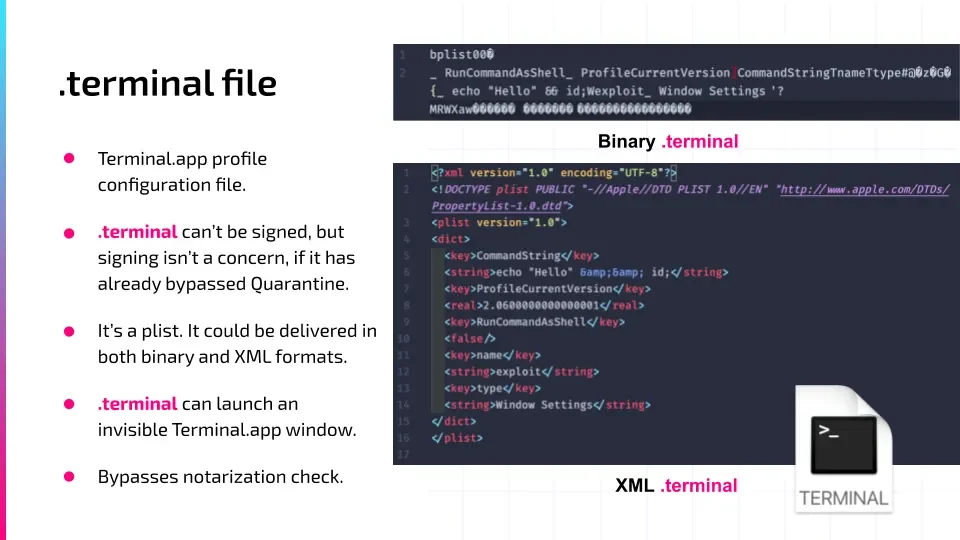
The author also notes that .terminal files do not require the +x file permission to execute a malicious payload on the device, because a .terminal file is a Terminal.app configuration profile rather than a plain executable.
Finding it
The core observation is that many apps neither delegate quarantine to the OS nor apply the attribute themselves. Many apps simply write the file to disk without the attribute, so Gatekeeper never sees it as untrusted.
The general attack scenario is stated as four steps:
- A macOS user downloads and opens a
hello.terminalfile received through the application. - The user expects the downloaded file is quarantined and is tracked by Gatekeeper.
- The application neither delegates file quarantine process to OS, nor does it on its own.
- Boom! Malicious code executes on the device.
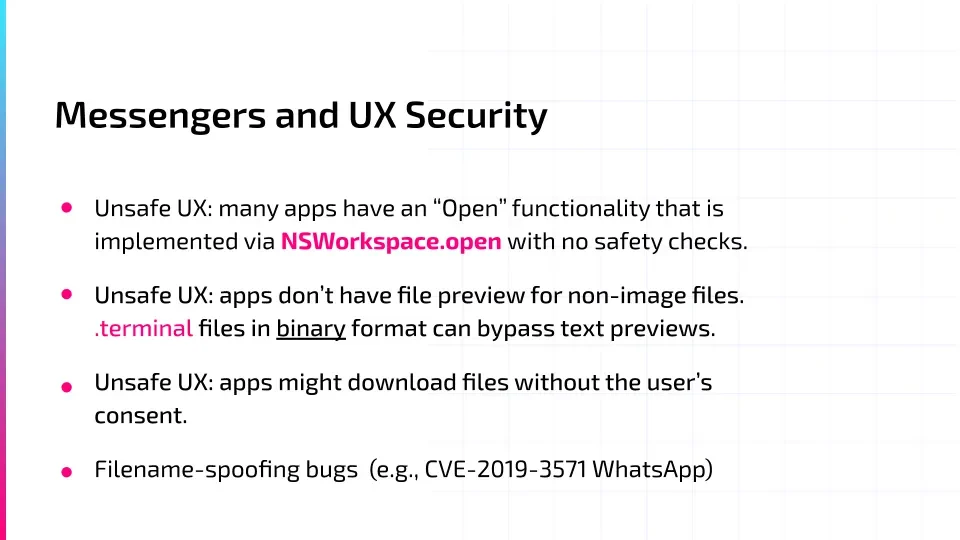
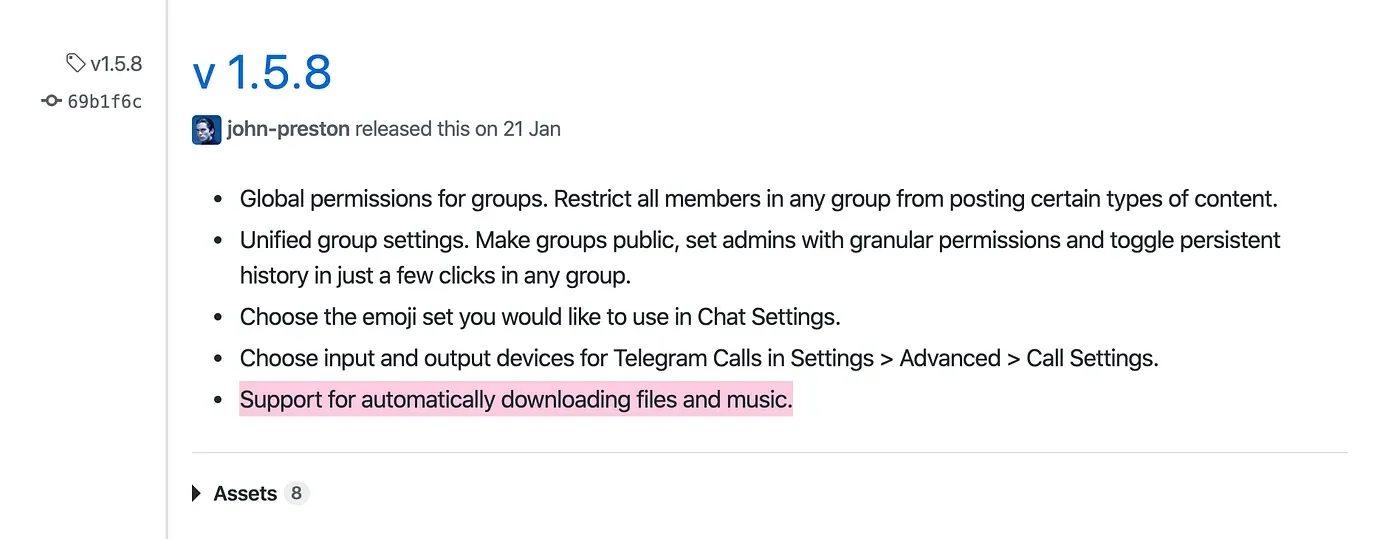
The scenario relies on user interaction and on convincing the user to open the file with phishing. The author argues that the state of UX security in many chat apps is poor and significantly increases the risk: some apps allow executing the malicious file with a single click on the file icon, and previous versions of Telegram downloaded files automatically without user consent. iMessage is held up as a good example because it shows a QuickLook preview of the file instead of opening it. Some developers also reject secure file handling as a developer responsibility and shift the risk to users; the author cites WhatsApp's response as an example of that position.
Exploitation
Step 1: Deliver a .terminal file through an app that skips quarantine
The payload is a .terminal file. It is not widely known, but it is a Terminal.app configuration profile, and it does not need the executable bit to run its payload. If the receiving app writes the file without com.apple.quarantine, opening it runs the payload without a Gatekeeper prompt.
Step 2: Fix the quarantine gap in the app (the two options)
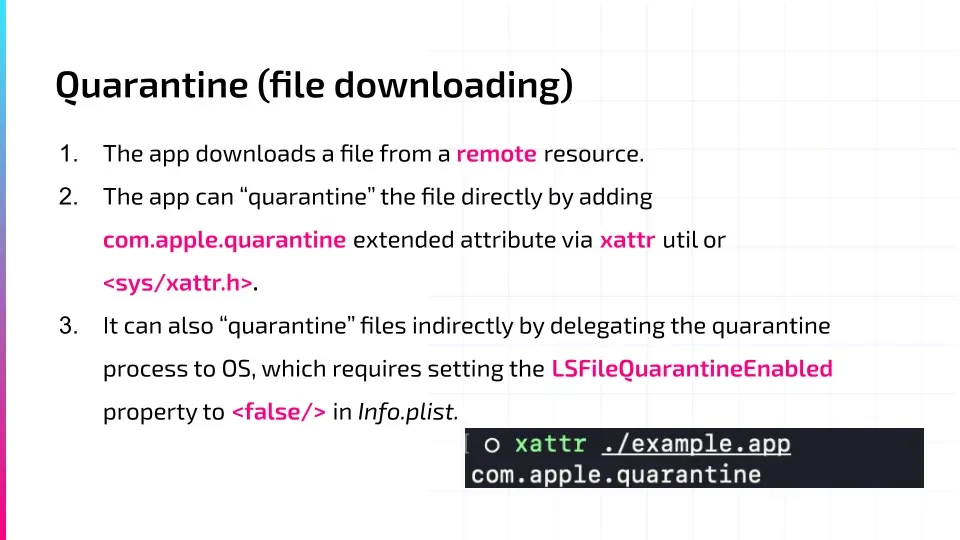
The author describes two ways an application can close the gap:
- Quarantine the downloaded file with the
xattrutility, setting thecom.apple.quarantineattribute to a specific value (setting an arbitrary value also works). Signal for macOS implements this option. - Delegate quarantine to the OS in
Info.plist, so the OS quarantines all files downloaded by the application. This approach is tricky because the OS may also quarantine the new version of the app downloaded by the auto-update mechanism; the author notes that Brave browser had this issue in the past.
Step 3: Attack file-syncing apps by syncing instead of downloading
Most file-syncing apps sync files without the quarantine attribute. The attack idea is to sync [1] the file into the user's cloud file storage and later "somehow" launch [2] the synced file on the user's device.
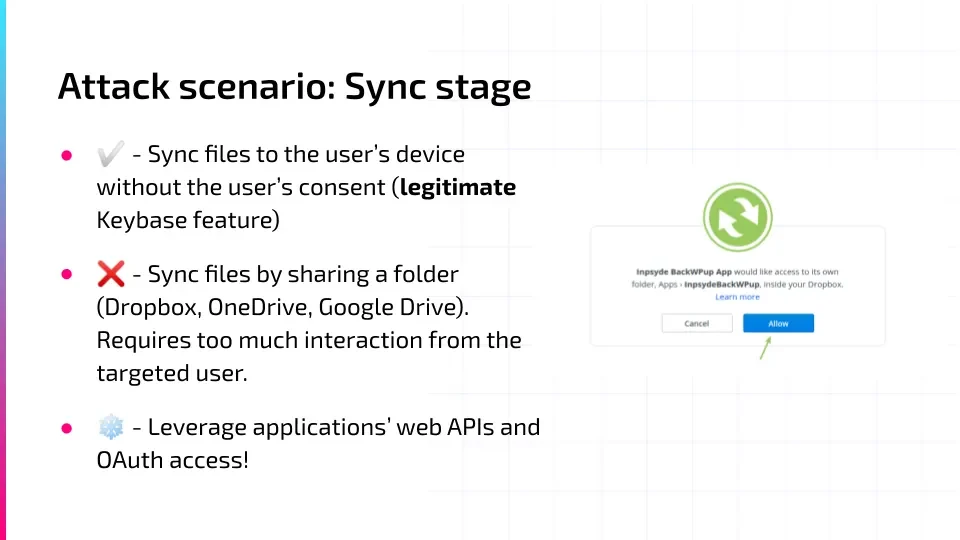
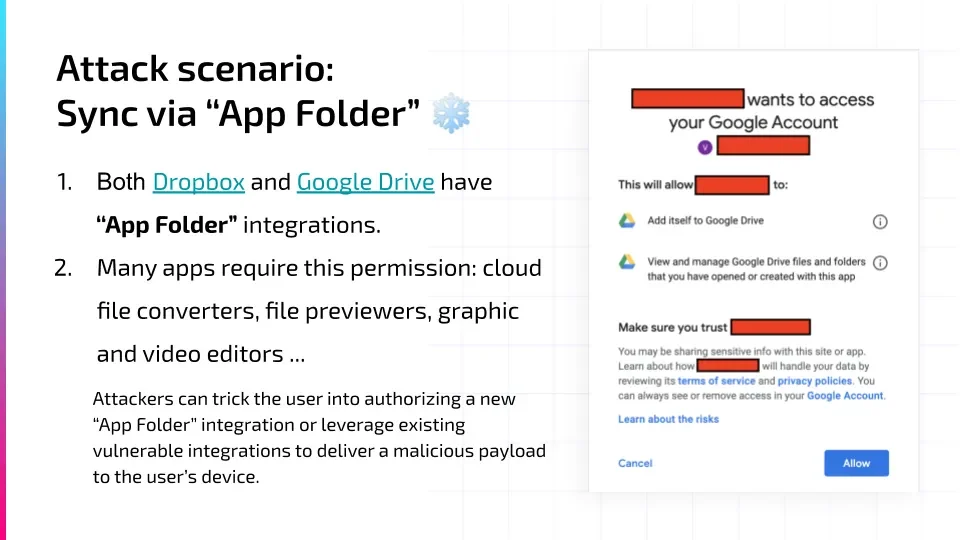
The most interesting "syncing" approach, in the author's opinion, is to leverage App Folder integrations that users authorise via OAuth. If an attacker compromises a file converter and steals OAuth tokens, the attacker can sync anything to all machines owned by users who authorised the hacked OAuth app to write into their cloud folders, and those malicious files will not carry a quarantine attribute once synced to the device.
The attacker still needs an inconspicuous way to execute the synced file with minimal user attention. The .url shortcut file is offered as that option: it can launch any file on the device by its full path.
Step 4: Use .fileloc to launch the synced file
When Apple fixed .url file handling in Catalina, the author searched for a bypass and found mentions of the .fileloc file. Its dangerous nature has been known since 2009:
Incomplete blacklist vulnerability in Launch Services in Apple Mac OS X 10.5.8 allows user-assisted remote attackers to execute arbitrary code via a .fileloc file, which does not trigger a "potentially unsafe" warning message in the Quarantine feature.
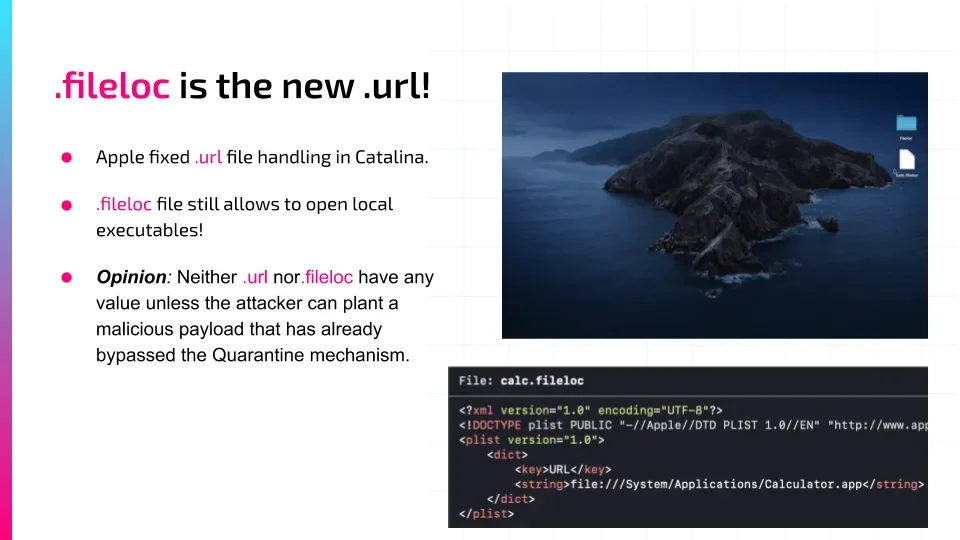
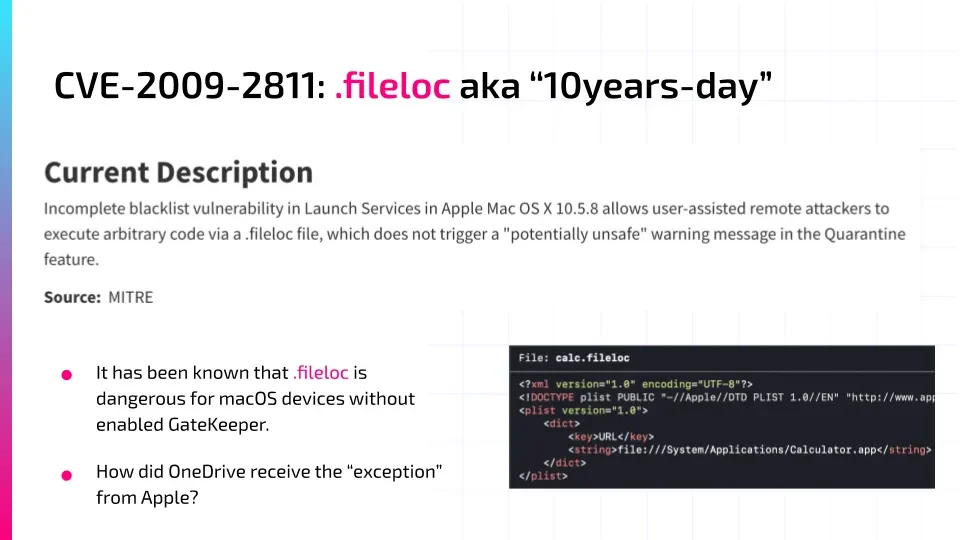
The author's reasoning about why this survived for ten years:
.filelocstill works on Catalina, which means Apple does not consider this feature to be a bug in macOS.- Apple knows it is possible to execute files on the device with
.fileloc, and knows that all default apps have quarantine enabled. - Launching a quarantined file with
.fileloccarries no security risk, because the user is asked to confirm the launch. - Therefore
.filelocis not a vulnerability by itself unless there are files without a quarantine attribute.
A sample .fileloc file is linked from the report.
Step 5: .fileloc in browsers
- Chrome and Firefox did not have
.filelocin their safebrowsing blocklists. - Thus, a browser extension with the
downloadspermission could execute arbitrary files on the device.
This produced CVE-2020-6797 and CVE-2020-6402. A PoC screencast (fileloc-ff-macos.mov) is linked in the report.
Step 6: Dropbox and OneDrive
The author believes Dropbox was aware of the issue for a long time but left it unpatched because the patch impacts UX, and therefore users and profits.
OneDrive is distributed on the App Store, yet it does not apply quarantine to synced files. The explanation given is the com.apple.security.files.user-selected.executable entitlement. The report quotes:
"However, when an app such as TextEdit with the "com.apple.security.files.user-selected.executable" entitlement saves a file, it removes the quarantine extended attribute!"
OneDrive removes the quarantine meta-attribute because Apple granted it that entitlement.
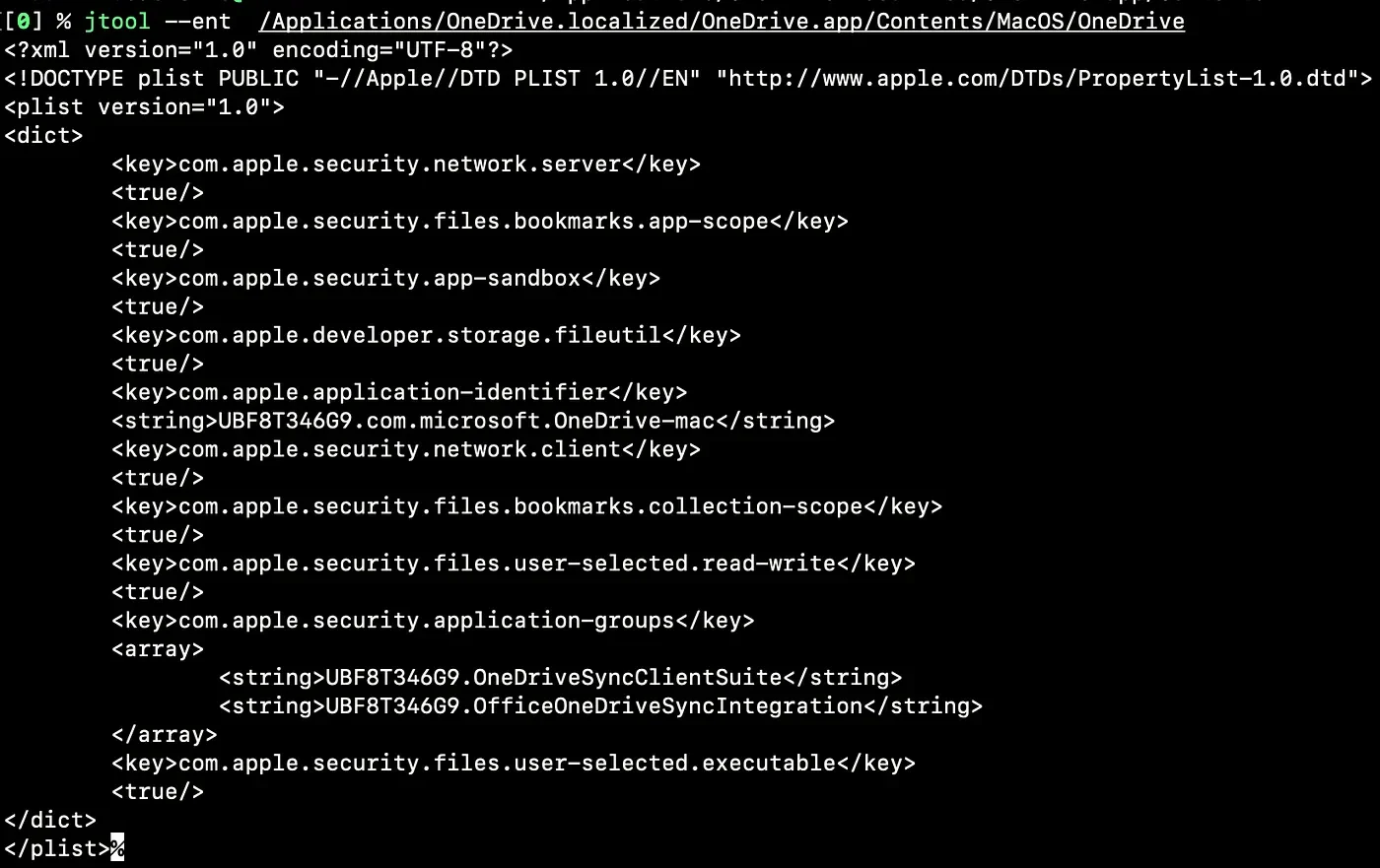
MSRC's response about file quarantine in OneDrive:
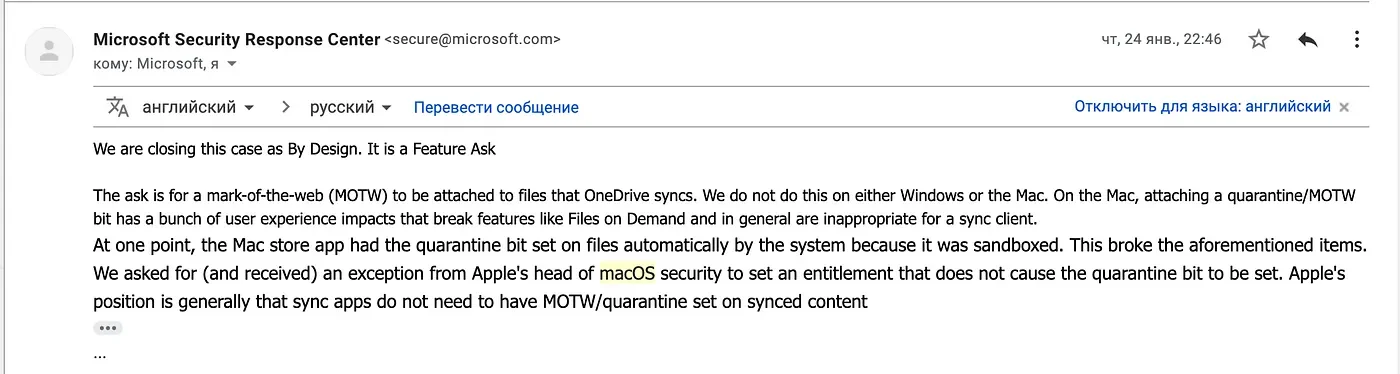
The ask is for a mark-of-the-web (MOTW) to be attached to files that OneDrive syncs. We do not do this on either Windows or the Mac. On the Mac, attaching a quarantine/MOTW bit has a bunch of user experience impacts that break features like Files on Demand and in general are inappropriate for a sync client.
At one point, the Mac store app had the quarantine bit set on files automatically by the system because it was sandboxed. This broke the aforementioned items. We asked for (and received) an exception from Apple's head of macOS security to set an entitlement that does not cause the quarantine bit to be set. Apple's position is generally that sync apps do not need to have MOTW/quarantine set on synced content.
According to MSRC, as summarised by the author:
- Quarantine dialogs break UX.
- Apple "legitimately" granted OneDrive those entitlements.
- Apple's head of macOS security made an exception for OneDrive. The author compares this to the "Hey vs Apple" case, where big companies obtain specific permissions while ignoring general platform rules.
- "Apple's position is generally that sync apps do not need to have MOTW". At the same time, Apple's iCloud applies the quarantine meta-attribute to synced files.
The author's summary of the exchange:
Microsoft: Hey Apple, we lose $PROFIT per year due to Quarantine dialogs. Do you have a hack for this?Apple: Sure, apply these entitlements.Microsoft: Cool.
Conclusions drawn:
- Both TCC and Quarantine impact macOS UX heavily. Product companies do not want to implement OS security features because it impacts their growth and profits.
- Apple is aware of
.filelocand implements secure file handling in default apps, yet grants entitlements to App Store apps (OneDrive) to bypass quarantine. That makes.fileloca security threat again.
The author also notes that Microsoft historically has issues with secure file handling, visible in Chrome SafeBrowsing rules where most "DANGEROUS" executable file types belong to Windows, and that Microsoft's response to the Skype quarantine report was "ok, nice, bye. We will fix it", with no hall of fame entry, no bounty and no thanks.
Step 7: Telegram link handling
Telegram for macOS allowed users to send links pointing to file:// origin. Combined with insecure link opening (NSWorkspace.openURL), an attacker could send a crafted link whose opening leads to code execution on the device. The author calls it the same bug as in Zoom. The PoC was:
file://host/Applications/Calculator.app/Contents/MacOS/Calculator
Root cause
The mistake is that quarantine is left to the writing application, and many apps skip it. An app that writes or syncs a file without setting com.apple.quarantine (or without delegating the download to the OS) produces a file that Gatekeeper treats as trusted. The .terminal file type turns that into code execution without the executable bit, and .fileloc and .url shortcut files turn it into a way to launch an arbitrary local file by full path.
Existing defences did not stop it because:
.filelocwas not in Chrome's or Firefox's safebrowsing blocklists, so a browser extension with thedownloadspermission could use it..filelocis not treated as a vulnerability by Apple when the target file is quarantined, because the user is asked to confirm the launch. The gap only opens when unquarantined files exist.- OneDrive holds the
com.apple.security.files.user-selected.executableentitlement, and the report quotes that saving with it removes the quarantine attribute.
Impact
An attacker who can get a file into an app that skips quarantine can execute code on the user's device when the user opens it. The author rates the vulnerability itself as low/moderate impact, but notes it can be combined with other custom behaviours and UX features to increase severity. The scenario relies on user interaction and on phishing to convince the user to open the file, and one-click or automatic download behaviour in some chat apps lowers that barrier.
For file-syncing apps, the attacker needs a way to write into the user's cloud storage, for example by compromising an OAuth App Folder integration and stealing tokens, and then needs an inconspicuous launch method such as .fileloc or .url. The author states the issue affected at least 20+ apps.
Fix
What was changed, per the report:
- Keybase added quarantine to both the macOS and Windows apps and, most importantly, to Keybase FileSystem (KBFS). The author thanks the Keybase team for effective collaboration.
- Slack has a HackerOne report linked in the write-up.
- Signal for macOS implements the
xattroption, settingcom.apple.quarantineon downloaded files. - Telegram is listed among the apps that fixed the issue.
- Brave is cited as an example of the auto-update side effect of the
Info.plistdelegation approach. - Big Sur is described as the end of the
.terminalepoch: assuming there are no similar file types, asking for user confirmation on file opening is a good way to prevent further abuse of.terminal.
What remained unfixed at the time of writing: Dropbox, OneDrive and Google Drive, according to the author. The two remediation options for developers are the xattr approach and delegating quarantine to the OS in Info.plist.
Variants to test
- Other chat, messenger and mail apps. Send a
.terminalfile and check whether the received file carriescom.apple.quarantine. A positive result is a file that opens and runs its payload without a Gatekeeper prompt. - File-syncing apps. Sync a
.terminalor.filelocfile into a cloud folder and check the attribute on the local copy. A positive result is a synced file with no quarantine attribute. - OAuth App Folder integrations. Look for integrations that can write into a user's cloud storage. A positive result is the ability to place an arbitrary file into the synced folder without the user downloading it manually.
- Browser extensions with the
downloadspermission. Download a.filelocfile and check whether the browser blocks it. A positive result is the file being saved and launchable, which is the pattern behind CVE-2020-6797 and CVE-2020-6402. file://link handling in desktop clients. Send a link pointing to a local application binary, as in the Telegram PoC. A positive result is the client opening the local path throughNSWorkspace.openURLand executing the target.- Entitlement review of App Store apps. Check whether an app holds
com.apple.security.files.user-selected.executableand whether files it saves lose the quarantine attribute. A positive result is a saved file withoutcom.apple.quarantine. - Other shortcut file types. The author suggests searching for misconfigurations when researching macOS/iOS apps, citing SMJobBless as further evidence of the theory. A positive result is another file type that launches local files by path without a quarantine prompt.
Response from bug hunters
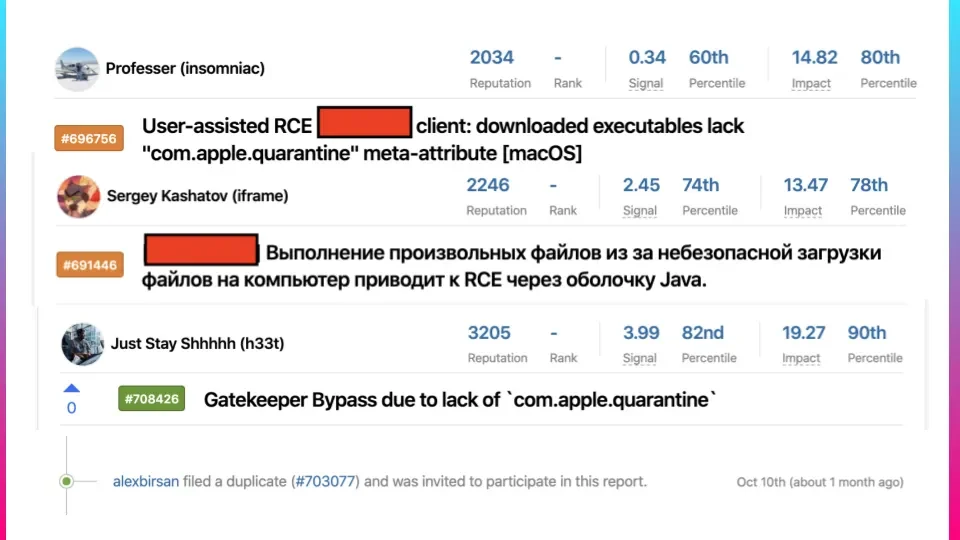
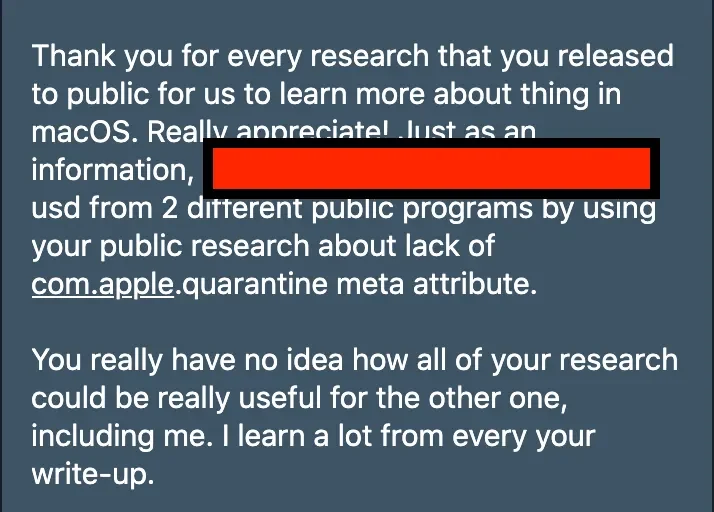
After the reports to Brave Browser and Keybase were disclosed, other bug hunters began reporting file quarantine issues to other macOS apps; the author had not seen the technique mentioned on bug bounty programs before. The author thanks the hunters for making macOS apps more secure and notes this proves the vulnerability is easy to understand and reproduce. The author also received thanks from bug hunters for making the technique public.
Open questions
The author closes with questions rather than answers: who should be responsible for secure file handling (developers, platforms or users); how best to engage companies to implement security features; whether exceptions for some companies are acceptable; whether this is a unique case in the Apple ecosystem; and whether there is a way to fix all problems with file quarantine, and whether they need to be solved.
What happened, in plain words
When you download a file on a Mac, the operating system is supposed to put a small invisible label on it. That label says "this file came from the internet and has not been checked". The label is called a quarantine flag, and it is stored as an extended attribute: a piece of extra information attached to a file, separate from its contents. The Mac feature that reads this label and warns you before opening the file is called Gatekeeper. Windows has the same idea under a different name: Mark-of-the-Web, or MOTW.
The problem described in this research is simple to state. The label is not applied automatically by the operating system to every file that lands on your disk. It is the job of the application that downloads or copies the file to ask the system to apply it, or to apply it itself. Many popular Mac apps with file-sharing features did neither. So a file that arrived through them looked to the Mac like a file you had created yourself, and it opened without any warning.
The author used a file type called .terminal as the payload. A .terminal file is a settings file for the built-in Terminal app. Opening it makes Terminal run a command. Because it is a settings file rather than a normal program, it does not need the executable bit (the permission that marks a file as something the system may run) to do its work. So an attacker who can get a .terminal file onto your Mac through an app that skips the quarantine step can get code running when you open it.
The research covers chat apps, messengers, mail apps and file-syncing apps. The author names Keybase, Slack, Skype, Signal and Telegram as products that decided to fix the issue, while it stayed unfixed in file-syncing apps such as Dropbox, OneDrive and Google Drive. In total, the author says the issue affected at least 20+ apps, a significant part of the macOS ecosystem. Apps from the App Store are described as not vulnerable to these quarantine issues, with OneDrive as the exception discussed later.
Along the way the author found two macOS "insecure features": the way the system handles .fileloc and .url shortcut files. Both can launch any local file by its full path when the shortcut is opened. That behaviour led to two browser bugs, CVE-2020-6797 (Firefox) and CVE-2020-6402 (Chrome). A CVE is a public catalogue number for a known security flaw, so people can refer to the same bug unambiguously.
Setup
The research does not describe a lab setup, accounts or tool versions. What matters is behaviour, and it comes down to three conditions:
- A macOS user receives a file through an application that handles downloads or syncs files.
- The application either does not ask the operating system to quarantine the file, or does not set the
com.apple.quarantineattribute itself. - The user opens the file, either because of phishing (a message crafted to make them trust and open it) or because the app makes opening a one-click action.
The author also notes that .terminal files do not need the +x file permission to run a malicious payload on the device, because a .terminal file is a Terminal.app configuration profile rather than a plain executable.
Finding it
The core observation is about who is responsible for the label. Many apps neither ask the OS to quarantine files nor set the attribute themselves. It is the application's job to ask the OS to quarantine downloads, or to set the attribute itself. Many apps simply write the file to disk without the attribute, so Gatekeeper never sees it as untrusted.
The general attack scenario is stated as four steps:
- A macOS user downloads and opens a
hello.terminalfile received through the application. - The user expects the downloaded file is quarantined and is tracked by Gatekeeper.
- The application neither delegates file quarantine process to OS, nor does it on its own.
- Boom! Malicious code executes on the device.
The scenario relies on user interaction and on convincing the user to open the file with phishing. The author argues that the state of UX security (how safely the user interface guides people) in many chat apps is poor and significantly increases the risk. Some apps allow executing the malicious file with a single click on the file icon, and previous versions of Telegram downloaded files automatically without user consent. iMessage is held up as a good example because it shows a QuickLook preview of the file instead of opening it. Some developers also reject secure file handling as a developer responsibility and shift the risk to users; the author cites WhatsApp's response as an example of that position.
Exploitation
Step 1: Deliver a .terminal file through an app that skips quarantine
The payload is a .terminal file. It is not widely known, but it is a Terminal.app configuration profile, and it does not need the executable bit to run its payload. If the receiving app writes the file without com.apple.quarantine, opening it runs the payload without a Gatekeeper prompt.
Step 2: Fix the quarantine gap in the app (the two options)
The author describes two ways an application can close the gap:
- Quarantine the downloaded file with the
xattrutility, setting thecom.apple.quarantineattribute to a specific value (setting an arbitrary value also works). Signal for macOS implements this option.xattris a command-line tool for reading and writing extended attributes, the same kind of invisible label described above. - Delegate quarantine to the OS in
Info.plist, so the OS quarantines all files downloaded by the application.Info.plistis a settings file inside every Mac app bundle that tells the system how the app behaves. This approach is tricky because the OS may also quarantine the new version of the app downloaded by the auto-update mechanism; the author notes that Brave browser had this issue in the past.
Step 3: Attack file-syncing apps by syncing instead of downloading
Most file-syncing apps sync files without the quarantine attribute. The attack idea is to sync [1] the file into the user's cloud file storage and later "somehow" launch [2] the synced file on the user's device.
The most interesting "syncing" approach, in the author's opinion, is to leverage App Folder integrations that users authorise via OAuth. OAuth is a way to let one app act on your behalf in another service without giving it your password: you approve the connection once, and the app receives a token, a long random string that proves the permission was granted. If an attacker compromises a file converter and steals those OAuth tokens, the attacker can sync anything to all machines owned by users who authorised the hacked OAuth app to write into their cloud folders, and those malicious files will not carry a quarantine attribute once synced to the device.
The attacker still needs an inconspicuous way to execute the synced file with minimal user attention. The .url shortcut file is offered as that option: it can launch any file on the device by its full path.
Step 4: Use .fileloc to launch the synced file
When Apple fixed .url file handling in Catalina, the author searched for a bypass and found mentions of the .fileloc file. Its dangerous nature has been known since 2009:
Incomplete blacklist vulnerability in Launch Services in Apple Mac OS X 10.5.8 allows user-assisted remote attackers to execute arbitrary code via a .fileloc file, which does not trigger a "potentially unsafe" warning message in the Quarantine feature.
The author's reasoning about why this survived for ten years:
.filelocstill works on Catalina, which means Apple does not consider this feature to be a bug in macOS.- Apple knows it is possible to execute files on the device with
.fileloc, and knows that all default apps have quarantine enabled. - Launching a quarantined file with
.fileloccarries no security risk, because the user is asked to confirm the launch. - Therefore
.filelocis not a vulnerability by itself unless there are files without a quarantine attribute.
A sample .fileloc file is linked from the report.
Step 5: .fileloc in browsers
- Chrome and Firefox did not have
.filelocin their safebrowsing blocklists. Safebrowsing is the list of file types and addresses a browser refuses to download or warns about. - Thus, a browser extension with the
downloadspermission could execute arbitrary files on the device. An extension is a small add-on installed in the browser, and a permission is a specific capability the user grants it, such as saving files.
This produced CVE-2020-6797 and CVE-2020-6402. A PoC screencast (fileloc-ff-macos.mov) is linked in the report. PoC means proof of concept: a demonstration that the attack really works.
Step 6: Dropbox and OneDrive
The author believes Dropbox was aware of the issue for a long time but left it unpatched because the patch impacts UX, and therefore users and profits.
OneDrive is distributed on the App Store, yet it does not apply quarantine to synced files. The explanation given is the com.apple.security.files.user-selected.executable entitlement. An entitlement is a special permission that Apple grants to an app, allowing it to do something ordinary apps cannot. The report quotes:
"However, when an app such as TextEdit with the "com.apple.security.files.user-selected.executable" entitlement saves a file, it removes the quarantine extended attribute!"
OneDrive removes the quarantine meta-attribute because Apple granted it that entitlement.
MSRC's response about file quarantine in OneDrive. MSRC is Microsoft's security response centre, the team that handles security reports about Microsoft products:
The ask is for a mark-of-the-web (MOTW) to be attached to files that OneDrive syncs. We do not do this on either Windows or the Mac. On the Mac, attaching a quarantine/MOTW bit has a bunch of user experience impacts that break features like Files on Demand and in general are inappropriate for a sync client.
At one point, the Mac store app had the quarantine bit set on files automatically by the system because it was sandboxed. This broke the aforementioned items. We asked for (and received) an exception from Apple's head of macOS security to set an entitlement that does not cause the quarantine bit to be set. Apple's position is generally that sync apps do not need to have MOTW/quarantine set on synced content.
According to MSRC, as summarised by the author:
- Quarantine dialogs break UX.
- Apple "legitimately" granted OneDrive those entitlements.
- Apple's head of macOS security made an exception for OneDrive. The author compares this to the "Hey vs Apple" case, where big companies obtain specific permissions while ignoring general platform rules.
- "Apple's position is generally that sync apps do not need to have MOTW". At the same time, Apple's iCloud applies the quarantine meta-attribute to synced files.
The author's summary of the exchange:
Microsoft: Hey Apple, we lose $PROFIT per year due to Quarantine dialogs. Do you have a hack for this?Apple: Sure, apply these entitlements.Microsoft: Cool.
This block is a joke dialogue in three lines, written as if it were a chat between the two companies. Microsoft says it loses money every year because of the quarantine warning dialogs. Apple answers that the fix is to apply for the entitlements. Microsoft replies that this is fine. The point is that a security control was traded away for business convenience.
Conclusions drawn:
- Both TCC and Quarantine impact macOS UX heavily. TCC is the macOS privacy system that asks your permission when an app wants to use your camera, microphone, files and so on. Product companies do not want to implement OS security features because it impacts their growth and profits.
- Apple is aware of
.filelocand implements secure file handling in default apps, yet grants entitlements to App Store apps (OneDrive) to bypass quarantine. That makes.fileloca security threat again.
The author also notes that Microsoft historically has issues with secure file handling, visible in Chrome SafeBrowsing rules where most "DANGEROUS" executable file types belong to Windows, and that Microsoft's response to the Skype quarantine report was "ok, nice, bye. We will fix it", with no hall of fame entry, no bounty and no thanks.
Step 7: Telegram link handling
Telegram for macOS allowed users to send links pointing to file:// origin. A file:// address is a way of writing a path to a file on your own computer in the same form as a web address. Combined with insecure link opening (NSWorkspace.openURL, the macOS function an app calls to open a link), an attacker could send a crafted link whose opening leads to code execution on the device. The author calls it the same bug as in Zoom. The PoC was:
file://host/Applications/Calculator.app/Contents/MacOS/Calculator
Read from left to right, the line says: use the file scheme, then a host part, then a path that points inside the Calculator app to the actual program file that the app runs. If the chat client passes this string to the system function that opens links without checking it, the system opens that program, and the program runs.
Root cause
The mistake is that quarantine is left to the writing application, and many apps skip it. An app that writes or syncs a file without setting com.apple.quarantine (or without delegating the download to the OS) produces a file that Gatekeeper treats as trusted. The .terminal file type turns that into code execution without the executable bit, and .fileloc and .url shortcut files turn it into a way to launch an arbitrary local file by full path.
Existing defences did not stop it because:
.filelocwas not in Chrome's or Firefox's safebrowsing blocklists, so a browser extension with thedownloadspermission could use it..filelocis not treated as a vulnerability by Apple when the target file is quarantined, because the user is asked to confirm the launch. The gap only opens when unquarantined files exist.- OneDrive holds the
com.apple.security.files.user-selected.executableentitlement, and the report quotes that saving with it removes the quarantine attribute.
Impact
An attacker who can get a file into an app that skips quarantine can execute code on the user's device when the user opens it. The author rates the vulnerability itself as low/moderate impact, but notes it can be combined with other custom behaviours and UX features to increase severity. The scenario relies on user interaction and on phishing to convince the user to open the file, and one-click or automatic download behaviour in some chat apps lowers that barrier.
For file-syncing apps, the attacker needs a way to write into the user's cloud storage, for example by compromising an OAuth App Folder integration and stealing tokens, and then needs an inconspicuous launch method such as .fileloc or .url. The author states the issue affected at least 20+ apps.
Fix
What was changed, per the report:
- Keybase added quarantine to both the macOS and Windows apps and, most importantly, to Keybase FileSystem (KBFS). The author thanks the Keybase team for effective collaboration.
- Slack has a HackerOne report linked in the write-up. HackerOne is a platform where security researchers report bugs to companies.
- Signal for macOS implements the
xattroption, settingcom.apple.quarantineon downloaded files. - Telegram is listed among the apps that fixed the issue.
- Brave is cited as an example of the auto-update side effect of the
Info.plistdelegation approach. - Big Sur is described as the end of the
.terminalepoch: assuming there are no similar file types, asking for user confirmation on file opening is a good way to prevent further abuse of.terminal.
What remained unfixed at the time of writing: Dropbox, OneDrive and Google Drive, according to the author. The two remediation options for developers are the xattr approach and delegating quarantine to the OS in Info.plist.
Variants to test
- Other chat, messenger and mail apps. Send a
.terminalfile and check whether the received file carriescom.apple.quarantine. A positive result is a file that opens and runs its payload without a Gatekeeper prompt. - File-syncing apps. Sync a
.terminalor.filelocfile into a cloud folder and check the attribute on the local copy. A positive result is a synced file with no quarantine attribute. - OAuth App Folder integrations. Look for integrations that can write into a user's cloud storage. A positive result is the ability to place an arbitrary file into the synced folder without the user downloading it manually.
- Browser extensions with the
downloadspermission. Download a.filelocfile and check whether the browser blocks it. A positive result is the file being saved and launchable, which is the pattern behind CVE-2020-6797 and CVE-2020-6402. file://link handling in desktop clients. Send a link pointing to a local application binary, as in the Telegram PoC. A positive result is the client opening the local path throughNSWorkspace.openURLand executing the target.- Entitlement review of App Store apps. Check whether an app holds
com.apple.security.files.user-selected.executableand whether files it saves lose the quarantine attribute. A positive result is a saved file withoutcom.apple.quarantine. - Other shortcut file types. The author suggests searching for misconfigurations when researching macOS/iOS apps, citing SMJobBless as further evidence of the theory. A positive result is another file type that launches local files by path without a quarantine prompt.
Response from bug hunters
After the reports to Brave Browser and Keybase were disclosed, other bug hunters began reporting file quarantine issues to other macOS apps; the author had not seen the technique mentioned on bug bounty programs before. A bug bounty program is a scheme where a company pays researchers for reporting security flaws. The author thanks the hunters for making macOS apps more secure and notes this proves the vulnerability is easy to understand and reproduce. The author also received thanks from bug hunters for making the technique public.
Open questions
The author closes with questions rather than answers: who should be responsible for secure file handling (developers, platforms or users); how best to engage companies to implement security features; whether exceptions for some companies are acceptable; whether this is a unique case in the Apple ecosystem; and whether there is a way to fix all problems with file quarantine, and whether they need to be solved.
Glossary
- Gatekeeper: the macOS feature that checks downloaded apps and files before they are opened and warns the user.
- File Quarantine: the macOS mechanism that marks downloaded files as untrusted so Gatekeeper can warn about them.
- Mark-of-the-Web (MOTW): the Windows equivalent of the quarantine label, attached to files that came from the internet.
- Extended attribute: extra information attached to a file, separate from its contents, such as the quarantine label.
com.apple.quarantine: the name of the extended attribute that marks a file as downloaded and untrusted.xattr: a command-line utility for reading and writing extended attributes.- Executable bit (+x): the file permission that marks a file as something the system may run as a program.
.terminalfile: a settings file for the Terminal app; opening it makes Terminal run a command..filelocfile: a macOS shortcut file type that can launch a local file by its full path..urlfile: a shortcut file that points to a location, which on macOS can also be a local file path.Info.plist: a settings file inside a Mac app bundle that describes how the app behaves.- Entitlement: a special permission Apple grants to an app, allowing it to do something ordinary apps cannot.
com.apple.security.files.user-selected.executable: the entitlement that lets an app save executable files chosen by the user, and which removes the quarantine attribute when it does so.- Sandbox: a restricted environment in which an app can only touch the resources it has been granted.
- TCC: the macOS privacy system that asks the user's permission when an app wants to access things like the camera, microphone or files.
- OAuth: a way to let one app act on your behalf in another service without sharing your password.
- Token: a long random string that proves a permission was granted, used in place of a password.
- App Folder integration: a cloud storage feature that lets an approved third-party app read and write a dedicated folder in your account.
NSWorkspace.openURL: the macOS function an app calls to open a link or file location.file://: a way of writing a path to a file on your own computer in the same form as a web address.- Safebrowsing blocklist: the list of file types and addresses a browser refuses to download or warns about.
- Browser extension: a small add-on installed in the browser that adds features.
- Permission (extension): a specific capability the user grants an extension, such as saving files.
- CVE: a public catalogue number for a known security flaw.
- PoC (proof of concept): a demonstration that an attack really works.
- Phishing: a message crafted to make a person trust it and open a file or follow a link.
- UX security: how safely the design of a user interface guides people, for example whether opening a file takes one click or a deliberate confirmation.
- QuickLook: the macOS preview that shows a file's contents without opening it in an app.
- MSRC: Microsoft's security response centre, the team that handles security reports about Microsoft products.
- HackerOne: a platform where security researchers report bugs to companies.
- Bug bounty program: a scheme where a company pays researchers for reporting security flaws.
- SMJobBless: a macOS mechanism for installing privileged helper tools, cited by the author as another place where misconfigurations appear.
- Catalina, Big Sur: versions of macOS; Catalina is where
.urlhandling was fixed, Big Sur is where.terminalfiles began asking for confirmation.