From Hunting for a Laptop to Hunting down Remote Code Execution
The WebDAV service on an Asus subdomain allowed unauthenticated users to upload files, and the reporter demonstrated that a file could be created and then accessed via the web browser. An attacker could upload a malicious file that might execute on the server, potentially leading to remote code execution.

Hello guys, this is Anil back with another write-up on my bug hunting adventures. This time I helped out Asus. :)
The full write-up lives on its author's site
It belongs to its author, so we link to it rather than copy it. The other two tabs are our own rewrites, checked against it.
Context
This is a write-up of a bug hunt against Asus, triggered by nothing more technical than shopping advice. A friend wanted a new laptop, the author was reading about an Asus RoG model, and the question that followed was simply why not recon the Asus website. The target that eventually mattered was a single sub-domain, http://stw.asus.com/, which the author picked at random from the enumeration output.
The feature at the centre of the report is WebDAV. As the author puts it, Web Distributed Authoring and Versioning (WebDAV) is an extension of the Hypertext Transfer Protocol (HTTP) that allows clients to perform remote Web content authoring operations, and it is defined in RFC 4918 by one of the Internet Engineering Task Force groups. In normal use WebDAV lets an authorised client mount a collection over HTTP and create, edit and delete files inside it; the author used it to create and save a file on the server.
Setup
The tooling described is minimal. Recon on the main domain was done from a PC over a whole night. The sub-domain enumeration was run with sublister against asus.com, and notably it was run from a mobile phone through Termux, after an update notification for that app prompted the idea. No versions, wordlists, flags or configuration are given.
The only precondition that mattered was that the sub-domain answered and looked like a Microsoft server. The author states that after seeing the page he felt confident they were running Microsoft server, and that recollection is what pointed him at WebDAV: a few days earlier a friend had told him about the WEBDAV REMOTE CODE EXECUTION bug. The client used for the test was the Windows "Add a network location" wizard on his laptop, so no custom tooling or exploit code was needed at any point.
Finding it
The first night produced nothing. The author spent it looking for a bug on the main domain and did not find anything.

The next evening, with the hunt still on his mind, he ran sublister against asus.com from the phone and randomly selected one of the resulting sub-domains, http://stw.asus.com/. The page he was greeted with is shown below.
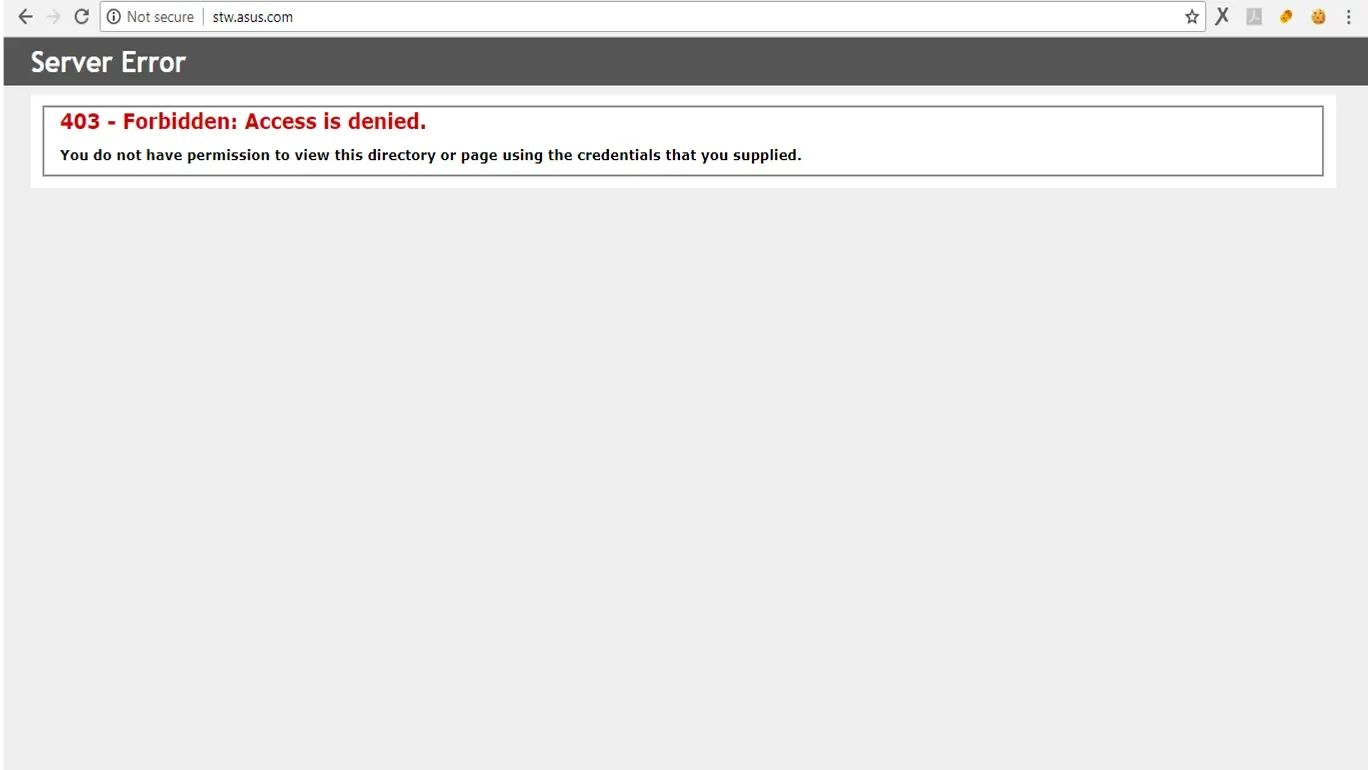
That page is the whole of the initial signal: it suggested a Microsoft server was behind the host. From there the reasoning was a direct match between the technology and a known bug class, WebDAV remote code execution, and the decision was to check whether WebDAV was enabled on this host.
Exploitation
Step 1: Add a network location
Back home, the author opened the site on his laptop and used the Windows wizard to add a network location pointing at the sub-domain.
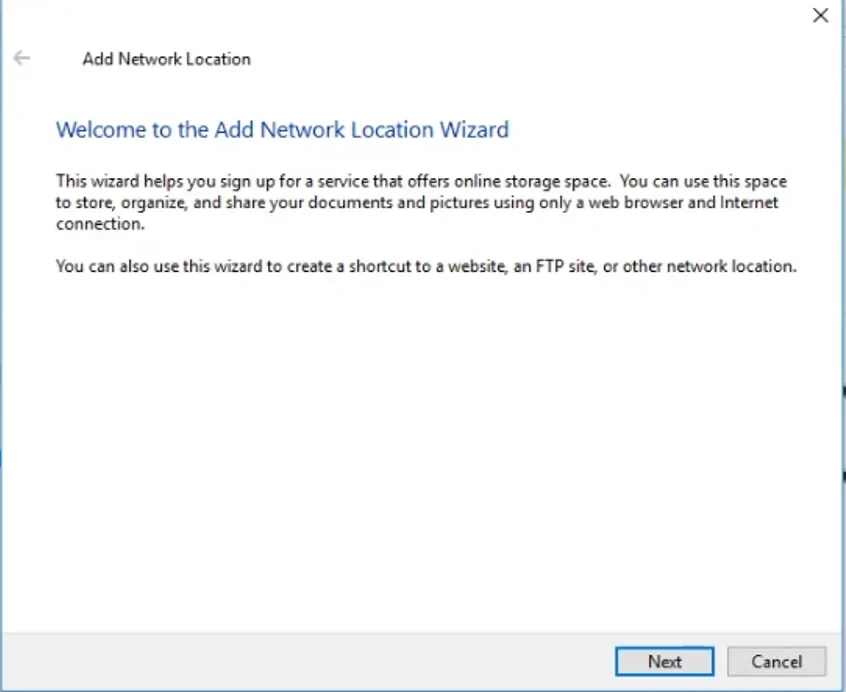
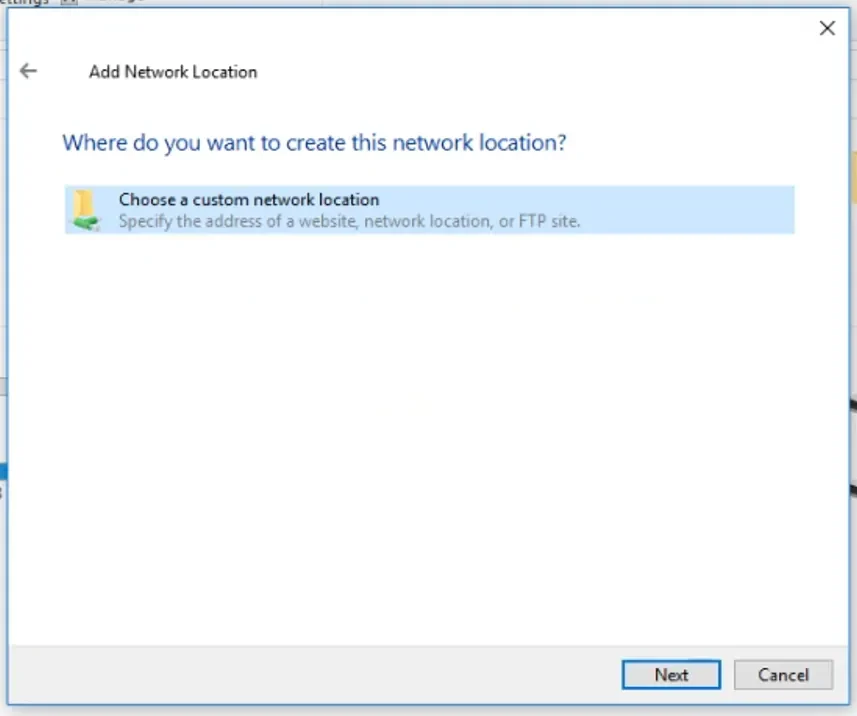
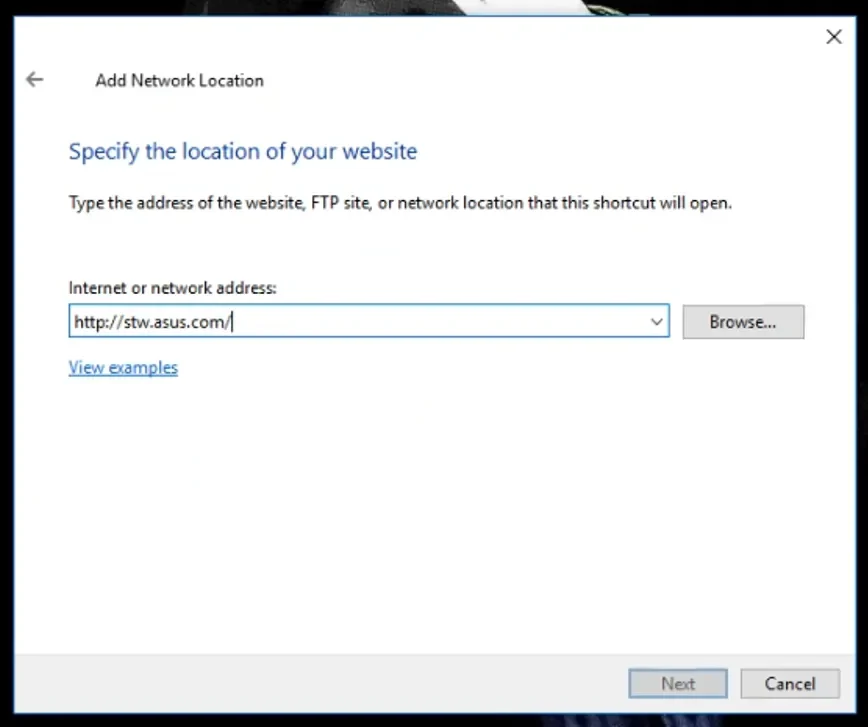
The screenshots above walk through the wizard pages up to the address entry.
Step 2: Observe that authentication was not enforced
The author contrasts two outcomes. Normally, when he tries connecting to something he does not have access to, the wizard shows an irritating pop-up, shown here:
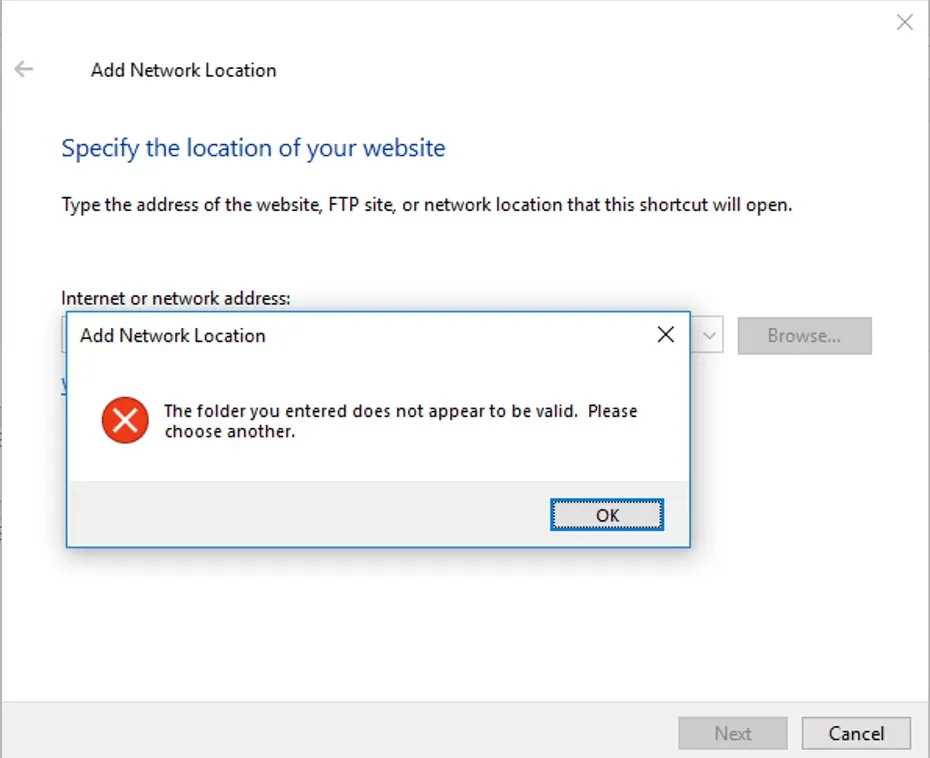
With http://stw.asus.com/ that did not happen. The wizard proceeded to the next step instead:
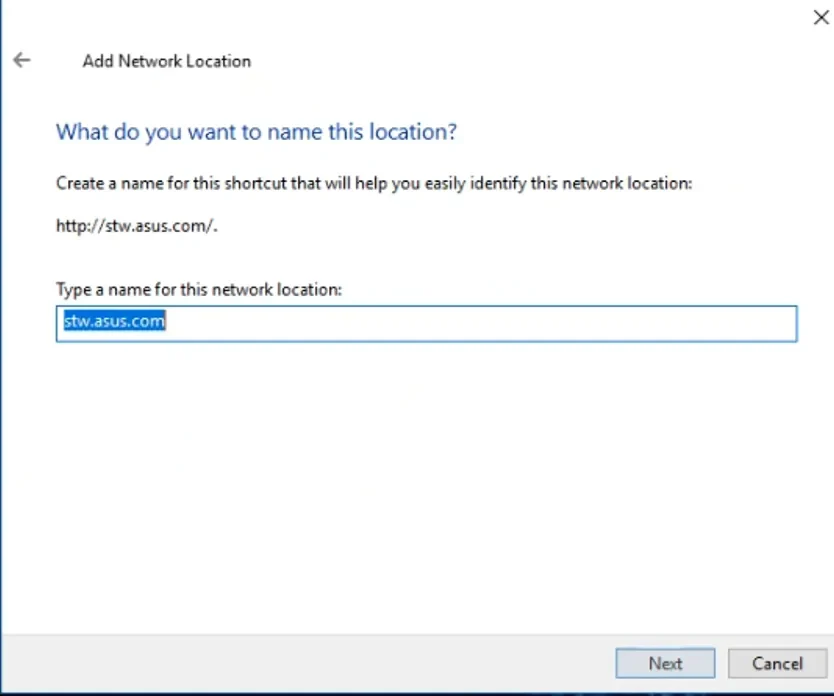
That difference is the finding. The server accepted the WebDAV connection without the credential prompt the author expected for a resource he had no access to, so the collection was reachable anonymously.
Step 3: Mount the location
The connection succeeded and the author completed the addition of the network location.

Step 4: Write a file
With the location mounted, he opened the folder, created a new file and saved it:
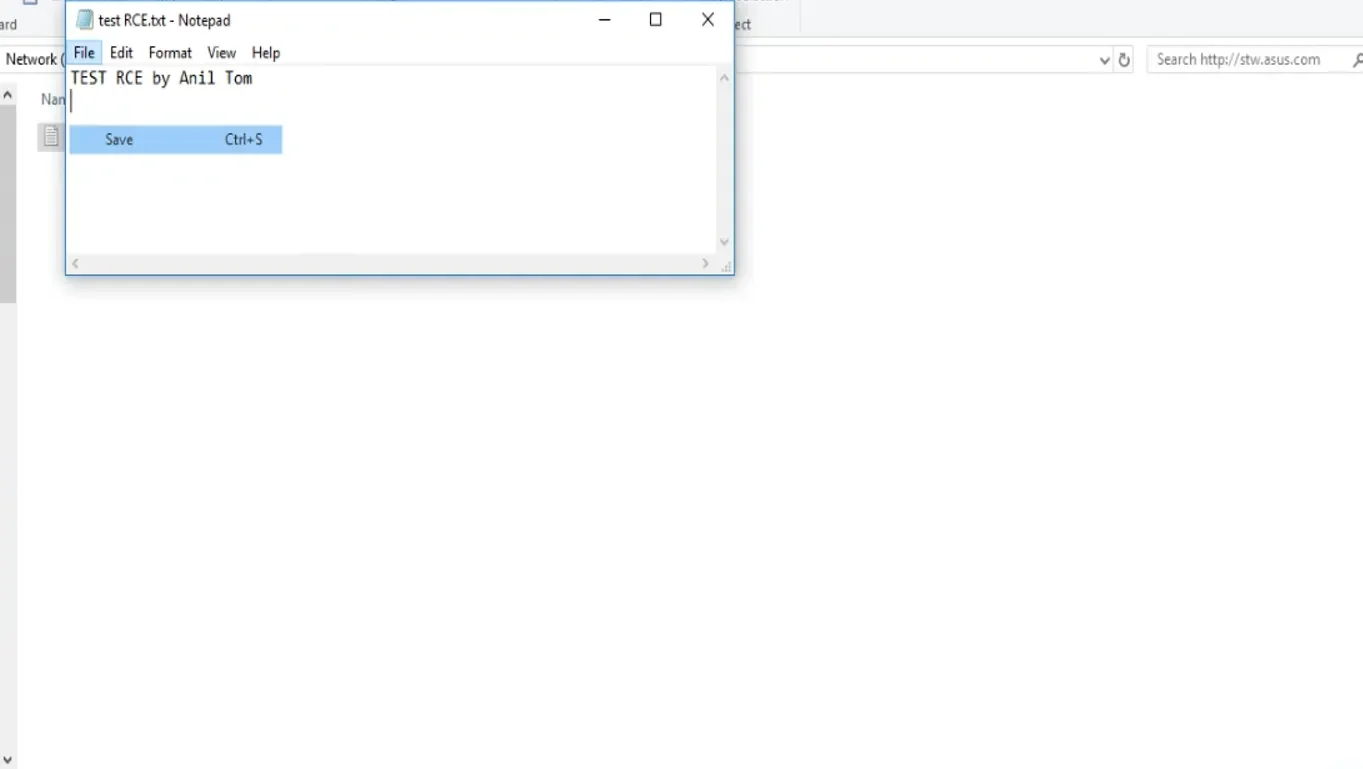
This is the write primitive: a new file saved into the mounted location without any credential prompt.
Step 5: Request the file over HTTP
He then opened that file in the web browser and saw it served back:
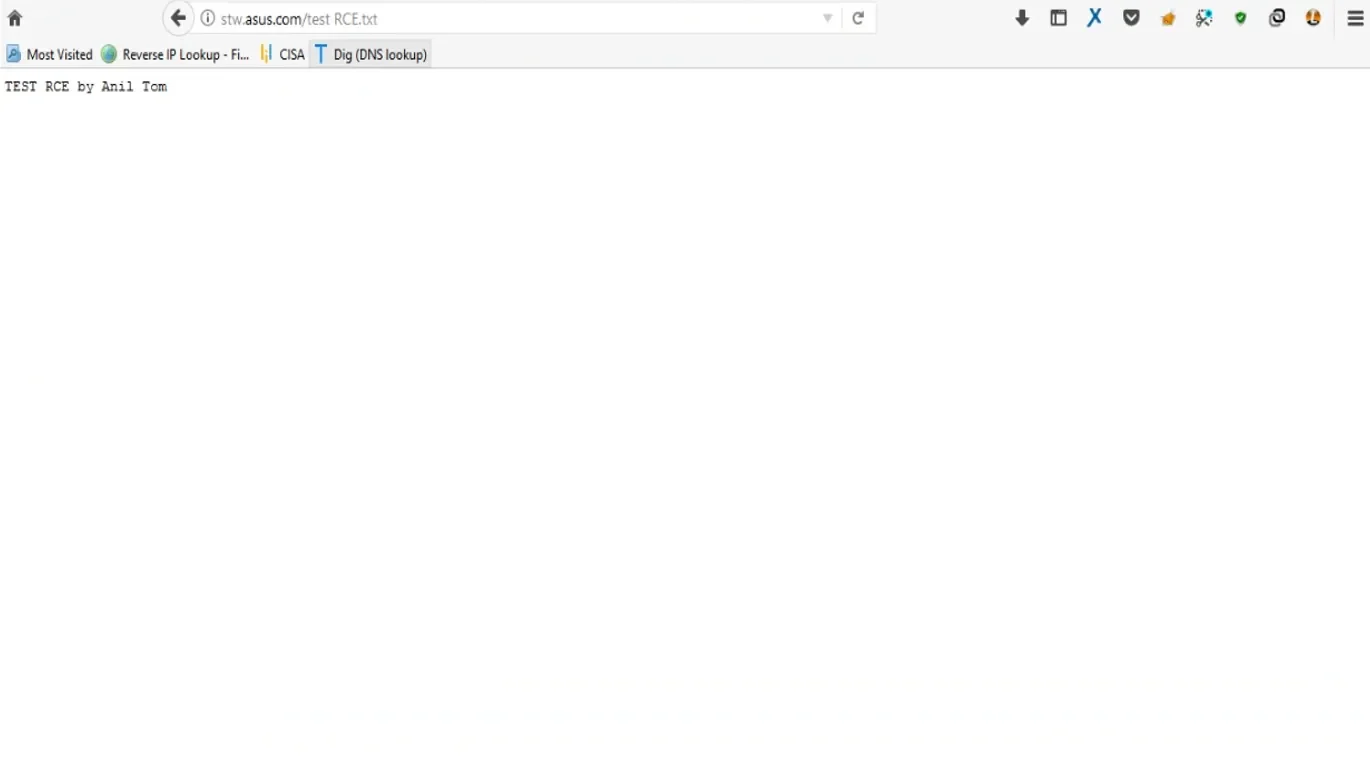

The file written through WebDAV was retrievable through the normal web interface of the same host. That closes the loop: content placed by an unauthenticated client is served back by the web server, which is the step that would turn a writable WebDAV collection into remote code execution if the uploaded file were a script the server runs.
Following this, the author made a PoC video and reported it to the Asus team. The report does not include the file name, extension or contents used, nor the exact HTTP requests and responses exchanged.
Root cause
Likely the WebDAV authoring module was enabled on the host and its access control was not enforced, so the WebDAV client could connect and write without credentials. Because the same directory was served by the web server, a file written over WebDAV became web-reachable content, and a script written there would be executed by the server rather than returned as text. The author's own test stopped at writing a file and reading it back in the browser; the report does not show a script being executed.
The existing defence that should have stopped this, authentication on the WebDAV endpoint, was absent for this host: the credential prompt the author expected never appeared. The report does not describe any other control, such as IP restriction or blocking of the WebDAV verbs, being present.
Impact
An unauthenticated attacker who can reach the host can mount the WebDAV collection and write files into it, and those files are then served by the web server. Under the conditions the author describes, an unauthenticated attacker can write files that the web server then serves, which is the path to remote code execution on the host.
Fix
The report records only that the issue was fixed.
Variants to test
- Enumerate sub-domains of the target and fingerprint each response for server banners or default pages that suggest IIS or another Microsoft stack. A positive result is a host whose page or headers point at a Microsoft server and which is not obviously a static site.
- Attempt to mount each candidate with a WebDAV client, for example the Windows "Add a network location" wizard. A positive result is the wizard advancing past the address step instead of prompting for credentials.
- Once mounted, create a file in the collection and request it over HTTP from the same host. A positive result is the file being served back at its URL.
- Try writing a server-side script rather than a plain file and request it. A positive result is the server executing it rather than returning its source, which confirms code execution rather than mere file write.
- Test the WebDAV verbs directly against candidate paths, checking whether write methods are accepted without authentication. A positive result is a successful write response where an authentication challenge would be expected.
- Check other hosts that share the same platform or deployment template, since a WebDAV module enabled in one place is often enabled in others. A positive result is the same unauthenticated mount and write behaviour on a second host.
What happened, in plain words
A security researcher was helping a friend choose a new laptop. While reading about an Asus RoG model, he decided to look for security problems on the Asus website. He spent a whole night on the main domain and found nothing. The next evening, an update notification for an app on his phone gave him an idea: run a tool that guesses sub-domain names against asus.com, from the phone. One of the sub-domains it turned up was http://stw.asus.com/. The page there made him think the site was running on a Microsoft web server. That reminded him of a bug a friend had told him about, WebDAV remote code execution, so he checked whether this host had WebDAV switched on. It appeared to be, and it let him connect and save a file without asking for a username or password. He then opened that file in his browser and the server handed it back. He recorded a proof of concept video and reported it to Asus; the timeline records the issue as fixed on 7 May, five days after the report.
A few words before we start, because this write-up is for people who have never done any of this.
A domain is the name you type to reach a site, like asus.com. A sub-domain is a name placed in front of it, like stw.asus.com, and it can point at a completely different machine run by the same organisation. Companies often have many of them, and they are not always as well looked after as the main site.
Recon (short for reconnaissance) means looking around a target before attacking it: what names exist, what software answers, what pages are served. It is the online equivalent of walking around a building and reading the signs before trying any doors.
WebDAV is the feature at the centre of this story. Web Distributed Authoring and Versioning (WebDAV) is an extension of the Hypertext Transfer Protocol (HTTP) that allows clients to perform remote Web content authoring operations. WebDAV is defined in RFC 4918 by one of the Internet Engineering Task Force group. In everyday terms: normal HTTP is for reading pages, like looking at a noticeboard. WebDAV adds the ability to pin new notices to the board, edit them and take them down, over the same connection. It is meant for people who are allowed to do that, and it is supposed to ask who you are first.
Remote code execution (RCE) is the worst kind of web bug: it means an outsider can make the server run instructions of their choosing. If a server will happily store a file and then run it when someone asks for it, and anyone can store a file, then anyone can run code.
The setup
The tools involved were modest. The first night of recon was done from a PC. The sub-domain search was run with sublister, a tool that tries a long list of common sub-domain names against a domain and reports which ones exist, and it was run from a mobile phone through Termux, an app that gives a phone a small Linux command line. The report gives no versions, word lists, flags or settings for any of this.
The one thing that mattered was what the sub-domain looked like. After seeing the page, the author felt confident that they were running Microsoft server. That guess is what pointed him at WebDAV, because a few days earlier a friend had told him about the WEBDAV REMOTE CODE EXECUTION bug. The only client he used to test it was the Windows "Add a network location" wizard on his laptop, so no custom tools or exploit code were needed at any point.
Finding it
The first night produced nothing. He spent it looking for a bug on the main domain and did not find anything.
The next evening, with the hunt still on his mind, he ran sublister against asus.com from the phone and randomly selected one of the resulting sub-domains, http://stw.asus.com/. The page he was greeted with is shown below.
That page is the whole of the initial signal: it suggested a Microsoft server was behind the host. From there the reasoning was a direct match between the technology and a known bug class, WebDAV remote code execution, and the decision was to check whether WebDAV was enabled on this host.
Exploitation
Step 1: Add a network location
Back home, the author opened the site on his laptop and used the Windows wizard to add a network location pointing at the sub-domain.
The screenshots above walk through the wizard pages up to the address entry.
Step 2: Observe that authentication was not enforced
The author contrasts two outcomes. Normally, when he tries connecting to something he does not have access to, the wizard shows an irritating pop-up, shown here:
With http://stw.asus.com/ that did not happen. The wizard proceeded to the next step instead:
That difference is the finding. The server accepted the WebDAV connection without the credential prompt the author expected for a resource he had no access to, so the collection was reachable anonymously.
Step 3: Mount the location
The connection succeeded and the author completed the addition of the network location.
Step 4: Write a file
With the location mounted, he opened the folder, created a new file and saved it:
This is the write primitive: a new file saved into the mounted location without any credential prompt.
Step 5: Request the file over HTTP
He then opened that file in the web browser and saw it served back:
The file written through WebDAV was retrievable through the normal web interface of the same host. That closes the loop: content placed by an unauthenticated client is served back by the web server, which is the step that would turn a writable WebDAV collection into remote code execution if the uploaded file were a script the server runs.
Following this, the author made a PoC video and reported it to the Asus team. The report does not include the file name, extension or contents used, nor the exact HTTP requests and responses exchanged.
Root cause
Likely the WebDAV authoring module was enabled on the host and its access control was not enforced, so the WebDAV client could connect and write without credentials. Because the same directory was served by the web server, a file written over WebDAV became web-reachable content, and a script written there would be executed by the server rather than returned as text. The author's own test stopped at writing a file and reading it back in the browser; the report does not show a script being executed.
The existing defence that should have stopped this, authentication on the WebDAV endpoint, was absent for this host: the credential prompt the author expected never appeared. The report does not describe any other control, such as IP restriction or blocking of the WebDAV verbs, being present.
Impact
An unauthenticated attacker who can reach the host can mount the WebDAV collection and write files into it, and those files are then served by the web server. Under the conditions the author describes, an unauthenticated attacker can write files that the web server then serves, which is the path to remote code execution on the host.
Fix
The report records only that the issue was fixed.
Variants to test
- Enumerate sub-domains of the target and fingerprint each response for server banners or default pages that suggest IIS or another Microsoft stack. A positive result is a host whose page or headers point at a Microsoft server and which is not obviously a static site.
- Attempt to mount each candidate with a WebDAV client, for example the Windows "Add a network location" wizard. A positive result is the wizard advancing past the address step instead of prompting for credentials.
- Once mounted, create a file in the collection and request it over HTTP from the same host. A positive result is the file being served back at its URL.
- Try writing a server-side script rather than a plain file and request it. A positive result is the server executing it rather than returning its source, which confirms code execution rather than mere file write.
- Test the WebDAV verbs directly against candidate paths, checking whether write methods are accepted without authentication. A positive result is a successful write response where an authentication challenge would be expected.
- Check other hosts that share the same platform or deployment template, since a WebDAV module enabled in one place is often enabled in others. A positive result is the same unauthenticated mount and write behaviour on a second host.
Glossary
- Domain: the name you type to reach a website, such as
asus.com. - Sub-domain: a name placed in front of a domain, such as
stw.asus.com, which can point at a separate machine. - Recon: reconnaissance; looking around a target to learn what exists before trying anything.
- Sublister: a tool that tries a long list of common sub-domain names against a domain and reports which ones exist.
- Termux: an app that provides a Linux command line on a mobile phone.
- HTTP: the protocol browsers and servers use to exchange web pages and other content.
- WebDAV: Web Distributed Authoring and Versioning; an extension of HTTP that lets clients create, edit and delete files on a server remotely.
- RFC 4918: the document that defines the WebDAV standard.
- IETF: Internet Engineering Task Force; the group that publishes internet standards such as RFCs.
- WebDAV verbs: the HTTP methods WebDAV adds for file operations, such as writing a file.
- PUT: the HTTP method used to send a file to a server, which is how a file is written over WebDAV.
- Authentication: proving who you are, usually with a username and password, before being allowed in.
- Unauthenticated: allowed without proving identity, i.e. anyone can do it.
- Access control: the rules that decide who is allowed to do what.
- Remote code execution (RCE): a bug that lets an outsider make the server run instructions of their choosing.
- Write primitive: the basic ability to place content of your choice on the target.
- Mount: to attach a remote location so it appears like a local folder or drive.
- Collection: a WebDAV term for a folder on the server.
- Exploit: the concrete action that abuses a bug.
- PoC: proof of concept; a demonstration, often a video, showing the bug is real.
- HOF: hall of fame; a page where a company lists researchers who reported valid issues.
- Fingerprinting: identifying what software and version a server runs from its pages, headers or behaviour.
- IIS: Microsoft's web server software.
- IP restriction: limiting access to requests coming from certain network addresses only.
- Server banner: a line in a response, often the
Serverheader, naming the software that answered.