Magic of the Back Slash
The web server allowed path traversal using URL-encoded backslashes in the URL path, letting an attacker read files outside the web root such as /etc/passwd. The same flaw was found on two subdomains.

This is Anil back with another write-up on my bug hunting adventures. Here, I am sharing a few of my findings in one of the BugcrowdPrivate Program.
The full write-up lives on its author's site
It belongs to its author, so we link to it rather than copy it. The other two tabs are our own rewrites, checked against it.
Context
This write-up covers two path traversal findings made in a Bugcrowd private program. The program had two wildcard scope domains, and at the time of testing no vulnerabilities had been reported against it. The researcher picked one subdomain from the first domain, referred to throughout as https://abc.redact.com, which presented as a static web page. The only directory discovered on it was /static/, which served the same content as the index page. The second finding was on a subdomain of the other domain, referred to as https://xyz.redact2.com, where a /client/ directory was found.
The feature involved is plain static file serving. There were no dynamic parameters in the application, so the usual approach of finding a parameter that fetches files (for example a file= or page= argument) was not available. The traversal had to be driven through the path itself.
Setup
The work was done against a Bugcrowd private program with two wildcard domains in scope. The tools used were:
- Sublist3r for subdomain enumeration on both wildcard domains, with the results saved for later recon.
- dirsearch for directory brute forcing.
- Burp Suite Spider for crawling.
The testing happened over a long night session, with the first report filed at 01:30 AM and the second at 04:05 AM.
Finding it
After enumerating subdomains with Sublist3r, the researcher picked one subdomain at random from the first domain. It looked like a static web page, so dirsearch and the Burp Suite Spider were run against it at the same time. Both produced only one result:
https://abc.redact.com/static/
That path rendered the same content as the index page. Basic recon plus attempts at open redirect and XSS turned up nothing.

The absence of any dynamic parameter is what shaped the rest of the approach. With no parameter to manipulate, the only input left was the URL path itself, and /static/ was the one directory that existed to attack.
Exploitation
Step 1: plain dot-dot-slash
The first attempt used the classic sequence directly in the path:
https://abc.redact.com/static/../../
This returned a 404 error page.
Step 2: backslash separators
Since the plain forward-slash form failed, the next attempt swapped in backslashes:
https://abc.redact.com/static/\..\../
This also returned the same 404 error page.
Step 3: URL encoding the backslashes
The next idea was to URL encode the payload. The encoded backslash is %5c, so the request became:
https://abc.redact.com/static/%5c..%5c..%5c/

The response this time was a blank page rather than a 404. The researcher notes having read a write-up describing the same observation during a path traversal attempt.
Step 4: extending the traversal to reach /etc/passwd
With the technique confirmed, the goal became reading a sensitive file, specifically /etc/passwd. The traversal was extended with more %5c.. segments:
https://abc.redact.com/static/%5c..%5c..%5c..%5c..%5c..%5c..%5c..%5c..%5c..%5c..%5c
At this depth the server again returned a 404 error page. Adding one more %5c and continuing the search produced the file contents.
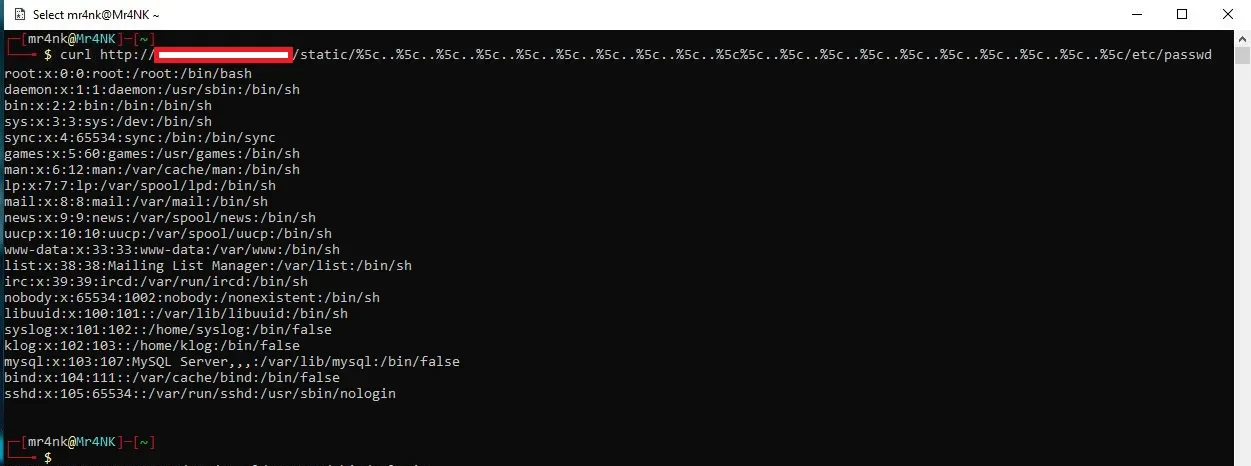
The screenshot shows the /etc/passwd contents returned by the server. The researcher notes that the file shown is not the real /etc/passwd, for privacy reasons.
Step 5: repeating the method on the second domain
The researcher then moved to the second wildcard domain, working through the saved Sublist3r list one subdomain at a time. On https://xyz.redact2.com, dirsearch found a directory called /client/. Burp Spider on that directory revealed one more directory. Applying the same encoded-backslash method produced a second path traversal.
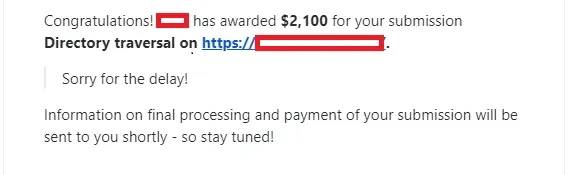
Both findings were reported. The first report was filed at 01:30 AM and the second at 04:05 AM.
Root cause
The application serves static content from a directory exposed at /static/, and the path component of the request is used to resolve a file on disk without adequately normalising or constraining it. The plain ../ form returned a 404, and so did the raw backslash form. Encoding the backslash as %5c bypassed that step: the value was decoded after the check, and the decoded backslash was then treated as a path separator by the underlying file system handling.
The report does not explain why the first encoded request returned a blank page or why the deeper one returned a 404. The report does not describe the filtering or decoding mechanism behind the behaviour.
Impact
An unauthenticated attacker could read files outside the web root on both affected hosts. The researcher demonstrated this by retrieving /etc/passwd, which exposes local user account names and shell information. The report does not enumerate what else was reachable, but the same primitive would apply to any file the web server process can read, subject to the operating system's own access controls (for example locked or in-use files on Windows).
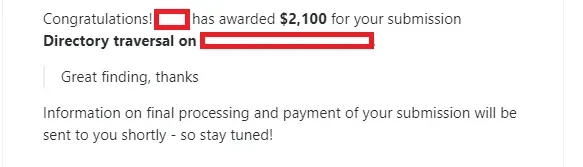
Both reports were triaged and accepted on the same day they were filed, and each was awarded a bounty of 2,100 USD. The second bounty was paid on 20 Mar 2020.
Fix
The fix that addresses this class of bug is to canonicalise the resolved path and verify that it still sits inside the intended static directory before serving the file, rejecting anything that escapes it. Validation should happen after all decoding and normalisation, so that encoded separators such as %5c cannot slip past a check performed on the raw input.
Variants to test
- Encoded backslash traversal on other static paths. Take any directory that serves files directly, such as
/static/,/assets/or/images/, and request%5c..%5c..%5csequences at increasing depth. A positive result is a response that differs from the 404 baseline, such as a blank page, a directory listing or file contents. - Mixed separators. Combine forward and back slashes, for example
..%5c..%2f, to probe whether only one form is filtered. A positive result is any response that resolves outside the web root. - Double encoding. Try
%255cand%252e%252e%255cin case the server decodes more than once. A positive result is the same traversal behaviour appearing only after the second decode. - Depth calibration. When a traversal returns 404, add one more
..segment and retry, as the researcher did. A positive result is a change from 404 to a blank page or file contents, which indicates the web root depth has been matched. - Sensitive file targets. Once traversal works, request
/etc/passwdand, where the platform allows, application configuration files. A positive result is readable file contents in the response.
What happened, in plain words
A security researcher spent one long night testing a website that a company had invited him to test through a bug bounty platform called Bugcrowd. A bug bounty program is an arrangement where a company says: if you find a security problem in our systems and report it to us privately, we will pay you a reward (the bounty) instead of taking legal action against you. A private program means only invited researchers can see the target list.
On this program he found two separate holes of the same kind, on two different servers. The hole is called path traversal: it lets someone who is just browsing the site ask the server for files that sit outside the folder the website is supposed to serve, such as the server's own password file. He reported both, and each report earned him 2,100 USD.
The interesting part is how he got in. The obvious tricks were blocked. He got past the 404 by writing the same trick in a slightly different, encoded form.

Background: how he got here
At a security conference called Nullcon 2020 he met other bug hunters, heard their stories, and felt motivated to start hunting again after a few months away. Back home he remembered an old bug he had found but never managed to exploit, and started on it at 7.30 in the evening. By 10.30 PM he still had nothing and was frustrated. A group call with friends followed, they suggested he drop that target and pick a new one, and that is what he did.
He opened his Bugcrowd account, looked at the program invitation, and saw some new targets. The program had no reported vulnerabilities at that point, which made it attractive: nobody had mapped it out yet. The scope (the list of systems he was allowed to test) contained two wildcard domains. A wildcard domain in scope means not just example.com but every subdomain of it, such as shop.example.com or api.example.com.
The tools, and what each one is for
He ran a tool called Sublist3r against both wildcard domains. Sublist3r looks in public places (search engines, certificate records and so on) for subdomain names that belong to a domain, and prints a list. He saved both lists for later.
From the first domain he picked one subdomain at random. In the write-up it is called https://abc.redact.com (the real name is hidden). It looked like a static web page: a page that just hands out fixed files, with no login, no forms and no database behind it. On such a page there is nothing to type into, so the only thing you can change is the address you ask for.
He then ran two tools at the same time:
- dirsearch, which tries a long list of common folder and file names against a site and reports which ones exist. Think of it as knocking on every door in a building to see which ones open.
- The Burp Suite Spider, which is a feature of Burp Suite (a tool that sits between your browser and the website so you can see and edit every request). The Spider automatically clicks through a site and records every link it finds, like a robot browsing for you.
Both tools produced exactly one result:
https://abc.redact.com/static/
That folder rendered the same content as the front page. He also tried some basic recon (general information gathering), plus open redirect and XSS attempts. An open redirect is a flaw where a site's link parameter can be made to send the visitor to an attacker's site. XSS (cross-site scripting) is a flaw where an attacker gets their own JavaScript to run inside another user's browser on the site. Neither worked here.
What path traversal is
The write-up pauses to explain the bug class, and it is worth reading slowly.
A web server keeps the files it is allowed to publish in one folder, called the web root. When you ask for https://site/static/logo.png, the server takes the part after the domain (/static/logo.png), sticks it onto the web root folder on disk, and sends back the file it finds. The rule is supposed to be: you can only ever get files from inside that folder.
A path traversal attack tries to break that rule. The trick is the sequence ../, which on any operating system means "go up one folder". If the web root is /var/www/site/static/ and you ask for ../secret.txt, the server may resolve it to /var/www/site/secret.txt, one level above where you should be allowed. Repeat it (../../../../) and you climb further up, eventually reaching the top of the disk, from where you can ask for system files such as /etc/passwd. The attack also goes by the names "dot-dot-slash", "directory traversal", "directory climbing" and "backtracking".
A useful everyday comparison: imagine a hotel reception desk that only hands out keys to rooms on its own floor. If you ask for "room 12, but go up one floor first", a careless clerk might hand you a key to a room on the floor above. Path traversal is exactly that request, and the fix is a clerk who checks the final room number, not just the words you said.
Access is still limited by the operating system's own permissions: files that are locked or in use (for example on Microsoft Windows) cannot be read even if the path resolves correctly.
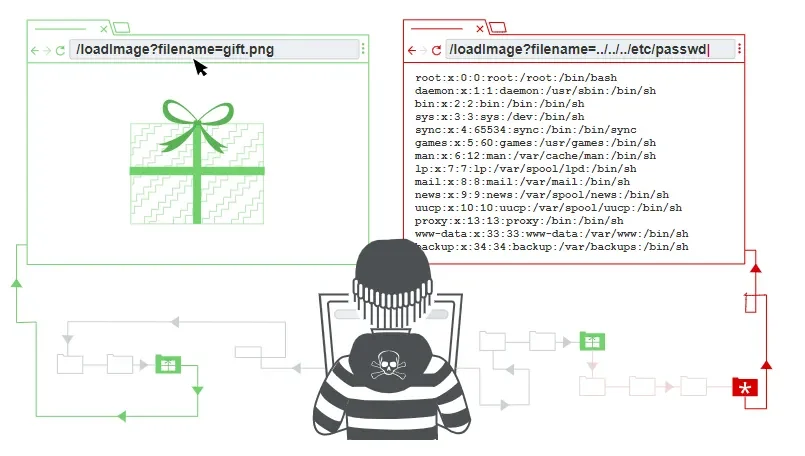
portswigger.net ❤
The two usual ways to test for it
Normally you look for a part of the URL that names a file, called a parameter, and try to put traversal sequences in it. A parameter is the bit after the ? in an address, like ?file=report.pdf. The write-up gives these examples:
http://examplesite.com/get-files.jsp?file=events.pdf
http://examplesite.com/get-page.php?home=abc.html
http://examplesite.com/some-page.asp?page=index.html
Each line is a URL where the last part after = is a file name the server will fetch. If you replace events.pdf with something like ../../etc/passwd, a vulnerable server will fetch the wrong file. The three lines are just three different file extensions (.jsp, .php, .asp), because different server technologies name their pages differently.
You can also try it with no parameter at all, straight in the path:
http://examplesite.com/../../../../some dir/some file
Here the traversal is written directly into the address, with no ? involved. This is the form that mattered in this case, because the target had no parameters at all. The only input available was the path itself, and /static/ was the one folder that existed to attack.
Step by step: the first finding
Step 1: the plain form
He first tried the classic sequence directly in the path:
https://abc.redact.com/static/../..
Reading it: start in the static folder, go up one level (..), then up another (..). The server answered with a 404 error page. A 404 is the standard "not found" response: the server is saying it has no such thing. So the plain form was blocked or simply did not resolve.
Step 2: backslashes instead of forward slashes
On Windows, and in some server software, the folder separator is a backslash \ rather than a forward slash /. So he tried the same idea with backslashes:
https://abc.redact.com/static/\..\../
Same result: the 404 error page. So the raw backslash form was blocked too.
Step 3: encoding the backslashes
Here is the key idea. A URL cannot contain every character directly, so there is a standard way of writing special characters as a percent sign followed by two hexadecimal digits. This is called URL encoding (or percent encoding). For example a space becomes %20. The backslash character \ is written %5c.
Why does this matter? Because a server often does its safety checks on the text as it arrived, and only afterwards decodes it into the real characters. If the check looks for a backslash and sees %5c, it may let it through, and then the decoding step turns %5c into \ after the check is over. This ordering, checking before decoding, is a common source of bypasses.
So he sent:
https://abc.redact.com/static/%5c..%5c..%5c/
Line by line: https://abc.redact.com/ is the site; /static/ is the folder; %5c.. means "backslash, then go up one level"; and this repeats three times. If the server decodes the %5c into a backslash and treats a backslash as a folder separator, this is the same as going up three folders.
The response was a blank page, not a 404. That change is the signal. The response was a blank page, not a 404. He notes he had read a write-up describing exactly this observation during a path traversal attempt.
Step 4: climbing far enough to reach /etc/passwd
Now the goal was to read a sensitive file. On Linux and other Unix-like systems, /etc/passwd is a plain text file listing the user accounts on the machine: their names, user IDs, home folders and which shell they use. It does not contain passwords in the modern sense (those live elsewhere), but it is still a classic proof that you have escaped the web root, because it sits at a fixed, well-known place on the disk.
He extended the traversal with more segments:
https://abc.redact.com/static/%5c..%5c..%5c..%5c..%5c..%5c..%5c..%5c..%5c..%5c..%5c
This is the same pattern as before, just repeated many more times: each %5c.. climbs one folder. He extended the traversal with more segments, each %5c.. climbing one folder.
At this depth the server returned a 404 again. He added one more %5c and kept going, and this time the file contents came back.
etc/passwd ❤
The screenshot shows the /etc/passwd contents returned by the server. He notes that the file shown is not the real /etc/passwd, for privacy reasons.
It was 01:00 AM, the group call was still going, and he told everyone he had the path traversal. He wrote the report and sent it.
The second finding
He did not stop. He did recon on other subdomains of the first domain and found nothing, so he moved to the second wildcard domain. He opened the subdomain list Sublist3r had saved earlier and worked through it one name at a time. On one of them, called https://xyz.redact2.com in the write-up, dirsearch found a folder called /client/. Running the Burp Spider on that folder revealed one more folder. He applied the same encoded-backslash method and it produced a second path traversal.
It was 04:00 AM. He wrote the second report and submitted it.

Why it worked
The site serves fixed files from a folder exposed at /static/, and it takes the path you typed and uses it to find a file on disk without properly cleaning it up first. Cleaning up a path so that it cannot escape its folder is called canonicalisation: you resolve all the .. and . parts into one final, absolute location, and then check that this final location is still inside the folder you meant to serve.
The plain ../ form returned a 404, and so did the raw backslash form. On a server that treats \ as a separator, %5c.. climbs folders just like ../.
The report does not explain why the first encoded request returned a blank page or why the deeper one returned a 404. The report does not describe the filtering or decoding mechanism behind the behaviour.
What the impact was
Someone with no account and no login could read files outside the web root on both affected hosts. He proved it by retrieving /etc/passwd, which exposes local user account names and shell information. The report does not list what else was reachable, but the same trick would work for any file the web server process is allowed to read, subject to the operating system's own access controls (for example locked or in-use files on Windows).
Both reports were triaged (checked by the program's team to confirm they were real) and accepted on the same day they were filed, and each was awarded a bounty of 2,100 USD. The second bounty was paid on 20 Mar 2020.
How to fix it
The fix that addresses this class of bug is to canonicalise the resolved path and verify that it still sits inside the intended static folder before serving the file, rejecting anything that escapes it. Validation should happen after all decoding and normalisation, so that encoded separators such as %5c cannot slip past a check performed on the raw input.
Other variations worth trying
- Encoded backslash traversal on other static paths. Take any folder that serves files directly, such as
/static/,/assets/or/images/, and request%5c..%5c..%5csequences at increasing depth. A positive result is a response that differs from the 404 baseline, such as a blank page, a folder listing or file contents. - Mixed separators. Combine forward and back slashes, for example
..%5c..%2f, to probe whether only one form is filtered. A positive result is any response that resolves outside the web root. - Double encoding. Try
%255cand%252e%252e%255cin case the server decodes more than once. A positive result is the same traversal behaviour appearing only after the second decode. - Depth calibration. When a traversal returns 404, add one more
..segment and retry, as the researcher did. A positive result is a change from 404 to a blank page or file contents, which indicates the web root depth has been matched. - Sensitive file targets. Once traversal works, request
/etc/passwdand, where the platform allows, application configuration files. A positive result is readable file contents in the response.
Timeline
First report:
- Initial report: 12 Mar 2020, 01:30 AM
- Triaged: 12 Mar 2020, 9:28 AM
- Accepted: 12 Mar 2020, 4:58 PM
- Bounty awarded: 12 Mar 2020, 4:59 PM (2,100 USD)
Second report:
- Initial report: 12 Mar 2020, 04:05 AM
- Triaged: 12 Mar 2020, 09:36 AM
- Accepted: 12 Mar 2020, 05:12 PM
- Bounty awarded: 20 Mar 2020, 09:45 PM (2,100 USD)
Glossary
- Bug bounty program: an arrangement where a company pays researchers who privately report security problems in its systems.
- Private program: a bug bounty program visible only to invited researchers.
- Scope: the list of systems a researcher is allowed to test.
- Wildcard domain: a domain entry that covers the domain itself and all of its subdomains.
- Subdomain: a named host under a domain, such as
shop.example.comunderexample.com. - Sublist3r: a tool that finds subdomain names from public sources.
- dirsearch: a tool that tries many common folder and file names against a site to discover what exists.
- Burp Suite: a tool that sits between your browser and a website so you can see and edit every request.
- Spider: a Burp Suite feature that automatically browses a site and records every link it finds.
- Recon: short for reconnaissance, the information-gathering phase before attacking.
- Static web page: a page that serves fixed files with no login, forms or database behind it.
- Web root: the folder on the server from which the website is allowed to serve files.
- Path traversal: a flaw that lets a request reach files outside the web root, usually via
../sequences. - Dot-dot-slash: another name for path traversal, after the
../sequence. - Parameter: the part of a URL after
?that passes a value to the server, such as?file=report.pdf. - Open redirect: a flaw where a site's link parameter can send the visitor to an attacker's site.
- XSS (cross-site scripting): a flaw where an attacker gets their own JavaScript to run in another user's browser on the site.
- 404: the standard HTTP response meaning "not found".
- URL encoding (percent encoding): writing special characters as a percent sign plus two hexadecimal digits, such as
%20for a space or%5cfor a backslash. - Decode-after-validate: a bug pattern where input is checked before it is decoded, so an encoded form slips past the check.
/etc/passwd: a plain text file on Unix-like systems listing user accounts, their IDs, home folders and shells.- Canonicalisation: resolving a path into one final, absolute location so it can be checked against the intended folder.
- Triaged: reviewed by the program's team to confirm a report is valid.
- Bounty: the money paid for a valid report.