Where is my Train : Tracking to Hacking !
An unauthenticated internal panel at /mt allowed changing train statuses, and a parameter in that panel was vulnerable to reflected XSS and error-based SQL injection. An attacker could run script in a victim's browser or extract database information.

I am Anil Tom . Since it’s been a long time that I have written a blog, I thought of writing one today.
The full write-up lives on its author's site
It belongs to its author, so we link to it rather than copy it. The other two tabs are our own rewrites, checked against it.
Context
Where Is My Train is a train tracking app built by Sigmoid Labs Pvt. Ltd. It shows live running status of trains and up-to-date schedules, and it works offline without internet or GPS. It is rated the number one travel app in India. Google acquired Sigmoid Labs on 10 December 2018, so the product became part of Google, and under the Google VRP rules vulnerabilities could be reported to Google six months after the acquisition date.

The researcher, Anil Tom, had a habit of hunting in acquisition domains. He did recon on the website whereismytrain.in but found nothing there. The interesting surface turned out to be elsewhere: a link a friend shared from the app, containing parameters, and a web panel behind that domain.

Setup
The work was done against whereismytrain.in, the web presence of the app, and against the Android application, which was used to confirm that changes made through the web panel actually reached end users. The tools used were:
- Dirsearch, for content discovery.
- Burp Suite, with the target added to scope, for spidering and for capturing requests.
- SQLMap, for the first attempt at the SQL injection.
- A second researcher, Nizam, for help with manual SQL injection and with the exploitation idea for the XSS.
- A third researcher, Thejus, who had found an open redirect in another Google acquisition domain and asked for help exploiting it.
No accounts or special roles are described. The panel that mattered was reachable without authentication.
Finding it
The lead came from the app itself. A friend travelling from Chennai to Bangalore shared his train status through Where Is My Train. The message contained a URL with parameters, but when the researcher tried to recon the site he could not find any of those parameters. He copied the link into his personal email for later testing and forgot about it.
A month later Thejus reported an open redirect in another Google acquisition domain and asked for help exploiting it, because Google does not accept an open redirect unless the way to exploit it is demonstrated. While testing that, the researcher remembered the Where Is My Train link, searched his email for whereismytrain.in, and started his basic recon steps on it.
- He ran Dirsearch first. It returned no results.
- He opened Burp, added the target to scope, and ran the Spider.
- After some time the Spider surfaced a directory called
/mt.
Opening /mt in the browser showed an internal panel with no authentication. It had options to change the train status. He changed the status of a train through the panel and checked the Android application: the change was reflected there. He reported this as internal panel access.
Exploitation
Step 1: unauthenticated internal panel
The /mt directory exposed an administrative panel that let anyone change train status, and the change propagated to the Android application. That was the first report. The report does not describe the request used to change the status.
Step 2: reflected XSS in the single insert tab
After reporting the panel, the researcher dug further and found many other endpoints. The panel had a tab called single insert with a train_date parameter whose value was reflected into the source code. He tried XSS with this payload:
onmouseover=alert(document.domain)
The alert box fired. The payload is an event handler rather than a full tag, which suggests it was being placed inside an existing HTML element attribute context, but the report does not show the surrounding markup.
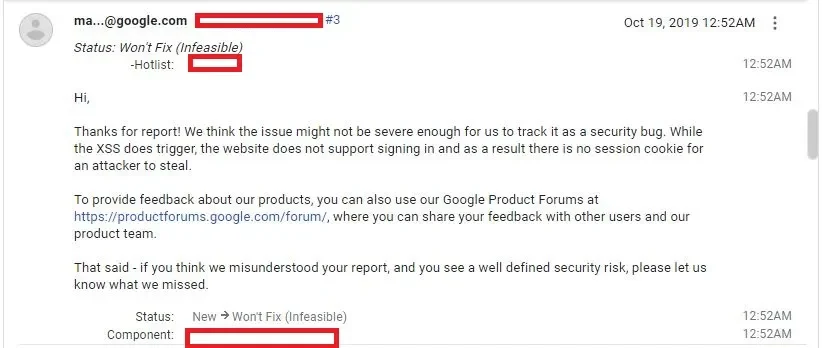
He reported the XSS and the Google VRP team rejected it as Infeasible.
Step 3: turning the XSS into something Google accepts
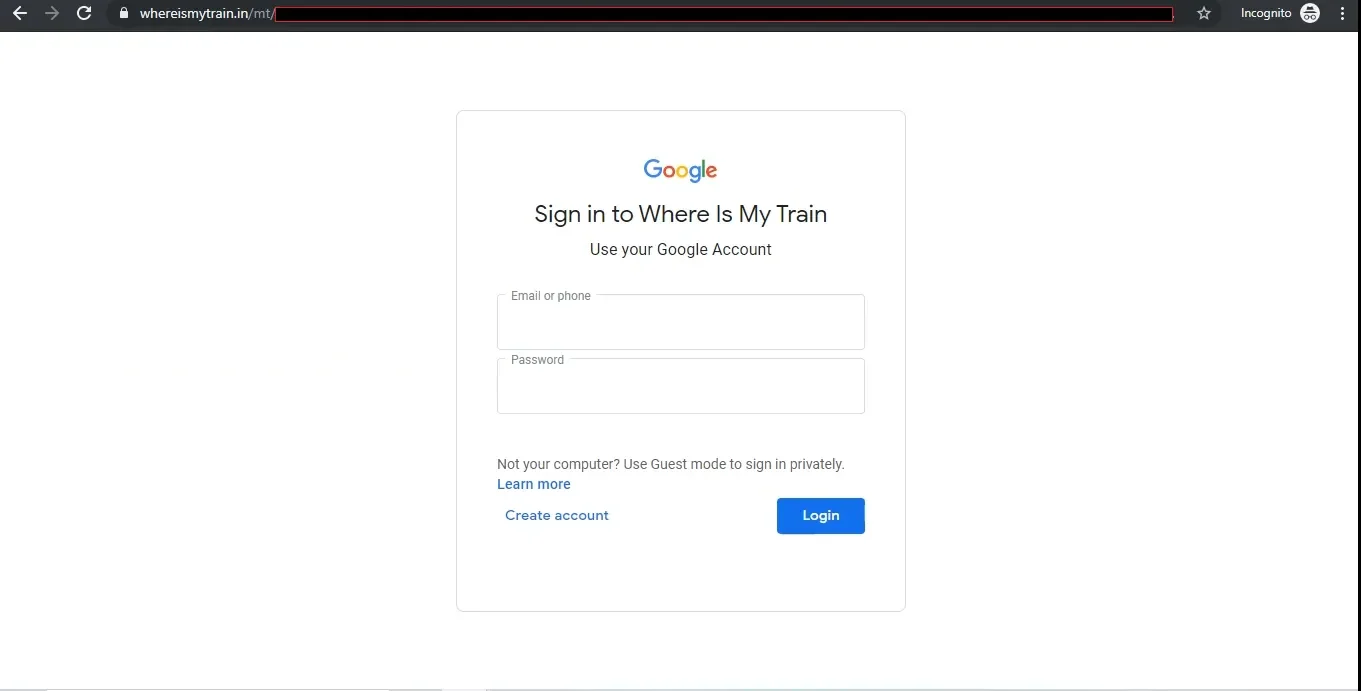
With the report rejected, he looked for a way to exploit the reflected XSS. His research found that virtual defacement is possible with reflected XSS, but he was not satisfied with that. He spoke to Nizam, who suggested building a phishing page. They created a Google Sign-in phishing page that triggers when the victim clicks the link.
He made a PoC video again and replied to the team, and the report was accepted.
Step 4: error-based SQL injection in /mt/submit_change_in_status
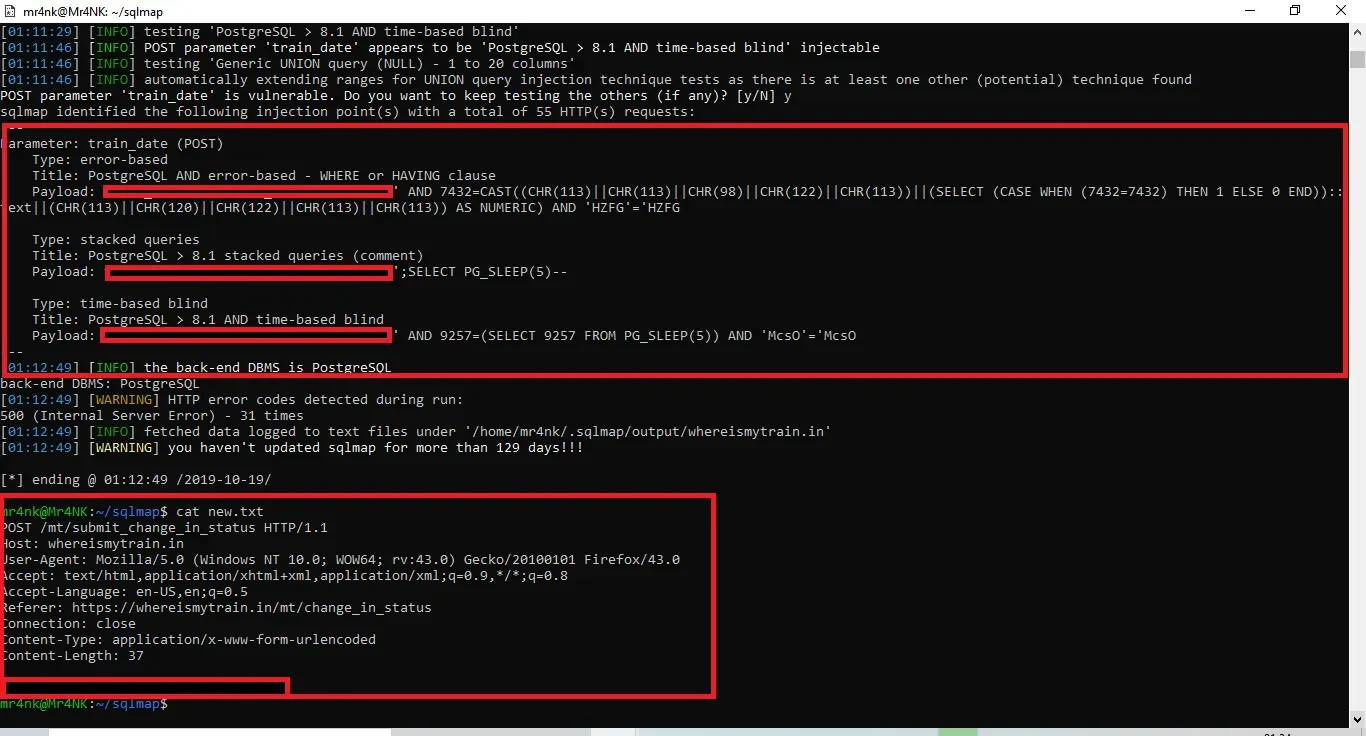
He continued the recon and found another endpoint, /mt/submit_change_in_status, which also takes the train_date parameter. Further recon showed the parameter was vulnerable to error-based SQL injection. Not being confident with manual SQL injection, he tried SQLMap first. It was a POST request, so he captured the request, saved it to a file, and ran SQLMap against it. The result is shown in the SQLMap output.
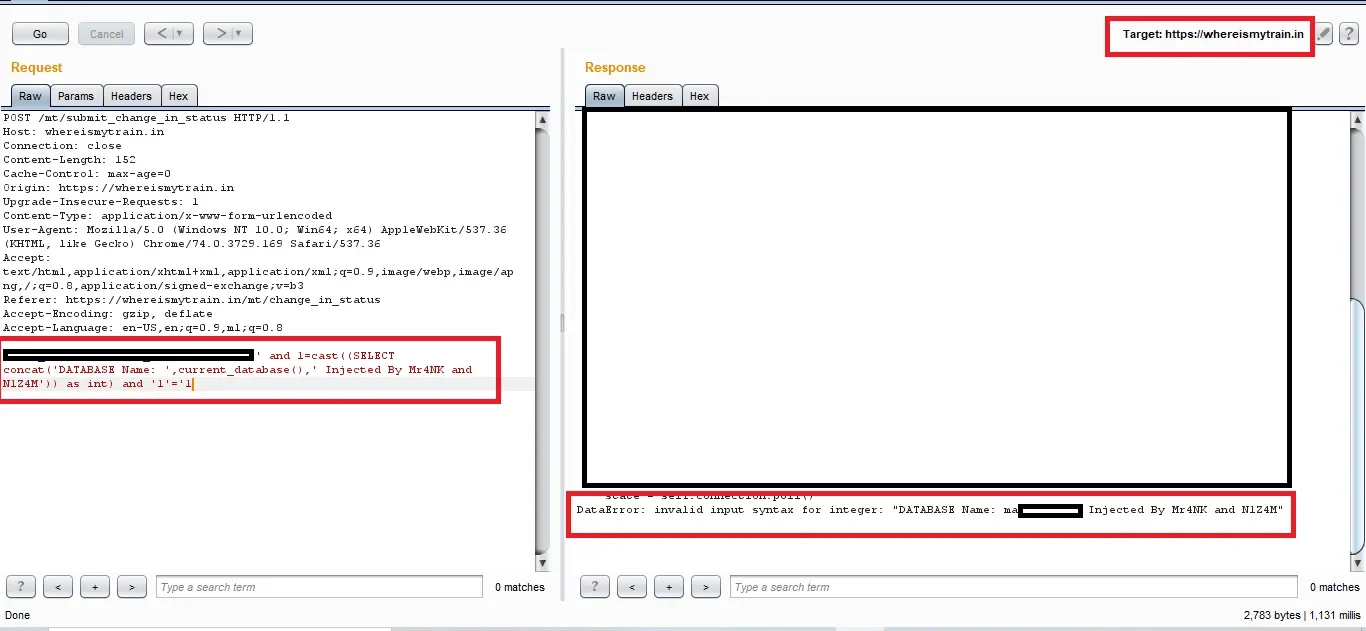
He then spoke to Nizam, who helped with the manual SQL injection, and they reproduced it by hand.
He sent another report and Google accepted it as well. The report does not include the captured request, the SQLMap command line, or the manual payloads.
Root cause
Two separate mistakes are described.
For the XSS, the train_date value from the single insert tab was reflected into the page source, and the payload executed in the browser.
For the SQL injection, the train_date parameter on /mt/submit_change_in_status was vulnerable to error-based injection. The panel itself had no authentication at all, which is what made both issues reachable by anyone.
Impact
The unauthenticated panel let an attacker change train status, and those changes appeared in the Android application used by passengers. The reflected XSS could be used for virtual defacement or, as the accepted PoC showed, as the entry point of a Google Sign-in phishing page that triggers when a victim clicks the link. The SQL injection was error-based on the status submission endpoint. The report does not quantify how many users or records were affected.
Fix
The changes that would address what is shown are: require authentication and authorisation on /mt and its endpoints, encode train_date on output in the single insert tab, and use parameterised queries for train_date in /mt/submit_change_in_status.
Variants to test
- Spider acquisition domains with Burp after Dirsearch returns nothing. A positive result is a directory such as
/mtthat returns an administrative interface without a login prompt. - Look for share features in mobile apps and collect the URLs they generate, then test the parameters in those URLs on the web tier. A positive result is a parameter that the public site does not otherwise expose but that the backend still processes.
- Submit a value like
onmouseover=alert(document.domain)into date and status fields and check the page source. A positive result is the value appearing unencoded inside an existing tag. - Send the same parameter to state-changing POST endpoints and watch for database error messages. A positive result is a verbose SQL error in the response.
- When a reflected XSS is rejected as infeasible, build a realistic phishing page that the reflected payload can load, record a video PoC, and reply on the same report.
What happened, in plain words
A security researcher found that a website belonging to a Google-owned train app had an internal control panel that anyone could open, without any password. From that panel he could change the train status that passengers saw in the mobile app. While exploring the panel he found two more problems: a field where text typed by the user was shown back on the page in a way that let him run a small piece of code in a visitor's browser (a reflected cross-site scripting, or XSS, bug), and another field that was plugged straight into the site's database queries, so specially crafted input could make the database reveal information (an SQL injection bug). Google first rejected the XSS report, then accepted it after he showed a realistic phishing page that the bug could be used to load. The SQL injection report was accepted too.
This article walks through the same story for someone who has never done security testing. Every tool and term is explained the first time it appears.
Background: the app and the rules
Where Is My Train is a train tracking app made by Sigmoid Labs Pvt. Ltd. It shows the live running status of trains and up-to-date schedules, and it works offline, without internet or GPS. It is rated the number one travel app in India.
Google acquired Sigmoid Labs on 10 December 2018, so the product became part of Google. Google runs a bug bounty programme called the Google VRP (Vulnerability Reward Program): outside researchers who report security bugs in Google products can be rewarded. Under the VRP rules, vulnerabilities in an acquired company's products could be reported to Google six months after the acquisition date. That waiting period matters here: it is why a site that was not originally Google's was fair game.
The image above is the opening of the blog post, where the researcher introduces himself and says he is sharing findings from one of the Google acquisition domains.
The second image introduces the app itself, Where Is My Train.
The researcher's habit and the first look
The researcher, Anil Tom, liked hunting for bugs in domains that Google had acquired. He did some recon on the website whereismytrain.in. Recon (short for reconnaissance) is the information-gathering phase: looking at a target's pages, links and behaviour before trying anything. On the main website he found nothing.
The clue that started it
One day a friend travelling from Chennai to Bangalore wanted to be picked up from the station, so he shared his train status through the Where Is My Train application. The shared message contained a URL (a web address) with parameters in it. A parameter is the part of a web address after a question mark that carries a value, for example the ? and & pieces you sometimes see in long links. Parameters are how a web page receives information, such as which train to show.
When the researcher tried to recon the site, he could not find any of those parameters on the public website. That mismatch is interesting: the app was generating links with parameters that the public site did not seem to expose. He copied the link into his personal email, which was his usual habit for testing later, and then forgot about it.
The second clue: an open redirect elsewhere
A month later another friend, Thejus, messaged him on WhatsApp. Thejus had found an open redirect in a different Google acquisition domain and asked for help exploiting it. An open redirect is a bug where a site takes a destination address from the URL and sends the visitor there, so an attacker can craft a link on the trusted site that quietly forwards the victim to an attacker-controlled page. Google does not accept an open redirect report unless the researcher also demonstrates how it can actually be exploited, so Thejus needed a way to turn it into something harmful.
While testing that, the researcher remembered the Where Is My Train link. He opened his email, searched for whereismytrain.in, found the link, and started his basic recon steps on it.
Recon steps
- He ran Dirsearch first. Dirsearch is a tool that guesses common file and folder names on a website (things like
/admin,/backup,/login) and reports which ones exist. It returned no results. - He opened Burp Suite, added the target to scope, and ran the Spider. Burp Suite is a tool that sits between your browser and the website so you can see and modify every request. The Spider automatically crawls a site, following links and filling in forms, to map out every page and endpoint it can reach. Adding the target to scope tells Burp to focus only on that site.
- After some time the Spider surfaced a directory called
/mt.
A directory is a folder on a website; /mt means the address ends in /mt, like a folder path on your computer.
The internal panel
Opening /mt in the browser showed an internal panel with no authentication. Authentication is the process of proving who you are, usually with a username and password. A panel with no authentication means anyone who knows the address can use it, with no login at all.
The panel had options to change the train status. He changed the status of a train through the panel and then checked the Android application: the change appeared there. In other words, the panel was not a harmless leftover page; it controlled what real passengers saw in the app.
He reported this as internal panel access. That was the first report.
Step 1: the unauthenticated panel, in more detail
The /mt directory exposed an administrative panel that let anyone change train status, and the change propagated to the Android application. That was the first report. The report does not describe the request used to change the status.
Why this matters: an administrative interface is meant to be used only by staff. If it has no login, the public internet can use it. The fact that the change reached the mobile app shows the panel was connected to the live data that passengers rely on.
Step 2: reflected XSS in the single insert tab
After reporting the panel, the researcher dug further and found many other endpoints. An endpoint is a specific address on a server that performs an action or returns data, like a particular counter in a shop rather than the whole shop.
The panel had a tab called single insert with a train_date parameter whose value was reflected into the source code. Reflected means the value you send in is echoed back into the page you receive. The source code is the HTML that the browser receives and turns into the page you see.
He tried XSS with this payload:
onmouseover=alert(document.domain)
A payload is the piece of input an attacker sends to trigger a bug. XSS (cross-site scripting) is a bug where an attacker's input ends up being treated as code by a victim's browser, so the attacker's code runs as if it came from the trusted site. alert(document.domain) is a JavaScript instruction that pops up a box showing the current site's domain name; researchers use it as a harmless proof that code is running. onmouseover= is an event handler: an attribute that tells the browser to run some code when the mouse moves over an element. The payload is not a complete HTML tag; it looks like an attribute that gets attached to an existing element. That suggests the value was being placed inside an existing HTML element's attribute, but the report does not show the surrounding markup.
The alert box fired. In plain terms: the browser executed the researcher's code.
He reported the XSS and the Google VRP team rejected it as Infeasible. Infeasible here means the team judged that the bug could not be turned into real harm, so it did not qualify.
The image above shows the reply from the Google VRP team rejecting the report.
Step 3: turning the XSS into something Google accepts
With the report rejected, he looked for a way to exploit the reflected XSS. His research found that virtual defacement is possible with reflected XSS. Virtual defacement means making a trusted page look altered to a visitor, without actually changing anything on the server: the attacker's code runs in the victim's browser and can draw over or replace what the page shows. He was not satisfied with that as a demonstration.
He spoke to Nizam, who suggested building a phishing page. Phishing is tricking someone into entering their credentials on a fake page that looks like the real one. They created a Google Sign-in phishing page that triggers when the victim clicks the link. The idea: the reflected XSS gives the attacker a way to run code on the trusted site, and that code can load the fake sign-in page, so the victim sees a Google address but a page controlled by the attacker.
The image above relates to the phishing page they created.
He made a PoC video again and replied to the team, and the report was accepted. A PoC (proof of concept) is a demonstration that the bug is real and can be exploited, usually a short recording showing the steps.
Step 4: error-based SQL injection in /mt/submit_change_in_status
He continued the recon and found another endpoint, /mt/submit_change_in_status, which also takes the train_date parameter. Further recon showed the parameter was vulnerable to error-based SQL injection.
SQL (Structured Query Language) is the language used to talk to a database, the system that stores and retrieves data. SQL injection is a bug where user input is pasted directly into a database query, so the input can change the query's meaning. Error-based means the attacker learns things by making the database produce error messages that reveal information.
Not being confident with manual SQL injection, he tried SQLMap first. SQLMap is a tool that automates finding and exploiting SQL injection. It was a POST request, so he captured the request, saved it to a file, and ran SQLMap against it. A POST request is one way a browser sends data to a server: instead of putting the values in the URL, it puts them in the body of the request, which is common for forms that submit or change something. Capturing the request means recording exactly what the browser sent, so the tool can replay and modify it.
The result is shown in the SQLMap output.
The image above relates to the SQLMap run.
He then spoke to Nizam, who helped with the manual SQL injection, and they reproduced it by hand.
The image above relates to the manual SQL injection.
He sent another report and Google accepted it as well. The report does not include the captured request, the SQLMap command line, or the manual payloads.
Why these bugs happened
Two separate mistakes are described.
For the XSS, the train_date value from the single insert tab was reflected into the page source, and the payload executed in the browser. Output encoding means converting special characters into harmless forms before showing them, so the browser displays them as text instead of treating them as code. Because that was missing, a value that looks like an event handler executed in the browser.
For the SQL injection, the train_date parameter on /mt/submit_change_in_status was vulnerable to error-based injection. Parameterisation means sending values to the database separately from the query text, so the database treats them as data and never as part of the query. Concatenation means gluing the value directly into the query string, which lets the value change the query. That produced database errors that leak information.
The panel itself had no authentication at all, which is what made both issues reachable by anyone.
What the impact was
The unauthenticated panel let an attacker change train status, and those changes appeared in the Android application used by passengers. The reflected XSS could be used for virtual defacement or, as the accepted PoC showed, as the entry point of a Google Sign-in phishing page that triggers when a victim clicks the link. The SQL injection was error-based on the status submission endpoint. The report does not quantify how many users or records were affected.
What would fix it
The changes that would address what is shown are: require authentication and authorisation on /mt and its endpoints, encode train_date on output in the single insert tab, and use parameterised queries for train_date in /mt/submit_change_in_status. Authorisation is the step after authentication: checking that the person who logged in is allowed to do this particular action.
Variants to test
These are the same ideas generalised, so a beginner can try them on their own targets.
- Spider acquisition domains with Burp after Dirsearch returns nothing. A positive result is a directory such as
/mtthat returns an administrative interface without a login prompt. - Look for share features in mobile apps and collect the URLs they generate, then test the parameters in those URLs on the web tier. A positive result is a parameter that the public site does not otherwise expose but that the backend still processes.
- Submit a value like
onmouseover=alert(document.domain)into date and status fields and check the page source. A positive result is the value appearing unencoded inside an existing tag. - Send the same parameter to state-changing POST endpoints and watch for database error messages. A positive result is a verbose SQL error in the response.
- When a reflected XSS is rejected as infeasible, build a realistic phishing page that the reflected payload can load, record a video PoC, and reply on the same report.
Glossary
- Authentication: proving who you are, usually with a username and password.
- Authorisation: checking that an authenticated person is allowed to perform a particular action.
- Burp Suite: a tool that sits between your browser and a website so you can see and modify requests; its Spider crawls a site automatically.
- Concatenation: gluing values directly into a string, such as a database query, so the value becomes part of the query.
- Directory: a folder on a website, such as
/mt. - Dirsearch: a tool that guesses common file and folder names on a website and reports which exist.
- Endpoint: a specific address on a server that performs an action or returns data.
- Error-based SQL injection: SQL injection where the attacker learns information from database error messages.
- Event handler: an HTML attribute that tells the browser to run code when something happens, such as
onmouseoverwhen the mouse moves over an element. - Google VRP: Google's Vulnerability Reward Program, which rewards outside researchers for reporting security bugs.
- Infeasible: a report rejection meaning the team judged the bug could not be turned into real harm.
- Open redirect: a bug where a site takes a destination from the URL and forwards the visitor there, letting an attacker craft a trusted-looking link to an attacker-controlled page.
- Output encoding: converting special characters into harmless forms before displaying them, so the browser shows text instead of running code.
- Parameter: the part of a URL after a question mark that carries a value to the page.
- Parameterisation: sending values to a database separately from the query text, so they are treated as data and never as query code.
- Payload: the piece of input an attacker sends to trigger a bug.
- Phishing: tricking someone into entering credentials on a fake page that looks like the real one.
- PoC: proof of concept, a demonstration that a bug is real and exploitable.
- POST request: a way a browser sends data to a server in the body of the request rather than in the URL, common for forms that submit or change something.
- Recon: reconnaissance, the information-gathering phase before testing.
- Reflected: a value you send in is echoed back into the page you receive.
- Source code: the HTML the browser receives and turns into the page you see.
- Spider: a tool that automatically crawls a site, following links and filling in forms, to map its pages.
- SQL: Structured Query Language, the language used to talk to a database.
- SQL injection: a bug where user input is pasted directly into a database query, so the input can change the query's meaning.
- SQLMap: a tool that automates finding and exploiting SQL injection.
- URL: a web address.
- Virtual defacement: making a trusted page look altered to a visitor without changing anything on the server, by running attacker code in the victim's browser.
- XSS: cross-site scripting, a bug where an attacker's input is treated as code by a victim's browser and runs as if it came from the trusted site.