A Story About How I Found XSS in ASUS
The Laravel Ignition debugging tool was left enabled on a public ASUS host, and a crafted URL caused script execution in the browser. An attacker could run arbitrary JavaScript in a victim's browser if they visited the link.
 Published on infosecwriteups.com
A few months ago, during a routine security assessment, I uncovered a significant cross-site scripting (XSS) vulnerability in the ASUS Laravel Ignition debugging tool. This vulnerability, identified as R-XSS, posed a high risk due to the potential for unauthorized script execution in users’ browsers.
The full write-up lives on its author's site
It belongs to its author, so we link to it rather than copy it. The other two tabs are our own rewrites, checked against it.
A few months ago, during a routine security assessment, I came across a cross-site scripting issue in the ASUS Laravel Ignition debugging tool. I labelled it R-XSS, and it carried a high risk because it allowed script execution in a user's browser. This is how I found it and how you can check for the same condition.
Context
Laravel Ignition is the error and debugging component that ships with Laravel applications. When debug mode is on, it exposes diagnostic routes under the _ignition path, including routes that serve script assets. On adam.asus.com those routes were reachable, and the endpoint was vulnerable to XSS.
The target in this report is the host adam.asus.com, reached over plain HTTP.
Setup
No account, role or special tooling was needed to confirm the issue. The only precondition was that Laravel Ignition debug mode was enabled on the host, which I observed while examining the target. The payload was delivered by simply opening a URL in a browser.
Finding it
While examining the target I noticed that Laravel Ignition debug mode was enabled on adam.asus.com, and that the endpoint was vulnerable to XSS. The vulnerable URL was:
http://adam.asus.com/_ignition/scripts/--%3E%3Csvg%20onload=alert('cappriciosec.com')%3E
What made this look wrong is the path segment after _ignition/scripts/. It is not a script filename at all: it is a URL-encoded fragment that decodes to a closing sequence followed by an SVG element with an onload handler. A route that serves scripts has no reason to accept arbitrary markup in that position, so the shape of the request itself was the signal.
Exploitation
Step 1: Open the vulnerable URL
I requested the URL directly in the browser:
http://adam.asus.com/_ignition/scripts/--%3E%3Csvg%20onload=alert('cappriciosec.com')%3E
The %3E sequences decode to >, so the path effectively contains --> followed by <svg onload=alert('cappriciosec.com')>. The leading --> closes whatever markup context the value is placed into, and the <svg> element with an onload handler supplies the script to run once the element loads.
Step 2: Observe the script execution
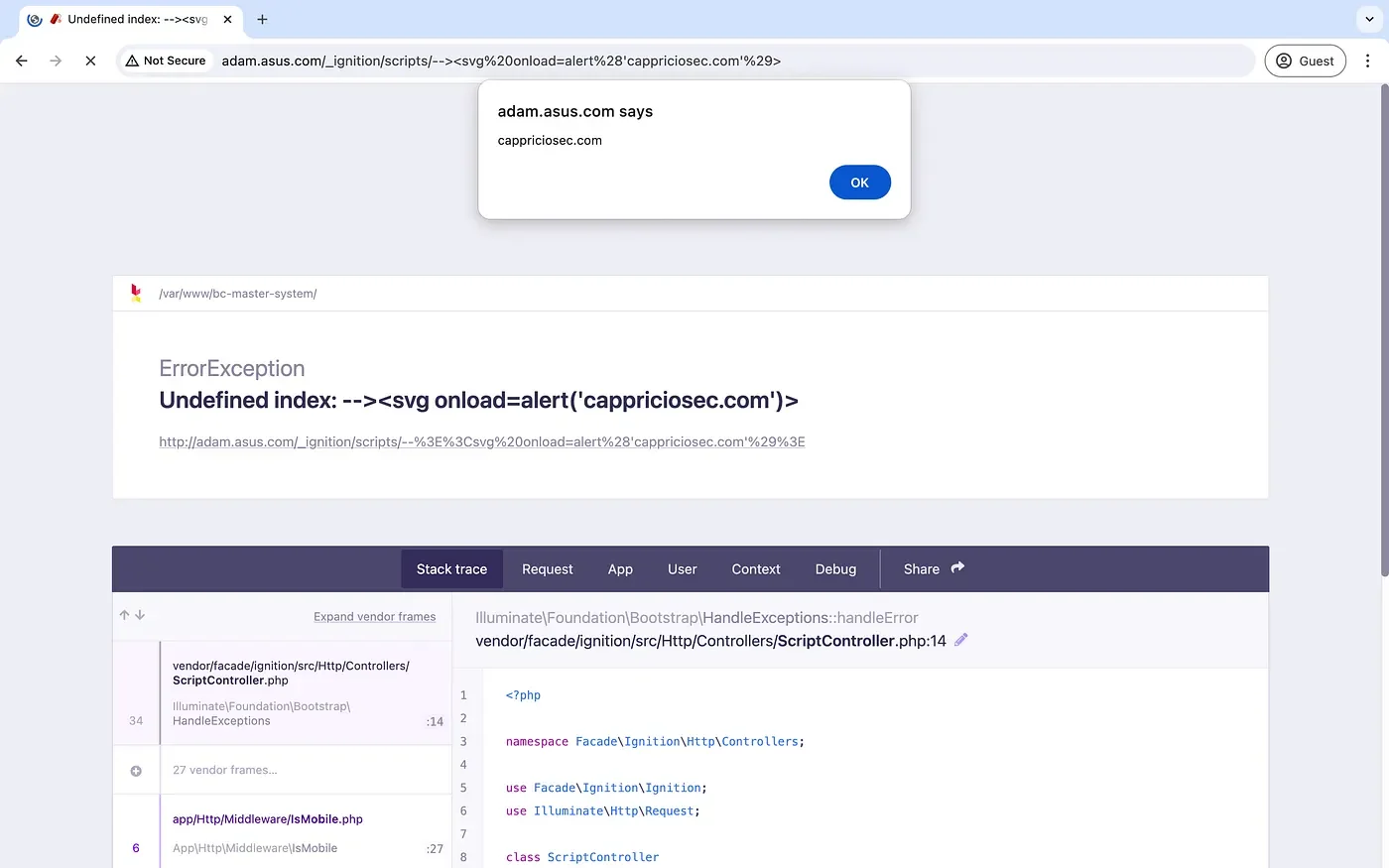
When the URL was accessed, the embedded script executed in the user's browser, confirming the presence of an XSS vulnerability. The alert displayed the text cappriciosec.com.
That is the whole reproduction: one request, one alert. There is no second request, no stored state and no interaction from another user in the report.
Root cause
The report attributes the issue to Laravel Ignition debug mode being enabled on the host. The report attributes the issue to Laravel Ignition debug mode being enabled on the host, and the endpoint was vulnerable to XSS. When the URL was accessed, the embedded script executed in the user's browser.
Debug mode is the enabling condition: with debugging exposed, the diagnostic routes are reachable. The report does not describe the server-side code, so the exact encoding step that failed is not shown.
Impact
The impact depends on the application's context and on the privileges of the compromised user. The report gives three bands:
| Context | Impact |
|---|---|
| Applications with public information | Might be negligible |
| Applications handling sensitive data, such as financial transactions or healthcare records | Could be severe, allowing unauthorised access to private information |
| A user with elevated privileges is compromised | The attacker could gain full control of the application, affecting all users and data |
The practical constraint is that the payload lives in a URL, so a victim has to be induced to open it. The report does not demonstrate theft of cookies, tokens or any other data; the confirmed result is script execution in the browser.
Automating the hunt
To streamline testing, I built a Python tool for detecting this vulnerability. It is published on PyPI as laravel-ignition-rxss and can be installed with pip:
pip install laravel-ignition-rxss laravel-ignition-rxss --chatid <YourTelegramChatID>
To check a single URL:
laravel-ignition-rxss -u http://mytargetprogram.com
To check a list of URLs:
laravel-ignition-rxss -i urls.txt
Fix
Disable debug mode by setting APP_DEBUG to false in the environment configuration. The report presents this as the mitigation: disabling debug mode by setting APP_DEBUG to false. The report presents this as the mitigation; it does not describe any change made on the ASUS host.
Variants to test
- Other hosts with Ignition exposed. Request
/_ignition/scripts/with an encoded payload on any Laravel host you are authorised to test. A positive result is an alert firing in the browser. - Different markup breakouts. The report uses
-->to close the surrounding context. If that does not work, try other closing sequences appropriate to the context the value lands in, and watch for the element being parsed rather than printed. - Other Ignition routes. The report only covers
_ignition/scripts/. Probe the other diagnostic paths under_ignitionfor reflected values, looking for the same unencoded reflection. - Debug mode detection first. Before sending payloads, check whether debug output is exposed at all.
POC by @karthithehacker.
What happened, in plain words
A security researcher was looking at a website belonging to ASUS, the computer hardware company. While poking around, he noticed that one of the site's pages was running a piece of software in a special "debugging" mode, a mode meant to help developers see detailed error information while they build a site. That mode was left switched on in a place the public could reach.
Because of that, he was able to craft a single web address (a URL) that, when opened in a browser, made the browser run a small piece of code that the researcher had written into the address. The browser popped up an alert box saying cappriciosec.com. That is the classic demonstration of a cross-site scripting (XSS) flaw: a website ends up running code that a visitor supplied, instead of only running its own code.
The researcher called this particular case "R-XSS" and rated it high risk, because running someone else's code in a victim's browser can, in the wrong context, let an attacker do things on that person's behalf. In this report the confirmed result is just the alert box; no data theft is shown.
The image above sits at the start of the write-up, just before the researcher describes the XSS issue in the ASUS Laravel Ignition debugging tool.
Below, I walk through the same story step by step, explaining every term from scratch, so that someone who has only ever used a browser can follow along.
The pieces you need to know first
Before the steps make sense, here are the basic ideas, each with a plain comparison.
- A website and a browser. Your browser (Chrome, Firefox, Safari) asks a web server for a page, the server sends back text and code, and the browser draws the page and runs the code. Think of the browser as a customer and the server as a kitchen: you order, the kitchen sends food back.
- HTML. The language web pages are written in. It is made of tags like
<p>for a paragraph or<svg>for a drawing. Tags are instructions to the browser about what to display. - JavaScript. The programming language browsers run. It is what makes pages interactive. A short JavaScript instruction like
alert('hello')tells the browser to show a pop-up box with the word hello. - XSS (cross-site scripting). A flaw where a website takes something a visitor supplied (often part of a URL) and puts it into the page in a way that the browser treats as code rather than as harmless text. The browser then runs the visitor's code as if the website itself had written it. The everyday comparison: a restaurant that prints whatever a customer writes on the order slip directly onto the menu board, so a customer can write "free meals for everyone" and the board announces it as if the restaurant meant it.
- Reflected XSS. A specific kind of XSS where the malicious input is not saved on the server; it is bounced straight back in the response to the same request. The comparison: a mirror that repeats whatever you say back to you immediately, rather than recording it for later.
- URL and URL encoding. A URL is a web address. Some characters are not allowed to appear literally in a URL, so they are written in a coded form using a percent sign and two characters. For example,
%3Emeans the>character and%3Cmeans<. This coding is called URL encoding (or percent encoding). The comparison: spelling out a word letter by letter over the phone when the normal pronunciation would be ambiguous. - Laravel. A popular toolkit (a "framework") that programmers use to build websites and web applications in the PHP programming language. It saves developers from writing everything from scratch.
- Laravel Ignition. An error and debugging component that comes with Laravel. When something goes wrong in a Laravel app, Ignition can show a detailed, developer-friendly error page. It also exposes some special web addresses (routes) under a path starting with
_ignition, including ones that serve script files. The comparison: a car's diagnostic port that a mechanic plugs into. Useful in the workshop, dangerous if left open on the street. - Debug mode. A switch that turns on extra diagnostic output. It is meant for development, not for a live public site. In Laravel this switch is controlled by a setting called
APP_DEBUG. - Route and endpoint. A route is a rule that says "when someone asks for this web address, run this code". An endpoint is a specific address that the server responds to. The comparison: a route is a door in a building, and the endpoint is what is behind that door.
- Payload. The crafted input an attacker sends to try to trigger a flaw. Here the payload is the specially encoded piece of text placed in the URL.
onloadhandler. An attribute you can put on an HTML element that says "when this element finishes loading, run this code". It is a normal feature of HTML, but it becomes dangerous when an attacker can inject it.- SVG. A format for drawing shapes and images in HTML. An
<svg>tag creates a drawing area, and like many HTML tags it can carry anonloadhandler. - Alert box. A simple pop-up the browser shows with a message. Security researchers use
alert(...)as a harmless, visible proof that their code ran. - PyPI and pip. PyPI is a public library of Python software packages.
pipis the command-line tool used to download and install packages from PyPI. The comparison: an app store and the button that installs from it. - Python. A popular programming language, often used for writing small security tools.
- Telegram. A messaging app. Some tools can send their results to a Telegram chat so you get notified.
With those ideas in hand, the rest of the story is straightforward.
The discovery
While examining the target, the researcher noticed two things. First, Laravel Ignition debug mode was enabled on the host adam.asus.com. Second, the endpoint he looked at was vulnerable to XSS. The vulnerability was exposed through this URL:
http://adam.asus.com/_ignition/scripts/--%3E%3Csvg%20onload=alert('cappriciosec.com')%3E
Let us take that address apart piece by piece, because the shape of it is the whole clue.
-
http://is the protocol, the set of rules for how the browser talks to the server.httpis the unencrypted version (the encrypted one ishttps). -
adam.asus.comis the host, the specific server belonging to ASUS that the researcher was looking at. -
/_ignition/scripts/is the path._ignitionis the name of the debugging component's section, andscriptssuggests this route is meant to hand out script files. -
Everything after that last slash is the interesting part. It is not a script filename at all. It is a URL-encoded fragment. Decoded,
%3Ebecomes>,%3Cbecomes<, and%20becomes a space. So the fragment really says: -
-->is the closing marker of an HTML comment. An HTML comment is a piece of text the browser ignores, written between<!--and-->. Sending-->is an attempt to close whatever comment or markup context the server has wrapped the value in, so that what follows is treated as fresh HTML. -
<svg onload=alert('cappriciosec.com')>is an SVG drawing element that carries anonloadhandler. When the browser finishes loading that element, it runs the JavaScriptalert('cappriciosec.com'), which pops up a box with the textcappriciosec.com.
Why does this matter? A route whose job is to serve script files has no reason to accept arbitrary HTML markup in the filename position. When the researcher accessed this URL, the embedded script executed in the browser, confirming the presence of an XSS vulnerability.
Understanding the vulnerability
The report records the finding in a short block:
- Bug Name: R-XSS
- Bug Priority: High
- Vulnerable URL:
http://adam.asus.com/_ignition/scripts/--%3E%3Csvg%20onload=alert('cappriciosec.com')%3E
"R-XSS" is the researcher's label for this case (the R standing for reflected, as explained above). "High" is the priority he assigned. The vulnerable URL is the same address as before: the one request that triggers the behaviour.
Impact
The impact of this XSS vulnerability depends on the application's context and on the privileges of the compromised user. In other words, how bad it is depends on what the site does and on who is using it when the malicious link is opened. The report gives three bands:
| Context | What it means in plain words |
|---|---|
| Applications with public information | The impact might be negligible. If everything on the site is already public, running a bit of extra code in a visitor's browser does not reveal much. |
| Applications handling sensitive data, such as financial transactions or healthcare records | The impact could be severe, allowing unauthorised access to private information. If the site holds private data, code running in a logged-in user's browser could potentially reach that data. |
| A user with elevated privileges is compromised | The attacker could gain full control of the application, affecting all users and data. If the person who opens the link is an administrator, the attacker's code runs with administrator-level power. |
One practical point: the payload lives in a URL, so a victim has to be persuaded to open that link. The report does not show any theft of cookies, tokens or other data; the confirmed result is that the script ran in the browser.
Steps to reproduce
To confirm the vulnerability, the researcher gives two steps. Here they are with the reasoning behind each.
- Access the vulnerable URL. Open the URL in your browser:
http://adam.asus.com/_ignition/scripts/--%3E%3Csvg%20onload=alert('cappriciosec.com')%3E
Why this step: the whole test is a single request. By pasting the address into the browser's address bar and pressing Enter, you are asking the server for that path. If the endpoint is vulnerable, the browser will interpret the decoded --> and <svg onload=...> as markup. No account, no special tool, no second request is needed.
-
Observe the script execution. The script will execute in your browser, displaying an alert with the text
cappriciosec.com.Why this step: the alert box is the visible proof. If the box appears, the browser ran the researcher's JavaScript, which means the site treated his input as code. That is the definition of XSS. If no box appears, the input was treated as harmless text and the flaw is not present in that form.
That is the entire reproduction: one request, one alert. There is no stored state and no interaction from another user in the report.
Automating the hunt
Checking one URL by hand is fine, but a researcher often has many targets. To streamline the process, the researcher built a Python tool specifically for detecting this vulnerability. It is published on PyPI as laravel-ignition-rxss and can be installed with pip:
pip install laravel-ignition-rxss laravel-ignition-rxss --chatid <YourTelegramChatID>
Line by line:
pip installis the command that downloads and installs a Python package from PyPI.laravel-ignition-rxssis the name of the package. It appears twice in the command as written in the report.--chatid <YourTelegramChatID>is an option that tells the tool where to send its results: to a Telegram chat identified by your chat ID. You replace<YourTelegramChatID>with your own value. A chat ID is just a number that identifies a conversation in Telegram.
Once installed, the tool can check a single URL:
laravel-ignition-rxss -u http://mytargetprogram.com
Line by line:
laravel-ignition-rxssruns the tool you just installed.-uis the flag that means "here is one URL to check".http://mytargetprogram.comis the example target address. You would put the site you are authorised to test in its place.
Or it can check a whole list of URLs at once:
laravel-ignition-rxss -i urls.txt
Line by line:
laravel-ignition-rxssruns the tool.-iis the flag that means "here is a file containing a list of URLs".urls.txtis the name of that file. Each line in the file is one address to test.
Why automate? Because the same check, opening a crafted URL and looking for the alert, can be repeated across many hosts quickly. The tool does the repetition for you and reports back.
Remediation
To mitigate this vulnerability, it is essential to disable debug mode by setting APP_DEBUG to false in the environment configuration. This will prevent unauthorised script execution and protect users from potential XSS attacks.
In plain words: APP_DEBUG is the Laravel setting that switches debugging on or off. Setting it to false turns debugging off. Setting it to false turns debugging off, which the report presents as the mitigation. The report presents this as the fix; it does not describe any change actually made on the ASUS host.
Variants to test
If you are learning to hunt for this kind of issue, the report's finding suggests a few related checks. Only test systems you are authorised to test.
- Other hosts with Ignition exposed. Request
/_ignition/scripts/with an encoded payload on any Laravel host you are allowed to test. A positive result is an alert firing in the browser. - Different markup breakouts. The report uses
-->to close the surrounding context. If that does not work, try other closing sequences appropriate to the context the value lands in, and watch for the element being parsed rather than printed. - Other Ignition routes. The report only covers
_ignition/scripts/. Probe the other diagnostic paths under_ignitionfor reflected values, looking for the same unencoded reflection. - Debug mode detection first. Before sending payloads, check whether debug output is exposed at all.
Glossary
- Alert box: A simple pop-up the browser shows with a message; researchers use
alert(...)as visible proof that their code ran. - APP_DEBUG: The Laravel setting that switches debug mode on or off.
- Browser: The program you use to view web pages (Chrome, Firefox, Safari).
- Chat ID: A number that identifies a conversation in Telegram.
- Cookie: A small piece of data a website stores in your browser to remember you between requests.
- Cross-site scripting (XSS): A flaw where a website puts visitor-supplied input into a page in a way the browser treats as code, so the visitor's code runs as if the site wrote it.
- Debug mode: A switch that turns on extra diagnostic output, meant for development rather than live public sites.
- Endpoint: A specific web address that a server responds to.
- HTML: The language web pages are written in, made of tags like
<p>and<svg>. - HTML comment: Text between
<!--and-->that the browser ignores. - Host: The specific server named in a URL, such as
adam.asus.com. - HTTP: The unencrypted protocol browsers and servers use to exchange web pages.
- JavaScript: The programming language browsers run to make pages interactive.
- Laravel: A popular framework for building web applications in PHP.
- Laravel Ignition: An error and debugging component that ships with Laravel and exposes diagnostic routes under
_ignition. - onload handler: An HTML attribute that runs code when an element finishes loading.
- Path: The part of a URL after the host, such as
/_ignition/scripts/. - Percent encoding (URL encoding): Writing characters in a URL in coded form, for example
%3Efor>and%3Cfor<. - PHP: The programming language Laravel is built on.
- pip: The command-line tool that installs Python packages from PyPI.
- PyPI: A public library of Python software packages.
- Python: A popular programming language, often used for small security tools.
- Reflected XSS: XSS where the malicious input is bounced straight back in the response to the same request, rather than being stored.
- Route: A rule that says which code runs when a particular web address is requested.
- R-XSS: The researcher's label for this reflected XSS case.
- SVG: An HTML format for drawings, created with the
<svg>tag. - Telegram: A messaging app; the tool can send results to a Telegram chat.
- URL: A web address.
- Vulnerability: A weakness in software that can be misused to make it behave in unintended ways.






