From payload to 300$ bounty: A story of CRLF injection and responsible disclosure on HackerOne
A website failed to sanitise user input placed in the Location header, allowing CRLF injection. An attacker could inject fake headers, such as a Set-Cookie header, to manipulate the response and potentially steal session cookies.
 Published on infosecwriteups.com
As a bug bounty hunter, I’m always on the lookout for security vulnerabilities that I can report to companies and earn rewards. Recently, I discovered a CRLF injection vulnerability on a popular website through the HackerOne platform, and in this blog post, I’m going to share how I found it and the impact it had.
The full write-up lives on its author's site
It belongs to its author, so we link to it rather than copy it. The other two tabs are our own rewrites, checked against it.
Context
CRLF injection is the class of bug this write-up is about. CRLF stands for Carriage Return Line Feed, the special characters that mark the end of a line in many protocols, HTTP included. When an application copies user-controlled input into an HTTP header without sanitising it, an attacker can inject those characters and break out of the intended header, which can lead to HTTP response splitting, cross-site scripting and cookie manipulation.
The target here was a popular website, tested through the HackerOne platform. The report does not name the site or the specific endpoint, so the exact feature that reflected the input is not described. What is described is the behaviour: a Location header whose value was built from user input and was not properly sanitised.
Setup
The researcher used a tool called crlfi, which he wrote himself for detecting CRLF injection. It is distributed through npm and runs on Windows, Mac and Linux. Installation is a single global npm install:
npm install crlfi -g
Usage details are in the GitHub repository at https://github.com/karthi-the-hacker/crlfi. No account, role or other precondition is mentioned beyond access to the target for testing through the HackerOne programme.
Finding it
After a few minutes of scanning with crlfi, the tool produced a vulnerable output for one of its payloads. The signal was in the Location header: its value was not properly sanitised, and CRLF characters injected into the input ended up in the header. A simple payload such as %0d%0a was enough to do it.
Exploitation
Step 1: confirm the injection with a harmless header
The researcher used a payload of the following shape, where the encoded CRLF is followed by a header name and value of his choosing:
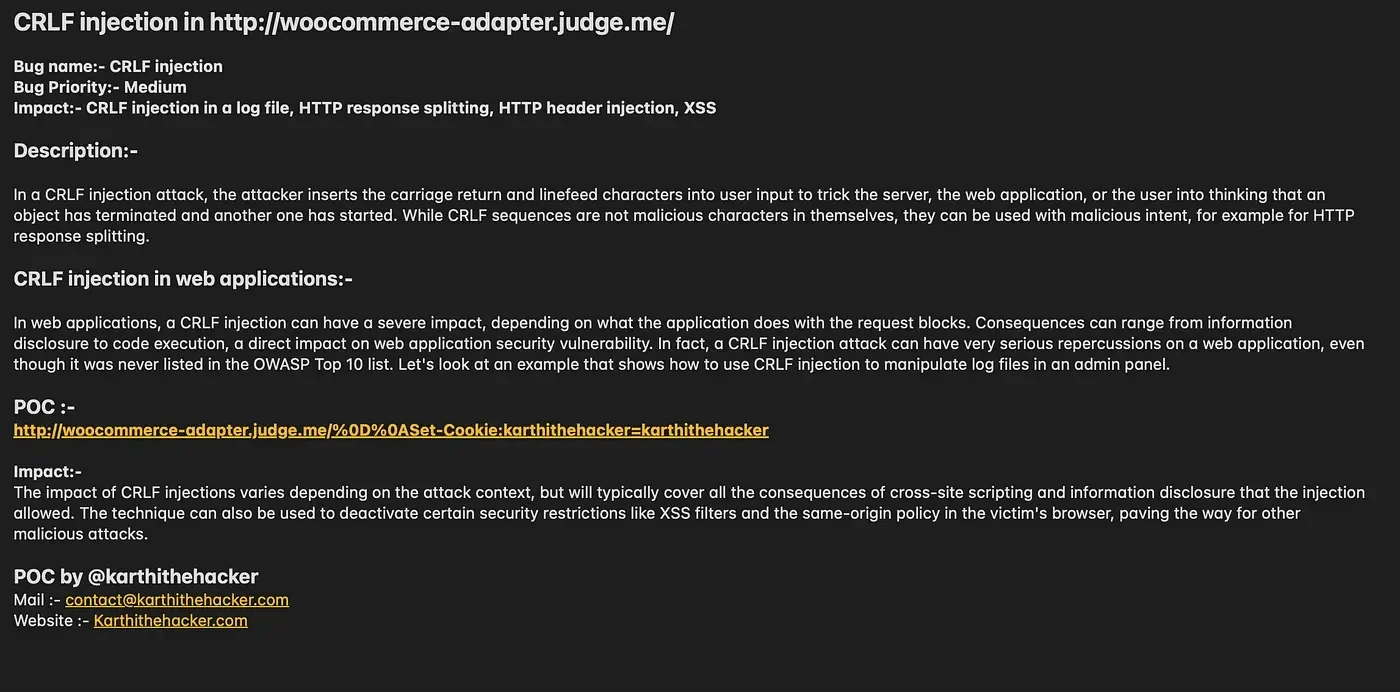
http://example.com/random%0D%0ATest-Header:karthithehacker
%0D%0A is the URL-encoded carriage return and line feed. When the server places this value into the Location header, the two characters terminate the header line early, and everything after them (Test-Header:karthithehacker) is interpreted as a new header in the response. The payload appends a header name and value of the researcher's choosing after the encoded CRLF.
Step 2: demonstrate impact with a fake cookie
To show what the bug is worth, the researcher built a proof of concept that injected a fake Set-Cookie header into the server's response. The researcher says the injected fake Set-Cookie header could be used to steal session cookies and perform session hijacking attacks.
Step 3: report and disclosure
The vulnerability was reported to the company through HackerOne. The company confirmed it and paid a bounty of 300 USD. The report was disclosed on 16 April 2023. A fuller technical write-up, including the proof of concept, is linked from the post at https://karthithehacker.com/blogs/crlf-in-h1-poc.html.
Root cause
The mistake is that user-controlled input was placed into the Location header without sanitising the CR and LF characters. Because HTTP headers are line-based, a CRLF inside a header value ends that header and starts a new one, so any content the attacker appends becomes part of the response headers. The report does not describe the server-side code, so the exact place where the filtering should have happened is not shown; The report does not describe the server-side code, so the exact place where the filtering should have happened is not shown..
Impact
The proof of concept injected a fake Set-Cookie header into the server's response, which could be used to steal session cookies and perform session hijacking attacks. That enables cookie manipulation, and with it session hijacking and theft of session cookies. The researcher also notes that arbitrary content such as JavaScript code can be injected into the response, which points to cross-site scripting and response splitting. The report does not quantify how many users or which parts of the site were affected, and the demonstration is a proof of concept rather than a live attack against real users.
Fix
The general fix it argues for is to properly sanitise user input before using it in HTTP headers, so that CR and LF characters cannot reach a header value. The lesson stated in the post is that even seemingly harmless headers can be vulnerable to CRLF injection.
Variants to test
- Redirect parameters. Any parameter that ends up in a
Locationheader is a candidate. - Other reflected headers. Try inputs that reach headers such as
Set-Cookieor custom headers. - Protocol downgrade. The post's own tip is to downgrade HTTPS to HTTP and inject CRLF payloads, since the handling of the request can differ between the two. The post's own tip is to downgrade HTTPS to HTTP and inject CRLF payloads.
- Automated scanning.
What happened, in plain words
A security researcher found a bug on a popular website and reported it through HackerOne, a platform where companies invite people to look for problems in their systems and pay for the useful findings. The company confirmed the bug and paid a bounty of 300 USD. The report was disclosed on 16 April 2023.
The bug is called CRLF injection. CRLF stands for Carriage Return Line Feed. These are two invisible characters that, in many internet protocols including HTTP, mean "this line ends here". HTTP is the language a browser and a web server use to talk to each other, and it is built out of lines: a request is a few lines, and a response is a few lines. If a website copies something a visitor typed into one of those lines without cleaning it first, an attacker can slip in those two end-of-line characters and start a line of their own. That is the whole idea of the bug.
A simple comparison: imagine a form where you write your name and the clerk stamps it onto a pre-printed letter. If you write your name and then, on a new line, "and also give the bearer 100 dollars", the clerk's stamp copies both lines and the letter now says something the clerk never intended. The end of the line is what let you add a new instruction. CRLF injection is exactly that, with HTTP headers instead of letters.
The report does not name the website or the exact page that was vulnerable, so we do not know which feature of the site reflected the input. What the report does describe is the behaviour: a Location header whose value was built from user input and was not properly cleaned.
The pieces you need to know first
Before walking through the steps, here are the few concepts the rest of the article leans on. Each one is explained from zero.
HTTP header. When your browser asks a server for a page, the request and the reply both carry a small block of lines at the top called headers. Each header is a name, a colon, and a value, for example Content-Type: text/html. Headers are not the page itself; they are the instructions and labels that travel with it. Things like "this page is in English", "this page expires in an hour", or "the browser should remember this cookie" are all said in headers.
Location header. This is a specific header a server sends when it wants the browser to go somewhere else. If you open a short link and end up on a different page, the server most likely answered with a Location header naming the destination, and the browser followed it automatically. Because the destination often depends on what the visitor asked for, the value of this header is frequently built from user input, which is exactly why it is a place worth checking for this bug.
Cookie. A cookie is a small piece of text a website asks your browser to store and send back on every later request to that site. It is how a website remembers that you are logged in: after you sign in, the server sets a cookie, and on each following page your browser presents it, so the server knows who you are without asking for your password again. A cookie that proves who you are is called a session cookie. If someone else obtains it, they can often act as you without knowing your password. That is called session hijacking.
Set-Cookie header. This is the header a server uses to hand a cookie to the browser. When you see a site "remember" you, a Set-Cookie header did it. If an attacker can make the server send a Set-Cookie header of their own choosing, they can plant a cookie in the victim's browser.
URL encoding. Some characters cannot appear literally in a web address, so they are written as a percent sign followed by two hexadecimal digits. %0D means the carriage return character and %0A means the line feed character. Together, %0D%0A is the encoded form of CRLF, the end of a line. When the server decodes the address, those two characters become real line breaks.
HTTP response splitting. Because headers are line-based, injecting a line break inside a header value splits the response into more parts than the server intended. The attacker's text after the break is read as a new header, or even as the start of a new response. That is what the name refers to.
Cross-site scripting. A class of bug where an attacker gets their own code, usually JavaScript, to run inside someone else's website in a victim's browser. The code then runs with the trust of that site. The report mentions it as one of the consequences this bug can lead to.
HackerOne. A platform that runs bug bounty programmes. Companies publish a scope of what may be tested, researchers submit reports, the company triages and confirms them, and a reward is paid. A report can later be disclosed publicly so others can learn from it.
npm. The package manager for JavaScript. It is the tool developers use to download and install small programs (packages) written by others. The -g flag means "install this for the whole machine", so the command becomes available from any folder.
Setting up the tool
The researcher used a tool called crlfi, which he wrote himself for the purpose of detecting CRLF injection. It is distributed through npm and runs on Windows, Mac and Linux. Installation is a single global npm install:
npm install crlfi -g
Line by line:
npmis the package manager program. You run it from a terminal, which is a text window where you type commands instead of clicking.installtells npm that you want to download and set up a package.crlfiis the name of the package being installed.-gmeans global: install it once for the whole computer rather than inside one project folder, so you can run it from anywhere.
Usage details are in the GitHub repository at https://github.com/karthi-the-hacker/crlfi. GitHub is a website where source code is published and shared. No account, role or other precondition is mentioned beyond access to the target for testing through the HackerOne programme.
Finding it
After a few minutes of scanning with crlfi, the tool produced a vulnerable output for one of its payloads. A payload is simply the piece of input an attacker sends to try to trigger a bug; here it is a crafted URL containing the encoded line break.
The signal was in the Location header: its value was not properly sanitised, and CRLF characters injected into the input ended up in the header. Sanitising means cleaning input before using it, for example by removing or encoding dangerous characters. A simple payload such as %0d%0a was enough to do it.
Why scan at all? Because a person cannot look at a website and see its headers by eye. The tool automates the boring part: send many crafted requests, watch the replies, and point at the ones where the injected line break shows up.
Exploitation
Step 1: confirm the injection with a harmless header
The researcher used a payload of the following shape, where the encoded CRLF is followed by a header name and value of his choosing:
http://example.com/random%0D%0ATest-Header:karthithehacker
Line by line:
http://example.com/randomis an ordinary web address.example.comis a placeholder domain used in examples, not the real target; the report does not name the real site.%0Dis the encoded carriage return, one half of the line break.%0Ais the encoded line feed, the other half. Together they are the end of a line.Test-Header:karthithehackeris a made-up header name and value. It is deliberately harmless: it does nothing except prove a point. If it appears in the response, the attacker's text was treated as a real header.
Why a harmless header first? Because the goal at this stage is only to prove the injection works, without causing any side effect. A made-up header named Test-Header cannot change anything in the browser; it is a marker. The payload appends a made-up header name and value after the encoded CRLF. If the server had cleaned the input, the %0D%0A would have been removed or encoded, and Test-Header would have stayed part of the Location value instead of becoming a header of its own.
When the server places this value into the Location header, the two characters terminate the header line early, and everything after them (Test-Header:karthithehacker) is interpreted as a new header in the response. The appearance of that injected header in the response confirms that the input reaches the header unsanitised.
Step 2: demonstrate impact with a fake cookie
Finding a bug is only half the job; the other half is showing why it matters. To show what the bug is worth, the researcher built a proof of concept that injected a fake Set-Cookie header into the server's response. A proof of concept is a small, controlled demonstration that the problem is real, rather than a full attack.
Why a cookie? Because a response header controlled by the attacker can be used to set cookies in the victim's browser, which in turn can be used to steal session cookies and perform session hijacking attacks. In plain terms: if the attacker can make the site's own response carry a Set-Cookie line of their choosing, the victim's browser will store that cookie as if the site had set it. The researcher says the injected fake Set-Cookie header could be used to steal session cookies and perform session hijacking attacks. The report describes this as the impact; it does not include the exact cookie value or the full request used for the demonstration.
Step 3: report and disclosure
The vulnerability was reported to the company through HackerOne. The company confirmed it and paid a bounty of 300 USD. A fuller technical write-up, including the proof of concept, is linked from the post at https://karthithehacker.com/blogs/crlf-in-h1-poc.html.
Why report instead of using it? Because the point of a bug bounty programme is exactly this: the person who finds the problem tells the owner, the owner fixes it, and the finder is paid for the help. That is what responsible disclosure means: giving the owner a chance to fix the issue before details become public.
Root cause
The mistake is that user-controlled input was placed into the Location header without sanitising the CR and LF characters. Because HTTP headers are line-based, a CRLF inside a header value ends that header and starts a new one, so any content the attacker appends becomes part of the response headers.
Concatenated means simply glued together: the program took the visitor's text and stuck it onto the header value as-is, the way you might paste a name into a sentence without checking it.
Impact
The proof of concept injected a fake Set-Cookie header into the server's response, which could be used to steal session cookies and perform session hijacking attacks. That enables cookie manipulation, and with it session hijacking and theft of session cookies. The researcher also notes that arbitrary content such as JavaScript code can be injected into the response, which points to cross-site scripting and response splitting.
The report does not quantify how many users or which parts of the site were affected, and the demonstration is a proof of concept rather than a live attack against real users.
Fix
The general fix it argues for is to properly sanitise user input before using it in HTTP headers, so that CR and LF characters cannot reach a header value. The lesson stated in the post is that even seemingly harmless headers can be vulnerable to CRLF injection.
In everyday terms: before a value goes into a header, the program should strip or encode the two line-break characters, so that whatever the visitor typed stays on one line. A header value should never be able to end its own line.
Variants to test
If you want to look for this bug yourself, here are the angles the post covers.
- Redirect parameters. Any parameter that ends up in a
Locationheader is a candidate. A parameter is the part of a web address after the question mark that carries a value, for example the destination in a "go to this page" link. If the site puts that value intoLocation, it is worth testing. - Other reflected headers. Try inputs that reach headers such as
Set-Cookieor custom headers. Raw response means the actual text the server sent, before the browser tidies it up; browsers hide headers from normal view, so you need a tool that shows them. - Protocol downgrade. The post's own tip is to downgrade HTTPS to HTTP and inject CRLF payloads, since the handling of the request can differ between the two. HTTPS is the encrypted version of HTTP; HTTP is the plain version. The post's own tip is to downgrade HTTPS to HTTP and inject CRLF payloads.
- Automated scanning. Automation finds candidates quickly; manual confirmation makes sure you are not reporting a false alarm.
Glossary
- Bounty: a reward, usually money, paid by a company for a valid security report.
- Bug bounty programme: a scheme where a company invites researchers to test its systems and pays for confirmed problems.
- Cookie: a small piece of text a website asks the browser to store and send back on later requests, often used to remember that you are logged in.
- CRLF: Carriage Return Line Feed, the two characters that mark the end of a line in many protocols, including HTTP.
- CRLF injection: a bug where an attacker slips those end-of-line characters into input that is copied into an HTTP header, so the attacker's text becomes a new header.
- Cross-site scripting: a bug where an attacker's code runs inside someone else's website in a victim's browser.
- Disclosure: making the details of a reported vulnerability public, usually after the owner has had time to fix it.
- Header: a line of instructions or labels sent with an HTTP request or response, in the form name: value.
- HackerOne: a platform that runs bug bounty programmes and handles reports between researchers and companies.
- HTTP: the language browsers and web servers use to exchange requests and responses.
- HTTP response splitting: a consequence of CRLF injection where injected line breaks split a response into extra parts the server never intended.
- HTTPS: the encrypted version of HTTP.
Locationheader: the response header that tells the browser to go to another address.- npm: the package manager for JavaScript, used to install small programs from the command line.
- Parameter: the part of a web address after the question mark that carries a value.
- Payload: the crafted input an attacker sends to try to trigger a bug.
- Proof of concept: a small, controlled demonstration that a vulnerability is real.
- Responsible disclosure: telling the owner about a vulnerability and giving them a chance to fix it before details are made public.
- Sanitising: cleaning input before using it, for example by removing or encoding dangerous characters.
- Session cookie: a cookie that proves who you are, so the site keeps you logged in.
- Session hijacking: using someone else's session cookie to act as them without their password.
Set-Cookieheader: the response header a server uses to hand a cookie to the browser.- URL encoding: writing characters that cannot appear literally in a web address as a percent sign plus two hexadecimal digits, such as
%0Dand%0A.