Stored Self XSS on https://app.crowdsignal.com (in Photo Insert App) + Stored XSS on https://*your-subdomain*.survey.fm
A quiz photo upload feature accepted a media identifier parameter that was reflected into the page without sanitisation, so a crafted value executed script. The same value was then stored and executed again when the quiz link was opened in a new tab, making it stored cross-site scripting.

- Triaged in 12 days
- Fixed in 15 days
- Paid in 15 days
- Disclosed after 3 months
Summary by the researcher
I love bug bounty. I love xss. https://twitter.com/alicanact60
The report
Steps:
- Go to https://app.crowdsignal.com/dashboard and click Create a New > Quiz
- Add Multiple Choice to your page and click image button, upload a photo and click upload.
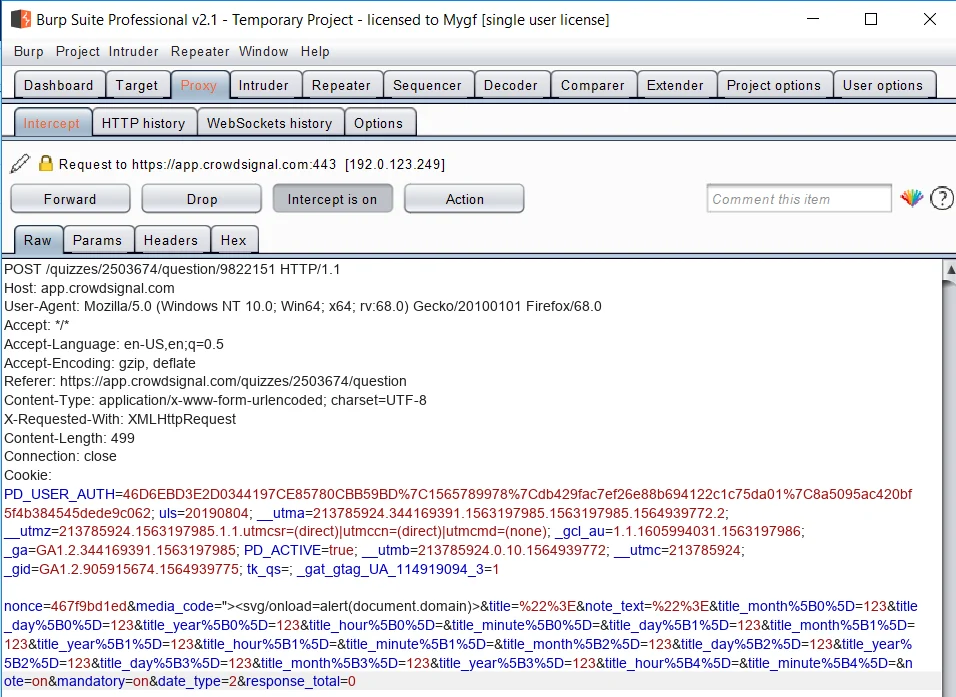
- Start the burp suite and click Save button. Look at the request (poc1.png) and you will see media_code= parameter. It will be your photo's id and change it as payload and forward the request. Payload: "><svg/onload=alert(document.domain)>
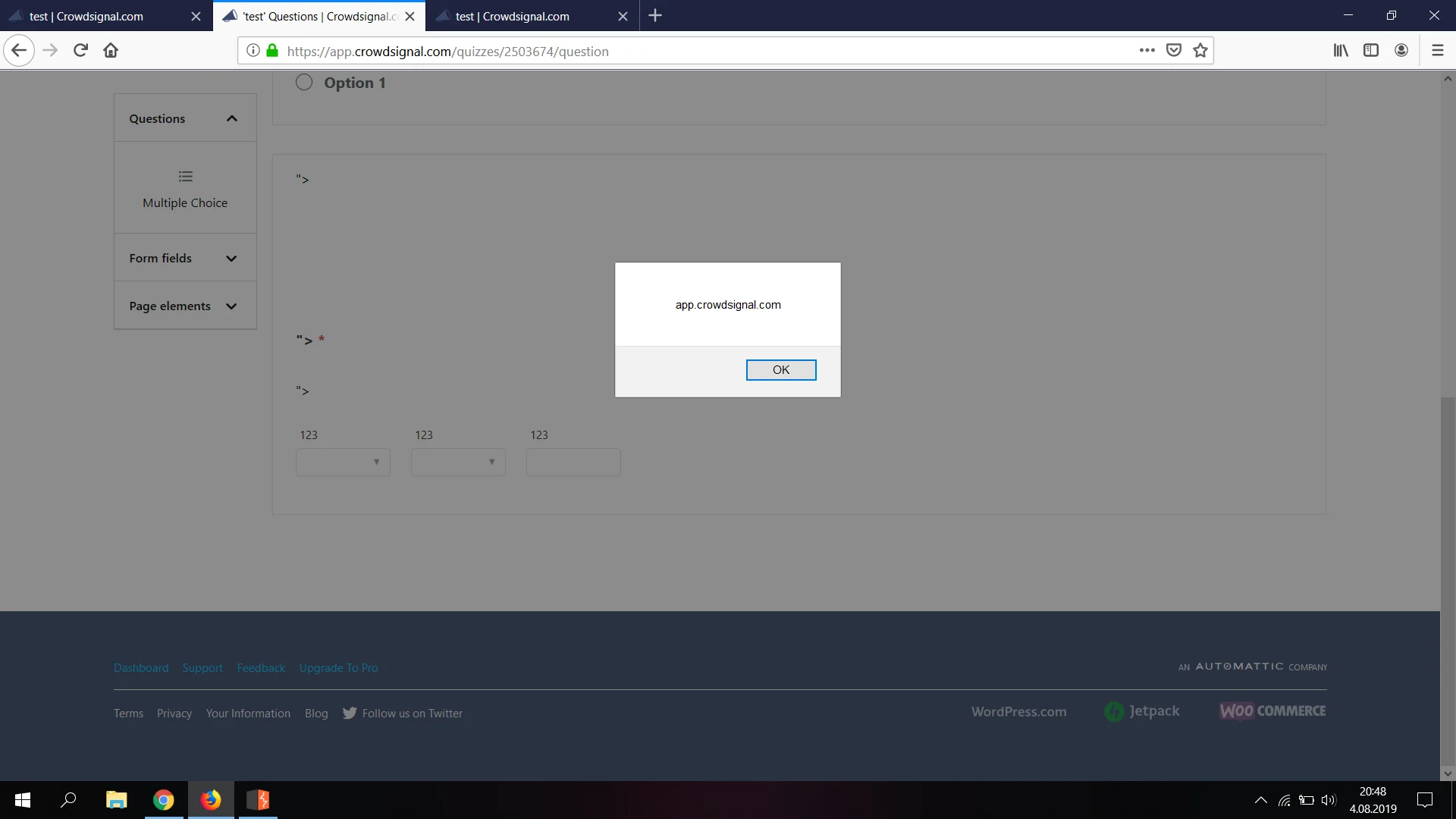
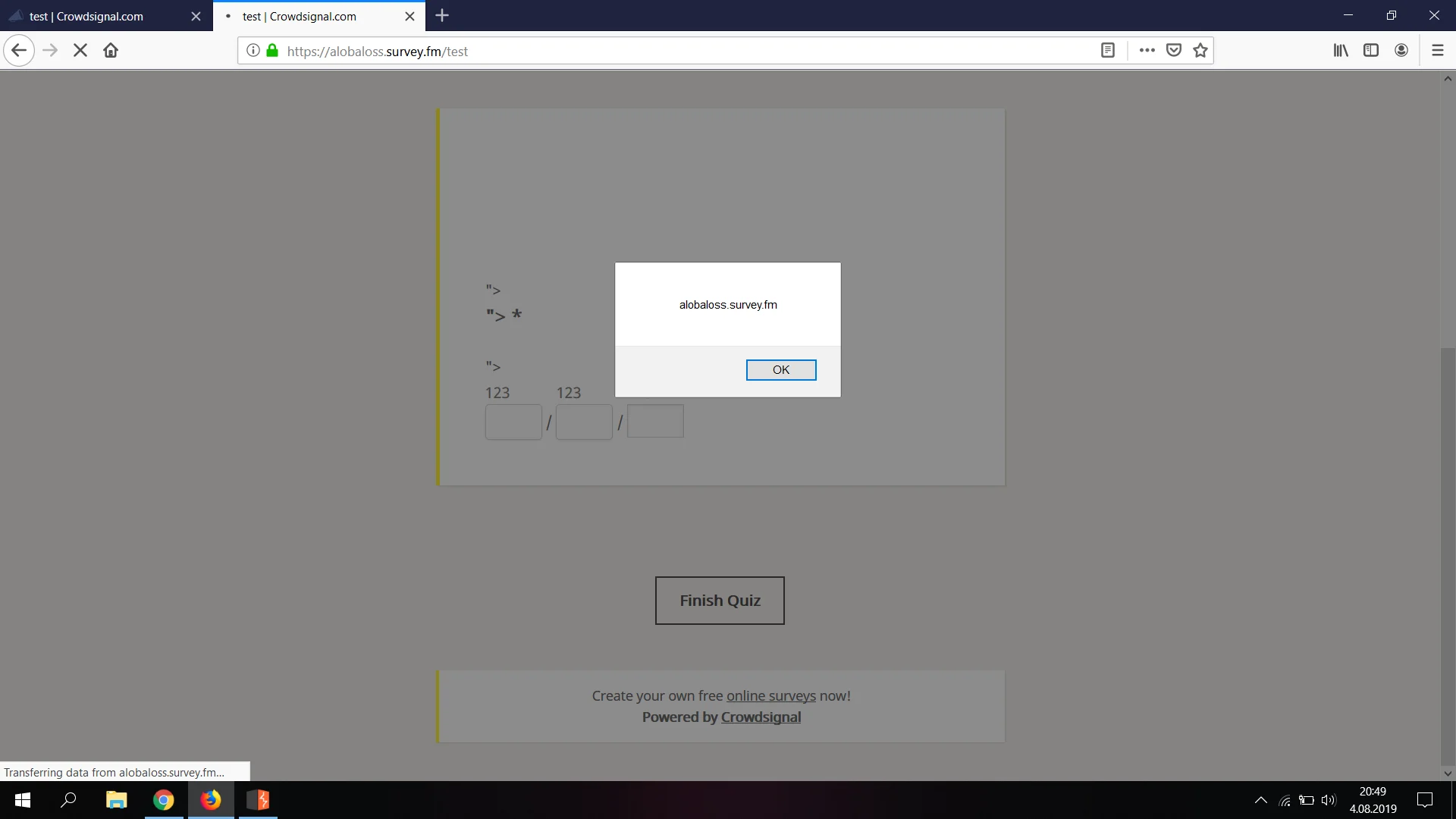
- Now you will see xss (poc2.png). Copy the quiz link and open it the new tab. You will see second xss (poc3.png). And this one is stored xss.
Impact
XSS
Attachments
What the report shows
The target is the quiz builder at https://app.crowdsignal.com, reached through the dashboard at https://app.crowdsignal.com/dashboard. The researcher describes two related findings: a stored self XSS inside the photo insert feature of the quiz editor, and a stored XSS that fires when the resulting quiz is opened through its public link on https://*your-subdomain*.survey.fm.
The steps in the report are:
- Go to
https://app.crowdsignal.com/dashboardand click Create a New > Quiz. - Add Multiple Choice to the page, click the image button, upload a photo and click upload.
- Start Burp Suite and click Save. Inspect the request, which contains a
media_code=parameter holding the photo's id. Replace that value with the payload and forward the request. - The payload fires in the editor, and the same payload fires again when the quiz link is opened in a new tab. The second one is stored XSS.
The payload, exactly as given:
"><svg/onload=alert(document.domain)>
The report gives no HTTP request or response, no version numbers and no fix details. Severity is recorded as high, the weakness as stored cross-site scripting, and the report was disclosed on 21 October 2019. No bounty amount is stated.
The three screenshots follow the steps. The first screenshot is labelled poc1.png:
The second screenshot is labelled poc2.png:
The third screenshot is labelled poc3.png:
Root cause
The report shows the media_code parameter of the save request being replaced with a payload. The value is meant to be an identifier for an uploaded photo, and the payload later executes in the editor and in the public quiz link. The report does not show the server-side code, so the exact cause is inferred from the behaviour. The likely mistake is that the identifier is treated as opaque data on the way in and then placed into an HTML context on the way out, so the "><svg/onload=...> sequence closes an attribute and introduces a new element with an event handler. The report does not show the server-side code, so the exact sink is inferred from the behaviour.
The distinction the researcher draws is between the editor context (self XSS, since the person who submits the payload is the one who sees it) and the public quiz link on the survey subdomain, where the payload fires again and the researcher calls it stored XSS.
Impact
The report states the impact simply as XSS. In the editor the effect is limited to the account that saved the quiz, which is why the researcher labels that instance self XSS. The stored instance on the public quiz link is the one the researcher calls stored XSS: the payload fires again when the quiz link is opened in a new tab.
How this kind of bug works
Stored XSS happens when input is persisted and later rendered into an HTML document without context-appropriate encoding. The dangerous part is the persistence: the payload survives the request that created it and is served to every later viewer of the affected page. Any field that is saved and displayed again is a candidate, including identifiers, names, descriptions and URLs.
Two properties make this class easy to miss. First, the vulnerable value often is not a free-text field a user would think of as content: an id, a slug or a media reference can end up in markup just as easily. Second, the same data can be rendered in several places (an editor preview and a public page), so a value that looks safely handled in one view may be unencoded in another.
The defences are well established. Output encoding must match the context: HTML-entity encoding for element content, attribute encoding for attribute values, JavaScript encoding inside script blocks, and URL encoding inside URL attributes. Values that are identifiers should be validated against an expected format, for example a numeric or fixed-pattern check, and rejected otherwise. A Content Security Policy that disallows inline script and event handlers limits the damage when encoding fails. Frameworks that auto-escape by default help, but only if the value is not passed through a raw-output helper.
How to test for it
- Map every feature that saves data and then displays it: profile fields, quiz and form builders, comments, media metadata, settings pages.
- For each saved value, capture the save request in an intercepting proxy and note every parameter, including ones the UI does not expose, such as identifiers and hidden fields.
- Submit a benign marker first, for example a short unique string, and find every place it is rendered, including public or shared views that use a different hostname or subdomain.
- Replace the marker with a payload that would be inert if properly encoded, such as a quoted angle-bracket sequence with an event handler, and check whether it executes. Test attribute contexts, element content and URL attributes separately, because the required encoding differs.
- Reload the page and open the public link in a fresh session to confirm the value is stored rather than reflected.
A positive result is script execution in the target origin, demonstrated with a harmless alert or a callback to a listener you control. Common false positives include payloads that appear in the response but are HTML-encoded, execution that only occurs in your own browser because of a client-side preview that never reaches the server, and values that are reflected from the request rather than stored. Also check whether a payload only fires in the editor you control: that is self XSS and is usually treated as low impact unless it can be delivered to another user.
How it is fixed
Encode the stored value for the exact output context wherever it is rendered, in both the editor and the public quiz page. Validate identifier parameters server-side against the expected format and reject anything else. Avoid building markup by string concatenation around stored values. Add a Content Security Policy that blocks inline event handlers as defence in depth, and review other fields saved by the same builder for the same pattern.
Hunting notes
Builder-style applications are productive ground for this class: anything that lets a user assemble a page, form or quiz and then publishes it on a separate hostname. The public rendering path is often written by a different part of the codebase from the editor, so encoding applied in one may be missing in the other. Recon signals worth following are separate publishing subdomains, preview endpoints, and save requests that carry opaque identifiers alongside the visible content.
To make a report land, show the full path from save request to execution in a public view, with the exact parameter and payload, and demonstrate execution in a context another user would reach. If the only execution is in your own editor session, say so plainly and explain what would be needed to reach other users; programs are much more likely to accept a stored issue that fires for a second party.
What happened, in plain words
This report is about a quiz-building website called CrowdSignal. A quiz builder is a web app where you assemble a quiz out of parts: questions, answer choices, pictures and so on, then publish it so other people can take it. The researcher found that the media_code value sent when you save a quiz could be replaced with a small piece of code, and that code later ran in the editor and again when the quiz link was opened in a new tab.
The kind of bug is called cross-site scripting, or XSS. In everyday terms: a web page is a set of instructions a browser follows, and some of those instructions can be little programs (scripts). Normally only the site's own code should be able to add scripts to its pages. XSS means an outsider manages to slip their own script into the page, so the browser runs it as if the site had written it. A script running this way can do things in the page, such as showing a pop-up box.
The researcher describes two related findings. The first is a stored self XSS inside the photo insert feature of the quiz editor. "Stored" means the bad value is saved on the server and comes back later, rather than just bouncing back once. "Self" means the only person who sees it is the person who typed it in, which makes it much less serious. The second finding is a stored XSS that fires when the quiz link is opened in a new tab on a survey subdomain.
The steps in the report are:
- Go to
https://app.crowdsignal.com/dashboardand click Create a New > Quiz. - Add Multiple Choice to the page, click the image button, upload a photo and click upload.
- Start Burp Suite and click Save. Inspect the request, which contains a
media_code=parameter holding the photo's id. Replace that value with the payload and forward the request. - The payload fires in the editor, and the same payload fires again when the quiz link is opened in a new tab. The second one is stored XSS.
A few of those words need unpacking. A request is the message your browser sends to a server when you do something, such as pressing Save; it carries the details of what you want to happen. Burp Suite is a tool that sits between your browser and the server and lets you pause a request, read it and change it before letting it continue. A parameter is one named piece of data inside a request, here media_code, which the site uses to identify which uploaded photo belongs in the quiz.
The payload, exactly as given:
"><svg/onload=alert(document.domain)>
Line by line: the leading "> closes whatever HTML attribute the site had put the value inside, and ends the tag. Then <svg ...> opens a new HTML element, an SVG image container. The onload= part attaches an event handler, meaning "when this element finishes loading, do the following". The following is alert(document.domain), which makes the browser show a pop-up box containing the address of the current site. Seeing that box is the harmless proof that the researcher's code ran. The final > closes the tag.
The report gives no HTTP request or response, no version numbers and no fix details. Severity is recorded as high, the weakness as stored cross-site scripting, and the report was disclosed on 21 October 2019. No bounty amount is stated.
The three screenshots follow the steps. The first screenshot is labelled poc1.png:
The second screenshot is labelled poc2.png:
The third screenshot is labelled poc3.png:
In general, how this kind of bug works
Stored XSS happens when input is saved and later written into a web page without being made safe first. The dangerous part is the saving: the payload survives the request that created it and is served to every later viewer of the affected page. Any field that is saved and shown again is a candidate, including identifiers, names, descriptions and web addresses.
Two properties make this class easy to miss. First, the vulnerable value often is not a free-text field a user would think of as content: an id, a slug or a media reference can end up in page markup just as easily. Second, the same data can be shown in several places, such as an editor preview and a public page, so a value that looks safely handled in one view may be unencoded in another.
The defences are well established. Output encoding must match the context: HTML-entity encoding for element content, attribute encoding for attribute values, JavaScript encoding inside script blocks, and URL encoding inside URL attributes. Values that are identifiers should be validated against an expected format, for example a numeric or fixed-pattern check, and rejected otherwise. A Content Security Policy, a set of rules the site sends telling the browser which scripts it may run, that disallows inline script and event handlers limits the damage when encoding fails. Frameworks that auto-escape by default help, but only if the value is not passed through a raw-output helper.
In general, how to test for it
- Map every feature that saves data and then displays it: profile fields, quiz and form builders, comments, media metadata, settings pages.
- For each saved value, capture the save request in an intercepting proxy and note every parameter, including ones the interface does not show, such as identifiers and hidden fields.
- Submit a harmless marker first, for example a short unique string, and find every place it is shown, including public or shared views that use a different hostname or subdomain.
- Replace the marker with a payload that would be inert if properly encoded, such as a quoted angle-bracket sequence with an event handler, and check whether it runs. Test attribute contexts, element content and URL attributes separately, because the required encoding differs.
- Reload the page and open the public link in a fresh session to confirm the value is stored rather than reflected.
A positive result is script execution in the target site, demonstrated with a harmless alert or a callback to a listener you control. Common false positives include payloads that appear in the response but are HTML-encoded, execution that only occurs in your own browser because of a client-side preview that never reaches the server, and values that are reflected from the request rather than stored. Also check whether a payload only fires in the editor you control: that is self XSS and is usually treated as low impact unless it can be delivered to another user.
In general, how it is fixed
Encode the stored value for the exact output context wherever it is shown, in both the editor and the public quiz page. Validate identifier parameters on the server against the expected format and reject anything else. Avoid building page markup by string concatenation around stored values. Add a Content Security Policy that blocks inline event handlers as defence in depth, and review other fields saved by the same builder for the same pattern.
In general, where to look
Builder-style applications are productive ground for this class: anything that lets a user assemble a page, form or quiz and then publishes it on a separate hostname. The public rendering path is often written by a different part of the codebase from the editor, so encoding applied in one may be missing in the other. Signals worth following are separate publishing subdomains, preview endpoints, and save requests that carry opaque identifiers alongside the visible content.
To make a report land, show the full path from save request to execution in a public view, with the exact parameter and payload, and demonstrate execution in a context another user would reach. If the only execution is in your own editor session, say so plainly and explain what would be needed to reach other users; programs are much more likely to accept a stored issue that fires for a second party.
Glossary
- XSS (cross-site scripting): a bug where an outsider's script ends up running inside a web page, as if the site had put it there.
- Stored XSS: XSS where the bad value is saved on the server and served to later visitors, rather than bouncing back once.
- Self XSS: XSS that only affects the person who entered the value, because nobody else ever sees it.
- Payload: the small piece of text an attacker submits to try to trigger a bug.
- Request: the message a browser sends to a server describing an action, such as saving a quiz.
- Parameter: one named piece of data inside a request, such as
media_code. - Burp Suite: a tool that sits between browser and server so you can pause, read and edit requests.
- Intercepting proxy: software that captures traffic between your browser and a site so you can inspect and change it.
- HTML attribute: a setting written inside an HTML tag, such as the source of an image.
- HTML element: a building block of a page, such as an image, a paragraph or a button.
- Event handler: code attached to an element that runs when something happens, such as the element loading.
- SVG: an image format described in HTML-like markup, which can carry event handlers.
- Output encoding: converting stored text so the browser displays it as text instead of treating it as markup.
- Content Security Policy: rules a site sends telling the browser which scripts it is allowed to run.
- Subdomain: a named section of a larger domain, such as a publishing area on its own hostname.
- Origin: the combination of scheme, host and port that a browser uses to decide which pages may touch each other's data.
- False positive: a result that looks like a bug but is not one, for example because the value was safely encoded.





