Users can bypass page restrictions via Export feature at "Share" feature in CrowdSignal
A user with access to only the Results page of a shared survey could export other restricted pages by directly visiting export URLs. This allowed access to data from pages the user was not permitted to view.

- Triaged in 27 days
- Fixed in 52 days
- Paid in 52 days
- Disclosed after 5 months
Summary:
Hi team, If you upgraded your account, you can share your survey results via "Share" button.
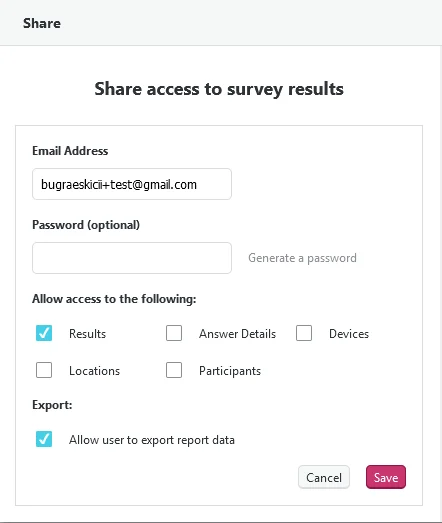
As you can see, I selected Results page on Allow access to the following. So user will access only Results page. But if user has the Export feature.
User can export the restricted pages with these URLs :
- Overview page : https://app.crowdsignal.com/share/(surveytoken).xlsx
- Locations page : https://app.crowdsignal.com/share/(surveytoken)/locations.xlsx
- Participants page : https://app.crowdsignal.com/share/(surveytoken)/participants.xlsx
Replace the survey token with your's.
Steps To Reproduce:
- Go to your survey's
Resultspage with upgraded account - Click
Share - Write the user's email
- Select
Resultspage only onAllow access to the followingand give access to Export. - Click
Saveand wait theShared surveymail - Click to survey link on mail
- Now try to export restricted pages via visiting the above URLs
Impact
Users can export restricted pages on survey sharing feature
Thanks, Bugra
Not written yet. The AI write-up for this report has not been written yet. The Original tab links to the source.
How it worked
Impact
Users could export restricted pages on the survey sharing feature, potentially accessing data they were not permitted to view.
What the attacker needed
Upgraded account; share survey with export permission
How it was found
- Go to your survey's Results page with an upgraded account.
- Click Share.
- Write the user's email.
- Select Results page only on Allow access to the following and give access to Export.
- Click Save and wait for the Shared survey email.
- Click the survey link in the email.
Explained by bugbounty.wiki with AI from the original and checked against quotes from it; it can still be wrong. Read the original before relying on a detail.
Not written yet. The AI write-up for this report has not been written yet. The Original tab links to the source.
When you share survey results, you can choose which pages the other person can see. The report shows that even if you only allow the Results page, the person can still download other pages by using special links. This means the restriction can be bypassed.
What is Access control?
A user can do something their role should not allow: reach an admin function, act on a feature they have not paid for, or skip a permission check. IDOR is the special case where the object belongs to someone else.