Exploration
A local file read vulnerability in the log_fdw extension of Amazon RDS for PostgreSQL allowed an attacker with database access to read arbitrary files on the underlying EC2 instance. By reading configuration files, the attacker obtained temporary AWS credentials for an internal service, potentially gaining access to AWS's internal account.
 Published on blog.lightspin.io
Lightspin's Research Team obtained credentials to an internal AWS service by exploiting a local file read vulnerability on the RDS EC2 instance using the logfdw extension. The internal AWS service was connected to AWS internal account, related to the RDS service.
The full write-up lives on its author's site
It belongs to its author, so we link to it rather than copy it. The other two tabs are our own rewrites, checked against it.
Context
Amazon Relational Database Service (RDS) is a managed database service that supports several engines, including MariaDB, MySQL and PostgreSQL. AWS also maintains its own engine, Amazon Aurora, which is compatible with PostgreSQL and MySQL. Because RDS is managed, the customer does not get a real PostgreSQL superuser: the postgres user is instead a predefined role called rds_superuser, which AWS documentation describes as similar to the PostgreSQL superuser role but with some restrictions.
The target of this research was the PostgreSQL side of RDS, and specifically the extensions AWS ships with it. The feature that turned out to matter is log_fdw, an extension supported by Amazon RDS for PostgreSQL engines of versions 9.6.2 and higher. It lets a user access the database engine log through a SQL interface and build foreign tables over the log data, with the log lines split into columns.
Setup
The researcher created an Amazon RDS database instance using the Amazon Aurora PostgreSQL engine and connected to it with psql. No other accounts, tools or versions are described in the report.
Finding it
The starting point was basic exploration of the databases and the pre-loaded roles.
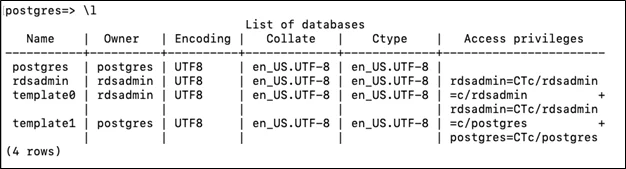
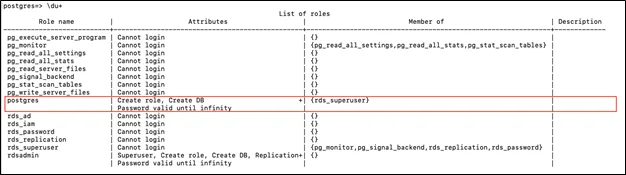
The postgres user is not a real superuser but the rds_superuser role. That role cannot run system commands, read local files or perform any action on the underlying machine, and attempts to do so fail.

The next idea was to use an untrusted language to create a function that executes system commands, but untrusted languages such as plperlu and plpythonu could not be loaded.
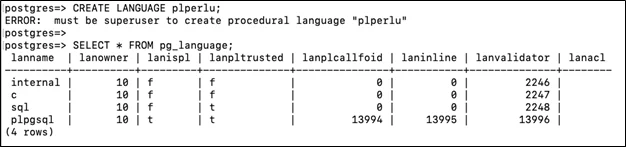

The error returned suggested looking at the rds.extensions configuration parameter.

Many language extensions are supported by Amazon RDS for PostgreSQL engines, but none of them is an untrusted language. That led to further analysis of the extensions in the hope of finding a lead, and to log_fdw.
Exploitation
Step 1: create the log server and read a log file
Following the documentation, the researcher created the foreign server and table.
CREATE EXTENSION log_fdw;
CREATE SERVER log_server FOREIGN DATA WRAPPER log_fdw;
SELECT * FROM list_postgres_log_files() order by 1;
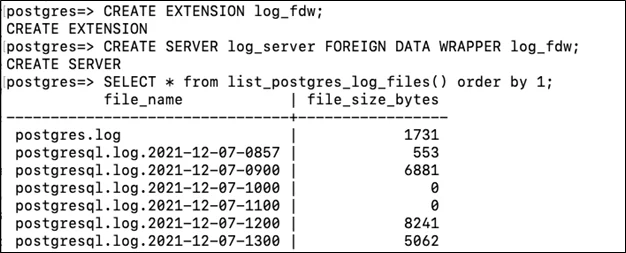
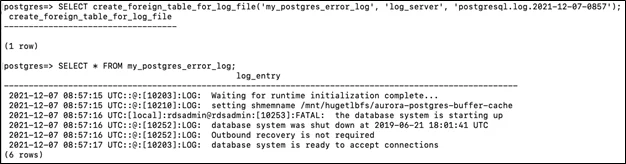
Then a log file was selected, a table created for it and its content read.
SELECT create_foreign_table_for_log_file(‘my_postgres_error_log’, ‘log_server’, ‘postgresql.log’);

SELECT * FROM my_postgres_error_log;
Step 2: try a path traversal
The obvious next step was a path traversal.
SELECT create_foreign_table_for_log_file(‘my_postgres_error_log’, ‘log_server’, ‘../../../../../etc/passwd’);

The command returned the exception Error: The log file path specified was invalid. To work out whether the failure came from the relative path itself or from a validation function, the researcher tried another relative path that looks less like a malicious pattern.
SELECT create_foreign_table_for_log_file(‘my_postgres_error_log’, ‘log_server’, ‘./postgresql.log’);
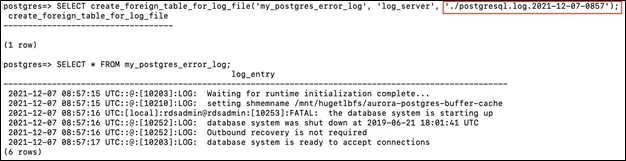

That also failed, which showed the check was a validation function rather than a reaction to the traversal pattern.
Step 3: understand PostgreSQL foreign data
PostgreSQL allows access to data outside the database through regular SQL queries. Such data is called foreign data and is reached through a foreign data wrapper, a library, usually written in C, that communicates with an external data source such as a file.
The author of a foreign data wrapper implements two functions:
- handler function: triggers the action of fetching the external data.
- validator function (optional): validates the options given to the foreign data wrapper, as well as the options for the foreign server and foreign tables.
Once the functions exist, the user can create a foreign data wrapper.
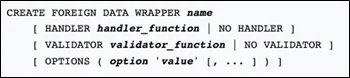
The user also creates a foreign server, which defines how to connect to a particular external data source.

Then a foreign table, which defines the structure of the external data.

All operations on a foreign data table are handled through its associated foreign data wrapper. AWS created a custom foreign data wrapper for log_fdw with both a handler function and a validator function.
SELECT * FROM pg_foreign_data_wrapper;

Step 4: drop the validator
Validation can happen in the validator function, the handler function, or both. Since the validator function is optional, it can be dropped without damaging functionality.
ALTER FOREIGN DATA WRAPPER log_fdw NO VALIDATOR;

With the validator gone, the traversal was tried again.
SELECT create_foreign_table_for_log_file(‘my_postgres_error_log’, ‘log_server’, ‘../../../../../etc/passwd’);

SELECT * FROM my_postgres_error_log;
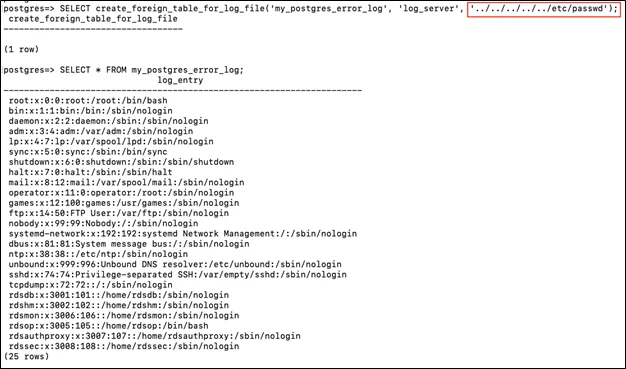
It worked: there is no validation in the handler function. Since the traversal was no longer needed, the table could be created directly with an absolute path.
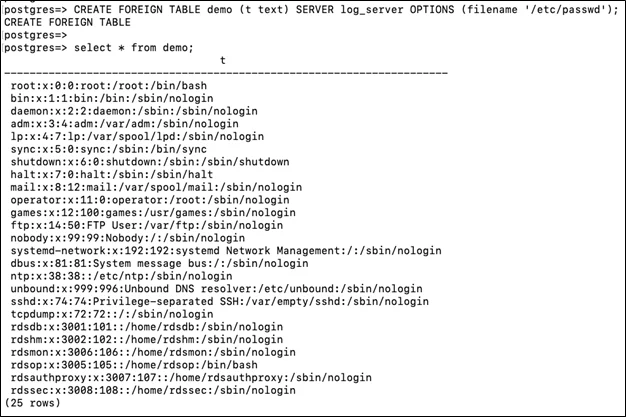
CREATE FOREIGN TABLE demo (t text) SERVER log_server OPTIONS (filename ‘/etc/passwd’);

SELECT * FROM demo;
Step 5: read the PostgreSQL configuration file
Some time was spent going over system files until an interesting argument appeared in the PostgreSQL configuration file that was not shown through psql. The file is at /rdsdbdata/config/postgresql.conf.
CREATE FOREIGN TABLE demo (t text) SERVER log_server OPTIONS (filename ‘/rdsdbdata/config/postgresql.conf’); SELECT * FROM demo;
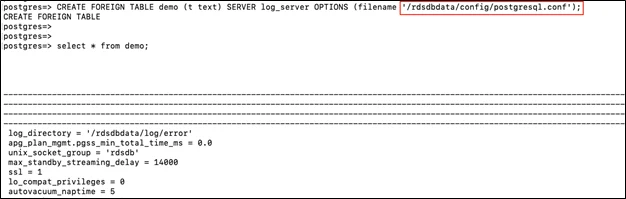
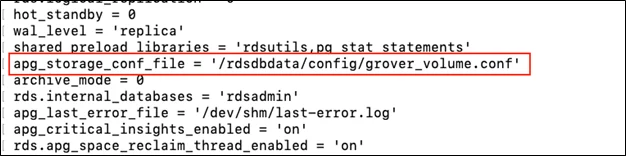
The interesting argument is apg_storage_conf_file, which points to another configuration file named grover_volume.conf.
Step 6: follow the configuration chain
The content of /rdsdbdata/config/grover_volume.conf was read next.
CREATE FOREIGN TABLE demo (t text) SERVER log_server OPTIONS (filename ‘/rdsdbdata/config/grover_volume.conf’); SELECT * FROM demo;

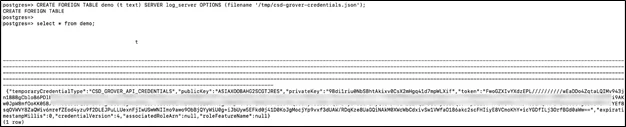
That file points to yet another file, /tmp/csd-grover-credentials.json.
CREATE FOREIGN TABLE demo (t text) SERVER log_server OPTIONS (filename ‘/tmp/csd-grover-credentials.json’); SELECT * FROM demo;
Step 7: use the credentials
The file contains temporary credentials of type CSD_GROVER_API_CREDENTIALS. The publicKey and privateKey values look like STS AccessKeyId and SecretAccessKey respectively. The signs are the publicKey prefix ASIA, as specified in the Unique Identifiers section of the AWS IAM User Guide, and the additional token parameter.
To validate this, the Access Key, Secret Access Key and Session Token were exported to the environment and the AWS Security Token Service (STS) GetCallerIdentity API was called. It returns the User ID, Account ID and Amazon Resource Name (ARN) of the currently used IAM credentials. From the ARN, the assumed role name is csd-grover-role in AWS' internal account.
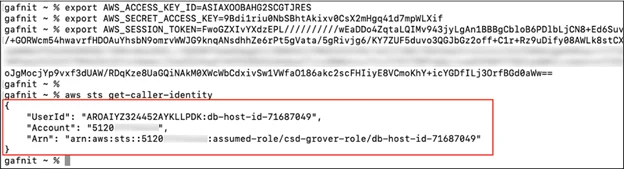
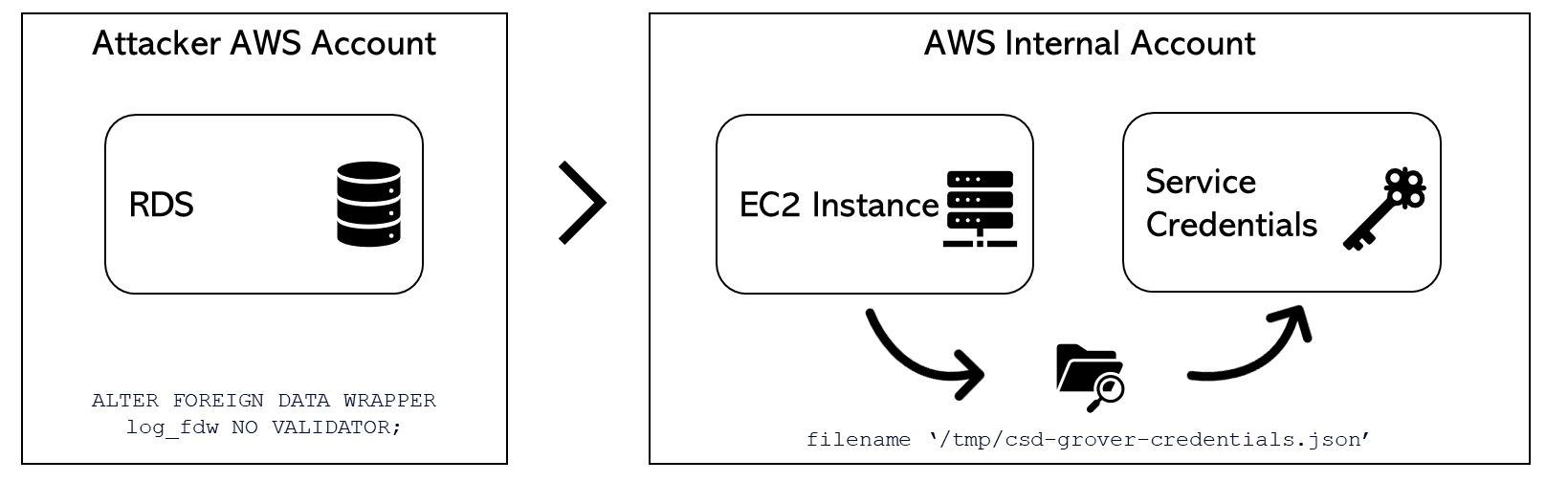
Through three different files, an internal AWS service was discovered and access to it obtained. The analysis and research ended there: no attempt was made to enumerate IAM permissions or move further laterally into AWS' internal environment.
Root cause
The log_fdw foreign data wrapper shipped by AWS performed its path validation in the validator function only. The handler function, which actually fetches the external data, did not validate the filename. Because the validator function is optional in PostgreSQL, a user with enough privilege to alter the foreign data wrapper could remove it with ALTER FOREIGN DATA WRAPPER log_fdw NO VALIDATOR; and then pass arbitrary absolute paths to the handler. The handler function did not validate the filename, so removing the validator allowed arbitrary absolute paths to be passed to it.
Impact
On the researcher's Amazon Aurora PostgreSQL instance, the rds_superuser role could read arbitrary files on the RDS EC2 instance. In this case that led, through /rdsdbdata/config/postgresql.conf, /rdsdbdata/config/grover_volume.conf and /tmp/csd-grover-credentials.json, to temporary credentials for an internal AWS service connected to an AWS internal account related to the RDS service. The researcher stopped at confirming the identity behind those credentials and did not enumerate permissions or move laterally. The report does not describe what the internal service, referred to as Grover, is able to do; AWS said it could not disclose details about it.
Fix
AWS released a fix for the latest engine version within a few days of the report. The initial patch was limited to the recent RDS and Aurora PostgreSQL engines and excluded older versions. The RDS team then personally reached out to every customer that had used a vulnerable version in the last months and guided them through the upgrade process. AWS confirmed that the vulnerability has been fixed and that no customers were affected, and its investigation validated that the vulnerability had not been exploited previously by someone else.
Timeline
| Date | Event |
|---|---|
| Dec 09, 2021 | Vulnerability reported to AWS security. |
| Dec 09, 2021 | AWS confirmed the vulnerability and began remediation and investigation. |
| Dec 14, 2021 | AWS deployed the initial patch, stating it was working on a full fix. |
| Mar 22, 2022 | AWS confirmed it had reached out to all affected customers and fixed all current supported versions. |
On 2022-04-11, after the post was published, AWS released a security bulletin related to the finding at https://aws.amazon.com/security/security-bulletins/AWS-2022-004/.
Variants to test
- Other foreign data wrappers with a validator but no handler-side check. On a PostgreSQL instance, list wrappers with
SELECT * FROM pg_foreign_data_wrapper;, drop the validator where the privilege allows it, and try a filename outside the intended directory. A positive result is a foreign table that returns content from a path the validator previously rejected. - Direct absolute paths after dropping the validator. Instead of a traversal, create the foreign table with an absolute path such as a configuration file. A positive result is readable content from a file the extension was never meant to expose.
- Configuration files that reference other files. Read the engine configuration and follow arguments that point to further configuration or credential files. A positive result is a chain that ends in a file containing credentials or connection details.
- Credential files in temporary directories. Look for JSON files under
/tmpreferenced by configuration. A positive result is a file whose fields match the shape of temporary cloud credentials, for example an access key identifier with theASIAprefix plus a secret and a session token. - Validation of the caller's identity. Confirm with
GetCallerIdentitywhat principal the recovered credentials belong to before doing anything else. A positive result is an ARN for a role in an account other than the one you expect.
What happened, in plain words
A security researcher was looking at Amazon RDS, which is a service from Amazon Web Services (AWS) that runs a database for you. Instead of installing and maintaining database software on your own computer, you rent a database from Amazon and connect to it over the internet. AWS takes care of the machine, the updates and the backups.
RDS can run several kinds of database software, called engines. One of them is PostgreSQL, a popular free database. AWS also has its own engine called Amazon Aurora, which speaks the same language as PostgreSQL and MySQL.
Because AWS manages the database, the customer does not get the all-powerful administrator account that a normal PostgreSQL installation has. The account named postgres is really a role called rds_superuser, which AWS describes as similar to the PostgreSQL superuser but with some restrictions. In everyday terms: you are the manager of the shop, but you are not allowed into the basement where the building's wiring lives.
The researcher found a way around that restriction. Using a feature called log_fdw, which is meant to let you read the database's own log files, they managed to read any file on the machine that runs the database. Following a chain of three files, they ended up with temporary login credentials for an internal AWS service. They reported it to AWS, AWS fixed it, and AWS said no customers were affected.
This article walks through the same steps the researcher took, explaining each concept from scratch along the way.
Background: what RDS and PostgreSQL are
Amazon Relational Database Service (RDS) is a managed database service. A database is an organised store of information, and a database engine is the program that reads and writes that information. RDS supports several engines, including MariaDB, MySQL and PostgreSQL. AWS also maintains its own engine, Amazon Aurora, which is compatible with PostgreSQL and MySQL.
"Managed" means AWS runs the machine for you. You do not get to log in to the operating system, install software or change system settings. You only get to talk to the database itself.
That is why the customer does not get a real PostgreSQL superuser. In a normal PostgreSQL installation, the superuser can do anything: read any file, run any program, change any setting. On RDS, the postgres user is instead a predefined role called rds_superuser. AWS documentation describes it as similar to the PostgreSQL superuser role but with some restrictions.
The target of this research was the PostgreSQL side of RDS, and specifically the extensions AWS ships with it. An extension is an add-on that gives the database extra abilities, a bit like a plugin in a browser. The extension that turned out to matter is log_fdw, supported by Amazon RDS for PostgreSQL engines of versions 9.6.2 and higher. It lets a user access the database engine log through a SQL interface and build foreign tables over the log data, with the log lines split into columns.
Two terms to unpack there. SQL is the language you use to ask a database questions, for example "show me every row in this table". A log is a running diary that a program writes as it works, recording events, warnings and errors. A foreign table is a table that looks normal inside the database but whose contents actually come from somewhere outside it, such as a file. We will come back to that idea in detail.
Setup
The researcher created an Amazon RDS database instance using the Amazon Aurora PostgreSQL engine and connected to it with psql. psql is the standard command-line client for PostgreSQL: a text window where you type SQL commands and read the answers. No other accounts, tools or versions are described in the report.
Finding it
The starting point was basic exploration of the databases and the pre-loaded roles. A role, in database terms, is a named set of permissions, roughly like a user account with a job description attached.
The postgres user is not a real superuser but the rds_superuser role. That role cannot run system commands, read local files or perform any action on the underlying machine, and attempts to do so fail. "The underlying machine" here means the actual computer, the server, on which the database runs. Reading a local file would mean opening, say, a configuration file stored on that computer's disk, which is exactly the kind of thing the restriction is meant to prevent.
The next idea was to use an untrusted language to create a function that executes system commands. A function is a small piece of code stored inside the database that you can call by name. PostgreSQL lets you write functions in other programming languages, and some of those languages are marked "untrusted". An untrusted language is one that is allowed to reach outside the database and touch the operating system, for example by running a shell command. A trusted language is deliberately limited so that it cannot do that.
But untrusted languages such as plperlu and plpythonu could not be loaded. plperlu is Perl in untrusted mode, and plpythonu is Python in untrusted mode; the trailing u stands for untrusted.
The error returned suggested looking at the rds.extensions configuration parameter. A configuration parameter is a named setting that controls how the database behaves, like a preference in a program's settings screen. rds.extensions is the list of extensions AWS allows on RDS.
Many language extensions are supported by Amazon RDS for PostgreSQL engines, but none of them is an untrusted language. That led to further analysis of the extensions in the hope of finding a lead, and to log_fdw.
Exploitation
Step 1: create the log server and read a log file
Following the documentation, the researcher created the foreign server and table. A foreign server is a definition that says where outside data lives and how to reach it. A foreign table is the table-shaped view of that outside data.
CREATE EXTENSION log_fdw;
CREATE SERVER log_server FOREIGN DATA WRAPPER log_fdw;
SELECT * FROM list_postgres_log_files() order by 1;
Line by line:
CREATE EXTENSION log_fdw;switches on thelog_fdwadd-on for this database. Until this runs, the database has no idea whatlog_fdwmeans.CREATE SERVER log_server FOREIGN DATA WRAPPER log_fdw;creates a foreign server namedlog_serverand says it is handled by thelog_fdwwrapper. Think of the wrapper as the adapter plug and the server as the socket you plug it into.SELECT * FROM list_postgres_log_files() order by 1;asks the extension for the list of log files it can see.SELECT *means "give me every column", andorder by 1means "sort by the first column". This is a reconnaissance step: before reading anything, find out what is available.
Then a log file was selected, a table created for it and its content read.
SELECT create_foreign_table_for_log_file(‘my_postgres_error_log’, ‘log_server’, ‘postgresql.log’);

SELECT * FROM my_postgres_error_log;
Line by line:
SELECT create_foreign_table_for_log_file(‘my_postgres_error_log’, ‘log_server’, ‘postgresql.log’);calls a helper function provided by the extension. It takes three arguments: the name to give the new table (my_postgres_error_log), the foreign server to use (log_server), and the log file to read (postgresql.log). The function builds the table definition for you.SELECT * FROM my_postgres_error_log;reads the table, which means reading the log file. If this works, the database can show you the contents of a file on disk through an ordinary query.
Step 2: try a path traversal
The obvious next step was a path traversal. A path is the address of a file on a computer, like /etc/passwd. A path traversal is an attempt to escape the folder you are supposed to be limited to by using .., which means "go up one folder". If a program intends to read only files inside /logs, then a path like ../../etc/passwd tries to climb out of /logs and reach a file somewhere else entirely. /etc/passwd is a well-known file on Unix-like systems that lists user accounts, which makes it a classic target for testing whether a file read is possible.
SELECT create_foreign_table_for_log_file(‘my_postgres_error_log’, ‘log_server’, ‘../../../../../etc/passwd’);
Line by line: this is the same helper function as before, but the third argument, the filename, is now ../../../../../etc/passwd. Each .. climbs one folder up. The researcher is asking: will the extension happily read a file that is not a log file at all?
The command returned the exception Error: The log file path specified was invalid. An exception is the database's way of saying "I refuse". To work out whether the failure came from the relative path itself or from a validation function, the researcher tried another relative path that looks less like a malicious pattern. A validation function is a piece of code whose only job is to inspect the input and reject anything that does not fit the rules.
SELECT create_foreign_table_for_log_file(‘my_postgres_error_log’, ‘log_server’, ‘./postgresql.log’);
Line by line: the filename is now ./postgresql.log. The ./ means "in the current folder", so this points at the same log file as before, just written in a slightly different way. It is a control experiment: if this also fails, the problem is not the .. pattern but the way the filename is checked.
That also failed, which showed the check was a validation function rather than a reaction to the traversal pattern.
Step 3: understand PostgreSQL foreign data
PostgreSQL allows access to data outside the database through regular SQL queries. Such data is called foreign data and is reached through a foreign data wrapper, a library, usually written in C, that communicates with an external data source such as a file. A library is a bundle of ready-made code that a program can load and call.
An everyday comparison: the database is a librarian who normally only fetches books from their own shelves. A foreign data wrapper is a courier the librarian can hire to fetch a book from somewhere else, for example a warehouse. The librarian does not need to know how the warehouse works; they just hand the courier an address.
The author of a foreign data wrapper implements two functions:
- handler function: triggers the action of fetching the external data.
- validator function (optional): validates the options given to the foreign data wrapper, as well as the options for the foreign server and foreign tables.
In the courier comparison, the validator is the person at the door who checks the address on the parcel before it is accepted, and the handler is the courier who actually goes and fetches it. The important word is "optional": PostgreSQL does not require a wrapper to have a validator at all.
Once the functions exist, the user can create a foreign data wrapper.
The user also creates a foreign server, which defines how to connect to a particular external data source.
Then a foreign table, which defines the structure of the external data.
All operations on a foreign data table are handled through its associated foreign data wrapper. AWS created a custom foreign data wrapper for log_fdw with both a handler function and a validator function.
SELECT * FROM pg_foreign_data_wrapper;
Line by line: pg_foreign_data_wrapper is a built-in system table that lists every foreign data wrapper installed in the database. SELECT * shows all its columns. The researcher is checking what AWS actually installed, and whether a validator is attached.
Step 4: drop the validator
Validation can happen in the validator function, the handler function, or both. Since the validator function is optional, it can be dropped without damaging functionality. "Dropping" here means removing the attachment, not deleting the code from disk.
ALTER FOREIGN DATA WRAPPER log_fdw NO VALIDATOR;
Line by line: ALTER means "change an existing object". FOREIGN DATA WRAPPER log_fdw names the object being changed. NO VALIDATOR tells PostgreSQL to stop calling the validator for this wrapper. The handler is untouched, so fetching still works; only the door check is removed.
With the validator gone, the traversal was tried again.
SELECT create_foreign_table_for_log_file(‘my_postgres_error_log’, ‘log_server’, ‘../../../../../etc/passwd’);

SELECT * FROM my_postgres_error_log;
Line by line: the first statement is exactly the traversal attempt from Step 2, repeated now that the validator is out of the way. The second statement reads the resulting table, which is where the file's contents would appear if the attempt succeeded.
It worked: there is no validation in the handler function. That is the core of the bug. The check existed in only one of the two places it could have been, and that one place could be switched off by the user.
Since the traversal was no longer needed, the table could be created directly with an absolute path. An absolute path starts from the very top of the filesystem, so it needs no .. climbing.
CREATE FOREIGN TABLE demo (t text) SERVER log_server OPTIONS (filename ‘/etc/passwd’);

SELECT * FROM demo;
Line by line:
CREATE FOREIGN TABLE demo (t text) SERVER log_server OPTIONS (filename ‘/etc/passwd’);creates a foreign table calleddemowith a single text column namedt. It is attached to thelog_serverforeign server, and the optionfilenameis set to/etc/passwd. This is the direct route: no helper function, just a table pointed at a file.SELECT * FROM demo;reads the table, and therefore the file.
Step 5: read the PostgreSQL configuration file
Some time was spent going over system files until an interesting argument appeared in the PostgreSQL configuration file that was not shown through psql. A configuration file is a plain text file of settings that a program reads when it starts. The file is at /rdsdbdata/config/postgresql.conf.
CREATE FOREIGN TABLE demo (t text) SERVER log_server OPTIONS (filename ‘/rdsdbdata/config/postgresql.conf’); SELECT * FROM demo;
Line by line: the same two statements as before, with the filename swapped for the PostgreSQL configuration file. The first creates the foreign table pointed at that path, the second reads it. The reason for looking here is that configuration files often mention other files, and each mention is a new lead.
The interesting argument is apg_storage_conf_file, which points to another configuration file named grover_volume.conf.
The screenshot highlights that argument in the output.
Step 6: follow the configuration chain
The content of /rdsdbdata/config/grover_volume.conf was read next.
CREATE FOREIGN TABLE demo (t text) SERVER log_server OPTIONS (filename ‘/rdsdbdata/config/grover_volume.conf’); SELECT * FROM demo;
Line by line: again the same pattern, now aimed at the file named by apg_storage_conf_file. The researcher is following the chain, one reference at a time, the way you might follow links from one web page to the next.
That file points to yet another file, /tmp/csd-grover-credentials.json. /tmp is a folder on Unix-like systems for temporary files, and .json is a common text format for structured data, made of names and values in curly braces.
CREATE FOREIGN TABLE demo (t text) SERVER log_server OPTIONS (filename ‘/tmp/csd-grover-credentials.json’); SELECT * FROM demo;
Line by line: the same two statements once more, this time reading the file the previous one pointed to. The name itself, containing "credentials", is a strong hint about what is inside.
Step 7: use the credentials
The file contains temporary credentials of type CSD_GROVER_API_CREDENTIALS. Credentials are the proof of identity that a program presents when it talks to another service, the way a password proves who you are. "Temporary" means they expire after a while, which limits the damage if they leak.
An API is an interface that one program offers so another program can ask it to do things, like a service counter where you hand over a request and get an answer. AWS APIs are the way software talks to AWS services.
The publicKey and privateKey values look like STS AccessKeyId and SecretAccessKey respectively. STS stands for Security Token Service, the AWS component that hands out temporary credentials. An access key identifier is a public name for the credential, and a secret access key is the private half that must never be shared, like a username and password pair.
The signs are the publicKey prefix ASIA, as specified in the Unique Identifiers section of the AWS IAM User Guide, and the additional token parameter. IAM stands for Identity and Access Management, the AWS system that decides who may do what. The ASIA prefix is a known marker for temporary access keys, and a session token is an extra value that must be sent along with temporary credentials to prove they are still valid.
To validate this, the Access Key, Secret Access Key and Session Token were exported to the environment and the AWS Security Token Service (STS) GetCallerIdentity API was called. "Exported to the environment" means setting them as environment variables, which are named values that programs on the machine can read. GetCallerIdentity is a simple API that answers one question: who am I? It returns the User ID, Account ID and Amazon Resource Name (ARN) of the currently used IAM credentials. An ARN is a structured name that identifies a resource in AWS, and an account ID is the number that identifies an AWS account.
From the ARN, the assumed role name is csd-grover-role in AWS' internal account. An assumed role is a temporary identity that a program takes on, rather than a permanent user.
Through three different files, an internal AWS service was discovered and access to it obtained. The analysis and research ended there: no attempt was made to enumerate IAM permissions or move further laterally into AWS' internal environment. "Enumerate permissions" means listing what the credentials are allowed to do, and "move laterally" means using one foothold to reach further systems.
Root cause
The log_fdw foreign data wrapper shipped by AWS performed its path validation in the validator function only. The handler function, which actually fetches the external data, did not validate the filename. Because the validator function is optional in PostgreSQL, a user with enough privilege to alter the foreign data wrapper could remove it with ALTER FOREIGN DATA WRAPPER log_fdw NO VALIDATOR; and then pass arbitrary absolute paths to the handler. The handler function did not validate the filename, so removing the validator allowed arbitrary absolute paths to be passed to it.
In plain words: the rule was written on a removable sign rather than built into the door.
Impact
On the researcher's Amazon Aurora PostgreSQL instance, the rds_superuser role could read arbitrary files on the RDS EC2 instance. EC2 is AWS's service for renting virtual computers, and the RDS database runs on one of them. In this case that led, through /rdsdbdata/config/postgresql.conf, /rdsdbdata/config/grover_volume.conf and /tmp/csd-grover-credentials.json, to temporary credentials for an internal AWS service connected to an AWS internal account related to the RDS service. The researcher stopped at confirming the identity behind those credentials and did not enumerate permissions or move laterally. The report does not describe what the internal service, referred to as Grover, is able to do; AWS said it could not disclose details about it.
Fix
AWS released a fix for the latest engine version within a few days of the report. The initial patch was limited to the recent RDS and Aurora PostgreSQL engines and excluded older versions. A patch is an update that repairs a flaw. The RDS team then personally reached out to every customer that had used a vulnerable version in the last months and guided them through the upgrade process. AWS confirmed that the vulnerability has been fixed and that no customers were affected, and its investigation validated that the vulnerability had not been exploited previously by someone else.
Timeline
| Date | Event |
|---|---|
| Dec 09, 2021 | Vulnerability reported to AWS security. |
| Dec 09, 2021 | AWS confirmed the vulnerability and began remediation and investigation. |
| Dec 14, 2021 | AWS deployed the initial patch, stating it was working on a full fix. |
| Mar 22, 2022 | AWS confirmed it had reached out to all affected customers and fixed all current supported versions. |
On 2022-04-11, after the post was published, AWS released a security bulletin related to the finding at https://aws.amazon.com/security/security-bulletins/AWS-2022-004/.
Variants to test
These are the same ideas generalised, so that someone testing a similar setup knows what to look for.
- Other foreign data wrappers with a validator but no handler-side check. On a PostgreSQL instance, list wrappers with
SELECT * FROM pg_foreign_data_wrapper;, drop the validator where the privilege allows it, and try a filename outside the intended directory. A positive result is a foreign table that returns content from a path the validator previously rejected. - Direct absolute paths after dropping the validator. Instead of a traversal, create the foreign table with an absolute path such as a configuration file. A positive result is readable content from a file the extension was never meant to expose.
- Configuration files that reference other files. Read the engine configuration and follow arguments that point to further configuration or credential files. A positive result is a chain that ends in a file containing credentials or connection details.
- Credential files in temporary directories. Look for JSON files under
/tmpreferenced by configuration. A positive result is a file whose fields match the shape of temporary cloud credentials, for example an access key identifier with theASIAprefix plus a secret and a session token. - Validation of the caller's identity. Confirm with
GetCallerIdentitywhat principal the recovered credentials belong to before doing anything else. A positive result is an ARN for a role in an account other than the one you expect.
Glossary
- API: an interface one program offers so another program can ask it to do things, like a service counter for software.
- ARN (Amazon Resource Name): a structured name that identifies a resource in AWS.
- AWS (Amazon Web Services): Amazon's cloud platform, which rents out computing and storage over the internet.
- Access key identifier: the public half of a pair of credentials, used to name the credential.
- Account ID: the number that identifies an AWS account.
- Amazon Aurora: AWS's own database engine, compatible with PostgreSQL and MySQL.
- Configuration file: a plain text file of settings that a program reads when it starts.
- Configuration parameter: a named setting that controls how a program behaves.
- Credentials: the proof of identity a program presents to another service, such as a key pair or a password.
- EC2: AWS's service for renting virtual computers.
- Engine: the database software that actually stores and retrieves data, such as PostgreSQL or MySQL.
- Environment variable: a named value stored in a program's environment that other programs can read.
- Exception: a program's way of signalling that it refuses to do something or has hit an error.
- Extension: an add-on that gives a database extra abilities.
- Foreign data: data that lives outside the database but is accessed through it.
- Foreign data wrapper: a library that lets the database talk to an external data source such as a file.
- Foreign server: a definition of where external data lives and how to reach it.
- Foreign table: a table inside the database whose contents actually come from outside it.
- Function: a named piece of code stored in the database that can be called.
- Handler function: the part of a foreign data wrapper that actually fetches the external data.
- IAM (Identity and Access Management): the AWS system that decides who may do what.
- JSON: a common text format for structured data, made of names and values in curly braces.
- Library: a bundle of ready-made code a program can load and call.
- Log: a running diary a program writes as it works, recording events, warnings and errors.
- Managed service: a service where the provider runs the underlying machine for you.
- Patch: an update that repairs a flaw.
- Path: the address of a file on a computer.
- Path traversal: using
..to climb out of the folder a program is supposed to be limited to. plperlu: Perl in untrusted mode, a language that can reach outside the database.plpythonu: Python in untrusted mode, a language that can reach outside the database.psql: the standard command-line client for PostgreSQL.- RDS (Relational Database Service): AWS's managed database service.
- Role: a named set of permissions, roughly a user account with a job description.
rds_superuser: the restricted administrator role AWS gives RDS customers instead of a real PostgreSQL superuser.- Secret access key: the private half of a pair of credentials, which must never be shared.
- Session token: an extra value sent with temporary credentials to prove they are still valid.
- SQL: the language used to ask a database questions.
- STS (Security Token Service): the AWS component that hands out temporary credentials.
- Superuser: the all-powerful administrator account of a database.
- Temporary credentials: credentials that expire after a while, limiting the damage if they leak.
- Untrusted language: a programming language inside the database that is allowed to reach the operating system.
- Validator function: the part of a foreign data wrapper that checks the options it is given and rejects anything that does not fit the rules.




