Unauthorized Access To Admin Panel via Swagger
An API Swagger endpoint for an admin panel was exposed without authentication, allowing the author to access all admin functions. The main login panel was secure, but the Swagger interface lacked authentication, effectively bypassing the admin panel.

Hi guys, My name is Arman and you know me as M7arm4n. Today I want to talk about how I was able to access the admin panel in Coca-Cola for the 2022 World Cup 🏆
The full write-up lives on its author's site
It belongs to its author, so we link to it rather than copy it. The other two tabs are our own rewrites, checked against it.
Context
Coca-Cola ran a bug bounty programme on Bugcrowd, and this write-up covers a website built for the 2022 World Cup. The site was a blog model: normal users had no ability to log in or create an account, and there was only one role, the admin. The admin directory sat at /admin.

The interesting part of the target was not the blog itself but an API Swagger endpoint belonging to the same website. Swagger is a description and test interface for an API: it lists the available operations and, in the default setup, lets you call them from the browser. On this site the Swagger interface exposed the admin functions of the API.
Setup
The researcher, Arman (@M7arm4n), worked with a private recon tool that performs subdomain enumeration daily and pushes results into a database. The tool had been running against Coca-Cola domains for about one month before hunting started on the programme. Fuzzing was done with FFUF. No accounts, credentials or special roles were needed at any point: the whole finding depends on unauthenticated access.
Finding it
After around one month of continuous recon, the researcher checked the results. Around 20 to 30 subdomains had been added during the last month. Before starting deep hunting, the plan was a mass scan on all new results.
The researcher notes that fuzzing directories of subdomains for sensitive information is one of the most popular methods, and that the weak point of the method is the wordlist. The recommendation is to build your own wordlist from GitHub, write-ups and even CVEs. As an aside, the write-up recalls a Hack The Box machine with a WordPress website without any features, where a WordPress-specific wordlist immediately turned up an endpoint leading to local file inclusion:
wp-admin/admin-ajax.php?action=duplicator_download&file=..%2F..%2F..%2F..%2F..%2Fetc%2Fpasswd
Back to Coca-Cola: the researcher usually fuzzes with FFUF and recommends fuzzing websites one by one, but in this case did it all in one, with the following command:
ffuf -w wordlist.txt:FUZZ -w subdomain.txt:URL -u URLFUZZ -ac -of csv -o result.txt
Here wordlist.txt supplies the path wordlist as FUZZ, subdomain.txt supplies the hosts as URL, and the template URLFUZZ concatenates the two. -ac enables automatic calibration of the filters, -of csv selects CSV output and -o result.txt writes it to a file. To check the result:
cat result.txt | awk -F ',' '{print $3}'
This prints the third CSV field of each line, which is where the interesting column of the FFUF output lands.
The researcher reflects that the rush of programmers to present a website to the employer sometimes makes them forget basic security protocols during development. In this scenario the programmer was building a site for the 2022 World Cup, a blog model where normal users could not log in or create an account and only one admin role existed.
The admin directory was available at /admin. The researcher tried directory and file brute force to find a registering endpoint, SQL and LDAP bypass, and other methods, and found nothing. The write-up describes the feeling that the admin panel was reachable even so.
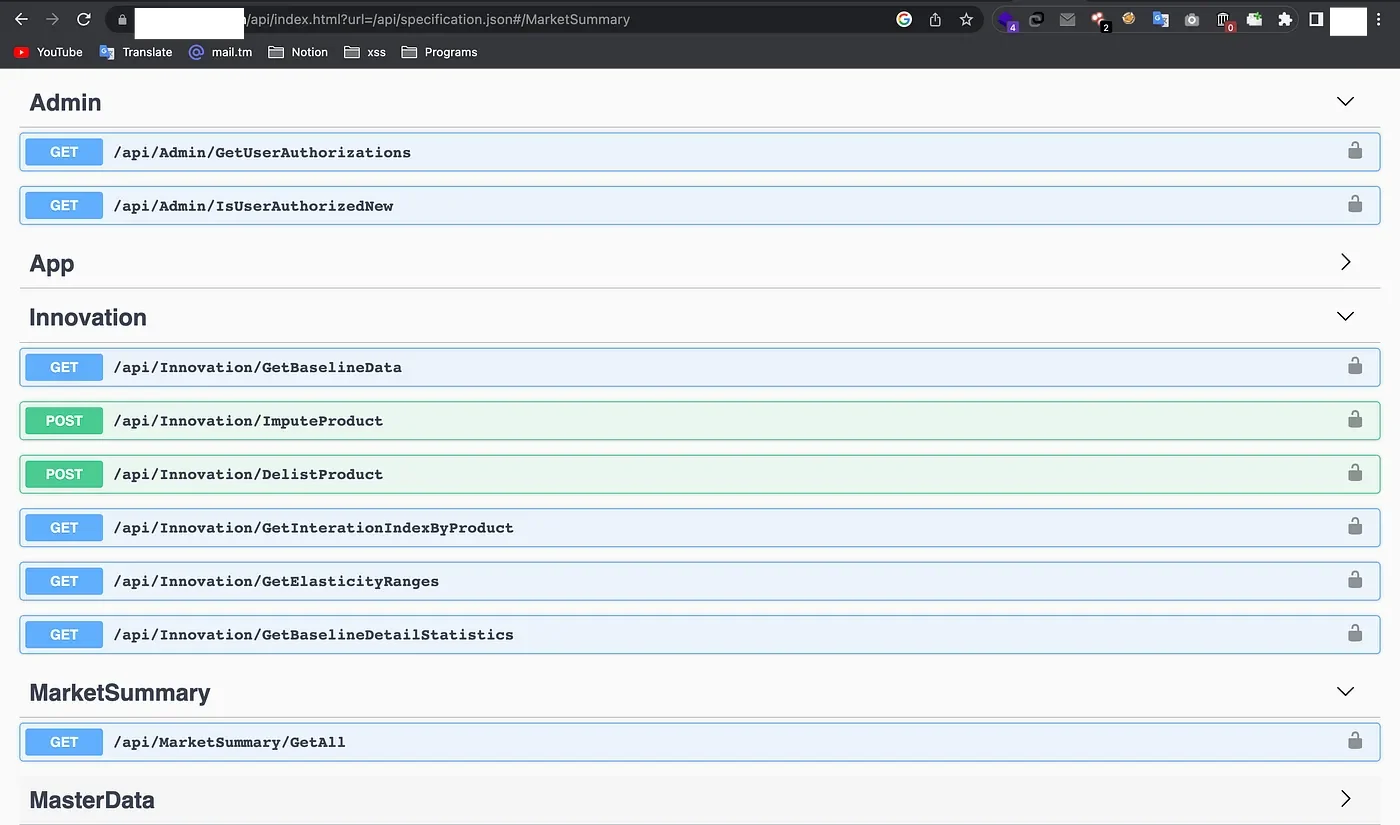
During the testing of the admin panel, the fuzzing process finished as well. Going back to the results, the researcher found another important endpoint to check for this website: an API Swagger. Opening the endpoint and checking the functions showed that all the functions and features were available without authentication, and all of them were for admin.
Exploitation
Step 1: Recon for new subdomains
The private tool enumerated subdomains daily for about a month and stored them in a database. Around 20 to 30 new subdomains appeared in that period. This is the precondition for everything that follows: the researcher had a fresh list of hosts to scan.
Step 2: Mass fuzzing of the new hosts
The FFUF command above was run across all new subdomains, with CSV output and automatic calibration. The awk command extracted the interesting column from the CSV to review the hits.
Step 3: Attacking the admin panel directly
The admin directory at /admin was tested with directory and file brute force to look for a registering endpoint, and with SQL and LDAP bypass techniques. None of it produced access. The main login admin panel was safe.
Step 4: Opening the Swagger endpoint
The fuzzing results contained an API Swagger endpoint for the same website. Opening it and checking the functions showed every function and feature available without authentication, all of them admin functions. No request, response or URL for this endpoint is reproduced in the write-up.
Root cause
The main login admin panel was safe. The researcher's reading is that the programmer was updating the API admin panel and using Swagger for his tests, but forgot to define authentication for Swagger. The Swagger interface therefore exposed the admin API operations to anyone who could reach it, and the admin panel was effectively bypassed through the API rather than through its own login. In other words, the main login admin panel was safe, but the API surface exposed the admin functions without authentication.
Impact
An unauthenticated attacker who found the Swagger endpoint could reach all of the admin functions and features exposed there. The write-up does not enumerate the individual operations or describe what data or actions they gave access to, so the concrete impact beyond administrative access to the API is not stated. The condition is simply reachability of the Swagger endpoint.
Fix
The write-up does not describe a fix applied by the programme. The implied remedy is to define authentication on the Swagger interface, or to remove it from production, so that the admin API operations are no longer reachable without credentials.
Variants to test
- Run continuous subdomain enumeration and fuzz only the newly appeared hosts with a custom wordlist built from GitHub, write-ups and CVEs. A positive result is a new host or path that returns interesting content in the FFUF CSV column you extract.
- Add Swagger and OpenAPI paths to the wordlist (
swagger,swagger-ui,api-docs, and similar) and open any hit. A positive result is a Swagger UI that lists operations and lets you execute them without a session. - When an admin panel at a path such as /admin resists brute force and bypass attempts, look for an API on the same host that performs the same functions. A positive result is an API operation that returns admin data or performs an admin action without authentication.
- Use a technology-specific wordlist when the stack is recognisable, as in the WordPress example above. A positive result is a component endpoint such as the duplicator download action returning file contents it should not.
What happened, in plain words
A security researcher named Arman, known online as M7arm4n, found a way to reach the administrative side of a Coca-Cola website built for the 2022 World Cup. He did not guess a password and he did not break any encryption. He found a page that was meant to be a testing tool for the site's API, and that page had no lock on it at all. Anyone who opened it could see and use the admin functions.
To follow this you only need to know a few ideas, and I will explain each one as it comes up. The important thing to take away is that the front door of the admin area was locked properly, but a side door, the API testing page, was left wide open.
The image above is the Bugcrowd programme page for Coca-Cola, the place where companies publish the rules for people who want to test their systems and report problems. A bug bounty programme is a formal arrangement: the company says which of its systems may be tested, and researchers report what they find instead of using it for harm.
The target and the vocabulary you need
The website was a blog. In a blog, visitors read posts. On this particular site, ordinary visitors could not log in and could not create an account. There was exactly one kind of user: the admin, the person who runs the site. The admin area lived at a path called /admin. A path is the part of a web address after the domain name, the bit that tells the server which page you want. If a site is example.com, then example.com/admin is the admin page.
The most interesting part of the target was not the blog pages themselves. It was something called an API Swagger endpoint.
An API (Application Programming Interface) is a way for two pieces of software to talk to each other. A useful comparison: a restaurant. You do not walk into the kitchen and cook. You tell the waiter what you want, the waiter takes the order to the kitchen, and food comes back. The API is the waiter. It is a fixed list of requests a program can make ("give me the list of posts", "delete this post") and the answers it gets back. Websites often have an API behind them so that the pages you see in your browser can fetch data without reloading.
Swagger is a description and test interface for an API. Think of it as a menu with buttons next to every dish: it lists all the operations the API offers, and in its default setup it lets you press a button and actually run the operation from your browser. That is very handy for a programmer testing their own work. It is also very dangerous if it is left reachable by the public, because the menu shows everything the API can do and the buttons work.
On this site, the Swagger interface exposed the admin functions of the API. In other words, the waiter's menu included all the kitchen's management commands, and anyone could press the buttons.
Setting up: watching for new subdomains
Before hunting on the programme, the researcher had a private tool running. Its job was recon, short for reconnaissance: quietly gathering information about a target before touching it. Specifically, the tool did subdomain enumeration every day.
A subdomain is a name that sits in front of a domain. If the domain is example.com, then blog.example.com and shop.example.com are subdomains. Companies often have many of them, one per service, and some are forgotten or less protected than the main site. Enumerating them means finding out which ones exist. The tool pushed its results into a database, so the researcher had a growing list rather than a one-off snapshot.
The tool had been running against Coca-Cola domains for about one month before hunting started on the programme. This matters because new subdomains appear over time, and a fresh one is often less tested than an old one.
For the fuzzing step the researcher used a tool called FFUF. Fuzzing means taking a request and automatically trying many variations of one part of it, very fast, to see which variations produce an interesting answer. A simple comparison: trying every key on a keyring in a lock, one after another, instead of reasoning about which key fits. FFUF is a program that does this over the web.
No accounts, credentials or special roles were needed at any point in this finding. The whole thing depends on access without logging in, which is what unauthenticated means: no identity proven, no login performed.
Finding it
After around one month of continuous recon, the researcher checked the results. Around 20 to 30 subdomains had been added during the last month. Before starting deep hunting, the plan was a mass scan on all new results: run one sweep across everything new rather than studying each host by hand.
The researcher notes that fuzzing directories of subdomains for sensitive information is one of the most popular methods, and that the weak point of the method is the wordlist. A wordlist is simply a text file with one candidate name per line: common folder names, common file names, common paths. The fuzzer tries each line in turn. If your list does not contain the name of the thing you are looking for, you will never find it, no matter how fast the tool runs. That is why the wordlist is the weak point.
The recommendation is to build your own wordlist from GitHub, write-ups and even CVEs. A CVE is a public identifier for a known security flaw, so reading them tells you which file names and paths tend to be vulnerable.
As an aside, the write-up recalls a Hack The Box machine (a practice environment for security learners) with a WordPress website without any features. WordPress is a very common software for building blogs and sites. A WordPress-specific wordlist immediately turned up an endpoint leading to local file inclusion:
wp-admin/admin-ajax.php?action=duplicator_download&file=..%2F..%2F..%2F..%2F..%2Fetc%2Fpasswd
Line by line, in plain words:
wp-admin/admin-ajax.phpis a file that WordPress uses to handle background requests. It is a normal part of WordPress, not a secret.?starts the query string, the part of a web address that carries parameters, the little named values you pass to the page.action=duplicator_downloadis a parameter telling the site which action to perform. Here it asks for a download from a plugin called Duplicator.file=..%2F..%2F..%2F..%2F..%2Fetc%2Fpasswdis the parameter that says which file to download.%2Fis the encoded form of the/character, so the value decodes to../../../../../etc/passwd...means "go up one folder". Repeating it walks up out of the website's own folder and towards the root of the machine./etc/passwdis a standard file on Linux systems that lists user accounts. Reading it is a classic sign that a site will hand over files it should not.
That whole trick is called local file inclusion: the site is persuaded to include or return a file from its own machine that the visitor was never meant to see. It is included here only as an example of why a tailored wordlist pays off.
Back to Coca-Cola: the researcher usually fuzzes with FFUF and recommends fuzzing websites one by one, but in this case did it all in one, with the following command:
ffuf -w wordlist.txt:FUZZ -w subdomain.txt:URL -u URLFUZZ -ac -of csv -o result.txt
Line by line:
ffufis the name of the program being run.-w wordlist.txt:FUZZsays: take the filewordlist.txtand use each of its lines wherever the placeholderFUZZappears. This is the list of paths to try.-w subdomain.txt:URLsays: take the filesubdomain.txtand use each of its lines wherever the placeholderURLappears. This is the list of hosts to try.-u URLFUZZis the template for the address to request. It glues the two placeholders together, so for each host and each path you get one full address to try.-acturns on automatic calibration. FFUF first sends some requests to learn what a normal "not found" answer looks like, so it can filter those out and show you only the unusual ones.-of csvchooses the output format: CSV, a plain text table with commas between columns, which is easy to read in a spreadsheet or with command line tools.-o result.txtwrites the output to a file calledresult.txtinstead of only printing it on screen.
To check the result:
cat result.txt | awk -F ',' '{print $3}'
Line by line:
cat result.txtprints the contents of the results file.|is a pipe: it passes that output into the next command instead of showing it.awkis a small text-processing program.-F ','tells awk that the columns are separated by commas, matching the CSV format chosen above.'{print $3}'tells awk to print only the third column of each line.
Why the third column? Because that is where the interesting column of the FFUF output lands, so printing it gives a short list of the hits to review without the noise of the other columns.
The researcher reflects that the rush of programmers to present a website to the employer sometimes makes them forget basic security protocols during development. In this scenario the programmer was building a site for the 2022 World Cup, a blog model where normal users could not log in and could not create an account and only one admin role existed.
The admin directory was available at /admin. The researcher tried directory and file brute force to find a registering endpoint, SQL and LDAP bypass, and other methods, and found nothing.
A few of those terms, from zero:
- Directory and file brute force is the same idea as fuzzing: try a long list of folder and file names and see which ones exist.
- SQL is the language databases speak. A SQL injection is when a login form or similar input is tricked into running database commands, for example to skip a password check. A bypass here means getting past the login without valid credentials.
- LDAP is a different system for storing users and checking logins, common in companies. The same kind of bypass attempt applies.
None of it worked. The write-up describes the feeling that the admin panel was reachable even so.
During the testing of the admin panel, the fuzzing process finished as well. Going back to the results, the researcher found another important endpoint to check for this website: an API Swagger. An endpoint is one specific address on a server that accepts requests, one entry in the waiter's list. Opening the endpoint and checking the functions showed that all the functions and features were available without authentication, and all of them were for admin.
The image above shows the Swagger interface with its list of available functions, the menu of operations that could be run without logging in.
Exploitation
Step 1: Recon for new subdomains
The private tool enumerated subdomains daily for about a month and stored them in a database. Around 20 to 30 new subdomains appeared in that period. This is the precondition for everything that follows: the researcher had a fresh list of hosts to scan.
Step 2: Mass fuzzing of the new hosts
The FFUF command above was run across all new subdomains, with CSV output and automatic calibration. The awk command extracted the interesting column from the CSV to review the hits. The point of doing it in one sweep was speed: a quick first pass over everything new, then a closer look at whatever stood out.
Step 3: Attacking the admin panel directly
The admin directory at /admin was tested with directory and file brute force to look for a registering endpoint, and with SQL and LDAP bypass techniques. None of it produced access. The main login admin panel was safe. This is worth pausing on: the obvious door was properly locked, which is exactly why the researcher kept looking elsewhere.
Step 4: Opening the Swagger endpoint
The fuzzing results contained an API Swagger endpoint for the same website. Opening it and checking the functions showed every function and feature available without authentication, all of them admin functions. No request, response or URL for this endpoint is reproduced in the write-up.
Root cause
The main login admin panel was safe. The researcher's reading is that the programmer was updating the API admin panel and using Swagger for his tests, but forgot to define authentication for Swagger. The Swagger interface therefore exposed the admin API operations to anyone who could reach it, and the admin panel was effectively bypassed through the API rather than through its own login. In other words, the main login admin panel was safe, but the API surface exposed the admin functions without authentication.
A comparison: the shop has a locked front door, but the staff entrance round the back, used during refurbishment, was left open. The lock was not broken; it was simply never fitted to the second door.
Impact
An unauthenticated attacker who found the Swagger endpoint could reach all of the admin functions and features exposed there. The write-up does not enumerate the individual operations or describe what data or actions they gave access to, so the concrete impact beyond administrative access to the API is not stated. The condition is simply reachability of the Swagger endpoint.
Fix
The write-up does not describe a fix applied by the programme. The implied remedy is to define authentication on the Swagger interface, or to remove it from production, so that the admin API operations are no longer reachable without credentials. In everyday terms: either put a lock on the staff entrance, or brick it up when the refurbishment is done.
Variants to test
- Run continuous subdomain enumeration and fuzz only the newly appeared hosts with a custom wordlist built from GitHub, write-ups and CVEs. A positive result is a new host or path that returns interesting content in the FFUF CSV column you extract.
- Add Swagger and OpenAPI paths to the wordlist (
swagger,swagger-ui,api-docs, and similar) and open any hit. A positive result is a Swagger UI that lists operations and lets you execute them without a session. - When an admin panel at a path such as /admin resists brute force and bypass attempts, look for an API on the same host that performs the same functions. A positive result is an API operation that returns admin data or performs an admin action without authentication.
- Use a technology-specific wordlist when the stack is recognisable, as in the WordPress example above. A positive result is a component endpoint such as the duplicator download action returning file contents it should not.
Glossary
- API: a fixed set of requests one piece of software can make to another, like a waiter taking orders to a kitchen.
- Admin: the user role that runs a site and has the highest level of control.
- Authentication: proving who you are, usually by logging in, so the server knows which permissions you have.
- Unauthenticated: done without logging in and without proving any identity.
- Bug bounty programme: a formal arrangement where a company invites researchers to test specified systems and report flaws.
- Bugcrowd: the platform on which the Coca-Cola programme was published.
- Subdomain: a name in front of a domain, such as
blog.example.comforexample.com. - Subdomain enumeration: discovering which subdomains of a domain exist.
- Recon: reconnaissance, quietly gathering information about a target before testing it.
- Endpoint: one specific address on a server that accepts requests.
- Path: the part of a web address after the domain, such as
/admin. - Fuzzing: automatically trying many variations of one part of a request to see which produce an interesting answer.
- Wordlist: a text file with one candidate name per line, used by a fuzzer.
- FFUF: a command line fuzzing tool for the web.
- CSV: a plain text table format with commas between columns.
- Automatic calibration: a fuzzer feature that learns what a normal "not found" answer looks like and filters it out.
- Swagger: a description and test interface for an API that lists its operations and, by default, lets you run them from the browser.
- OpenAPI: the specification that Swagger interfaces describe.
- SQL: the language databases speak.
- SQL injection: tricking an input into running database commands, for example to skip a password check.
- LDAP: a system for storing users and checking logins, common in companies.
- Bypass: getting past a check, such as a login, without satisfying it properly.
- Brute force: trying a long list of possibilities one by one until something works.
- Local file inclusion: persuading a site to include or return a file from its own machine that visitors were never meant to see.
- CVE: a public identifier for a known security flaw.
- WordPress: a very common software for building blogs and websites.
- Hack The Box: a practice environment where people learn security skills on deliberately vulnerable machines.
- Query string: the part of a web address after
?that carries named parameters. - Parameter: a named value passed to a page in the address or in a request.
- Root cause: the underlying reason a flaw exists, as opposed to its visible symptom.
- Impact: what an attacker could actually do by exploiting the flaw.



