Remote Code Execution through Extension Bypass on Log Functionality
The logging settings page in concrete5 CMS allowed an authenticated administrator to bypass a file extension check by omitting the logging_mode parameter, enabling the log file path to be set to a .php file. An attacker could then inject PHP code into the log via a login attempt and execute it by requesting the file, achieving remote code execution.

- Triaged in 3 days
- Fixed in 58 days
- Disclosed after 3 months
Summary:
The Application concrete5 CMS available on github is vulnerable to remote code execution through the functionality of setting the log file in "Loggin Settings". It is possible to bypass the portion of code responsible for the verification of the extension of the log file (.log).
Description:
The code in the {path_of_installation}/concrete5/concrete/controllers/single_page/dashboard/system/environment/logging.php has a vulnerable function (update_loggin()). This function has a condition that verifies if the parameter "handler" in the HTTP request is equal to "file" and, if the parameter "logging_mode" has any value. In case one of these conditions is not met the application will not proceed to verify if the extension of the log file ends with ".log" and will go straight to the next if, which verifies if there is any error (in case, there are not) and set the "concrete.log.configuration.simple.file.file" variable to the value of "logFile" parameter in the HTTP request. By doing that it is possible to set the log file to a .php file in the system. An attacker may be able to inject PHP code in the log File by injecting it on parameters in the application. Then, by requesting the file in the browser the code will get executed.
Vulnerable code:
public function update_logging()
    {
        $config = $this->app->make('config');
        if (!$this->token->validate('update_logging')) {
            $this->error->add($this->token->getErrorMessage());
        }
        if ($this->request->request->get('handler') == 'file' && $this->request->request->get('logging_mode')) { // this if condition that can be bypassed
            $logFile = $this->request->request->get('logFile');
            $filesystem = new Filesystem();
            $directory = dirname($logFile);
            if ($filesystem->isFile($logFile) && !$filesystem->isWritable($logFile)) {
                $this->error->add(t('Log file exists but is not writable by the web server.'));
            }
            if (!$filesystem->isFile($logFile) && (!$filesystem->isDirectory($directory) || !$filesystem->isWritable($directory))) {
                $this->error->add(t('Log file does not exist on the server. The directory of the file provided must exist and be writable on the web server.'));
            }
            $filename = basename($logFile);
            if (!$filename || substr($filename, -4) != '.log') {
                $this->error->add(t('The filename provided must be a valid filename and end with .log'));
            }
        }
        if (!$this->error->has()) {// it is possible to jump straight to this condition and set the log file to a .php file.
            $intLogErrorsPost = $this->post('ENABLE_LOG_ERRORS') == 1 ? 1 : 0;
            $intLogEmailsPost = $this->post('ENABLE_LOG_EMAILS') == 1 ? 1 : 0;
            $intLogApiPost = $this->post('ENABLE_LOG_API') == 1 ? 1 : 0;

            $config->save('concrete.log.errors', $intLogErrorsPost);
            $config->save('concrete.log.emails', $intLogEmailsPost);
            $config->save('concrete.log.api', $intLogApiPost);

            $mode = $this->request->request->get('logging_mode');
            if ($mode != 'advanced') {
                $mode = 'simple';
                $config->save('concrete.log.configuration.simple.core_logging_level',
                    $this->request->request->get('logging_level')
                );
                $config->save('concrete.log.configuration.simple.handler',
                    $this->request->request->get('handler')
                );
                $config->save('concrete.log.configuration.simple.file.file',
                    $this->request->request->get('logFile') //set the PHP
                );
            }
            $config->save('concrete.log.enable_dashboard_report',
                $this->request->request->get('enable_dashboard_report') ? true : false);
            $config->save('concrete.log.configuration.mode', $mode);

            $this->redirect('/dashboard/system/environment/logging', 'logging_saved');
        }
Steps To Reproduce:
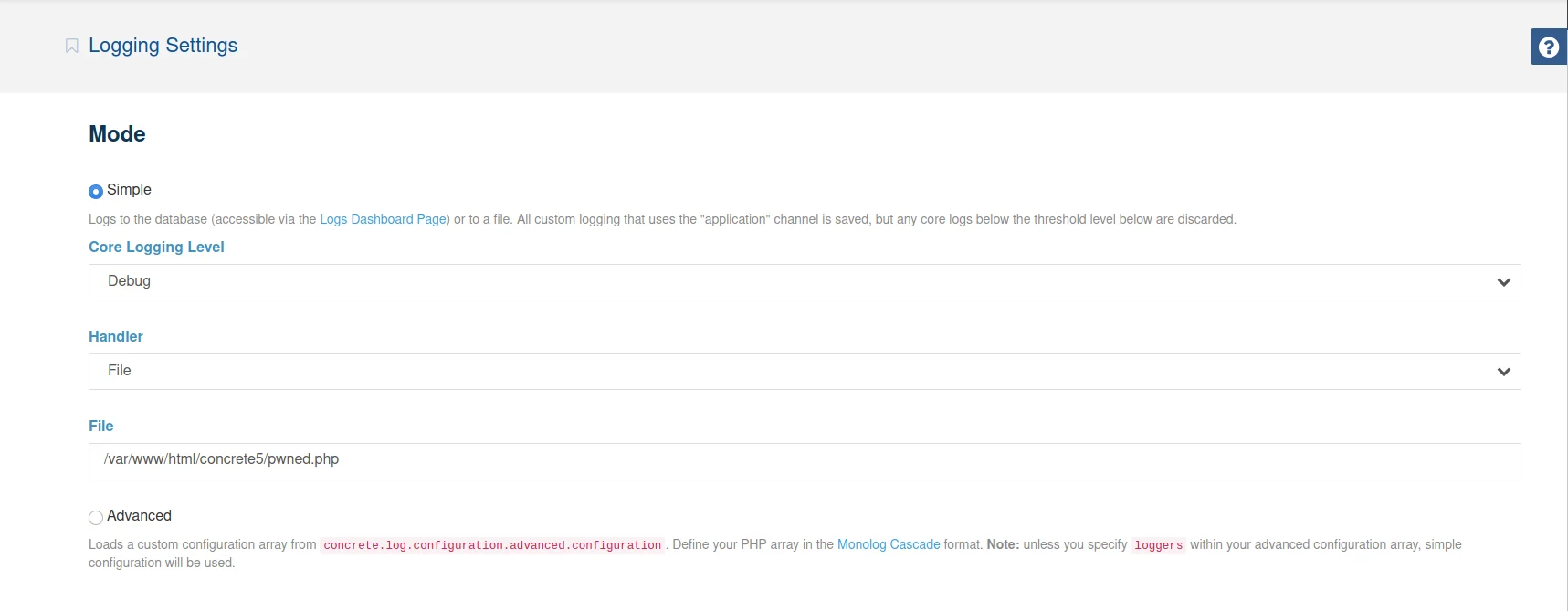
- Login to the administrative panel of the application and navigate to :http://{concrete5_website}/index.php/dashboard/system/environment/logging. Set the File variable to: {INSTALLATION_PATH_OF_CONCRETE5}/pwned.php, send the request and intercept it.
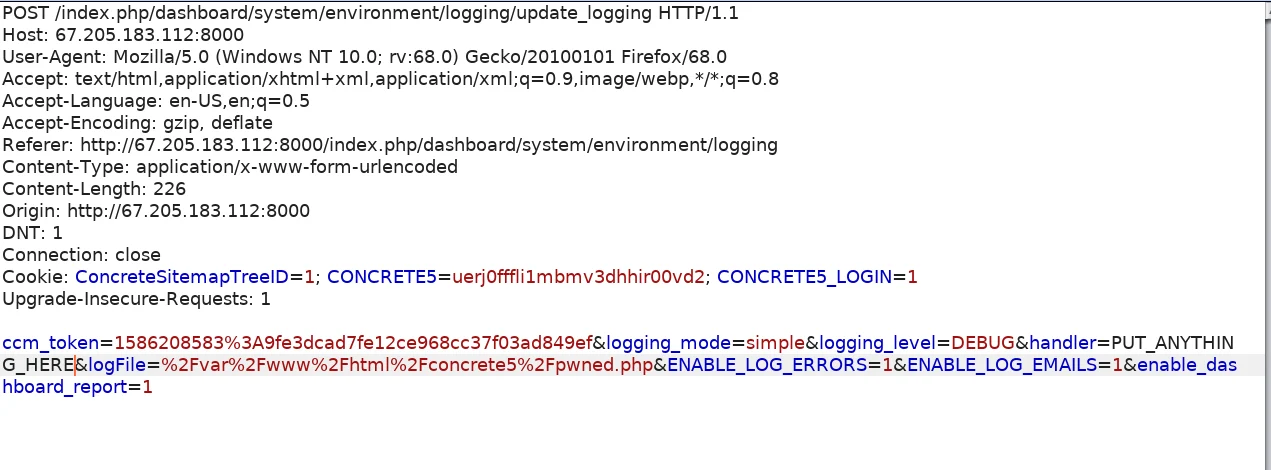
- Change the handler parameter in the HTTP request to any value. By doing that we will get straight to the next "if condition" mentioned before. However, by doing that the handler will be set to its default value (Database) in the backend.
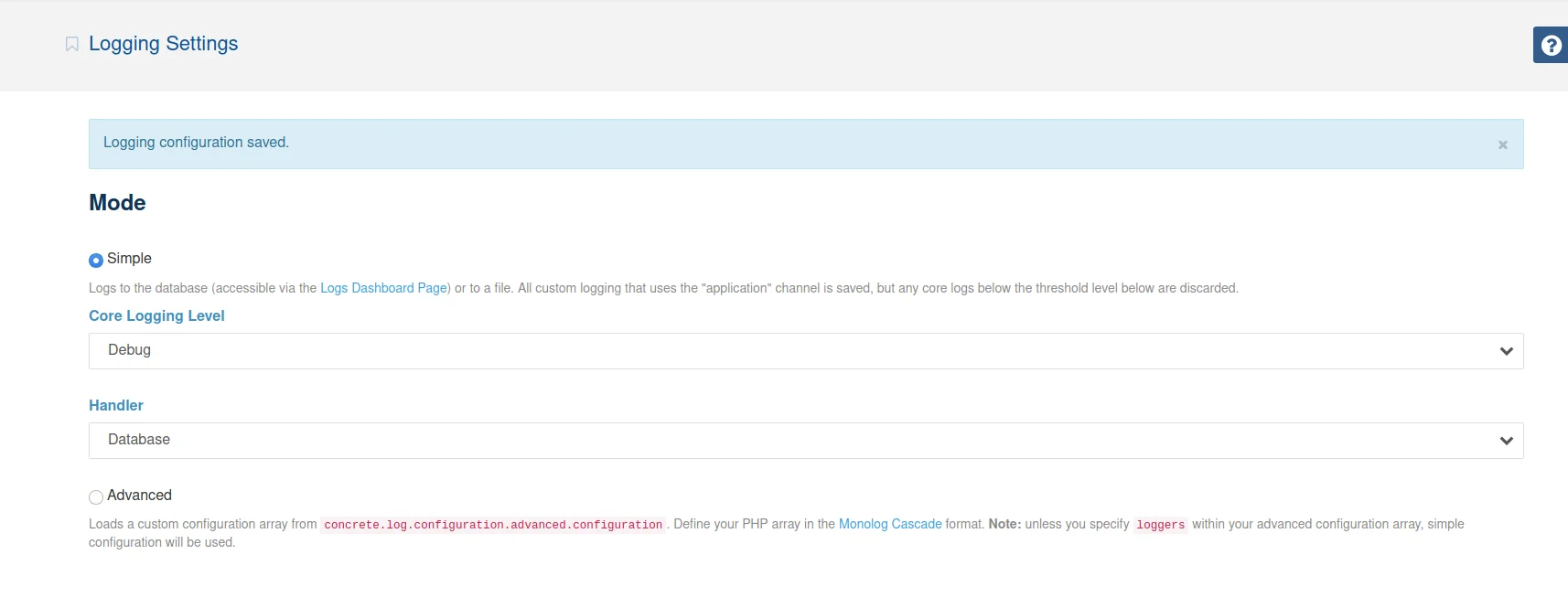
- Now we need to make the handler get the "file" value. We change the "Handler" in the panel to the "File" option and send the request again. Then, the request is intercepted and the value in the parameter "logging_mode" of the HTTP request must be completely erased.
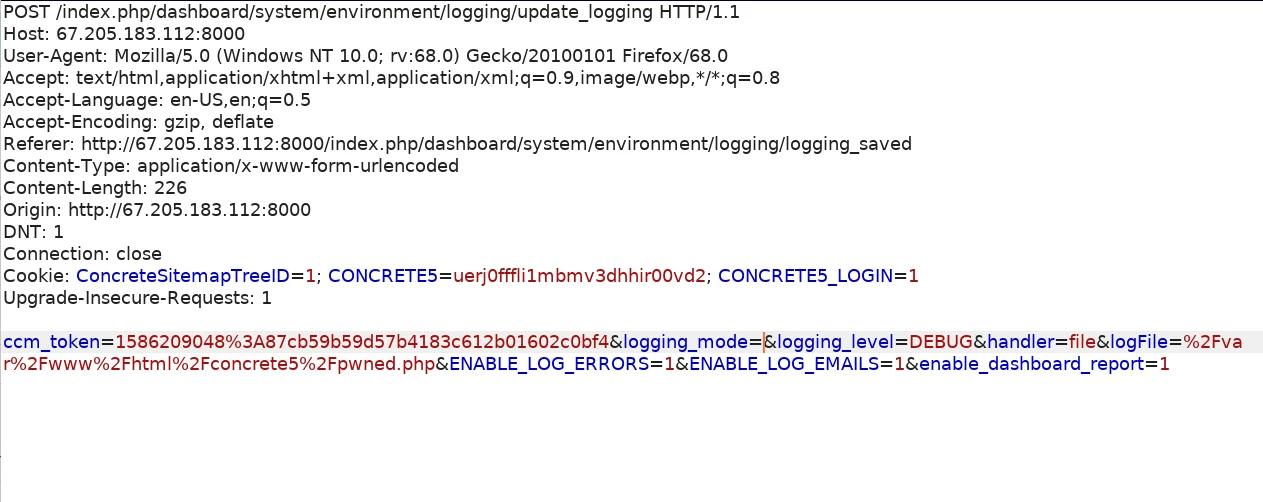
By doing that we will go straight to the next if, since the condition: $this->request->request->get('logging_mode'))` is not met. Right after entering the next if condition, the value of "logging_mode" will get restored to the value of "simple":
if ($mode != 'advanced') {
                $mode = 'simple';
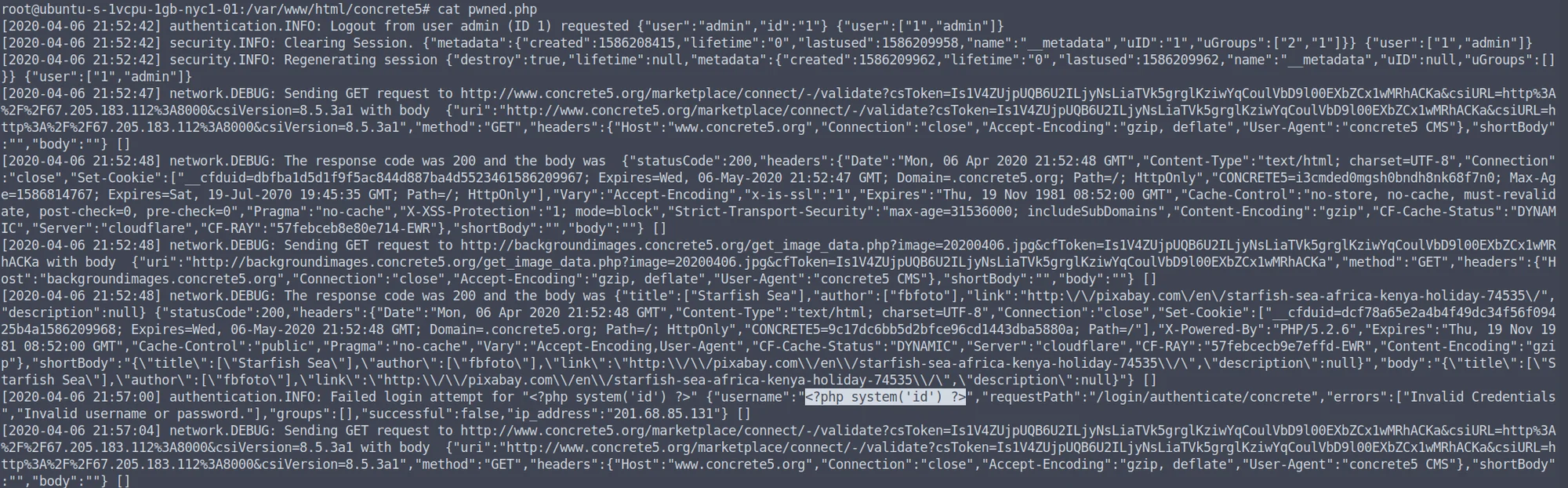
- To get the code execution to work we now need to inject the malicious PHP code in the log file. This can be achieve by trying to login with a user called: <?php system('id'); ?>.

We can see the file is now created in the server with the malicious content.

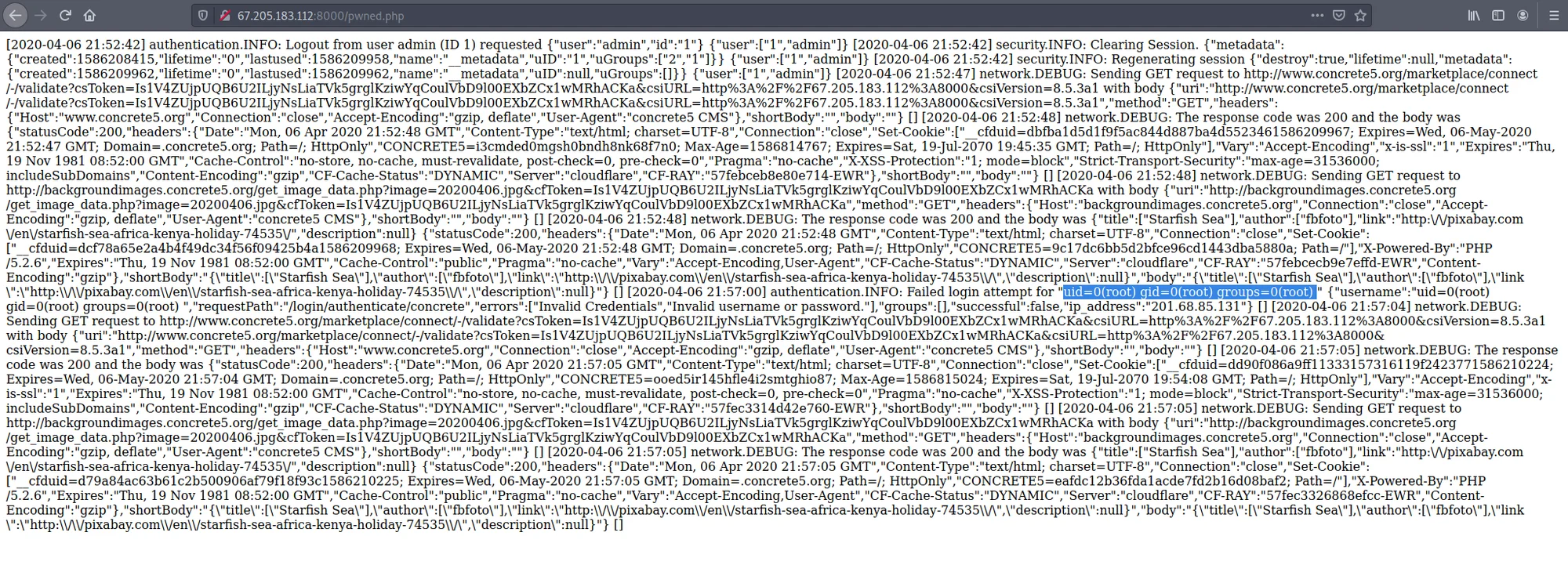
- By accessing the file in the browser it is possible to verify that the code is successfully executed.
Resubmitted the report since it was missing the "crayons".
Thanks!!
Impact
OS command execution in the webserver under the permissions of the OS user executing the server application, being able to completely modify the application code or compromise the server (reading, editing, adding or removing files). In case of selecting a .php file that already exists in the server it will have log text appended to it and will interrupt the application operation (example: select the index.php as the log file) by resulting in a malformed php file.
Not written yet. The AI write-up for this report has not been written yet. The Original tab links to the source.
How it worked
Root cause
The extension validation is nested inside a conditional that can be bypassed by omitting the logging_mode parameter, so the log file path is saved without the .log check.
Impact
An attacker with admin access could execute arbitrary OS commands on the web server, leading to full compromise of the application and server files.
What the attacker needed
Administrative access to the CMS
How it was found
- Log in to the admin panel and navigate to the logging settings page.
- Set the log file path to a .php file inside the installation directory and intercept the request.
- Change the handler parameter to any value to bypass the extension check.
- Set the handler back to 'file' and remove the logging_mode parameter from the request.
- Inject PHP code into the log by attempting to log in with a username containing the code.
- Access the created .php file in the browser to execute the code.
Explained by bugbounty.wiki with AI from the original and checked against quotes from it; it can still be wrong. Read the original before relying on a detail.
Not written yet. The AI write-up for this report has not been written yet. The Original tab links to the source.
The application lets an admin choose where to save its log file, but it only checks that the filename ends in .log if certain form fields are filled in. By leaving one field empty, the check is skipped and the log file can be pointed at a .php file. The attacker then writes PHP code into the log (for example by using it as a username) and visits the file, causing the server to run the code.
What is RCE?
Running the attacker's code on the target's servers: through command or code injection, unsafe deserialisation or template injection.


